|
As this forum is rarely used anymore, we've locked it. Feel free to browse and read. Questions? Please reach out to us directly. Cheers! |
|
|
 |
|
|
| Author |
Message |
AnalogRocks
Forum Moderator

Joined: 08 Mar 2006
Posts: 26706
Location: Toronto, Ontario, Canada
TV/Projector: Sony 1252Q, AMPRO 4000G
|
| Posted: Mon Feb 27, 2023 5:07 pm Post subject: |
|
|
I like the curved 15 gain screens SONY had in the early days. Made out of fiberglass.
Yes it hot spots but when you're in the sweet spot it's bright.
I bought mine on Craigs List for $100 +$300 to ship it to Buffalo. Then I went and picked it up;.
_________________
Tech support for nothing
CRT.
HD done right!
|
|
| Back to top |
|
 |
Videodrome

Joined: 22 Feb 2023
Posts: 56
|
| Posted: Tue Feb 28, 2023 7:38 am Post subject: |
|
|
The JVC looks really nice, but I can’t find anything on the internet about motion clarity and projectors.
I did read it has “Motion Enhance”, I wonder how this looks and if it’s able to process it in combination with low-latency mode.
For non-interactive content like films, motion clarity feels less of an issue compared to playing 3D games.
Where you control the camera and start looking off-center, before panning.
I’ll make a topic on the digital forum to see if people are willing to test their projector on https://www.testufo.com.
I spend quite some hours going through different websites for projector screens.
I decided to get a cheap local version with a 1.6 gain for now.
If the brightness looks ok but colors are off, I might get a better one.
|
|
| Back to top |
|
|
kal
Forum Administrator

Joined: 06 Mar 2006
Posts: 18114
Location: Ottawa, Canada
TV/Projector: JVC DLA-NZ7
|
| Posted: Tue Feb 28, 2023 2:34 pm Post subject: |
|
|
My JVC is a 2013 model (DLA-RS56U) and some gamers will tell you that the input lag is too high but I frankly do not notice it. We play a lot of PS4/PS5 games and nobody complains. Thousands of hours of gaming in fact. 60Hz console games are buttery smooth. Annoys me to go back to something older that's only 30Hz. I can't say I notice anything that resembles lag. I know that newer models have much lower input lag too if it bothers people.
Kal
_________________

Support our site by using our affiliate links. We thank you!
My basement/HT/bar/brewery build 2.0
|
|
| Back to top |
|
|
Videodrome
Joined: 22 Feb 2023
Posts: 56
|
| Posted: Thu Mar 02, 2023 8:42 am Post subject: |
|
|
Received the 1.6 gain screen today.
Though it shows a lot more in an ambient lit room, at perfect dark it makes no difference from the previous 0.95 gain screen. So that’s dissappointing, I was hoping for more brightness in a dark room. Is this because it’s a ‘cheap’ version, or is that how gain screens work? Improvement in ambient conditions, but hardly any in dark conditions.
Anyway, I’m hoping this weekend my fake fansensors will arrive so I can start working on the new exhaust system. The fan on max speed has about 700cfm, so it should be more than sufficient at 50%. I'll have temperature sensors on the heatsinks to make sure.
About the smoothness, and maybe you already understand, it’s more about not having any blur while moving the camera. Low quality laptops and the ‘steamdeck’ for example has an incredible amount of ‘smearing/ghosting’. Where you don’t even have to turn on motion blur in the game settings, because the screen does it for you…
The best way for me to describe how it feels, is that when you pan the camera and stop, the moment you stop, the screen shows more detail and no more blur. While on crt, even while there is movement, it stays crystal clear. Is that the case with your JVC at 60hz?
//this doesn't have to be a fast movement, turning around 1 time (360 degrees) in 30 seconds would already show the blur.
When, in a few years, I’m going to buy a high-end projector I’ll make sure to visit some showrooms and do tests myself. Though it would be nice if you have any information on this. It would relieve some of my worries, knowing that at the end of crt life there is a viable solution. 
|
|
| Back to top |
|
|
kal
Forum Administrator
Joined: 06 Mar 2006
Posts: 18114
Location: Ottawa, Canada
TV/Projector: JVC DLA-NZ7
|
| Posted: Thu Mar 02, 2023 2:10 pm Post subject: |
|
|
| Videodrome wrote: | Received the 1.6 gain screen today.
Though it shows a lot more in an ambient lit room, at perfect dark it makes no difference from the previous 0.95 gain screen. So that’s dissappointing, I was hoping for more brightness in a dark room. Is this because it’s a ‘cheap’ version, or is that how gain screens work? Improvement in ambient conditions, but hardly any in dark conditions. |
Nope. You should get more light off of it. Are you using a light meter to confirm? Otherwise it may be hard to tell.
I know what you mean by motion blur. Can happen in from two different places: Content shot at lower refresh rate. 24 fps film is a good example. Fast pans at 24 fps will always be blurry. Content shot at 60 fps is less blurry. Doesn't matter what you display it on, if the source is blurry, the result on the display will also be blurry. Now that said, JVC have something called "Clear Motion Drive" that will make a 24 or 30 fps movie/video content look buttery smooth. Very odd to watch. I've used it in some BBC nature documentaries but for most film based content I don't use it as it's completely unnatural and not what the director intended.
Then there's display persistence: Some display types can't turn the pixels on/off fast enough so everything has a 'blur' or a 'tail'. That's different. JVC DILA doesn't tend to suffer from this as much as some technologies. I've never had concerns or issues, and other HT enthusiasts do not either as JVCs are highly regarded for their image quality.
Kal
_________________
Support our site by using our affiliate links. We thank you!
My basement/HT/bar/brewery build 2.0
|
|
| Back to top |
|
|
garyfritz

Joined: 08 Apr 2006
Posts: 12088
Location: Fort Collins, CO
|
| Posted: Thu Mar 02, 2023 2:24 pm Post subject: |
|
|
| kal wrote: | | Nope. You should get more light off of it. Are you using a light meter to confirm? Otherwise it may be hard to tell. |
That was my thought too. It may be delivering more light to your eyes, but then your eyes might just shut down the irises so you don't notice a difference. "Dim in dark room" might look just like "brighter in dark room." With ambient light it might override your eyes' light-sensing adjustments so the difference is more noticeable.
In any case, it sounds like you don't notice a difference. So whether it technically is brighter or not, it doesn't seem to help you. I'd return the new screen.
|
|
| Back to top |
|
|
Videodrome
Joined: 22 Feb 2023
Posts: 56
|
| Posted: Thu Mar 02, 2023 6:16 pm Post subject: |
|
|
I'm returning the screen. I was wrong thinking it had better ambient performance.
I received some sample A4 sheets from my old screen manufacturer.
One is the same type as my previous screen, 0.95 gain.
When I put the sheet on the screen it looks exactly the same wherever I put it, ambient light or not.
So that was some nice false advertising.
Just so I knew my eyes wouldn't deceive me, another sample was a silver/gray 1.1-1.2 gain sheet and it did show improvement.
About the motion, again  . .
Display persistence is exactly what I meant.
Good to hear JVC DILA is a good performer, do you feel it's on par with CRT projectors?
|
|
| Back to top |
|
|
kal
Forum Administrator
Joined: 06 Mar 2006
Posts: 18114
Location: Ottawa, Canada
TV/Projector: JVC DLA-NZ7
|
|
| Back to top |
|
|
Videodrome
Joined: 22 Feb 2023
Posts: 56
|
| Posted: Sat Mar 04, 2023 10:05 am Post subject: |
|
|
Minor update on the fan noise.
Today I’ve replaced the 3 fans at the back with a custom duct going to a 200mm fan. At the lowest setting it keeps everything cooler than the stock fans while being quiet so I’m happy. I’m reaching the point I can enjoy the projector without having to put on headhpones. Finally.
The input A board fan is the last one that needs replacing. Still can hear a whine over the lower sound the duct fan makes. So I’ll replace that one with a 60mm low noise fan. I wonder how hot it will get since I’m not using any inputs from that board. It might not need the fan, but rather be safe than sorry..
Stock noise was 40-46db, using a phone app so not that accurate.
Duct replacement made it 36-38. Great improvement in my book.
Also ordered a new screen which should arrive in a couple of weeks.
Draper Argent White XH1500E 1.5 gain to be exact. Hope that gives me more pop so I can fully enjoy the projector.
|
|
| Back to top |
|
|
kal
Forum Administrator
Joined: 06 Mar 2006
Posts: 18114
Location: Ottawa, Canada
TV/Projector: JVC DLA-NZ7
|
| Posted: Sat Mar 04, 2023 2:13 pm Post subject: |
|
|
| Videodrome wrote: | | Today I’ve replaced the 3 fans at the back with a custom duct going to a 200mm fan. At the lowest setting it keeps everything cooler than the stock fans while being quiet so I’m happy. I’m reaching the point I can enjoy the projector without having to put on headhpones. Finally. |
That's great! If you're at all into audio I find it makes a huge difference to the dynamic range. Some people will say "just turn up the volume" but it doesn't work that way. You need to lower the noise floor. No different than black level in video: If you have an elevated black level and blacks are grey, raising the light output (equivalent to turning up the volume) may keep your contrast ratio the same but isn't going to make blacks black.
Where and how did you measure temp? Back when I did a bunch of tests I'd tape a few $10 kitchen temperature probes on various heatsinks to see to compare. They're not always the most accurate but I wasn't interested in an accurate reading but a relative before and after reading when running the projector for a good half an hour or more with video content.
The heatsinks on the 3 tube necks would be a good place to measure. There are some other small heatsinks in there as well that would be interesting to see:

Kal
_________________
Support our site by using our affiliate links. We thank you!
My basement/HT/bar/brewery build 2.0
|
|
| Back to top |
|
|
Videodrome
Joined: 22 Feb 2023
Posts: 56
|
| Posted: Sat Mar 04, 2023 3:51 pm Post subject: |
|
|
I totally agree.
Last year I finally got rid of studio monitors I had been using for over a decade. Since I’m partly in the audio business I thought it would be a smart move to get them, and people online tend to rave over studio monitors. The hiss was driving me insane during work and at night. Not that apparent, but enough you'd get that moment of 'What am I hearing?? Where is it coming from??''. My room is about 24db without the projector running, so it becomes easy to hear any hiss, fans and electrical noises like a bad power supply. I replaced them with a good set of mono-amps and passive speakers, recommended at audioscienereview.com.
The same with contrast ratio’s. Companies claiming insane amounts of contrast ratio which 9 out of 10 times meant you’re staring at a lightbulb at full brightness and black becoming dark gray. That might actually be my only minor gripe with crt’s, the black level is good but not OLED good. In the movie “Once upon a time in Hollywood” they start out with a small square frame, which in a complete dark room and oled just looks fantastic. It put a smile on my face realizing how true black, oled was. The tv-frame no longer mattered. If only the motion was better…
I put 2 temperature probes, normally used for aquariums according to amazon, on the left and right heatsink with some gafffer tape, near the outward flow fans. The green tube heatsink was a bit bothersome because the wire wasn’t long enough.
About 10 degrees celsius over room temperature when running, and with the new duct system 6-8 degrees, so mission accomplished in that regard.
Tomorrow I’ll replace the final fan and then I should be satisfied.
Watercooling won’t be an option.
|
|
| Back to top |
|
|
AnalogRocks
Forum Moderator
Joined: 08 Mar 2006
Posts: 26706
Location: Toronto, Ontario, Canada
TV/Projector: Sony 1252Q, AMPRO 4000G
|
| Posted: Sat Mar 04, 2023 3:59 pm Post subject: |
|
|
We need some pictures of your air ducting setup!
I have an Amro 4000 here where someone added 2, 80mm fans to keep things cool. I'd love to see what you did.
_________________
Tech support for nothing
CRT.
HD done right!
|
|
| Back to top |
|
|
kal
Forum Administrator
Joined: 06 Mar 2006
Posts: 18114
Location: Ottawa, Canada
TV/Projector: JVC DLA-NZ7
|
| Posted: Sat Mar 04, 2023 4:05 pm Post subject: |
|
|
| Videodrome wrote: | | The same with contrast ratio’s. Companies claiming insane amounts of contrast ratio which 9 out of 10 times meant you’re staring at a lightbulb at full brightness and black becoming dark gray. That might actually be my only minor gripe with crt’s, the black level is good but not OLED good. |
If you're running the CRT projector straight from a source and have no gamma boost/curve adjustment it can off. You're likely not coming out of black fast enough which means you need to raise the black level slightly (through the brightness control on the CRT) but then that turns the black level to dark grey. This is one place that I find CRT really suffers and I mentioned it in my write-up ~10 years when I switched from CRT to JVC LCoS that I linked to previously. You need something like a Radiance (http://www.curtpalme.com/Radiance.shtm) or similar to fix that. And no, I'm not just saying that because we sell them here. (Nobody's going to spend that sort of money just to fix a gamma curve).
Out of all the display techs CRT is by far the one that needs proper calibration the most. More in my calibration guide:
https://www.curtpalme.com/forum_archived/viewtopic.php@t=35322.html
| Quote: | I put 2 temperature probes, normally used for aquariums according to amazon, on the left and right heatsink with some gafffer tape, near the outward flow fans. The green tube heatsink was a bit bothersome because the wire wasn’t long enough.
About 10 degrees celsius over room temperature when running, and with the new duct system 6-8 degrees, so mission accomplished in that regard. |
Good stuff!
| Quote: | | Watercooling won’t be an option. |
I do remember over the years people talking about watercooling here (similar to what's done on high end gaming PCs) if you want to dig those threads up. From what I remember/understand it's not obvious to partially because of the lack of good flat surfaces to attach to (similar to what's done on CPUs/GPUs) and also because liquids around 30-40kV is kinda dangerous.
Kal
_________________
Support our site by using our affiliate links. We thank you!
My basement/HT/bar/brewery build 2.0
|
|
| Back to top |
|
|
Videodrome
Joined: 22 Feb 2023
Posts: 56
|
| Posted: Sat Mar 04, 2023 6:51 pm Post subject: |
|
|
I’ll try and take some pictures of the setup soon, depending on how well the last fan replacement goes.
I have a moome IFB card for HDMI input.
INPUT 1 goes to a splitter for Playstation and PC input.
Does 12-bit color input matter a lot? I might connect them directly to the IFB card INPUT 1/2 instead of the splitter which doesn’t give me the option to use 12-bit.
The PC has enough control to change gamma, brightness and contrast settings, both in the nvidia driver and videoplayer. I’m still tinkering and adjusting per movie, not ideal but I blame that more on some movies being shot too dark.
For now I have the gamma on the moome card maxed. Otherwise it's simply too dark, which might also be because of the 0.95 gain screen.
Thanks for the calibration link, very in-depth. Too much for now, but I might do something like this in the future.
As for watercooling, submerging the entire projector in mineral oil would be the only workable ‘solution’.
No way I’m going to do that though.
|
|
| Back to top |
|
|
kal
Forum Administrator
Joined: 06 Mar 2006
Posts: 18114
Location: Ottawa, Canada
TV/Projector: JVC DLA-NZ7
|
| Posted: Sat Mar 04, 2023 7:22 pm Post subject: |
|
|
| Videodrome wrote: | | I have a moome IFB card for HDMI input. |
Good stuff. The most recent version has adjustable gamma.
| Videodrome wrote: | | Does 12-bit color input matter a lot? |
I wouldn't be concerned. Most content is only 8-bit colour depth.
| Quote: | | The PC has enough control to change gamma, brightness and contrast settings, both in the nvidia driver and videoplayer. I’m still tinkering and adjusting per movie, not ideal but I blame that more on some movies being shot too dark. |
You need to adjust using known test patterns (per my calibration guide), not actual content like movies and TV as you have no idea what the director intended.
| Quote: | As for watercooling, submerging the entire projector in mineral oil would be the only workable ‘solution’.
No way I’m going to do that though. |
That may work for 120 - 240 V (max) PC stuff, but it would not be smart to try with a CRt projector when voltages can get as high as 40,000 V.
Kal
_________________
Support our site by using our affiliate links. We thank you!
My basement/HT/bar/brewery build 2.0
|
|
| Back to top |
|
|
Videodrome
Joined: 22 Feb 2023
Posts: 56
|
| Posted: Sun Mar 05, 2023 8:20 am Post subject: |
|
|
Replaced the final fan in the INPUT A board, what a difference!
Now I only hear the low hum of the duct.
A few pictures, I didn’t want to take everything apart so it doesn’t show everything.

Welcome to earthquake country, Japan.
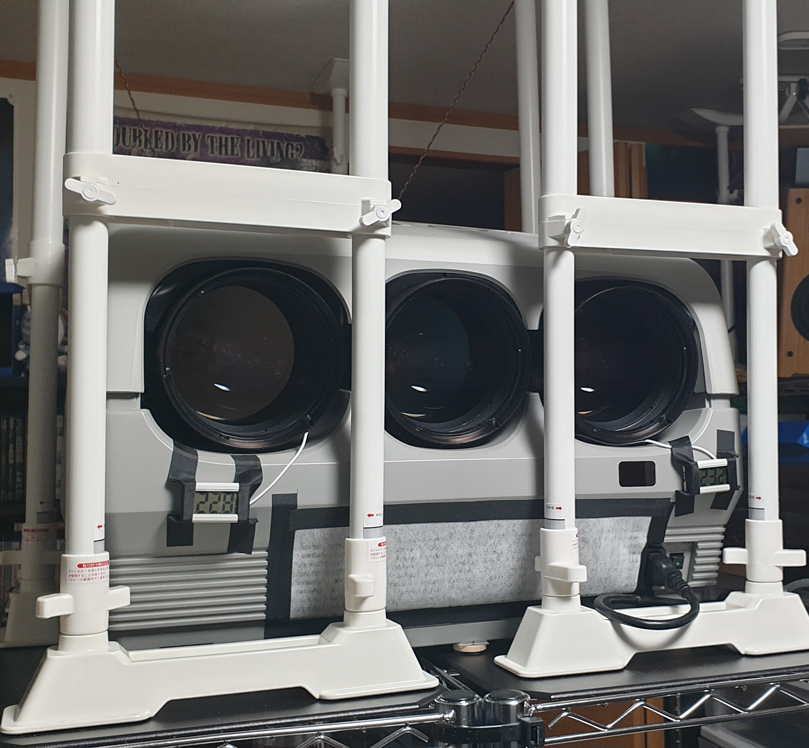
It sits on top of a 150cm metal rack and I secured everything with the ceiling.
Temperature sensors, temporary, taped to the left and right.
Taped a filter over the intake, to reduce dust.

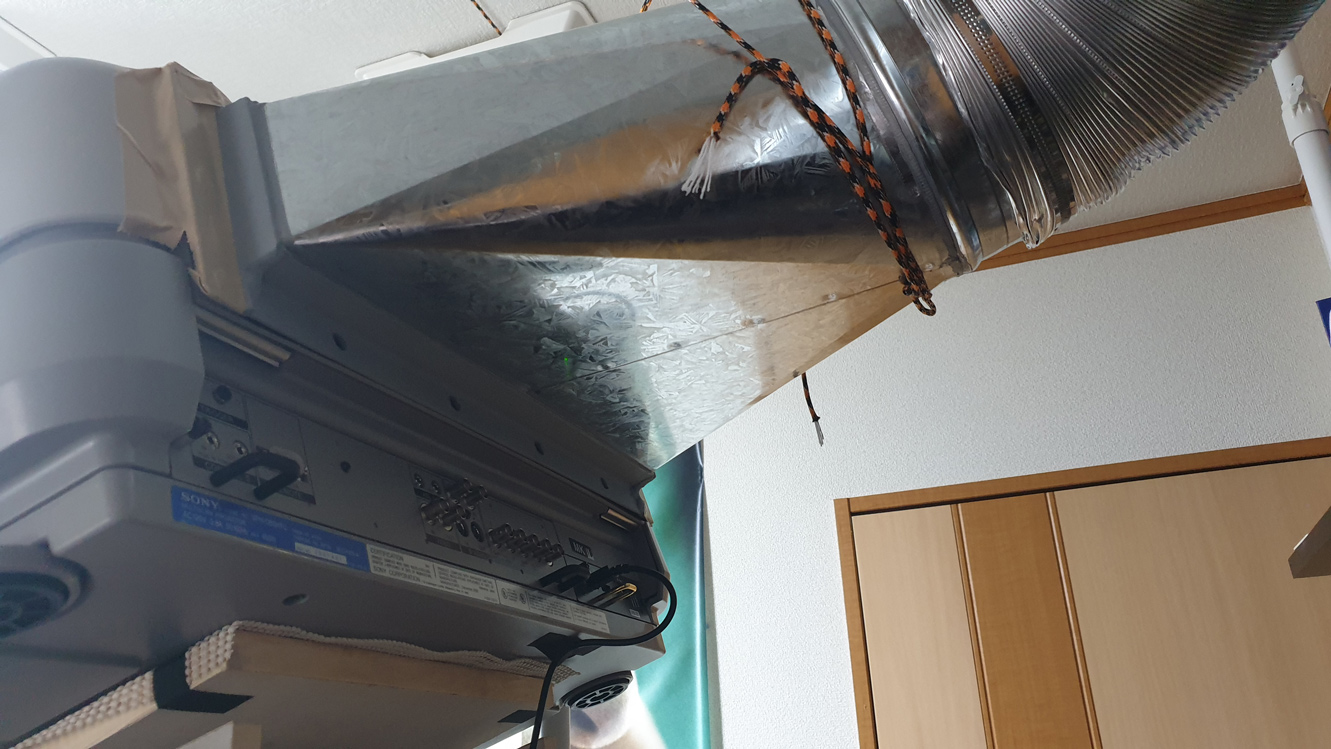
The duct. Custom made and sadly a lot heavier than expected.
Used doublesided velcro tape so it’s not a permanent connection.
I also had to secure it with a wire to the stability beams going to the ceiling, which means I can’t take off the cover for now. I need to replace the wire with some sort of quick release.
The duct itself goes to a small walk-in closet where my ps5 and NAS also sit.

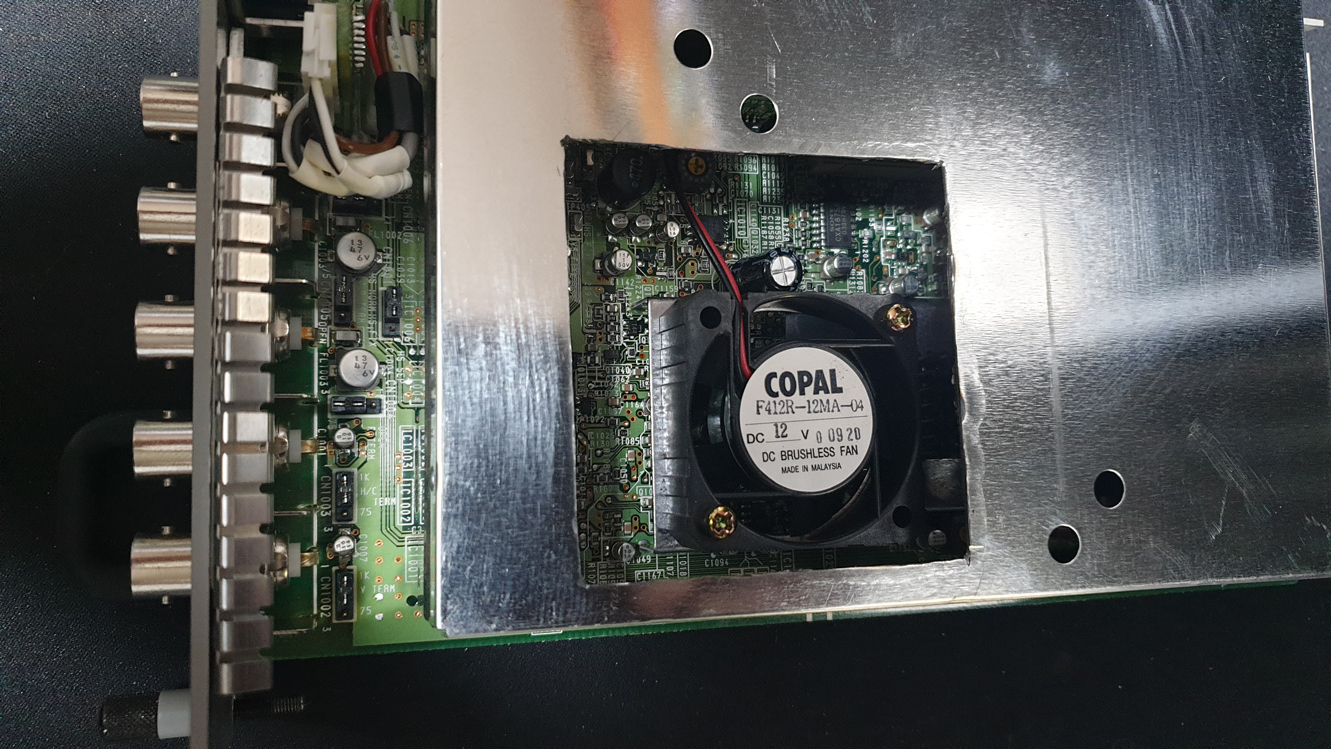
The hole I cut for the 60mm fan. I secured it with tieraps and 4 small pieces of mousemat on the sides so it has a cushion and won’t vibrate. I did exactly the same for the psu fan, replaced with a 80mm noctua fan.
For now I’m done with the modding and very happy with the outcome.
I’ll just have to wait for the 1.5 gain screen and then I can fully enjoy this baby.
| Description: |
|
| Filesize: |
494.6 KB |
| Viewed: |
4275 Time(s) |
|
| Description: |
|
| Filesize: |
350.79 KB |
| Viewed: |
4275 Time(s) |
|
| Description: |
|
| Filesize: |
217.3 KB |
| Viewed: |
4275 Time(s) |
|
|
|
| Back to top |
|
|
AnalogRocks
Forum Moderator
Joined: 08 Mar 2006
Posts: 26706
Location: Toronto, Ontario, Canada
TV/Projector: Sony 1252Q, AMPRO 4000G
|
| Posted: Mon Mar 06, 2023 7:29 am Post subject: |
|
|
So we can call this a SONY D50 MO - Modded Out version or just plain "Cool" :thumbsup"
Thanks for the pictures.
Did you see someone in Singapore is selling 3 more D50's new? That's 4 total in a short time. Weird but neat.
_________________
Tech support for nothing
CRT.
HD done right!
|
|
| Back to top |
|
|
Videodrome
Joined: 22 Feb 2023
Posts: 56
|
| Posted: Mon Mar 06, 2023 11:58 am Post subject: |
|
|
Thanks, I'm not familiar with the Singapore seller, I got it at ebay, shipped from the USA.
Any link?
I'm expecting some things tomorrow which will make it easier to remove the cover when necessary.
I'll post a few pictures of the new fans.
The only drawback of this setup is that when I need to remove the cover and adjust the lens angle or flapping, there won't be any cooling. I need to put the stock fans inside and plug them in whenever I do this, not ideal. It shouldn't happen too often so it's not worth cutting out the entire back of the cover, just yet.. Then again, I do enjoy modding
|
|
| Back to top |
|
|
kal
Forum Administrator
Joined: 06 Mar 2006
Posts: 18114
Location: Ottawa, Canada
TV/Projector: JVC DLA-NZ7
|
|
| Back to top |
|
|
Videodrome
Joined: 22 Feb 2023
Posts: 56
|
| Posted: Mon Mar 13, 2023 2:33 pm Post subject: |
|
|
I have a few new questions,
When turning the ABG off, it still shows a faint line in the blue tube, is this normal?
The powersupply has a buzz, volume differs and sometimes goes completely away after ‘ringing’ for a short time.
So it goes from a loud constant buzz to something like buzz…..buzz…buzzz..buzz.buzzbuzzbuzz, and poof, the buzz is gone or very low volume. Anyone knows what the faulty component could be. I might send it away to get it fixed.
Can I move the powersupply of a 120v D50 projector to a 220v D50 projector, or vice versa, and have it work without any problems? Of course making sure the input voltage would be correct.
I can’t imagine they have other components work differently, because the power-output from connection pins should be the same, no?
// I was wrong about ABG problem, it shows no lines when turned off.
What I meant was with pic-muting on, blue shows a horizontal line at the top of the screen. The other tubes seemed to be turned off completely. Is this normal behavior?
|
|
| Back to top |
|
|
|
|
|
|
|
You cannot post new topics in this forum
You cannot reply to topics in this forum
You cannot edit your posts in this forum
You cannot delete your posts in this forum
You cannot vote in polls in this forum
You cannot attach files in this forum
You can download files in this forum
|
Forum powered by phpBB © phpBB Group
|
|




