| Author |
Message |
cdsnyder
Joined: 08 Jan 2018
Posts: 7
Location: wisconsin, usa
|
| Posted: Mon Jan 08, 2018 4:45 pm Post subject: Marquee 8000 horizontal linearity |
|
|
Hi all. Been using this marquee 8000 for around 6 years. Haven't registered until now because I always found enough info through your site to solve my own problems up until now. Thanks for the great site!
I recently took my projector down off the ceiling to replace a tube. Everything went fine, but I'd like to solve another problem that I've just tolerated up until now.
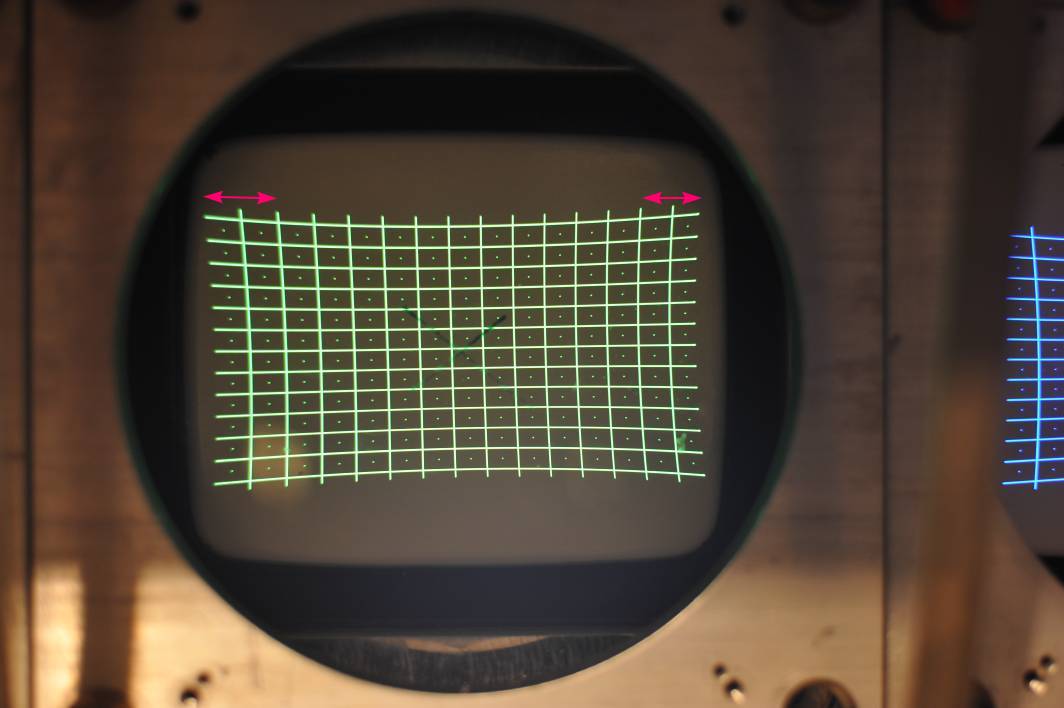
Attached is a test pattern. All projector settings are nulled, no blanking. I only set the flare/astig/focus on the green tube. The distance between vertical lines starts wide on the left and gradually gets closer together on the right. The right side horizontal scan also seems to stop short of the full image width, and there is a bright bar on the last "pixel" column (doesn't show up well in pictures). In the past I've just set the blanking to 1 and it gets hidden. This is true of all 3 colors.
I usually have to either shift the image on the raster or shift the screen. If I put the test grid center point on the screen center point, then the left side hangs over the border and the right side comes up short. The screen is aligned pretty close to perfect (and besides, the linearity problem can be seen on the tube face).
Is this fixable? Or just something to put up with for owning a mid-tier CRT?
| Description: |
|
| Filesize: |
58.45 KB |
| Viewed: |
2935 Time(s) |
|
|
|
| Back to top |
|
 |
gjaky

Joined: 05 Jun 2010
Posts: 2802
Location: Budapest, Hungary
|
| Posted: Mon Jan 08, 2018 6:17 pm Post subject: |
|
|
I'm quite sure the bright line on the edge is normal for a 8000.
As for the linearity, while everything at midpoint see if unplugging the corresponding convergence yoke makes any difference? If not, then it's the HDM.
_________________
projectors in the past : NEC 6-9PG xtra, Electrohome Marquee 6-7500, NEC XG 1351 LC ( with super modified Electrohome VNB neckboard !!!)
current: VDC Marquee 9500LC
The MOD: VNB-DB, VIM-DB
|
|
| Back to top |
|
|
barclay66

Joined: 27 Jun 2011
Posts: 1304
Location: Germany
TV/Projector: Marquee 9500 Ultra
|
| Posted: Mon Jan 08, 2018 8:25 pm Post subject: |
|
|
Hi,
What about using the horizontal linearity controls in the geometry menu?
Or is it that the 8000 doesn‘t have them?
In this case, a chassis upgrade to a 9500 would be a big plus...
Regards,
barclay66
|
|
| Back to top |
|
|
gjaky
Joined: 05 Jun 2010
Posts: 2802
Location: Budapest, Hungary
|
| Posted: Mon Jan 08, 2018 9:59 pm Post subject: |
|
|
| barclay66 wrote: | Hi,
What about using the horizontal linearity controls in the geometry menu?
Or is it that the 8000 doesn‘t have them?
In this case, a chassis upgrade to a 9500 would be a big plus...
Regards,
barclay66 |
Indeed the Horizontal linearity adjustments were introduced with the CLM V3.3 software, which was well past M8000 times.
_________________
projectors in the past : NEC 6-9PG xtra, Electrohome Marquee 6-7500, NEC XG 1351 LC ( with super modified Electrohome VNB neckboard !!!)
current: VDC Marquee 9500LC
The MOD: VNB-DB, VIM-DB
|
|
| Back to top |
|
|
cdsnyder
Joined: 08 Jan 2018
Posts: 7
Location: wisconsin, usa
|
| Posted: Tue Jan 09, 2018 4:16 am Post subject: |
|
|
| gjaky wrote: |
Indeed the Horizontal linearity adjustments were introduced with the CLM V3.3 software, which was well past M8000 times. |
Yep, no horizontal. I got excited when I saw a screenshot somewhere that had vertical and horizontal and thought I hadn't noticed it while looking at the backwards image on my tube face. Alas, there was only vertical.
Removing convergence didn't help. I can live with it. I might be upgrading soon! Thanks gjaky and barclay.
Chris
|
|
| Back to top |
|
|
gjaky
Joined: 05 Jun 2010
Posts: 2802
Location: Budapest, Hungary
|
| Posted: Tue Jan 09, 2018 9:03 am Post subject: |
|
|
Well, you can also put the 8" tubes right into your 9500 chassis with the mounting plates from the 8000 until (if ever) you replace the 9" tubes, this is something like a 1 hour work (not including projector mounting issues)
_________________
projectors in the past : NEC 6-9PG xtra, Electrohome Marquee 6-7500, NEC XG 1351 LC ( with super modified Electrohome VNB neckboard !!!)
current: VDC Marquee 9500LC
The MOD: VNB-DB, VIM-DB
|
|
| Back to top |
|
|
cdsnyder
Joined: 08 Jan 2018
Posts: 7
Location: wisconsin, usa
|
| Posted: Tue Jan 09, 2018 9:08 pm Post subject: |
|
|
|
Wow I didn't know I could do that. I've had this 9500 chassis sitting in a closet for 3 years with the 8000 on the ceiling. I might be getting 9" tubes, but it's good to know I can make an improvement either way. Thanks.
|
|
| Back to top |
|
|
|
|




