| Author |
Message |
rjnsales
Joined: 27 May 2006
Posts: 19
Location: Lee's Summit, Missouri
|
| Posted: Sun May 28, 2017 2:51 am Post subject: Sony G90 will not power on was working fine. |
|
|
I just went to power up my G90 to make sure it was ready to do some Crestron programming of my other equipment and no power nothing its completely dead I checked the 2 fuses by the power cord entrance they seem fine the outlet in the ceiling has 120 volts and operates my drill. I have it unplugged currently anyone have any ideas? It worked Ok last week.
Regards Bob
|
|
| Back to top |
|
 |
cmjohnson

Joined: 03 Apr 2006
Posts: 5180
Location: Buried under G90s
|
| Posted: Mon May 29, 2017 12:59 pm Post subject: |
|
|
You may want to contact either Curt Palme (our benefactor) via PM, or alternatively, contact Craig Rounds (www.cir-engineering.com) for assistance.
Both are highly experienced G90 techs who will be able to assist you.
I know something of the G90 but not enough to be of much help to you at this time.
|
|
| Back to top |
|
|
Curt Palme
CRT Tech
Joined: 08 Mar 2006
Posts: 24396
Location: Langley, BC
TV/Projector: All of them!
|
| Posted: Mon May 29, 2017 1:37 pm Post subject: |
|
|
the set came from me originally.
Chris, could you post a pix of where the two LV power supplies are located? I need Bob to send me those along with the YA and RGB boards I sent him. I am in and out of town for the next couple of weeks, and won't have a chance to send him pix of the location of those two LVPS. I suspect a bad solder joint on them, but need to test them here before confirming that..
|
|
| Back to top |
|
|
cmjohnson
Joined: 03 Apr 2006
Posts: 5180
Location: Buried under G90s
|
| Posted: Mon May 29, 2017 1:54 pm Post subject: |
|
|
I'd be happy to do that, if you'd refresh my memory on their location. A verbal description is all I need.
I've never had a power supply issue with any of my units yet so I've never messed with them.
|
|
| Back to top |
|
|
Curt Palme
CRT Tech
Joined: 08 Mar 2006
Posts: 24396
Location: Langley, BC
TV/Projector: All of them!
|
| Posted: Mon May 29, 2017 2:55 pm Post subject: |
|
|
Yeah, they don't fail too often, that's for sure.
They are under the top cover, then under the metal cover that is under the rear of the back cover. Take off a few Philips screws, and there's two boards that slide out, and the wires disconnect. Both of those are the LVPS.
|
|
| Back to top |
|
|
cmjohnson
Joined: 03 Apr 2006
Posts: 5180
Location: Buried under G90s
|
| Posted: Mon May 29, 2017 2:59 pm Post subject: |
|
|
Got it.
Pics to come in a little bit...
|
|
| Back to top |
|
|
cmjohnson
Joined: 03 Apr 2006
Posts: 5180
Location: Buried under G90s
|
| Posted: Mon May 29, 2017 3:15 pm Post subject: |
|
|
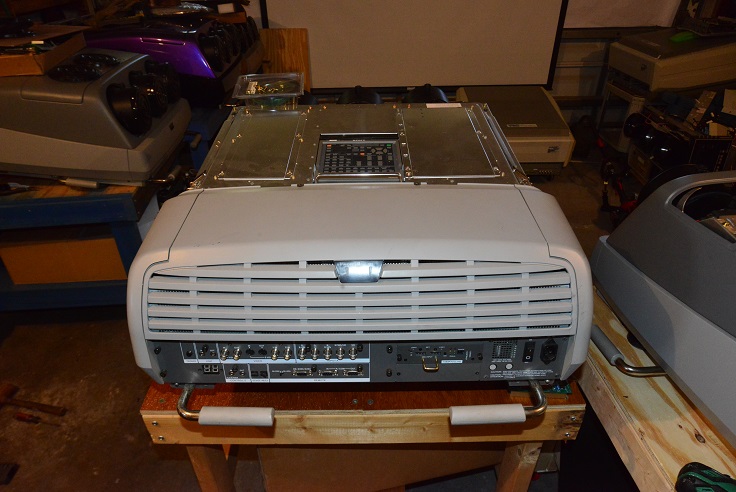
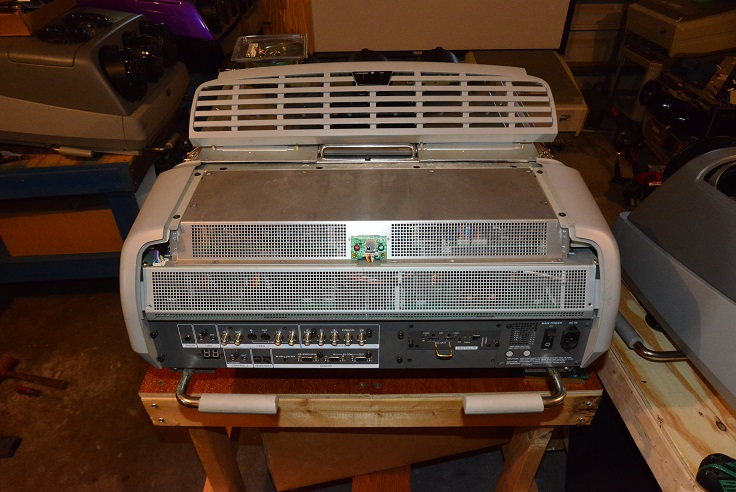
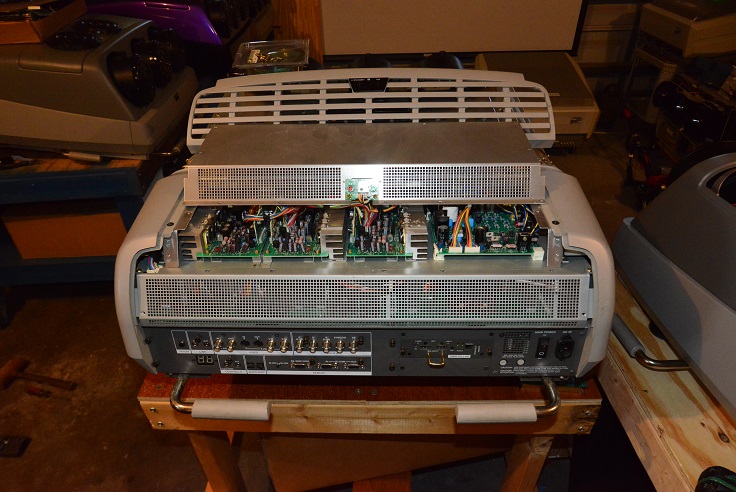
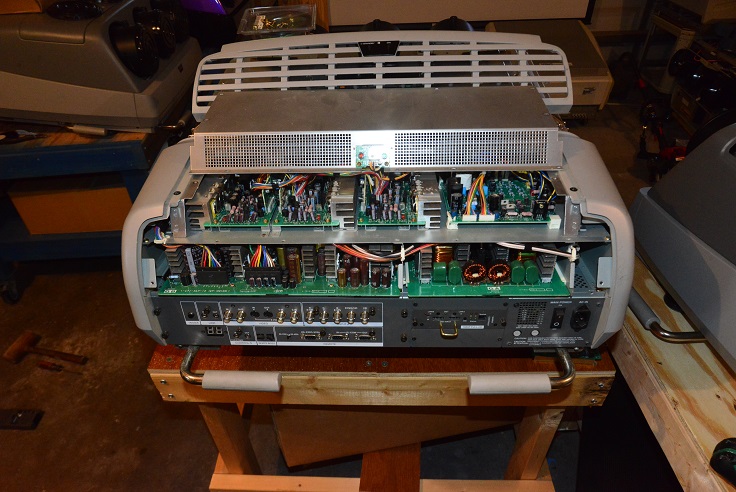
Pics: You're looking for the GA and GB boards.
These four pics are step-by-step to get access to them.
Remove the top cover.
Remove the rear plastic cover by releasing the 2 black captive screws. No need to completely remove the screws, just loosen them until they are free of the metal underneath.
Remove the 11 screws that attaches the upper shield that is now exposed. Remove the shield
Remove the six screws that attach the power supply bay vented shield. Note that two screws are different from the others, they
are longer and black. Note where they go, they have to go back to their original locations.
Remove the shield, and the GA and GB boards slide out, you have to remove the connectors as you go.
| Description: |
|
| Filesize: |
166.64 KB |
| Viewed: |
8282 Time(s) |
|
| Description: |
|
| Filesize: |
186.44 KB |
| Viewed: |
8282 Time(s) |
|
| Description: |
|
| Filesize: |
189.3 KB |
| Viewed: |
8282 Time(s) |
|
| Description: |
|
| Filesize: |
194.35 KB |
| Viewed: |
8282 Time(s) |
|
|
|
| Back to top |
|
|
cmjohnson
Joined: 03 Apr 2006
Posts: 5180
Location: Buried under G90s
|
| Posted: Tue May 30, 2017 3:39 am Post subject: |
|
|
Oh, check for tube damage. I think the unit won't power up if it has a broken tube. Unfortunately, G90s have a little bit of a
reputation for breaking tubes. Not really often, but what is unheard of in Marquees and Barcos is not all that rare in G90s.
|
|
| Back to top |
|
|
rjnsales
Joined: 27 May 2006
Posts: 19
Location: Lee's Summit, Missouri
|
| Posted: Tue May 30, 2017 3:51 am Post subject: |
|
|
|
What do I look for in regards to the broken tube. Will it be obvious? will I find broken glass a hazy tube face? I have never experienced this so not sure how to proceed. It has been sitting with no use for several days would tube break after shutdown from last use ?? The unit has been stationary mounted to ceiling with no bumps or movement since last used.
|
|
| Back to top |
|
|
cmjohnson
Joined: 03 Apr 2006
Posts: 5180
Location: Buried under G90s
|
| Posted: Tue May 30, 2017 4:24 am Post subject: |
|
|
If a tube breaks, you should see evidence of it when you look in the lenses. Or, remove the top cover and open the lid underneath (one screw and two latches on the sides) and if part of the tube falls out, that could be a broken tube. 
It's not LIKELY, but it's POSSIBLE, and easy to check for.
|
|
| Back to top |
|
|
km987654

Joined: 25 Jul 2007
Posts: 2874
Location: Australia
TV/Projector: Barco BG809s
|
| Posted: Tue May 30, 2017 5:23 am Post subject: |
|
|
| cmjohnson wrote: | If a tube breaks, you should see evidence of it when you look in the lenses. Or, remove the top cover and open the lid underneath (one screw and two latches on the sides) and if part of the tube falls out, that could be a broken tube.
It's not LIKELY, but it's POSSIBLE, and easy to check for. |
How about a tube short?
|
|
| Back to top |
|
|
cmjohnson
Joined: 03 Apr 2006
Posts: 5180
Location: Buried under G90s
|
| Posted: Tue May 30, 2017 12:14 pm Post subject: |
|
|
I did say "break", as in tube implosion or envelope failure. Curt has seen that a few times on G90s, and the first G90 I bought
had a broken blue tube in this manner.
To check for a tube short, disconnect the neck card. The PJ will run with that disconnected if it's a short in the electron gun assembly.
To check for an anode to ground short, disconnect the anode lead at the splitter block. (Push hard, turn 90 degrees, pull the red cable out of the block. Unit OFF!!! while doing this.
|
|
| Back to top |
|
|
|
|




