| Author |
Message |
ecrabb
Forum Moderator

Joined: 13 Mar 2006
Posts: 15909
Location: Utah
TV/Projector: JVC RS40, Epson 5010
|
| Posted: Tue Feb 20, 2007 3:47 am Post subject: |
|
|
Uh yeah, Mark - where is $190 half of a good EM projector?
I've seen you and a few others make these off-the-cuff remarks about how it's silly to spend any money at all on these old ES-focus projectors when good EM-focus projectors are so cheap. I haven't run across them, and I'm wondering where they are.
From my experience, anything much less than a grand, and you're not buying a useable EM projector - you're buying a "project". It'll probably have at least one toasty tube that's going to cost $500-600 to make right.
In my opinion, an EM-projector that's in nice shape is going to be in the $1500-2000 ballpark - either up front, or in total after you put some money into it. The occasional high-hour Marquee 8000 or 8110 or something is an occasional exception. Or, an ebay machine that's a complete gamble.
I'm not saying I'd spend $190 on convergence boards for a 1251 - I wouldn't - but, to make it sound like $190 is half of an EM projector isn't reality. Hell, $190 US probably won't even cover SHIPPING!
SC
|
|
| Back to top |
|
 |
ecrabb
Forum Moderator
Joined: 13 Mar 2006
Posts: 15909
Location: Utah
TV/Projector: JVC RS40, Epson 5010
|
| Posted: Tue Feb 20, 2007 3:55 am Post subject: |
|
|
| AnalogRocks wrote: | | I think my 1252 was about 11.5 feet from the 96" screen we were running it on. |
I maximized rasters and set up for a 96x54 when I hung my 1271 last month. I'm right in the middle of construction right now, so I don't have a screen up, but I just checked and horizontal throw distance is just over 10 feet! Probably around 10'4" or 10'5"!!!
My machine has Sony PT-65 lenses on it so your throw could be slightly different if you have PT-43 or HD-8's, but I'd say your projector is at least a couple of feet too far back.
SC
|
|
| Back to top |
|
|
Mark_A_W
Joined: 15 Mar 2006
Posts: 3068
Location: Sunny Melbourne Australia
|
| Posted: Tue Feb 20, 2007 4:21 am Post subject: |
|
|
I bought my XG for $500 from Ebay in Singapore (+ shipping). Yes, it turned into a project, but it was well worth it.
You just need to look around, know what you want, and know what condition something needs to be in to be usable.
If you want it all perfect and safe, then yep, it'll cost you $1500+ from Curt.
Otherwise, take the ebay lottery, preferably local, and see how you go. I've seen PG Xtras go for next to nothing. Just make sure the tubes are ok.
Throw distance on a 1251 is 1.3x width, but you will need to shim the tube mounts to toe them in.
|
|
| Back to top |
|
|
1031

Joined: 22 Mar 2006
Posts: 657
Location: Finland
|
|
| Back to top |
|
|
AnalogRocks
Forum Moderator

Joined: 08 Mar 2006
Posts: 26706
Location: Toronto, Ontario, Canada
TV/Projector: Sony 1252Q, AMPRO 4000G
|
| Posted: Tue Feb 20, 2007 6:30 am Post subject: |
|
|
| ecrabb wrote: | | AnalogRocks wrote: | | I think my 1252 was about 11.5 feet from the 96" screen we were running it on. |
I maximized rasters and set up for a 96x54 when I hung my 1271 last month. I'm right in the middle of construction right now, so I don't have a screen up, but I just checked and horizontal throw distance is just over 10 feet! Probably around 10'4" or 10'5"!!!
My machine has Sony PT-65 lenses on it so your throw could be slightly different if you have PT-43 or HD-8's, but I'd say your projector is at least a couple of feet too far back.
SC |
I'll take your word for it Ecrab. I was going from memory. But if he maximizes the rasters and moves it forward then he will have the correct throw distance. I'd measure but my 1252 is on a cart facing a wall underblankets right now. I still have no idea what lenses are on it. I'm plastering, sanding and painting. I'm trying to keep it safe(r) than it was when I dropeed the fan on the lens. ( Waaaaa)
Then there's this Ampro in pieces on my projection cart LOL.
Always a project. It's never finished.
So sdubreuil take Ecrabb's word for the throw distance. I was going from memory. Sorry about that. ;(
_________________
Tech support for nothing
CRT.
HD done right!
|
|
| Back to top |
|
|
rwijnhov
Joined: 28 Jan 2007
Posts: 32
|
| Posted: Tue Feb 20, 2007 9:40 am Post subject: |
|
|
|
ok i have a 1251 where I put in the DE and DD board. So if you tell me what res to check I can test this for you. But I do believe there are two kinds of 2151 there is one with the slot between the red and green and one without.
|
|
| Back to top |
|
|
ecrabb
Forum Moderator
Joined: 13 Mar 2006
Posts: 15909
Location: Utah
TV/Projector: JVC RS40, Epson 5010
|
| Posted: Tue Feb 20, 2007 4:49 pm Post subject: |
|
|
| 1031 wrote: | | I did quick reading on this topic.. But i think that bandwidht difference is from different Ca cards..(Cab+carg) and there is different output amps..Vph05 or Vph06(1272 and 1271) and that makes that difference. |
Are there different Ca cards between a 1251 and 1271, or just between generations of machines (i.e. 1271 vs. 1272)... because the OP needs to concern himself specifically with the differences only between a 1251 and a 1271.
SC
|
|
| Back to top |
|
|
ecrabb
Forum Moderator
Joined: 13 Mar 2006
Posts: 15909
Location: Utah
TV/Projector: JVC RS40, Epson 5010
|
| Posted: Tue Feb 20, 2007 4:57 pm Post subject: |
|
|
| AnalogRocks wrote: | | I'll take your word for it Ecrab. I was going from memory. But if he maximizes the rasters and moves it forward then he will have the correct throw distance. I'd measure but my 1252 is on a cart facing a wall underblankets right now. I still have no idea what lenses are on it. |
No need to take my word for it - I wasn't contradicting you, but rather just offering some more data. Like I said, your lenses may give you a slightly different throw. You may have more keystone and therefore a little longer throw. You may not be doing 16:9 and therefore need more room for keystone, etc.
I just had the benefit of having my projector hanging from the ceiling in what is likely it's final resting place. It's also worth noting that I was probably pretty conservative with my rasters (it's probably not quite as maximized as it could be). Also, I have a pretty shallow offset, and therefore will have less keystone than some people will have, too so maybe those two things cancel each other out a little.
Your point is the most important... that the OP should maximize rasters and move the projector to fit the screen.... and find his own best throw distance.
There are too many factors in each install to come up with a "perfect" throw distance or offset, etc.
SC
|
|
| Back to top |
|
|
AnalogRocks
Forum Moderator
Joined: 08 Mar 2006
Posts: 26706
Location: Toronto, Ontario, Canada
TV/Projector: Sony 1252Q, AMPRO 4000G
|
| Posted: Tue Feb 20, 2007 11:59 pm Post subject: |
|
|
I was running 4:3 with the back of the projector tilted up and the projector about 2 feet up from the bottom of the screen. SO yes totaly different setup.
_________________
Tech support for nothing
CRT.
HD done right!
|
|
| Back to top |
|
|
sdubreuil

Joined: 18 Jan 2007
Posts: 43
Location: Montreal, Quebec Canada
|
| Posted: Wed Feb 21, 2007 1:43 am Post subject: |
|
|
Hi
I have now my PJ at 10ft. I will try it that way. Unfortunatly I do not have my Moome IFB-HD HDMI card yet so I can't try it at 1080i or 720p.
Question, why the Sony Throw Distance Calculator (PJCalc! v5.20) do not has the VPH 12xx inside the list? It look like this one was remove At version 1.9.
Can I use another model in the list?
Thnaks
|
|
| Back to top |
|
|
AnalogRocks
Forum Moderator
Joined: 08 Mar 2006
Posts: 26706
Location: Toronto, Ontario, Canada
TV/Projector: Sony 1252Q, AMPRO 4000G
|
| Posted: Wed Feb 21, 2007 1:52 am Post subject: |
|
|
I've never used that so I coulnd't realy say. It's better to look into the lenses with the sunglasses and use the RGB Size control to set your rasters 3/8" from the tube edge and then move the projector forward/backward untill the picture fits your screen. Refocus and reconverg.
Most of the PJCalculators are 5=7%(maybe more?) conservative from what people have said in previous post's.
_________________
Tech support for nothing
CRT.
HD done right!
|
|
| Back to top |
|
|
sdubreuil
Joined: 18 Jan 2007
Posts: 43
Location: Montreal, Quebec Canada
|
| Posted: Wed Feb 21, 2007 1:53 am Post subject: |
|
|
rwijnhov
I'm happy to see somebody who did that change. Could you please comment about your performance observation since you did that change?
Regards
|
|
| Back to top |
|
|
sdubreuil
Joined: 18 Jan 2007
Posts: 43
Location: Montreal, Quebec Canada
|
| Posted: Wed Feb 21, 2007 3:40 am Post subject: |
|
|
Analog Rock
I just found the PJcal from (sony software). Do you believe this will be the equivalent of what you are doing with the sunglass?
This will be easier with the setup I have.
Look at
http://www.crtprojectors.co.uk/crt_tech.htm
I did a mistake with screen size earlier. It is a 50*67 = 84 dia or (16*9) = 77.
This software tell me to put my PJ at 7.7 feet.
Lens Ring = small and CRT spacers at small as well.
Thanks
|
|
| Back to top |
|
|
ecrabb
Forum Moderator
Joined: 13 Mar 2006
Posts: 15909
Location: Utah
TV/Projector: JVC RS40, Epson 5010
|
| Posted: Wed Feb 21, 2007 5:12 am Post subject: |
|
|
PJcalc is super conservative and was designed to be very forgiving for many different installations and less-than-careful installers. In our HTs where time isn't money, we can be much more exact about how we set them up. That's why you should use the "sunglasses / maximize-rasters" method - and pretty much ignore what the manual or PJcalc says. You can use PJ calc to get rough numbers but realize - it's could be as much as 10% on the long side for throw distance.
Now, with a screen that small, you really should be able to get a nice, sharp, and bright image on a screen that size... even with contrast cranked down some - which will help sharpness.
Man, if you had the projector at almost 13 feet from the screen, it's no wonder you had a soft image - you would have been using barely half the tube face!
After you get things in the ballpark, pull the lenses off and see if the red and blue rasters are centered. If they're not, don't use the CRT spacers and do the "spring" mod. That mod uses springs and nuts to make the CRT toe-in angle infinitely adjustable.
Also, to really maximize sharpness (especially with a screen that small), you'll eventually probably want to do the "mooneyass" mod to give you Scheimpflug correction.
I can't emphasize enough once you find the throw distance that maximizes rasters, to take your time, be anal, and find the exact (down to the gnat's ass!) spot where the projector is perfectly centered and perfectly square to the screen. When the projector is in that spot, it's amazing how easy it is to converge. When it's not in that spot and is off even my a few inches, it's amazing what a paint in the ass it is to converge.
Finally, realize that you'll probably do a full setup no less than ten times on your projector over the next few weeks or months. Every time you do it, you'll get a little bit better at it, and the image will get better every time.
SC
|
|
| Back to top |
|
|
1031
Joined: 22 Mar 2006
Posts: 657
Location: Finland
|
| Posted: Wed Feb 21, 2007 5:53 am Post subject: |
|
|
| ecrabb wrote: | | 1031 wrote: | | I did quick reading on this topic.. But i think that bandwidht difference is from different Ca cards..(Cab+carg) and there is different output amps..Vph05 or Vph06(1272 and 1271) and that makes that difference. |
Are there different Ca cards between a 1251 and 1271, or just between generations of machines (i.e. 1271 vs. 1272)... because the OP needs to concern himself specifically with the differences only between a 1251 and a 1271.
SC |
I got read service manuals (again)..i remember that 1271&1272 uses that vhp-06 ic (and that was rated about 60-70mhz) and if i remember correct those other 12xx uses vph-05 or vhp-04(1270) ic and those was 50mhz and 40 mhz(vph04)..
So only place to really found those differences are just compairing servicemanuals&circuit diagrams..
Was there somewhere manual for 1251? i have foundet only 1270,1271 and 1272 manuals.
But those CA-cards can be different otherways too, so swapping cards from 1271 to 1251 is maybe ok..but i cant confirm that..Maybe someboby other knows that..Sonynut,Curt?
_________________
Marquee 9500LC (Frankenyokes / Thomas electric tubes / HD-10L / +many mod´s)
DVDO VP-50
New hobby, Rally
http://www.youtube.com/watch?v=vX2Rtpr1njs
http://www.youtube.com/watch?v=6ZP9FEFXV5c
http://www.youtube.com/watch?v=j065vei6j6s
http://www.facebook.com/pages/JTS-Racing-team/204443719572685
|
|
| Back to top |
|
|
rwijnhov
Joined: 28 Jan 2007
Posts: 32
|
| Posted: Wed Feb 21, 2007 9:29 am Post subject: |
|
|
|
Ok after swapping the cards I have de 21 zone convergence. And I can project 720p and 1080i without any problem and these are the onlyones i use. I even tested 1360x768@60Hz and this was no problem either. So pls give me a resolution so I can test the bandwidth. But I believe a normal 1251 would not do 1360x768@60Hz. But maybe I am wrong. I also found out that there are different versions of the 1251 the ones with the empty slots between red en green and the ones without. My believe is that de 1251 with the empty slots are 1271's which they crippled with the zone convergence.
|
|
| Back to top |
|
|
rwijnhov
Joined: 28 Jan 2007
Posts: 32
|
| Posted: Wed Feb 21, 2007 9:31 am Post subject: |
|
|
|
And when i have time i can check the ca cards of the 1251 and 1271 for differences. But this will be in the weekend.
|
|
| Back to top |
|
|
sdubreuil
Joined: 18 Jan 2007
Posts: 43
Location: Montreal, Quebec Canada
|
| Posted: Thu Feb 22, 2007 2:18 am Post subject: |
|
|
Hi again
This forum is so hot; I will have a lot of fun to try all this new method and ideas. Thanks everyone. Thanks Analog Rock, I will try your method with the sunglass for sure. I will get back to you with the result as soon that is done.
rwijnhov, regarding the empty slot of the DE and DD, I have it but between G and B tube. I have also had exchange email with Curt about this and here what he said.
"By putting in the 21 point convergence boards, yes the 1251 will be a 1271."
You will also find on his web site, this info:
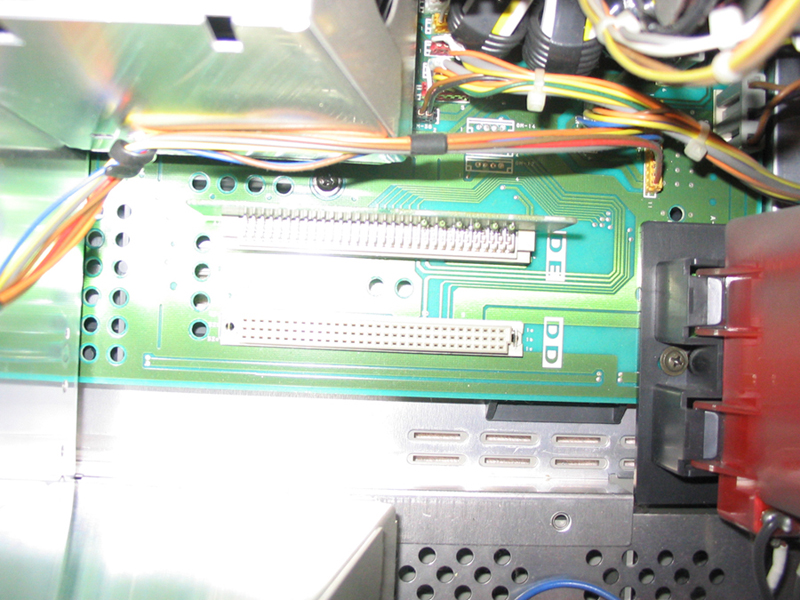
“Between the G and B tubes are the DD and DE boards. Note that not every set has these boards. These are extra D/A converters and zone convergence boards”
"Note: All it takes for a 1251 to become a 1271 is the installation of a newer DD and DE board from a 1271 projector. Doing so will give the 1251 the 21 zone convergence and higher bandwidth found on the 1271. This will only work if the 1251 main board has the two slots between the green and red tube needed. "
I believe the last comment about the “between the green and red” is wrong but the first one about the G and B is the right one if I compare to my PJ.
The only thing I want to do with this projector is 720p and 1080i just like you.
As per you last comment, I can understand that your PJ did a better job after you have added this DD and DE boards. Please confirm?
I can have those cards for $190 (for both). Do you believe it worth it performance wise?
FYI, one of the 2 slots is not empty. See the Picture
It is look like very small board with resistances. This is probably only for ground connection.
Stephane
| Description: |
|
| Filesize: |
423.12 KB |
| Viewed: |
10979 Time(s) |
|
|
|
| Back to top |
|
|
rwijnhov
Joined: 28 Jan 2007
Posts: 32
|
| Posted: Thu Feb 22, 2007 6:23 pm Post subject: |
|
|
|
sorry indeed must be between green and blue. My machine did become a better performer. and the card now there is a dummy.
|
|
| Back to top |
|
|
sdubreuil
Joined: 18 Jan 2007
Posts: 43
Location: Montreal, Quebec Canada
|
| Posted: Fri Feb 23, 2007 4:35 am Post subject: |
|
|
Hi Ecrabb
I just read again all the info that you provide me. In particular thsi one:
"Also, to really maximize sharpness (especially with a screen that small), you'll eventually probably want to do the "mooneyass" mod to give you Scheimpflug correction.
"
Could you please tell me what you mean by ""mooneyass" mod to give you Scheimpflug correction. "
Again Thanks a lot
|
|
| Back to top |
|
|
|
|





