| Author |
Message |
barcodude

Joined: 14 Jun 2014
Posts: 169
Location: The Netherlands
|
| Posted: Wed Mar 30, 2016 3:20 pm Post subject: picture color wash out barco graphics 801s |
|
|
i really need to know how to solve this 'leaking color' problem sometimes it looks like when watching a movie the colors are all wrong, and then it jumps to an ok picture again. I'm a picky git if it comes to perfection so not every body should notice this but i do!!! 
my setup is simple i got a bluray player hooked up to my hd fury to my gamma box to my pj with a vga to 5 bnc cable that's it.
can it be the 17v pod on the power supply, or bad g2 settings? help 
_________________
Epson EMP TW700 - Projecta HomeScreen Deluxe- Denon a/v receiver - Mission highrisers -klipsch subwoofer - Samsung Bluray player
|
|
| Back to top |
|
 |
tschaeikaei
Joined: 08 Apr 2013
Posts: 490
Location: Germany/Saarland
|
| Posted: Wed Mar 30, 2016 3:41 pm Post subject: |
|
|
Sounds like one of the tubes is going low-output from time to time.
I think you should find out which one it is and then swap it with one of the others.
Could be the tube or ... anything that drives it.
I've used an 801s for movies for about a year but cannot remember if i ever had this problem.
Regards, Julian
_________________
Marquee 9500U edgeblend P43 | NEC 9PG
|
|
| Back to top |
|
|
barcodude
Joined: 14 Jun 2014
Posts: 169
Location: The Netherlands
|
| Posted: Wed Mar 30, 2016 3:55 pm Post subject: |
|
|
| tschaeikaei wrote: | Sounds like one of the tubes is going low-output from time to time.
I think you should find out which one it is and then swap it with one of the others.
Could be the tube or ... anything that drives it.
I've used an 801s for movies for about a year but cannot remember if i ever had this problem.
Regards, Julian |
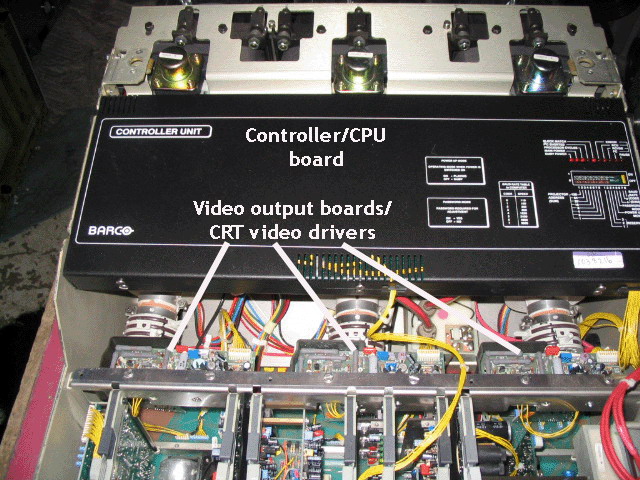
i'm trying to leave the swap for now how do i find out wich tube it is? and i got some video driver boards maybe that wil help? Also got some video noise on the white warm up screen is that normal?
| Description: |
|
| Filesize: |
133.18 KB |
| Viewed: |
4097 Time(s) |
|
_________________
Epson EMP TW700 - Projecta HomeScreen Deluxe- Denon a/v receiver - Mission highrisers -klipsch subwoofer - Samsung Bluray player
|
|
| Back to top |
|
|
tschaeikaei
Joined: 08 Apr 2013
Posts: 490
Location: Germany/Saarland
|
| Posted: Wed Mar 30, 2016 4:39 pm Post subject: |
|
|
I'd find out where that noise comes from. Maybe it only comes from one tube (mute the other tubes or cover the lenses to find out)
It seems possible that this tube is causing your problems, either the tube itself or anything that drives the tube.
Is the problem intensity dependant, meaning does it only appear in very bright settings or on mostly white pictures?
_________________
Marquee 9500U edgeblend P43 | NEC 9PG
|
|
| Back to top |
|
|
barcodude
Joined: 14 Jun 2014
Posts: 169
Location: The Netherlands
|
| Posted: Wed Mar 30, 2016 4:47 pm Post subject: |
|
|
it only appears on all three tubes while warming up faint lines (not the scan lines) After, the picture seems normal even looking into the tubes. this tektst i found in layout and setup tips:
RGB/Video output board(s)
The video output boards are identical for all three tubes. These boards can cause a number of problems, including spot burn at turnoff, retrace lines (thin diagonal lines running across the picture), and varying color balance as the gain of the PC board changes. The WORST thing to do when you suspect a bad video board is to tweak the trimpots on the board. A burnt tube is virtually guaranteed if you tweak these pots.
_________________
Epson EMP TW700 - Projecta HomeScreen Deluxe- Denon a/v receiver - Mission highrisers -klipsch subwoofer - Samsung Bluray player
|
|
| Back to top |
|
|
barcodude
Joined: 14 Jun 2014
Posts: 169
Location: The Netherlands
|
| Posted: Wed Mar 30, 2016 7:27 pm Post subject: |
|
|
just changed the video output boards with no result  still having the same isseu i guess i have to swap tubes after all or live with the problem until it really dies on me still having the same isseu i guess i have to swap tubes after all or live with the problem until it really dies on me
_________________
Epson EMP TW700 - Projecta HomeScreen Deluxe- Denon a/v receiver - Mission highrisers -klipsch subwoofer - Samsung Bluray player
|
|
| Back to top |
|
|
|
|




