| Author |
Message |
hiddink
Joined: 09 Jan 2014
Posts: 47
|
| Posted: Wed Dec 09, 2015 10:39 am Post subject: Raster setup for Barco Graphics 808 |
|
|
Hello,
I am trying to finetune the setup of my BG 808...
From the menu, I played with the following options:
- Guided
- Random access
- Installation
- Service
First problem: from the Installation menu, if I reset the center of the projector to the center of my screen, the image is not perfectly centered, it is out of the middle (at this stage, I have already done static focussing)
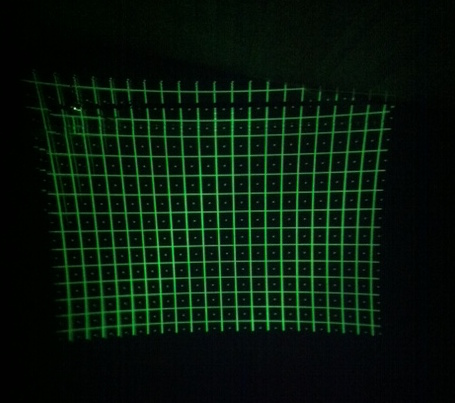
Second problem: from the Installation menu, I get an almost perfectly square raster, filling my 4x3 screen. However, when I switch to "Guided" or "Random access" with the Selected source on port 3, I get a distorted image in the sense that it is not square as the raster was. Why is that and how to correct this...
Thanks in advance for any pointers?
Regards,
bert
|
|
| Back to top |
|
 |
Curt Palme
CRT Tech
Joined: 08 Mar 2006
Posts: 24396
Location: Langley, BC
TV/Projector: All of them!
|
| Posted: Wed Dec 09, 2015 2:51 pm Post subject: |
|
|
|
As long as the test pattern is centered, you're fine. the image is centered by the H phase adjustment in the geometry menu.
|
|
| Back to top |
|
|
hiddink
Joined: 09 Jan 2014
Posts: 47
|
| Posted: Wed Dec 09, 2015 4:24 pm Post subject: |
|
|
Hello Curt,
Thanks for your reply, I attached an image of the test-pattern. As you see, it is not square...however, the angle and position of the projector to the screen should be fine (according to the manual). Were/how should I proceed to get a perfect square or (rectangled) test-pattern?
Thanks again in advance!
Regards,
Bert
| Description: |
|
| Filesize: |
75.78 KB |
| Viewed: |
1912 Time(s) |
|
|
|
| Back to top |
|
|
Curt Palme
CRT Tech
Joined: 08 Mar 2006
Posts: 24396
Location: Langley, BC
TV/Projector: All of them!
|
| Posted: Wed Dec 09, 2015 5:19 pm Post subject: |
|
|
|
What you have is normal. Follow the manual and do a full set up step by step. Your lens focusing and/or Scheimpflug adjustment is off as well.
|
|
| Back to top |
|
|
|
|





