| Author |
Message |
T08066
Joined: 07 Jan 2015
Posts: 14
Location: Germany
|
| Posted: Tue Jun 09, 2015 5:07 pm Post subject: Barco Data 808s phase adjustment problem |
|
|
Hi there,
I have a problem with my Barco Data 808s. It's connected via 5BNC with a HD Fury 2 and is getting 1080i input. The picture is shifted horizontally to the right and about 30% of the image is invisible due to this.
I've played around with:
- Input Source # and connection
- h and v shift
- measured the smps 17V and adjusted the G2 too. No red LED turned on in my PJ.
I do really appreciate your help!
Cheers, Tobi
|
|
| Back to top |
|
 |
gregstv
Joined: 27 Aug 2007
Posts: 628
Location: Australia
|
| Posted: Tue Jun 09, 2015 8:42 pm Post subject: |
|
|
|
Check the blanking and the phase.
|
|
| Back to top |
|
|
T08066
Joined: 07 Jan 2015
Posts: 14
Location: Germany
|
| Posted: Tue Jun 09, 2015 8:47 pm Post subject: |
|
|
|
The blanking is completely off. Moving the raster is working, but doesn't solve the issue. Changing the horizontal phase still has no effect.
|
|
| Back to top |
|
|
gregstv
Joined: 27 Aug 2007
Posts: 628
Location: Australia
|
| Posted: Tue Jun 09, 2015 8:59 pm Post subject: |
|
|
|
Did it just go like this? Or are you installing it?
|
|
| Back to top |
|
|
T08066
Joined: 07 Jan 2015
Posts: 14
Location: Germany
|
| Posted: Tue Jun 09, 2015 10:09 pm Post subject: |
|
|
|
The problem is still there. I'm installing the set. Every signal is cut on the right side, PC-VGA to RGBHV too (800x600, 720p, 1080i, 1200x900 tested). The internal pattern is centered perfectly, but h-phase does not have any effect. Is there a connection or cable that controls the adjustment of the h-phase?
|
|
| Back to top |
|
|
Curt Palme
CRT Tech
Joined: 08 Mar 2006
Posts: 24396
Location: Langley, BC
TV/Projector: All of them!
|
| Posted: Tue Jun 09, 2015 11:27 pm Post subject: |
|
|
|
This is a Fury/signal issue, not an issue within the projector. We had some of these issues with some Furys back when the site was doing tech support, but I haven't heard of this in about 5 years. Are you using the power supply with the Fury?
|
|
| Back to top |
|
|
winny
Joined: 09 Oct 2013
Posts: 403
Location: Sweden
TV/Projector: BD808s, BG1209/2
|
| Posted: Wed Jun 10, 2015 8:04 am Post subject: |
|
|
Same BD808s, HDFury 1, same problem. Worked around it by lowering the resolution and moving the active picture area with XBMC and compensated by moving and stretching the image on the projector.
Upgraded to an VP50.
_________________
| Melifluonze wrote: | | Digital is easy. This is torture, but far more interesting... |
|
|
| Back to top |
|
|
gregstv
Joined: 27 Aug 2007
Posts: 628
Location: Australia
|
| Posted: Wed Jun 10, 2015 9:02 am Post subject: |
|
|
|
Do you have a video processor? if so check the settings
|
|
| Back to top |
|
|
winny
Joined: 09 Oct 2013
Posts: 403
Location: Sweden
TV/Projector: BD808s, BG1209/2
|
| Posted: Wed Jun 10, 2015 11:00 am Post subject: |
|
|
Do you mean from his source -> hdmi -> video processor -> hdmi -> hdfury2 -> BD808s?
_________________
| Melifluonze wrote: | | Digital is easy. This is torture, but far more interesting... |
|
|
| Back to top |
|
|
gregstv
Joined: 27 Aug 2007
Posts: 628
Location: Australia
|
| Posted: Wed Jun 10, 2015 11:40 am Post subject: |
|
|
|
yes, check the settings. maybe do a factory reset on the video processor
|
|
| Back to top |
|
|
winny
Joined: 09 Oct 2013
Posts: 403
Location: Sweden
TV/Projector: BD808s, BG1209/2
|
| Posted: Wed Jun 10, 2015 12:17 pm Post subject: |
|
|
Assuming he does have a video processor in the chain.
_________________
| Melifluonze wrote: | | Digital is easy. This is torture, but far more interesting... |
|
|
| Back to top |
|
|
T08066
Joined: 07 Jan 2015
Posts: 14
Location: Germany
|
| Posted: Wed Jun 10, 2015 3:18 pm Post subject: |
|
|
I am using the fury with a power supply. The issue is independent from the fury.
My routings:
1) PS3 (480p, 720p, 1080i, 1080p) -> HD Fury II -> VGA to 5BNC cable-> 808s
2) Lenovo Laptop VGA out (800x600 up to 1600x900) -> VGA to 5BNC cable -> 808s
The error is independent from the source, every adjustment has an effect on my image except the h-phase shift that controls if the image is shiftet to the left / right side.
Do you still have any ideas what I could do? Can a video processor shift the h-phase?
|
|
| Back to top |
|
|
winny
Joined: 09 Oct 2013
Posts: 403
Location: Sweden
TV/Projector: BD808s, BG1209/2
|
| Posted: Wed Jun 10, 2015 3:26 pm Post subject: |
|
|
PowerStrip?
_________________
| Melifluonze wrote: | | Digital is easy. This is torture, but far more interesting... |
|
|
| Back to top |
|
|
T08066
Joined: 07 Jan 2015
Posts: 14
Location: Germany
|
| Posted: Wed Jun 10, 2015 4:08 pm Post subject: |
|
|
|
Can you please explain how I can adjust this? I can't find a PowerStrip adjustment.
|
|
| Back to top |
|
|
Bodi79
Joined: 08 Oct 2011
Posts: 130
Location: Austria
|
| Posted: Wed Jun 10, 2015 6:33 pm Post subject: |
|
|
@T08066
winny suggested u try Powerstrip on the PC.
It´s a good alternative if you don´t have an video processor at your disposal.
|
|
| Back to top |
|
|
T08066
Joined: 07 Jan 2015
Posts: 14
Location: Germany
|
| Posted: Wed Jun 10, 2015 10:40 pm Post subject: |
|
|
|
I'll try PowerStrip. Connected my old Play Station 1 via S-Video. Same Problem here, i can move and stretch the picture but there's still the same problem. Can I solve this by using a scaler like the VP30?
|
|
| Back to top |
|
|
gregstv
Joined: 27 Aug 2007
Posts: 628
Location: Australia
|
| Posted: Thu Jun 11, 2015 2:04 am Post subject: |
|
|
|
Have you deleted all blocks and done a full install?
|
|
| Back to top |
|
|
T08066
Joined: 07 Jan 2015
Posts: 14
Location: Germany
|
| Posted: Thu Jun 11, 2015 8:24 pm Post subject: |
|
|
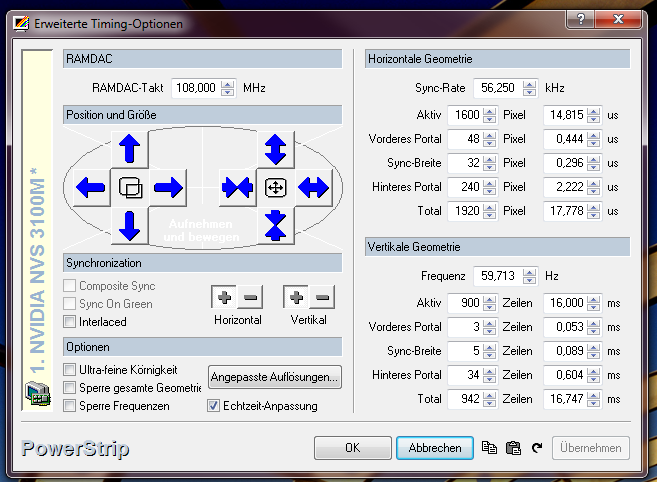
@winny: Thank you, had a first success with PowerStrip. (@1080i60) Now this is my working result. Can I convert my input signal to match this configuration?
| Description: |
| PowerStrip working config |
|
| Filesize: |
91.46 KB |
| Viewed: |
6129 Time(s) |
|
|
|
| Back to top |
|
|
winny
Joined: 09 Oct 2013
Posts: 403
Location: Sweden
TV/Projector: BD808s, BG1209/2
|
| Posted: Fri Jun 12, 2015 8:00 am Post subject: |
|
|
| T08066 wrote: | | @winny: Thank you, had a first success with PowerStrip. (@1080i60) Now this is my working result. Can I convert my input signal to match this configuration? |
'97 PowerStrip for the win once more! 
Sure thing, with a decent scaler like the VP30 you suggested earlier.
_________________
| Melifluonze wrote: | | Digital is easy. This is torture, but far more interesting... |
|
|
| Back to top |
|
|
winny
Joined: 09 Oct 2013
Posts: 403
Location: Sweden
TV/Projector: BD808s, BG1209/2
|
| Posted: Fri Jun 12, 2015 10:50 am Post subject: |
|
|
Oh! I've missed this CRT goodie part! "an anti-burn-in orbiting option"
_________________
| Melifluonze wrote: | | Digital is easy. This is torture, but far more interesting... |
|
|
| Back to top |
|
|
|
|




