| Author |
Message |
gjaky

Joined: 05 Jun 2010
Posts: 2802
Location: Budapest, Hungary
|
| Posted: Mon Dec 15, 2014 7:10 am Post subject: |
|
|
| garyfritz wrote: | | So is the display supposed to result in different levels of gray for the checkerboard, depending on your gamma? And you look to see which gray level it matches? |
Yes No, the checker board has 50% duty cycle, from a distant view point it looks to an 50% gray, and depending on the gamma setting this will match to a manually set gray level. It should be noted that the checker board part is highly dependent from bandwidth.
_________________
projectors in the past : NEC 6-9PG xtra, Electrohome Marquee 6-7500, NEC XG 1351 LC ( with super modified Electrohome VNB neckboard !!!)
current: VDC Marquee 9500LC
The MOD: VNB-DB, VIM-DB
Last edited by gjaky on Mon Dec 15, 2014 7:27 am; edited 1 time in total
|
|
| Back to top |
|
 |
ecrabb
Forum Moderator

Joined: 13 Mar 2006
Posts: 15909
Location: Utah
TV/Projector: JVC RS40, Epson 5010
|
| Posted: Mon Dec 15, 2014 7:16 am Post subject: |
|
|
| garyfritz wrote: | !? How the hell does that work?? The outline is different levels of gray. The checkerboards are identical, or close enough I can't tell them apart. I grabbed samples of the 0.8 and 2.3 levels and blew them up, and I can't see any difference.
So is the display supposed to result in different levels of gray for the checkerboard, depending on your gamma? And you look to see which gray level it matches? |
Just the opposite. You look to see which gray matches the checkerboard (which should "blur" to 50% gray).
The black and white of the checkerboard is defined by the white point and black point of the display, or more specifically, on CRT, bias and gain. Black point and white point are unaffected by gamma correction.
Gamma, on the other hand changes the response curve of how different luminance values are reproduced by the display. So, assuming a given RGB value, like 127, 127, 127, a gamma correction value of 1.5 will display that RGB value much lighter than would a gamma correction value of 2.5.
SC
|
|
| Back to top |
|
|
ecrabb
Forum Moderator
Joined: 13 Mar 2006
Posts: 15909
Location: Utah
TV/Projector: JVC RS40, Epson 5010
|
| Posted: Mon Dec 15, 2014 7:21 am Post subject: |
|
|
| CasetheCorvetteman wrote: | | Nashou66 wrote: | Here is a patter guys that helps determine what your Gamma is.
But it depends on how far you can stand back in your room to
look at the patterns. You need to walk back till the checker board in the middle of the pattern is not visible and a checker board but more solid. When the out line of that pattern matches the checker board , that is the gamma your display is showing. |
What gamma level should we be aiming for? |
Depends on your display and room. In a fully light-controlled room, for movies, we're usually shooting for around 2.4. However, 2.3 or 2.2 might be more to your liking for video games or if you like to have a bit of light in the room.
SC
|
|
| Back to top |
|
|
CasetheCorvetteman

Joined: 09 Nov 2008
Posts: 6326
Location: Australia
|
| Posted: Mon Dec 15, 2014 7:28 am Post subject: |
|
|
Yeah i always have the room dark for both games and movies, i dont know where its at with the new MOOME, but shaddow details and blacks are significantly better.
_________________
Barco Cine 9, ,Sony VPL570ES 4K SXRD, 135" OZ Theatre Majestic 16:9 screen, Denon X6700in preamp mode, 2x 7ch Tonewinner amps, 2x Tonewinner 15" subs, 2x 10" subs, 7.2.6...
RUNCO DTV991 LC ( NEC XG 852 LC ) 100" 4:3 screen, H/K AVR 7.1...
|
|
| Back to top |
|
|
redfox001

Joined: 16 Mar 2009
Posts: 2257
Location: The Netherlands
|
| Posted: Mon Dec 15, 2014 12:21 pm Post subject: |
|
|
| garyfritz wrote: | | Nashou66 wrote: | Here is a patter guys that helps determine what your Gamma is.
... When the out line of that pattern matches the checker board , that is the gamma your display is showing. |
!? How the hell does that work?? The outline is different levels of gray. The checkerboards are identical, or close enough I can't tell them apart. I grabbed samples of the 0.8 and 2.3 levels and blew them up, and I can't see any difference.
So is the display supposed to result in different levels of gray for the checkerboard, depending on your gamma? And you look to see which gray level it matches? |
I think the hatch has black and white dots. The edge is grey. You gamma is related to the difference between the black and white dots. Than the gamma number will give an average checkerbox that matches the edge around the box.
I like gamma 2.1 that comes out of most input boards I use. A little lower would give more shadow detail. A little higher is closer to what it is intended to be?
_________________
701s->runco933->8500ultra->cinemax->9500mp->919 splitpack + cinemax
|
|
| Back to top |
|
|
ecrabb
Forum Moderator
Joined: 13 Mar 2006
Posts: 15909
Location: Utah
TV/Projector: JVC RS40, Epson 5010
|
| Posted: Mon Dec 15, 2014 9:46 pm Post subject: |
|
|
| redfox001 wrote: | | I think the hatch has black and white dots. The edge is grey. You gamma is related to the difference between the black and white dots. Than the gamma number will give an average checkerbox that matches the edge around the box. |
No, that's exactly backwards. See my post above. The white and black dots in the checkerboard will appear the same value regardless of a display's gamma correction value. It's the *gray border* which changes appearance (luminance) with varying gamma correction values. In this pattern, there are different values of gray, one or two of which will appear to best match the checkerboard. Which one or two of the blocks matches will be dependent on the display's gamma correction.
SC
|
|
| Back to top |
|
|
redfox001
Joined: 16 Mar 2009
Posts: 2257
Location: The Netherlands
|
| Posted: Mon Dec 15, 2014 11:27 pm Post subject: |
|
|
Depends on how you read  The difference between the black and white is the same agreed on that and well said. But the grey border is relative to that difference that is what I wrote. The one that matches will give you the gamma number. I think we agree. The difference between the black and white is the same agreed on that and well said. But the grey border is relative to that difference that is what I wrote. The one that matches will give you the gamma number. I think we agree.
_________________
701s->runco933->8500ultra->cinemax->9500mp->919 splitpack + cinemax
|
|
| Back to top |
|
|
redfox001
Joined: 16 Mar 2009
Posts: 2257
Location: The Netherlands
|
| Posted: Mon Dec 15, 2014 11:30 pm Post subject: |
|
|
| ecrabb wrote: | | CasetheCorvetteman wrote: | | Nashou66 wrote: | Here is a patter guys that helps determine what your Gamma is.
But it depends on how far you can stand back in your room to
look at the patterns. You need to walk back till the checker board in the middle of the pattern is not visible and a checker board but more solid. When the out line of that pattern matches the checker board , that is the gamma your display is showing. |
What gamma level should we be aiming for? |
Depends on your display and room. In a fully light-controlled room, for movies, we're usually shooting for around 2.4. However, 2.3 or 2.2 might be more to your liking for video games or if you like to have a bit of light in the room.
SC |
I do not agree with this. 2.4 is much to high.
| Quote: |
Others argue that one should use a display gamma of 2.4, especially if one has a high contrast display. This stems partially from the fact that Rec. 709 implies a 2.4 display gamma and many professional studio environments reportedly use 2.4 when mastering content for Blu-ray release. This is also not quite true. Calibrating a display to a straight power curve of 2.4 will only result in substantially reduced shadow detail and an unnatural "contrasty" quality to the image.
|
http://www.chromapure.com/colorscience-gamma.asp
_________________
701s->runco933->8500ultra->cinemax->9500mp->919 splitpack + cinemax
|
|
| Back to top |
|
|
stridsvognen
Guest
|
| Posted: Mon Dec 15, 2014 11:36 pm Post subject: |
|
|
| redfox001 wrote: | | ecrabb wrote: | | CasetheCorvetteman wrote: | | Nashou66 wrote: | Here is a patter guys that helps determine what your Gamma is.
But it depends on how far you can stand back in your room to
look at the patterns. You need to walk back till the checker board in the middle of the pattern is not visible and a checker board but more solid. When the out line of that pattern matches the checker board , that is the gamma your display is showing. |
What gamma level should we be aiming for? |
Depends on your display and room. In a fully light-controlled room, for movies, we're usually shooting for around 2.4. However, 2.3 or 2.2 might be more to your liking for video games or if you like to have a bit of light in the room.
SC |
I do not agree with this. 2.4 is much to high.
| Quote: |
Others argue that one should use a display gamma of 2.4, especially if one has a high contrast display. This stems partially from the fact that Rec. 709 implies a 2.4 display gamma and many professional studio environments reportedly use 2.4 when mastering content for Blu-ray release. This is also not quite true. Calibrating a display to a straight power curve of 2.4 will only result in substantially reduced shadow detail and an unnatural "contrasty" quality to the image.
|
http://www.chromapure.com/colorscience-gamma.asp |
You will some day if you get a CRT who runs a smooth linear out of black..  And the perfect room. And the perfect room.
Last edited by stridsvognen on Mon Dec 15, 2014 11:50 pm; edited 1 time in total
|
|
| Back to top |
|
|
redfox001
Joined: 16 Mar 2009
Posts: 2257
Location: The Netherlands
|
| Posted: Mon Dec 15, 2014 11:41 pm Post subject: |
|
|
Than what about this quote?
| Quote: |
A straight power curve of 2.4 is correct only if the display has a zero black level and an infinite contrast ratio, which no real-world display has.
|
But perhaps you are saying that if the black is perfect we can use 2.4 at the low end?
_________________
701s->runco933->8500ultra->cinemax->9500mp->919 splitpack + cinemax
|
|
| Back to top |
|
|
Nashou66

Joined: 12 Jan 2007
Posts: 16171
Location: West Seneca NY
|
|
| Back to top |
|
|
redfox001
Joined: 16 Mar 2009
Posts: 2257
Location: The Netherlands
|
| Posted: Tue Dec 16, 2014 12:21 am Post subject: |
|
|
I am thinking I did not correct gamma because I do not have a scaler  But I am afraid to use any correction in the digital part because of colour banding. Is this an issue when you use a scaler? But if the gamma could be corrected in the analogue part that would give some options. But I am afraid to use any correction in the digital part because of colour banding. Is this an issue when you use a scaler? But if the gamma could be corrected in the analogue part that would give some options.
_________________
701s->runco933->8500ultra->cinemax->9500mp->919 splitpack + cinemax
|
|
| Back to top |
|
|
Nashou66
Joined: 12 Jan 2007
Posts: 16171
Location: West Seneca NY
|
| Posted: Tue Dec 16, 2014 12:27 am Post subject: |
|
|
| redfox001 wrote: | | I am thinking I did not correct gamma because I do not have a scaler But I am afraid to use any correction in the digital part because of colour banding. Is this an issue when you use a scaler? But if the gamma could be corrected in the analogue part that would give some options. |
Some see issues with a scaler With my two radiance XS's I do not see any issues. Before I did blending I tried my Oppo direct to my Marquee and then through the XS,s I could not see any difference. And then I calibrated with using the XS's CMS and still no banding . However if you do not get a good greyscale on the CRT first and try to compensate for it on the VP then you will get Posterization .
So fist off when using a VP for CMS always try to get the greyscale and primaries as close as possible in the PJ. then use the VP's CMS to get it as possible to REC 709.
Nashou
_________________
Don't blame your underwear for your crooked ass~ unknown Greek philosopher
"Republicans believe every day is the Fourth of July, but the Democrats believe every day is April 15." --- President Reagan
One Smart Dog!!!
Marquee High Performance Bellows now shipping!!
Marquee Modifications and Performance Enhancement
Marquee C-element and Bellow removal
|
|
| Back to top |
|
|
redfox001
Joined: 16 Mar 2009
Posts: 2257
Location: The Netherlands
|
| Posted: Tue Dec 16, 2014 10:41 am Post subject: |
|
|
| Nashou66 wrote: | Mine is at 2.35 about. But not all are the same, I think my 10% white is 2.4.
the new gamma curve that many like is the BT-1886 curve which resembles the old RGBs Gamma curve.
http://www.spectracal.com/Documents/BT.1886.pdf
is it a lower gamma on the lower % whites then rises up a little goes flat and then rises on the upper % whites 80 and up.
I think this is what I need on my blend to reduce the blend zone at the bottom and top ends.
Nashou |
When I read the pdf it seems that 1886 is solving a problem for displays that do not have total black. But the kink that I see in the 2.4 curve is probable not there on a CRT?
_________________
701s->runco933->8500ultra->cinemax->9500mp->919 splitpack + cinemax
|
|
| Back to top |
|
|
Nashou66
Joined: 12 Jan 2007
Posts: 16171
Location: West Seneca NY
|
| Posted: Tue Dec 16, 2014 4:31 pm Post subject: |
|
|
Think it will help all displays. It helps to not crush blacks yet keeps the upper colors vibrant.
I have not tried ut yet on the blend since the way the Gamma is controlled in the blend zone
might not have the same curve. But due to the inherent drop off of the contrast at the edges of the tube face
due to the lens it might work out ok. I have been wanting to try this for a long time but
just never wanted to screw up what i have now
I should set up a separate Memory in the radiance's for the different gamma curves I want to try.
Nashou
_________________
Don't blame your underwear for your crooked ass~ unknown Greek philosopher
"Republicans believe every day is the Fourth of July, but the Democrats believe every day is April 15." --- President Reagan
One Smart Dog!!!
Marquee High Performance Bellows now shipping!!
Marquee Modifications and Performance Enhancement
Marquee C-element and Bellow removal
|
|
| Back to top |
|
|
ecrabb
Forum Moderator
Joined: 13 Mar 2006
Posts: 15909
Location: Utah
TV/Projector: JVC RS40, Epson 5010
|
| Posted: Tue Dec 16, 2014 4:33 pm Post subject: |
|
|
Hey Nashou - you and Kurt take a look at that revised pattern I posted? That what you guys are after?
SC
|
|
| Back to top |
|
|
Nashou66
Joined: 12 Jan 2007
Posts: 16171
Location: West Seneca NY
|
| Posted: Tue Dec 16, 2014 4:38 pm Post subject: |
|
|
| ecrabb wrote: | Hey Nashou - you and Kurt take a look at that revised pattern I posted? That what you guys are after?
SC |
it looks good. Now in a 2.4 aspect, 1920x800.
Also if there is a way to maybe add a greyscale ramp from black to white.
maybe in the middle or on the right side going from top to bottom?
Not the stair step but the smooth transition.
Not sure if you could add that. That would also show the uniformity of
the gamma from black to white.
you might be able to fit a narrow one in the center form left to right, and spread the
1:1 out a bit.
EDIT : Or remove the 3:3 pattern. Not really needed if you ask me. And change the IRE to % IRE is antiquated now.
Athansios
_________________
Don't blame your underwear for your crooked ass~ unknown Greek philosopher
"Republicans believe every day is the Fourth of July, but the Democrats believe every day is April 15." --- President Reagan
One Smart Dog!!!
Marquee High Performance Bellows now shipping!!
Marquee Modifications and Performance Enhancement
Marquee C-element and Bellow removal
|
|
| Back to top |
|
|
ecrabb
Forum Moderator
Joined: 13 Mar 2006
Posts: 15909
Location: Utah
TV/Projector: JVC RS40, Epson 5010
|
| Posted: Tue Dec 16, 2014 5:57 pm Post subject: |
|
|
| Nashou66 wrote: | | it looks good. Now in a 2.4 aspect, 1920x800. |
One more to verify it's the final, and then I'll make it a release and add the other AR's.
| Nashou66 wrote: | Also if there is a way to maybe add a greyscale ramp from black to white.
maybe in the middle or on the right side going from top to bottom?
Not the stair step but the smooth transition.
Not sure if you could add that. That would also show the uniformity of
the gamma from black to white. |
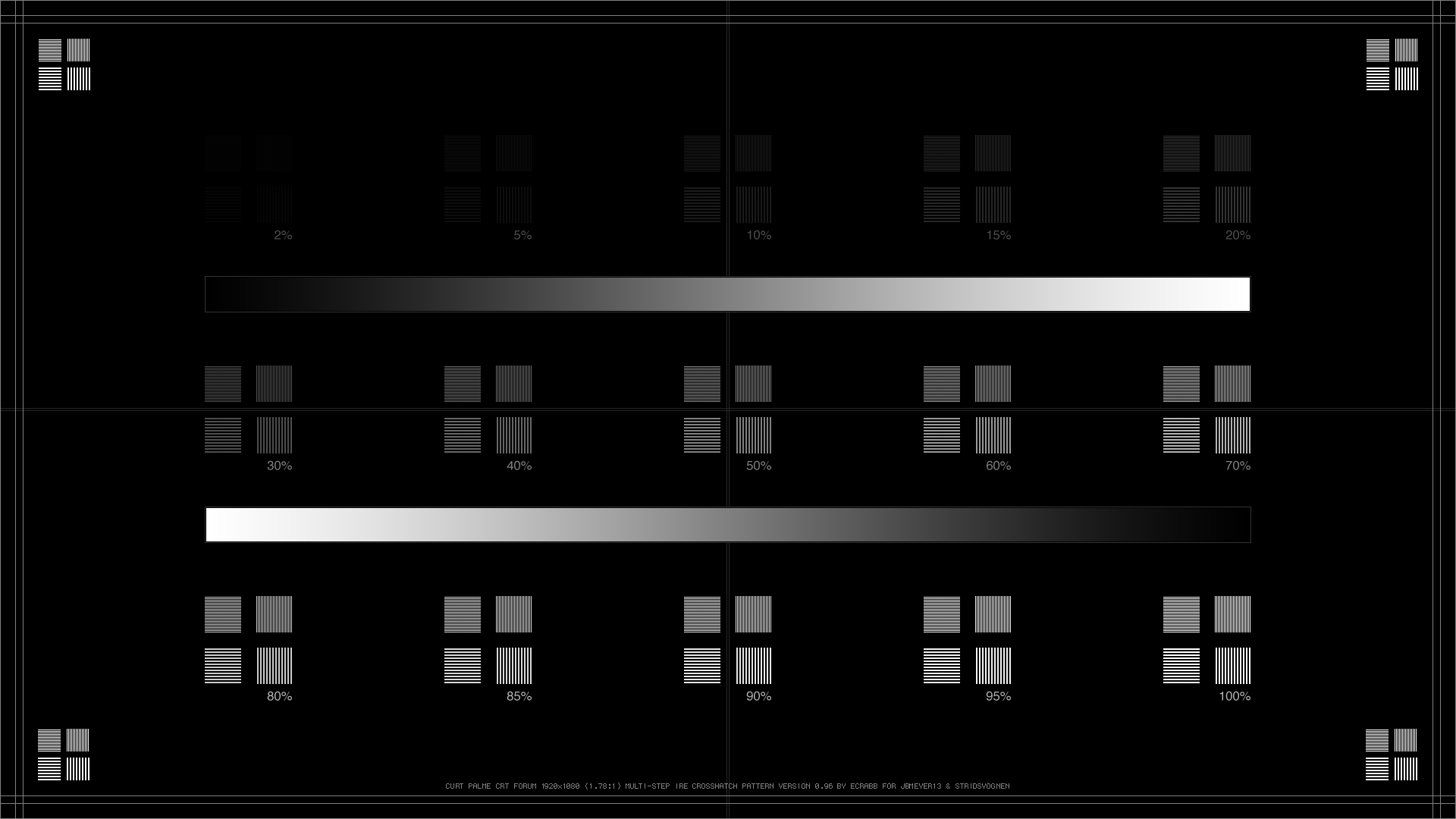
Good idea. Done. I added two, in opposite directions.
| Nashou66 wrote: | you might be able to fit a narrow one in the center form left to right, and spread the
1:1 out a bit.
EDIT : Or remove the 3:3 pattern. Not really needed if you ask me. And change the IRE to % IRE is antiquated now. |
Good point on changing to IRE. That really wasn't correct. % is probably the most simple. Good point on the 3:3 pattern, too. Not much use, really. Removing them made the change to scope much easier, too. Just pushed things closer together.
I also added a crosshair. I don't know why, but I always liked to be able to see if something wasn't plumb or square. I made it ~15% so it should be pretty unobtrusive.
Let me know if that looks good, and I'll save out finals.
Cheers,
SC
| Description: |
|
| Filesize: |
30.54 KB |
| Viewed: |
8213 Time(s) |
|
|
|
| Back to top |
|
|
jbmeyer13

Joined: 03 Dec 2010
Posts: 1135
|
| Posted: Tue Dec 16, 2014 5:59 pm Post subject: |
|
|
| ecrabb wrote: | | Nashou66 wrote: | | it looks good. Now in a 2.4 aspect, 1920x800. |
One more to verify it's the final, and then I'll make it a release and add the other AR's.
| Nashou66 wrote: | Also if there is a way to maybe add a greyscale ramp from black to white.
maybe in the middle or on the right side going from top to bottom?
Not the stair step but the smooth transition.
Not sure if you could add that. That would also show the uniformity of
the gamma from black to white. |
Good idea. Done. I added two, in opposite directions.
| Nashou66 wrote: | you might be able to fit a narrow one in the center form left to right, and spread the
1:1 out a bit.
EDIT : Or remove the 3:3 pattern. Not really needed if you ask me. And change the IRE to % IRE is antiquated now. |
Good point on changing to IRE. That really wasn't correct. % is probably the most simple. Good point on the 3:3 pattern, too. Not much use, really. Removing them made the change to scope much easier, too. Just pushed things closer together.
I also added a crosshair. I don't know why, but I always liked to be able to see if something wasn't plumb or square. I made it ~15% so it should be pretty unobtrusive.
Let me know if that looks good, and I'll save out finals.
Cheers,
SC |
I like it. My only request is that you send me a copy on a BD. My damn BD player won't read anything but a JPG file 
_________________
Projector: Modded 9501LC ULtra- MP VIM, Vold VNB, ETECH LVPS, Silver VIM Cables, HD10F's & a V1 case!
|
|
| Back to top |
|
|
stridsvognen
Guest
|
| Posted: Tue Dec 16, 2014 6:43 pm Post subject: |
|
|
|
Nice patterns, if i should have a wish its one where you only have low level patterns in it, like op to 20 or 30% for not washing out the 2% pattern.
|
|
| Back to top |
|
|
|
|




