|
As this forum is rarely used anymore, we've locked it. Feel free to browse and read. Questions? Please reach out to us directly. Cheers! |

|
 |
|
|
| Author |
Message |
dentree
Joined: 01 May 2009
Posts: 247
Location: Melbourne Australia
TV/Projector: BARCO GRAPHICS 808 BARCO GRAPHICS 801
|
| Posted: Mon Dec 15, 2014 11:59 pm Post subject: |
|
|
This particular Cine 8 has not got colored tubes, they are I believe new from Curt (they certainly look new to me) the older BG 808 which I have here does have colored tubes, sitting behind the HD8s,s my question is in the absence of any color filtering do I still just go ahead with the resolution I would normally use (760) and still go for 17.2 volts on all white?
I was just thinking, all the issues that have cropped up with this machine could be attributed to the fact that there was damage sustained in transit, apart from loose clamps etc..etc there was damage to the top corner at the rear of the case, (which is split) the remote door flap was broken at one of its hinges, and finally I noticed underneath, the rail which sits forward of the front mounting bracket was all bent out of shape, these things became apparent after a close examination of the unit after I got it home, so this thing by the looks of it has been mishandled somewhere along the way, in fact after having a good look at the (shall we call it transit damage) I am surprised it works at all
Trevor
|
|
| Back to top |
|
 |
CasetheCorvetteman

Joined: 09 Nov 2008
Posts: 6326
Location: Australia
|
| Posted: Tue Dec 16, 2014 12:37 am Post subject: |
|
|
Id go about 17.4v on 1280x720p 60Hz if that is what you use, that should give you a good running voltage.
The tubes wont have colour filtering, itll be the lenses, id expect a Cine 8 to have HD-145s on it.
_________________
Barco Cine 9, ,Sony VPL570ES 4K SXRD, 135" OZ Theatre Majestic 16:9 screen, Denon X6700in preamp mode, 2x 7ch Tonewinner amps, 2x Tonewinner 15" subs, 2x 10" subs, 7.2.6...
RUNCO DTV991 LC ( NEC XG 852 LC ) 100" 4:3 screen, H/K AVR 7.1...
|
|
| Back to top |
|
|
km987654

Joined: 25 Jul 2007
Posts: 2874
Location: Australia
TV/Projector: Barco BG809s
|
| Posted: Tue Dec 16, 2014 12:38 am Post subject: |
|
|
| dentree wrote: | This particular Cine 8 has not got colored tubes, they are I believe new from Curt (they certainly look new to me) the older BG 808 which I have here does have colored tubes, sitting behind the HD8s,s my question is in the absence of any color filtering do I still just go ahead with the resolution I would normally use (760) and still go for 17.2 volts on all white?
I was just thinking, all the issues that have cropped up with this machine could be attributed to the fact that there was damage sustained in transit, apart from loose clamps etc..etc there was damage to the top corner at the rear of the case, (which is split) the remote door flap was broken at one of its hinges, and finally I noticed underneath, the rail which sits forward of the front mounting bracket was all bent out of shape, these things became apparent after a close examination of the unit after I got it home, so this thing by the looks of it has been mishandled somewhere along the way, in fact after having a good look at the (shall we call it transit damage) I am surprised it works at all
Trevor |
Coloured C elements or not has nothing to do with resolution so dial in what you want. Coloured C element on green and red provide the correct coulours for the displayed image.
Sounds like your projector was dropped.
|
|
| Back to top |
|
|
dentree
Joined: 01 May 2009
Posts: 247
Location: Melbourne Australia
TV/Projector: BARCO GRAPHICS 808 BARCO GRAPHICS 801
|
| Posted: Tue Dec 16, 2014 12:43 am Post subject: |
|
|
The lenses are in fact HD8 with no coloring at all, however I do have a set of HD 145 which are colored, but as I do not have the adapter plates, and they do not seem to be available, unfortunately they will remain packed away unless something comes up along the way, I am sure that they would be a much nicer proposition than the HD 8
Trevor
|
|
| Back to top |
|
|
dentree
Joined: 01 May 2009
Posts: 247
Location: Melbourne Australia
TV/Projector: BARCO GRAPHICS 808 BARCO GRAPHICS 801
|
| Posted: Tue Dec 16, 2014 1:22 am Post subject: |
|
|
Have attempted the 17.2 volt adjustment
Before adjustment voltage =17.55
After adjustment voltage =17.18 to 17.25 is that Ok?
Is the fluctuation acceptable
This measurement was derived running crosshatch actually at 33K
|
|
| Back to top |
|
|
Hulio
Joined: 15 Apr 2006
Posts: 494
Location: Belgium
|
| Posted: Tue Dec 16, 2014 4:11 am Post subject: |
|
|
Somewhere betweer 17,3-17,5 wiil do. It wasn't that much off anyway, it just could improved the focus issue.
Like Keith mensioned, colour filtering has nothing to do with the ability of focusing right on not. And no C-elements, a Cine 8 is a AC machine. Stock, they all came with colour filtered HD8-rev. B lenses. It seems that your machine has bits from different projectors. I also noticed, reading all your posts again, that your EHT board is from a BG1209S.
Forget the HD-145 for now, those are improvements for later. Your electronic focus is way off and no way that HD8 lenses are responsable for that. To exclude the optical path, dismount the green lens and look in the tube while you play with midpoint focus. If still no decent focus arround 40-60 scale, the lenses are not your problem.
|
|
| Back to top |
|
|
CasetheCorvetteman
Joined: 09 Nov 2008
Posts: 6326
Location: Australia
|
| Posted: Tue Dec 16, 2014 5:25 am Post subject: |
|
|
Keep your eye out for an NEC XG. Youll never look back.
This is an electronics issue, its not an optical issue.
_________________
Barco Cine 9, ,Sony VPL570ES 4K SXRD, 135" OZ Theatre Majestic 16:9 screen, Denon X6700in preamp mode, 2x 7ch Tonewinner amps, 2x Tonewinner 15" subs, 2x 10" subs, 7.2.6...
RUNCO DTV991 LC ( NEC XG 852 LC ) 100" 4:3 screen, H/K AVR 7.1...
|
|
| Back to top |
|
|
dentree
Joined: 01 May 2009
Posts: 247
Location: Melbourne Australia
TV/Projector: BARCO GRAPHICS 808 BARCO GRAPHICS 801
|
| Posted: Sun Dec 21, 2014 1:37 am Post subject: |
|
|
Morning all,
Have been re-reading all your comments and thoughts and going back over everything on the projector, I think I am very slowly getting the hang of it, although the electronic focus settings are still an issue, however my main frustration at present is the fact that my DVD remote is adversely reacting with the projector functions.
The DVD remote is for a Panasonic player and every time I select various functions on the DVD remote it powers the the projector OFF, or it can also send the projector off looking for another input which may or may not exist and during this process it flashes up the crosshatch pattern then searches for another input source
The Panasonic remote has a choice of 3 modes, I have tried all 3 in turn but it has no effect, and I do not know what is causing it, obviously the remote is seeing the projector,so is there a way to disable the projectors RF remote sensors, I am assuming if this can be done by some means, then I would be able to stop/start/pause etc..etc without the projector shutting down.
Please let me know if I am explaining this situation clearly enough for you to understand
Thanks again for all your help and advice..........so far!!
|
|
| Back to top |
|
|
CasetheCorvetteman
Joined: 09 Nov 2008
Posts: 6326
Location: Australia
|
| Posted: Sun Dec 21, 2014 3:32 am Post subject: |
|
|
I had the exact same issue with the remote before i went from Panasonic to OPPO, seems they conflict with the Barco!
_________________
Barco Cine 9, ,Sony VPL570ES 4K SXRD, 135" OZ Theatre Majestic 16:9 screen, Denon X6700in preamp mode, 2x 7ch Tonewinner amps, 2x Tonewinner 15" subs, 2x 10" subs, 7.2.6...
RUNCO DTV991 LC ( NEC XG 852 LC ) 100" 4:3 screen, H/K AVR 7.1...
|
|
| Back to top |
|
|
Hulio
Joined: 15 Apr 2006
Posts: 494
Location: Belgium
|
| Posted: Sun Dec 21, 2014 8:25 pm Post subject: |
|
|
Trevor, you need to change the remote adress of the projector with the DIP switches on the controller. The factory preset adress is 0. When controlling the projector with a RCU, up to 9 adresses can be set ( 255 adresses when the projector is controlled with a PC ).
Don't forget when you will have a IR remote for your Barco, you'll have to match that to the new adress, else the projector will not "listen" to the remote.
|
|
| Back to top |
|
|
dentree
Joined: 01 May 2009
Posts: 247
Location: Melbourne Australia
TV/Projector: BARCO GRAPHICS 808 BARCO GRAPHICS 801
|
| Posted: Mon Dec 22, 2014 1:57 am Post subject: Cine 8 |
|
|
Hi Hulio,Thanks for your input, what I need to know is what and how do I change the projector address, and what would you recommend I change it to I know where all the dip switches are the first 3 (that is numbers 1-2-3 are ON everything else on the dip switch panel is OFF.
On the opening screen it tells me that the address is 0
Regards
Trevor
|
|
| Back to top |
|
|
Hulio
Joined: 15 Apr 2006
Posts: 494
Location: Belgium
|
| Posted: Mon Dec 22, 2014 4:14 am Post subject: |
|
|
Right now it does not matter what adress you choose, since you don't have a remote. Just move another swich to on ( with the projector powered off ) and than look in the opening screen. Like i said, when you do have a remote, it has to be between 0-9. In the installation manual, on page 19, is well explained how to change the adress with those switches.
Let us know.
|
|
| Back to top |
|
|
dentree
Joined: 01 May 2009
Posts: 247
Location: Melbourne Australia
TV/Projector: BARCO GRAPHICS 808 BARCO GRAPHICS 801
|
| Posted: Mon Dec 22, 2014 4:38 am Post subject: |
|
|
thanks for that Hulio
However changing the projector address has not stopped my Panasonic remote from shutting the projector down, I do find it strange that various function buttons on the remote will shut down and start up the projector,
what I had thought of was disabling the remote sensors on the projector (front and back) would that idea work?
If yes then where would be a good point to unplug the remote side of things, the odd thing is that I have actually got both sensors taped over and that does not stop it registering Panasonic commands, what do you think?
|
|
| Back to top |
|
|
dentree
Joined: 01 May 2009
Posts: 247
Location: Melbourne Australia
TV/Projector: BARCO GRAPHICS 808 BARCO GRAPHICS 801
|
| Posted: Mon Dec 22, 2014 7:47 am Post subject: |
|
|
Here's another question for the gurus,
Going back over the suggestions and advice, I followed the instructions for setting the 17 volt pot and setting it anywhere between 17 and 17.5 volts which puts a bow at the screen center, when I try to straighten the bow I then end up with a wavy north/south line as it is skewing the crosshatch to the right at top and bottom, at 17.6 volts there is a east west weave in the pattern which is oscillating across the screen , (just below center,down to the bottom) so out of curiosity I increased the voltage to 18.1 volts and the crosshatch is perfect and the image is rock steady (no weave) the question is....what is the likely outcome of running at 18.1 volts?
Or should reduce the voltage back to 17.5 or so and attempt to straighten the picture by some other means, not forgetting that at that setting I have the image shimmering backwards and forwards from left to right
|
|
| Back to top |
|
|
CasetheCorvetteman
Joined: 09 Nov 2008
Posts: 6326
Location: Australia
|
| Posted: Mon Dec 22, 2014 8:41 am Post subject: |
|
|
Plug a cable into the external remote port, that should fix it. On the XG doing that disables the remote sensors, im reasonably sure it does on a Barco too.
_________________
Barco Cine 9, ,Sony VPL570ES 4K SXRD, 135" OZ Theatre Majestic 16:9 screen, Denon X6700in preamp mode, 2x 7ch Tonewinner amps, 2x Tonewinner 15" subs, 2x 10" subs, 7.2.6...
RUNCO DTV991 LC ( NEC XG 852 LC ) 100" 4:3 screen, H/K AVR 7.1...
|
|
| Back to top |
|
|
CasetheCorvetteman
Joined: 09 Nov 2008
Posts: 6326
Location: Australia
|
| Posted: Mon Dec 22, 2014 8:44 am Post subject: |
|
|
Mine was 18.86v at one point, so i wouldnt be too concerned. Depending on what meter you used it may not be accurate anyway.
Question is, under what conditions was it reading 18.1v? If you leave it there, then display a full white field at 1280x720p, what voltage do you then read?
_________________
Barco Cine 9, ,Sony VPL570ES 4K SXRD, 135" OZ Theatre Majestic 16:9 screen, Denon X6700in preamp mode, 2x 7ch Tonewinner amps, 2x Tonewinner 15" subs, 2x 10" subs, 7.2.6...
RUNCO DTV991 LC ( NEC XG 852 LC ) 100" 4:3 screen, H/K AVR 7.1...
|
|
| Back to top |
|
|
redfox001

Joined: 16 Mar 2009
Posts: 2257
Location: The Netherlands
|
| Posted: Mon Dec 22, 2014 11:17 am Post subject: |
|
|
Curt wrote this once
| Quote: |
One adjustment that does drift occasionally is the + 17 volt trimpot. The test point for this trimpot is shown in the picture. Use a meter to measure the DC voltage with reference to the chassis, and adjust for + 17.0 volts*. This adjustment is critical for proper operation. If the voltage is off by more than ½ volt, the picture can blank out.
*Note: If you're reading through these 808 tips because you have a 1208/1209 projector, be aware that the +17.0V trimpot should actually be adjusted to 17.5V (not 17.0V). Setting the pot to 17.0V may cause eventual spotburns.
|
So setting it to low may cause spotburns this says. To high seems to cause more noise only.
_________________
701s->runco933->8500ultra->cinemax->9500mp->919 splitpack + cinemax
|
|
| Back to top |
|
|
dentree
Joined: 01 May 2009
Posts: 247
Location: Melbourne Australia
TV/Projector: BARCO GRAPHICS 808 BARCO GRAPHICS 801
|
| Posted: Tue Dec 23, 2014 8:34 am Post subject: |
|
|
Running at 720p
Full white =17.96 volts
Video image =18.31 volts
No input (black) = 18.49 volts
All read with a digital multimeter
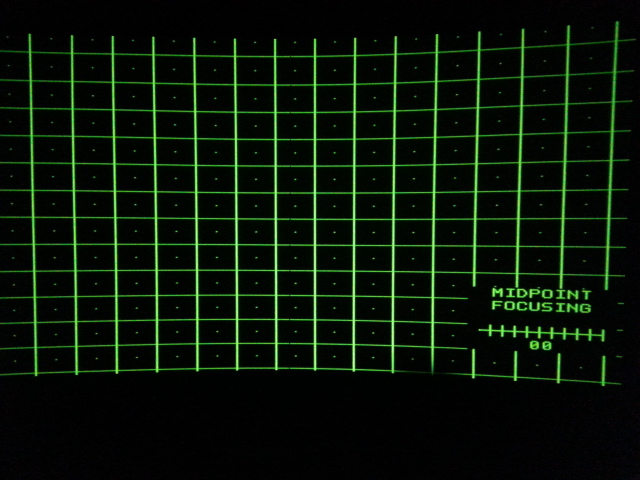
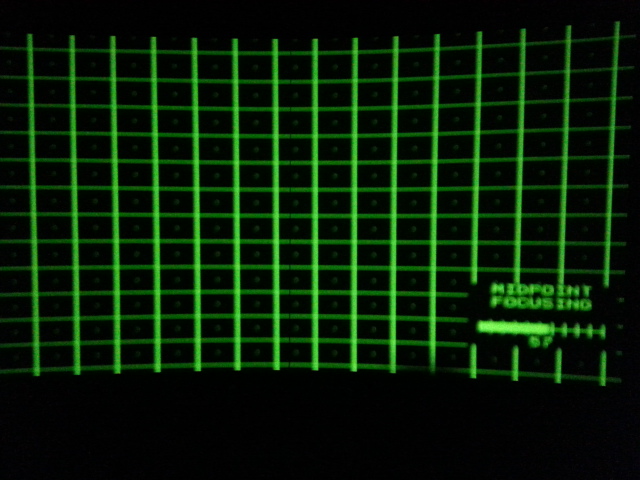
Going back to my original call for help regarding the focusing issue with the RGB settings at center nearing ZERO this is still of concern, and the fact that the coils cannot be moved neither forward or back is making it impossible to achieve really tight focus the whole thing is slightly off, having said that the Top/Bottom and sides will pull in at a respectable setting 10 to 15 either side of 49.
I have followed the instructions regarding ramping down the focus to get the agist shading tight (at which time the crosshatch is almost in focus anyway) at the other end of the scale beyond the 70 range on the ramp up the crosshatch is so far out of focus that the crosshatch pattern almost blends to the point that the dots cannot be seen, I will take some pictures of this situation as I think it would more graphically illustrate the issue along with the related setting, I will do full ramp down/ full ramp up and the 57 best mechanical focus point,
I will do it on green as all tubes are reacting to roughly the same settings
|
|
| Back to top |
|
|
dentree
Joined: 01 May 2009
Posts: 247
Location: Melbourne Australia
TV/Projector: BARCO GRAPHICS 808 BARCO GRAPHICS 801
|
| Posted: Tue Dec 23, 2014 8:44 am Post subject: Barco Cine 8 |
|
|
Focusing problems all tubes
| Description: |
| Focusing problems all tubes |
|
| Filesize: |
147.6 KB |
| Viewed: |
5393 Time(s) |
|
|
|
| Back to top |
|
|
dentree
Joined: 01 May 2009
Posts: 247
Location: Melbourne Australia
TV/Projector: BARCO GRAPHICS 808 BARCO GRAPHICS 801
|
| Posted: Tue Dec 23, 2014 8:46 am Post subject: Barco Cine 8 |
|
|
focus problem
| Description: |
|
| Filesize: |
138.5 KB |
| Viewed: |
5390 Time(s) |
|
|
|
| Back to top |
|
|
|
|
|
|
|
You cannot post new topics in this forum
You cannot reply to topics in this forum
You cannot edit your posts in this forum
You cannot delete your posts in this forum
You cannot vote in polls in this forum
You cannot attach files in this forum
You can download files in this forum
|
Forum powered by phpBB © phpBB Group
|
|



