|
As this forum is rarely used anymore, we've locked it. Feel free to browse and read. Questions? Please reach out to us directly. Cheers! |

|
 |
|
|
| Author |
Message |
dentree
Joined: 01 May 2009
Posts: 247
Location: Melbourne Australia
TV/Projector: BARCO GRAPHICS 808 BARCO GRAPHICS 801
|
| Posted: Fri Jan 16, 2015 10:57 am Post subject: |
|
|
WoW!! that is an offer I definitely cannot refuse, But I in all conscience you have done more than I can thank you for and I find it a little embarrassing to accept such a generous offer, perhaps you might just put a nominal figure on this device just, if for no other reason to make me comfortable. I am not used to getting things for nothing, anyway i will await your reply.
Many thanks Casey,
Trev
|
|
| Back to top |
|
 |
CasetheCorvetteman

Joined: 09 Nov 2008
Posts: 6326
Location: Australia
|
| Posted: Fri Jan 16, 2015 11:03 am Post subject: |
|
|
I just dug it all out, there is a cable there for port 3 or port 5, so take your pick there.

Im not fussed about the money, im here to help, i do it cause i can 
Give me a call if you like, 0412258844
_________________
Barco Cine 9, ,Sony VPL570ES 4K SXRD, 135" OZ Theatre Majestic 16:9 screen, Denon X6700in preamp mode, 2x 7ch Tonewinner amps, 2x Tonewinner 15" subs, 2x 10" subs, 7.2.6...
RUNCO DTV991 LC ( NEC XG 852 LC ) 100" 4:3 screen, H/K AVR 7.1...
|
|
| Back to top |
|
|
dentree
Joined: 01 May 2009
Posts: 247
Location: Melbourne Australia
TV/Projector: BARCO GRAPHICS 808 BARCO GRAPHICS 801
|
| Posted: Fri Jan 16, 2015 11:16 am Post subject: |
|
|
Casey,
As you read this your phone might ring !!
|
|
| Back to top |
|
|
km987654

Joined: 25 Jul 2007
Posts: 2874
Location: Australia
TV/Projector: Barco BG809s
|
| Posted: Fri Jan 16, 2015 10:24 pm Post subject: |
|
|
| CasetheCorvetteman wrote: | I just dug it all out, there is a cable there for port 3 or port 5, so take your pick there.
Im not fussed about the money, im here to help, i do it cause i can
Give me a call if you like, 0412258844 |
Nice one Casey. With the Fury in the video chain he will have a much better experience.
|
|
| Back to top |
|
|
dentree
Joined: 01 May 2009
Posts: 247
Location: Melbourne Australia
TV/Projector: BARCO GRAPHICS 808 BARCO GRAPHICS 801
|
| Posted: Fri Jan 16, 2015 11:52 pm Post subject: |
|
|
Nothing to report yet, I am trying to rustle up some victims to help put the device where it now belongs.
Also many thanks for the "company/conversation last evening/this morning, I hope it has not left you too short of shut eye,but I did notice you were up early as Got your address, thanks for that, also have copied the photographs, they will probably be in the mail today
Regards
Trev
|
|
| Back to top |
|
|
CasetheCorvetteman
Joined: 09 Nov 2008
Posts: 6326
Location: Australia
|
| Posted: Sat Jan 17, 2015 2:03 am Post subject: |
|
|
No worries Trev, it was my pleasure mate, i enjoyed the chat!!
I was up about 5:30am yes!
_________________
Barco Cine 9, ,Sony VPL570ES 4K SXRD, 135" OZ Theatre Majestic 16:9 screen, Denon X6700in preamp mode, 2x 7ch Tonewinner amps, 2x Tonewinner 15" subs, 2x 10" subs, 7.2.6...
RUNCO DTV991 LC ( NEC XG 852 LC ) 100" 4:3 screen, H/K AVR 7.1...
|
|
| Back to top |
|
|
dentree
Joined: 01 May 2009
Posts: 247
Location: Melbourne Australia
TV/Projector: BARCO GRAPHICS 808 BARCO GRAPHICS 801
|
| Posted: Sun Jan 18, 2015 1:32 am Post subject: Barco Cine 8 |
|
|
Managed to get the projector back on the ceiling late yesterday, then last night I went through the menu system just to make sure everything was operational, that's when things started to show up.
Up until now during the Tube/focus affair the only thing in the menu system that I used was the centre focus adjustment, but last night I thought I would make a start on all the adjustments, only to find that in the geometry menu apart from (oddly I think) SIDE BOW & SIDE KEYSTONE nothing else functioned.
In the CONVERGENCE menu there was nothing at all with the exception the raster shift.
i have changed the convergence tray to the BG 808 tray and everything appears to be working in the menu system with the exception of the functions on the CINE 8 tray which are not on the BG 808 tray which obviously give a 12c error (because the function selected does not exist on that board)
Do not know why this tray would malfunction at the stage quite catastrophically, I did check all the pins to make sure there was not a bent one anywhere, everything checked out OK there,
So having the choice of a backup has proved it's worth, but still need to investigate the suspect tray, haven't had a really good look at it yet to see if there is anything obvious,
So after all this useless information, we are back on track.................so far so good, I use the term 'WE' because without the 'WE' all I would have here would be a rather substantial door stop/boat anchor etc..etc..
Would be interested in any thoughts regarding this issue,
other than that all I can say is 'Thank got for prostitution? or should that be Substitution, I suppose either approach has merit!!
Trev
|
|
| Back to top |
|
|
CasetheCorvetteman
Joined: 09 Nov 2008
Posts: 6326
Location: Australia
|
| Posted: Sun Jan 18, 2015 2:48 am Post subject: |
|
|
At least you have those spares there mate!! I dont know much about the convergence board on those sets.
_________________
Barco Cine 9, ,Sony VPL570ES 4K SXRD, 135" OZ Theatre Majestic 16:9 screen, Denon X6700in preamp mode, 2x 7ch Tonewinner amps, 2x Tonewinner 15" subs, 2x 10" subs, 7.2.6...
RUNCO DTV991 LC ( NEC XG 852 LC ) 100" 4:3 screen, H/K AVR 7.1...
|
|
| Back to top |
|
|
dentree
Joined: 01 May 2009
Posts: 247
Location: Melbourne Australia
TV/Projector: BARCO GRAPHICS 808 BARCO GRAPHICS 801
|
| Posted: Mon Jan 19, 2015 1:48 am Post subject: |
|
|
|
What does '12c 86H error mean on Barco Cine 8'
|
|
| Back to top |
|
|
CasetheCorvetteman
Joined: 09 Nov 2008
Posts: 6326
Location: Australia
|
| Posted: Mon Jan 19, 2015 2:34 am Post subject: |
|
|
Have a look here:
http://www.curtpalme.com/docs/Barco_Error_codes.pdf
You sure its 86?
_________________
Barco Cine 9, ,Sony VPL570ES 4K SXRD, 135" OZ Theatre Majestic 16:9 screen, Denon X6700in preamp mode, 2x 7ch Tonewinner amps, 2x Tonewinner 15" subs, 2x 10" subs, 7.2.6...
RUNCO DTV991 LC ( NEC XG 852 LC ) 100" 4:3 screen, H/K AVR 7.1...
|
|
| Back to top |
|
|
dentree
Joined: 01 May 2009
Posts: 247
Location: Melbourne Australia
TV/Projector: BARCO GRAPHICS 808 BARCO GRAPHICS 801
|
| Posted: Mon Jan 19, 2015 5:25 am Post subject: Barco Cine 8 |
|
|
Hi Casey,
The error I posted was in fact related to the BG 808 convergence board, so I can understand the errors coming up because there are functions on the Cine which are not on the BG 808 board, and other than the errors showing that board works fine except that I cannot obviously access the LEFT side bow and skew, because the BG 808 does not have that function, the CINE 8 convergence board however appears not to function in ANY convergence menu mode, other than RASTER SHIFT which I surmise in not a function of the convergence board itself. it's almost as though it is not there.
What boards are relative to the convergence tray?
I ask this because I did at one point attempt to remove the boards 4-5 & 6, I was at that stage going through the board swap procedure, but I found that those 3 boards were all strapped together as part of the LIMO device (I think),,and some of the wiring is also hard wired onto boards, so I just pushed them back in and went no further with the substitution idea, as we had virtually ruled the boards out in favour of the tube magnet idea.
I was wondering if I might have dislodged a connector along the way, but then thinking about it I would have expected the BG 808 not to function either, I am of a mind to investigate the 3 boards, but I may have to take the projector down again as it would be almost impossible to handle 3 boards at once that are wired together, it was hard enough just trying to ease them out when I had the projector on the table,
These are my thoughts so fa unless you have some other avenue to go down.
The error as posted were correct, I had looked on Curt's site but could find no reference 86H
The actual window that pops up says: ERROR 12C,- address 86H
Regards
Trev
|
|
| Back to top |
|
|
km987654
Joined: 25 Jul 2007
Posts: 2874
Location: Australia
TV/Projector: Barco BG809s
|
| Posted: Mon Jan 19, 2015 6:10 am Post subject: |
|
|
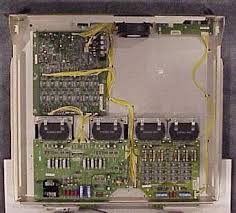
There are three standard Convergence tray Boards.
Convergence driver
Convergence output
Astig
Optional C.O.G daughter board attached to convergence driver.
Make sure you have the right tray in the right projector and that it is seated properly.
| Description: |
|
| Filesize: |
10.77 KB |
| Viewed: |
4475 Time(s) |
|
|
|
| Back to top |
|
|
dentree
Joined: 01 May 2009
Posts: 247
Location: Melbourne Australia
TV/Projector: BARCO GRAPHICS 808 BARCO GRAPHICS 801
|
| Posted: Mon Jan 19, 2015 6:45 am Post subject: |
|
|
Hi km987654
On page 8 you can see both the Cine and the 808 convergence boards that I have and, as I pointed out to Casey,they have been swapped and tried, and at present the BG 808 is in the CINE 8 as the original will not function in convergence mode, all other functions appear to be OK
Other than removing and re-fitting there has been nothing/altered, they are original the only 'quirky' thing I noticed was on the opening screen there is a menu item relating to the line multiplier, which if selected just blanks the screen and there are no further functions available, so the projector has to be re started to get the menus back.
Many thanks
Trev
|
|
| Back to top |
|
|
km987654
Joined: 25 Jul 2007
Posts: 2874
Location: Australia
TV/Projector: Barco BG809s
|
| Posted: Mon Jan 19, 2015 6:53 am Post subject: |
|
|
| dentree wrote: | Hi km987654
On page 8 you can see both the Cine and the 808 convergence boards that I have and, as I pointed out to Casey,they have been swapped and tried, and at present the BG 808 is in the CINE 8 as the original will not function in convergence mode, all other functions appear to be OK
Other than removing and re-fitting there has been nothing/altered, they are original the only 'quirky' thing I noticed was on the opening screen there is a menu item relating to the line multiplier, which if selected just blanks the screen and there are no further functions available, so the projector has to be re started to get the menus back.
Many thanks
Trev |
Make sure there are no bent pins in the connectors at the end of the convergence tray.
|
|
| Back to top |
|
|
dentree
Joined: 01 May 2009
Posts: 247
Location: Melbourne Australia
TV/Projector: BARCO GRAPHICS 808 BARCO GRAPHICS 801
|
| Posted: Mon Jan 19, 2015 7:03 am Post subject: |
|
|
|
They are all clear, that was actually the first thing I looked at
|
|
| Back to top |
|
|
km987654
Joined: 25 Jul 2007
Posts: 2874
Location: Australia
TV/Projector: Barco BG809s
|
| Posted: Mon Jan 19, 2015 7:24 am Post subject: |
|
|
|
Do you still have the Line multiplier connected?
|
|
| Back to top |
|
|
dentree
Joined: 01 May 2009
Posts: 247
Location: Melbourne Australia
TV/Projector: BARCO GRAPHICS 808 BARCO GRAPHICS 801
|
| Posted: Mon Jan 19, 2015 7:48 am Post subject: |
|
|
As far as I know, yes, as I said a couple of posts earlier, DID start to remove boards 4,5 & 6 when we were in 'board changing mode' but was having a hard time trying to get all 3 out together as they are all attached to each other, and some cables are hard wired, I gave up on that and pushed the boards back, That was why I was wondering if any of the boards 3,4&5 could have any influence on the actual operation of the convergence side of things, the boards themselves I will try and double check that there is nothing amiss (not going to be easy as the cine is back in the ceiling)
Will post as soon as I can make a thorough check
Trev
|
|
| Back to top |
|
|
km987654
Joined: 25 Jul 2007
Posts: 2874
Location: Australia
TV/Projector: Barco BG809s
|
| Posted: Mon Jan 19, 2015 8:15 am Post subject: |
|
|
|
Just had a look at your pictures of the two convergence trays. I will bet that the convergence driver boards are different versions. The one in the BG808 is missing one row of chips which I believe (even though I can't view that part of the board as it is covered by the COG board) are there on the Cine 8 board. The driver board is the one at the front of the tray. Take a look at the Cine 8 convergence tray and look under the COG board and see if there is a row of chips (2 chips) that are not present on the BG808 driver board. The I2C error will be because those chips are not there and the controller is expecting them to be.
|
|
| Back to top |
|
|
barclay66

Joined: 27 Jun 2011
Posts: 1304
Location: Germany
TV/Projector: Marquee 9500 Ultra
|
| Posted: Mon Jan 19, 2015 8:45 am Post subject: |
|
|
| km987654 wrote: | | The I2C error will be because those chips are not there and the controller is expecting them to be. |
Correct!
The Barco controllers scan the I2C Bus (a serial communication link where one master controls the I2C devices connected to this three-wire bus) at startup. Depending on the Barco model and the firmware they will expect a specific set of I2C deveices to be present. Each device is identified through its address and will send an acknowlege signal when scanned. So if there's and acknowledge signal missing it will throw an I2C error indicating the address where there was no answer.
I don't have access to the Cine 8 or BG808s service manuals. But they will have a section where the I2C addresses and the corresponding chip locations (mostly digital potentiometers) are described...
Regards,
barclay66
|
|
| Back to top |
|
|
km987654
Joined: 25 Jul 2007
Posts: 2874
Location: Australia
TV/Projector: Barco BG809s
|
| Posted: Mon Jan 19, 2015 8:58 am Post subject: |
|
|
| barclay66 wrote: | | km987654 wrote: | | The I2C error will be because those chips are not there and the controller is expecting them to be. |
Correct!
The Barco controllers scan the I2C Bus (a serial communication link where one master controls the I2C devices connected to this three-wire bus) at startup. Depending on the Barco model and the firmware they will expect a specific set of I2C deveices to be present. Each device is identified through its address and will send an acknowlege signal when scanned. So if there's and acknowledge signal missing it will throw an I2C error indicating the address where there was no answer.
I don't have access to the Cine 8 or BG808s service manuals. But they will have a section where the I2C addresses and the corresponding chip locations (mostly digital potentiometers) are described...
Regards,
barclay66 |
Then swap the Convergence Driver board including the COG board that is attached to it and you should get rid of that error. The only thing we don't know is if this board is faulty or not. That should simply be a case of it works or not.
|
|
| Back to top |
|
|
|
|
|
|
|
You cannot post new topics in this forum
You cannot reply to topics in this forum
You cannot edit your posts in this forum
You cannot delete your posts in this forum
You cannot vote in polls in this forum
You cannot attach files in this forum
You can download files in this forum
|
Forum powered by phpBB © phpBB Group
|
|




