|
As this forum is rarely used anymore, we've locked it. Feel free to browse and read. Questions? Please reach out to us directly. Cheers! |

|
 |
|
|
| Author |
Message |
dentree
Joined: 01 May 2009
Posts: 247
Location: Melbourne Australia
TV/Projector: BARCO GRAPHICS 808 BARCO GRAPHICS 801
|
| Posted: Mon Jan 12, 2015 12:40 pm Post subject: Barco Cine 8 |
|
|
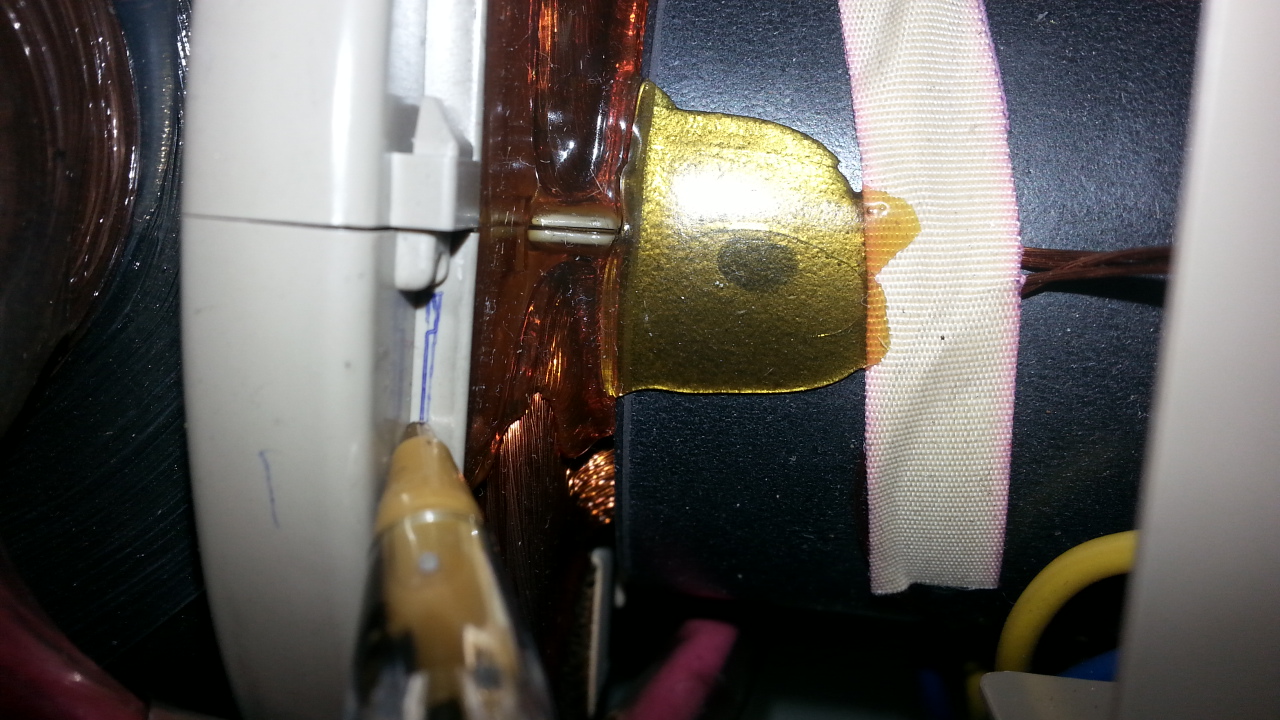
the neck length from the ceramic plate at pin end to the ballpoint pen indicator is 280 mm
which is marking the rear of the neck magnets, just from looking at the gun itself that point seems to be the extent of the neck before it flares out to the bell
| Description: |
|
| Filesize: |
370.85 KB |
| Viewed: |
5339 Time(s) |
|
|
|
| Back to top |
|
 |
dentree
Joined: 01 May 2009
Posts: 247
Location: Melbourne Australia
TV/Projector: BARCO GRAPHICS 808 BARCO GRAPHICS 801
|
| Posted: Mon Jan 12, 2015 1:00 pm Post subject: |
|
|
Casey
If you remove the front ring, there won't be any front support for the focus magnets will there?
I thought that the front ring actually centered the magnet assembly on the neck, I notice when it is slackened off there is a slight amount of slop/play radially, however I can see that by cutting off the font clamp and ring assembly, there would be about 5-6 mm forward movement possible on the assembly.
I was just wondering if the focus assembly is the same on the BARCOGRAPHICS 801 that I have here in storage, or do the magnetic field strength vary for different guns (I think the guns on the 801 are SONY 07MSP) I say that because I am 99% certain they are original
|
|
| Back to top |
|
|
cosaw

Joined: 08 Mar 2006
Posts: 164
Location: Nottingham, England
|
| Posted: Mon Jan 12, 2015 2:39 pm Post subject: |
|
|
| Quote: | | I thought that the front ring actually centered the magnet assembly on the neck, I notice when it is slackened off there is a slight amount of slop/play radially, |
I suppose if worst came to the very worst, and you had to mod the focus yokes, you could take that slack up with masking tape or something similar. It would require some experimentation of course.
Last edited by cosaw on Mon Jan 12, 2015 2:43 pm; edited 1 time in total
|
|
| Back to top |
|
|
dentree
Joined: 01 May 2009
Posts: 247
Location: Melbourne Australia
TV/Projector: BARCO GRAPHICS 808 BARCO GRAPHICS 801
|
| Posted: Mon Jan 12, 2015 2:42 pm Post subject: |
|
|
Just looking at Curts spec sheets it would seem that as you have said Casey, these tubes are definitely NOT for the
CINE 8, but should be 180DVB22
Which is the same as the BG 808
Whereas the the BARCO CINE 8 DIGITAL ARE P16LXV
AND THE BARCO CINE 8 ONYX ARE P16LNP (which are the tubes we have here)
As the machine here says nothing other than CINE 8 I would assume from that, that this machine is the 180DVB22 tube version, and not the digital CINE 8 version with the P16LXV tubes.
So the appeal goes out to anyone with a CINE 8 ONYX who can supply pictures and information as to the tube layout, to see if there is a difference in the neck magnets, and the focus magnets compared with the stock standard CINE 8.
If the neck magnets turn out to be the same as what is fitted here, it is suggesting to me that I really need a set of the correct tubes to solve all the issues.
From a technical standpoint i have no idea what the difference is between these different sets of tubes, but obviously there is certainly an incompatibility existing.
So to summerize, I would need to get rid of the PL16LNP tubes
with the prospect of sourcing a set of CINE 8/ BG 808 tubes, plus one QUADROUPLER, then in theory I would have 2 working machines, and that to me sounds about the size of it.
I wonder if Curt has a set of the correct 180DVB22 tubes and a QUAD to fix all this up
|
|
| Back to top |
|
|
dentree
Joined: 01 May 2009
Posts: 247
Location: Melbourne Australia
TV/Projector: BARCO GRAPHICS 808 BARCO GRAPHICS 801
|
| Posted: Mon Jan 12, 2015 2:43 pm Post subject: |
|
|
Just looking at Curts spec sheets it would seem that as you have said Casey, these tubes are definitely NOT for the
CINE 8, but should be 180DVB22
Which is the same as the BG 808
Whereas the the BARCO CINE 8 DIGITAL ARE P16LXV
AND THE BARCO CINE 8 ONYX ARE P16LNP (which are the tubes we have here)
As the machine here says nothing other than CINE 8 I would assume from that, that this machine is the 180DVB22 tube version, and not the digital CINE 8 version with the P16LXV tubes.
So the appeal goes out to anyone with a CINE 8 ONYX who can supply pictures and information as to the tube layout, to see if there is a difference in the neck magnets, and the focus magnets compared with the stock standard CINE 8.
If the neck magnets turn out to be the same as what is fitted here, it is suggesting to me that I really need a set of the correct tubes to solve all the issues.
From a technical standpoint i have no idea what the difference is between these different sets of tubes, but obviously there is certainly an incompatibility existing.
So to summerize, I would need to get rid of the PL16LNP tubes
with the prospect of sourcing a set of CINE 8/ BG 808 tubes, plus one QUADROUPLER, then in theory I would have 2 working machines, and that to me sounds about the size of it.
I wonder if Curt has a set of the correct 180DVB22 tubes and a QUAD to fix all this up
|
|
| Back to top |
|
|
dentree
Joined: 01 May 2009
Posts: 247
Location: Melbourne Australia
TV/Projector: BARCO GRAPHICS 808 BARCO GRAPHICS 801
|
| Posted: Mon Jan 12, 2015 2:47 pm Post subject: |
|
|
|
Of course another scenario would be if anyone has a CINE 8 ONYX with Knackered tubes!!
|
|
| Back to top |
|
|
CasetheCorvetteman

Joined: 09 Nov 2008
Posts: 6326
Location: Australia
|
| Posted: Mon Jan 12, 2015 9:31 pm Post subject: |
|
|
Sorry for slow reply Trev, i had to sleep, early start today, im not retired yet!! 
Removing the rings would possibly make the yokes loose, but not by much, and they are still retained firmly at the rear end anyway.
_________________
Barco Cine 9, ,Sony VPL570ES 4K SXRD, 135" OZ Theatre Majestic 16:9 screen, Denon X6700in preamp mode, 2x 7ch Tonewinner amps, 2x Tonewinner 15" subs, 2x 10" subs, 7.2.6...
RUNCO DTV991 LC ( NEC XG 852 LC ) 100" 4:3 screen, H/K AVR 7.1...
|
|
| Back to top |
|
|
dentree
Joined: 01 May 2009
Posts: 247
Location: Melbourne Australia
TV/Projector: BARCO GRAPHICS 808 BARCO GRAPHICS 801
|
| Posted: Tue Jan 13, 2015 1:30 am Post subject: |
|
|
Apologies not needed, I quite understand, as you say, unlike me you are not retired, for my part being in that situation means that most of the time I am not aware of time per se, and my sleeping habits are not governed by work commitments (as they used to be), most of the time I am not even aware of time, and mostly I have to check to see what day it is, I am just grateful that you and others like you actually find the time to read all my "drivel" so thank you in advance for your interest, it keeps me from getting despondent over the subject matter for which I have little understanding, but remain forever the optimist.
Regards
Trev
|
|
| Back to top |
|
|
dentree
Joined: 01 May 2009
Posts: 247
Location: Melbourne Australia
TV/Projector: BARCO GRAPHICS 808 BARCO GRAPHICS 801
|
| Posted: Tue Jan 13, 2015 1:31 am Post subject: |
|
|
Apologies not needed, I quite understand, as you say, unlike me you are not retired, for my part being in that situation means that most of the time I am not aware of time per se, and my sleeping habits are not governed by work commitments (as they used to be), most of the time I am not even aware of time, and mostly I have to check to see what day it is, I am just grateful that you and others like you actually find the time to read all my "drivel" so thank you in advance for your interest, it keeps me from getting despondent over the subject matter for which I have little understanding, but remain forever the optimist.
Regards
Trev
|
|
| Back to top |
|
|
CasetheCorvetteman
Joined: 09 Nov 2008
Posts: 6326
Location: Australia
|
| Posted: Tue Jan 13, 2015 1:50 am Post subject: |
|
|
No worries at all mate, happy to help  5am start here today though 5am start here today though
_________________
Barco Cine 9, ,Sony VPL570ES 4K SXRD, 135" OZ Theatre Majestic 16:9 screen, Denon X6700in preamp mode, 2x 7ch Tonewinner amps, 2x Tonewinner 15" subs, 2x 10" subs, 7.2.6...
RUNCO DTV991 LC ( NEC XG 852 LC ) 100" 4:3 screen, H/K AVR 7.1...
|
|
| Back to top |
|
|
dentree
Joined: 01 May 2009
Posts: 247
Location: Melbourne Australia
TV/Projector: BARCO GRAPHICS 808 BARCO GRAPHICS 801
|
| Posted: Tue Jan 13, 2015 9:10 am Post subject: Barco Cine 8 |
|
|
Here's a question for anyone who can answer for me, it has nothing to do with the current CINE 8 issue, but can someone explain to me what the term "SYNC ON GREEN" means, and how is it applied, I have just seen it mentioned in some paperwork I have here, I also notice that in the CINE 8 menu under CONVERGENCE there is a tag which says CONVERGENCE ON GREEN ONLY, how does that work/apply, this item does not present itself on the BG 808 menu, and I have not seen it before
Thanks in advance
|
|
| Back to top |
|
|
barclay66

Joined: 27 Jun 2011
Posts: 1304
Location: Germany
TV/Projector: Marquee 9500 Ultra
|
| Posted: Tue Jan 13, 2015 9:47 am Post subject: |
|
|
Hi,
Sync on Green and Convergence on Green are two separate things.
Sync on Green describes a method that allows reduction of connectors/cabling.
Any display device needs two type of input signals: Video and Sync. Video is the signal that carries the content which should be displayed and Sync tells the display when to start a new line (Horizontal Sync) or frame (Vertical Sync). Normally these signals are transported separately. So You will need five connectors/cables (R, G, B, HS, VS). Then there is the possibility to combine the two sync signals which then saves one connector/cable (Combined Sync or CSync). And then there is Sync on Green which merges the green video signal with the Combined Sync, thus eliminating a separate connector/cable for sync signals.
The Barco PJs will accept all three of the described sync types. Barcos are only a bit picky when it comes to sync polarity (negative sync preferred). See the User Manual for a description of the inputs and on how to select them (Manuals can be found on this site).
Convergence on Green is an additional convergence option on Barcos and requires an additional hardware board.
Normally, the green raster is only affected by the geometry controls and represents the reference onto which the red/blue rasters are aligned using the convergence controls. For a single PJ setup this is completely sufficient.
On a two-projector setup (stack or blend) this isn't enough because the two green rasters have to be aligned to each other. So at least one of the PJs will need the additional Convergence on Green Board (CoG Board) which will allow convergence settings on the green raster too. This board is detected by the PJs software and will only show the corresponding menu items when mounted. Some people like to have the CoG Board on a single PJ too as it allows for corrections of the green raster on a more detailed level than the geometry controls alone (e.g. for challenging setups like curved screens or off-the-axis installations).
Regards,
barclay66
|
|
| Back to top |
|
|
cosaw
Joined: 08 Mar 2006
Posts: 164
Location: Nottingham, England
|
| Posted: Tue Jan 13, 2015 9:47 am Post subject: |
|
|
Sync on green and convergence on green are two separate things.
Sync on green means the horizontal and vertical synchronisation signals are combined with your green input signal. So for your "Port 5" on the barco you have five BNC inputs, H sync, V sync, Red, Green and Blue. H and V Sync are combined onto the green input for sync on green so if you were using that method of input you would only need to use 3 of your 5 BNC inputs, the red, the green with composite sync, and the blue. It's mostly dictated by what cable you have and what your source is set to output. Having 5 BNCs on the back means you can use 3, 4 or 5 of those dependent on your source.
Convergence on green - I don't think most Barcos have it. My Data 500 unusually does. Basically you normally converge red over green and blue over green. As far as I understand convergence on green would be particularly useful for stacking and blending. Otherwise it would also be useful to tweak the geometry of your green tube before you do red and blue convergence. Say your screen was bent, like mine has warped when it was in storage (need to do a rebuild). Anyway say it was a bit bent in the bottom right corner, enough to see in the image, you'd be able to just tease the corner out a little with convergence on green.
Hope that helps.
Edit: Was writing at the same time as Barclay66.
Last edited by cosaw on Tue Jan 13, 2015 9:50 am; edited 1 time in total
|
|
| Back to top |
|
|
barclay66
Joined: 27 Jun 2011
Posts: 1304
Location: Germany
TV/Projector: Marquee 9500 Ultra
|
| Posted: Tue Jan 13, 2015 9:48 am Post subject: |
|
|
|
Cool! The same answer at about the same time!
|
|
| Back to top |
|
|
cosaw
Joined: 08 Mar 2006
Posts: 164
Location: Nottingham, England
|
| Posted: Tue Jan 13, 2015 9:51 am Post subject: |
|
|
Have to admit yours was slightly more complete.
_________________
Simon
|
|
| Back to top |
|
|
dentree
Joined: 01 May 2009
Posts: 247
Location: Melbourne Australia
TV/Projector: BARCO GRAPHICS 808 BARCO GRAPHICS 801
|
| Posted: Tue Jan 13, 2015 11:23 am Post subject: Barco Cine 8 |
|
|
Thanks to both of you for the explanation, all quite clear now, although I have always used RGBHV connections, mainly because it matches the LUMAGEN scaler output, but it was mainly the convergence on green which had me going, couldn't see why I would need the green on it's own in the covnergence mode, given that all the geometry had been don in previous menus, but the stacking explanation makes it crystal clear, so many thanks for that
Trevor
|
|
| Back to top |
|
|
cosaw
Joined: 08 Mar 2006
Posts: 164
Location: Nottingham, England
|
| Posted: Tue Jan 13, 2015 2:41 pm Post subject: |
|
|
The Cine will have COG because it's a Cine I guess and should be the highest spec. If you get supper fussy with a tape measure etc. you may find the COG comes in handy. Not sure how many people who don't stack or blend, and have COG, actually use it though.
_________________
Simon
|
|
| Back to top |
|
|
CasetheCorvetteman
Joined: 09 Nov 2008
Posts: 6326
Location: Australia
|
| Posted: Wed Jan 14, 2015 4:31 am Post subject: |
|
|
Its a standard feature on every NEC...
_________________
Barco Cine 9, ,Sony VPL570ES 4K SXRD, 135" OZ Theatre Majestic 16:9 screen, Denon X6700in preamp mode, 2x 7ch Tonewinner amps, 2x Tonewinner 15" subs, 2x 10" subs, 7.2.6...
RUNCO DTV991 LC ( NEC XG 852 LC ) 100" 4:3 screen, H/K AVR 7.1...
|
|
| Back to top |
|
|
dentree
Joined: 01 May 2009
Posts: 247
Location: Melbourne Australia
TV/Projector: BARCO GRAPHICS 808 BARCO GRAPHICS 801
|
| Posted: Wed Jan 14, 2015 11:09 am Post subject: Barco Cine 8 |
|
|
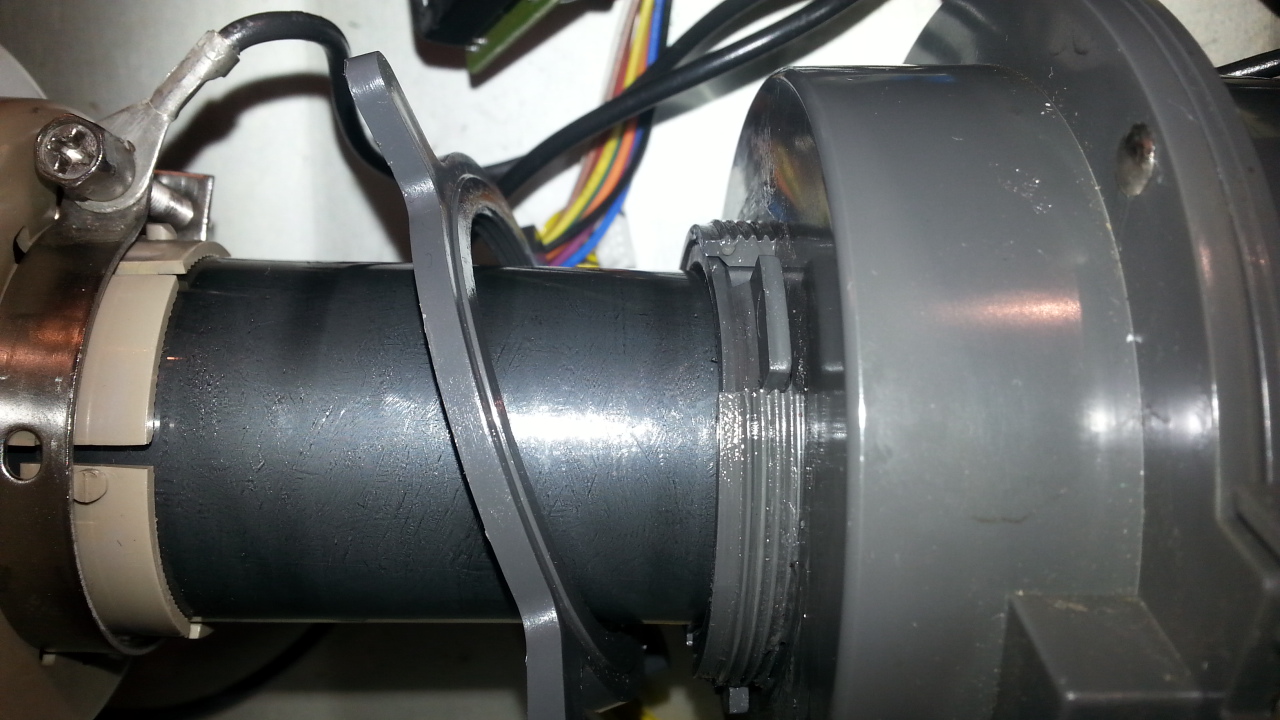
picture 424
this image shows the front locking ring assembly of the FOCUS COIL as you will see the whole threaded
part is 5 mm in total,the picture also shows the centering shim/collar in place.
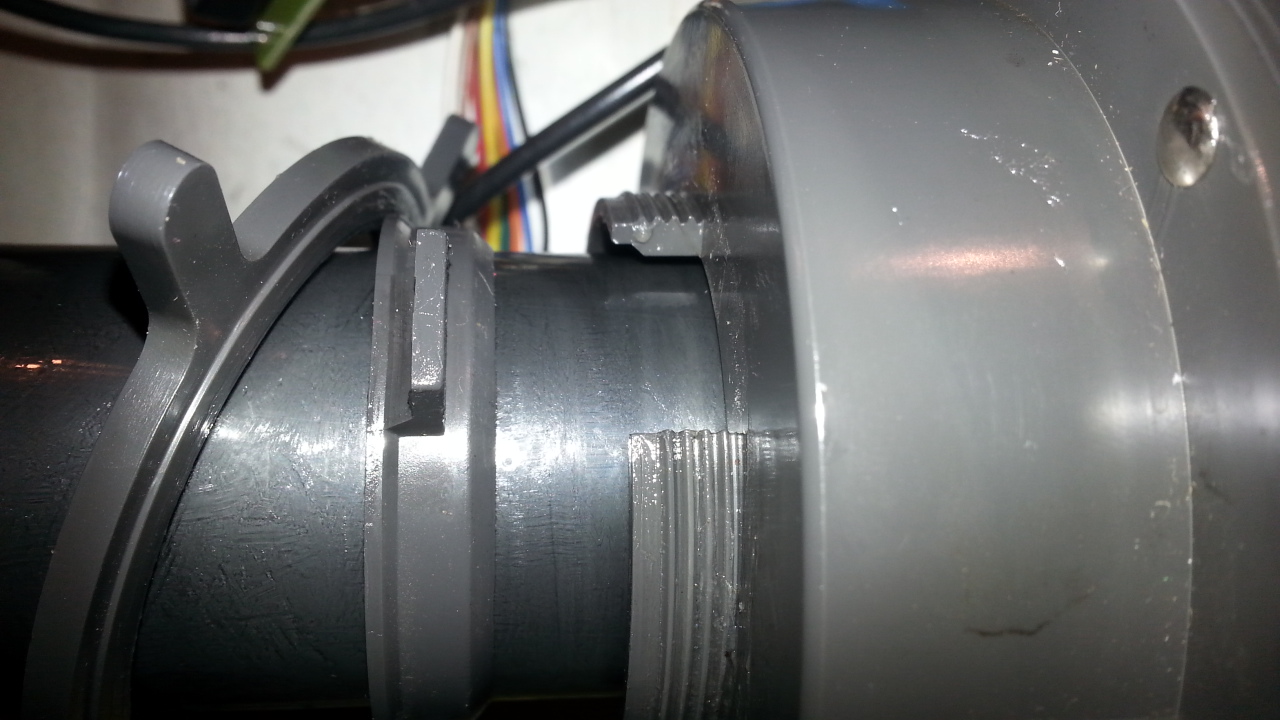
in picture 738 the detail shows the locking ring (left) the centering collar (centre)
looking at the centering ring, it works as a centering shim which slides up inside the coil, then is pulled tight with the locking ring
In picture 147 I have shifted the yoke clamp as far forward as it will go, if the gray plastic ring to the right of the clamps new position you would gain 5 mm.
There are 2 possibilities that I can see:
1. Cut off the 5 mm from the yoke magnet clamp arrangement (it will still lock onto the tube neck)
2. Cut off the whole locking arrangement from the front of the focus ring, and glue the centering shim into the assembly to maintain centering and just use the rear locking device to hold it in place.
3. In total there would then be 7.5 mm forward movement on the focus ring before it hits the back of the focus yoke........the question arises, would that be enough to make any real difference to the focus issue??
4. Is there anything to be gained from modifying the front of the focus magnet for what would be just over 2 mm
5. I am questioning this because I now realize that to access this mod I will have to remove the tubes from the projector to get the components off the tube neck, so is the 5 or 7 mm really worth the effort??
6. Just as a matter of interest all the neck assembly components on both machines are of the same dimensions
the only difference appears to be (apart from the neckboard assemblies) is the actual difference in the tube neck length, the CINE 8 has the P16LNP tubes the BG 808 has the 180DVB22 tubes.
The cine 8 Tubes (as measured from the front edge of the yoke magnet to the PCB board at the neck
The BG 808 measured likewise
Cine 8 =395 mm
BG 808 =415 mm
Even though there is a 20 mm difference in length, I do not see that that is really relevent, given that the point of interest is at the other end of the neck (unless of course the internal structure of the electron gun is different and/or has different focusing characteristics (which is probable)
Just out of curiosity I have removed (and reversed the neckboard front mount which affords about 12 mm rearward movement of the focus coil (not that it did any good, except de-focus the image more) which makes your assesment of moving forward on the neck more than a reasonable idea, I just question what at
best 7.5 mm forward movement would do in reality.
As you know from earlier posts focus can (almost be achieved at ZERO) which is not really desirable from the electronics point of view. The one saving grace in all of this is that it would appear that the interchangability between the two machines of the boards seems to be OK, so at least I have some backup spares,(even though I really bought the Cine 8 for the tubes!!)
Take your time on this one Casey,in your own good time
| Description: |
|
| Filesize: |
310.9 KB |
| Viewed: |
5114 Time(s) |
|
|
|
| Back to top |
|
|
dentree
Joined: 01 May 2009
Posts: 247
Location: Melbourne Australia
TV/Projector: BARCO GRAPHICS 808 BARCO GRAPHICS 801
|
| Posted: Wed Jan 14, 2015 11:11 am Post subject: Barco Cine 8 |
|
|
738
| Description: |
|
| Filesize: |
276.12 KB |
| Viewed: |
5111 Time(s) |
|
|
|
| Back to top |
|
|
|
|
|
|
|
You cannot post new topics in this forum
You cannot reply to topics in this forum
You cannot edit your posts in this forum
You cannot delete your posts in this forum
You cannot vote in polls in this forum
You cannot attach files in this forum
You can download files in this forum
|
Forum powered by phpBB © phpBB Group
|
|




