| Author |
Message |
Curt Palme
CRT Tech
Joined: 08 Mar 2006
Posts: 24396
Location: Langley, BC
TV/Projector: All of them!
|
| Posted: Wed Dec 10, 2014 3:16 pm Post subject: |
|
|
|
Very common fault on those quads. The 801 quad will not fit, you need the 7622091 older version for best reliability.
|
|
| Back to top |
|
 |
dentree
Joined: 01 May 2009
Posts: 247
Location: Melbourne Australia
TV/Projector: BARCO GRAPHICS 808 BARCO GRAPHICS 801
|
| Posted: Wed Dec 10, 2014 11:10 pm Post subject: Barco Cine 8 |
|
|
Thanks for that feedback Curt,
Do you have the correct QUAD to replace this one, also the fact that as I mentioned in an earlier post that I actually put the put the Cine 8 EHT into the BG 808 and there was no red LED's showing and it all seemed to work, images on the tubes etc, I am assuming that the EHT is in fact OK, and without investigating the splitter in the Cine 8 yet, it's condition is yet to be determined, I will take the QUAD out of the BG 808 and stick it into the Cine 8 and see what happens, then if all is well I would just need a price from you for a QUAD + postage to Australia,
do you have any thoughts on the "slag burn" appearance on this faulty unit?
The fact that 4 years ago the unit came from you and was never used until I bought it leads me to think that at some point in time before it came into your possession the QUAD has been changed and the fact that it had a large NUT between the chassis acting as a spacer and the bottom bolt, and no nuts securing the 2 top bolts, in fact by using a spacer at the bottom prevents the 2 top bolts from coming anywhere near the casing, obviously the whole device is meant to be bolted hard up to the casing (which I imagine would act as a kind of heatsink if the device gets hot in operation) or is that not a logical assumption.
All the information which is stamped into this faulty QUAD is as follows: R762717 INDEX 05
and the second legend reads:03 /00 - M058940
I will let everyone know the results of the impending changeover test
and thank you all for the prompt and valued input, if there are further thoughts please post.
Thanks
|
|
| Back to top |
|
|
dentree
Joined: 01 May 2009
Posts: 247
Location: Melbourne Australia
TV/Projector: BARCO GRAPHICS 808 BARCO GRAPHICS 801
|
| Posted: Sat Dec 13, 2014 1:26 pm Post subject: |
|
|
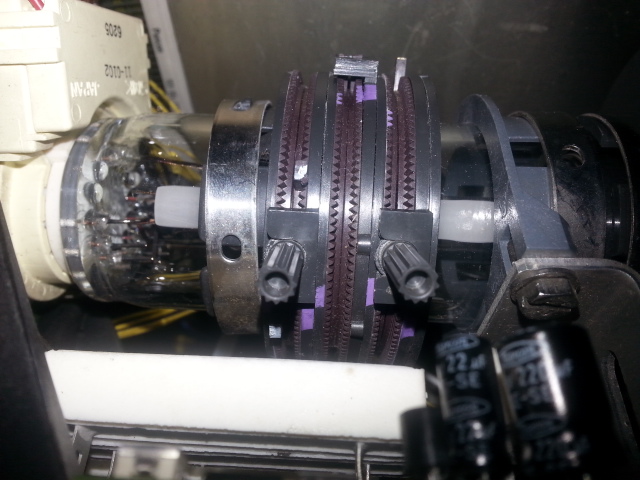
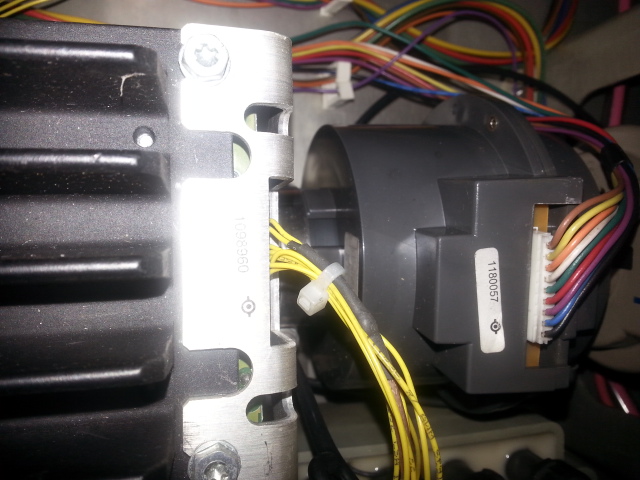
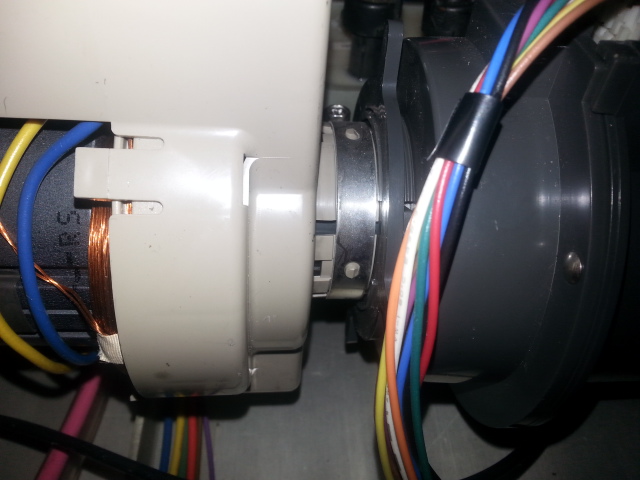
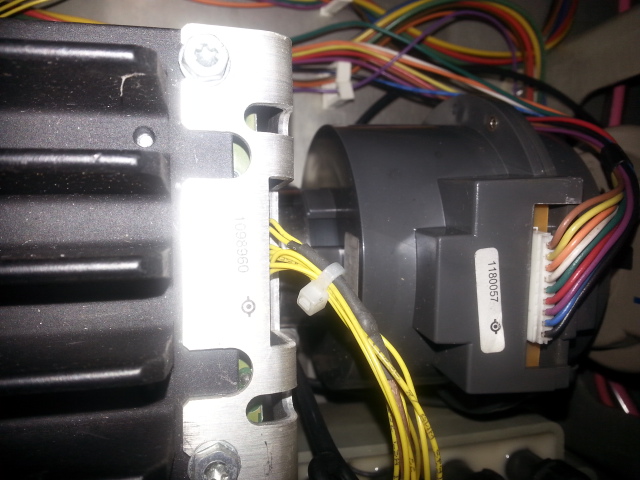
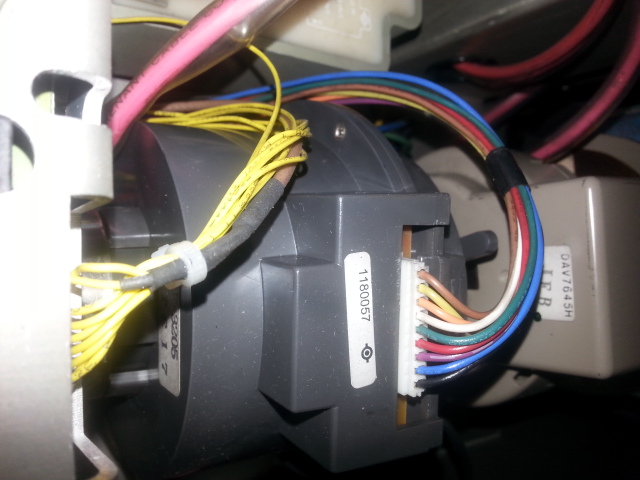
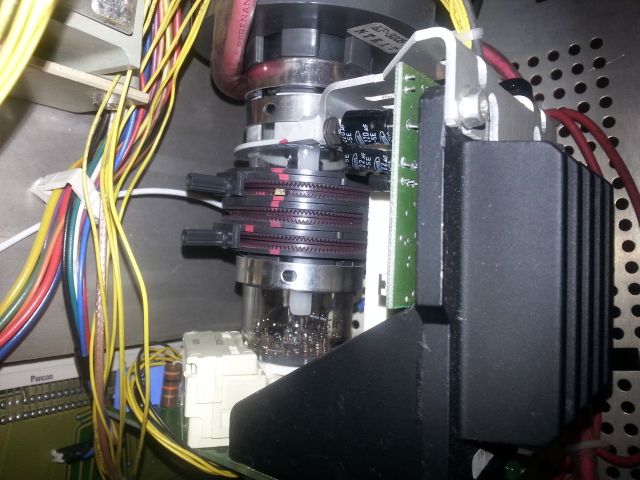
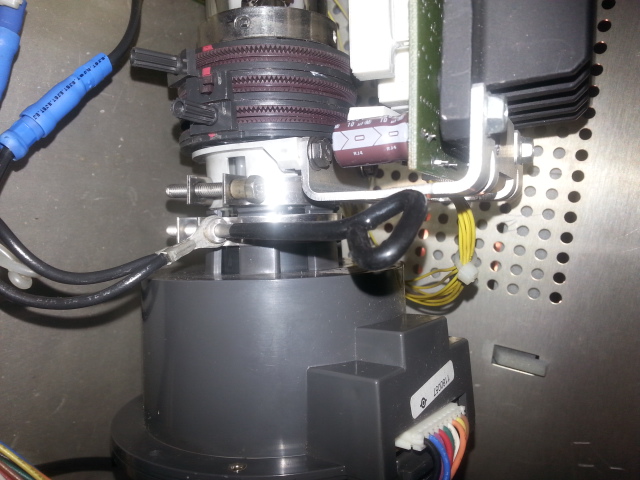
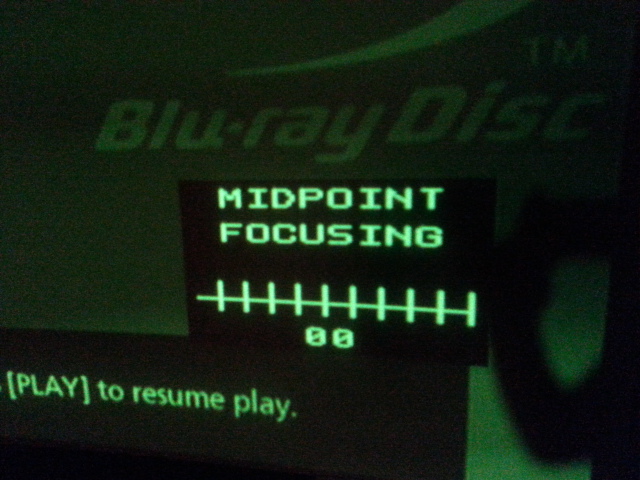
Update on the Quadrupler, It seems to be a success, I now have an image on screen...........but I seem to have run into another issue, according to the install manual to get a 3.1 meter wide screen I need to position the projector 4.25 meters back....This I have done to within a couple of mil, however focus is now a major issue I can only manage to crack focus electronically at ZERO, I have also noticed (by comparing the Cine 8 with the BG 808) that on the BG 808 the is loads of space on the tube neck to slide the Focus coil back and forth, however on the Cine 8 there is ZERO space between the deflection yoke, and the focus coil, hard up against the rear of the focus coil is the bracket supporting the neck board and the heatsink, so there is NO movement at all back and forth along the tube neck.
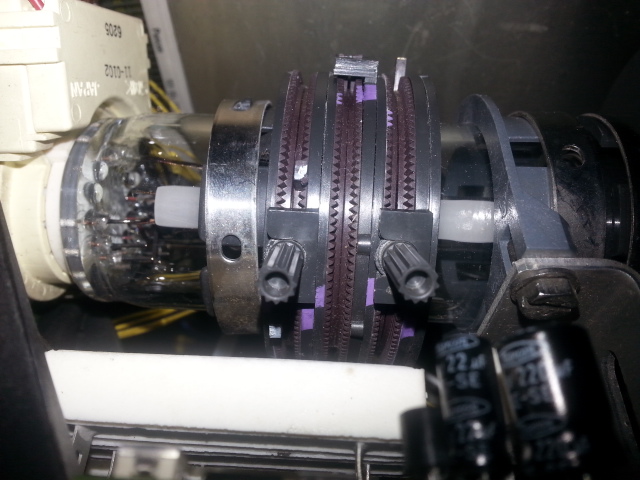
I also notice that the astig ring Knobs are currently positioned in a vertical position buried in amongst the neck board components, so the cannot be moved around the tube neck either ( although all the dots are circular on all tubes with the halos almost central) so I do not think they are really an issue ) although there is a suggestion of a slight halo off to one side
Any suggestions regarding this issue gratefully received,
The lenses on the Cine 8 are HD 8 REV B the same as on the BG 808, I really thought this was going to be a straight forward projector swap, but life wasn't meant to be easy was it? I can provide pictures of both the Cine 8 and the BG 808 if you require them, but I am assuming at this point that you will be familiar with the layout and differences between the 2 machines
Unless I have totally mis-read the manual I thought I had done everything right so far, but I must be missing something somewhere
Thanks in advance
|
|
| Back to top |
|
|
Hulio
Joined: 15 Apr 2006
Posts: 494
Location: Belgium
|
| Posted: Sat Dec 13, 2014 7:45 pm Post subject: |
|
|
There might be two reasons why you can't slide the focus coil:
1. The deflection yoke is not hard against the tube bulb.
2. The gear clamp of the neckboard was tighten to close to the focus coil.
But to begin with, don't touch the deflection yoke yet, i bet is the second reason.
First loose the gear clamp of the neckboard and the two screws on the heat sink of the neck board which are holding the clamp in it's place. You shold be able to slide a bit the metal clamp away from the focus coil. While you do that, hold the neckboard with the other hand, you don't want to pull that out.
Just if this procedure does not help, you may check if the deflection yoke is at maximum against the tube belly. Don't forget the horizontal alignment of the raster if you do so.
Normaly, there should be approx. 8mm between the focus coil and deflection yoke. Put the midpoint focus on 57 with the RCU and contrast at 80. Move the focus coil for- or backwards for the best focus on the middle of the screen. Tighten the clasp ring and the gear clamp of the focus coil when ready.
|
|
| Back to top |
|
|
dentree
Joined: 01 May 2009
Posts: 247
Location: Melbourne Australia
TV/Projector: BARCO GRAPHICS 808 BARCO GRAPHICS 801
|
| Posted: Sun Dec 14, 2014 1:57 am Post subject: |
|
|
Thanks for the reply, as you maybe be able to see from the pictures there is no room for any movement,
| Description: |
|
| Filesize: |
131.95 KB |
| Viewed: |
7063 Time(s) |
|
|
|
| Back to top |
|
|
dentree
Joined: 01 May 2009
Posts: 247
Location: Melbourne Australia
TV/Projector: BARCO GRAPHICS 808 BARCO GRAPHICS 801
|
| Posted: Sun Dec 14, 2014 1:59 am Post subject: Barco Cine 8 |
|
|
pic 1
| Description: |
|
| Filesize: |
138.12 KB |
| Viewed: |
7059 Time(s) |
|
|
|
| Back to top |
|
|
dentree
Joined: 01 May 2009
Posts: 247
Location: Melbourne Australia
TV/Projector: BARCO GRAPHICS 808 BARCO GRAPHICS 801
|
| Posted: Sun Dec 14, 2014 2:01 am Post subject: Barco Cine 8 |
|
|
pic 2
| Description: |
|
| Filesize: |
138.73 KB |
| Viewed: |
7057 Time(s) |
|
|
|
| Back to top |
|
|
dentree
Joined: 01 May 2009
Posts: 247
Location: Melbourne Australia
TV/Projector: BARCO GRAPHICS 808 BARCO GRAPHICS 801
|
| Posted: Sun Dec 14, 2014 2:02 am Post subject: Barco Cine 8 |
|
|
pic 3
| Description: |
|
| Filesize: |
137.71 KB |
| Viewed: |
7055 Time(s) |
|
|
|
| Back to top |
|
|
dentree
Joined: 01 May 2009
Posts: 247
Location: Melbourne Australia
TV/Projector: BARCO GRAPHICS 808 BARCO GRAPHICS 801
|
| Posted: Sun Dec 14, 2014 2:03 am Post subject: Barco Cine 8 |
|
|
pic 4
| Description: |
|
| Filesize: |
135.94 KB |
| Viewed: |
7052 Time(s) |
|
|
|
| Back to top |
|
|
dentree
Joined: 01 May 2009
Posts: 247
Location: Melbourne Australia
TV/Projector: BARCO GRAPHICS 808 BARCO GRAPHICS 801
|
| Posted: Sun Dec 14, 2014 2:05 am Post subject: Barco Cine 8 |
|
|
Pic 5
| Description: |
|
| Filesize: |
131.95 KB |
| Viewed: |
7049 Time(s) |
|
|
|
| Back to top |
|
|
dentree
Joined: 01 May 2009
Posts: 247
Location: Melbourne Australia
TV/Projector: BARCO GRAPHICS 808 BARCO GRAPHICS 801
|
| Posted: Sun Dec 14, 2014 2:06 am Post subject: Barco Cine 8 |
|
|
pic 6
| Description: |
|
| Filesize: |
107.74 KB |
| Viewed: |
7047 Time(s) |
|
|
|
| Back to top |
|
|
dentree
Joined: 01 May 2009
Posts: 247
Location: Melbourne Australia
TV/Projector: BARCO GRAPHICS 808 BARCO GRAPHICS 801
|
| Posted: Sun Dec 14, 2014 2:11 am Post subject: Barco Cine 8 |
|
|
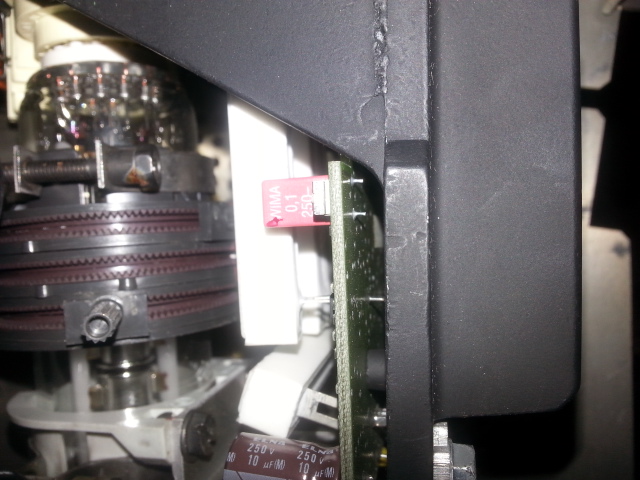
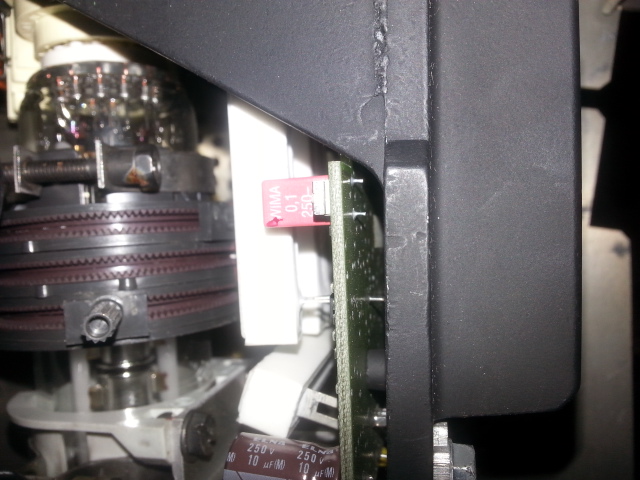
The yokes seem to be hard up to the rear of the tube and notice that white block at bottom center, it is skewed and I found that it is NOT soldered in, so just pushed it back into it's slot
| Description: |
|
| Filesize: |
137.71 KB |
| Viewed: |
7047 Time(s) |
|
Last edited by dentree on Sun Dec 14, 2014 2:27 am; edited 1 time in total
|
|
| Back to top |
|
|
dentree
Joined: 01 May 2009
Posts: 247
Location: Melbourne Australia
TV/Projector: BARCO GRAPHICS 808 BARCO GRAPHICS 801
|
| Posted: Sun Dec 14, 2014 2:14 am Post subject: Barco Cine 8 |
|
|
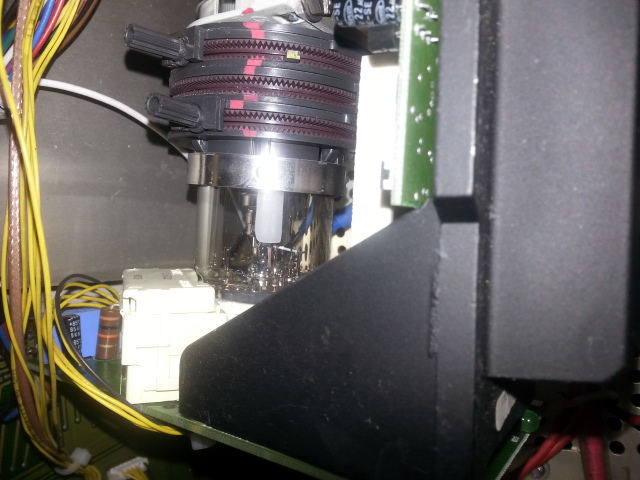
Trying to cover all angles so you can see how tight all this stuff is[/b]
| Description: |
|
| Filesize: |
135.94 KB |
| Viewed: |
7045 Time(s) |
|
|
|
| Back to top |
|
|
dentree
Joined: 01 May 2009
Posts: 247
Location: Melbourne Australia
TV/Projector: BARCO GRAPHICS 808 BARCO GRAPHICS 801
|
| Posted: Sun Dec 14, 2014 2:16 am Post subject: Barco Cine 8 |
|
|
picture 8
| Description: |
|
| Filesize: |
120.68 KB |
| Viewed: |
7043 Time(s) |
|
|
|
| Back to top |
|
|
dentree
Joined: 01 May 2009
Posts: 247
Location: Melbourne Australia
TV/Projector: BARCO GRAPHICS 808 BARCO GRAPHICS 801
|
| Posted: Sun Dec 14, 2014 2:18 am Post subject: Barco Cine 8 |
|
|
Picture 9
| Description: |
|
| Filesize: |
169.67 KB |
| Viewed: |
7041 Time(s) |
|
|
|
| Back to top |
|
|
dentree
Joined: 01 May 2009
Posts: 247
Location: Melbourne Australia
TV/Projector: BARCO GRAPHICS 808 BARCO GRAPHICS 801
|
| Posted: Sun Dec 14, 2014 2:19 am Post subject: Barco Cine 8 |
|
|
Picture 10
| Description: |
|
| Filesize: |
140.57 KB |
| Viewed: |
7039 Time(s) |
|
|
|
| Back to top |
|
|
dentree
Joined: 01 May 2009
Posts: 247
Location: Melbourne Australia
TV/Projector: BARCO GRAPHICS 808 BARCO GRAPHICS 801
|
| Posted: Sun Dec 14, 2014 2:23 am Post subject: Barco Cine 8 |
|
|
Even at Zero the focus is very very soft
| Description: |
|
| Filesize: |
141.25 KB |
| Viewed: |
7036 Time(s) |
|
|
|
| Back to top |
|
|
CasetheCorvetteman

Joined: 09 Nov 2008
Posts: 6326
Location: Australia
|
| Posted: Sun Dec 14, 2014 2:40 am Post subject: |
|
|
Havent got any metal in there near the focus coil have ya? That will do exactly what you describe, although I cant see any in your pics.
Is it only the green?? Are all three focus coils the same on the CINE 8 or is the green one different? Id expect there to be almost zero space to slide them back and forward on an 8" set, the whole lot will likely be hard up from the bell to the neck board.
I cant see all your pics here, the internet is quite ordinary in this part of Australia 
_________________
Barco Cine 9, ,Sony VPL570ES 4K SXRD, 135" OZ Theatre Majestic 16:9 screen, Denon X6700in preamp mode, 2x 7ch Tonewinner amps, 2x Tonewinner 15" subs, 2x 10" subs, 7.2.6...
RUNCO DTV991 LC ( NEC XG 852 LC ) 100" 4:3 screen, H/K AVR 7.1...
|
|
| Back to top |
|
|
CasetheCorvetteman
Joined: 09 Nov 2008
Posts: 6326
Location: Australia
|
| Posted: Sun Dec 14, 2014 2:44 am Post subject: |
|
|
Ok I can see a couple pics, that white block is a resistor, are you saying that is loose on the neckboard???
_________________
Barco Cine 9, ,Sony VPL570ES 4K SXRD, 135" OZ Theatre Majestic 16:9 screen, Denon X6700in preamp mode, 2x 7ch Tonewinner amps, 2x Tonewinner 15" subs, 2x 10" subs, 7.2.6...
RUNCO DTV991 LC ( NEC XG 852 LC ) 100" 4:3 screen, H/K AVR 7.1...
|
|
| Back to top |
|
|
dentree
Joined: 01 May 2009
Posts: 247
Location: Melbourne Australia
TV/Projector: BARCO GRAPHICS 808 BARCO GRAPHICS 801
|
| Posted: Sun Dec 14, 2014 2:46 am Post subject: Barco Cine 8 |
|
|
|
I would like to mention that although I have been showing the focus problem on GREEN, it is in fact across all 3 tubes, to get anywhere near any kind of focus although all 3 are still soft all the electronic focus controls have to be ramped all the way down to ZERO, it is almost as though the projector is beyond it's focus ability in terms of distance from the screen, when in fact it is bang on, I have 100mm to move fore and aft, moving the projector through this range has absolutely no effect at all with regard to focus, all it does obviously, is marginally increase/decrease the width of the image on screen
|
|
| Back to top |
|
|
|
|




