| Author |
Message |
olakjen
Joined: 21 Sep 2011
Posts: 24
|
| Posted: Wed Dec 03, 2014 12:13 am Post subject: sony g90 problem |
|
|
hello a have g90 whit all new tubes , if a take a green full screen test pattern, a get a tinny black line in the screen from
right to left, and it becomes brighter on the left side on the screen , this is on internal and external test patterns ,
if a move the test pattern opp ore down it follows the movement, any body have some idea ?
thanks
_________________
JVC DLA-RS65 : LUMAGEN RADIANCE XE3D+ : DARBEE : SONY G90 : SONY G70 : OPPO BDP-103 : TOSHIBA EX1 : ONKYO 886 : VIDEOEQ PRO : CRYSTALIO 2 3800 :
|
|
| Back to top |
|
 |
Curt Palme
CRT Tech
Joined: 08 Mar 2006
Posts: 24396
Location: Langley, BC
TV/Projector: All of them!
|
| Posted: Wed Dec 03, 2014 2:01 am Post subject: |
|
|
|
In Barcos this is called a 'line of coincidence, although I've never seen it in a G90 before. Try zeroing out the convergence settings to 50% to see if you can get rid of it. My suspicion is that you've got one or more convergence settings too far towards the maximum, causing that line.
|
|
| Back to top |
|
|
CIR Engineering

Joined: 25 Aug 2008
Posts: 4269
Location: Chicago USA & Berlin Germany
|
| Posted: Wed Dec 03, 2014 6:57 pm Post subject: |
|
|
You probably should reset everything to factory defaults. You can get distortion similar to that with focus settings too.
craigr
_________________
JETI 1501-HiRes 2nm Spectroradiometer
JETI 1211 Spectroradiometer
Photo Research PR-650 Spectroradiometer
Klein K10-A Colorimeter
Murideo Fresco SIX-G HDMI 2.x Multimedia Generator
Murideo Fresco SIX-A HDMI 2.x Analyzer
Light Illusion ColourSpace XPT Color Calibration Software
Light Illusion LightSpace XPT Pro Version 10.x Color Calibration Software
OMARDRIS JVC Software Patch to use K10-A and Jeti with JVC OEM AutoCal Software!
Sencore CR7000 CRT Tube Analyzer / Rejuvenater
Authorized Dealer for Lumagen & just about everything worth buying 
www.CIR-Engineering.com - craigr@cir-engineering.com
Phone: 865-405-6892
|
|
| Back to top |
|
|
olakjen
Joined: 21 Sep 2011
Posts: 24
|
| Posted: Fri Dec 12, 2014 8:56 pm Post subject: |
|
|
thanks that helped , the blue gamma curve is to high and it is not possible to straighten out whit original gamma adjustments , any ideas ?
_________________
JVC DLA-RS65 : LUMAGEN RADIANCE XE3D+ : DARBEE : SONY G90 : SONY G70 : OPPO BDP-103 : TOSHIBA EX1 : ONKYO 886 : VIDEOEQ PRO : CRYSTALIO 2 3800 :
|
|
| Back to top |
|
|
stridsvognen
Guest
|
| Posted: Fri Dec 12, 2014 11:33 pm Post subject: |
|
|
| olakjen wrote: | | thanks that helped , the blue gamma curve is to high and it is not possible to straighten out whit original gamma adjustments , any ideas ? |
Same result if you feed the G90 direct from player.?
|
|
| Back to top |
|
|
CIR Engineering
Joined: 25 Aug 2008
Posts: 4269
Location: Chicago USA & Berlin Germany
|
| Posted: Sat Dec 13, 2014 6:25 pm Post subject: |
|
|
| olakjen wrote: | | thanks that helped , the blue gamma curve is to high and it is not possible to straighten out whit original gamma adjustments , any ideas ? |
Do you have blue "standard defocus" turned on or off? I would suggest just leaving it turned on. This will allow blue to track better.
You could also consider turning blue defocus off and defocusing blue manually. Use your color analyzer to measure the light output of blue with blue tightly focused. Then adjust blue to defocus enough to reach 20% more light output from blue only.
If none of that works well enough for you, than you can adjust the blue gamma. Go into the G90 "expert mode" for this adjustment. To do this, first enter "service mode" then enter "expert mode" by hitting ENTER > ENTER > LEFT > RIGHT > ENTER. Once in "expert mode" you can adjust the gamma of red, blue, and green separately. To get to the gamma adjustments press "Bias" and "Gain" on the remote at the same time. Write down your original values!
craigr
_________________
JETI 1501-HiRes 2nm Spectroradiometer
JETI 1211 Spectroradiometer
Photo Research PR-650 Spectroradiometer
Klein K10-A Colorimeter
Murideo Fresco SIX-G HDMI 2.x Multimedia Generator
Murideo Fresco SIX-A HDMI 2.x Analyzer
Light Illusion ColourSpace XPT Color Calibration Software
Light Illusion LightSpace XPT Pro Version 10.x Color Calibration Software
OMARDRIS JVC Software Patch to use K10-A and Jeti with JVC OEM AutoCal Software!
Sencore CR7000 CRT Tube Analyzer / Rejuvenater
Authorized Dealer for Lumagen & just about everything worth buying
www.CIR-Engineering.com - craigr@cir-engineering.com
Phone: 865-405-6892
|
|
| Back to top |
|
|
olakjen
Joined: 21 Sep 2011
Posts: 24
|
| Posted: Mon Dec 22, 2014 12:36 am Post subject: |
|
|
| CIR Engineering wrote: | | olakjen wrote: | | thanks that helped , the blue gamma curve is to high and it is not possible to straighten out whit original gamma adjustments , any ideas ? |
Do you have blue "standard defocus" turned on or off? I would suggest just leaving it turned on. This will allow blue to track better.
You could also consider turning blue defocus off and defocusing blue manually. Use your color analyzer to measure the light output of blue with blue tightly focused. Then adjust blue to defocus enough to reach 20% more light output from blue only.
If none of that works well enough for you, than you can adjust the blue gamma. Go into the G90 "expert mode" for this adjustment. To do this, first enter "service mode" then enter "expert mode" by hitting ENTER > ENTER > LEFT > RIGHT > ENTER. Once in "expert mode" you can adjust the gamma of red, blue, and green separately. To get to the gamma adjustments press "Bias" and "Gain" on the remote at the same time. Write down your original values!
craigr |
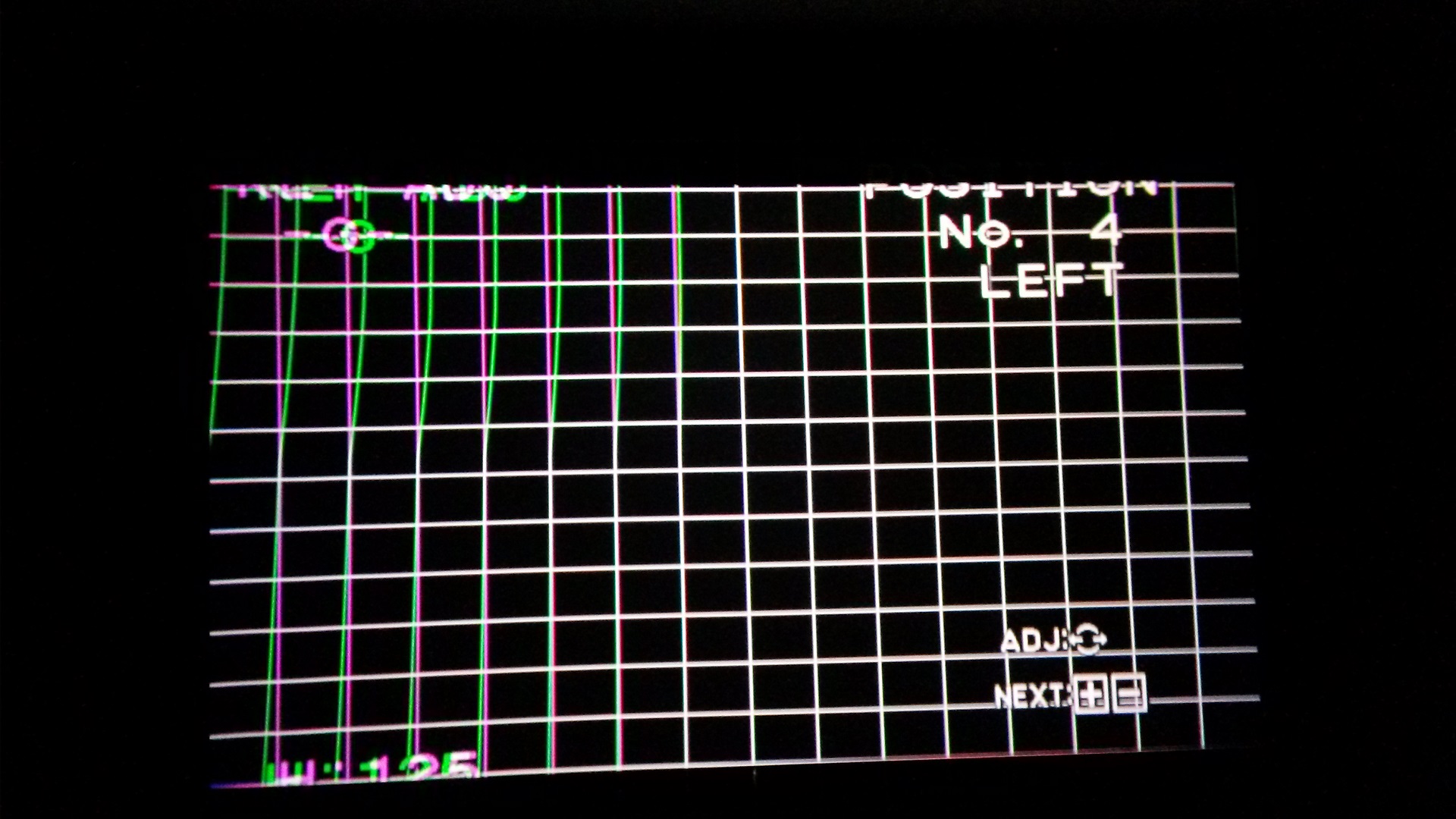
that helped allot, but now a have a new problem when a watched a movie and suddenly a weird sound from the projector
and the convergence on the green goes off on the upper left side of the screen , and then the zone and key on the left
side dont work
| Description: |
|
| Filesize: |
385.41 KB |
| Viewed: |
3704 Time(s) |
|
_________________
JVC DLA-RS65 : LUMAGEN RADIANCE XE3D+ : DARBEE : SONY G90 : SONY G70 : OPPO BDP-103 : TOSHIBA EX1 : ONKYO 886 : VIDEOEQ PRO : CRYSTALIO 2 3800 :
|
|
| Back to top |
|
|
|
|




