| Author |
Message |
redfox001

Joined: 16 Mar 2009
Posts: 2257
Location: The Netherlands
|
| Posted: Wed Feb 11, 2015 10:41 pm Post subject: |
|
|
Yeah sound good. Banding and ringing is solved. What do you mean with tearing?
_________________
701s->runco933->8500ultra->cinemax->9500mp->919 splitpack + cinemax
|
|
| Back to top |
|
 |
thewolfman

Joined: 28 Mar 2011
Posts: 1311
Location: Sweden
|
| Posted: Wed Feb 11, 2015 10:56 pm Post subject: |
|
|
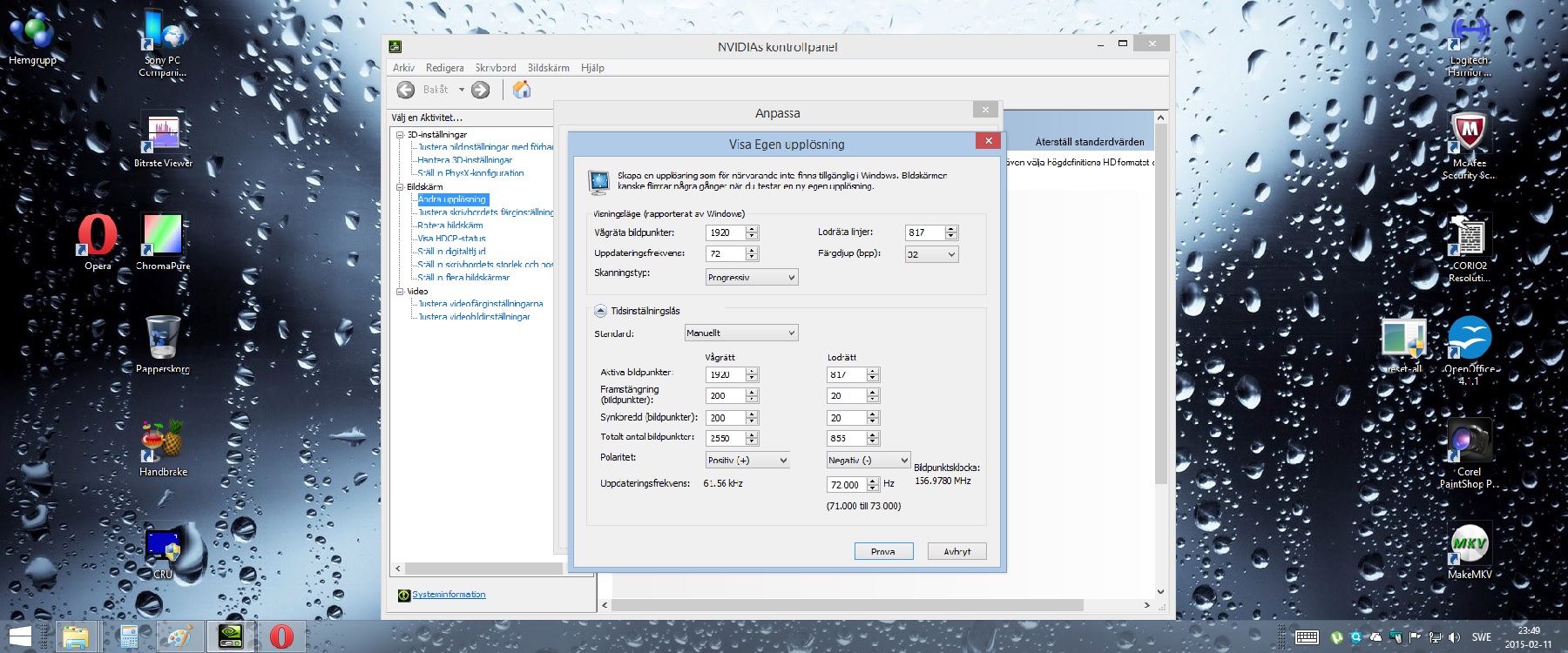
With 817p and certain numbers I get tearing of the image, mostly in the middle, when camera moves a little faster sideways and or upwards/downwards. I have these numbers for the time being as I came up with them tonight and tested.. still tears. Difficult to explain how it looks, small sections of the image gets zigzagy. I'll try some more with different numbers and see what happens.
| Description: |
|
| Filesize: |
447.47 KB |
| Viewed: |
6013 Time(s) |
|
|
|
| Back to top |
|
|
redfox001
Joined: 16 Mar 2009
Posts: 2257
Location: The Netherlands
|
| Posted: Wed Feb 11, 2015 11:22 pm Post subject: |
|
|
No idea what the reason is but I always used powerstrip for custom resolutions under windows. Perhaps fun to install and try if it makes no tearing resolutions. But I am not sure what I am looking at.
_________________
701s->runco933->8500ultra->cinemax->9500mp->919 splitpack + cinemax
|
|
| Back to top |
|
|
thewolfman
Joined: 28 Mar 2011
Posts: 1311
Location: Sweden
|
| Posted: Wed Feb 11, 2015 11:30 pm Post subject: |
|
|
It's Nvidia's own custom resolution center that goes with the graphics card, with my current numbers, but I need to translate I guess so that people can understand. Powerstrip cost's money and never did end up buying it. I'll look into that though..
Feel free to share you numbers and I'll try them with Nvidia, some numbers can be used.
|
|
| Back to top |
|
|
redfox001
Joined: 16 Mar 2009
Posts: 2257
Location: The Netherlands
|
| Posted: Wed Feb 11, 2015 11:38 pm Post subject: |
|
|
Does this help? But this is barco sorry.

_________________
701s->runco933->8500ultra->cinemax->9500mp->919 splitpack + cinemax
|
|
| Back to top |
|
|
thewolfman
Joined: 28 Mar 2011
Posts: 1311
Location: Sweden
|
| Posted: Wed Feb 11, 2015 11:46 pm Post subject: |
|
|
|
Oh, yeah! I'll definitely try those numbers. Thanks a lot. If anyone else has numbers that I can use and try I would like them. But Nashe's numbers didn't work as good as expected because I couldn't make it fit my screen as it became to narrow. If I unhook the monitor I gain like a foot on each side but tiered of having to do so. I have set it up with the monitor connected this time.. so there's 2 ways around this + tearing in every case.
|
|
| Back to top |
|
|
Nashou66

Joined: 12 Jan 2007
Posts: 16171
Location: West Seneca NY
|
|
| Back to top |
|
|
thewolfman
Joined: 28 Mar 2011
Posts: 1311
Location: Sweden
|
| Posted: Thu Feb 12, 2015 12:54 am Post subject: |
|
|
|
I have both set up but I never use 800 because I think it's the opposite.. rarely is it anything else then 2,35:1.
|
|
| Back to top |
|
|
Nashou66
Joined: 12 Jan 2007
Posts: 16171
Location: West Seneca NY
|
|
| Back to top |
|
|
thewolfman
Joined: 28 Mar 2011
Posts: 1311
Location: Sweden
|
| Posted: Thu Feb 12, 2015 1:24 am Post subject: |
|
|
|
Ok. I googled movies shot in 2.40 and came up with a few.. and looked at them, as I usually do on IMDB if they are 2,35 or 1,85, and they seem to always label them 2,35.. no wonder there's no 2,40 then. I think I need to look elsewhere for the proper ratio from now on. And also set up the pj slightly different perhaps.
|
|
| Back to top |
|
|
Nashou66
Joined: 12 Jan 2007
Posts: 16171
Location: West Seneca NY
|
| Posted: Thu Feb 12, 2015 1:30 am Post subject: |
|
|
most IMBD movies are listed as 2.35 but are mastered to BD in 2.4. If you down load movies i best hey do not list what they are mastered in.
From the Blu ray forum
| Quote: | CinemaScope's Anamorphic Projection ratio was 2.55:1 originally with magnetic soundtracks.
Around 1957 they switched to optical tracks and the width was reduced to 2.35:1 to accommodate the optical track.
20th Century Fox used a special splicer but when studios used a normal splicer, you could see splice lines on a 2.35:1 aperture so in the 70's SMPTE changed the standard to 2.4:1 (actually 2.39), reducing the height of the image.
(You don't see splices on theaters every time the scene changes, do you? Then the movie is using the 2.39:1 height).
With the advent of digital sound prints in the mid 90's and the DTS control track, the Scope overall projector aperture was reduced ever so slightly again to make sure the control track wouldn't show up on the screen, which also made the 35mm anamorphic format width be exactly the same (20.955 mm/0.825") as all other 35mm projection formats since the implementation of the Academy ratio in 1931.
SMPTE standards allow for a 5% crop in theaters so 2.39:1 minus 5% width gives a 2.27:1 aspect ratio.
Similarly, 2.35:1 cropped vertically 5% could end as 2.47:1
In a related/unrelated note for example the 2.89:1 version of HTWWW is showing extra camera aperture image on the sides (but not the height) from the 2.59:1 camera aperture, that was not projected, while cropping the allowed, maybe about 5-6%, vertically from the 2.59:1 projector aperture, so 2.59:1 - 6% = 2.75:1 or so, plus extra image width from camera aperture = 2.89:1 |
_________________
Don't blame your underwear for your crooked ass~ unknown Greek philosopher
"Republicans believe every day is the Fourth of July, but the Democrats believe every day is April 15." --- President Reagan
One Smart Dog!!!
Marquee High Performance Bellows now shipping!!
Marquee Modifications and Performance Enhancement
Marquee C-element and Bellow removal
|
|
| Back to top |
|
|
redfox001
Joined: 16 Mar 2009
Posts: 2257
Location: The Netherlands
|
|
| Back to top |
|
|
thewolfman
Joined: 28 Mar 2011
Posts: 1311
Location: Sweden
|
| Posted: Thu Feb 12, 2015 7:06 am Post subject: |
|
|
I've dug up some old setting from others and will give them a go later.. I'll start with yours first and then move on to screenies from other users in the past. It shouldn't be to difficult finding one that works.
Do you run yours with long or short retrace?
|
|
| Back to top |
|
|
redfox001
Joined: 16 Mar 2009
Posts: 2257
Location: The Netherlands
|
| Posted: Thu Feb 12, 2015 11:33 am Post subject: |
|
|
Sorry my timings where barco related so perhaps not so useful. About the 818p I was thinking that if the player keeps the aspect ratio original it will add some black pixels on top and on the bottom I guess.
_________________
701s->runco933->8500ultra->cinemax->9500mp->919 splitpack + cinemax
|
|
| Back to top |
|
|
mp20748
Joined: 12 Sep 2006
Posts: 5689
Location: Maryland
TV/Projector: 9500LC Ultra / Super 02 and 03 VIM
|
| Posted: Thu Feb 12, 2015 12:09 pm Post subject: |
|
|
| redfox001 wrote: | | Sorry my timings where barco related so perhaps not so useful. About the 818p I was thinking that if the player keeps the aspect ratio original it will add some black pixels on top and on the bottom I guess. |
Why are you talking or thinking about going 800P?
|
|
| Back to top |
|
|
redfox001
Joined: 16 Mar 2009
Posts: 2257
Location: The Netherlands
|
| Posted: Thu Feb 12, 2015 12:14 pm Post subject: |
|
|
Hi, I am not going for 800p. I only have 818p but there was some discussion about 818p or 817p. I do not think 800p will improve much and it is a lot of effort to set up another resolution.
In actual practise I use the 1080p resolution most because the other one is often not calibrated or not readjusted in convergence etc.
_________________
701s->runco933->8500ultra->cinemax->9500mp->919 splitpack + cinemax
|
|
| Back to top |
|
|
mp20748
Joined: 12 Sep 2006
Posts: 5689
Location: Maryland
TV/Projector: 9500LC Ultra / Super 02 and 03 VIM
|
| Posted: Thu Feb 12, 2015 12:48 pm Post subject: |
|
|
800 or 800 anything should be only because you're not able to resolve 1080, or if you have a special display that would require sizing considerations.
But for HT, and the absolute best in HT, you would have to respect the "Native Rate" of the resolution. So a True 1920X1080 resolution would need to remain True to its nature when being displayed, especially on larger screens.
For instance, when you modify a native resolution like 1920X1080 on either number, you diminish it's 2D dimensional effect. meaning also it will not have Depth (an attribute of HD). That depth is because of Bandwidth, Speed and Native Resolution. And the further you move away in numbers from that native rate, the more the HD image becomes SD
|
|
| Back to top |
|
|
redfox001
Joined: 16 Mar 2009
Posts: 2257
Location: The Netherlands
|
| Posted: Thu Feb 12, 2015 12:52 pm Post subject: |
|
|
Yes ok that is true but we are talking about cropping the black bars from 2.35:1 material I think.
_________________
701s->runco933->8500ultra->cinemax->9500mp->919 splitpack + cinemax
|
|
| Back to top |
|
|
mp20748
Joined: 12 Sep 2006
Posts: 5689
Location: Maryland
TV/Projector: 9500LC Ultra / Super 02 and 03 VIM
|
| Posted: Thu Feb 12, 2015 12:57 pm Post subject: |
|
|
| redfox001 wrote: | | Yes ok that is true but we are talking about cropping the black bars from 2.35:1 material I think. |
Mask the screen... keep the native
|
|
| Back to top |
|
|
redfox001
Joined: 16 Mar 2009
Posts: 2257
Location: The Netherlands
|
| Posted: Thu Feb 12, 2015 1:11 pm Post subject: |
|
|
Ok but does not cropping reduce the bandwidth of the movie material?
I agree that we should avoid any type of scaling but do you really say that cropping affects the 3d effect of the movie? I am not sure but cropped I can go till 72Hz and it looks reasonable although it is clearly bandwidth limited but when I go to 1080p@72 it looks very soft on the barco. That is just to much while 818p@72 works reasonable. Not as sharp as a modified Marquee I suppose 
_________________
701s->runco933->8500ultra->cinemax->9500mp->919 splitpack + cinemax
|
|
| Back to top |
|
|
|
|





