|
As this forum is rarely used anymore, we've locked it. Feel free to browse and read. Questions? Please reach out to us directly. Cheers! |

|
 |
|
|
| Author |
Message |
ecrabb
Forum Moderator

Joined: 13 Mar 2006
Posts: 15909
Location: Utah
TV/Projector: JVC RS40, Epson 5010
|
| Posted: Thu Oct 02, 2014 5:45 pm Post subject: |
|
|
| jbmeyer13 wrote: | | So basically each PJ was outputting 800 x 1200; correct? (blended that's 1600 x 1200) If so, that's only 95-100mhz for each PJ. It should be no problem to resolve that. |
No, the screen was very wide… I'm guessing something like 20 feet give or take. Each projector was outputting 1600x1200@100hz for stereo, each from one channel of the SGI (fed by multiple graphics pipelines each). I think the whole display was probably 3000 x 1200 with a couple-hundred pixels of blend. Thinking back, it was really quite sharp, even knowing what I know now. Flock of Birds motion tracking, and stereo shutter glasses. This was super-advanced sh*t for back then. The SGI was the size of a refrigerator. This was right before 9/11… We were flying into EWR with carried-on tool bags back then. 
I'll have to see if I can find a photo or two. Shouldn't be any problem with posting it anymore… That was 15 years ago.
SC
|
|
| Back to top |
|
 |
jbmeyer13

Joined: 03 Dec 2010
Posts: 1135
|
| Posted: Thu Oct 02, 2014 6:13 pm Post subject: |
|
|
| ecrabb wrote: | | jbmeyer13 wrote: | | So basically each PJ was outputting 800 x 1200; correct? (blended that's 1600 x 1200) If so, that's only 95-100mhz for each PJ. It should be no problem to resolve that. |
No, the screen was very wide… I'm guessing something like 20 feet give or take. Each projector was outputting 1600x1200@100hz for stereo, each from one channel of the SGI (fed by multiple graphics pipelines each). I think the whole display was probably 3000 x 1200 with a couple-hundred pixels of blend. Thinking back, it was really quite sharp, even knowing what I know now. Flock of Birds motion tracking, and stereo shutter glasses. This was super-advanced sh*t for back then. The SGI was the size of a refrigerator. This was right before 9/11… We were flying into EWR with carried-on tool bags back then.
I'll have to see if I can find a photo or two. Shouldn't be any problem with posting it anymore… That was 15 years ago.
SC |
Post that photo!
If the PJ's had minimal keystone and were firing 1600 it should be relatively easy at 60hz, 100 would be more taxing. CRT's always struggle with the H resolution, especially because of a squished raster. I wonder at what point that becomes noticeable, 1500, 1600, 1800 lines of H rez. I haven't run a resolution under 1920 in so long (and I ran 1280 back in the days of DVD) and didn't do much experimenting.
Truth be told, at that rate without perfect magnetic set up any gains in BW will be quickly lost.
_________________
Projector: Modded 9501LC ULtra- MP VIM, Vold VNB, ETECH LVPS, Silver VIM Cables, HD10F's & a V1 case!
|
|
| Back to top |
|
|
ecrabb
Forum Moderator
Joined: 13 Mar 2006
Posts: 15909
Location: Utah
TV/Projector: JVC RS40, Epson 5010
|
| Posted: Thu Oct 02, 2014 6:41 pm Post subject: |
|
|
Zero keystone. They were mounted on custom 80/20 stands, aimed at screen-center, orthogonal to screen. Only part that reduced raster significantly (and it did indeed) was the tricky geometry that resulted from the curved screen. Too bad I don't have a photo of that. Sides were square, but much smaller than center. Top and bottom were bowed. Look like a pillow IIRC.
I'll try to scrounge for old photos later. I think I have one from behind the screen… It's a little pornographic for a CRT'er.
SC
|
|
| Back to top |
|
|
ecrabb
Forum Moderator
Joined: 13 Mar 2006
Posts: 15909
Location: Utah
TV/Projector: JVC RS40, Epson 5010
|
| Posted: Fri Oct 03, 2014 12:55 am Post subject: |
|
|
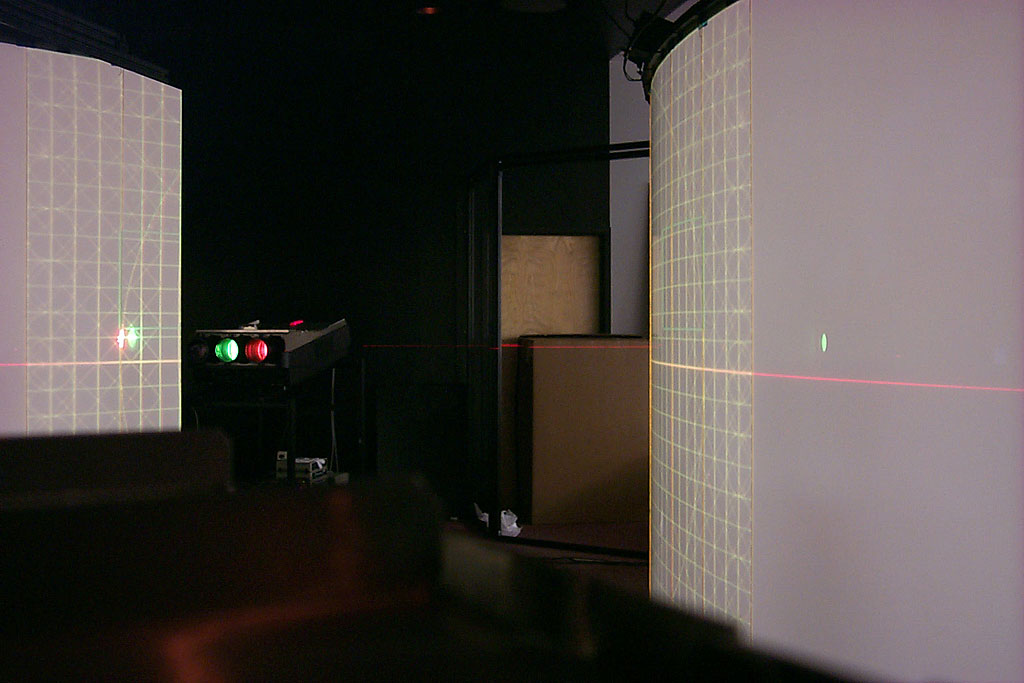
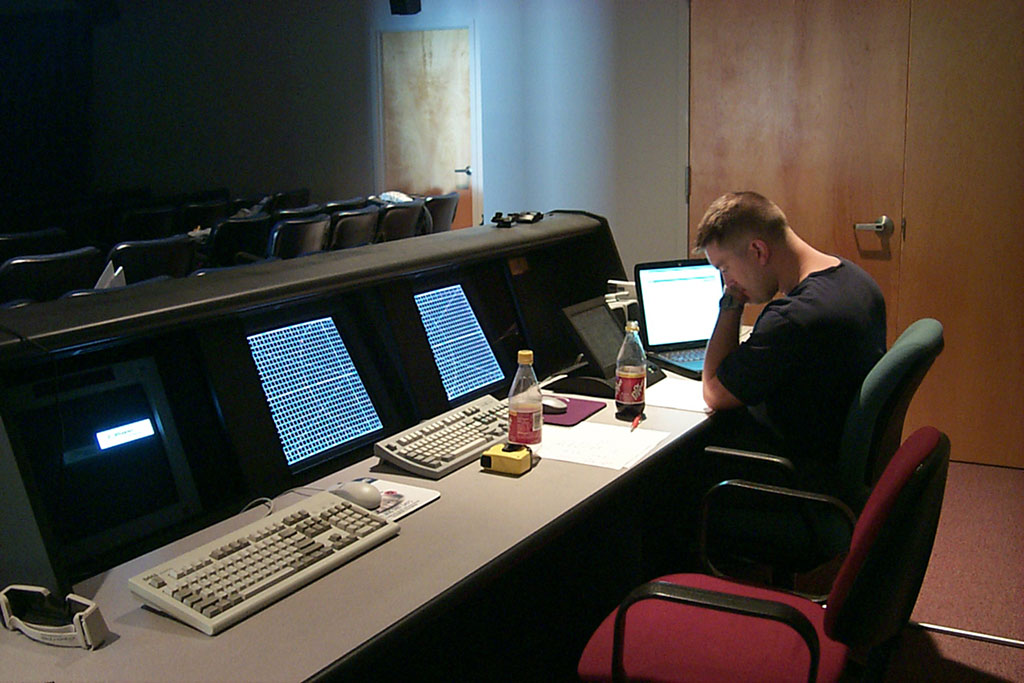
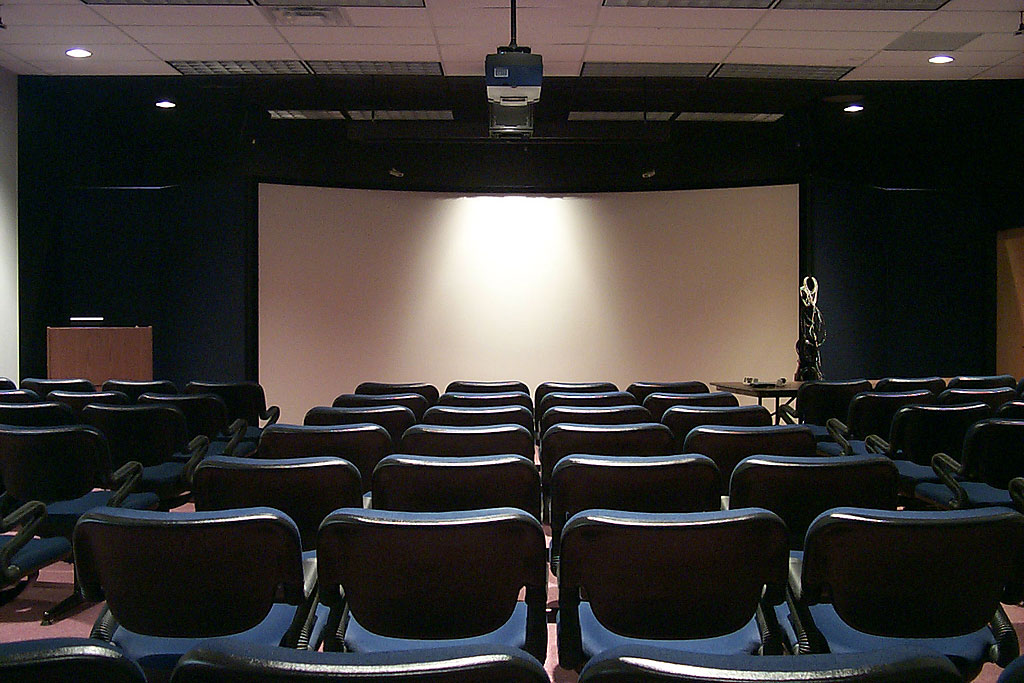
Took a little digging, but I found a couple! Somewhere, I have 20 or 30 shots of the project, but these three I scrounged from an email from 2009 where my buddy and I were talking about the project, and I'd found the photos on a CD-ROM and emailed them to him.
So, in that old email I also saw that we were talking about the blend zone - 320 pixels. That would be about right - 10% - for two 1600-px wide signals. So, the final blended resolution must have been 2880x1200. You can see in the first and second images how the resolution is. So, total The monitors in the console are SGI Sony 21-inch Trinitrons displaying the same signal as the 909's. I believe everything was routed through an Extron Crosspoint 8x8.
Judging by the ceiling tiles, the screen was just under 20 feet wide. 10-foot ceiling, 8 foot tall screen. Using that 2880x1200 resolution (which is 2.40:1, BTW ), that would make the screen 19.2 feet x 8 feet. So, each projector was making roughly a 10'-9"x8' image. This display was for visualization (virtual reality), so viewers stood maybe 10-15 feet away with shutter glasses and head-tracking for full immersion. That's why they needed the really high resolution.
The projectors bounced off large mylar first-surface mirrors. The were absolutely amazing optically. You could literally not tell if you were looking at the mirror, or not.
SC
| Description: |
|
| Filesize: |
93.02 KB |
| Viewed: |
5058 Time(s) |
|
| Description: |
|
| Filesize: |
136.02 KB |
| Viewed: |
5058 Time(s) |
|
| Description: |
|
| Filesize: |
157.4 KB |
| Viewed: |
5058 Time(s) |
|
|
|
| Back to top |
|
|
ecrabb
Forum Moderator
Joined: 13 Mar 2006
Posts: 15909
Location: Utah
TV/Projector: JVC RS40, Epson 5010
|
| Posted: Fri Oct 03, 2014 1:01 am Post subject: |
|
|
BTW, this is where I first learned how to do a wicked-accurate, down-to-the-mm, gnat's ass CRT setup. You can see the laser level striking a line across the screen and projector case. Everything was laid out in CAD to high accuracy, then installed on-site with as much precision as humanly possible. I remember going back and forth with string and tape measures, putting arcs on tape on the floor to find distances to nail angles down, and pinning everything down to the 1/32 of an inch. I'd say that setup was about as perfect as you could ever get one without robot-manufactured jigs or something.
This was also the project that made me lust after 909's. I wanted one so badly for so many years, but alas, it was never to be. 
SC
|
|
| Back to top |
|
|
CasetheCorvetteman

Joined: 09 Nov 2008
Posts: 6326
Location: Australia
|
| Posted: Fri Oct 03, 2014 1:12 am Post subject: |
|
|
Its never too late Crabb...
_________________
Barco Cine 9, ,Sony VPL570ES 4K SXRD, 135" OZ Theatre Majestic 16:9 screen, Denon X6700in preamp mode, 2x 7ch Tonewinner amps, 2x Tonewinner 15" subs, 2x 10" subs, 7.2.6...
RUNCO DTV991 LC ( NEC XG 852 LC ) 100" 4:3 screen, H/K AVR 7.1...
|
|
| Back to top |
|
|
Curt Palme
CRT Tech
Joined: 08 Mar 2006
Posts: 24396
Location: Langley, BC
TV/Projector: All of them!
|
| Posted: Fri Oct 03, 2014 1:22 am Post subject: |
|
|
Well, I know a guy..
Thanks for posting, Crabb! Awesome work and installation. I too have tweaked an installation using the mylar, very cool (DON'T TOUCH IT!), and a unique installation.
|
|
| Back to top |
|
|
jeffslife

Joined: 17 Apr 2010
Posts: 4190
Location: ohio usa
|
| Posted: Fri Oct 03, 2014 1:57 am Post subject: |
|
|
I figured you to be a Coke Classic guy.
_________________
We are ALL job creators !
|
|
| Back to top |
|
|
jbmeyer13
Joined: 03 Dec 2010
Posts: 1135
|
| Posted: Fri Oct 03, 2014 7:18 pm Post subject: |
|
|
| ecrabb wrote: | BTW, this is where I first learned how to do a wicked-accurate, down-to-the-mm, gnat's ass CRT setup. You can see the laser level striking a line across the screen and projector case. Everything was laid out in CAD to high accuracy, then installed on-site with as much precision as humanly possible. I remember going back and forth with string and tape measures, putting arcs on tape on the floor to find distances to nail angles down, and pinning everything down to the 1/32 of an inch. I'd say that setup was about as perfect as you could ever get one without robot-manufactured jigs or something.
This was also the project that made me lust after 909's. I wanted one so badly for so many years, but alas, it was never to be.
SC |
Wow Steve, I never took you for a detail oriented type of guy 
I spent a f*ck*** of time getting everything aligned on my set up prior to even starting geometry so I can appreciate the effort. At least you hopefully had help, going back and forth to check the laser level alignment becomes draining to say the least...
I'm curious about the blend zone; was it noticeable? With those high power SGI I'm assuming it was some custom blend hardware/software that gave you tremendous control over the CMS parameters. Blending at home is limited to the hardware and neither the Diventix, VideoEq or TVone platforms have the necessary control to truly eliminate the blend zone. Just imagine if Nash got his hands on one of those computers- he'd never leave the house again!!
_________________
Projector: Modded 9501LC ULtra- MP VIM, Vold VNB, ETECH LVPS, Silver VIM Cables, HD10F's & a V1 case!
|
|
| Back to top |
|
|
CasetheCorvetteman
Joined: 09 Nov 2008
Posts: 6326
Location: Australia
|
| Posted: Sat Oct 04, 2014 12:30 am Post subject: |
|
|
Cant imagine one of those computers being overly sofisticated by todays standard!!
_________________
Barco Cine 9, ,Sony VPL570ES 4K SXRD, 135" OZ Theatre Majestic 16:9 screen, Denon X6700in preamp mode, 2x 7ch Tonewinner amps, 2x Tonewinner 15" subs, 2x 10" subs, 7.2.6...
RUNCO DTV991 LC ( NEC XG 852 LC ) 100" 4:3 screen, H/K AVR 7.1...
|
|
| Back to top |
|
|
Curt Palme
CRT Tech
Joined: 08 Mar 2006
Posts: 24396
Location: Langley, BC
TV/Projector: All of them!
|
| Posted: Sat Oct 04, 2014 1:08 am Post subject: |
|
|
IN dialing these 909s, I discovered something interesting, Case, take note:
If the astig is out by even a bit, the digital electronic focus has no effect! I've noticed this before, but since I spent 2+ hours working on the sets today, I REALLY noticed it. bottom line, nail the astig to get best focus on these 909s.
|
|
| Back to top |
|
|
CasetheCorvetteman
Joined: 09 Nov 2008
Posts: 6326
Location: Australia
|
| Posted: Sat Oct 04, 2014 3:06 am Post subject: |
|
|
As in the mechanical or the electronic? I redid mine mechanically a couple weeks ago, I hadn't ever done it since I got the set, but its done now.
Did you do it 100% perfect mechanically or just get it real close and finish it all off with the electronic?
It is basically perfect as possible all over the screen. Funny enough though, that edge issue I have with the green only really started since I adjusted the focus yokes to get the perfect centre at 57.
I still have to put in those 3 new tubes you sold me over twelve months ago Curt!! It seems as though I don't rush these things any more than you do!!
_________________
Barco Cine 9, ,Sony VPL570ES 4K SXRD, 135" OZ Theatre Majestic 16:9 screen, Denon X6700in preamp mode, 2x 7ch Tonewinner amps, 2x Tonewinner 15" subs, 2x 10" subs, 7.2.6...
RUNCO DTV991 LC ( NEC XG 852 LC ) 100" 4:3 screen, H/K AVR 7.1...
|
|
| Back to top |
|
|
barb
Joined: 17 Feb 2014
Posts: 10
|
| Posted: Sat Oct 04, 2014 6:43 am Post subject: |
|
|
|
All I can say is "wow," Curt's stack o'Barcos is spectacular. He sez it needs tweaking and I think there needs a bit if interior design and then it will be over-the-top. 👍
|
|
| Back to top |
|
|
Curt Palme
CRT Tech
Joined: 08 Mar 2006
Posts: 24396
Location: Langley, BC
TV/Projector: All of them!
|
| Posted: Sat Oct 04, 2014 2:53 pm Post subject: |
|
|
Both, Case. I zero out the electronic astig, then do the mechanical rings, then back to electronic.
The second projector is running, and I did get it to overlap with the first set without issues or maxing anything out. It focuses really well, now I have to go back to the first one. Sadly, the second one has some issue on the convergence board (or system board), as the far left edge has no linearity at all. Will try and swap boards out today to see which one is causing the issue. Did watch The Italian Job last night on HD DVD. Spectacular!
Oh also, I tried taking the output of the Onkyo through the Lumagen, and signal hell ensued. HDMI snow, no locking of the image, and errors on the Lumagen menus telling me it can't see the signal. The output of the Onkyo is 1080p, so I'll try lowering that to see where the issue is. It's back to SOURCE-> Onkyo (internal 1080p scaling) -> Moome box ->Extron RGB splitter -> projectors.
Not sure if I posted above, I had issues with the Extron box rolling etc. Also had to engage the signal boost switch to get a pix.. that ended up rolling.
Not sure if this is now rampant in the industry, but seems like a bunch of manufacturers, Extron included.. are subbing out power supplies to China. the RGB op amp board is high quality, and next to it sits this piece o'crap switching power supply on a phenolic board with bulging caps. A quick stop at the bench fixed that, and I have a solid RGB amp.
Crown power amps are doing this too, and they are going down like crazy.
|
|
| Back to top |
|
|
CasetheCorvetteman
Joined: 09 Nov 2008
Posts: 6326
Location: Australia
|
| Posted: Sat Oct 04, 2014 4:01 pm Post subject: |
|
|
Why dont you set the Onkyo to HDMI passthrough?
When you do the mechanical rings, do you do them with the convergence close, or with all the settings neutral? At what resolution do you set them?
I used a round dot pattern at 1920x1080p 60Hz, convergence was basically set before i started, used binoculars to get as perfectly round and centered as i could in the middle, then corrected zones as required. Middle didnt need anything electronic on any tube. Even 6 pole was still neutral.
One thing i have always struggled with is i have trouble seeing a bright core within the dots. That means walking back and forward to and from the screen. The electronic is easy since i can stand at the screen. Using the binoculars is ok but too difficult to know where im looking.
_________________
Barco Cine 9, ,Sony VPL570ES 4K SXRD, 135" OZ Theatre Majestic 16:9 screen, Denon X6700in preamp mode, 2x 7ch Tonewinner amps, 2x Tonewinner 15" subs, 2x 10" subs, 7.2.6...
RUNCO DTV991 LC ( NEC XG 852 LC ) 100" 4:3 screen, H/K AVR 7.1...
|
|
| Back to top |
|
|
Curt Palme
CRT Tech
Joined: 08 Mar 2006
Posts: 24396
Location: Langley, BC
TV/Projector: All of them!
|
| Posted: Sat Oct 04, 2014 4:11 pm Post subject: |
|
|
The Barco still is a POS when it comes to dot size of the test pattern! I use the resolutions that I watch at, 1080p/60 for now, and I don't bother looking hard for the core. If the dots don't change position when ramping the focus up and down, you can assume the core/dot is centered. If you're off, the image will shift slightly.
What I actually look at are the row of dots in the test pattern. Those can go to ovals, or defocus unevenly, and are actually a decent substitute for small dots. To do astig, I defocus the tube first, which makes a nice round dot in the astig test pattern easier to see.
Once you see what the row of dots defocuses like evenly on the main test pattern, you'll get the hang of it....
If they defocus unevenly, it's like someone took a paint brush over a row of wet paint dots, and smears it, usually diagonally. that means your astig is off.
|
|
| Back to top |
|
|
CasetheCorvetteman
Joined: 09 Nov 2008
Posts: 6326
Location: Australia
|
| Posted: Sat Oct 04, 2014 4:28 pm Post subject: |
|
|
Mine dont do that, they stay round from over to under. Its a pain in the arse of a job to do on these though. Incredibly easy to do on a Sony VPH 1001
_________________
Barco Cine 9, ,Sony VPL570ES 4K SXRD, 135" OZ Theatre Majestic 16:9 screen, Denon X6700in preamp mode, 2x 7ch Tonewinner amps, 2x Tonewinner 15" subs, 2x 10" subs, 7.2.6...
RUNCO DTV991 LC ( NEC XG 852 LC ) 100" 4:3 screen, H/K AVR 7.1...
|
|
| Back to top |
|
|
redfox001

Joined: 16 Mar 2009
Posts: 2257
Location: The Netherlands
|
| Posted: Sat Oct 04, 2014 5:25 pm Post subject: |
|
|
Interesting to read the tips. I needed much time to get the rings right for blue walking to the screen and back until 4 and 2 pole where right. Than I did focus in zones and looked briefly at electronic astig but it did not seem to improve anything so I left hem in mid. Is there a lot to win from electronic astig when the rings are good?
_________________
701s->runco933->8500ultra->cinemax->9500mp->919 splitpack + cinemax
Last edited by redfox001 on Sat Oct 04, 2014 6:08 pm; edited 1 time in total
|
|
| Back to top |
|
|
CasetheCorvetteman
Joined: 09 Nov 2008
Posts: 6326
Location: Australia
|
| Posted: Sat Oct 04, 2014 5:39 pm Post subject: |
|
|
Yeah in my case the edges needed electronic correction, and if you dont get the blue focus somewhat even you wont get perfect colour balance when you defocus the blue
_________________
Barco Cine 9, ,Sony VPL570ES 4K SXRD, 135" OZ Theatre Majestic 16:9 screen, Denon X6700in preamp mode, 2x 7ch Tonewinner amps, 2x Tonewinner 15" subs, 2x 10" subs, 7.2.6...
RUNCO DTV991 LC ( NEC XG 852 LC ) 100" 4:3 screen, H/K AVR 7.1...
|
|
| Back to top |
|
|
redfox001
Joined: 16 Mar 2009
Posts: 2257
Location: The Netherlands
|
| Posted: Sat Oct 04, 2014 5:53 pm Post subject: |
|
|
| CasetheCorvetteman wrote: | | Yeah in my case the edges needed electronic correction, and if you dont get the blue focus somewhat even you wont get perfect colour balance when you defocus the blue |
Ah that is also something I wanted to ask. When you defocus blue you just use the midpoint focus? Do the zones go with it? I was confused because there is also a blue focus something in the colour temp menu where the calibration is done. I could not figure that out but midpoint defocus seems to work but I did not take the trouble of measuring everywhere on the screen.
Looked it upt. I have the option 'restore blue focus' in the colour temp menu. But it is not in the manual and how do I defocus blue in that menu?
_________________
701s->runco933->8500ultra->cinemax->9500mp->919 splitpack + cinemax
Last edited by redfox001 on Sat Oct 04, 2014 6:18 pm; edited 1 time in total
|
|
| Back to top |
|
|
|
|
|
|
|
You cannot post new topics in this forum
You cannot reply to topics in this forum
You cannot edit your posts in this forum
You cannot delete your posts in this forum
You cannot vote in polls in this forum
You cannot attach files in this forum
You can download files in this forum
|
Forum powered by phpBB © phpBB Group
|
|




