|
As this forum is rarely used anymore, we've locked it. Feel free to browse and read. Questions? Please reach out to us directly. Cheers! |

|
 |
|
|
| Author |
Message |
redfox001

Joined: 16 Mar 2009
Posts: 2257
Location: The Netherlands
|
| Posted: Sat Oct 04, 2014 5:55 pm Post subject: |
|
|
By the way I do think I understand what you say with coulour balance on the screen. The left is somewhat blue and the right is somewhat red in coulour temp. Hmm perhaps astig can help there.
_________________
701s->runco933->8500ultra->cinemax->9500mp->919 splitpack + cinemax
|
|
| Back to top |
|
 |
CasetheCorvetteman

Joined: 09 Nov 2008
Posts: 6326
Location: Australia
|
| Posted: Sat Oct 04, 2014 6:22 pm Post subject: |
|
|
You need to get that astig right and then get the focus right 
_________________
Barco Cine 9, ,Sony VPL570ES 4K SXRD, 135" OZ Theatre Majestic 16:9 screen, Denon X6700in preamp mode, 2x 7ch Tonewinner amps, 2x Tonewinner 15" subs, 2x 10" subs, 7.2.6...
RUNCO DTV991 LC ( NEC XG 852 LC ) 100" 4:3 screen, H/K AVR 7.1...
|
|
| Back to top |
|
|
CasetheCorvetteman
Joined: 09 Nov 2008
Posts: 6326
Location: Australia
|
| Posted: Sat Oct 04, 2014 6:25 pm Post subject: |
|
|
| redfox001 wrote: | | CasetheCorvetteman wrote: | | Yeah in my case the edges needed electronic correction, and if you dont get the blue focus somewhat even you wont get perfect colour balance when you defocus the blue |
Ah that is also something I wanted to ask. When you defocus blue you just use the midpoint focus? Do the zones go with it? I was confused because there is also a blue focus something in the colour temp menu where the calibration is done. I could not figure that out but midpoint defocus seems to work but I did not take the trouble of measuring everywhere on the screen.
Looked it upt. I have the option 'restore blue focus' in the colour temp menu. But it is not in the manual and how do I defocus blue in that menu? |
I dont know exactly what that restore blue focus option does, so i dont use it.
The way i do it is get everything as sharp as i can, then use midpoint focus which does the whole screen.
I usually defocus the blue with the coloured ramps on the screen, i think i sent you the pattern, it has a white bar, the red green and blue bars, then yellow and magenta bars. I back the focus off on the blue until the blue bar looks to be about the same brightness as the red and green all the way across. I dont know if this is an acceptable method or not, i usually end up about 52 midpoint if perfect is 57.
_________________
Barco Cine 9, ,Sony VPL570ES 4K SXRD, 135" OZ Theatre Majestic 16:9 screen, Denon X6700in preamp mode, 2x 7ch Tonewinner amps, 2x Tonewinner 15" subs, 2x 10" subs, 7.2.6...
RUNCO DTV991 LC ( NEC XG 852 LC ) 100" 4:3 screen, H/K AVR 7.1...
|
|
| Back to top |
|
|
CasetheCorvetteman
Joined: 09 Nov 2008
Posts: 6326
Location: Australia
|
| Posted: Sat Oct 04, 2014 6:31 pm Post subject: |
|
|
There is also an iphone app i use called Colour Assistant, which isnt a perfect way to measure, but it will give you pretty decent guide on RGB values.
_________________
Barco Cine 9, ,Sony VPL570ES 4K SXRD, 135" OZ Theatre Majestic 16:9 screen, Denon X6700in preamp mode, 2x 7ch Tonewinner amps, 2x Tonewinner 15" subs, 2x 10" subs, 7.2.6...
RUNCO DTV991 LC ( NEC XG 852 LC ) 100" 4:3 screen, H/K AVR 7.1...
|
|
| Back to top |
|
|
CasetheCorvetteman
Joined: 09 Nov 2008
Posts: 6326
Location: Australia
|
| Posted: Sat Oct 04, 2014 6:33 pm Post subject: |
|
|
Just looked, it is incorrectly spelt as "Color Assist"
_________________
Barco Cine 9, ,Sony VPL570ES 4K SXRD, 135" OZ Theatre Majestic 16:9 screen, Denon X6700in preamp mode, 2x 7ch Tonewinner amps, 2x Tonewinner 15" subs, 2x 10" subs, 7.2.6...
RUNCO DTV991 LC ( NEC XG 852 LC ) 100" 4:3 screen, H/K AVR 7.1...
|
|
| Back to top |
|
|
redfox001
Joined: 16 Mar 2009
Posts: 2257
Location: The Netherlands
|
| Posted: Sat Oct 04, 2014 7:59 pm Post subject: |
|
|
He Case get an i1pro or a spider that is easier I think. I did a complete gamma and founc blue going from high to low. Defocus of a few points under and setting the midlights of blue in the gamma menu to 11 and red to 15 and they went as a spear.
_________________
701s->runco933->8500ultra->cinemax->9500mp->919 splitpack + cinemax
|
|
| Back to top |
|
|
CIR Engineering

Joined: 25 Aug 2008
Posts: 4269
Location: Chicago USA & Berlin Germany
|
| Posted: Sat Oct 04, 2014 10:10 pm Post subject: |
|
|
| Curt Palme wrote: | | TI own two colorimeters, very old ones, and have never learned how to use them. If Craig ever ends up in the Seattle area, I'll bribe him to come up across the border to tweak mine. I can do focusing and converging, but have actually skipped most of the geekly tech threads posted here and on avs over the years. Some of you talk in the stratosphere when it comes to tweaking, but given the amounts of projectors I've seen, I know what they can do, and mine isn't close to being done from an image POV. |
Just let me know when you are ready and I'll come up to BC for a vacation for a few days. It'll be fun to hang out.
BTW, I'll be heading to Toronto tomorrow for a new JVC 4k / Radiance 2143 install. That should be fun, but I don't feel like driving really.
craigr
_________________
JETI 1501-HiRes 2nm Spectroradiometer
JETI 1211 Spectroradiometer
Photo Research PR-650 Spectroradiometer
Klein K10-A Colorimeter
Murideo Fresco SIX-G HDMI 2.x Multimedia Generator
Murideo Fresco SIX-A HDMI 2.x Analyzer
Light Illusion ColourSpace XPT Color Calibration Software
Light Illusion LightSpace XPT Pro Version 10.x Color Calibration Software
OMARDRIS JVC Software Patch to use K10-A and Jeti with JVC OEM AutoCal Software!
Sencore CR7000 CRT Tube Analyzer / Rejuvenater
Authorized Dealer for Lumagen & just about everything worth buying
www.CIR-Engineering.com - craigr@cir-engineering.com
Phone: 865-405-6892
|
|
| Back to top |
|
|
CIR Engineering
Joined: 25 Aug 2008
Posts: 4269
Location: Chicago USA & Berlin Germany
|
| Posted: Sat Oct 04, 2014 10:15 pm Post subject: |
|
|
| CasetheCorvetteman wrote: | | redfox001 wrote: | | CasetheCorvetteman wrote: | | Yeah in my case the edges needed electronic correction, and if you dont get the blue focus somewhat even you wont get perfect colour balance when you defocus the blue |
Ah that is also something I wanted to ask. When you defocus blue you just use the midpoint focus? Do the zones go with it? I was confused because there is also a blue focus something in the colour temp menu where the calibration is done. I could not figure that out but midpoint defocus seems to work but I did not take the trouble of measuring everywhere on the screen.
Looked it upt. I have the option 'restore blue focus' in the colour temp menu. But it is not in the manual and how do I defocus blue in that menu? |
I dont know exactly what that restore blue focus option does, so i dont use it.
The way i do it is get everything as sharp as i can, then use midpoint focus which does the whole screen.
I usually defocus the blue with the coloured ramps on the screen, i think i sent you the pattern, it has a white bar, the red green and blue bars, then yellow and magenta bars. I back the focus off on the blue until the blue bar looks to be about the same brightness as the red and green all the way across. I dont know if this is an acceptable method or not, i usually end up about 52 midpoint if perfect is 57. |
Focus blue to its sharpest. Put up a blue window and measure the light output. Multiply Y light output by 1.2 to find the +20% light output level. Defocus blue and remeasure until you get blue 20-25% brighter. That should be about the best compromise.
craigr
_________________
JETI 1501-HiRes 2nm Spectroradiometer
JETI 1211 Spectroradiometer
Photo Research PR-650 Spectroradiometer
Klein K10-A Colorimeter
Murideo Fresco SIX-G HDMI 2.x Multimedia Generator
Murideo Fresco SIX-A HDMI 2.x Analyzer
Light Illusion ColourSpace XPT Color Calibration Software
Light Illusion LightSpace XPT Pro Version 10.x Color Calibration Software
OMARDRIS JVC Software Patch to use K10-A and Jeti with JVC OEM AutoCal Software!
Sencore CR7000 CRT Tube Analyzer / Rejuvenater
Authorized Dealer for Lumagen & just about everything worth buying
www.CIR-Engineering.com - craigr@cir-engineering.com
Phone: 865-405-6892
|
|
| Back to top |
|
|
Curt Palme
CRT Tech
Joined: 08 Mar 2006
Posts: 24396
Location: Langley, BC
TV/Projector: All of them!
|
| Posted: Sun Oct 05, 2014 1:39 am Post subject: |
|
|
Spent about 5 hours on the second set. First the HV splitter cracked and arced. Replaced it, the shaking I noticed last night was gone. Typical Barco splitters.
I then spent the next 4 1/2 effing hours farting around with the second Barco, getting it to work. IN my defense, it's a high hour 919 projector that I only tested briefly on the bench to make sure it worked. I had a bad controller card, caused a ripple on the left side of the image. Then I smelled smoke, and the green focus channel died. Then I noticed that the astig on the blue wasn't working, bad astig board, components smoked from before when I got it. Finally, after futzing around, I have two stable projectors.
I did notice one thing.. the 919s and (( think) the 3.20 software has a control very handy for stacking or blending.. fine H and V linearity, over about 10 zones each. that saves using a bunch of fine convergence (point) to dial the set in.
Will dive into the stacking tomorrow now that everything is running correctly.
|
|
| Back to top |
|
|
CasetheCorvetteman
Joined: 09 Nov 2008
Posts: 6326
Location: Australia
|
| Posted: Sun Oct 05, 2014 3:37 am Post subject: |
|
|
Don't spose you have a good working controller board with the latest firmware do ya?
_________________
Barco Cine 9, ,Sony VPL570ES 4K SXRD, 135" OZ Theatre Majestic 16:9 screen, Denon X6700in preamp mode, 2x 7ch Tonewinner amps, 2x Tonewinner 15" subs, 2x 10" subs, 7.2.6...
RUNCO DTV991 LC ( NEC XG 852 LC ) 100" 4:3 screen, H/K AVR 7.1...
|
|
| Back to top |
|
|
CasetheCorvetteman
Joined: 09 Nov 2008
Posts: 6326
Location: Australia
|
| Posted: Sun Oct 05, 2014 3:41 am Post subject: |
|
|
| CIR Engineering wrote: |
Focus blue to its sharpest. Put up a blue window and measure the light output. Multiply Y light output by 1.2 to find the +20% light output level. Defocus blue and remeasure until you get blue 20-25% brighter. That should be about the best compromise.
craigr |
Thanks mate I don't have anything other than the light measuring programs on the iPhone to use, which work ok for certain tasks.
_________________
Barco Cine 9, ,Sony VPL570ES 4K SXRD, 135" OZ Theatre Majestic 16:9 screen, Denon X6700in preamp mode, 2x 7ch Tonewinner amps, 2x Tonewinner 15" subs, 2x 10" subs, 7.2.6...
RUNCO DTV991 LC ( NEC XG 852 LC ) 100" 4:3 screen, H/K AVR 7.1...
|
|
| Back to top |
|
|
CasetheCorvetteman
Joined: 09 Nov 2008
Posts: 6326
Location: Australia
|
| Posted: Sun Oct 05, 2014 4:09 am Post subject: |
|
|
Curt, how can I get more width out of this machine? 1920x1080i used to fill the width of the XG tube face with stock timings, and not that I use it, but the Barco wont stretch it out wide enough to fill the screen, by quite a bit.
There are a couple other resolutions I wanted to set up in that machine that don't get to full screen width before maxing out the H size, I am using a fair amount of tube face, but I am what I would consider to be in the safe zone according to the installation manual, and the lens calculation program also, I am slightly ( millimetres!! ) further back than it states.
_________________
Barco Cine 9, ,Sony VPL570ES 4K SXRD, 135" OZ Theatre Majestic 16:9 screen, Denon X6700in preamp mode, 2x 7ch Tonewinner amps, 2x Tonewinner 15" subs, 2x 10" subs, 7.2.6...
RUNCO DTV991 LC ( NEC XG 852 LC ) 100" 4:3 screen, H/K AVR 7.1...
|
|
| Back to top |
|
|
Curt Palme
CRT Tech
Joined: 08 Mar 2006
Posts: 24396
Location: Langley, BC
TV/Projector: All of them!
|
| Posted: Sun Oct 05, 2014 2:20 pm Post subject: |
|
|
| CasetheCorvetteman wrote: | | Don't spose you have a good working controller board with the latest firmware do ya? |
I do, $1500 incl shipping.
|
|
| Back to top |
|
|
Curt Palme
CRT Tech
Joined: 08 Mar 2006
Posts: 24396
Location: Langley, BC
TV/Projector: All of them!
|
| Posted: Sun Oct 05, 2014 2:22 pm Post subject: |
|
|
| CasetheCorvetteman wrote: | Curt, how can I get more width out of this machine? 1920x1080i used to fill the width of the XG tube face with stock timings, and not that I use it, but the Barco wont stretch it out wide enough to fill the screen, by quite a bit.
There are a couple other resolutions I wanted to set up in that machine that don't get to full screen width before maxing out the H size, I am using a fair amount of tube face, but I am what I would consider to be in the safe zone according to the installation manual, and the lens calculation program also, I am slightly ( millimetres!! ) further back than it states. |
All you can do is use a scaler and set porches within it.
|
|
| Back to top |
|
|
hal
Joined: 28 Nov 2012
Posts: 100
|
| Posted: Sun Oct 05, 2014 8:22 pm Post subject: |
|
|
|
Where are the pictures.. Screenshots..
|
|
| Back to top |
|
|
Curt Palme
CRT Tech
Joined: 08 Mar 2006
Posts: 24396
Location: Langley, BC
TV/Projector: All of them!
|
| Posted: Sun Oct 05, 2014 9:16 pm Post subject: |
|
|
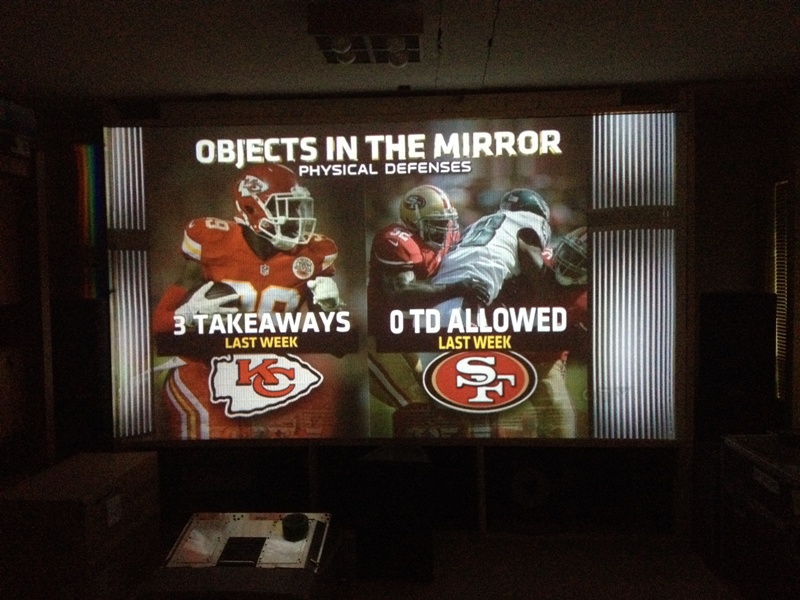
Ask and you shall receive!
Yes, the pix is flawed, I haven't even used H phase to center the two images.
The overall quality is about what I had when I set up my first Barco 800.  
I have some linearity issues between the two sets in a couple of zones, but as I was fine tuning the alignment, I am pretty sure I know what it is. Will dive back into it shortly.
I am now going to quickly tweak one projector to the Onkyo menu so I can read it, as I want to find out why the subwoofer isn't registering on the mic.
getting this far took about 6 tweaking hours, never mind replacing boards that had issues...
| Description: |
|
| Filesize: |
184.23 KB |
| Viewed: |
8662 Time(s) |
|
|
|
| Back to top |
|
|
CasetheCorvetteman
Joined: 09 Nov 2008
Posts: 6326
Location: Australia
|
| Posted: Mon Oct 06, 2014 12:02 am Post subject: |
|
|
| Curt Palme wrote: | | CasetheCorvetteman wrote: | | Don't spose you have a good working controller board with the latest firmware do ya? |
I do, $1500 incl shipping. |
Last fully working 909 sold over here for about $800 AUD
_________________
Barco Cine 9, ,Sony VPL570ES 4K SXRD, 135" OZ Theatre Majestic 16:9 screen, Denon X6700in preamp mode, 2x 7ch Tonewinner amps, 2x Tonewinner 15" subs, 2x 10" subs, 7.2.6...
RUNCO DTV991 LC ( NEC XG 852 LC ) 100" 4:3 screen, H/K AVR 7.1...
|
|
| Back to top |
|
|
Curt Palme
CRT Tech
Joined: 08 Mar 2006
Posts: 24396
Location: Langley, BC
TV/Projector: All of them!
|
| Posted: Mon Oct 06, 2014 12:34 am Post subject: |
|
|
|
Yes, but I get $1500 easily from my industrial clients. Supply and demand!
|
|
| Back to top |
|
|
CasetheCorvetteman
Joined: 09 Nov 2008
Posts: 6326
Location: Australia
|
| Posted: Mon Oct 06, 2014 12:44 am Post subject: |
|
|
Yeah mate i know, and i can easily respect the fact you charge that, same as you will probably agree id be wasting my $1,650 + to buy a part i dont need for a projector i could probably get for under $1,000 AUD, two years ago there is no way youd get one for under five grand!!
_________________
Barco Cine 9, ,Sony VPL570ES 4K SXRD, 135" OZ Theatre Majestic 16:9 screen, Denon X6700in preamp mode, 2x 7ch Tonewinner amps, 2x Tonewinner 15" subs, 2x 10" subs, 7.2.6...
RUNCO DTV991 LC ( NEC XG 852 LC ) 100" 4:3 screen, H/K AVR 7.1...
|
|
| Back to top |
|
|
CasetheCorvetteman
Joined: 09 Nov 2008
Posts: 6326
Location: Australia
|
| Posted: Mon Oct 06, 2014 12:45 am Post subject: |
|
|
Yeah mate i know, and i can easily respect the fact you charge that, same as you will probably agree id be wasting my $1,650 + to buy a part i dont need for a projector i could probably get for under $1,000 AUD, two years ago there is no way youd get one for under five grand!!
_________________
Barco Cine 9, ,Sony VPL570ES 4K SXRD, 135" OZ Theatre Majestic 16:9 screen, Denon X6700in preamp mode, 2x 7ch Tonewinner amps, 2x Tonewinner 15" subs, 2x 10" subs, 7.2.6...
RUNCO DTV991 LC ( NEC XG 852 LC ) 100" 4:3 screen, H/K AVR 7.1...
|
|
| Back to top |
|
|
|
|
|
|
|
You cannot post new topics in this forum
You cannot reply to topics in this forum
You cannot edit your posts in this forum
You cannot delete your posts in this forum
You cannot vote in polls in this forum
You cannot attach files in this forum
You can download files in this forum
|
Forum powered by phpBB © phpBB Group
|
|



