|
As this forum is rarely used anymore, we've locked it. Feel free to browse and read. Questions? Please reach out to us directly. Cheers! |

|
 |
|
|
| Author |
Message |
redfox001

Joined: 16 Mar 2009
Posts: 2257
Location: The Netherlands
|
| Posted: Sat Oct 11, 2014 10:58 am Post subject: |
|
|
One other thing that bothers me is that Casey writes that there is not much difference in picture quality comparing a moome and the vga. I know that improving the bandwidth makes a huge difference. Francisco also said that it looked more digital. Strid says so and many many others. But Casey says there is not much difference. That made me think that there is something elde going on.
_________________
701s->runco933->8500ultra->cinemax->9500mp->919 splitpack + cinemax
|
|
| Back to top |
|
 |
redfox001
Joined: 16 Mar 2009
Posts: 2257
Location: The Netherlands
|
| Posted: Sat Oct 11, 2014 11:31 am Post subject: |
|
|
And a third thing on the rise time calculations. If we assume 320MHz is a approximation of the bandwidth for a 8800GTS than we say that it is 3db down at 320MHz. For the bandwidth to look even we can at most tolerate 0,1 db down at 100MHz. What I read that is to get 0,1 db at 100MHz we need at least 5 times 100 MHz and more would be better. So 500 MHz would be needed.
A good theory in my opinion is that there is a VGA card out there that does 500MHz and Casey has him 
_________________
701s->runco933->8500ultra->cinemax->9500mp->919 splitpack + cinemax
|
|
| Back to top |
|
|
redfox001
Joined: 16 Mar 2009
Posts: 2257
Location: The Netherlands
|
| Posted: Sat Oct 11, 2014 11:41 am Post subject: |
|
|
| gjaky wrote: |
It is a sad thing that I'm a victim of this as well, bet if you look around a bit I'm not the only one, though not a severe as mine. Compare the screenshots posted by CIR Engineering and Stridsvognen at 1080p72Hz on the G90, they not quite the same. |
Yes good point. Might be an accumulation of good vga card and something like dirt or moisture on the boards or ageing of components?
_________________
701s->runco933->8500ultra->cinemax->9500mp->919 splitpack + cinemax
|
|
| Back to top |
|
|
Francisco

Joined: 05 Apr 2007
Posts: 305
Location: The Netherlands
|
| Posted: Sat Oct 11, 2014 12:07 pm Post subject: |
|
|
| redfox001 wrote: | To compare the images more carefully. Which one looks higher bandwidth?
Casey's 1080p@60 nothing modified and with PC through vga. Cine Max.

Francisco's 1080p@60 fully modified and with Moome. 909 not a splitpack!
 |
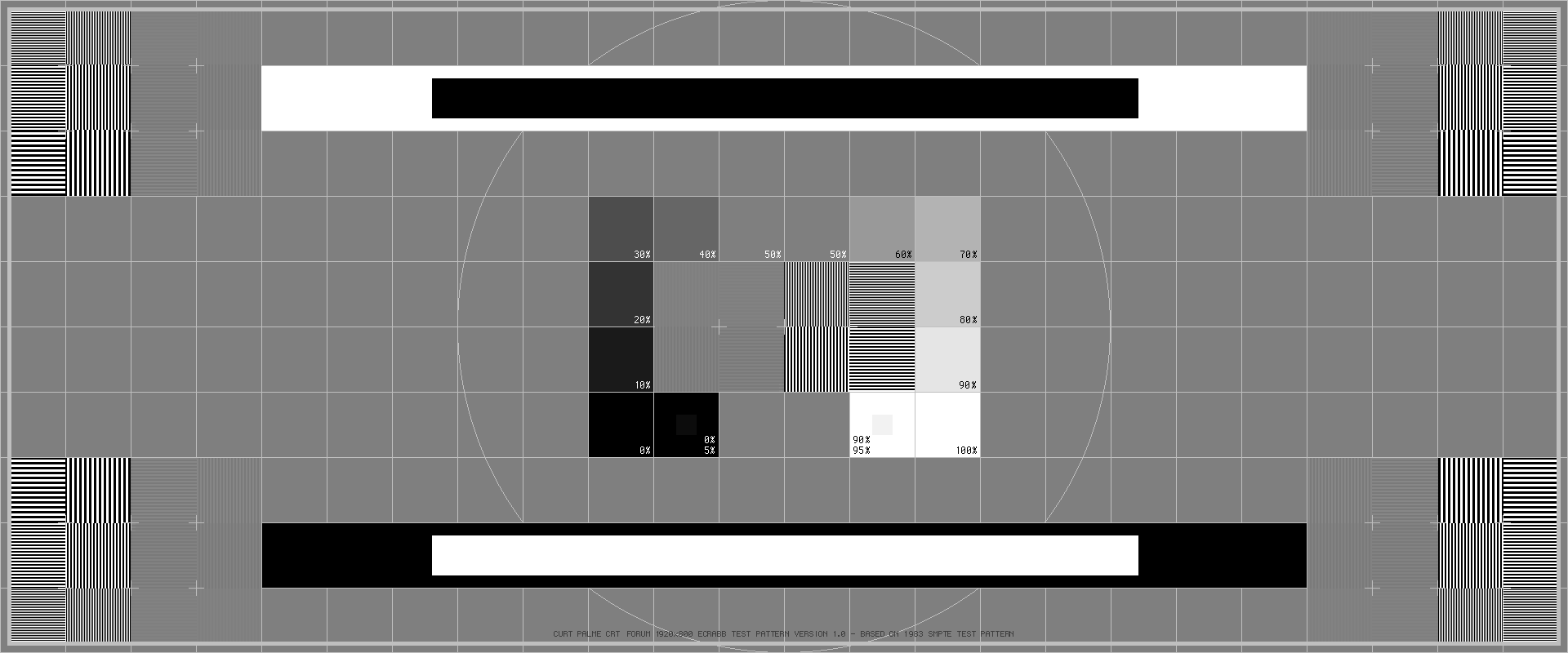
To be honest, I doubt that Casey's picture is 1080p@60hz. Scanlines are very visible and it's a different SMPTE pattern, look at where 50% is written. It doesn't line out with my picture.
In my picture focus is not adjusted to the max. Astig is still off etc. But I do know that I never get the sharpness on 1080@60 as in Casey's picture on 1080P@60 especially when using long VGA cables.
_________________
Philips vacuum cleaner | Trystar double toaster | Car radio with orange plastic memory arrows | Class A Fridge
|
|
| Back to top |
|
|
Francisco
Joined: 05 Apr 2007
Posts: 305
Location: The Netherlands
|
| Posted: Sat Oct 11, 2014 12:16 pm Post subject: |
|
|
Ah found it, Casey used 1920x800 ...... look at this pattern and where 50% is written. So....this clarify's it I think
| Description: |
|
| Filesize: |
20.49 KB |
| Viewed: |
9133 Time(s) |
|
_________________
Philips vacuum cleaner | Trystar double toaster | Car radio with orange plastic memory arrows | Class A Fridge
|
|
| Back to top |
|
|
redfox001
Joined: 16 Mar 2009
Posts: 2257
Location: The Netherlands
|
| Posted: Sat Oct 11, 2014 12:26 pm Post subject: |
|
|
In fact they look like the 1920x800 testpatterns here:
http://www.curtpalme.com/forum/viewtopic.php?topic=30209&forum=1
_________________
701s->runco933->8500ultra->cinemax->9500mp->919 splitpack + cinemax
Last edited by redfox001 on Sat Oct 11, 2014 12:27 pm; edited 1 time in total
|
|
| Back to top |
|
|
redfox001
Joined: 16 Mar 2009
Posts: 2257
Location: The Netherlands
|
| Posted: Sat Oct 11, 2014 12:27 pm Post subject: |
|
|
| Francisco wrote: | | Ah found it, Casey used 1920x800 ...... look at this pattern and where 50% is written. So....this clarify's it I think |
LOL we found the same image!  And probable at 48 Hz And probable at 48 Hz
_________________
701s->runco933->8500ultra->cinemax->9500mp->919 splitpack + cinemax
|
|
| Back to top |
|
|
gjaky

Joined: 05 Jun 2010
Posts: 2802
Location: Budapest, Hungary
|
|
| Back to top |
|
|
gjaky
Joined: 05 Jun 2010
Posts: 2802
Location: Budapest, Hungary
|
| Posted: Sat Oct 11, 2014 1:27 pm Post subject: |
|
|
| Francisco wrote: |
To be honest, I doubt that Casey's picture is 1080p@60hz. Scanlines are very visible and it's a different SMPTE pattern, look at where 50% is written. It doesn't line out with my picture.
In my picture focus is not adjusted to the max. Astig is still off etc. But I do know that I never get the sharpness on 1080@60 as in Casey's picture on 1080P@60 especially when using long VGA cables. |
But at 1920x800 the scanlines are at the same distance as with 1080p, lines are just cropped from the top and bottom, and the vertical resolution has nothing to do with bandwidth.
_________________
projectors in the past : NEC 6-9PG xtra, Electrohome Marquee 6-7500, NEC XG 1351 LC ( with super modified Electrohome VNB neckboard !!!)
current: VDC Marquee 9500LC
The MOD: VNB-DB, VIM-DB
|
|
| Back to top |
|
|
stridsvognen
Guest
|
| Posted: Sat Oct 11, 2014 1:44 pm Post subject: |
|
|
| gjaky wrote: | | Francisco wrote: |
To be honest, I doubt that Casey's picture is 1080p@60hz. Scanlines are very visible and it's a different SMPTE pattern, look at where 50% is written. It doesn't line out with my picture.
In my picture focus is not adjusted to the max. Astig is still off etc. But I do know that I never get the sharpness on 1080@60 as in Casey's picture on 1080P@60 especially when using long VGA cables. |
But at 1920x800 the scanlines are at the same distance as with 1080p, lines are just cropped from the top and bottom, and the vertical resolution has nothing to do with bandwidth. |
Hmm.. How do you calculate the pixel clock.?
|
|
| Back to top |
|
|
gjaky
Joined: 05 Jun 2010
Posts: 2802
Location: Budapest, Hungary
|
| Posted: Sat Oct 11, 2014 4:07 pm Post subject: |
|
|
| stridsvognen wrote: | | gjaky wrote: | | Francisco wrote: |
To be honest, I doubt that Casey's picture is 1080p@60hz. Scanlines are very visible and it's a different SMPTE pattern, look at where 50% is written. It doesn't line out with my picture.
In my picture focus is not adjusted to the max. Astig is still off etc. But I do know that I never get the sharpness on 1080@60 as in Casey's picture on 1080P@60 especially when using long VGA cables. |
But at 1920x800 the scanlines are at the same distance as with 1080p, lines are just cropped from the top and bottom, and the vertical resolution has nothing to do with bandwidth. |
Hmm.. How do you calculate the pixel clock.? |
It is: H total pixels * V total pixels * Framerate (/2 -if interlaced). But I still don't understand how this is realted to the complaint that the scanlines are too visible...
_________________
projectors in the past : NEC 6-9PG xtra, Electrohome Marquee 6-7500, NEC XG 1351 LC ( with super modified Electrohome VNB neckboard !!!)
current: VDC Marquee 9500LC
The MOD: VNB-DB, VIM-DB
|
|
| Back to top |
|
|
Francisco
Joined: 05 Apr 2007
Posts: 305
Location: The Netherlands
|
| Posted: Sat Oct 11, 2014 7:06 pm Post subject: |
|
|
| gjaky wrote: | | stridsvognen wrote: | | gjaky wrote: | | Francisco wrote: |
To be honest, I doubt that Casey's picture is 1080p@60hz. Scanlines are very visible and it's a different SMPTE pattern, look at where 50% is written. It doesn't line out with my picture.
In my picture focus is not adjusted to the max. Astig is still off etc. But I do know that I never get the sharpness on 1080@60 as in Casey's picture on 1080P@60 especially when using long VGA cables. |
But at 1920x800 the scanlines are at the same distance as with 1080p, lines are just cropped from the top and bottom, and the vertical resolution has nothing to do with bandwidth. |
Hmm.. How do you calculate the pixel clock.? |
It is: H total pixels * V total pixels * Framerate (/2 -if interlaced). But I still don't understand how this is realted to the complaint that the scanlines are too visible... |
You are right it doesn't change scan lines distance and it's not a complaint, it's just an observation. As well as my observation is that Casey used a different SMPTE pattern made for a different resolution. Now we have that clear I'm still wondering which resolution he used in this shot? 1080p60hz? 800p60hz? or something else (720p60hz) by mistake.... From my own experience I never have seen a 909 Cine9 Sony g90 etc. do 1080p@60hz running analog cables giving that amount of sharpness. So I'm very curious what I am looking at.
Strids is very right about lower pixel clock will give the projector more headroom resulting in better resolving 1:1
Therefore judged on: 1) 1:1 resolvability 2) sharpness 3) using a 1920x800 SMPTE pattern I would say this isn't 1080p@60hz
_________________
Philips vacuum cleaner | Trystar double toaster | Car radio with orange plastic memory arrows | Class A Fridge
|
|
| Back to top |
|
|
stridsvognen
Guest
|
| Posted: Sat Oct 11, 2014 7:12 pm Post subject: |
|
|
| gjaky wrote: | | stridsvognen wrote: | | gjaky wrote: | | Francisco wrote: |
To be honest, I doubt that Casey's picture is 1080p@60hz. Scanlines are very visible and it's a different SMPTE pattern, look at where 50% is written. It doesn't line out with my picture.
In my picture focus is not adjusted to the max. Astig is still off etc. But I do know that I never get the sharpness on 1080@60 as in Casey's picture on 1080P@60 especially when using long VGA cables. |
But at 1920x800 the scanlines are at the same distance as with 1080p, lines are just cropped from the top and bottom, and the vertical resolution has nothing to do with bandwidth. |
Hmm.. How do you calculate the pixel clock.? |
It is: H total pixels * V total pixels * Framerate (/2 -if interlaced). But I still don't understand how this is realted to the complaint that the scanlines are too visible... |
I dont see any pics with visible scanlines, so not sure whats that all about.
|
|
| Back to top |
|
|
CasetheCorvetteman

Joined: 09 Nov 2008
Posts: 6326
Location: Australia
|
| Posted: Sat Oct 11, 2014 9:42 pm Post subject: |
|
|
| Francisco wrote: | | Ah found it, Casey used 1920x800 ...... look at this pattern and where 50% is written. So....this clarify's it I think |
That is the pattern i used yes, the ones Crabb posted some time ago.
You cant see the scanlines in that image, or i certainly cant, you can see lines on the one on one off, but that is a given. On 1080p i have to put my face about 1-2 feet from the screen to see scanlines, even then its only on the middle area and only on green.
That image is about as focussed and well astiged ( electronically and mechanically ) as i can get it.
_________________
Barco Cine 9, ,Sony VPL570ES 4K SXRD, 135" OZ Theatre Majestic 16:9 screen, Denon X6700in preamp mode, 2x 7ch Tonewinner amps, 2x Tonewinner 15" subs, 2x 10" subs, 7.2.6...
RUNCO DTV991 LC ( NEC XG 852 LC ) 100" 4:3 screen, H/K AVR 7.1...
|
|
| Back to top |
|
|
stridsvognen
Guest
|
| Posted: Sun Oct 12, 2014 7:12 am Post subject: |
|
|
| CasetheCorvetteman wrote: | | Francisco wrote: | | Ah found it, Casey used 1920x800 ...... look at this pattern and where 50% is written. So....this clarify's it I think |
That is the pattern i used yes, the ones Crabb posted some time ago.
You cant see the scanlines in that image, or i certainly cant, you can see lines on the one on one off, but that is a given. On 1080p i have to put my face about 1-2 feet from the screen to see scanlines, even then its only on the middle area and only on green.
That image is about as focussed and well astiged ( electronically and mechanically ) as i can get it. |
Its quite important information, as you run a hole different pixel clock.
It do explain a lot why your shot looks a lot like the one Redfox posted running 720P 60hz regarding bandwidth performance. And no one else has been able to get the same result running 1080P 60hz, as its a much higher pixel clock.
Why dont you guys use the same pattern, prefered the one from HD Basic, it better to look at when detecting peaking.
And then always tell what pixel clock you run.
|
|
| Back to top |
|
|
redfox001
Joined: 16 Mar 2009
Posts: 2257
Location: The Netherlands
|
| Posted: Sun Oct 12, 2014 8:19 am Post subject: |
|
|
Yep we all make mistakes with these patterns. We should make a standard and also press the remote to show the scan frequencies or something. It is easy to forget about something when in a hurry or focussed on something else.
_________________
701s->runco933->8500ultra->cinemax->9500mp->919 splitpack + cinemax
|
|
| Back to top |
|
|
CasetheCorvetteman
Joined: 09 Nov 2008
Posts: 6326
Location: Australia
|
| Posted: Sun Oct 12, 2014 9:01 am Post subject: |
|
|
The pattern was still run at 1920x1080 60Hz... So its not different.
_________________
Barco Cine 9, ,Sony VPL570ES 4K SXRD, 135" OZ Theatre Majestic 16:9 screen, Denon X6700in preamp mode, 2x 7ch Tonewinner amps, 2x Tonewinner 15" subs, 2x 10" subs, 7.2.6...
RUNCO DTV991 LC ( NEC XG 852 LC ) 100" 4:3 screen, H/K AVR 7.1...
|
|
| Back to top |
|
|
redfox001
Joined: 16 Mar 2009
Posts: 2257
Location: The Netherlands
|
| Posted: Sun Oct 12, 2014 10:20 am Post subject: |
|
|
There are enough reasons to doubt the pictures so I think you should back up the miraculous clame with very strong evidence. That is a normal procedure in science. When someone comes with spectacular results like the guys that said certain particles went faster than light, the whole community was going crazy until they had to provide so hard evidence that it turned out there was something wrong with the wiring.
I am not able to confirm the measurements so you should provide more evidence like pressing the remote to show the frequencies.
But I am afraid you will not have the time
Until that I will close this subject and move on. Very much luck with your miracle Max.
_________________
701s->runco933->8500ultra->cinemax->9500mp->919 splitpack + cinemax
|
|
| Back to top |
|
|
CasetheCorvetteman
Joined: 09 Nov 2008
Posts: 6326
Location: Australia
|
| Posted: Sun Oct 12, 2014 10:33 am Post subject: |
|
|
Youre right, i dont have the time, and of late ive been very unwell. I work 60 hours a week and dont get much time to myself. Its all irrelevant.
_________________
Barco Cine 9, ,Sony VPL570ES 4K SXRD, 135" OZ Theatre Majestic 16:9 screen, Denon X6700in preamp mode, 2x 7ch Tonewinner amps, 2x Tonewinner 15" subs, 2x 10" subs, 7.2.6...
RUNCO DTV991 LC ( NEC XG 852 LC ) 100" 4:3 screen, H/K AVR 7.1...
|
|
| Back to top |
|
|
redfox001
Joined: 16 Mar 2009
Posts: 2257
Location: The Netherlands
|
| Posted: Sun Oct 12, 2014 11:43 am Post subject: |
|
|
| CasetheCorvetteman wrote: | | Youre right, i dont have the time, and of late ive been very unwell. I work 60 hours a week and dont get much time to myself. Its all irrelevant. |
It is not that I don't trust you without evidence of the contrary but it is just so spectaculair and difficult to repeat that investing more money into this track is not wise untill I know for sure you did not make a mistake.
Take it easy
_________________
701s->runco933->8500ultra->cinemax->9500mp->919 splitpack + cinemax
|
|
| Back to top |
|
|
|
|
|
|
|
You cannot post new topics in this forum
You cannot reply to topics in this forum
You cannot edit your posts in this forum
You cannot delete your posts in this forum
You cannot vote in polls in this forum
You cannot attach files in this forum
You can download files in this forum
|
Forum powered by phpBB © phpBB Group
|
|




