| Author |
Message |
hiddink
Joined: 09 Jan 2014
Posts: 47
|
| Posted: Sat Apr 19, 2014 9:29 am Post subject: Connecting an iPad to a Barco G 808 via HD fury |
|
|
Hello,
I have the following set-up:
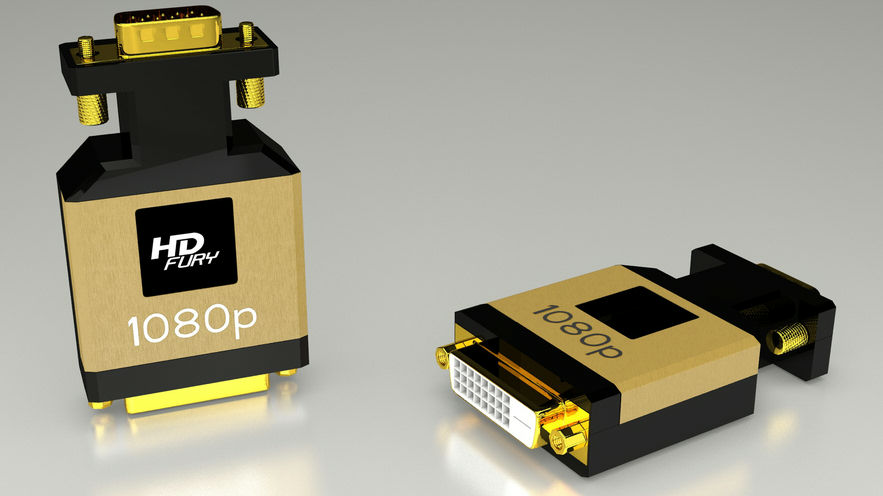
VLC-player on iPad-> via HDMI dock-connector to DVI input of HD-Fury using a HDMI-DVI-D cable-> HD-Fury connected to port 4/5 using VGA 5BNC cable (SVGA)...
I have not powered the HD Fury yet but since I see the blue led, I suppose it has enough power...
When I play a MP4 video on the iPad via the VLC-player, it says: "video playing now on connected TV display"...
However, on the Barco, it says: "No source input detected"...
What am I doing wrong? Do I have to tell the Barco in the setup that the input is coming through port 4/5?
Any ideas/suggestions?
Thanks in advance,
-brt
| Description: |
|
| Filesize: |
64 KB |
| Viewed: |
2451 Time(s) |
|
|
|
| Back to top |
|
 |
AnalogRocks
Forum Moderator

Joined: 08 Mar 2006
Posts: 26706
Location: Toronto, Ontario, Canada
TV/Projector: Sony 1252Q, AMPRO 4000G
|
| Posted: Sat Apr 19, 2014 11:25 am Post subject: |
|
|
Barco needs negative sync for the video signal. So you will need another box to flip the sync like a GammaX or Extron 202 box.
Also you will probably need the power cord for it as well.
Do you have a PC monitor handy? If so try plugging your setup into that to see if you get a picture. That way at least you will know it works.
_________________
Tech support for nothing
CRT.
HD done right!
|
|
| Back to top |
|
|
hiddink
Joined: 09 Jan 2014
Posts: 47
|
| Posted: Wed Apr 23, 2014 6:40 pm Post subject: Also negativa sync for Port 3? |
|
|
Hello,
| AnalogRocks wrote: | Barco needs negative sync for the video signal. So you will need another box to flip the sync like a GammaX or Extron 202 box.
Also you will probably need the power cord for it as well.
Do you have a PC monitor handy? If so try plugging your setup into that to see if you get a picture. That way at least you will know it works. |
Do I also need sync inversion if I use Port 3? Or is this only for 4/5? I am a bit lost...
Thanks
-brt
|
|
| Back to top |
|
|
the big E
Joined: 20 Apr 2013
Posts: 1928
Location: speedwell Tn.
|
| Posted: Sat Apr 26, 2014 7:21 pm Post subject: Re: Also negativa sync for Port 3? |
|
|
| hiddink wrote: | Hello,
| AnalogRocks wrote: | Barco needs negative sync for the video signal. So you will need another box to flip the sync like a GammaX or Extron 202 box.
Also you will probably need the power cord for it as well.
Do you have a PC monitor handy? If so try plugging your setup into that to see if you get a picture. That way at least you will know it works. |
Do I also need sync inversion if I use Port 3? Or is this only for 4/5? I am a bit lost...
Thanks
-brt |
Most sets only take negitive sync
The gamma x or a extron box(I have one) will work
My dwin is the same way and I use the gamma x to flip the sync signal
_________________
crt king of black
|
|
| Back to top |
|
|
hiddink
Joined: 09 Jan 2014
Posts: 47
|
| Posted: Sun Apr 27, 2014 7:16 am Post subject: Re: Also negativa sync for Port 3? |
|
|
| the big E wrote: | | hiddink wrote: | Hello,
| AnalogRocks wrote: | Barco needs negative sync for the video signal. So you will need another box to flip the sync like a GammaX or Extron 202 box.
Also you will probably need the power cord for it as well.
Do you have a PC monitor handy? If so try plugging your setup into that to see if you get a picture. That way at least you will know it works. |
Do I also need sync inversion if I use Port 3? Or is this only for 4/5? I am a bit lost...
Thanks
-brt |
Most sets only take negitive sync
The gamma x or a extron box(I have one) will work
My dwin is the same way and I use the gamma x to flip the sync signal |
Hello,
Thanks for your reply. However, Curt says here:
http://www.curtpalme.com/Barco_Port3_Input.shtm
"Port 3 will accept RGsB, RGBS and RGBHV signals and both positive and negative sync is supported. Component video via port 3 is not supported on any Barco projector however. While all "s" model projectors (except the 801s) will accept a component signal via port 4/5, the same is not true for port 3. "
So port 3 should be ok WITHOUT sync invertor, isn't it?
Thanks and regards,
-brt
|
|
| Back to top |
|
|
the big E
Joined: 20 Apr 2013
Posts: 1928
Location: speedwell Tn.
|
| Posted: Sun Apr 27, 2014 7:29 am Post subject: |
|
|
Port 3 will work without sync inversion
_________________
crt king of black
|
|
| Back to top |
|
|
|
|





