| Author |
Message |
km987654

Joined: 25 Jul 2007
Posts: 2874
Location: Australia
TV/Projector: Barco BG809s
|
| Posted: Wed Apr 23, 2014 6:57 am Post subject: |
|
|
| shelleybear wrote: | | All but two of the boards that I can see are 1096339. |
Part Numbers look like R7622696. Which is the part number for the board on Curts site and the one Decibel has posted. There is another version that does not have the daughter board.
|
|
| Back to top |
|
 |
Decibel

Joined: 31 May 2007
Posts: 904
Location: Roma - Italia
|
| Posted: Wed Apr 23, 2014 7:12 am Post subject: |
|
|
Yes exist an V-board without daughter board.
I have one. Today I'll post the p/n and pictures.
_________________
Domenico (Barco fan!)
|
|
| Back to top |
|
|
Decibel
Joined: 31 May 2007
Posts: 904
Location: Roma - Italia
|
| Posted: Wed Apr 23, 2014 8:49 am Post subject: |
|
|
| Decibel wrote: | Yes exist an V-board without daughter board.
I have one. Today I'll post the p/n and pictures. |
R7628085
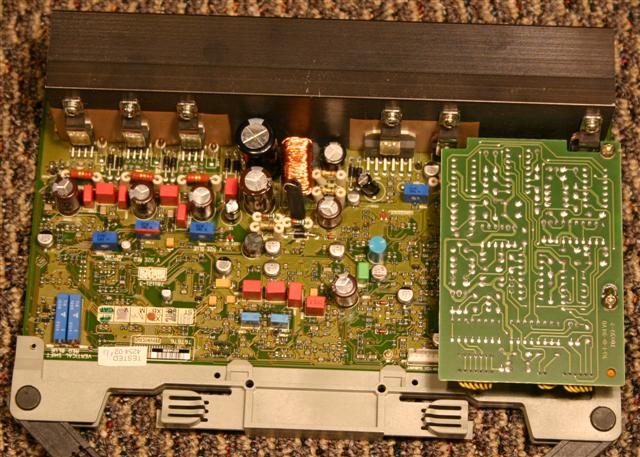
The little board in picture is a orbiting board.
_________________
Domenico (Barco fan!)
|
|
| Back to top |
|
|
Hulio
Joined: 15 Apr 2006
Posts: 494
Location: Belgium
|
| Posted: Wed Apr 23, 2014 10:13 am Post subject: |
|
|
There you have the picture from Decibel. The pots for R and B vertical shift are on the lower left side.
Like Curt already said, i also think you turned by mistake the vert. amplitude pots instead. Use his advise to get that back right.
Domenico, i'm not hanging the smart xss here but seeing the shape of that small board, could be the HDTV module R762268T ?
|
|
| Back to top |
|
|
km987654
Joined: 25 Jul 2007
Posts: 2874
Location: Australia
TV/Projector: Barco BG809s
|
| Posted: Wed Apr 23, 2014 11:06 am Post subject: |
|
|
| Hulio wrote: | There you have the picture from Decibel. The pots for R and B vertical shift are on the lower left side.
Like Curt already said, i also think you turned by mistake the vert. amplitude pots instead. Use his advise to get that back right.
Domenico, i'm not hanging the smart xss here but seeing the shape of that small board, could be the HDTV module R762268T ? |
Most likely the Orbit board.
|
|
| Back to top |
|
|
shelleybear
Joined: 18 Jul 2013
Posts: 70
|
| Posted: Wed Apr 23, 2014 2:13 pm Post subject: |
|
|
Decibel, thanks for the help, but tis is the same board Curt sent me the last time, and we have already seen that the configuration is different.
What we are trying to determine is where on the board the V-shift pots are.
|
|
| Back to top |
|
|
Curt Palme
CRT Tech
Joined: 08 Mar 2006
Posts: 24396
Location: Langley, BC
TV/Projector: All of them!
|
| Posted: Wed Apr 23, 2014 2:21 pm Post subject: |
|
|
|
Shelley, can you post a pic of your board? One glance at the pic, and I can tell you where they are.
|
|
| Back to top |
|
|
shelleybear
Joined: 18 Jul 2013
Posts: 70
|
| Posted: Thu Apr 24, 2014 3:59 pm Post subject: |
|
|
|
I'll get on it.
|
|
| Back to top |
|
|
Decibel
Joined: 31 May 2007
Posts: 904
Location: Roma - Italia
|
| Posted: Thu Apr 24, 2014 9:23 pm Post subject: |
|
|
| Hulio wrote: |
Domenico, i'm not hanging the smart xss here but seeing the shape of that small board, could be the HDTV module R762268T ? |
I don't know.
I never owned HDTV board.
The picture that I've posted come from Curt's website into Zenith 1200 section.
http://www.curtpalme.com/Zenith1200_Layout5.shtm
I think that's orbiting board.
http://www.barco.com/tde/(2552531702302320)/R5975385/05/Barco_InstallationManual_R5975385_05__Orbiting-Kit.pdf
(copy and paste all row above in your browser for orbiting board manual)
_________________
Domenico (Barco fan!)
|
|
| Back to top |
|
|
Hulio
Joined: 15 Apr 2006
Posts: 494
Location: Belgium
|
| Posted: Thu Apr 24, 2014 10:48 pm Post subject: |
|
|
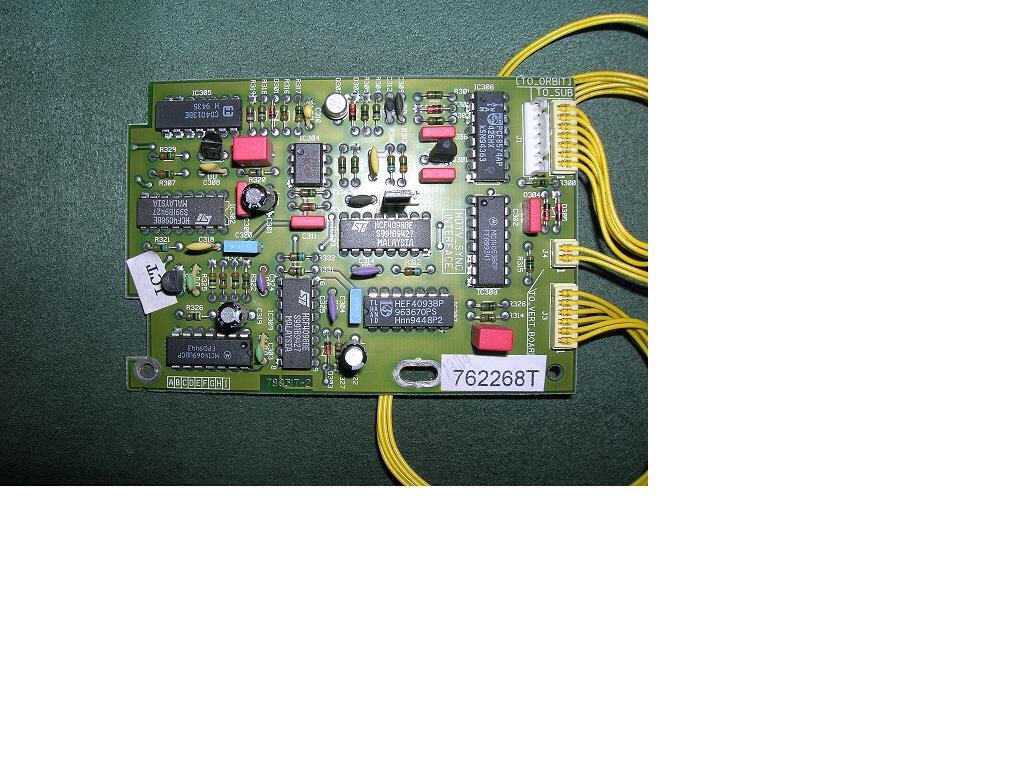
I am sure that in not the orbiting module. I owned the HDTV module in the past ( AKA tri-level sync board ).
The orbiting module is rectangular and have only two wire connections.
On the HDTV board there are three connection jumpers and also the shape is a bit different. Here a pic of my former HDTV module.
| Description: |
|
| Filesize: |
199.95 KB |
| Viewed: |
3371 Time(s) |
|
|
|
| Back to top |
|
|
Decibel
Joined: 31 May 2007
Posts: 904
Location: Roma - Italia
|
| Posted: Thu Apr 24, 2014 10:58 pm Post subject: |
|
|
ok 
_________________
Domenico (Barco fan!)
|
|
| Back to top |
|
|
shelleybear
Joined: 18 Jul 2013
Posts: 70
|
| Posted: Sat May 03, 2014 3:52 am Post subject: Vertical Update |
|
|
| Curt Palme wrote: | Ok, you're adjusting the wrong pots! One pair of pots adjusts the V size of the R and B tubes, the other set of pots that are longer in length with a little brass screw at the top end facing you are the V shift pots. Those are the ones you need to adjust.
Once you've got the center cross overlapped with the V shift pots, then go back into the main convergence test pattern, and adjust the V size controls so that the size of all three images are pretty close to equal top and bottom. That will minimize use of the convergence controls, which is a good thing. |
Curt, I found one pot with two metal screws side by side.
one has a red dot.
They are in the same general location as the ones in the diagram.
That is, to the right of V-size adjustment.
What threw me off, is the fact that there was only a single pot with two screws, rather then two pots with one each.
What sort of tool can I use to adjust these as the plastic screwdriver bits are way too large.
I was thinking standard Jewelers screwdrivers.
Either way, I will not touch them until I get your answer.
Shelley
|
|
| Back to top |
|
|
Apfelmousse
Joined: 26 Apr 2014
Posts: 74
Location: Germany
|
| Posted: Sat May 03, 2014 4:12 am Post subject: |
|
|
Hi all,
the thread reminds me of my setup experience.
I was wondering: There is a pot-control of red and blue to align with green. Thats OK, in theory you do not need 3 pots to align 3 items with each other, 2 are sufficient.
But how do you align the green tube if it should be necessary, if the raster is not centered there? Is that only possible electronically, i.e. through the menus? If so, why do they have a pot alignment for red and blue anyway??
cheers
Martin
|
|
| Back to top |
|
|
km987654
Joined: 25 Jul 2007
Posts: 2874
Location: Australia
TV/Projector: Barco BG809s
|
| Posted: Sat May 03, 2014 7:04 am Post subject: Re: Vertical Update |
|
|
| shelleybear wrote: | | Curt Palme wrote: | Ok, you're adjusting the wrong pots! One pair of pots adjusts the V size of the R and B tubes, the other set of pots that are longer in length with a little brass screw at the top end facing you are the V shift pots. Those are the ones you need to adjust.
Once you've got the center cross overlapped with the V shift pots, then go back into the main convergence test pattern, and adjust the V size controls so that the size of all three images are pretty close to equal top and bottom. That will minimize use of the convergence controls, which is a good thing. |
Curt, I found one pot with two metal screws side by side.
one has a red dot.
They are in the same general location as the ones in the diagram.
That is, to the right of V-size adjustment.
What threw me off, is the fact that there was only a single pot with two screws, rather then two pots with one each.
What sort of tool can I use to adjust these as the plastic screwdriver bits are way too large.
I was thinking standard Jewelers screwdrivers.
Either way, I will not touch them until I get your answer.
Shelley |
You can use a normal screwdriver.
|
|
| Back to top |
|
|
|
|




