|
As this forum is rarely used anymore, we've locked it. Feel free to browse and read. Questions? Please reach out to us directly. Cheers! |

|
 |
|
|
| Author |
Message |
Spanky Ham

Joined: 22 Mar 2006
Posts: 5643
Location: Comedy Central
|
| Posted: Fri Jul 04, 2014 5:30 pm Post subject: |
|
|
| stridsvognen wrote: | | Spanky Ham wrote: | Francisco,
I wouldn't worry about doing all three colors at the same time. It really is a waste of time. Also, if you are testing bandwidth with a one/one pattern, then the pattern should be in the upper left hand corner. |
Are you not confusing bandwidth with focus.?
If you can resolve the 1:1 somewhere on the screen you know that the video chain has the speed, then the rest is setup related, not bandwidth.
So for a bandwidth evaluation the center screen is fine, as you can check it out before you get all your setup nailed 100% perfect. |
Not sure where you are getting your info from, but maybe you should take some time to read all of Scott's posts. Nash might have most of his relevant posts and threads bookmarked from here and AVS, so you might ask him for some links.
http://www.curtpalme.com/forum/viewtopic.php?p=271631&highlight=pattern#271631
|
|
| Back to top |
|
 |
stridsvognen
Guest
|
| Posted: Fri Jul 04, 2014 6:04 pm Post subject: |
|
|
| Spanky Ham wrote: | | stridsvognen wrote: | | Spanky Ham wrote: | Francisco,
I wouldn't worry about doing all three colors at the same time. It really is a waste of time. Also, if you are testing bandwidth with a one/one pattern, then the pattern should be in the upper left hand corner. |
Are you not confusing bandwidth with focus.?
If you can resolve the 1:1 somewhere on the screen you know that the video chain has the speed, then the rest is setup related, not bandwidth.
So for a bandwidth evaluation the center screen is fine, as you can check it out before you get all your setup nailed 100% perfect. |
Not sure where you are getting your info from, but maybe you should take some time to read all of Scott's posts. Nash might have most of his relevant posts and threads bookmarked from here and AVS, so you might ask him for some links.
http://www.curtpalme.com/forum/viewtopic.php?p=271631&highlight=pattern#271631 |
Again you keep quoting someone else, i doubt anyone in here will claim that video chain bandwidth is tube face or magnetic related. At least thats new to me.
I think you should try play with bandwidth, and see how it reacts, and what it makes to the image. Get your own experience.!!
I know you cant get a good understanding of it if playing with a G90, but you are closer to Justin or Mike Parker, go there see the result.
Im sure they can both show you.
If you like to play, you can make a thread and post a 1:1 of your projector, full SMPTE pattern, a picture of each corner, and each color and all of them together.
Ill be happy to do the same and show you what decent bandwidth is.
Also what difference focus and magnetic adjustment do to the bandwidth test pattern, in all 4 corners.
|
|
| Back to top |
|
|
redfox001

Joined: 16 Mar 2009
Posts: 2257
Location: The Netherlands
|
| Posted: Fri Jul 04, 2014 6:18 pm Post subject: |
|
|
I have no idea why but this is what Mike says:
| Quote: |
The right top horiz line group is mostly focus, stig and setup dependent, while the top left vert line group require the same, but its also THE line group to verify the bandwidth. So with the top left line group being the real rule for bandwidth, the top right line group also doubles as the reference to the top left as to what the lines should look like, and it is also the reference to what the dark section in between the lines should look like on the top left line group.
|
https://www.curtpalme.com/forum_archived/viewtopic.php@t=34512.html
|
|
| Back to top |
|
|
stridsvognen
Guest
|
| Posted: Fri Jul 04, 2014 6:26 pm Post subject: |
|
|
| redfox001 wrote: | I have no idea why but this is what Mike says:
| Quote: |
The right top horiz line group is mostly focus, stig and setup dependent, while the top left vert line group require the same, but its also THE line group to verify the bandwidth. So with the top left line group being the real rule for bandwidth, the top right line group also doubles as the reference to the top left as to what the lines should look like, and it is also the reference to what the dark section in between the lines should look like on the top left line group.
|
https://www.curtpalme.com/forum_archived/viewtopic.php@t=34512.html |
Simply use the horizontal lines as reference, and your vertical lines need the same level sharpness and hold the same level betwen the lines.
You scan horizontal,. so making a vertical line means that your beam have to start and stop very fast, to do that you need bandwidth, if to low it will not reach the right level, muting the output, just as you see in your shots.
To find the bandwidth of your setup, lower the resolution until both vertical and horizontal lines look the same.
For a fast peak, dont worry about focus and other adjustments, just step back and look if all the resolution groups holds the same level, they are all ½ black ½ white, so the same amount of light on all groups.
|
|
| Back to top |
|
|
Spanky Ham
Joined: 22 Mar 2006
Posts: 5643
Location: Comedy Central
|
| Posted: Fri Jul 04, 2014 7:26 pm Post subject: |
|
|
| stridsvognen wrote: | | Spanky Ham wrote: | | stridsvognen wrote: | | Spanky Ham wrote: | Francisco,
I wouldn't worry about doing all three colors at the same time. It really is a waste of time. Also, if you are testing bandwidth with a one/one pattern, then the pattern should be in the upper left hand corner. |
Are you not confusing bandwidth with focus.?
If you can resolve the 1:1 somewhere on the screen you know that the video chain has the speed, then the rest is setup related, not bandwidth.
So for a bandwidth evaluation the center screen is fine, as you can check it out before you get all your setup nailed 100% perfect. |
Not sure where you are getting your info from, but maybe you should take some time to read all of Scott's posts. Nash might have most of his relevant posts and threads bookmarked from here and AVS, so you might ask him for some links.
http://www.curtpalme.com/forum/viewtopic.php?p=271631&highlight=pattern#271631 |
Again you keep quoting someone else, i doubt anyone in here will claim that video chain bandwidth is tube face or magnetic related. At least thats new to me.
I think you should try play with bandwidth, and see how it reacts, and what it makes to the image. Get your own experience.!!
I know you cant get a good understanding of it if playing with a G90, but you are closer to Justin or Mike Parker, go there see the result.
Im sure they can both show you.
If you like to play, you can make a thread and post a 1:1 of your projector, full SMPTE pattern, a picture of each corner, and each color and all of them together.
Ill be happy to do the same and show you what decent bandwidth is.
Also what difference focus and magnetic adjustment do to the bandwidth test pattern, in all 4 corners. |
Yes, I keep quoting TSE. I respect MP and CIR and both are highly knowledgeable, but IMHO Scott knows more about the electronics than anyone here especially Marquee. Have you even spent time reading some of the old threads both here and on AVS?
Why should I play with my own pj, when others who I know to be better at this than me have already tested and documented this? I have been to VDC multiple times and seen Scott's playroom, so I have seen well set up Marquees. On one visit, Scott showed me how to focus using his MTF measuring equipment. One minute and you have perfect focus.
|
|
| Back to top |
|
|
stridsvognen
Guest
|
| Posted: Fri Jul 04, 2014 7:41 pm Post subject: |
|
|
| Spanky Ham wrote: | | stridsvognen wrote: | | Spanky Ham wrote: | | stridsvognen wrote: | | Spanky Ham wrote: | Francisco,
I wouldn't worry about doing all three colors at the same time. It really is a waste of time. Also, if you are testing bandwidth with a one/one pattern, then the pattern should be in the upper left hand corner. |
Are you not confusing bandwidth with focus.?
If you can resolve the 1:1 somewhere on the screen you know that the video chain has the speed, then the rest is setup related, not bandwidth.
So for a bandwidth evaluation the center screen is fine, as you can check it out before you get all your setup nailed 100% perfect. |
Not sure where you are getting your info from, but maybe you should take some time to read all of Scott's posts. Nash might have most of his relevant posts and threads bookmarked from here and AVS, so you might ask him for some links.
http://www.curtpalme.com/forum/viewtopic.php?p=271631&highlight=pattern#271631 |
Again you keep quoting someone else, i doubt anyone in here will claim that video chain bandwidth is tube face or magnetic related. At least thats new to me.
I think you should try play with bandwidth, and see how it reacts, and what it makes to the image. Get your own experience.!!
I know you cant get a good understanding of it if playing with a G90, but you are closer to Justin or Mike Parker, go there see the result.
Im sure they can both show you.
If you like to play, you can make a thread and post a 1:1 of your projector, full SMPTE pattern, a picture of each corner, and each color and all of them together.
Ill be happy to do the same and show you what decent bandwidth is.
Also what difference focus and magnetic adjustment do to the bandwidth test pattern, in all 4 corners. |
Yes, I keep quoting TSE. I respect MP and CIR and both are highly knowledgeable, but IMHO Scott knows more about the electronics than anyone here especially Marquee. Have you even spent time reading some of the old threads both here and on AVS?
Why should I play with my own pj, when others who I know to be better at this than me have already tested and documented this? I have been to VDC multiple times and seen Scott's playroom, so I have seen well set up Marquees. On one visit, Scott showed me how to focus using his MTF measuring equipment. One minute and you have perfect focus. |
Yes i spent time reading old threads, just like you, but not like you i also do my own testing and get some hands on experience, and with that and what i read fits quite nice together, but i get the feeling that you might not have a clue what they wrote and what bandwidth is all about, on top of that, there has been a lot of updates on the Marquee bandwidth side thanks to Mike, and if you have only seen standard CRT machines, i fully understand that you dont have a clue to whats going on, and what to look for.
MTF is as you write is for some parts focus related, and try separate that from bandwidth, as its 2 different things. Not that they are not both important.
Your coment about having to evaluate bandwidth in the corner just dont make sense.
Its hard to argue with someone like you, that just have a opinion based on what you read, not knowing what you understood or misunderstood.
So if you want to argue with me please do with proofs and experience of your own, and ill do the same, your welcome to bring in the experts to help you, just let them comment in the actual argument we are having, not slapping around with old threads.
|
|
| Back to top |
|
|
Francisco

Joined: 05 Apr 2007
Posts: 305
Location: The Netherlands
|
| Posted: Fri Jul 04, 2014 7:52 pm Post subject: |
|
|
Ok please do so in another or new topic....
_________________
Philips vacuum cleaner | Trystar double toaster | Car radio with orange plastic memory arrows | Class A Fridge
|
|
| Back to top |
|
|
redfox001
Joined: 16 Mar 2009
Posts: 2257
Location: The Netherlands
|
| Posted: Fri Jul 04, 2014 8:27 pm Post subject: |
|
|
|
Strid is a little to focussed on small things. Perhaps some slight autistic thing. Try to see the big picture please. We are all trying to HELP each other. Enough said cause Strid is certainly a smart person too.
|
|
| Back to top |
|
|
stridsvognen
Guest
|
| Posted: Fri Jul 04, 2014 9:11 pm Post subject: |
|
|
|
Sorry for the noise, ill let Spanky Ham take over from here.
|
|
| Back to top |
|
|
Francisco
Joined: 05 Apr 2007
Posts: 305
Location: The Netherlands
|
| Posted: Sun Jul 06, 2014 10:10 am Post subject: |
|
|
Okay, did some more tests but this time with a by Moome modified RGB2 card. It uses the IFB FULLHD V3 Sony input board.
It's tested with original switcher, driver and neck cards so original video chain. as you can see the PJ isn't holding BW capabilities but it lies within the HDMI card.
Sharpness, picture noise and stability are far less with original video chain then with Greg's modifications. So I would bet that when Greg would use Moome's RGB2 card in combination with his mods we'll have best results.
I will test Moome's RGB2 board with greg's modified driver, switcher and neck cards and see what result it will give.
Picture 1080p @60hz Original video chain and Moome's RGB2


_________________
Philips vacuum cleaner | Trystar double toaster | Car radio with orange plastic memory arrows | Class A Fridge
|
|
| Back to top |
|
|
wwm
Joined: 15 Aug 2012
Posts: 18
|
| Posted: Thu Jul 10, 2014 8:44 am Post subject: |
|
|
| Francisco wrote: | Okay, did some more tests but this time with a by Moome modified RGB2 card. It uses the IFB FULLHD V3 Sony input board.
It's tested with original switcher, driver and neck cards so original video chain. as you can see the PJ isn't holding BW capabilities but it lies within the HDMI card.
Sharpness, picture noise and stability are far less with original video chain then with Greg's modifications. So I would bet that when Greg would use Moome's RGB2 card in combination with his mods we'll have best results.
I will test Moome's RGB2 board with greg's modified driver, switcher and neck cards and see what result it will give.
Picture 1080p @60hz Original video chain and Moome's RGB2
|
Admirable experiment, want to have very good results. To tell you.
|
|
| Back to top |
|
|
Francisco
Joined: 05 Apr 2007
Posts: 305
Location: The Netherlands
|
| Posted: Tue Jul 15, 2014 1:20 pm Post subject: |
|
|
Okay now I mixed Greg modified boards with the Port3 modified board by Moome, this is the result:

I quite like it. Sharpness is superb 1:1 attenuation far better than original.
The Eisemann modifications are now HDMI 1.4 and because of this experiment Greg is building new mods with even higher BW and a new HDMI 2.0 chip with high BW capabilities. I think this will bring the 909 to a new level. I agree that this is accomplished more easy on a Marquee maybe because of the fact it's simple 8 step video chain. But I must say I still like the sharpness of the 909 it's almost like a digital but still the advantages of CRT.
_________________
Philips vacuum cleaner | Trystar double toaster | Car radio with orange plastic memory arrows | Class A Fridge
|
|
| Back to top |
|
|
redfox001
Joined: 16 Mar 2009
Posts: 2257
Location: The Netherlands
|
| Posted: Tue Jul 15, 2014 1:57 pm Post subject: |
|
|
Ok that looks better than I have it and better than without the Greg chain. I know what you mean when you say something digital comes in. After a little getting used to that it is an improvement to see little details and the more pronounced/sharper edges  But I doubted a little because at first it seems a bit unnatural real. But I doubted a little because at first it seems a bit unnatural real. 
Great work! I think I will try some of these mods too.
|
|
| Back to top |
|
|
jbmeyer13

Joined: 03 Dec 2010
Posts: 1135
|
| Posted: Tue Jul 15, 2014 2:37 pm Post subject: |
|
|
| Spanky Ham wrote: | | stridsvognen wrote: | | Spanky Ham wrote: | | stridsvognen wrote: | | Spanky Ham wrote: | Francisco,
I wouldn't worry about doing all three colors at the same time. It really is a waste of time. Also, if you are testing bandwidth with a one/one pattern, then the pattern should be in the upper left hand corner. |
Are you not confusing bandwidth with focus.?
If you can resolve the 1:1 somewhere on the screen you know that the video chain has the speed, then the rest is setup related, not bandwidth.
So for a bandwidth evaluation the center screen is fine, as you can check it out before you get all your setup nailed 100% perfect. |
Not sure where you are getting your info from, but maybe you should take some time to read all of Scott's posts. Nash might have most of his relevant posts and threads bookmarked from here and AVS, so you might ask him for some links.
http://www.curtpalme.com/forum/viewtopic.php?p=271631&highlight=pattern#271631 |
Again you keep quoting someone else, i doubt anyone in here will claim that video chain bandwidth is tube face or magnetic related. At least thats new to me.
I think you should try play with bandwidth, and see how it reacts, and what it makes to the image. Get your own experience.!!
I know you cant get a good understanding of it if playing with a G90, but you are closer to Justin or Mike Parker, go there see the result.
Im sure they can both show you.
If you like to play, you can make a thread and post a 1:1 of your projector, full SMPTE pattern, a picture of each corner, and each color and all of them together.
Ill be happy to do the same and show you what decent bandwidth is.
Also what difference focus and magnetic adjustment do to the bandwidth test pattern, in all 4 corners. |
Yes, I keep quoting TSE. I respect MP and CIR and both are highly knowledgeable, but IMHO Scott knows more about the electronics than anyone here especially Marquee. Have you even spent time reading some of the old threads both here and on AVS?
Why should I play with my own pj, when others who I know to be better at this than me have already tested and documented this? I have been to VDC multiple times and seen Scott's playroom, so I have seen well set up Marquees. On one visit, Scott showed me how to focus using his MTF measuring equipment. One minute and you have perfect focus. |
Just to interject for a brief moment. CIR, MP and TSE are all extremely valuable resources and I've leaned on each of them in different capacities. CIR is the perhaps the best calibrator in the business and one of the few that still knows how to truly maximize a CRT's performance.
MP is the Marquee mad scientist who keeps pushing the boundaries of modified video chain performance. CIR says one of the things he loves about MP is that he just keeps digging deeper. I for one was very skeptical about this but CIR's insistence in getting together with Mike was an eye opening experience. I can't go back to stock boards now.
TSE (to Spanky's point) is the Marquee top gun. He re-designed an entire neck board and along with the original EH engineers knows more about the Marquee than anyone else. Best part is that he's accessible. He instructed me on how to calculate MTF and what perceptible difference are for home theater use.
With all of that said I also greatly respect Kurt's efforts. To some it may seem like nitpicking but he's spent a fair amount of money to acquire and objectively compare multiple CRT and digital projectors. He's one of the few that can do a real time A/B comparison and he really drills into the visual analysis. Perhaps he notices things that don't always make the biggest difference BUT he does notice them. That critical approach is what keeps pushing things forward and resulting in better finished products; especially when we are talking about niche products like Lumagen processors and Moome cards.
Carry one 
_________________
Projector: Modded 9501LC ULtra- MP VIM, Vold VNB, ETECH LVPS, Silver VIM Cables, HD10F's & a V1 case!
|
|
| Back to top |
|
|
jbmeyer13
Joined: 03 Dec 2010
Posts: 1135
|
| Posted: Tue Jul 15, 2014 2:41 pm Post subject: |
|
|
| Francisco wrote: | Okay now I mixed Greg modified boards with the Port3 modified board by Moome, this is the result:
I quite like it. Sharpness is superb 1:1 attenuation far better than original.
The Eisemann modifications are now HDMI 1.4 and because of this experiment Greg is building new mods with even higher BW and a new HDMI 2.0 chip with high BW capabilities. I think this will bring the 909 to a new level. I agree that this is accomplished more easy on a Marquee maybe because of the fact it's simple 8 step video chain. But I must say I still like the sharpness of the 909 it's almost like a digital but still the advantages of CRT. |
That looks much better than before! Keep up the good work.
_________________
Projector: Modded 9501LC ULtra- MP VIM, Vold VNB, ETECH LVPS, Silver VIM Cables, HD10F's & a V1 case!
|
|
| Back to top |
|
|
ElTopo

Joined: 07 Nov 2006
Posts: 1640
|
| Posted: Tue Jul 15, 2014 7:25 pm Post subject: |
|
|
WOW that looks amazing !
_________________
Barco Cine 9 the one and only
|
|
| Back to top |
|
|
ElTopo
Joined: 07 Nov 2006
Posts: 1640
|
| Posted: Tue Jul 15, 2014 7:39 pm Post subject: |
|
|
HDMI 2.0 and HDCP 2.2 mods ?
_________________
Barco Cine 9 the one and only
|
|
| Back to top |
|
|
CasetheCorvetteman

Joined: 09 Nov 2008
Posts: 6326
Location: Australia
|
| Posted: Wed Jul 16, 2014 8:09 am Post subject: |
|
|
| redfox001 wrote: | | Just green 1080p@60 because Case asked. |
Sorry mate i hadnt seen this til now.
I did indeed also test the MOOME V3 external against the V2 XG internal and found the V2 internal to be considerably better, and it was on par with the RGBHV from my PC ( using a GTX 650Ti ) on the XG. I dont remember where the HD Fury 3 came in but it wasnt as good as the V2 internal.
When i tested on the Barco i did the RGBHV ( from a GTX 760 ) against the MOOME V3 external and it was clearly better via RGBHV.
I did also test 2560x1600 via RGBHV and although it was easy enough to read the text in Windows, apart from being extremely small, it was also noticably softer. There was no option in those drivers for 2560x1440, which could possibly have been a shade better, but no way it would go 1:1, and i have no video files in such a high resolution to test with so i used a 1920x1080 file run in a window which i must say didnt look too bad. Considering i spent about 25 minutes on convergence and didnt do anything to focus or astig.
_________________
Barco Cine 9, ,Sony VPL570ES 4K SXRD, 135" OZ Theatre Majestic 16:9 screen, Denon X6700in preamp mode, 2x 7ch Tonewinner amps, 2x Tonewinner 15" subs, 2x 10" subs, 7.2.6...
RUNCO DTV991 LC ( NEC XG 852 LC ) 100" 4:3 screen, H/K AVR 7.1...
|
|
| Back to top |
|
|
ElTopo
Joined: 07 Nov 2006
Posts: 1640
|
| Posted: Tue Jul 22, 2014 5:02 am Post subject: |
|
|
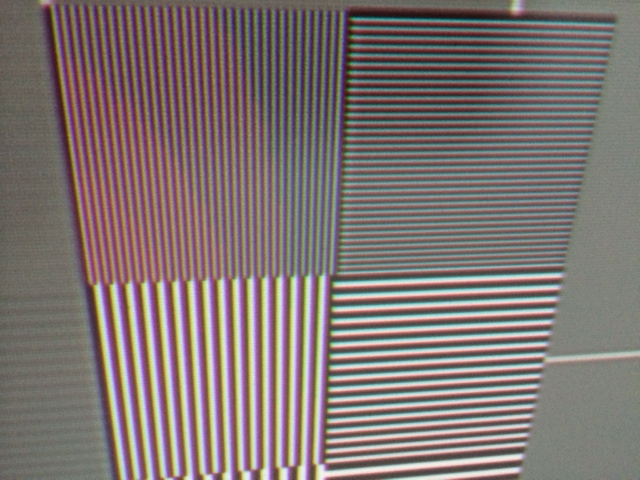
Perfect 1:1 with 1080p@60Hz
Sony VPL VW200
ElTopo
| Description: |
|
| Filesize: |
137.01 KB |
| Viewed: |
4635 Time(s) |
|
_________________
Barco Cine 9 the one and only
|
|
| Back to top |
|
|
stridsvognen
Guest
|
| Posted: Tue Jul 22, 2014 12:40 pm Post subject: |
|
|
| ElTopo wrote: | Perfect 1:1 with 1080p@60Hz
Sony VPL VW200
ElTopo |
Lol nice joke.
|
|
| Back to top |
|
|
|
|
|
|
|
You cannot post new topics in this forum
You cannot reply to topics in this forum
You cannot edit your posts in this forum
You cannot delete your posts in this forum
You cannot vote in polls in this forum
You cannot attach files in this forum
You can download files in this forum
|
Forum powered by phpBB © phpBB Group
|
|



