| Author |
Message |
redfox001

Joined: 16 Mar 2009
Posts: 2257
Location: The Netherlands
|
| Posted: Fri Jul 04, 2014 2:37 pm Post subject: |
|
|

This was the resolution for the former pictures.
Does anyone know what timings are good for a Cine Max? The image is wider than the raster is right now.
|
|
| Back to top |
|
 |
stridsvognen
Guest
|
| Posted: Fri Jul 04, 2014 2:56 pm Post subject: |
|
|
Try start with the 1080P 60hz standard, 1125x 2200.
Also there is something wrong with your framerate.. It has to be 59.94
|
|
| Back to top |
|
|
soleboy

Joined: 27 Aug 2010
Posts: 22
|
| Posted: Fri Jul 04, 2014 3:10 pm Post subject: |
|
|
Don't you have left ringing problem? almost all barco, even marquee have left ringing problem.
so I set 'back porch' more than 200.
and shift image to right using shift phase.
http://www.curtpalme.com/forum/viewtopic.php?topic=35422&forum=1
_________________
1 Cine9, 1 CineMAX and a bunch of faulty boards...
|
|
| Back to top |
|
|
redfox001
Joined: 16 Mar 2009
Posts: 2257
Location: The Netherlands
|
| Posted: Fri Jul 04, 2014 4:18 pm Post subject: |
|
|
Ok I changed the timings to this and indead everything is a lot better now. With the internal moome the timings where perfect in the standard mode.

|
|
| Back to top |
|
|
redfox001
Joined: 16 Mar 2009
Posts: 2257
Location: The Netherlands
|
| Posted: Fri Jul 04, 2014 4:24 pm Post subject: |
|
|
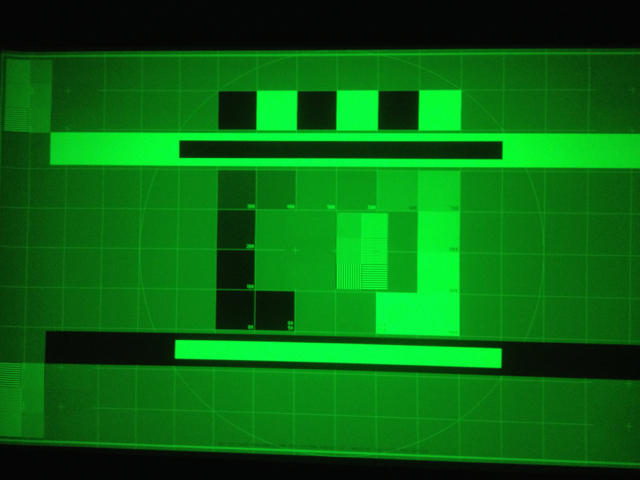
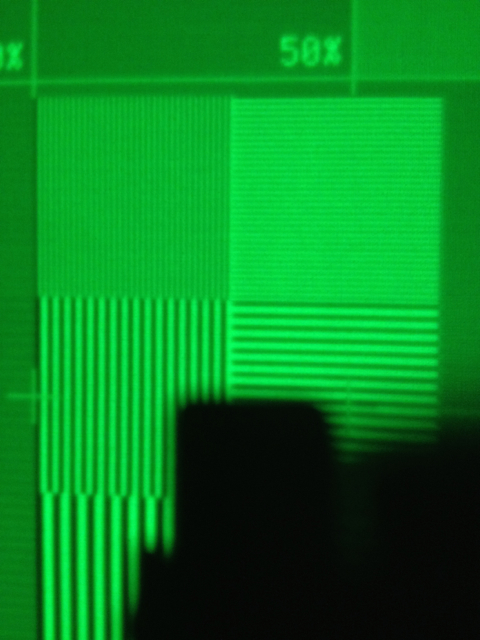
And new smpte pictures 1:1 1080p@60 143,45 MHz
Left a little curling still.
| Description: |
|
| Filesize: |
266.39 KB |
| Viewed: |
3794 Time(s) |
|
| Description: |
|
| Filesize: |
267.23 KB |
| Viewed: |
3794 Time(s) |
|
|
|
| Back to top |
|
|
stridsvognen
Guest
|
| Posted: Fri Jul 04, 2014 5:02 pm Post subject: |
|
|
Why dont you run a full normal 148Mhz standard 1080P 60hz.?
And see how that looks, and try a higher Htotal if you cant get a clean image.
|
|
| Back to top |
|
|
redfox001
Joined: 16 Mar 2009
Posts: 2257
Location: The Netherlands
|
| Posted: Fri Jul 04, 2014 6:14 pm Post subject: |
|
|
| stridsvognen wrote: | Why dont you run a full normal 148Mhz standard 1080P 60hz.?
And see how that looks, and try a higher Htotal if you cant get a clean image. |
No reason but there is no standard setting like that. Sorry.
|
|
| Back to top |
|
|
stridsvognen
Guest
|
| Posted: Fri Jul 04, 2014 6:20 pm Post subject: |
|
|
| redfox001 wrote: | | stridsvognen wrote: | Why dont you run a full normal 148Mhz standard 1080P 60hz.?
And see how that looks, and try a higher Htotal if you cant get a clean image. |
No reason but there is no standard setting like that. Sorry. |
No 1080P 60 hz standard,? I was sure every digital display needs the same timings to work.
No reason.? ? This means that the left side ringing or fold dont bother you ?
If what your saying is that you dont know the timing nr of the standard setting, im sure we can find them to you. 
|
|
| Back to top |
|
|
redfox001
Joined: 16 Mar 2009
Posts: 2257
Location: The Netherlands
|
| Posted: Fri Jul 04, 2014 6:31 pm Post subject: |
|
|
|
Yes I am saying that but I have the idea that that left side thing is allways there since it was there with the internal moome too. So this setup looks to me as good as it gets with timings?
|
|
| Back to top |
|
|
stridsvognen
Guest
|
| Posted: Fri Jul 04, 2014 6:34 pm Post subject: |
|
|
| redfox001 wrote: | | Yes I am saying that but I have the idea that that left side thing is allways there since it was there with the internal moome too. So this setup looks to me as good as it gets with timings? |
The moome has nothing to do with it, it will pass the timings you select, its setup related, and ill guess you need to run a larger H total to push it out of the image. But if it dont bother you, it dont bother me.
|
|
| Back to top |
|
|
redfox001
Joined: 16 Mar 2009
Posts: 2257
Location: The Netherlands
|
| Posted: Fri Jul 04, 2014 6:56 pm Post subject: |
|
|
Ok than I will try that but because Curt said
| Quote: |
That wiggle is very common on 1209s
|
I want to be sure that it is not very common on a Cine 9. If not I will try your idea. Hope someone tells me if it is common on a 909.
|
|
| Back to top |
|
|
stridsvognen
Guest
|
| Posted: Fri Jul 04, 2014 7:09 pm Post subject: |
|
|
| redfox001 wrote: | Ok than I will try that but because Curt said
| Quote: |
That wiggle is very common on 1209s
|
I want to be sure that it is not very common on a Cine 9. If not I will try your idea. Hope someone tells me if it is common on a 909. |
1:1 pixel mapping is a powerfull thing, but with the bandwidth limitations of the Barco you might like 720P better, as you dont push the bandwith much higher than it handles. 75Mhz at 1600x780 60 hz
Then the LUG tubes might be a problem, i cant tell, but its free to test it.
Or crop the image running 820x 1920 60hz, keeping the 1:1 pixel mapping. should be around 120Mhz not sure that will help you much.
|
|
| Back to top |
|
|
redfox001
Joined: 16 Mar 2009
Posts: 2257
Location: The Netherlands
|
| Posted: Fri Jul 04, 2014 7:49 pm Post subject: |
|
|
I just watched a movie and there is really nothing missing in 1080p It is very sharp.
Last edited by redfox001 on Sun Jul 06, 2014 3:23 pm; edited 1 time in total
|
|
| Back to top |
|
|
Francisco

Joined: 05 Apr 2007
Posts: 305
Location: The Netherlands
|
| Posted: Fri Jul 04, 2014 9:05 pm Post subject: |
|
|
It's very common on Barco in general and less but also on 909. I use a front porch arround 100 and back arround 250. You'll need it to push it away from ringing and not to max out Phase. It will be around 20 without dimming the picture or losing of BW.
Than it's perfectly capable to run 1080p 60hz
To run your cinemax at 720p is a very dull comment if it's not only for testing.
_________________
Philips vacuum cleaner | Trystar double toaster | Car radio with orange plastic memory arrows | Class A Fridge
|
|
| Back to top |
|
|
stridsvognen
Guest
|
| Posted: Fri Jul 04, 2014 9:06 pm Post subject: |
|
|
| redfox001 wrote: | How is your G90 doing? 720P?
I just watched a movie and there is really nothing missing in 1080p It is very sharp. |
I never did other then 720P testpatterns to test bandwidth.
If nothing is missing running 1080P then its perfect, and no need to worry more, just run some movies.

|
|
| Back to top |
|
|
redfox001
Joined: 16 Mar 2009
Posts: 2257
Location: The Netherlands
|
| Posted: Sat Jul 05, 2014 7:08 am Post subject: |
|
|
| Francisco wrote: | It's very common on Barco in general and less but also on 909. I use a front porch arround 100 and back arround 250. You'll need it to push it away from ringing and not to max out Phase. It will be around 20 without dimming the picture or losing of BW.
Than it's perfectly capable to run 1080p 60hz
To run your cinemax at 720p is a very dull comment if it's not only for testing. |
Ok, thanks! I'll try those timings there where some strange lines in the picture that I suspect have to do with this too.
One thing when you have a white blok to the side in a pure black screen I noticed a ghost image on the other side. Very faint but is that normal? I saw it in the credits of the movie 'Out of the furnace'. Strange as if it might be an optical reflection as it was completely mirrored. Guess it is normal  I am starting to see ghost everywhere now LOL. The streaking is still there a very little. I am starting to see ghost everywhere now LOL. The streaking is still there a very little.
|
|
| Back to top |
|
|
ElTopo

Joined: 07 Nov 2006
Posts: 1640
|
| Posted: Sat Jul 05, 2014 8:31 am Post subject: |
|
|
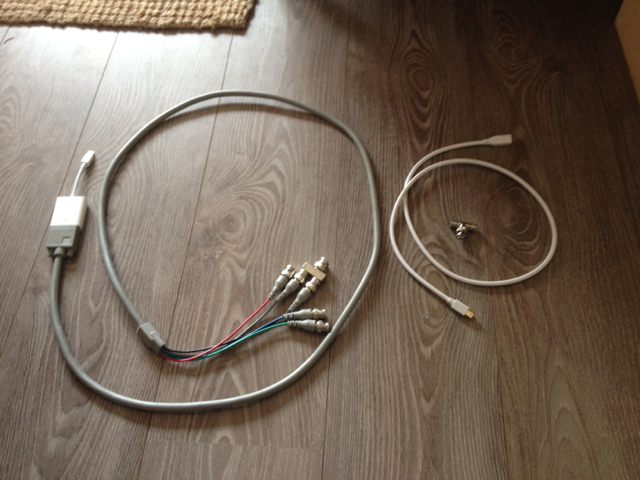
Could you post a pic of your VGA cable/adapter ?
thanks
_________________
Barco Cine 9 the one and only
|
|
| Back to top |
|
|
redfox001
Joined: 16 Mar 2009
Posts: 2257
Location: The Netherlands
|
| Posted: Sat Jul 05, 2014 9:22 am Post subject: |
|
|
This is what I have tested so far. To the left my current VGA cable (ferrite removed) mind the T-connector as the normal T-connector did strange things. Weird is too that with this T-connector I have a picture on 5 and 4 while the connector is connected to the combined sync of cause. I don't understand that.
I also tested the extension cable for the displayport (right) and everything synced fine. The short VGA cable I ordered turned out to have the wrong bnc connectors (femaile) aaarch
| Description: |
|
| Filesize: |
312.64 KB |
| Viewed: |
3660 Time(s) |
|
|
|
| Back to top |
|
|
ElTopo
Joined: 07 Nov 2006
Posts: 1640
|
| Posted: Sat Jul 05, 2014 11:08 am Post subject: |
|
|
Thanks.
What blu-ray software for mac do you have in use ?
_________________
Barco Cine 9 the one and only
|
|
| Back to top |
|
|
CasetheCorvetteman

Joined: 09 Nov 2008
Posts: 6326
Location: Australia
|
| Posted: Sat Jul 05, 2014 11:41 am Post subject: |
|
|
Ports 4 and 5 are the same physical input, thats why it matters not which number you press.
_________________
Barco Cine 9, ,Sony VPL570ES 4K SXRD, 135" OZ Theatre Majestic 16:9 screen, Denon X6700in preamp mode, 2x 7ch Tonewinner amps, 2x Tonewinner 15" subs, 2x 10" subs, 7.2.6...
RUNCO DTV991 LC ( NEC XG 852 LC ) 100" 4:3 screen, H/K AVR 7.1...
|
|
| Back to top |
|
|
|
|





