| Author |
Message |
redfox001

Joined: 16 Mar 2009
Posts: 2257
Location: The Netherlands
|
| Posted: Fri Apr 25, 2014 10:12 am Post subject: |
|
|
I have done a short check on astigmatism. Green and red seemed reasonable. I noticed that turning the 2 pole or 4 pole astig did not move the beam very much. However with blue the whole grid moved when I adjusted the astig. Now I was wondering does this meen that blue is way out of astig and that I should rotate the magnets completely around the tube?
Without a binoculair it was impossible to see how well blue was focussed. I will check with a binoculair next.
_________________
701s->runco933->8500ultra->cinemax->9500mp->919 splitpack + cinemax
|
|
| Back to top |
|
 |
redfox001
Joined: 16 Mar 2009
Posts: 2257
Location: The Netherlands
|
| Posted: Fri Apr 25, 2014 10:34 am Post subject: |
|
|
|
One more question. When I look at the astig magnets I see that the first and last have a thing to move them but the middle one does not. Does this mean that I only should adjust the outmost two?
|
|
| Back to top |
|
|
CasetheCorvetteman

Joined: 09 Nov 2008
Posts: 6326
Location: Australia
|
| Posted: Fri Apr 25, 2014 1:34 pm Post subject: |
|
|
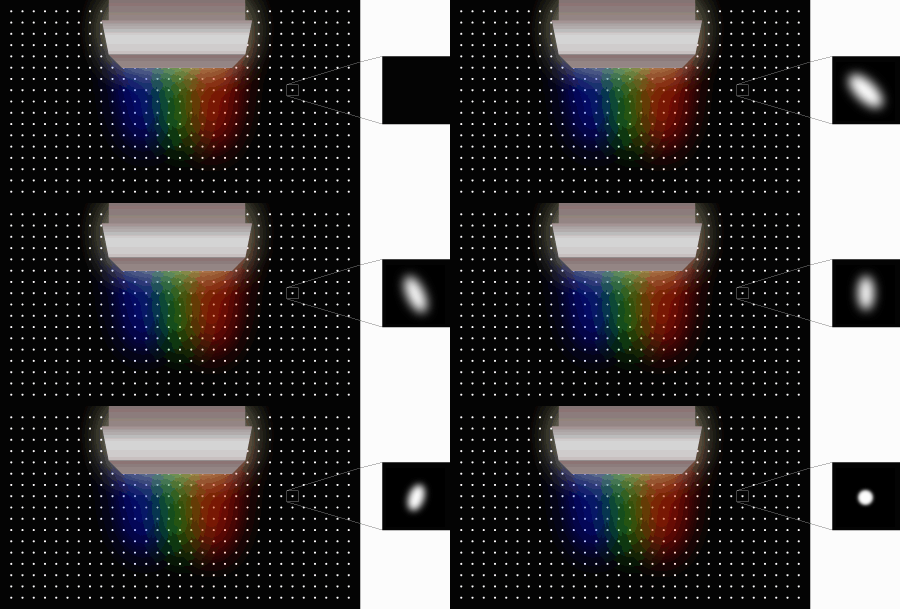
You need to read the tech article on adjusting the astig and do it all properly, thatll be the best way. To check how good or bad it is, display a dot pattern and then adjust the electronic focus control for the center from 0-99 and see if the dots flare in one dirrection or another, they should stay still and not move in any direction.
_________________
Barco Cine 9, ,Sony VPL570ES 4K SXRD, 135" OZ Theatre Majestic 16:9 screen, Denon X6700in preamp mode, 2x 7ch Tonewinner amps, 2x Tonewinner 15" subs, 2x 10" subs, 7.2.6...
RUNCO DTV991 LC ( NEC XG 852 LC ) 100" 4:3 screen, H/K AVR 7.1...
|
|
| Back to top |
|
|
thewolfman

Joined: 28 Mar 2011
Posts: 1311
Location: Sweden
|
| Posted: Fri Apr 25, 2014 7:06 pm Post subject: |
|
|
| CasetheCorvetteman wrote: | | You need to read the tech article on adjusting the astig and do it all properly, thatll be the best way. To check how good or bad it is, display a dot pattern and then adjust the electronic focus control for the center from 0-99 and see if the dots flare in one dirrection or another, they should stay still and not move in any direction. |
This is a thing to remember, and I will try this myself tonight. A rhetorical question.. dose anyone even use the manual these days? I never do, as I found it to be so f*cking difficult to understand, but with a question here, you get what you need in 1 or 2 sentences.
|
|
| Back to top |
|
|
Hulio
Joined: 15 Apr 2006
Posts: 494
Location: Belgium
|
| Posted: Fri Apr 25, 2014 9:37 pm Post subject: |
|
|
It's pretty much what Case is describing in his last post.
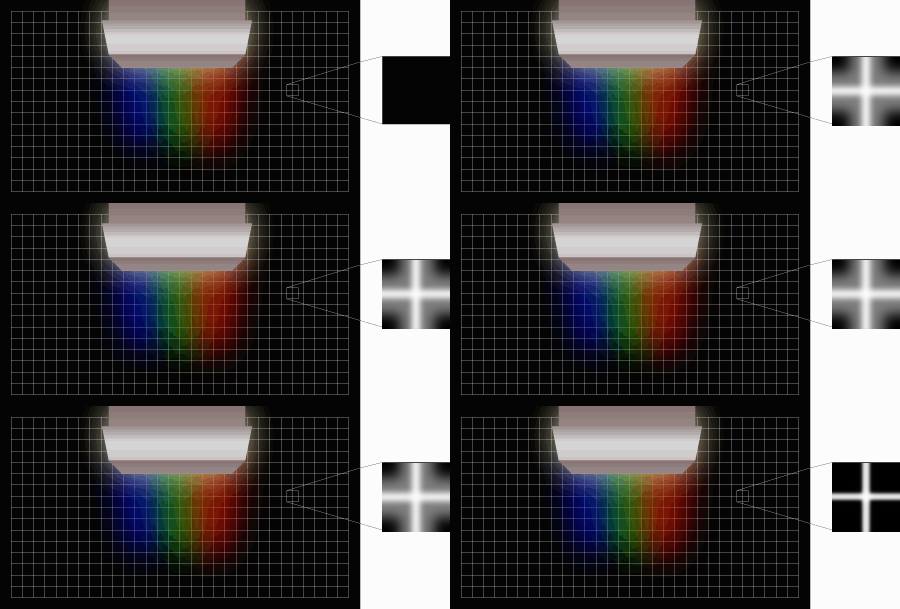
If it helps, here a quote from a Barco tech guy about proper astig adjustments. Back in that time (2000), product engineers were giving custom support on Barco home theater forum.
Procedure on how to do astigmatism adjustments
Johan Coudyser - Thursday, 12 Apr
--------------------------------------------------------------------------------
Please find hereafter the description on how to do proper astigmatism adjustment.
PREPARATION :
- Proceed to quick optical lens focusing.
- Select a source that will generate a field of small dots and crosshairs.
* Adjustment of the stigmators (4-pole magnet ring closest to the deflection yoke) :
- lower the brightness and increase the contrast.
- Overdrive the midpoint focus
- Adjust the four pole rings until the defocused dots are circular.
- Realign the electrical and optical focus
* Adjustment of the 2-pole magnets (The rings closests to the CRT soket)
- Underdrive the electronic focus
- Adjust the 2-pole magnets rings by rotating one or both up to a point where
the 'shading' of both sides of the vertical and horizontal lines is equal.
- Realign the electrical and optical focus.
Note : Repeat the alignment of the stigmators if necessary, as both adjustments
(stigmator and 2-pole magnets) influence each other.
Best Regards,
Johan Coudyser
Customer Support Engineer
|
|
| Back to top |
|
|
CasetheCorvetteman
Joined: 09 Nov 2008
Posts: 6326
Location: Australia
|
| Posted: Fri Apr 25, 2014 9:40 pm Post subject: |
|
|
That makes it nice and simple Hulio 
_________________
Barco Cine 9, ,Sony VPL570ES 4K SXRD, 135" OZ Theatre Majestic 16:9 screen, Denon X6700in preamp mode, 2x 7ch Tonewinner amps, 2x Tonewinner 15" subs, 2x 10" subs, 7.2.6...
RUNCO DTV991 LC ( NEC XG 852 LC ) 100" 4:3 screen, H/K AVR 7.1...
|
|
| Back to top |
|
|
redfox001
Joined: 16 Mar 2009
Posts: 2257
Location: The Netherlands
|
| Posted: Fri Apr 25, 2014 9:55 pm Post subject: |
|
|
Yes I do understand it. I just could not see anything with blue and it all shifted. I found binoculairs that might be of help but sometimes I wanted I could just ask an expert to show me  Thanks guys! Thanks guys!
|
|
| Back to top |
|
|
Francisco

Joined: 05 Apr 2007
Posts: 305
Location: The Netherlands
|
| Posted: Fri Apr 25, 2014 11:00 pm Post subject: |
|
|
Blue is sometime difficult and you cant see middle within the FAT underfocused line. Procedure: Underfocus to the end, move 2 pole from left to right watch the raster moving. See were the lines go fat left and then fat right. Try to get it in the middle between those were the vertical line is at it's smallest. Do this also for top and bottom and repeat several times to get the feeling. The aim is to get the lines as small as possible, and to find out were the middle is between fatter L vs R and Top vs Bottom.
_________________
Philips vacuum cleaner | Trystar double toaster | Car radio with orange plastic memory arrows | Class A Fridge
|
|
| Back to top |
|
|
CasetheCorvetteman
Joined: 09 Nov 2008
Posts: 6326
Location: Australia
|
| Posted: Sat Apr 26, 2014 4:56 am Post subject: |
|
|
I generally use the binoculars for everything too, i cant see well enough from 4 meters back to do everything!! 
_________________
Barco Cine 9, ,Sony VPL570ES 4K SXRD, 135" OZ Theatre Majestic 16:9 screen, Denon X6700in preamp mode, 2x 7ch Tonewinner amps, 2x Tonewinner 15" subs, 2x 10" subs, 7.2.6...
RUNCO DTV991 LC ( NEC XG 852 LC ) 100" 4:3 screen, H/K AVR 7.1...
|
|
| Back to top |
|
|
Hulio
Joined: 15 Apr 2006
Posts: 494
Location: Belgium
|
| Posted: Sat Apr 26, 2014 6:58 am Post subject: |
|
|
| CasetheCorvetteman wrote: | | That makes it nice and simple Hulio |
Thanks Case.
Forgot to add this:
| Description: |
|
| Filesize: |
53.58 KB |
| Viewed: |
4498 Time(s) |
|
| Description: |
|
| Filesize: |
21.23 KB |
| Viewed: |
4498 Time(s) |
|
|
|
| Back to top |
|
|
CasetheCorvetteman
Joined: 09 Nov 2008
Posts: 6326
Location: Australia
|
| Posted: Sat Apr 26, 2014 7:23 am Post subject: |
|
|
Ive never used a crosshatch pattern for astig, but thinking about it i can see where that could be easier than the dots for the 4 pole.
_________________
Barco Cine 9, ,Sony VPL570ES 4K SXRD, 135" OZ Theatre Majestic 16:9 screen, Denon X6700in preamp mode, 2x 7ch Tonewinner amps, 2x Tonewinner 15" subs, 2x 10" subs, 7.2.6...
RUNCO DTV991 LC ( NEC XG 852 LC ) 100" 4:3 screen, H/K AVR 7.1...
|
|
| Back to top |
|
|
redfox001
Joined: 16 Mar 2009
Posts: 2257
Location: The Netherlands
|
| Posted: Sat Apr 26, 2014 10:25 am Post subject: |
|
|
|
Wow this is helpfull I remember that my runco/nec had a H pattern. Could not find such a pattern.
|
|
| Back to top |
|
|
redfox001
Joined: 16 Mar 2009
Posts: 2257
Location: The Netherlands
|
| Posted: Sat Apr 26, 2014 10:36 am Post subject: |
|
|
By the way I went through a heart attacking situation yesterday. When I started the Cine Max after cleaning some dust away and inspecting the quadrupler just for education I think I heard a fan act abnormal. Than she became hot very soon. Feeling the air in the vicinity of the smps the air was very hot. However the big Fans spinned normal. So I took the powerfactor corrector out and checked that little fan. Seemed ok too but when I did another testrun I heard no strange sounds and the temperature did not rise that fast anymore. Checking after half an hour the air was not so hot around the smps but the ribbons where and that is normal I guess. So I think whatever it was it was fixed but just to be sure is it normal for a Cine Max to reach 30/31 degrees? Until now I was below 30 but the weater has become hotter too.
Oh I forgot I also had the temperature read 12 degrees but than it changed to i2c error. After rebooting that disappeared too. Very strange. Also I found out that the temp sensor seems to be on the sub board of the smps very close to the little fan.
Hmm also a temp sensor behind the big fans I see.
Last edited by redfox001 on Sat Apr 26, 2014 10:56 am; edited 1 time in total
|
|
| Back to top |
|
|
CasetheCorvetteman
Joined: 09 Nov 2008
Posts: 6326
Location: Australia
|
| Posted: Sat Apr 26, 2014 10:56 am Post subject: |
|
|
Mine is on now watching a movie, hold on five minutes...
_________________
Barco Cine 9, ,Sony VPL570ES 4K SXRD, 135" OZ Theatre Majestic 16:9 screen, Denon X6700in preamp mode, 2x 7ch Tonewinner amps, 2x Tonewinner 15" subs, 2x 10" subs, 7.2.6...
RUNCO DTV991 LC ( NEC XG 852 LC ) 100" 4:3 screen, H/K AVR 7.1...
|
|
| Back to top |
|
|
CasetheCorvetteman
Joined: 09 Nov 2008
Posts: 6326
Location: Australia
|
| Posted: Sat Apr 26, 2014 11:04 am Post subject: |
|
|

Nothing to worry about, ive seen it high as 40°
_________________
Barco Cine 9, ,Sony VPL570ES 4K SXRD, 135" OZ Theatre Majestic 16:9 screen, Denon X6700in preamp mode, 2x 7ch Tonewinner amps, 2x Tonewinner 15" subs, 2x 10" subs, 7.2.6...
RUNCO DTV991 LC ( NEC XG 852 LC ) 100" 4:3 screen, H/K AVR 7.1...
|
|
| Back to top |
|
|
redfox001
Joined: 16 Mar 2009
Posts: 2257
Location: The Netherlands
|
| Posted: Sat Apr 26, 2014 11:06 am Post subject: |
|
|
|
Thanks! Pfff everything is normal than. Perhaps somehow the sensor failed. I found out it is a good thing to feel the different parts with the hand to know how hot they should be. Gives a feeling. Pffff
|
|
| Back to top |
|
|
CasetheCorvetteman
Joined: 09 Nov 2008
Posts: 6326
Location: Australia
|
| Posted: Sat Apr 26, 2014 10:52 pm Post subject: |
|
|
I wouldnt even worry about it
_________________
Barco Cine 9, ,Sony VPL570ES 4K SXRD, 135" OZ Theatre Majestic 16:9 screen, Denon X6700in preamp mode, 2x 7ch Tonewinner amps, 2x Tonewinner 15" subs, 2x 10" subs, 7.2.6...
RUNCO DTV991 LC ( NEC XG 852 LC ) 100" 4:3 screen, H/K AVR 7.1...
|
|
| Back to top |
|
|
redfox001
Joined: 16 Mar 2009
Posts: 2257
Location: The Netherlands
|
| Posted: Mon Apr 28, 2014 10:43 am Post subject: |
|
|
After doing some serious listening I concluded that a little cork between the fans and the chasis and a little cork behind the fans did lower the sound production somewhat (small improvement). The cork between the fan and chasis is only an edge and it made the lower resonance tone appear one wall further away The cork on the plate behind the fans made the periodic upspinning of the horizontal deflection fan less audible. Only little improvements but worth a try. I only needed some new screws for the fans that where a little longer. Take care that there is no space between the fanchasis and the mainchasis as this was very clever constructed to not cause an air short circuit. The air realy blows stronger when you keep the metal frame on the fan in close contact to the mainframe. Tested all that and monitored the temperatures


_________________
701s->runco933->8500ultra->cinemax->9500mp->919 splitpack + cinemax
|
|
| Back to top |
|
|
redfox001
Joined: 16 Mar 2009
Posts: 2257
Location: The Netherlands
|
| Posted: Mon Apr 28, 2014 10:53 am Post subject: |
|
|
By the way man that movie 'Her' was impressive. I kept watching until all the end music was gone. Long time ago I enjoyed a movie that much Also checked the power use and it turned out to be only something like 500 Watt! I expected much more.
_________________
701s->runco933->8500ultra->cinemax->9500mp->919 splitpack + cinemax
|
|
| Back to top |
|
|
CasetheCorvetteman
Joined: 09 Nov 2008
Posts: 6326
Location: Australia
|
| Posted: Mon Apr 28, 2014 11:44 pm Post subject: |
|
|
Yeah mate power consumption isnt that bad. Its neither here nor there really for the amount of time it runs. Youll probably find it was less that 500w anyway unless you were using a reasonably sophisticated meter that calculates power factor, most power meters only take voltage and current which will provide you with a reading in VA, even though it says watts.
_________________
Barco Cine 9, ,Sony VPL570ES 4K SXRD, 135" OZ Theatre Majestic 16:9 screen, Denon X6700in preamp mode, 2x 7ch Tonewinner amps, 2x Tonewinner 15" subs, 2x 10" subs, 7.2.6...
RUNCO DTV991 LC ( NEC XG 852 LC ) 100" 4:3 screen, H/K AVR 7.1...
|
|
| Back to top |
|
|
|
|




