| Author |
Message |
winny
Joined: 09 Oct 2013
Posts: 403
Location: Sweden
TV/Projector: BD808s, BG1209/2
|
| Posted: Thu Feb 13, 2014 10:41 pm Post subject: Scan failure on BG1209/2 |
|
|
Thought I better start a new thread for this since it's a completely new and separate problem from the other.
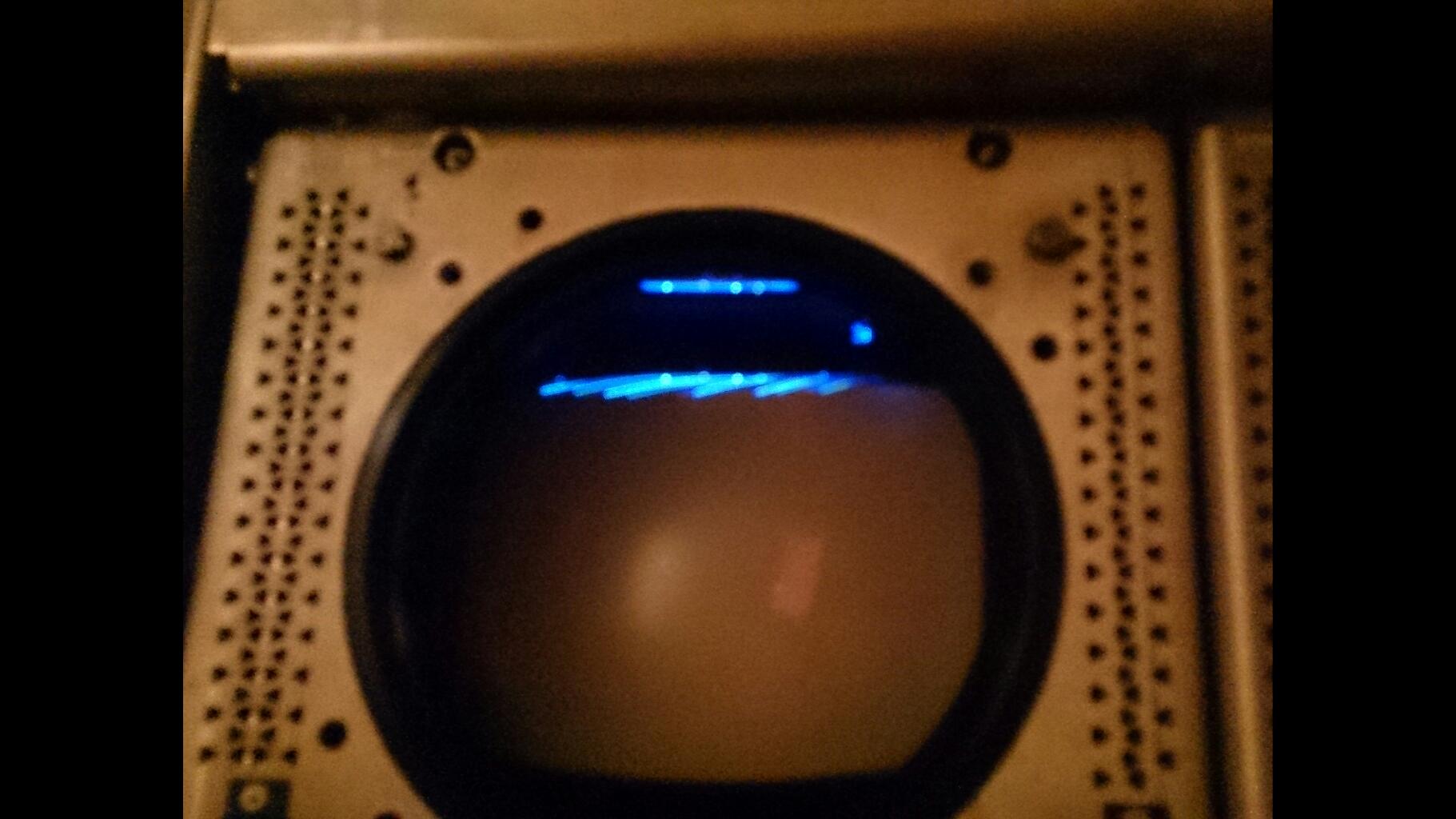
After pulling the tubes for new silicone and housings but no electrical changes what so ever, I got some very strange scan problems. Started with just the blue tube while the red and green showed the line pattern and logo at start-up. Opened it again and checked all connections and tried again and now I have the same problem on all three tubes. If its any help, it stoped responding to the remote control as well when it happened.
Due to dark conditions and crappy cell phone camera, the shutter time is too long for the pattern to show clearly but it looks like a saw-tooth line with low amplitute at the very top of the tube face, partially outside the phosphor area. I took a video of it which I will try to extract something useful out of tomorrow.
Any ideas?
[img]http://www.curtpalme.com/forum/download.php?id=17914[/img]
| Description: |
|
| Filesize: |
138.15 KB |
| Viewed: |
6608 Time(s) |
|
_________________
| Melifluonze wrote: | | Digital is easy. This is torture, but far more interesting... |
|
|
| Back to top |
|
 |
Curt Palme
CRT Tech
Joined: 08 Mar 2006
Posts: 24396
Location: Langley, BC
TV/Projector: All of them!
|
| Posted: Thu Feb 13, 2014 11:28 pm Post subject: |
|
|
That's the AKB line (auto brightness). Completely normal on all Barcos.
Press the recessed key on both the remote and keyboard (separately), then press 0,0,0. that will reset the projector and remote to address 0, and it shoudl work again.
|
|
| Back to top |
|
|
winny
Joined: 09 Oct 2013
Posts: 403
Location: Sweden
TV/Projector: BD808s, BG1209/2
|
| Posted: Fri Feb 14, 2014 8:45 am Post subject: |
|
|
Much better! Thanks a lot!
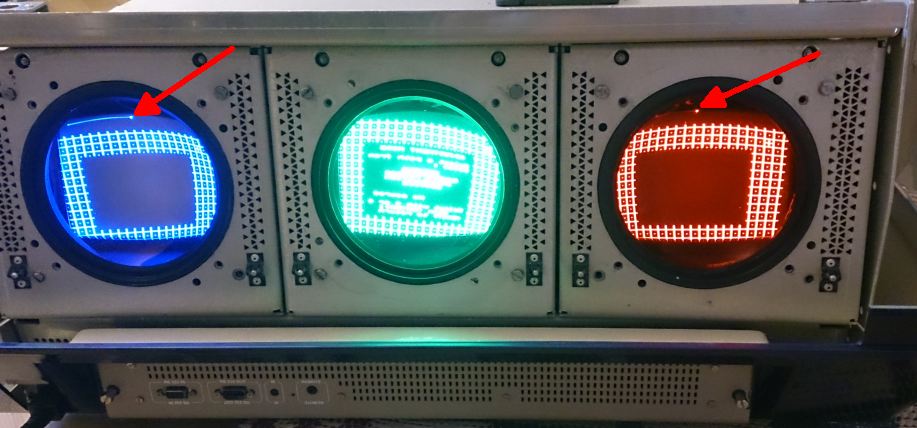
The fringe scan line is still present though... Just mask it out?
| Description: |
|
| Filesize: |
78.14 KB |
| Viewed: |
7194 Time(s) |
|
_________________
| Melifluonze wrote: | | Digital is easy. This is torture, but far more interesting... |
|
|
| Back to top |
|
|
km987654

Joined: 25 Jul 2007
Posts: 2874
Location: Australia
TV/Projector: Barco BG809s
|
| Posted: Fri Feb 14, 2014 9:10 am Post subject: |
|
|
|
Your deflection coils need rotating.
|
|
| Back to top |
|
|
Decibel

Joined: 31 May 2007
Posts: 904
Location: Roma - Italia
|
| Posted: Fri Feb 14, 2014 9:24 am Post subject: |
|
|
The rasters appear too low.
Ignore the lines for now and start to center (and straighten) the rasters.
- Reset the projector to midpoint values.
- Rotate the deflection yokes for straighten the crosshatch, especially horizontal lines (ignore the curved lines in the edges that are normal).
- Set focus to value 57 then move forward/backward the focus yokes until the focus will be best as possible.
- Center the raster with cpc magnets (flare/astigmatism).
- then ...
... you're just at the beginning of the long process of setup 
_________________
Domenico (Barco fan!)
|
|
| Back to top |
|
|
Curt Palme
CRT Tech
Joined: 08 Mar 2006
Posts: 24396
Location: Langley, BC
TV/Projector: All of them!
|
| Posted: Fri Feb 14, 2014 2:39 pm Post subject: |
|
|
Decibel is right. Normally that line is over the edge of the tube face. With your raster shift being too low, you can see it.
Go into the service menu and do a 'set to midposition'. That will clear out the memory location. Also, at this point you need to send a signal to the projector once you start setting the projector up.
|
|
| Back to top |
|
|
km987654
Joined: 25 Jul 2007
Posts: 2874
Location: Australia
TV/Projector: Barco BG809s
|
| Posted: Fri Feb 14, 2014 9:07 pm Post subject: |
|
|
|
You need to do a complete setup. After clearing the memory blocks use the cross hair pattern to centre the image and if vertical alignment isn't there use the trim pots on the vertical board to adjust the height of the red and/or blue.
|
|
| Back to top |
|
|
winny
Joined: 09 Oct 2013
Posts: 403
Location: Sweden
TV/Projector: BD808s, BG1209/2
|
| Posted: Fri Feb 14, 2014 9:29 pm Post subject: |
|
|
Set to mid position.
I'm still waiting for the setup guide DVD which I hope will bring some valuable insight for how to do the setup. Hopefully it will arrive next week, otherwise I will do a preliminary setup to evaluate the throw distance and blue wear.
| Curt Palme wrote: | | Also, at this point you need to send a signal to the projector once you start setting the projector up. |
Ah yes, this part has got the best of me several times while attempting to set up the 808. Do the setup with the built in pattern becase it's fast and easy, connect the HTPC, start all over, genlock to the HTPC and do the setup again, test with video only to realize I need to adjust phase/porch to get the image centered, realize that the convergence is screwed up again, start over and so on.
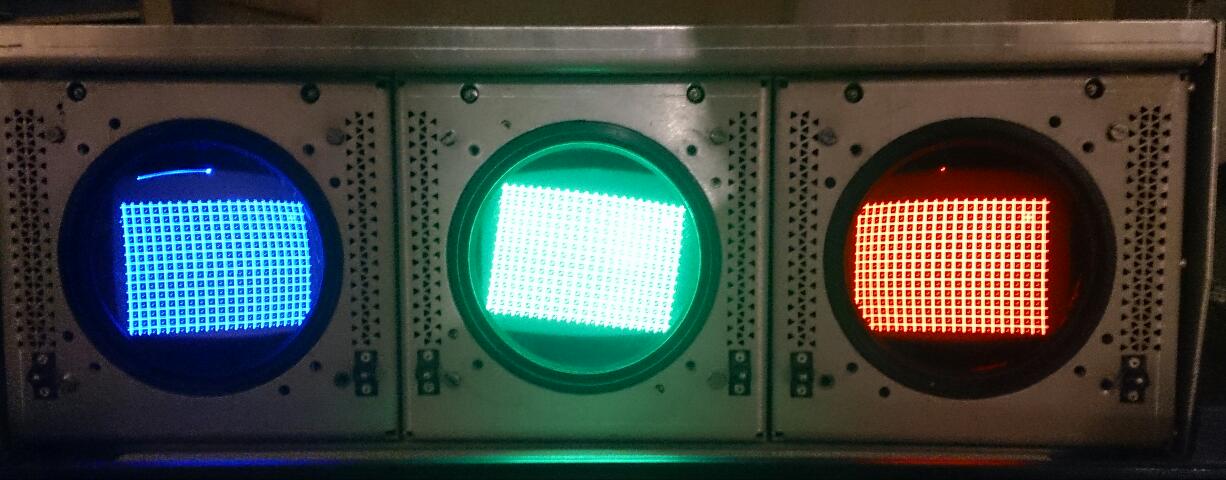
Another thing. The green tube is about ten times brighter than red and blue. I know that the human eye have almost ten times the sensitivity to green than red and blue and it will also depend on the white point setting but the 808 have more uniform brightness from all tubes. Is it just a G2 setting?
| Description: |
|
| Filesize: |
89.09 KB |
| Viewed: |
7135 Time(s) |
|
_________________
| Melifluonze wrote: | | Digital is easy. This is torture, but far more interesting... |
|
|
| Back to top |
|
|
CasetheCorvetteman

Joined: 09 Nov 2008
Posts: 6326
Location: Australia
|
| Posted: Sat Feb 15, 2014 12:53 pm Post subject: |
|
|
You know, if you wipe out every memory block, connect your source, wait for sync, converge, and the exit, that will become the default setting for any new source.
You can also copy settings from an inactive memory to the currently active one.
Another thing you can do is use the internal pattern to converge any source, if you so desire. It may not result in perfect convergence with the source though, so youre better off using a test pattern from the PC if the internal patterns leave you short of perfection.
_________________
Barco Cine 9, ,Sony VPL570ES 4K SXRD, 135" OZ Theatre Majestic 16:9 screen, Denon X6700in preamp mode, 2x 7ch Tonewinner amps, 2x Tonewinner 15" subs, 2x 10" subs, 7.2.6...
RUNCO DTV991 LC ( NEC XG 852 LC ) 100" 4:3 screen, H/K AVR 7.1...
|
|
| Back to top |
|
|
CasetheCorvetteman
Joined: 09 Nov 2008
Posts: 6326
Location: Australia
|
| Posted: Sat Feb 15, 2014 12:55 pm Post subject: |
|
|
Why is your green still tilted? Sort that out before you get any older.
_________________
Barco Cine 9, ,Sony VPL570ES 4K SXRD, 135" OZ Theatre Majestic 16:9 screen, Denon X6700in preamp mode, 2x 7ch Tonewinner amps, 2x Tonewinner 15" subs, 2x 10" subs, 7.2.6...
RUNCO DTV991 LC ( NEC XG 852 LC ) 100" 4:3 screen, H/K AVR 7.1...
|
|
| Back to top |
|
|
winny
Joined: 09 Oct 2013
Posts: 403
Location: Sweden
TV/Projector: BD808s, BG1209/2
|
| Posted: Sat Feb 15, 2014 1:24 pm Post subject: |
|
|
Will try that. Thanks!
I only had a few minutes to spare before I had to leave when I took the photo. Will continue on Monday. I'm still reluctant to adjust it mechanically during operation since the flashover in the 808.
_________________
| Melifluonze wrote: | | Digital is easy. This is torture, but far more interesting... |
|
|
| Back to top |
|
|
CasetheCorvetteman
Joined: 09 Nov 2008
Posts: 6326
Location: Australia
|
| Posted: Sat Feb 15, 2014 10:10 pm Post subject: |
|
|
Youll be fine mate, if you get a boot off it, we will know i was wrong 
_________________
Barco Cine 9, ,Sony VPL570ES 4K SXRD, 135" OZ Theatre Majestic 16:9 screen, Denon X6700in preamp mode, 2x 7ch Tonewinner amps, 2x Tonewinner 15" subs, 2x 10" subs, 7.2.6...
RUNCO DTV991 LC ( NEC XG 852 LC ) 100" 4:3 screen, H/K AVR 7.1...
|
|
| Back to top |
|
|
winny
Joined: 09 Oct 2013
Posts: 403
Location: Sweden
TV/Projector: BD808s, BG1209/2
|
| Posted: Sat Feb 15, 2014 10:52 pm Post subject: |
|
|
That would be something. Draining all your energy, time and money for years, taking up all available floor space in your home, slowly poisoning you with glycol, irradiating you with X-rays and when you are finally almost done it fires off 35 kV and kill you. Ha! Take that you easy to use and cheap DLP.
I have several colleagues which used to work for ABB building high voltage stuff but none of them had any high voltage gloves. They all suggested three pairs of washing gloves and not touching the chassis.
_________________
| Melifluonze wrote: | | Digital is easy. This is torture, but far more interesting... |
|
|
| Back to top |
|
|
winny
Joined: 09 Oct 2013
Posts: 403
Location: Sweden
TV/Projector: BD808s, BG1209/2
|
| Posted: Tue Feb 18, 2014 8:39 am Post subject: |
|
|
Ok, rotated the coils yesterday so now they sit straight.
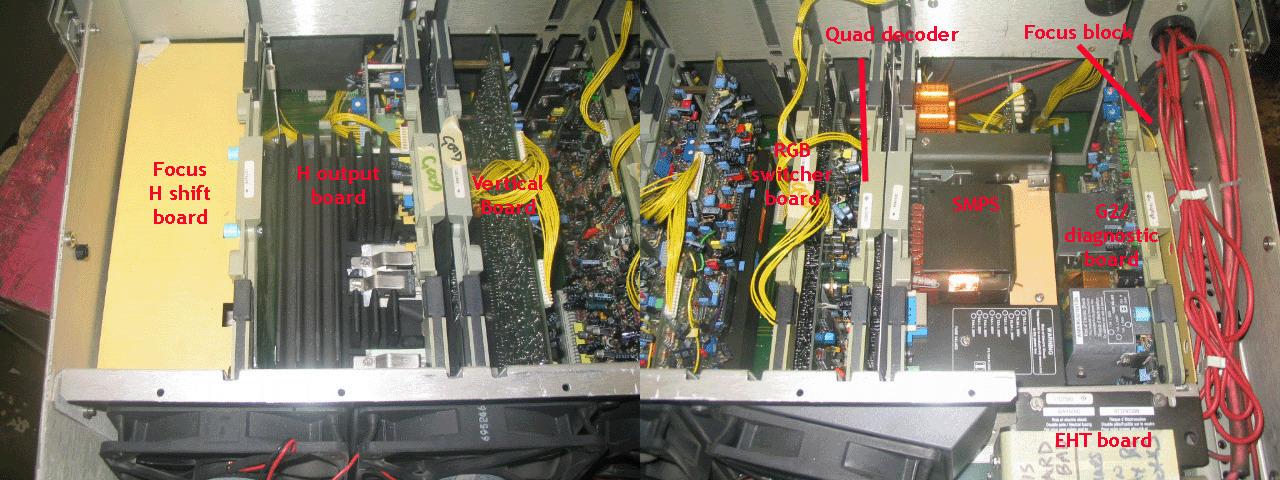
There are a lot of things which needs immediate adjustment - G2 on green needs to be lowered and vertical offset on blue and red both needs to go higher to match up with green.
Could someone helpful add some arrows to show which pot does what in this picture?
| Description: |
|
| Filesize: |
128.27 KB |
| Viewed: |
7046 Time(s) |
|
_________________
| Melifluonze wrote: | | Digital is easy. This is torture, but far more interesting... |
|
|
| Back to top |
|
|
Decibel
Joined: 31 May 2007
Posts: 904
Location: Roma - Italia
|
| Posted: Tue Feb 18, 2014 12:48 pm Post subject: |
|
|
- H shift board
There are two (very) little trimmers that shift blu and red rasters horizontally.
-Vertical board
There are two (very) little trimmers that shift blu and red rasters vertically.
There are also two (plastic white) trimmers that expands (or tightens) blu and red rasters vertically.
- SMPS board
There's a trimmer (plastic white, not sealed) in daughter board that expands (or tightens) the raster of ALL TUBES horizontally.
_________________
Domenico (Barco fan!)
|
|
| Back to top |
|
|
Curt Palme
CRT Tech
Joined: 08 Mar 2006
Posts: 24396
Location: Langley, BC
TV/Projector: All of them!
|
|
| Back to top |
|
|
winny
Joined: 09 Oct 2013
Posts: 403
Location: Sweden
TV/Projector: BD808s, BG1209/2
|
| Posted: Tue Feb 18, 2014 3:41 pm Post subject: |
|
|
Ah yes, but as as first timer you get very mixed messages about compability/similarity between 80x and 120x so I thought I'll better ask first. Sorry for flooding the forum...
_________________
| Melifluonze wrote: | | Digital is easy. This is torture, but far more interesting... |
|
|
| Back to top |
|
|
Curt Palme
CRT Tech
Joined: 08 Mar 2006
Posts: 24396
Location: Langley, BC
TV/Projector: All of them!
|
| Posted: Tue Feb 18, 2014 4:02 pm Post subject: |
|
|
No worries! 
|
|
| Back to top |
|
|
winny
Joined: 09 Oct 2013
Posts: 403
Location: Sweden
TV/Projector: BD808s, BG1209/2
|
| Posted: Tue Feb 18, 2014 6:59 pm Post subject: |
|
|
Before I run it too long, is the top side fan suppose to run at normal room temperature or am I slowly frying my convergence driver?
_________________
| Melifluonze wrote: | | Digital is easy. This is torture, but far more interesting... |
|
|
| Back to top |
|
|
Curt Palme
CRT Tech
Joined: 08 Mar 2006
Posts: 24396
Location: Langley, BC
TV/Projector: All of them!
|
| Posted: Tue Feb 18, 2014 7:06 pm Post subject: |
|
|
|
Yes it is supposed to run all the time.
|
|
| Back to top |
|
|
|
|




