|
As this forum is rarely used anymore, we've locked it. Feel free to browse and read. Questions? Please reach out to us directly. Cheers! |

|
 |
|
|
| Author |
Message |
andy2000
Joined: 03 May 2013
Posts: 32
|
| Posted: Wed Nov 27, 2013 5:06 pm Post subject: 9PG point convergence problem |
|
|
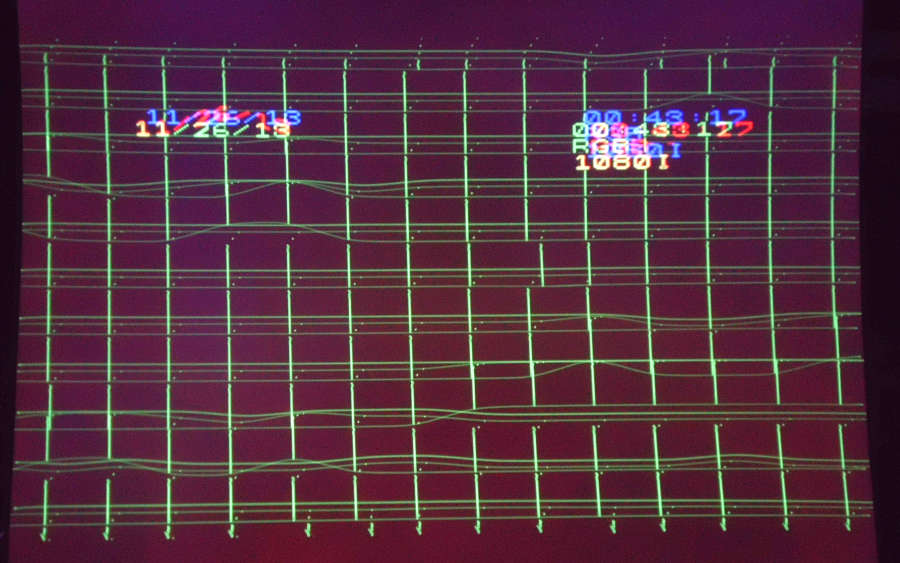
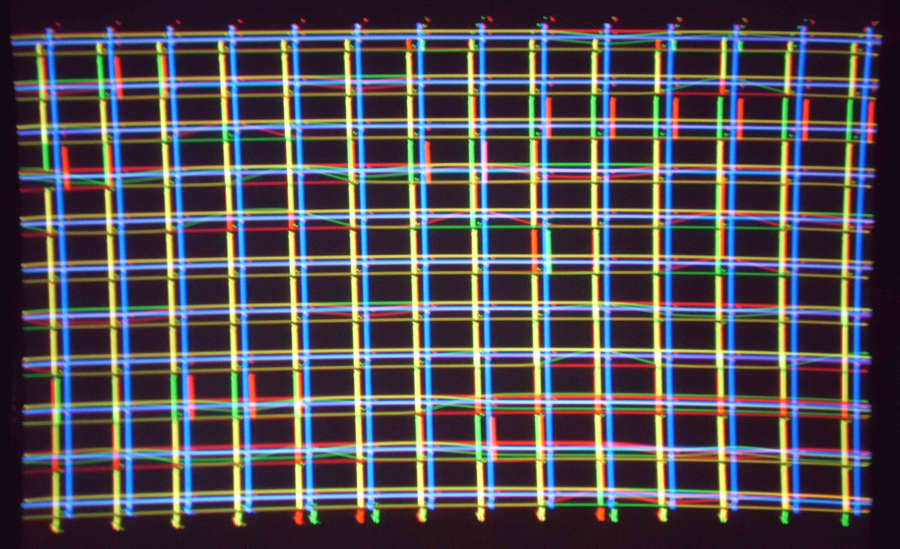
The point convergence board on my 9PG has developed an odd intermittent problem. It seems fine when cold, but after about an hour if the projector has to re-sync, it loads completely wrong values for the red and green point convergence. Attempting to adjust any point results in the entire screen changing wildly (although not randomly). Strangely, the blue is completely unaffected. Turning off point convergence restores a normal picture. I turned point on the next day, and it was fine until I changed sources after it had been on for an hour.
I suspect that there is a problem reading data from the EEPROM (maybe a bad address line that only affects the memory used for the red and green). That would explain why it works until it has to reload the point data.
I've already inspected the board for obvious problems (it has been recapped). I'm going to take one more look at it, but considering how hard it is to troubleshoot an intermittent problem on a very inaccessible board, I'd take a replacement if I could find one. Does anyone in the US have a board they could sell for a reasonable price? It doesn't have to be recapped.
Andy
| Description: |
|
| Filesize: |
85.85 KB |
| Viewed: |
9128 Time(s) |
|
| Description: |
|
| Filesize: |
115.99 KB |
| Viewed: |
9128 Time(s) |
|
|
|
| Back to top |
|
 |
deronmoped
Joined: 03 Nov 2006
Posts: 1154
Location: San Diego
|
| Posted: Wed Nov 27, 2013 6:52 pm Post subject: |
|
|
I have a point board.
But my recommendation is to get the PJ set up correctly, point is not needed. And a lot of times, you will find it's your initial convergence set up that needs refinement.
I found using point, although it fixes one point of convergence, it messes up another point of convergence. More of a crutch then a fix.
|
|
| Back to top |
|
|
CasetheCorvetteman

Joined: 09 Nov 2008
Posts: 6326
Location: Australia
|
| Posted: Wed Nov 27, 2013 11:46 pm Post subject: |
|
|
That is somewhat untrue, you wont get perfect linearity across the entire screen without using point. Its there to be used. It has no effect on the stability if if is used correctly.
If you set everything perfect as you can, then use green point to make it flawless, then line up red and blue followed by red and blue point, you will not have issues.
If you find that moving one point has an effect on other points, you have NOT set it up properly, and id say your phase is out. Moving one point moves only that point, it has no effect on the next point if phase is correctly set.
Pull the point board out, clean the terminals and put it back in. That might fix it if youre lucky.
_________________
Barco Cine 9, ,Sony VPL570ES 4K SXRD, 135" OZ Theatre Majestic 16:9 screen, Denon X6700in preamp mode, 2x 7ch Tonewinner amps, 2x Tonewinner 15" subs, 2x 10" subs, 7.2.6...
RUNCO DTV991 LC ( NEC XG 852 LC ) 100" 4:3 screen, H/K AVR 7.1...
|
|
| Back to top |
|
|
andy2000
Joined: 03 May 2013
Posts: 32
|
| Posted: Thu Nov 28, 2013 12:10 am Post subject: |
|
|
|
I'm only using the point convergence for minor touch ups after getting is as close as possible with the standard controls. I'm still using it with point disabled, but it's a little less perfect than I would like. It's a handy feature for a perfectionist.
|
|
| Back to top |
|
|
Curt Palme
CRT Tech
Joined: 08 Mar 2006
Posts: 24396
Location: Langley, BC
TV/Projector: All of them!
|
| Posted: Thu Nov 28, 2013 12:45 am Post subject: |
|
|
|
Nah, I've seen this before, it is a bad point board. I should have one as well if Deron's doesn't work for some reason.
|
|
| Back to top |
|
|
CasetheCorvetteman
Joined: 09 Nov 2008
Posts: 6326
Location: Australia
|
| Posted: Thu Nov 28, 2013 2:01 am Post subject: |
|
|
| andy2000 wrote: | | I'm only using the point convergence for minor touch ups after getting is as close as possible with the standard controls. I'm still using it with point disabled, but it's a little less perfect than I would like. It's a handy feature for a perfectionist. |
Its a great feature mate yes, allows you to very easily get flawless convergence all over, even when the screen surface isnt flat!!
_________________
Barco Cine 9, ,Sony VPL570ES 4K SXRD, 135" OZ Theatre Majestic 16:9 screen, Denon X6700in preamp mode, 2x 7ch Tonewinner amps, 2x Tonewinner 15" subs, 2x 10" subs, 7.2.6...
RUNCO DTV991 LC ( NEC XG 852 LC ) 100" 4:3 screen, H/K AVR 7.1...
|
|
| Back to top |
|
|
deronmoped
Joined: 03 Nov 2006
Posts: 1154
Location: San Diego
|
| Posted: Thu Nov 28, 2013 5:05 am Post subject: |
|
|
| CasetheCorvetteman wrote: | That is somewhat untrue, you wont get perfect linearity across the entire screen without using point. Its there to be used. It has no effect on the stability if if is used correctly.
If you set everything perfect as you can, then use green point to make it flawless, then line up red and blue followed by red and blue point, you will not have issues.
If you find that moving one point has an effect on other points, you have NOT set it up properly, and id say your phase is out. Moving one point moves only that point, it has no effect on the next point if phase is correctly set.
Pull the point board out, clean the terminals and put it back in. That might fix it if youre lucky. |
I have found that convergence problems your trying to fix with point can be your lenses. If you had a set of matched lenses, you would find that some of your convergence problems would go away. If you have extra lenses, try swapping them around. You will see immediately that the tolerances vary from lenses to lenses.
Using point, drags everything around that point in the direction you use it. It does not just effect the line on the screen, your trying to line up.
If point is needed, then why are so many people not using it and getting correct convergence?
|
|
| Back to top |
|
|
CasetheCorvetteman
Joined: 09 Nov 2008
Posts: 6326
Location: Australia
|
| Posted: Thu Nov 28, 2013 7:39 am Post subject: |
|
|
If you have PHASE set as it should be, then POINT will only move the exact point youre on, moving the line between the two points either side of it, leaving those two points exactly where they were unless you go a huge amount. If you don't set the PHASE correctly, you will get exactly what you describe.
Who are you claiming is not using it and where are their images of 100% perfection? Here is mine:

That was set around 3 months prior to that pic being taken. POINT was used where required on all three colours to gain the best possible geometry. Solid as a rock, never ever drifted. Scanlines were straight as an arrow from top to bottom, no undue deviation anywhere on the entire screen. Colours all lined up pixel perfect from corner to corner. You wont get that without using some POINT.
Ive never had an issue with it on both the 9PG and again on the XG, in both instances it works exactly as I describe, and if yours is not, then you have not set something else correctly.
I don't use much of it, you shouldn't need to use much, but the fact remains there is no good reason not to use it, its there to be used for that very reason.
_________________
Barco Cine 9, ,Sony VPL570ES 4K SXRD, 135" OZ Theatre Majestic 16:9 screen, Denon X6700in preamp mode, 2x 7ch Tonewinner amps, 2x Tonewinner 15" subs, 2x 10" subs, 7.2.6...
RUNCO DTV991 LC ( NEC XG 852 LC ) 100" 4:3 screen, H/K AVR 7.1...
|
|
| Back to top |
|
|
deronmoped
Joined: 03 Nov 2006
Posts: 1154
Location: San Diego
|
| Posted: Fri Nov 29, 2013 6:07 pm Post subject: |
|
|
Over the years I have been on here and AVS, someone would usually chime in to recommend not using point.
The reasons for this, were several. If the PJ is properly set up, it's not needed. People were having problems with setting up point. The PJ did not have the board to begin with, no reason to track one down and buy it. The point board was failing, like Andy's board is.
Quite a few people using CRT PJ's are not up to speed on the fine details that involve getting a corner to corner pixel perfect convergence. Recommending that they not use point, will force them to go over and over their set up till they have found the problem that is causing the convergence to be off.
You probably even found that your using less point then when you first set up the PJ. First time around most people use a lot of point, after they have had the PJ for a while and the more they learn and the more they revisit their set up, they are able to get away with using less and less point. Anyone that has set up a PJ, no matter what type it is, finds that they learn how to get it more and more refined.
|
|
| Back to top |
|
|
CasetheCorvetteman
Joined: 09 Nov 2008
Posts: 6326
Location: Australia
|
| Posted: Fri Nov 29, 2013 10:39 pm Post subject: |
|
|
Im not doubting or disagreeing with most of this, but point is there to be used.
In some situations, such as projecting onto a wall with a less than absolutely perfect surface using a PG Plain series that does not have line distortion adjustment, YOU WILL NEED POINT TO GET IT PERFECT. Its a fact. Curt even says so in his setup guide, im reasonably confident he knows what he is on about 
If others are not proficient enough in their mechanical setups as well as initial electronic alignment, that is not the fault of point convergence. If people get themselves into trouble using point when they shouldnt, that is not the fault of point.
Im not sure if youre under the impression here that im saying nothing is super critical, you can fix it all with point, but im not. Everything is critical, if you want it perfect it has to be perfect every step of the way, but i will repeat it over and over, you wont get pixel perfect convergence in every setup to every corner without using point, ESPECIALLY if youre using a larger tube face area on an earlier PG.
_________________
Barco Cine 9, ,Sony VPL570ES 4K SXRD, 135" OZ Theatre Majestic 16:9 screen, Denon X6700in preamp mode, 2x 7ch Tonewinner amps, 2x Tonewinner 15" subs, 2x 10" subs, 7.2.6...
RUNCO DTV991 LC ( NEC XG 852 LC ) 100" 4:3 screen, H/K AVR 7.1...
|
|
| Back to top |
|
|
CasetheCorvetteman
Joined: 09 Nov 2008
Posts: 6326
Location: Australia
|
| Posted: Fri Nov 29, 2013 11:36 pm Post subject: |
|
|
| deronmoped wrote: | | The PJ did not have the board to begin with, no reason to track one down and buy it. |
Yes it did, factory fitted as a standard feature on all 9 and 10 series PG, optional extra on 6 series.
Read here:
http://www.curtpalme.com/CRTSetupGuide4.shtm
| Setup guide wrote: | By adjusting all of the above parameters, you should be able to get decent geometry out of the XG set… but it won’t be perfect. In order to obtain perfect geometry out of the XG chassis, you MUST use some point convergence.
|
_________________
Barco Cine 9, ,Sony VPL570ES 4K SXRD, 135" OZ Theatre Majestic 16:9 screen, Denon X6700in preamp mode, 2x 7ch Tonewinner amps, 2x Tonewinner 15" subs, 2x 10" subs, 7.2.6...
RUNCO DTV991 LC ( NEC XG 852 LC ) 100" 4:3 screen, H/K AVR 7.1...
|
|
| Back to top |
|
|
Curt Palme
CRT Tech
Joined: 08 Mar 2006
Posts: 24396
Location: Langley, BC
TV/Projector: All of them!
|
| Posted: Sat Nov 30, 2013 2:01 am Post subject: |
|
|
you're both right. the point board is there for fine tuning. Normally a PG with a skilled setup tech won't need the point board, but at 20ish years old for most PG sets at this point, component drift is applicable, and even 10 years ago I had some PG sets that simply wouldn't converge properly no matter what I did until i added the point board.
As Doug said years ago, more than 4-5 point board clicks in any direction, and the basic setup isn't good enough.
Also, if you're lazy, the point board is a workaround from doing a good basic setup. 
|
|
| Back to top |
|
|
CasetheCorvetteman
Joined: 09 Nov 2008
Posts: 6326
Location: Australia
|
| Posted: Sat Nov 30, 2013 6:14 am Post subject: |
|
|
| Curt Palme wrote: | you're both right. the point board is there for fine tuning. Normally a PG with a skilled setup tech won't need the point board, but at 20ish years old for most PG sets at this point, component drift is applicable, and even 10 years ago I had some PG sets that simply wouldn't converge properly no matter what I did until i added the point board.
As Doug said years ago, more than 4-5 point board clicks in any direction, and the basic setup isn't good enough.
Also, if you're lazy, the point board is a workaround from doing a good basic setup. |
I don't think ive ever used more than 5 clicks anywhere, although on my 9PG with a near 0 degree angle and almost maximum tube face usage I was using between 3 and 5 clicks in the corner areas, not on the green, but certainly on the red and blue.
Although it ran for over 4 years that way and was always rock solid, my convergence board did run quite hot probably due to the amount of correction required mostly on pincushion, which took quite abit when using so much tube face. Eventually the convergence board did fail, however I had 3 spares anyway and the set was removed from service before it had failed.
If you set it up following the book and use the raster size they state, youd hardly need much correction at all, and in that case the point board probably isn't required. Once you run that raster right out huge, certain settings take a lot to correct.
_________________
Barco Cine 9, ,Sony VPL570ES 4K SXRD, 135" OZ Theatre Majestic 16:9 screen, Denon X6700in preamp mode, 2x 7ch Tonewinner amps, 2x Tonewinner 15" subs, 2x 10" subs, 7.2.6...
RUNCO DTV991 LC ( NEC XG 852 LC ) 100" 4:3 screen, H/K AVR 7.1...
|
|
| Back to top |
|
|
andy2000
Joined: 03 May 2013
Posts: 32
|
| Posted: Sat Nov 30, 2013 8:16 am Post subject: |
|
|
Re seating the connectors hasn't changed anything. I still plan to try a few basic things on the my board, but I don't want to spend days working on a board if I can replace it cheaply. While I'm in there, I wouldn't mind adding the composite video board if anyone has one.
I don't want to get into a debate about whether or not the point convergence feature is a good thing. I'm fairly sure it's not supposed to make the whole screen look crazy at random times. Even if I don't use it, I wold like to have a fully working 9PG (including the apparently controversial point convergence board)...
|
|
| Back to top |
|
|
CasetheCorvetteman
Joined: 09 Nov 2008
Posts: 6326
Location: Australia
|
| Posted: Sat Nov 30, 2013 10:44 pm Post subject: |
|
|
Nothing controversial about it mate, and its actually been a long time since ive seen a post where someone has come along and said "get rid of it, it causes issues" which is garbage. It used to get said quite abit here. The people saying it sometime knew what they were on about and were assuming it was going to lead to lazyness and sloppy pre-alignment, the others were just repeating something someone else said and they thought it sounded plausable enough. Either way, to just remove it and live with less than perfect convergence would be plain stupid. May as well buy a Barco and be done with it 
NEC always had the most comprehensive convergence systems for their time, and provided you set it up properly they are exceptionally stable for a very long time. Its great. Extremely fine adjustment and very easy to get perfect.
_________________
Barco Cine 9, ,Sony VPL570ES 4K SXRD, 135" OZ Theatre Majestic 16:9 screen, Denon X6700in preamp mode, 2x 7ch Tonewinner amps, 2x Tonewinner 15" subs, 2x 10" subs, 7.2.6...
RUNCO DTV991 LC ( NEC XG 852 LC ) 100" 4:3 screen, H/K AVR 7.1...
|
|
| Back to top |
|
|
hansilili

Joined: 09 Mar 2007
Posts: 302
Location: Köln, Germany
|
| Posted: Wed Dec 04, 2013 1:42 pm Post subject: |
|
|
Andy,
I had a quite similar issue recently (go search for the thread). Tried to recap the point board but made it worse - my fault. With some time gone by the problem escalated and finally the tubes stayed totally dark. After replacing all 4 boards all is now good again.
So if you look tor a replacement point board, better try to exchange all boards in the system cage.
_________________
HansA, alles andere ist euer Bier!
|
|
| Back to top |
|
|
andy2000
Joined: 03 May 2013
Posts: 32
|
| Posted: Thu Dec 05, 2013 6:59 am Post subject: |
|
|
| CasetheCorvetteman wrote: |
NEC always had the most comprehensive convergence systems for their time, and provided you set it up properly they are exceptionally stable for a very long time. Its great. Extremely fine adjustment and very easy to get perfect. |
You're right about that. I used a Sony 1270 about 10 years ago, and I had to touch up the center convergence almost every time I turned it on. The NEC 9PG (which is about the same age) is much more stable.
I still haven't had a chance to re-check the point board. As soon as I do, I'll post back with either what I found wrong, or a request for another board.
Andy
|
|
| Back to top |
|
|
CasetheCorvetteman
Joined: 09 Nov 2008
Posts: 6326
Location: Australia
|
| Posted: Thu Dec 05, 2013 8:12 am Post subject: |
|
|
No worries mate
_________________
Barco Cine 9, ,Sony VPL570ES 4K SXRD, 135" OZ Theatre Majestic 16:9 screen, Denon X6700in preamp mode, 2x 7ch Tonewinner amps, 2x Tonewinner 15" subs, 2x 10" subs, 7.2.6...
RUNCO DTV991 LC ( NEC XG 852 LC ) 100" 4:3 screen, H/K AVR 7.1...
|
|
| Back to top |
|
|
gjaky

Joined: 05 Jun 2010
Posts: 2802
Location: Budapest, Hungary
|
| Posted: Sun Dec 15, 2013 7:12 pm Post subject: |
|
|
We have a similarly bad point convergence board here too. And we found that the EPROM content on the bad board is corrupted.. I know of a good working point board so we'll try to rewrite the EPROM with the good working on, and we'll see if that solves the problem.
_________________
projectors in the past : NEC 6-9PG xtra, Electrohome Marquee 6-7500, NEC XG 1351 LC ( with super modified Electrohome VNB neckboard !!!)
current: VDC Marquee 9500LC
The MOD: VNB-DB, VIM-DB
|
|
| Back to top |
|
|
CasetheCorvetteman
Joined: 09 Nov 2008
Posts: 6326
Location: Australia
|
| Posted: Sun Dec 15, 2013 8:25 pm Post subject: |
|
|
Keep us all posted Gábor
_________________
Barco Cine 9, ,Sony VPL570ES 4K SXRD, 135" OZ Theatre Majestic 16:9 screen, Denon X6700in preamp mode, 2x 7ch Tonewinner amps, 2x Tonewinner 15" subs, 2x 10" subs, 7.2.6...
RUNCO DTV991 LC ( NEC XG 852 LC ) 100" 4:3 screen, H/K AVR 7.1...
|
|
| Back to top |
|
|
|
|
|
|
|
You cannot post new topics in this forum
You cannot reply to topics in this forum
You cannot edit your posts in this forum
You cannot delete your posts in this forum
You cannot vote in polls in this forum
You cannot attach files in this forum
You can download files in this forum
|
Forum powered by phpBB © phpBB Group
|
|




