| Author |
Message |
ReTrO
Joined: 08 Feb 2010
Posts: 28
Location: London, UK
|
| Posted: Thu Nov 14, 2013 3:51 pm Post subject: Marquee 9500LC Ultra with Moome HDMI and a problem |
|
|
I have a Marquee 9500LC Ultra donated by a customer that is fitted with a Moome HDMI card (fitted around June 2012). It was donated to me as it refused to switch on one day and the customer thinks it is related to voltage issues with the Moome card, which I believe may be slightly different now to prevent this, or requires a resistor/diode or more to be replaced. I did have a hunt around at the time I received the unit to see if I could find a fix but without any luck.
Regardless it has been quite some time since I had my Barco Data 600 and I need to either fix this up or move it on.
Does the Moome issue sound familiar? I did a brief search and scan on here before posting this and couldn't see anything blatantly obvious (I'm happy to be corrected though).
I'm in the UK and the old CRT servicing guys I used to deal with aren't contactable or in the business anymore. I previously worked for Marata Vision and we were the Marquee distributors back in the early 2000's.
_________________
Thanks
Richard
|
|
| Back to top |
|
 |
barclay66

Joined: 27 Jun 2011
Posts: 1304
Location: Germany
TV/Projector: Marquee 9500 Ultra
|
| Posted: Thu Nov 14, 2013 4:02 pm Post subject: |
|
|
Hi,
Could You specify the problem more into detail please?
Is it that the Marquee doesn't switch on or do only the Moome card's light stay dark?
In the first case it would be easy removing the Moome card and see if the PJ powers up then. In the second case it might be possible to try a spare Moome card (if You have one) or to send Yours to some other Marquee owner for testing.
Regards,
barclay66
|
|
| Back to top |
|
|
ReTrO
Joined: 08 Feb 2010
Posts: 28
Location: London, UK
|
| Posted: Thu Nov 14, 2013 5:07 pm Post subject: |
|
|
The unit is in storage at the moment, so I'll wheel it out and give it a run to confirm asap.
_________________
Thanks
Richard
|
|
| Back to top |
|
|
draganm

Joined: 08 Mar 2006
Posts: 8990
Location: Colorado
|
| Posted: Thu Nov 14, 2013 5:18 pm Post subject: |
|
|
the odd's of a bad Moome card keeping the PJ from powering up are pretty close to Zero, there or are no diodes or resistors to replace.
More than likely you have either an oxidized connection somewhere in the chassis or a bad high voltage power supply. We need a more detailed explanation of what's happening. Do the fans kick on? Is there an error light on the back of the machine, lower control opposite the RGB input board? Looking through the front grill, can you see any red error lights on the power supply that the power chord plugs into?
My money's on an oxidized connection on the horizontal deflection module between the main board and the small daughter board, a 10 minute fix.
|
|
| Back to top |
|
|
ReTrO
Joined: 08 Feb 2010
Posts: 28
Location: London, UK
|
| Posted: Fri Nov 15, 2013 11:59 am Post subject: |
|
|
Thanks for the posting. I've got the unit home now and will give it a run over the weekend to see what I can determine.
_________________
Thanks
Richard
|
|
| Back to top |
|
|
ReTrO
Joined: 08 Feb 2010
Posts: 28
Location: London, UK
|
| Posted: Thu Nov 21, 2013 8:57 pm Post subject: |
|
|
Ok, I have power connected and a yellow LED lit on the standby indicator.
Pressing power on the remote gives me a blinking red on the C LED and causes the LVPS red LED to come on and stay on until hard powered off at the mains.
_________________
Thanks
Richard
|
|
| Back to top |
|
|
barclay66
Joined: 27 Jun 2011
Posts: 1304
Location: Germany
TV/Projector: Marquee 9500 Ultra
|
| Posted: Thu Nov 21, 2013 9:40 pm Post subject: |
|
|
Hi,
So it looks like a LVPS error. Either the LVPS is bad or there's a short on one of the boards that causes the LVPS to shut down.
Now take off the panel at the front (where the mains connector is) and look for one or more lit red LEDs and report back which (if any) one is on...
Regards,
barclay66
|
|
| Back to top |
|
|
ReTrO
Joined: 08 Feb 2010
Posts: 28
Location: London, UK
|
| Posted: Thu Nov 21, 2013 10:54 pm Post subject: |
|
|
Thank you for the help so far. 
Front panel off and I have both cooling fans spinning but no lit up LEDs at any time.
_________________
Thanks
Richard
|
|
| Back to top |
|
|
barclay66
Joined: 27 Jun 2011
Posts: 1304
Location: Germany
TV/Projector: Marquee 9500 Ultra
|
| Posted: Thu Nov 21, 2013 11:34 pm Post subject: |
|
|
OK,
Do the LEDs stay off no matter if You switch the set on and off via the remote?
If Yes (and with the LVPS error LED on at the CLM) then it looks more like a defective LVPS. Try with a spare if You have one at hand. Maybe someone (Curt?) can confirm my findings...
Regards,
barclay66
|
|
| Back to top |
|
|
ReTrO
Joined: 08 Feb 2010
Posts: 28
Location: London, UK
|
| Posted: Thu Nov 21, 2013 11:45 pm Post subject: |
|
|
Yup the LEDs all stay off regardless of the on status of the projector (in theory of course).
_________________
Thanks
Richard
|
|
| Back to top |
|
|
Curt Palme
CRT Tech
Joined: 08 Mar 2006
Posts: 24396
Location: Langley, BC
TV/Projector: All of them!
|
| Posted: Thu Nov 21, 2013 11:56 pm Post subject: |
|
|
In order for the fans to turn on in the belly of the unit, all that needs to be installed is the LV power supply and the CLM processor board with those red error LEDs on it. You can pull out and disconnect all other boards to see if the LVPS light will go out and the set will respond to the remote.
Worst case one of the tubes leaked glycol, and poured out onto the motherboard and smaller vertical backplane in the set. Best case, one board has a short on it, causing the set to stay shut down. By disconnecting it, the set should power up, but you won't get a picture of course.
If nothing gets the unit running, you'll need to pull out the CLM board and LVPS and send them to me for testing/repair.
|
|
| Back to top |
|
|
barclay66
Joined: 27 Jun 2011
Posts: 1304
Location: Germany
TV/Projector: Marquee 9500 Ultra
|
| Posted: Thu Nov 21, 2013 11:58 pm Post subject: |
|
|
Well, then it looks like the LVPS still can supply StandBy power (for the CLM), but the main rails don't power up when the LVPS receives the Power_On signal from the CLM.
There's a remote chance that the CLM is the culprit, but a failure of the LVPS is much more likely.
I'd remove it, open it (careful with the upper and lower PCB connectors!) and check the fuse(s) that are visible. If all checks out OK, I'd try with a different LVPS...
Regards,
barclay66
|
|
| Back to top |
|
|
ReTrO
Joined: 08 Feb 2010
Posts: 28
Location: London, UK
|
| Posted: Fri Nov 22, 2013 12:05 am Post subject: |
|
|
I'll have a further check on Saturday to see what I can find out. Thanks for all the help guys, much appreciated.
_________________
Thanks
Richard
|
|
| Back to top |
|
|
barclay66
Joined: 27 Jun 2011
Posts: 1304
Location: Germany
TV/Projector: Marquee 9500 Ultra
|
| Posted: Fri Nov 22, 2013 8:15 am Post subject: |
|
|
| Curt Palme wrote: | In order for the fans to turn on in the belly of the unit, all that needs to be installed is the LV power supply and the CLM processor board with those red error LEDs on it. You can pull out and disconnect all other boards to see if the LVPS light will go out and the set will respond to the remote.
Worst case one of the tubes leaked glycol, and poured out onto the motherboard and smaller vertical backplane in the set. Best case, one board has a short on it, causing the set to stay shut down. By disconnecting it, the set should power up, but you won't get a picture of course.
If nothing gets the unit running, you'll need to pull out the CLM board and LVPS and send them to me for testing/repair. |
+1
Only one thing: The fans he's hearing could be the LVPS fans only. Maybe the 24V rails don't get powered at all...
|
|
| Back to top |
|
|
ReTrO
Joined: 08 Feb 2010
Posts: 28
Location: London, UK
|
| Posted: Fri Nov 22, 2013 8:25 am Post subject: |
|
|
I can see the 2 fans in the front on the psu going round, I haven't checked for any others, but I don't think others are turning. It's quite quiet still.
_________________
Thanks
Richard
|
|
| Back to top |
|
|
ReTrO
Joined: 08 Feb 2010
Posts: 28
Location: London, UK
|
| Posted: Sun Dec 01, 2013 2:19 pm Post subject: |
|
|
It's been a while since I had some spare time so have only just looked at the projector again today. I've removed all the rear board bar the main board as suggested and still getting the red LVPS LED coming on. I'm going to try and check the fuses next.
_________________
Thanks
Richard
|
|
| Back to top |
|
|
ReTrO
Joined: 08 Feb 2010
Posts: 28
Location: London, UK
|
| Posted: Sun Dec 01, 2013 2:54 pm Post subject: |
|
|
Right, LVPSU out, opened and dusted (it had 14 years of dust in it, looks like the projector was made in 1999 from all the date stamps, although some on the chassis say 1994).
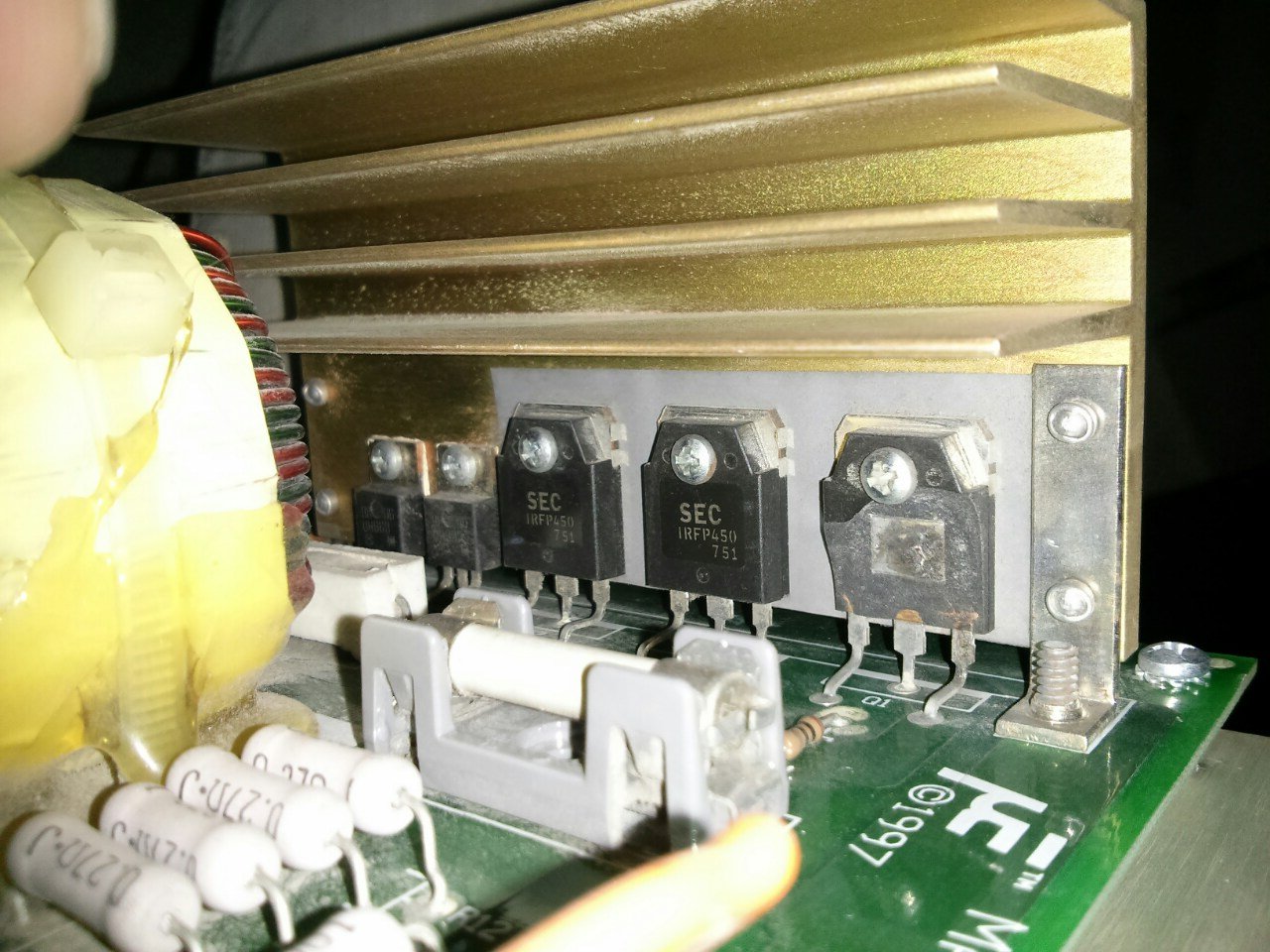
I heard a rattling sound on removing the LVPSU and have found half a power transistor floating around, might be all/part of the cause. See photo attached.
Is it worth me simply replacing it and testing it again?
| Description: |
| LVPSU with blown transistor. |
|
| Filesize: |
226.33 KB |
| Viewed: |
8328 Time(s) |
|
_________________
Thanks
Richard
|
|
| Back to top |
|
|
Curt Palme
CRT Tech
Joined: 08 Mar 2006
Posts: 24396
Location: Langley, BC
TV/Projector: All of them!
|
| Posted: Sun Dec 01, 2013 3:09 pm Post subject: |
|
|
|
Try that, but it most likely has other issues in it. If you need another LVPS or PC board out of it, let me know.
|
|
| Back to top |
|
|
ReTrO
Joined: 08 Feb 2010
Posts: 28
Location: London, UK
|
|
| Back to top |
|
|
ReTrO
Joined: 08 Feb 2010
Posts: 28
Location: London, UK
|
| Posted: Sun Dec 01, 2013 3:37 pm Post subject: |
|
|
Spare fuses and parts on order. Will hopefully be able to update again on Tuesday.
Many thanks for all the help so far.
_________________
Thanks
Richard
|
|
| Back to top |
|
|
|
|




