|
As this forum is rarely used anymore, we've locked it. Feel free to browse and read. Questions? Please reach out to us directly. Cheers! |
|
|
 |
|
|
| Author |
Message |
tschaeikaei
Joined: 08 Apr 2013
Posts: 490
Location: Germany/Saarland
|
| Posted: Sun Jun 29, 2014 9:46 am Post subject: |
|
|
Another question that thrills me for months now.
Is there anyone here who experienced a Marquee projector switching the picture off and back on
if a lamp (anything but a normal bulb, e.g. an energy saving light) is switched on or off?
Both my Marquees do behave like this. It is possible that the CLM causes the problem, but i'm not sure.
If i am e.g. doing convergence, while the light is switched on or off, the picture disappears for about 1 or 2seconds,
comes back and i can't move the raster anymore.
I would have to leave the convergence menu and begin again. Everything works then.
This is really driving me nuts, and i cannot imagine i was the only marquee user with that problem.
Regards, Julian
_________________
Marquee 9500U edgeblend P43 | NEC 9PG
|
|
| Back to top |
|
 |
gjaky

Joined: 05 Jun 2010
Posts: 2802
Location: Budapest, Hungary
|
| Posted: Sun Jun 29, 2014 10:15 am Post subject: |
|
|
| tschaeikaei wrote: | Another question that thrills me for months now.
Is there anyone here who experienced a Marquee projector switching the picture off and back on
if a lamp (anything but a normal bulb, e.g. an energy saving light) is switched on or off?
Both my Marquees do behave like this. It is possible that the CLM causes the problem, but i'm not sure.
If i am e.g. doing convergence, while the light is switched on or off, the picture disappears for about 1 or 2seconds,
comes back and i can't move the raster anymore.
I would have to leave the convergence menu and begin again. Everything works then.
This is really driving me nuts, and i cannot imagine i was the only marquee user with that problem.
Regards, Julian |
Ha! My friend has a 9500 (actually an overhauled 9000) and his is doing the same, however it's just blacks out for a second or so but he haven't got control problems afterwards.
_________________
projectors in the past : NEC 6-9PG xtra, Electrohome Marquee 6-7500, NEC XG 1351 LC ( with super modified Electrohome VNB neckboard !!!)
current: VDC Marquee 9500LC
The MOD: VNB-DB, VIM-DB
|
|
| Back to top |
|
|
tschaeikaei
Joined: 08 Apr 2013
Posts: 490
Location: Germany/Saarland
|
| Posted: Sun Jun 29, 2014 10:41 am Post subject: |
|
|
So i guess he didn't fix it yet?
Maybe it's worth looking at the LVPS mains input filtering?
I didn't do that yet, but thats the only idea i had where to search.
Your 7500 didn't do it?
Regards, Julian
_________________
Marquee 9500U edgeblend P43 | NEC 9PG
|
|
| Back to top |
|
|
barclay66

Joined: 27 Jun 2011
Posts: 1304
Location: Germany
TV/Projector: Marquee 9500 Ultra
|
| Posted: Tue Jul 01, 2014 6:33 pm Post subject: |
|
|
Hi,
I just would like to add some bit of information regarding the problem with Your green tube.
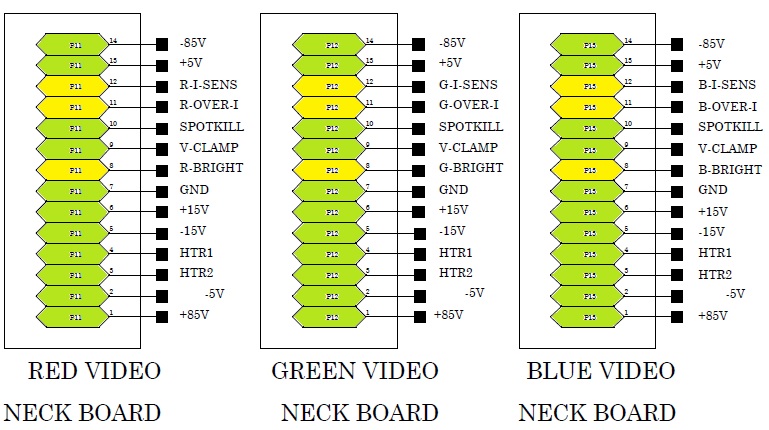
The 14-pin ribbon connector going to each of the neck boards has been discussed before and some people mentioned that it carries identical signals and supplies for each tube. Well, this is not the case.
Three of the 14 pins carry color-dependent signals (see the ones marked in yellow on the picture).
So, if You really want to find out if the tube is bad, You should swap two tubes (e.g. red and green) entirely by putting the green on the red tubes's location and vice versa. If You try this and the green tube still shows the same effect (although being fed all of the red's tube signals and supplies now), then it is the tube itself for sure.
If the tube really has a problem, we might be able to arrange something. I have a tube analyzing/restoring device. Maybe another visit to my place?
Regards,
barclay66
Edit: Updated the picture file
| Description: |
|
| Filesize: |
127.19 KB |
| Viewed: |
7140 Time(s) |
|
Last edited by barclay66 on Thu Jul 03, 2014 5:31 am; edited 1 time in total
|
|
| Back to top |
|
|
barclay66
Joined: 27 Jun 2011
Posts: 1304
Location: Germany
TV/Projector: Marquee 9500 Ultra
|
| Posted: Tue Jul 01, 2014 6:45 pm Post subject: |
|
|
| tschaeikaei wrote: | Another question that thrills me for months now.
Is there anyone here who experienced a Marquee projector switching the picture off and back on
if a lamp (anything but a normal bulb, e.g. an energy saving light) is switched on or off? |
Hi,
I've never seen such a behaviour on any of my machines, nor have I seen anything similar at the places of my HT friends (three Marquee owners and one Barco owner). The only thing I can imagine, is a problem with the power cabling at Your place which allows for surges to propagate (and maybe amplify). In order to avoid this, I connected my Marquee and all the HT components to one of the three phases arriving at the Basement and all of the rest to another. Maybe You could try this if You have acccess to all three main supply phases at Your place. Or maybe, You could route an extra power line to the fuse box in order to separate it from the rest...
Regards,
barclay66
|
|
| Back to top |
|
|
tschaeikaei
Joined: 08 Apr 2013
Posts: 490
Location: Germany/Saarland
|
| Posted: Wed Jul 02, 2014 11:34 pm Post subject: |
|
|
Hello Barclay66, nice to hear from you.
I guess you're back in Germany now for a longer period of time?
Will try swapping the green with the red tube. But as i asked before,
I heard that the red phosphor is kind of more effective than the green phosphor and therefore driven with less power.
Should the green tube be darker then if i feed it with the red tubes signals and supplies?
I can't open your attached picture.
But did you look at the video? I cannot imagine, that the problem during power-up
should be caused by the tube. It seems that HV is switched on too early (before the deflection circuit is running stable)
and switched off to late (after the deflection is shut down).
In my understanding, HV should be switched on after the deflection and off before the deflection magnetic field collapses.
What i think is visible looking into the tube is the start and shutdown of the deflection.
It should happen, but not be visible.
It's not that i believe to know this, but i guess it. Am i right or if i'm wrong...how?
Video
Regarding your second post: I don't think the problem is in the electrical installation of our home, because
the projectors behaved the same when i was using them at my fathers place before we moved to our flat.
It would be possible to connect the projector to another phase then the rest (exept the electric cooker for sure),
but only transitional. It's a rental flat and i cannot open the walls to seperate that one wall outlet from the rest using another cable.
What i thought might be possible, is to route the power through a good filter at the projectors mains input.
As there are filters (i should look at them again for more precise understanding how the input is filtered)
maybe they are faulty or just not filtering enough.
I should use a scope parallel to the incoming power and provoke the failure. Maybe that will help to understand it.
My guess at this point was that the " light switch causes projector to switch off and back on again" problem is widespread and
there could be an easy fix for it. But let's go on learning and find it myself. Hopefully with further help from you.
I thank you very much for the invitation to your home. I would be glad to meet you again, but it's about 500km to drive.
If you are ok with it, i could send you the tube. (If it causes the problem..)
Another question i wanted to ask you, but did yet: What do you think is better?
Colorfiltering via HD145 or tinting glycol? You know i have P43 greens and did not find anything on the net about filtering fast greens.
AFAIK the P43 have a good output at 545nm and a peak added in the more yellow area.
Would this work with the HD145 filters? I think they are optimized for "normal" P22 greens.
Colorfiltering could be more experimental, but even more flexible. I could try until it works.
The colors of those 8500s with p43 and no color filtering are really dull (compared to the 9PG with P22 green and HD6CML i got here).
It is important to me to fix this.
Maybe it is possible, that i call you on the phone? Please drop me a pm which time would be best.
Have a nice time and regards,
Julian
_________________
Marquee 9500U edgeblend P43 | NEC 9PG
|
|
| Back to top |
|
|
gjaky
Joined: 05 Jun 2010
Posts: 2802
Location: Budapest, Hungary
|
| Posted: Thu Jul 03, 2014 7:00 am Post subject: |
|
|
| tschaeikaei wrote: | So i guess he didn't fix it yet?
Maybe it's worth looking at the LVPS mains input filtering?
I didn't do that yet, but thats the only idea i had where to search.
Your 7500 didn't do it? |
I don't know how is his doing now, it is in his posession for three years now, and wasn't doing from the begining only since a year or so, will meet hin on saturday, and will ask.
| Quote: | Another question i wanted to ask you, but did yet: What do you think is better?
Colorfiltering via HD145 or tinting glycol? You know i have P43 greens and did not find anything on the net about filtering fast greens.
AFAIK the P43 have a good output at 545nm and a peak added in the more yellow area.
Would this work with the HD145 filters? I think they are optimized for "normal" P22 greens.
Colorfiltering could be more experimental, but even more flexible. I could try until it works. |
In this case I'd vote to glycol tinting, with filtered lens you'r hands are pretty tied, it may work out good, or may not -but that's about it. With tinting glycol you can adjust the ammount (or even the colour) of the dye, a colormeter would be necessary for that though.
_________________
projectors in the past : NEC 6-9PG xtra, Electrohome Marquee 6-7500, NEC XG 1351 LC ( with super modified Electrohome VNB neckboard !!!)
current: VDC Marquee 9500LC
The MOD: VNB-DB, VIM-DB
|
|
| Back to top |
|
|
tschaeikaei
Joined: 08 Apr 2013
Posts: 490
Location: Germany/Saarland
|
| Posted: Thu Jul 03, 2014 8:44 am Post subject: |
|
|
Hi,
| Quote: | | In this case I'd vote to glycol tinting, with filtered lens you'r hands are pretty tied |
these are my thoughts, too.
Maybe i should go for clear HD145s, because i'd like to have improved corner focus, too.
Seems to be important on a blend, having 4 "corners" in the center of the picture...
Regards, Julian
_________________
Marquee 9500U edgeblend P43 | NEC 9PG
|
|
| Back to top |
|
|
barclay66
Joined: 27 Jun 2011
Posts: 1304
Location: Germany
TV/Projector: Marquee 9500 Ultra
|
| Posted: Thu Jul 03, 2014 1:55 pm Post subject: |
|
|
Hi,
| tschaeikaei wrote: | | I guess you're back in Germany now for a longer period of time? |
Well, not yet. I'm still in Singapore until July 20th. But then I should be back permanently.
| tschaeikaei wrote: | | Should the green tube be darker then if i feed it with the red tubes signals and supplies? |
I really don't know. But it shouldn't matter as this is for testing purposes only. Be sure that You adjust the green tube's G2 (with the red G2 settings) correctly so that it allows for an 1:1 comparision.
| tschaeikaei wrote: | | I can't open your attached picture. |
Fixed it.
| tschaeikaei wrote: | | It seems that HV is switched on too early and switched off to late. |
How would that be possible on the green tube only? HV is generated in the HVPS and is evenly distributed through the splitter. All tubes get the same HV at the same time.
| tschaeikaei wrote: | | In my understanding, HV should be switched on after the deflection and off before the deflection magnetic field collapses. |
Not quite. HV is present some time before You see any light. You can hear the crackling much earlier. At startup, the tube's cathodes (and G1, I think) are driven to complete darkness according to the length of the startup phase programmed into the CLM's firmware and on shutdown, exactly the same happens in a reversed order. It is specifically designed not to show what You're seeing. Therefore it's logical to assume that either the tube isn't driven correctly or that the tube is not behaving correctly due to some kind of short or contamination. Both can be tested by connecting the green tube to the complete set of signals of another tube that is working properly. If the problem stays with the green tube, it's the tube itself. If it stays on the original location of the green tube, it's the signals arriving there.
| tschaeikaei wrote: | | If you are ok with it, i could send you the tube. (If it causes the problem..) |
Sure. We could do that after July 20th.
| tschaeikaei wrote: | | What do you think is better? Colorfiltering via HD145 or tinting glycol? |
Tinting glycol will give You more freedom in adjusting primaries. As stated before, You can vary the intensity as well as the tinting color.
Regards,
barclay66
|
|
| Back to top |
|
|
tschaeikaei
Joined: 08 Apr 2013
Posts: 490
Location: Germany/Saarland
|
| Posted: Sat Jul 05, 2014 11:41 pm Post subject: |
|
|
I will dismount that green tube and replae it with the green from the other projector i currently do not use.
It's easier that way. I'll tell you if the other green tube works in that place.
If it does, i'll send you the bad one after you're home again.
Thank you for helping me. 
Now looking for ink to color the glycol.
Do you know, if there is suitable ink available in Germany?
Curt tells about waterman ink, but i don't think i can buy this brand at our local store.
Would be easier with Lamy or Pelikan.
Regards, Julian
_________________
Marquee 9500U edgeblend P43 | NEC 9PG
|
|
| Back to top |
|
|
tschaeikaei
Joined: 08 Apr 2013
Posts: 490
Location: Germany/Saarland
|
| Posted: Sun Jul 06, 2014 2:32 pm Post subject: |
|
|
Maybe asked before, but is there someone, who changed the 3 belly fans?
It should be possible to reach them from underneath the projector, i think.
The screws that hold them are screwed from underneath.
I want those projectors silent.
Currently exchanging the green tube. Did not think that it would be that easy.
Took me about 10min to take one out. Is there a trick to readjust the 3 big Scheimflug screws?
Just orientate at the red and blue raster, get it matching (H and V)
and try to get it sharp without touching the focus setting at the lens?
Regards, Julian
_________________
Marquee 9500U edgeblend P43 | NEC 9PG
|
|
| Back to top |
|
|
tschaeikaei
Joined: 08 Apr 2013
Posts: 490
Location: Germany/Saarland
|
| Posted: Sun Jul 06, 2014 3:08 pm Post subject: |
|
|
Ok, other green tube in. Normal behavior.
Now i have to center the raster again. Just on the green.
Should i use the focus coil (loosen the 3 brass wingnuts [....]) to center?
_________________
Marquee 9500U edgeblend P43 | NEC 9PG
|
|
| Back to top |
|
|
gjaky
Joined: 05 Jun 2010
Posts: 2802
Location: Budapest, Hungary
|
| Posted: Sun Jul 06, 2014 3:15 pm Post subject: |
|
|
| tschaeikaei wrote: | Now i have to center the raster again. Just on the green.
Should i use the focus coil (loosen the 3 brass wingnuts [....]) to center? |
The placement of the focus coil should not affect raster position, if it does your 2pole astig isn't set correctly. Raster centering is done only through the service menu on the Marquee if I am correct, it doesn't have the magnet rings like the older NECs.
_________________
projectors in the past : NEC 6-9PG xtra, Electrohome Marquee 6-7500, NEC XG 1351 LC ( with super modified Electrohome VNB neckboard !!!)
current: VDC Marquee 9500LC
The MOD: VNB-DB, VIM-DB
|
|
| Back to top |
|
|
tschaeikaei
Joined: 08 Apr 2013
Posts: 490
Location: Germany/Saarland
|
| Posted: Sun Jul 06, 2014 4:13 pm Post subject: |
|
|
Moving the focus coil to center the raster is described in Bill Blues Marquee magnetic setup.
I know that it is possible to move the raster using the focus coil. I just wanted to know if this is the best way to do it.
Maybe you mix this up with the focus settings. The raster position should not move if you go from focus 0% to focus 100%.
But i meant the mechanical moving of the coils body sideways and up and down on the tube.
Regards, Julian
Here it is again, with picture. You loosen those 3 wingnuts and move the focus coils body sideways and up and down to center the raster.
Marquee Teardown
_________________
Marquee 9500U edgeblend P43 | NEC 9PG
|
|
| Back to top |
|
|
gjaky
Joined: 05 Jun 2010
Posts: 2802
Location: Budapest, Hungary
|
| Posted: Sun Jul 06, 2014 5:53 pm Post subject: |
|
|
| tschaeikaei wrote: | Moving the focus coil to center the raster is described in Bill Blues Marquee magnetic setup.
I know that it is possible to move the raster using the focus coil. I just wanted to know if this is the best way to do it.
Maybe you mix this up with the focus settings. The raster position should not move if you go from focus 0% to focus 100%.
But i meant the mechanical moving of the coils body sideways and up and down on the tube.
Regards, Julian
Here it is again, with picture. You loosen those 3 wingnuts and move the focus coils body sideways and up and down to center the raster.
Marquee Teardown |
The core of the focus coil is a static magnet, and its magnetic field is modulated by the coils to get perfect beam focus. Ideally the procedure would be to set every focus adjustment to midpoint and adjust the focus coil for the best focus, THEN adjust in menu. Moving the focus coil has virtually the same effect as setting in the menu, so no, it should not move the raster. Ideally not...
_________________
projectors in the past : NEC 6-9PG xtra, Electrohome Marquee 6-7500, NEC XG 1351 LC ( with super modified Electrohome VNB neckboard !!!)
current: VDC Marquee 9500LC
The MOD: VNB-DB, VIM-DB
|
|
| Back to top |
|
|
thewolfman

Joined: 28 Mar 2011
Posts: 1311
Location: Sweden
|
| Posted: Sun Jul 06, 2014 6:27 pm Post subject: |
|
|
| gjaky wrote: | | tschaeikaei wrote: | Moving the focus coil to center the raster is described in Bill Blues Marquee magnetic setup.
I know that it is possible to move the raster using the focus coil. I just wanted to know if this is the best way to do it.
Maybe you mix this up with the focus settings. The raster position should not move if you go from focus 0% to focus 100%.
But i meant the mechanical moving of the coils body sideways and up and down on the tube.
Regards, Julian
Here it is again, with picture. You loosen those 3 wingnuts and move the focus coils body sideways and up and down to center the raster.
Marquee Teardown |
The core of the focus coil is a static magnet, and its magnetic field is modulated by the coils to get perfect beam focus. Ideally the procedure would be to set every focus adjustment to midpoint and adjust the focus coil for the best focus, THEN adjust in menu. Moving the focus coil has virtually the same effect as setting in the menu, so no, it should not move the raster. Ideally not... |
Very interesting, thanks for clearing some of it up for me also.
Last edited by thewolfman on Fri Aug 01, 2014 2:18 pm; edited 1 time in total
|
|
| Back to top |
|
|
stridsvognen
Guest
|
| Posted: Sun Jul 06, 2014 10:20 pm Post subject: |
|
|
You can move the raster adjusting the focus yoke sideways, or up down on the tube neck, and place the image inside the raster using the phase adjustment.
Try move the image all to the right of your raster and center the image after, using the focus yoke. That should help keep your raster ringing out of the image.
|
|
| Back to top |
|
|
dvh99

Joined: 25 Dec 2009
Posts: 2158
Location: nederland
|
| Posted: Sun Jul 06, 2014 10:50 pm Post subject: |
|
|
centering the raster should be done with the deflection coil when all yokes are replaced.
first connect the deflection coil (horizontal and vertical) and center the raster.
after this you can fine tune the position of the raster with the focus coil.
you will need some superglue for the deflection and try to get it as far up on the tube as possible but beware of the high voltages so always work with 1 hand and keep the other on deinen rucken.
_________________
1 answer always poses multiple questions.
marquee 9500ultra HD10L moome hdmi1.3 v3+ some mods.
Last edited by dvh99 on Mon Jul 07, 2014 9:43 am; edited 1 time in total
|
|
| Back to top |
|
|
barclay66
Joined: 27 Jun 2011
Posts: 1304
Location: Germany
TV/Projector: Marquee 9500 Ultra
|
| Posted: Mon Jul 07, 2014 1:24 am Post subject: |
|
|
Hi,
| tschaeikaei wrote: | Now looking for ink to color the glycol.
Do you know, if there is suitable ink available in Germany? |
Unfortunately I don't have any experience with tinting glycol. I always worked with colored C elements like on the BG801s You got from me.
| tschaeikaei wrote: | Maybe asked before, but is there someone, who changed the 3 belly fans?
It should be possible to reach them from underneath the projector, i think. |
I did. I replaced them with three temperature controlled 12V fans and included a circuit to reduce the arriving 24V to 12V. The fans are best accessible from the top. You have to remove all the tubes and then the metal cover below them. Then You can take out the frame which holds them.
| tschaeikaei wrote: | I'll tell you if the other green tube works in that place. If it does, i'll send you the bad one after you're home again.
...
Ok, other green tube in. Normal behavior. |
So it is the tube itself! We will chat as soon as I'm back from Singapore. Of course You may send it to me. I then can try to get it working again. BTW: One of my friends nearby will soon change from 8'' to 9'' tubes and he has an almost mint 8'' set with a green P43. Maybe I can put You in contact with him later.
Regards,
barclay66
|
|
| Back to top |
|
|
tschaeikaei
Joined: 08 Apr 2013
Posts: 490
Location: Germany/Saarland
|
| Posted: Mon Jul 07, 2014 11:08 pm Post subject: |
|
|
Hello, as i can't remember any noise when watching movies at your place, i think i should remove those noisy belly fans too.
Changing the LVPS fans with temperature controlled artic F9 made the projectors a lot quieter.
Did you add fans or other cooling mods to the backplane heatsink?
We'll talk again, soon.
Thank you so far, Julian
_________________
Marquee 9500U edgeblend P43 | NEC 9PG
|
|
| Back to top |
|
|
|
|
|
|
|
You cannot post new topics in this forum
You cannot reply to topics in this forum
You cannot edit your posts in this forum
You cannot delete your posts in this forum
You cannot vote in polls in this forum
You cannot attach files in this forum
You can download files in this forum
|
Forum powered by phpBB © phpBB Group
|
|




