| Author |
Message |
tschaeikaei
Joined: 08 Apr 2013
Posts: 490
Location: Germany/Saarland
|
| Posted: Fri Oct 11, 2013 9:34 pm Post subject: |
|
|
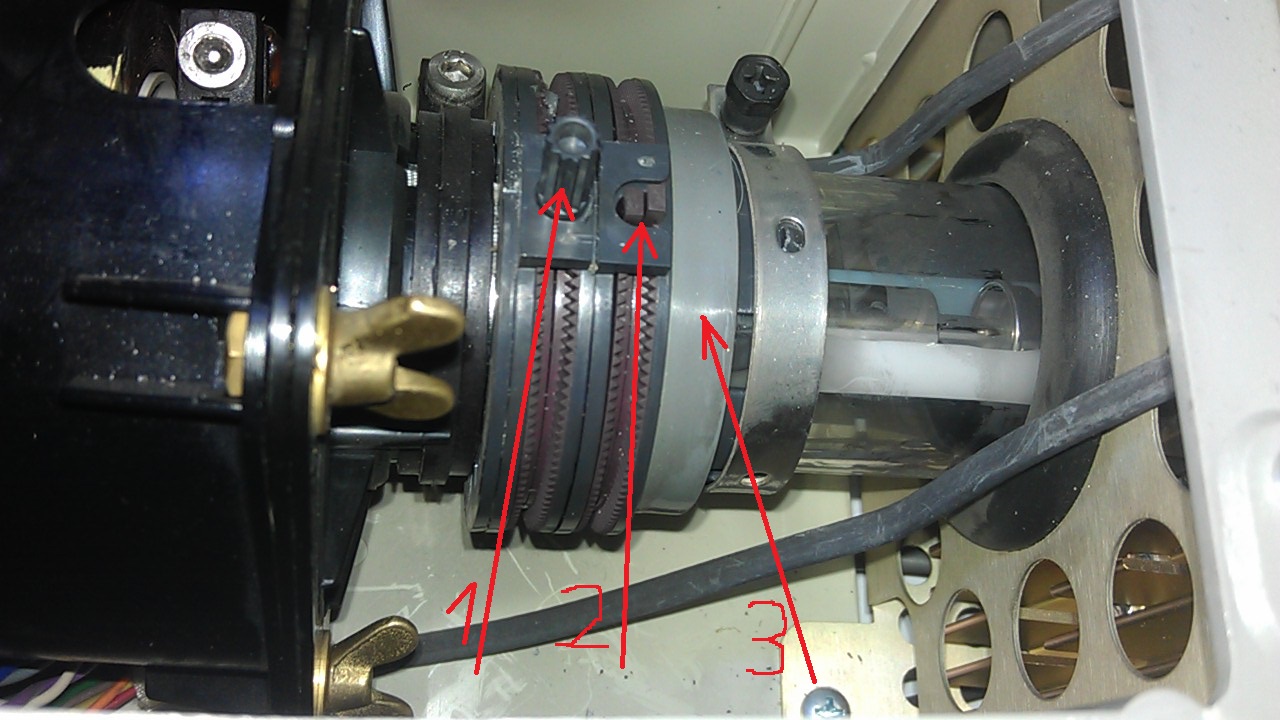
On my tubes, it's build like you painted it. Here's a picture. Flare ring, flare ring knob?
| Description: |
|
| Filesize: |
248.76 KB |
| Viewed: |
12444 Time(s) |
|
_________________
Marquee 9500U edgeblend P43 | NEC 9PG
|
|
| Back to top |
|
 |
Nashou66

Joined: 12 Jan 2007
Posts: 16171
Location: West Seneca NY
|
| Posted: Sat Oct 12, 2013 12:46 am Post subject: |
|
|
yes you only have a single pole magnet(1) which is the flare magnet. Each half of that magnet has two magnetic points on it at opposite ends, for example at 12 O'Clock and 6 O'Clock points. these magnets will push the electron beam towards the center location which will move as you move the entire knob back and forth around the tube neck and also if you twist the knob the magnets move away from each other or toward each other.
The NULL point is where the two magnets on each half are together. So the two magnetic points on the front ring half should match up with the magnetic points on the back half . You know this is true when you move the knob around the tube neck and nothing happens or there is very little movement. Another way is to turn the ring around by the knob till you find the two tabs
like the ones on magnet (2). Put those tabs together and you now have a Null magnet structure. Start here with Flare adjustment.
Do as Drags states looking for the bright dot and where there is a "comet trail" move the knob around to get the trail or flare to get closer to the center, first by moving the entire ring around then by twisting the knob so the four magnetic points, two on each half, move around the ring pushing or pulling the magnetic field closer to the center. You may have to also move the knob around the tube neck while twisting. it will take some practice to figure out what each action causes in a reaction to the electron beam.
Eventually you'll have an AH HA!!!! moment and understand what is going on.
Good luck !!

Athanasios
_________________
Don't blame your underwear for your crooked ass~ unknown Greek philosopher
"Republicans believe every day is the Fourth of July, but the Democrats believe every day is April 15." --- President Reagan
One Smart Dog!!!
Marquee High Performance Bellows now shipping!!
Marquee Modifications and Performance Enhancement
Marquee C-element and Bellow removal
|
|
| Back to top |
|
|
Tim in Phoenix

Joined: 21 Oct 2006
Posts: 4409
Location: Phoenix
|
|
| Back to top |
|
|
tschaeikaei
Joined: 08 Apr 2013
Posts: 490
Location: Germany/Saarland
|
| Posted: Sun Oct 13, 2013 12:38 pm Post subject: |
|
|
Thanks to both of you, the astig is done. Tim, referring to your website (wich I really like, thanks):
I want to add some picture width by turning the coil cores on the HDM.
But, nothing changes. I tried frequencies lower and higher than 60kHz. No changes in picture width or height.
Any ideas? Best regards, Julian
_________________
Marquee 9500U edgeblend P43 | NEC 9PG
|
|
| Back to top |
|
|
Tim in Phoenix
Joined: 21 Oct 2006
Posts: 4409
Location: Phoenix
|
| Posted: Sun Oct 13, 2013 1:36 pm Post subject: |
|
|
Hello
Under the daughter board is a two pin jumper with a programming shunt. Pulling that off gives a few percent more width.
|
|
| Back to top |
|
|
tschaeikaei
Joined: 08 Apr 2013
Posts: 490
Location: Germany/Saarland
|
| Posted: Sun Oct 13, 2013 2:43 pm Post subject: |
|
|
Thanks Tim, I'll try that. But is it normal that the width doesn't increase or decrease when I turn those ferrite cores?
Tried both directions either for high band and low band on the red and green.
_________________
Marquee 9500U edgeblend P43 | NEC 9PG
|
|
| Back to top |
|
|
Tim in Phoenix
Joined: 21 Oct 2006
Posts: 4409
Location: Phoenix
|
| Posted: Sun Oct 13, 2013 2:48 pm Post subject: |
|
|
Hello
The slugs have to go into the middle of the windings to make a difference; if they are backed out to the end that is the most width available from turning the slugs.
|
|
| Back to top |
|
|
tschaeikaei
Joined: 08 Apr 2013
Posts: 490
Location: Germany/Saarland
|
| Posted: Sun Oct 13, 2013 4:36 pm Post subject: |
|
|
The jumper was removed already. So the best thing would be to turn the green coil cores all the way out and adjust red and blue (convergence nulled)
to get the best picture possible, meaning that the fewest possible converging with the remote is needed.
The fans arrived friday, and yes, the produce enough airflow (cold air is coming out the projector).
It's much quieter now, I only hear the belly fans. If in standby, the projector is nearly inaudible.
Maybe I need to do the 16/9 mod, but I have no problems with picture height (1920*1080, width 100 height 23).
This just gives fewer height, right? haha...
_________________
Marquee 9500U edgeblend P43 | NEC 9PG
|
|
| Back to top |
|
|
tschaeikaei
Joined: 08 Apr 2013
Posts: 490
Location: Germany/Saarland
|
| Posted: Mon Oct 14, 2013 1:08 pm Post subject: |
|
|
The problem is that I have to use all the green convergence possible to get the image as wide as my screen is.
It fits on the tubes quiet nice, I have about 3mm (1/8") of phosphor left on the tubes.
All well centered. But I get convergence drift at the projector warming up. Think thats the convergence amp running hot.
It's even got worse since turning the red and blue coils to far out.
As I said: I use to much convergence correction.
But how do I get a picture that fills my screen and the tubes without overusing convergence?
Powerstrip is on its end, I have no more porches left.
What I also discovered is the solution of this problem: | Quote: | Next one: While the projector is running someone switches the light (fluorescent tube) on or off in my room
or in the bathroom nextdoor, the picture goes off and on again.
I think it's an LVPS problem, maybe something with a integrated mains filter. |
It's not the projector, the problem is caused by the Barco converter box (VGA to RGBS with negative sync).
It seems to be the best if I just use an adaptor cable and feed RGBHV in the Marquee,
I think it would not worry about postive or negative Sync, would it?
Best regards, Julian
_________________
Marquee 9500U edgeblend P43 | NEC 9PG
|
|
| Back to top |
|
|
ronaldus
Joined: 25 Dec 2010
Posts: 183
Location: france
|
|
| Back to top |
|
|
Nashou66
Joined: 12 Jan 2007
Posts: 16171
Location: West Seneca NY
|
| Posted: Mon Oct 14, 2013 2:15 pm Post subject: |
|
|
I'm sure you know this but make sure the PJ is at least warmed up for 30 minutes before you do convergence. I too have used Green convergence to max phosphor as some times it is the only way . Some times if some one moved the deflection yolk to center it and did not move it all the way up the grids will be too small.
So using Green convergence to widen the raster is usually ok. All Marquees need a bit of warm up for convergence to
settle in, one of mine takes about 20 minutes the other one about 5-10.
What date is PJ, some times changing caps on the CVA help drift as does the smaller 1.2 ohm resistors to a slightly larger and
type with a better heat rating. Those small resistors get hot and will drift. I think there are 24 on the CVA also change the 1 ohm resistors as well to half ohms some machines have two 1 ohm resistors piggy backed to make 1/2 ohm. Then cleaning the heat sink contact area for the amps and using fresh heat sink compound also helps, you know it is a nice contact if the heat sink is hotter than before. The quicker the temp stabilizes on those boards the faster convergence will also settle. So clean the VDM heat sink contacts as well
That should help with drifting
Athanasios
_________________
Don't blame your underwear for your crooked ass~ unknown Greek philosopher
"Republicans believe every day is the Fourth of July, but the Democrats believe every day is April 15." --- President Reagan
One Smart Dog!!!
Marquee High Performance Bellows now shipping!!
Marquee Modifications and Performance Enhancement
Marquee C-element and Bellow removal
|
|
| Back to top |
|
|
Tim in Phoenix
Joined: 21 Oct 2006
Posts: 4409
Location: Phoenix
|
| Posted: Mon Oct 14, 2013 2:41 pm Post subject: |
|
|
Guys
There might be another five percent of width available by backing the scan yokes away from the tube bell a few millimeters. I have not tried this; it may be detrimental to focus, and you do not want the electron beam hitting the glass inside the neck.
|
|
| Back to top |
|
|
Nashou66
Joined: 12 Jan 2007
Posts: 16171
Location: West Seneca NY
|
| Posted: Mon Oct 14, 2013 2:44 pm Post subject: |
|
|
| Tim in Phoenix wrote: | Guys
There might be another five percent of width available by backing the scan yokes away from the tube bell a few millimeters. I have not tried this; it may be detrimental to focus, and you do not want the electron beam hitting the glass inside the neck. |
I thought it was not having them forward the correct amount it made them smaller? But now thinking about it your right Tim.
Nashou
_________________
Don't blame your underwear for your crooked ass~ unknown Greek philosopher
"Republicans believe every day is the Fourth of July, but the Democrats believe every day is April 15." --- President Reagan
One Smart Dog!!!
Marquee High Performance Bellows now shipping!!
Marquee Modifications and Performance Enhancement
Marquee C-element and Bellow removal
|
|
| Back to top |
|
|
tschaeikaei
Joined: 08 Apr 2013
Posts: 490
Location: Germany/Saarland
|
| Posted: Tue Oct 15, 2013 9:29 am Post subject: |
|
|
Hey guys, my projectors are 2001 build and they have been used about 3000h, Pic is 1920*1080 72Hz progressive.
Remember, I have two identical projectors, only one is set up now. Planning to set up both when I have room for two.
The problem is that I have to use ALL the green convergence. I must tie the raster all the range out to fit on the screen/ tubes.
Sure the raster overshoots the tubes, but the picture goes straight form one end to the other.
And this is causing drift. I tried it without using green convergence and projected a smaller picture, just centered on the raster.
Much less drift, that's it. When I get home today, I'll try it again using Powerstrip, maybe switch between long and short retrace..
And now for something completely different: Whats the cheapest way to measure brightness and colors?
I'm planning to get a meter, but usually you need two, right? Colorimeter AND a luxmeter.
Is the a meter that's able of doing both?
Best regards, Julian
_________________
Marquee 9500U edgeblend P43 | NEC 9PG
|
|
| Back to top |
|
|
Nashou66
Joined: 12 Jan 2007
Posts: 16171
Location: West Seneca NY
|
|
| Back to top |
|
|
tschaeikaei
Joined: 08 Apr 2013
Posts: 490
Location: Germany/Saarland
|
| Posted: Wed Oct 16, 2013 2:08 am Post subject: |
|
|
Yeah the retrace and some strange powerstrip behavior.
Fixed it, works. Thanks 
Next question: I got some strange behavior of the blue tube, not sure how to call it.
Settings are:
Drive /G2
R: 12/71
G:90/63
B: 65/68
Brightness 60, Contrast 66.
It's only the blue tube. on the red, it never appears, on the green only if Contrast is set over 85 (sure for testing only).
The blue gets much sharper if I lower contrast under 50. But... That's not a setting where you can watch film with.
My (actively used) screen is 2,5x 1,4m (100x55"). That's not too much for an 8500 AC, is it?
Is this a leaking capacitor (as it always is ) or am I overdriving my projector?
Second one: Can't get the 1on 1off to work. Horizontal seems quiet nice, but vertical lines are horrible, meaning there are none.
Apart from that, astig (mechanically and electronically) is done, zone focus is done... I'm not the god of tweaking, but apart from this testfile, the aharpness really seems ok.
Best regards, Julian
    
    
_________________
Marquee 9500U edgeblend P43 | NEC 9PG
|
|
| Back to top |
|
|
stridsvognen
Guest
|
| Posted: Wed Oct 16, 2013 7:25 am Post subject: |
|
|
|
I bet your 1:1 pattern is messed up in the source.. You need to be sure there is no scaling going on. Sharpness , noise reduction need to be turned off.
|
|
| Back to top |
|
|
tschaeikaei
Joined: 08 Apr 2013
Posts: 490
Location: Germany/Saarland
|
| Posted: Thu Oct 17, 2013 12:50 am Post subject: |
|
|
Hey stridsvognen,
I have a PC as source. Nothing of these settings is activated. I just set resolution,
Vsync and porches in powerstrip. There is no scaler, the picture is resolved as is.
I know windows sometimes scales pics, but this is 1:1 original as centered
desktop background.The only reason that refers to the source is my 6m VGA cable,
witch is but really good quality. I have none of the typical ghostings caused by long cables.
Maybe you have a pic of your projector with this 1on1off hv pattern- would like to see the difference.
But my main problem is the strange blue tube behavior. The blue coming out at the side of the pic (Pics 1 and 2).
Seems like a focus issue, but increases with adding anode current (increasing contrast or blue drive).
maybe the resolving problem with the 1on 1off pattern is caused by that.
best regards, Julian
_________________
Marquee 9500U edgeblend P43 | NEC 9PG
|
|
| Back to top |
|
|
Nashou66
Joined: 12 Jan 2007
Posts: 16171
Location: West Seneca NY
|
|
| Back to top |
|
|
tschaeikaei
Joined: 08 Apr 2013
Posts: 490
Location: Germany/Saarland
|
| Posted: Thu Oct 17, 2013 9:45 am Post subject: |
|
|
Yes it is 1920*1080, so is the projectors resolution. And there is no scaling.
_________________
Marquee 9500U edgeblend P43 | NEC 9PG
|
|
| Back to top |
|
|
|
|




