|
As this forum is rarely used anymore, we've locked it. Feel free to browse and read. Questions? Please reach out to us directly. Cheers! |

|
 |
|
|
| Author |
Message |
barclay66

Joined: 27 Jun 2011
Posts: 1304
Location: Germany
TV/Projector: Marquee 9500 Ultra
|
| Posted: Tue Jul 08, 2014 6:44 am Post subject: |
|
|
| tschaeikaei wrote: | Hello, as i can't remember any noise when watching movies at your place, i think i should remove those noisy belly fans too.
Changing the LVPS fans with temperature controlled artic F9 made the projectors a lot quieter.
Did you add fans or other cooling mods to the backplane heatsink? |
Hi,
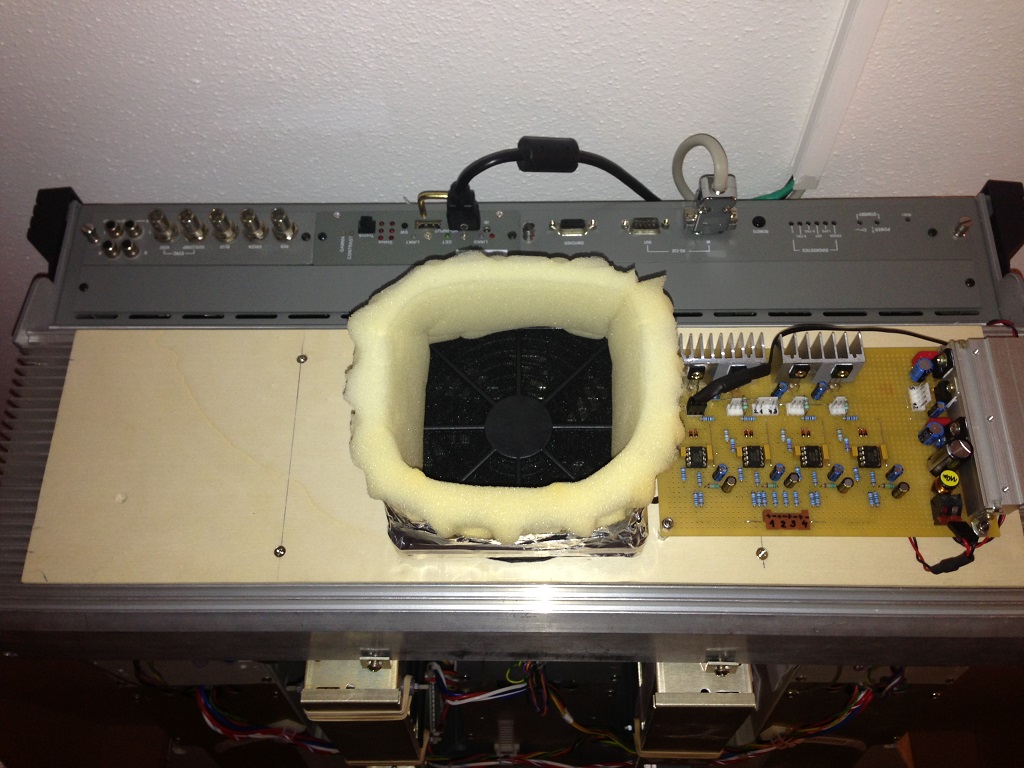
I added one fan (12cm) for cooling the large heat sink and I added two fans (8cm) for the HDM and FGM. As You might remember, I changed the ventilation system quite drastically:
- The LVPS fans have been replaced with beQuiet! SilentWings 2 (same air flow, but much quiter)
- (1) One fan is pushing air from the outside onto the large heat sink
- (2) One fan is pushing air from the outside into the HDM cage
- (3) One fan is pushing air from the outside into the FGM cage
- (4) The belly fans have been replaced and reversed. They now suck air from the inside and blow it out against the ceiling
- The cover over the belly fans (the one between the fans and the outside) was removed
- There are four temperature sensors. One on the large heat sink for controlling fan Group (1). One on the HDM heat sink for controlling fan Group (2). One on the FGM heat sink for controlling fan Group (3). One inside the board cage for controlling fan Group (4).
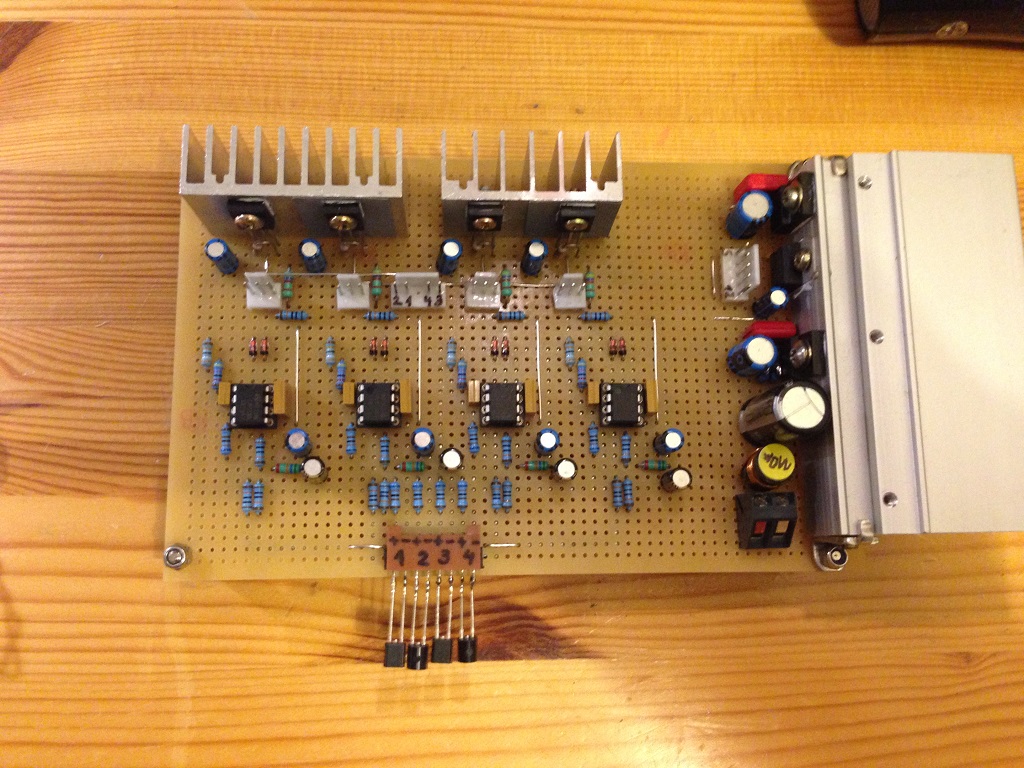
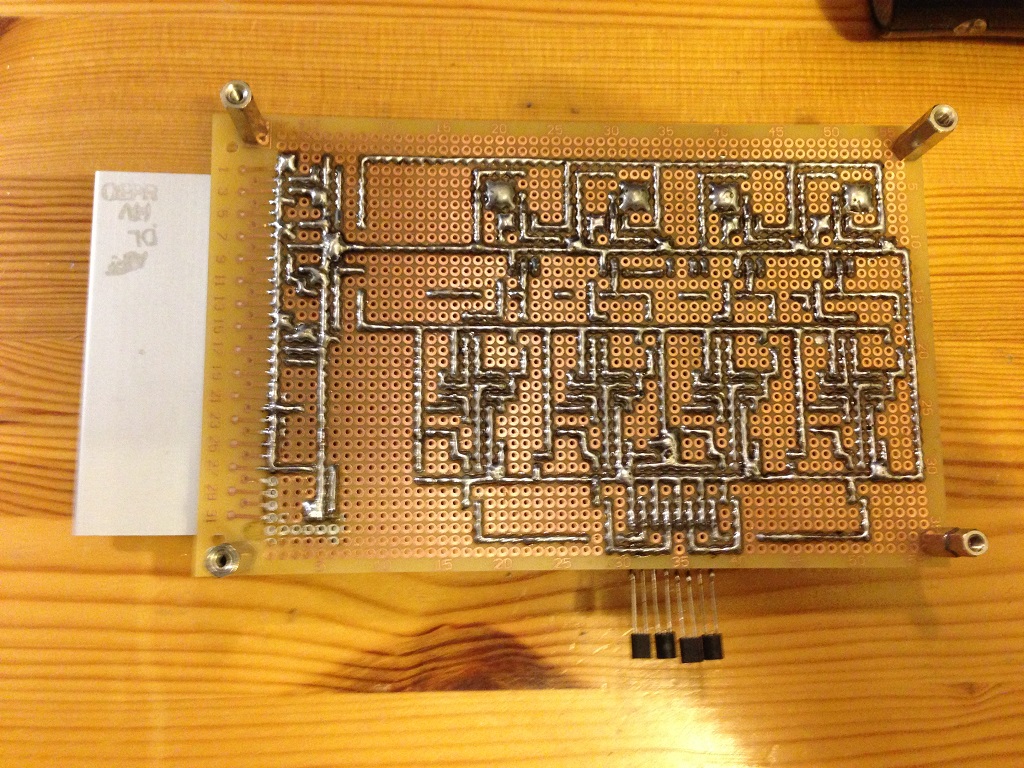
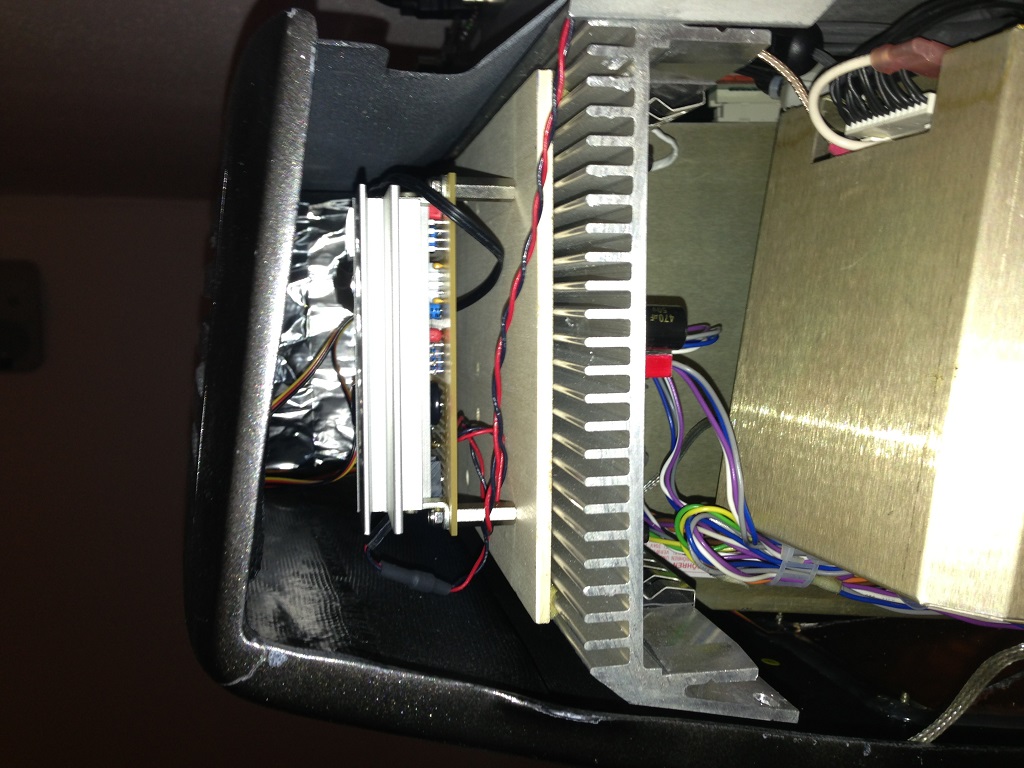
- I built a custom power converter (24V -> 12V) and four-channel fan control board which now sits at the back of the large heat sink.
With this, all temperatures and the noise are well behaved...
Regards,
barclay66
|
|
| Back to top |
|
 |
tschaeikaei
Joined: 08 Apr 2013
Posts: 490
Location: Germany/Saarland
|
| Posted: Thu Jul 10, 2014 9:32 pm Post subject: |
|
|
I'll have a look into this mod. But did you try other fans?
I think we talked about this last year when i was at your home, but i don't remember everything...
Are those "silent wings" really that much quieter than other (cheaper) fans?
I have the Arctic F9 pro TC (PWM, temperture controlled) as LVPS fans and they work quiet enough for me.
Sure, quieter is better, but i'm not gonna pay 15 to 20€ for a single fan.
The arctic came about 4€ per piece. Huge difference there.
Which step down converter did you use to control the fans?
I declare to be a LM317- guy, but for that many fans... it would be a lot better to use regulators that don't just burn half of the power.
I do currently have one of the two marquees set up for movies on a white wall, the other is stripped down
and waiting for it's green tube. I think i'll try everything on the not-in-use one and write her about it.
Today my screen material ( glass fiber fabric and epoxy resin) arrived.
Thats the main project now. There is a thread in the "Screens" section for this... Maybe someone will have a look...
Regards, Julian
_________________
Marquee 9500U edgeblend P43 | NEC 9PG
|
|
| Back to top |
|
|
barclay66
Joined: 27 Jun 2011
Posts: 1304
Location: Germany
TV/Projector: Marquee 9500 Ultra
|
| Posted: Fri Jul 11, 2014 3:07 am Post subject: |
|
|
Hi,
I selected the fans based on their technical specs. I looked for fans that would have the same or more air flow and air pressure than the original ones although being quiter. For this I dug up all sorts of datasheets from different manufacturers (NMB, Papst, Noctua, beQuiet! and some more) and compared all these values. For the best three I looked for pricing and the beQuiet! had the best package. And I really can say that they are very quiet, especially when You compare them against the original ones. An Yes, they were more than 4€ per fan, but I thought that good cooling would preserve my much larger investment (the Marquee itself) and therefore justified the cost.
The voltage regualtors weren't purchased specifically for this project. I took some that I found in my inventory. They are four-legged and their part numbers are PQ05RF21 (5V, 2A, Low Drop) and PQ30RV31 (Adjustable, set at 12V, 3A, Low Drop) if I remember correctly. I haven't drawn the schematic, but I may do so some time in the future.
Here are some pictures. The first two show the voltage regulator and fan control board. The transistor-like parts connected to it are the temperature sensors. The other two pictures show, how it is mounted on the rear heat sink and how the heat sink is cooled by its own fan. The wooden panel ensures that the airflow from the fan is forced onto the entire surface of the heat sink and at the same time it provides the support for both the fan and the board. The foam ring on the fan ensures that the it will only suck air from the outside as it adapts to the inner surface of the Vision 1 case...
Regards,
barclay66
| Description: |
|
| Filesize: |
323.6 KB |
| Viewed: |
14505 Time(s) |
|
| Description: |
|
| Filesize: |
386.45 KB |
| Viewed: |
14505 Time(s) |
|
| Description: |
|
| Filesize: |
231.46 KB |
| Viewed: |
14505 Time(s) |
|
| Description: |
|
| Filesize: |
232.75 KB |
| Viewed: |
14505 Time(s) |
|
|
|
| Back to top |
|
|
thewolfman

Joined: 28 Mar 2011
Posts: 1311
Location: Sweden
|
| Posted: Fri Jul 11, 2014 9:50 am Post subject: |
|
|
Very impressive and inspirational.
My projector is bare naked, and I sit 2 feet from it at head level, and not concerned about the LVPS noise at all. It's low and almost inaudible, the seller said that it was modded, but It looks completely stock to me and actually think it is, however, the fans runs smoothly and stopping both fans with my fingers makes it not much more quite. The LVPS-fans has blue rubber holding them on and that could have been changed I suppose.
Actually, I'm thinking the fans under the belly is what needs to be changed to make it less noisy, there's quite a bit of dB do be lowered from there as the noise sure seems to be coming from there.
Curtpalme.com should make a small 24-to-12-volt-step-down converter available for purchase, as I haven't found one on the internet, so that everyone could make these changes pretty easy. If I remember correctly, the fans I know about have magnets for bearings to make them airlifted (I think) but making those work with 24 volt is not all that easy for everyone to make.
Last edited by thewolfman on Fri Aug 01, 2014 2:20 pm; edited 1 time in total
|
|
| Back to top |
|
|
dvh99

Joined: 25 Dec 2009
Posts: 2158
Location: nederland
|
| Posted: Fri Jul 11, 2014 10:06 am Post subject: |
|
|
did you measure temps before and after under same circumstances and if so what`s the difference as i am very curious.
great work btw.
_________________
1 answer always poses multiple questions.
marquee 9500ultra HD10L moome hdmi1.3 v3+ some mods.
|
|
| Back to top |
|
|
barclay66
Joined: 27 Jun 2011
Posts: 1304
Location: Germany
TV/Projector: Marquee 9500 Ultra
|
| Posted: Fri Jul 11, 2014 2:16 pm Post subject: |
|
|
| thewolfman wrote: | | Curtpalme.com should make a small 24-to-12-volt-step-down converter available for purchase, as I haven't found one on the internet, so that everyone could make these changes pretty easy. If I remember correctly, the fans I know about have magnets for bearings to make them airlifted (I think) but making those work with 24 volt is not all that easy for everyone to make. |
Hi,
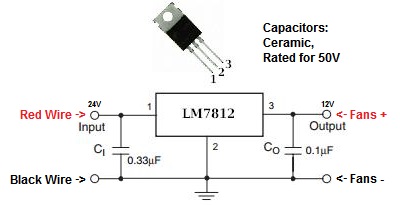
A voltage Regulator circuit around the very popular LM7812 is one of the easiest DIY Projects imaginable. It is made of only three parts (the LM7812 and two ceramic capacitors, don't omit those!).
If You want to use it for the belly fans, just make sure that You mount the LM7812 on a small heat sink and that the heat sink doesn't make contact to the chassis. This is why: The supply for the belly fans is connected to the -24V LVPS Output which means, that the red (+) wire is connected to the chassis ground and the black (-) wire is the live one. As the metallic back of the LM7812 is connected to the (-) line, it would shorten the -24V line if it made contact with the chassis.
EDIT: Or You could use one like this: http://amzn.com/B005CMIV2K
Here too You should isolate the device's case from the chassis if it is connected to the black cables.
Regards,
barclay66[url][/url]
| Description: |
|
| Filesize: |
19.7 KB |
| Viewed: |
14474 Time(s) |
|
Last edited by barclay66 on Fri Jul 11, 2014 2:53 pm; edited 2 times in total
|
|
| Back to top |
|
|
barclay66
Joined: 27 Jun 2011
Posts: 1304
Location: Germany
TV/Projector: Marquee 9500 Ultra
|
| Posted: Fri Jul 11, 2014 2:41 pm Post subject: |
|
|
| dvh99 wrote: | | did you measure temps before and after under same circumstances and if so what`s the difference as i am very curious. |
Hi,
I didn't do any exact measurements. I just noticed that the large heat sink became almost too hot to touch it over time. And there was some minor convergence drift too. The FGM heat sink was similar and the HDM heat sink went hot when running 1080p. After the mod they all are moderately warm and there's no drift anymore.
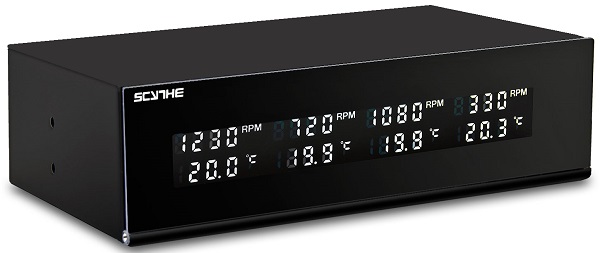
The system is prepared for temperature and fan monitoring but I haven't had time for installation yet, although all the parts are there and tests have been completed. It will show the exact temperature and fan RPM of all four locations including an audible alarm in case a fan gets stuck...
Regards,
barclay66
| Description: |
|
| Filesize: |
32.07 KB |
| Viewed: |
14470 Time(s) |
|
|
|
| Back to top |
|
|
thewolfman
Joined: 28 Mar 2011
Posts: 1311
Location: Sweden
|
| Posted: Fri Jul 11, 2014 3:28 pm Post subject: |
|
|
| barclay66 wrote: | | thewolfman wrote: | | Curtpalme.com should make a small 24-to-12-volt-step-down converter available for purchase, as I haven't found one on the internet, so that everyone could make these changes pretty easy. If I remember correctly, the fans I know about have magnets for bearings to make them airlifted (I think) but making those work with 24 volt is not all that easy for everyone to make. |
Hi,
A voltage Regulator circuit around the very popular LM7812 is one of the easiest DIY Projects imaginable. It is made of only three parts (the LM7812 and two ceramic capacitors, don't omit those!).
If You want to use it for the belly fans, just make sure that You mount the LM7812 on a small heat sink and that the heat sink doesn't make contact to the chassis. This is why: The supply for the belly fans is connected to the -24V LVPS Output which means, that the red (+) wire is connected to the chassis ground and the black (-) wire is the live one. As the metallic back of the LM7812 is connected to the (-) line, it would shorten the -24V line if it made contact with the chassis.
EDIT: Or You could use one like this: http://amzn.com/B005CMIV2K
Here too You should isolate the device's case from the chassis if it is connected to the black cables.
Regards,
barclay66[url][/url] |
Thanks for forwarding me to Amazon, I'll order that one next week. I'll make sure I take pictures before starting it up when I have done this.
If there's a very silent, free floating magnet belly fan, that I could get, feel free to link me for those as well. I read many of you have near inaudible Marquee's so I need to do this also.
|
|
| Back to top |
|
|
barclay66
Joined: 27 Jun 2011
Posts: 1304
Location: Germany
TV/Projector: Marquee 9500 Ultra
|
| Posted: Fri Jul 11, 2014 4:30 pm Post subject: |
|
|
Hi,
The only one I found which has enough air flow while being quiet is this one: http://amzn.com/B0026ZPFDE
Unfortunately, most product specs at Amazon are incomplete. For this one, the air pressure is missing. That sucks!
Look for a fan with at least 60cfm air flow and 0.2mm H2O air pressure (or 0.08" H2O) at less than 25dB noise.
The original ones (NMB 4710NL-05W-B10) have 59cfm and 0.08" H2O at 27dB and run at 1,550RPM...
Regards,
barclay66
|
|
| Back to top |
|
|
Nashou66

Joined: 12 Jan 2007
Posts: 16171
Location: West Seneca NY
|
|
| Back to top |
|
|
thewolfman
Joined: 28 Mar 2011
Posts: 1311
Location: Sweden
|
| Posted: Fri Jul 11, 2014 5:31 pm Post subject: |
|
|
I just climbed under it and stopped all 3 fans and it went all silent! I have to do this now.. I think I can remove the fans from underneath as I can sit right under it and just swap them out. It's a mystery how the LVPS can be so quite, but it just occurred to me now how silent it is with the pj turned off but with fans running. It's amazing how fast I get used to things the way things are.. but no more of that.
If Big E reads this, and confirm how silent they are, I may get these. At least I have some options now and will look into it myself also. Thanks to the both of you for this.
|
|
| Back to top |
|
|
thewolfman
Joined: 28 Mar 2011
Posts: 1311
Location: Sweden
|
| Posted: Fri Jul 11, 2014 7:14 pm Post subject: |
|
|
I can't believe I've had my head next to wind turbine all this time. This sucker is noisy! You were right Nashou, I think Couger Vortex 120mm is a winner. On this one segment in the video, he has the microphone very close to the fan, and yes, then it sounds a bit more, but I think the microphone picks up more audio the we will actually hear.
https://www.youtube.com/watch?v=arHLD19DyIs
https://www.youtube.com/watch?v=8eHtZgdusTQ
EDIT: I realize there are 2 versions of them - fixed and not fixed rpm. Which one to go with I don't know, but I wonder if my pc could run the fans for the pj.
Anyway, It would be easier to install a 6 channel fan controller and adjust temp from that. I only use PC anyway so.. a little more expensive but a little easier on myself also. I think. 6 channels, or more even, leaves me with the option to cool more things also, and just like Barclay is doing. To bad they are so expensive these little cougars.
http://www.eteknix.com/lamptron-unveil-fc5v3-fan-controller/
|
|
| Back to top |
|
|
thewolfman
Joined: 28 Mar 2011
Posts: 1311
Location: Sweden
|
| Posted: Sat Jul 12, 2014 1:55 pm Post subject: |
|
|
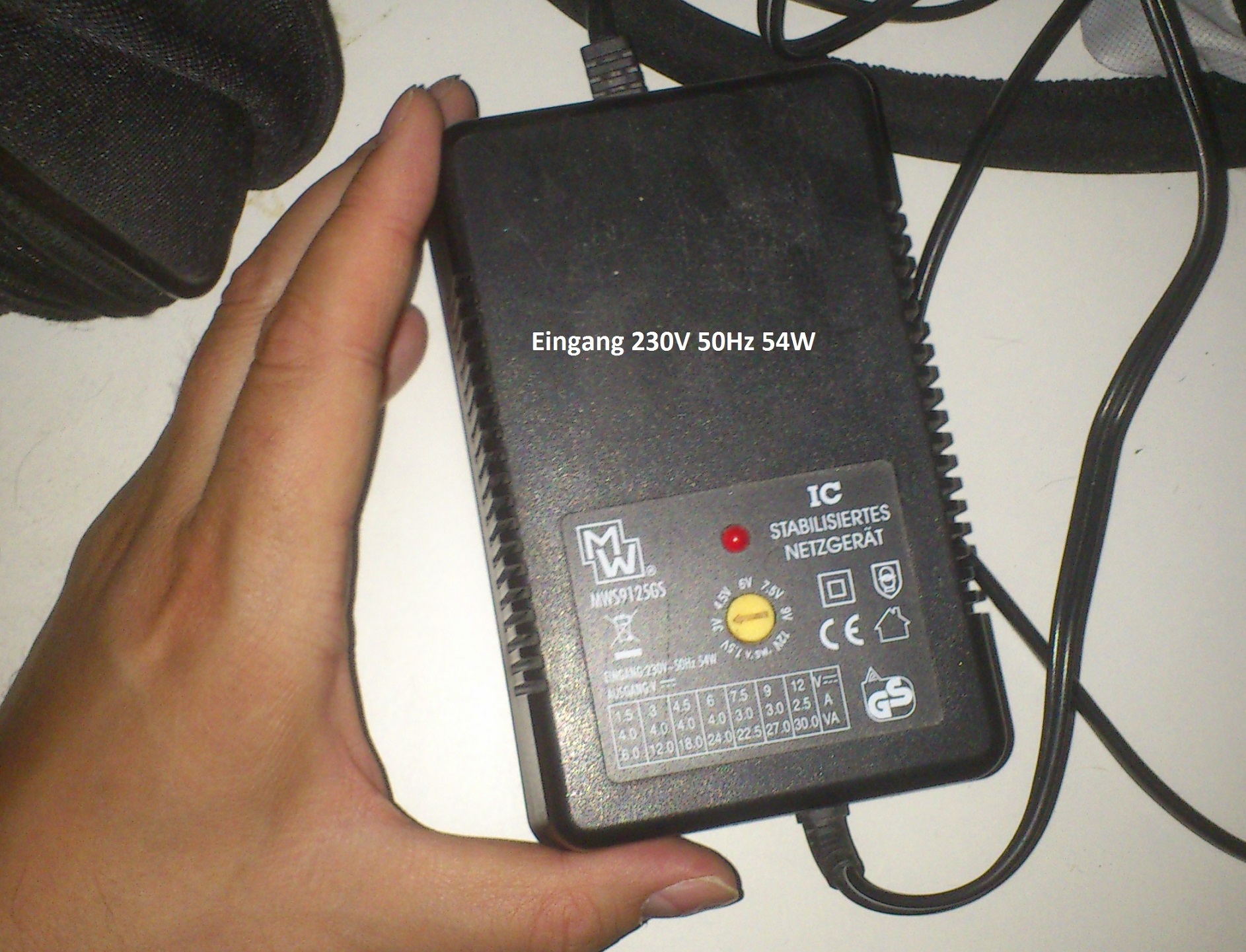
Ok, I dug up a power supply that I could use for my fans. It's rated high enough to power all the fans I could ever want, I think, but wonder if I can disconnect the fans on the pj and hook the new once into the power supply? At the back of my mind I believe some pj wont power up if there's no fans running?
I plan on buying the Cougar fans with interchangeable rpm:s because revving them up to 1500 still makes them silent. At a later state, I could add a pc fan controller, either connected to the pc or the Barclay method on the pj itself. I can't afford a controller now with these expensive cougars. I think. It's 62$ inc shipping from Sweden for the fans.
Power supply is rated 12V 2,5A and 30VA.
I could make sure the pj is hooked up onto a power distributor, with a flicker that shows a lit red lamp when active, with the fans connected to the same also, so that I wont forget to power them on. That's my plan in the early stages.
| Description: |
|
| Filesize: |
664.91 KB |
| Viewed: |
14217 Time(s) |
|
|
|
| Back to top |
|
|
barclay66
Joined: 27 Jun 2011
Posts: 1304
Location: Germany
TV/Projector: Marquee 9500 Ultra
|
| Posted: Sat Jul 12, 2014 2:09 pm Post subject: |
|
|
Hi,
Yes, You can do that. The fans in the Marquee aren't monitored like in a BR909. So You can power them from an external source and leave the internal supply unconnected.
Just don't do that on the LVPS fans. The LVPS and ist fans is an enclosed box and it will be difficult to route the external supply into it without messy cabling. In Addition, You can use 12V fans inside the LVPS easily. As there are two, You just connect them in series...
BTW: Why is the writing in German on Your picture? Are You in Germany?
Regards,
barclay66
|
|
| Back to top |
|
|
barclay66
Joined: 27 Jun 2011
Posts: 1304
Location: Germany
TV/Projector: Marquee 9500 Ultra
|
| Posted: Sat Jul 12, 2014 2:17 pm Post subject: |
|
|
| thewolfman wrote: | | At a later state, I could add a pc fan controller, either connected to the pc or the Barclay method on the pj itself. I can't afford a controller now with these expensive cougars. |
Just another thing:
I checked lots of different fan controllers. No matter how fancy they were and even if they had temperature sensors, there always was one thing missing: The dynamic control of the fans according to the temperature measured (revving up when temperature increases and revving down when temperature decreases). You only would be able to set a constant speed. Therefore I had to build this dynamic control by myself...
Regards,
barclay66
|
|
| Back to top |
|
|
thewolfman
Joined: 28 Mar 2011
Posts: 1311
Location: Sweden
|
| Posted: Sat Jul 12, 2014 3:08 pm Post subject: |
|
|
| barclay66 wrote: | Hi,
Yes, You can do that. The fans in the Marquee aren't monitored like in a BR909. So You can power them from an external source and leave the internal supply unconnected.
Just don't do that on the LVPS fans. The LVPS and ist fans is an enclosed box and it will be difficult to route the external supply into it without messy cabling. In Addition, You can use 12V fans inside the LVPS easily. As there are two, You just connect them in series...
BTW: Why is the writing in German on Your picture? Are You in Germany?
Regards,
barclay66 |
Oh, that's good to hear. I'll do this then.
Nah, I'm in Sweden, I bought that thing on Ebay some years ago.. probably from Germany, I can't remember.
|
|
| Back to top |
|
|
thewolfman
Joined: 28 Mar 2011
Posts: 1311
Location: Sweden
|
| Posted: Sat Jul 12, 2014 3:18 pm Post subject: |
|
|
| barclay66 wrote: | | thewolfman wrote: | | At a later state, I could add a pc fan controller, either connected to the pc or the Barclay method on the pj itself. I can't afford a controller now with these expensive cougars. |
Just another thing:
I checked lots of different fan controllers. No matter how fancy they were and even if they had temperature sensors, there always was one thing missing: The dynamic control of the fans according to the temperature measured (revving up when temperature increases and revving down when temperature decreases). You only would be able to set a constant speed. Therefore I had to build this dynamic control by myself...
Regards,
barclay66 |
Are you sure? So there's no controller fan at all that does this? I assume you mean the controller does this on its own once you set the temp you prefer.
Now, if someone could tell witch board to go with in order to get blue digital stig going again, I could save myself some money buying 1 board (the one most likely to be faulty) instead of 2, as that would make up for the fans I originally didn't plan for. If anyone are up for it, give me advice on that in a pm so as not to cludder up this thread. Thanks in advance.
|
|
| Back to top |
|
|
barclay66
Joined: 27 Jun 2011
Posts: 1304
Location: Germany
TV/Projector: Marquee 9500 Ultra
|
| Posted: Sat Jul 12, 2014 3:42 pm Post subject: |
|
|
Hi,
| thewolfman wrote: | | Are you sure? So there's no controller fan at all that does this? I assume you mean the controller does this on its own once you set the temp you prefer. |
I know, it's hard to believe. But I found that all of the manufacturers missed the last and most important step in the development: Coupling the temperature measured to the fan control. So they all allow for RPM Setting, but this is a constant value and You have to monitor if it's fast enough for cooling or not.
| thewolfman wrote: | | Now, if someone could tell witch board to go with in order to get blue digital stig going again, I could save myself some money buying 1 board (the one most likely to be faulty) instead of 2, as that would make up for the fans I originally didn't plan for. If anyone are up for it, give me advice on that in a pm so as not to cludder up this thread. Thanks in advance. |
Sorry, but there are two candidates: The Stigmator Waveform Board (daughter board on the CLM) which generates the correction signals and the Stigmator Amplifier Board (smallest board on the large heat sink) which amplifies them. As power components are more likely to fail, I would suggest starting with the Amplifier Board.
Regards,
barclay66
|
|
| Back to top |
|
|
thewolfman
Joined: 28 Mar 2011
Posts: 1311
Location: Sweden
|
| Posted: Sun Jul 13, 2014 4:35 pm Post subject: |
|
|
| barclay66 wrote: | Hi,
| thewolfman wrote: | | Are you sure? So there's no controller fan at all that does this? I assume you mean the controller does this on its own once you set the temp you prefer. |
I know, it's hard to believe. But I found that all of the manufacturers missed the last and most important step in the development: Coupling the temperature measured to the fan control. So they all allow for RPM Setting, but this is a constant value and You have to monitor if it's fast enough for cooling or not.
| thewolfman wrote: | | Now, if someone could tell witch board to go with in order to get blue digital stig going again, I could save myself some money buying 1 board (the one most likely to be faulty) instead of 2, as that would make up for the fans I originally didn't plan for. If anyone are up for it, give me advice on that in a pm so as not to cludder up this thread. Thanks in advance. |
Sorry, but there are two candidates: The Stigmator Waveform Board (daughter board on the CLM) which generates the correction signals and the Stigmator Amplifier Board (smallest board on the large heat sink) which amplifies them. As power components are more likely to fail, I would suggest starting with the Amplifier Board.
Regards,
barclay66 |
Ok, we'll see what it was soon enough.
Oh, and Good luck tonight! I'm thinking 3-2 in favour of Germany.

|
|
| Back to top |
|
|
barclay66
Joined: 27 Jun 2011
Posts: 1304
Location: Germany
TV/Projector: Marquee 9500 Ultra
|
| Posted: Mon Jul 14, 2014 1:51 pm Post subject: |
|
|
| barclay66 wrote: | | Yes, You can do that. The fans in the Marquee aren't monitored like in a BR909. So You can power them from an external source and leave the internal supply unconnected. |
Hi,
I have to correct myself (found out just yesterday): There seems to be some current sensing going on. If You connect only one of the belly fans, the Marquee will switch off. So You might need some replacement load on that fan connector. A resistor between 180 and 220 Ohm (5W) should do...
Regards,
barclay66
|
|
| Back to top |
|
|
|
|
|
|
|
You cannot post new topics in this forum
You cannot reply to topics in this forum
You cannot edit your posts in this forum
You cannot delete your posts in this forum
You cannot vote in polls in this forum
You cannot attach files in this forum
You can download files in this forum
|
Forum powered by phpBB © phpBB Group
|
|




