|
As this forum is rarely used anymore, we've locked it. Feel free to browse and read. Questions? Please reach out to us directly. Cheers! |

|
 |
|
|
| Author |
Message |
gjaky

Joined: 05 Jun 2010
Posts: 2802
Location: Budapest, Hungary
|
| Posted: Sat Apr 26, 2014 12:13 pm Post subject: |
|
|
Maybe totally irrelevant, but I had similar problems with the 'signal clamping' option: with some signals it didn't matter what I chosen, but with other signals I also got poor light output... but now this is only a faint recollection.
_________________
projectors in the past : NEC 6-9PG xtra, Electrohome Marquee 6-7500, NEC XG 1351 LC ( with super modified Electrohome VNB neckboard !!!)
current: VDC Marquee 9500LC
The MOD: VNB-DB, VIM-DB
|
|
| Back to top |
|
 |
tschaeikaei
Joined: 08 Apr 2013
Posts: 490
Location: Germany/Saarland
|
| Posted: Sat Apr 26, 2014 12:20 pm Post subject: |
|
|
Hm, i don't think this is the case. The projector changed from bright to dark with the signal connected.
Going to reseat the VIM. Maybe this will solve it.
_________________
Marquee 9500U edgeblend P43 | NEC 9PG
|
|
| Back to top |
|
|
gjaky
Joined: 05 Jun 2010
Posts: 2802
Location: Budapest, Hungary
|
| Posted: Sat Apr 26, 2014 12:25 pm Post subject: |
|
|
| tschaeikaei wrote: | Hm, i don't think this is the case. The projector changed from bright to dark with the signal connected.
Going to reseat the VIM. Maybe this will solve it. |
Oh.. get rid of those Marquees and get a decent projector for example a newer NEC 
_________________
projectors in the past : NEC 6-9PG xtra, Electrohome Marquee 6-7500, NEC XG 1351 LC ( with super modified Electrohome VNB neckboard !!!)
current: VDC Marquee 9500LC
The MOD: VNB-DB, VIM-DB
|
|
| Back to top |
|
|
tschaeikaei
Joined: 08 Apr 2013
Posts: 490
Location: Germany/Saarland
|
| Posted: Sat Apr 26, 2014 12:59 pm Post subject: |
|
|
Thanks for your help, i love you too.
_________________
Marquee 9500U edgeblend P43 | NEC 9PG
|
|
| Back to top |
|
|
tschaeikaei
Joined: 08 Apr 2013
Posts: 490
Location: Germany/Saarland
|
| Posted: Sat Apr 26, 2014 2:55 pm Post subject: |
|
|
Problem solved, the activated colorprofile was "user setting" and when i clicked through 6500k, that was activated.
Just my dumb fault, choose the "user setting" and thats it.
Sadly, the user settings are the following: all three G2s on 70, all drive on 50. And that looks good.
Seems the tubes would not last long anymore.
_________________
Marquee 9500U edgeblend P43 | NEC 9PG
|
|
| Back to top |
|
|
gjaky
Joined: 05 Jun 2010
Posts: 2802
Location: Budapest, Hungary
|
| Posted: Sat Apr 26, 2014 3:06 pm Post subject: |
|
|
| tschaeikaei wrote: | Sadly, the user settings are the following: all three G2s on 70, all drive on 50. And that looks good.
Seems the tubes would not last long anymore. |
Leave it alone, those are just numbers, use it while it lasts, and that's it  Probably still thousands of hours of fun in them. Probably still thousands of hours of fun in them.
_________________
projectors in the past : NEC 6-9PG xtra, Electrohome Marquee 6-7500, NEC XG 1351 LC ( with super modified Electrohome VNB neckboard !!!)
current: VDC Marquee 9500LC
The MOD: VNB-DB, VIM-DB
|
|
| Back to top |
|
|
tschaeikaei
Joined: 08 Apr 2013
Posts: 490
Location: Germany/Saarland
|
| Posted: Sat Apr 26, 2014 3:15 pm Post subject: |
|
|
Yes, i would not throw it away, i don't worry about it. but having G2s set to the mid 60s was more like fun.
Did a coarse recalibration of the 6500k and ended up on those G2s: R73/G74/B69.
_________________
Marquee 9500U edgeblend P43 | NEC 9PG
|
|
| Back to top |
|
|
tschaeikaei
Joined: 08 Apr 2013
Posts: 490
Location: Germany/Saarland
|
| Posted: Sat Apr 26, 2014 7:18 pm Post subject: |
|
|
Just a few pics of my boards. They all work well, but i'd like to mod them. More bandwith, more stability, sharper picture.
Those are 2001 Marquee 8500 Ultra with P43 greens and HD8 Rev.B No color filter (maybe i'll filter them in the next time).
Just want to get the best possible picture out of the projector before i mount it on the ceiling.
i will do all mods by myself. Maybe someone of the specialists will chime in and tell me, what can be done to those.
I really wonder about that black box on the geometry/focus board. Seems like a selfmade thing to make bigger adjustments possible. German text on the sticker:
Setting top-pin, bot-pin, v-bow:
switch---modification
1---2
off off-----off
on off-----few
off on-----medium
on on-----much
Klicking on a pic enlarges it in a new window.
Neckboards.
    
Astig board.
 
Focus/Geometry board.
  
Horizontal deflection board.
   
Vertical deflection board.
 
Convergence board.
 
_________________
Marquee 9500U edgeblend P43 | NEC 9PG
|
|
| Back to top |
|
|
gjaky
Joined: 05 Jun 2010
Posts: 2802
Location: Budapest, Hungary
|
| Posted: Sat Apr 26, 2014 8:17 pm Post subject: |
|
|
That box is not unknown, Barclay66 revealed its secret a while ago, two resistors in it, and increasing the pin cushion range as it says, making them more suitable for curved screens.
_________________
projectors in the past : NEC 6-9PG xtra, Electrohome Marquee 6-7500, NEC XG 1351 LC ( with super modified Electrohome VNB neckboard !!!)
current: VDC Marquee 9500LC
The MOD: VNB-DB, VIM-DB
|
|
| Back to top |
|
|
tschaeikaei
Joined: 08 Apr 2013
Posts: 490
Location: Germany/Saarland
|
| Posted: Sat Apr 26, 2014 8:24 pm Post subject: |
|
|
Black box problem solved, thanks for backwards engineering barclay. 
_________________
Marquee 9500U edgeblend P43 | NEC 9PG
|
|
| Back to top |
|
|
tschaeikaei
Joined: 08 Apr 2013
Posts: 490
Location: Germany/Saarland
|
| Posted: Tue Apr 29, 2014 7:00 pm Post subject: |
|
|
Hey, i took my Scope yesterday and measured the outcoming voltages on the LVPS yesterday.
I have some 0,4V noise low frequency noise at the + and - 85V rails.
They go to the neckboards and the HDM. I checked the manuals. The Neckboards have various filtering
on their voltage inputs.
Do you think it makes sense to filter this noise at the SMPS?
Regards, Julian
_________________
Marquee 9500U edgeblend P43 | NEC 9PG
|
|
| Back to top |
|
|
tschaeikaei
Joined: 08 Apr 2013
Posts: 490
Location: Germany/Saarland
|
| Posted: Wed May 14, 2014 5:25 am Post subject: |
|
|
Just that this thread doesn't get lost: see this pdf about the BARCO 908.
The 908 is not interesting for me, but a detail on that pdf.
On page 3, about bandwidth it says: 120MHz RGB bandwidth, accomodates digital clockrates of 240MHz.
Is this a general thing?
Eg. if my Marquee is spec'd 100MHz i coud run a 200MHz (1920x1080x74Hz, progressive)?
Always wondered about that, because... you know... 1080/72p works well.
Interlaced may be sharper, but it works. I just want to know how someone has to read and understand those specs.
I don't think interlaced will be useful with shutterglasses, will it?
Hopefully i get my glasses this weekend, will try it.
Regards, Julian
_________________
Marquee 9500U edgeblend P43 | NEC 9PG
|
|
| Back to top |
|
|
gjaky
Joined: 05 Jun 2010
Posts: 2802
Location: Budapest, Hungary
|
| Posted: Wed May 14, 2014 7:41 am Post subject: |
|
|
CRT specs, especially for bandwidth are marketing BS numbers lately. Bandwidth has very little to do with the projector's syncing capability. if you get your NEC 9PG it should lock on 1080P-72Hz just fine as its scanrate fits in the projector's capabilities (this about all what matters). It's an other question how will it look on screen.
Now about bandwidth: the given bandwidth corresponds to the theoretical response of the RGB chain measured with sine signal at -3dB point. Digital pixel clock is always double the frequency of the actual pixel, but this is not the bandwidth requirement of the signal. First, an ideal square wave signal (1:1 pattern) regardless of frequency has infinite bandwidth requirement, because it is composed of multiple frequency components (see Fourier analysis). A square wave signal with 100MHz frequency has its components at 300,500,700,900,... MHz, the less the projector can resolve from these the result will be more sinusoidal on the output (first harmonic).
As for projector specs many manufacturer underspecified their budget models to make more contrast in favour to the main stream model, while the used boards were essentially the same (NEC 6PG xtra (80MHz) <-> 9PG xtra (100MHz); Marquee 8500 (100MHz) <-> 9500 (120MHz) use the same RGB boards).
My main resolution is 1080i-96Hz on the XG (and was on my PG xtra as well) and it works fine with both 2D and shutter glass 3D as well. It looks nice on screen, no motion judder, low bandwidth requirement. In the future, however I want to experiment with 1080i-120Hz as at 96Hz in 3D the flicker bothers me a little.
_________________
projectors in the past : NEC 6-9PG xtra, Electrohome Marquee 6-7500, NEC XG 1351 LC ( with super modified Electrohome VNB neckboard !!!)
current: VDC Marquee 9500LC
The MOD: VNB-DB, VIM-DB
|
|
| Back to top |
|
|
tschaeikaei
Joined: 08 Apr 2013
Posts: 490
Location: Germany/Saarland
|
| Posted: Wed May 14, 2014 2:30 pm Post subject: |
|
|
Yes, sure i forget about the square wave. Everything in the signal path will flatten or round up the square, so if it passes any video chain,
the square will not be perfectly square afterwards. The 3dB is an amplitude thing, what does this say.
Not more than 3dB distortion after the signal passes the chain?
Do you have a PC on that PG? I'm looking for a good powerstrip setup, with as few porches as needed.
Those machine of mine is great, but horrible to max out the raster. I even got the deflecting coils backed off to the neck about 2cm or so.
But then the beam hits the tube sides and you don't get a good picture on the phosphor (edges softened and cut off).
Will check for picture width adjustment pots/coils in the projector.
Regards, Julian
_________________
Marquee 9500U edgeblend P43 | NEC 9PG
|
|
| Back to top |
|
|
gjaky
Joined: 05 Jun 2010
Posts: 2802
Location: Budapest, Hungary
|
| Posted: Wed May 14, 2014 2:59 pm Post subject: |
|
|
dB expresses a ratio between two numbers. -3dB means about 70% of the amplitude of a reference level, translating to projector bandwidth, the reference level is usualy a low freqency signal like 1MHz, where the projector supposed to have an ideal flat response, and the upper limit is given at where the amplitude level is only the 70% (-3dB) of the reference level. In practice this -3dB point is where the signal loss become obvious. This also means that the projector can handle higher frequency signals, but you have to count with the lower output level, this is what we are looking for with 1:1 testpatterns, if the projector rolls off in frequency, but assuming tight astig and focus there will be brightness difference between the horizontal (which is not bandwidth dependent) and vertical on/off lines.
Read more about decibel at wikipedia: http://en.wikipedia.org/wiki/Decibel
Yes, I use PC to drive my projector, I used power strip as well, but now I also use the built in nVidia tool. The interesting thing is if I put the same numbers in the nVidia driver as in power strip it produces two different signal... Later the day I'll post my timings.
Easy with the PG, they are simply not designed to run on maximalized raster, if you leave a good cm blank space on both sides with the rasters, you'll find that the beam focus and convergence will be very handy and easy to set up, and it will run much cooler.
_________________
projectors in the past : NEC 6-9PG xtra, Electrohome Marquee 6-7500, NEC XG 1351 LC ( with super modified Electrohome VNB neckboard !!!)
current: VDC Marquee 9500LC
The MOD: VNB-DB, VIM-DB
|
|
| Back to top |
|
|
gjaky
Joined: 05 Jun 2010
Posts: 2802
Location: Budapest, Hungary
|
| Posted: Wed May 14, 2014 9:34 pm Post subject: |
|
|
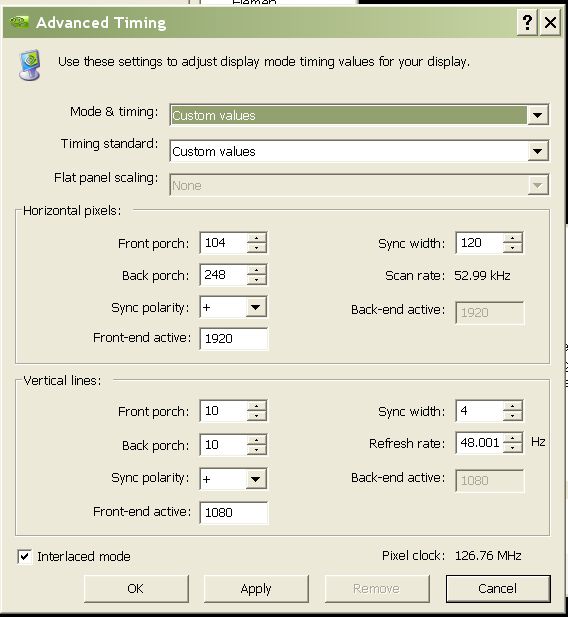
Here are they, the power strip file is a special bread for the NEC 9PG+, made by kschmit2 long ago, the other is my experimented nvidia timings on a GF6600Gt card with 162.50 driver, interesingly if I swap the card to an other nvidia card (have a 8800GTs, and a GF7950GT) this same timing isn't recognized by the projector, it seems every card has its own timing in this nvidia driver
Thes should work with the Marquee too as they have similar retrace times.
Interlaced resolutions not always working fine, if it is not working you should restart the machine while you confirmed (blindly) the resolution, if it doesn't work you can still play with different drivers and such.
| Description: |
|
| Filesize: |
52.12 KB |
| Viewed: |
8362 Time(s) |
|
| Description: |
|

Download |
| Filename: |
pstrip_1080i_96Hz.txt |
| Filesize: |
420 Bytes |
| Downloaded: |
330 Time(s) |
_________________
projectors in the past : NEC 6-9PG xtra, Electrohome Marquee 6-7500, NEC XG 1351 LC ( with super modified Electrohome VNB neckboard !!!)
current: VDC Marquee 9500LC
The MOD: VNB-DB, VIM-DB
|
|
| Back to top |
|
|
tschaeikaei
Joined: 08 Apr 2013
Posts: 490
Location: Germany/Saarland
|
| Posted: Sun May 18, 2014 1:58 pm Post subject: |
|
|
As i don't have an NVidia card yet, i have to use the ATI with powerstrip.
Maybe you can explain me those numbers of the "special breed".
I am looking for this thread by kschmit2, but can't find it.
Stumbled over it some days ago, too bad i did not bookmark it.
I have set up 1080i 72 on the nec so far, but it is not perfect.
You can see some motion judder, not much, but it is there.
With 96Hz interlaced, it should be perfect.
Thank you, Julian
_________________
Marquee 9500U edgeblend P43 | NEC 9PG
|
|
| Back to top |
|
|
gjaky
Joined: 05 Jun 2010
Posts: 2802
Location: Budapest, Hungary
|
| Posted: Sun May 18, 2014 2:54 pm Post subject: |
|
|
I think this was that thread.
It was just experimented to fully accommodate with the NEC's sync system. Generally knowing your projector's retrace times will give you an idea what is the minimal total pixel count in both planes, the rest is for adjusting the shifting of the picture and leaving sufficient amount time for syncing.
_________________
projectors in the past : NEC 6-9PG xtra, Electrohome Marquee 6-7500, NEC XG 1351 LC ( with super modified Electrohome VNB neckboard !!!)
current: VDC Marquee 9500LC
The MOD: VNB-DB, VIM-DB
|
|
| Back to top |
|
|
tschaeikaei
Joined: 08 Apr 2013
Posts: 490
Location: Germany/Saarland
|
| Posted: Sun May 18, 2014 5:22 pm Post subject: |
|
|
Thanks very much, works fine.
_________________
Marquee 9500U edgeblend P43 | NEC 9PG
|
|
| Back to top |
|
|
tschaeikaei
Joined: 08 Apr 2013
Posts: 490
Location: Germany/Saarland
|
| Posted: Mon Jun 23, 2014 8:30 pm Post subject: |
|
|
Hey guys, i had a bright dot in the green CRT on one of my 8500Ultras while powering off yesterday.
Will anyone tell me what to do or which keyword to search after?
It didn't burn the tube ....yet and i don't wat it to.
Regards, Julian
_________________
Marquee 9500U edgeblend P43 | NEC 9PG
|
|
| Back to top |
|
|
|
|
|
|
|
You cannot post new topics in this forum
You cannot reply to topics in this forum
You cannot edit your posts in this forum
You cannot delete your posts in this forum
You cannot vote in polls in this forum
You cannot attach files in this forum
You can download files in this forum
|
Forum powered by phpBB © phpBB Group
|
|




