|
As this forum is rarely used anymore, we've locked it. Feel free to browse and read. Questions? Please reach out to us directly. Cheers! |

|
 |
|
|
| Author |
Message |
stridsvognen
Guest
|
| Posted: Wed Mar 11, 2015 7:19 pm Post subject: |
|
|
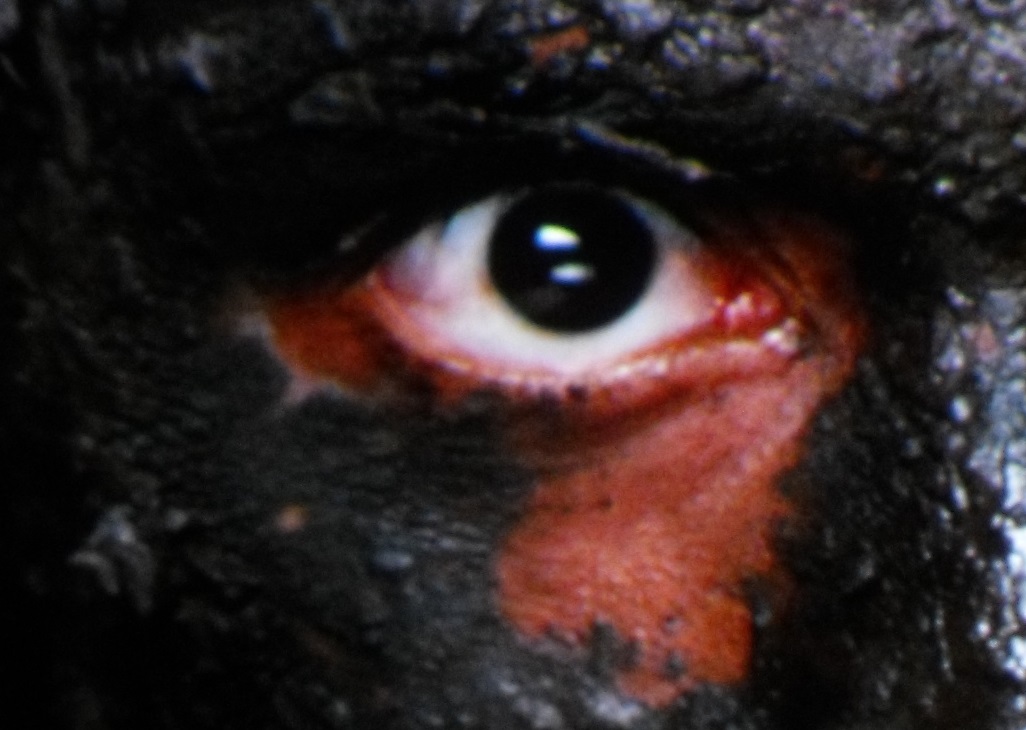
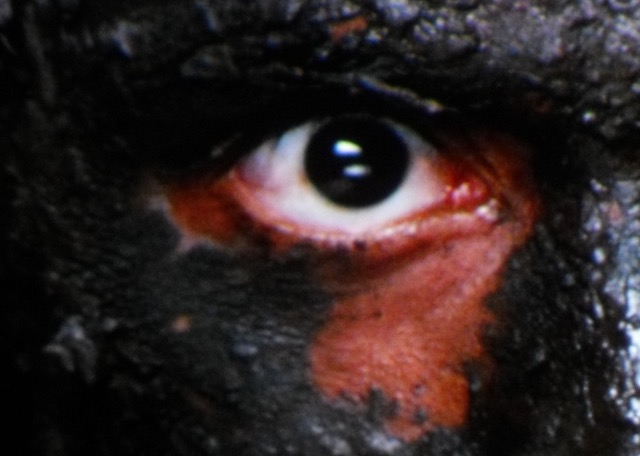
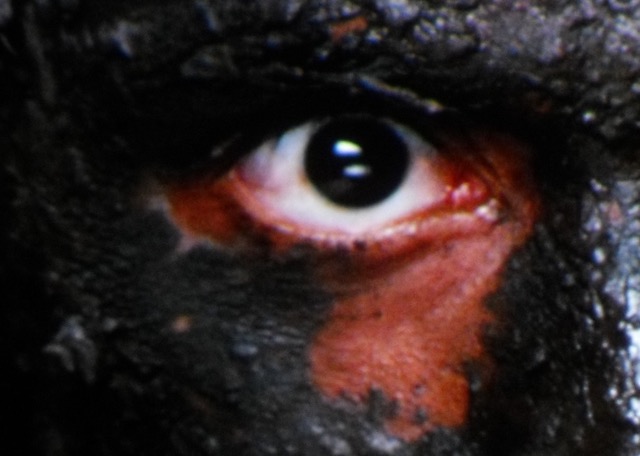
Here is the good old mud face from a CRT, original camera resolution.
Lets see how the JVC looks with a high resolution shot of that part.
|
|
| Back to top |
|
 |
mp20748
Joined: 12 Sep 2006
Posts: 5689
Location: Maryland
TV/Projector: 9500LC Ultra / Super 02 and 03 VIM
|
| Posted: Wed Mar 11, 2015 7:56 pm Post subject: |
|
|
| Andreas21 wrote: |
I am talking about detail and resolution and sharpness, and the closeup shots can show this in a way, but of corse not perfect. And I know what BACKGROUD detail is! And if you think your projector is so good at showing BACKGROUND detail why don´t you show it to us then? And you can not show that with a fullscreen shot resized to 300kb and watched on a 20-30 inch computer screens and the picture is maby 10" on screen. I only comment on your pictures to have a lot of black crush and look soft and with poor detai and oversaturated colors, I know I can not see this from screenshot, but it sure looks like it in your shots. But this is maby because you use a sh*tty camere to shoot them and in real life your projector is actually showing 1080p at 4K detail level and perfect detail in black and a natural infinite sharpness beyond what our eyes can behold. I have never post prosessed of doctored up my screenshots posted on this site and this is the only site I have posted more than one shot on ever. I only point and shoot with different shutterspeeds and ISO to get a close to true picture, then I resize it and post it here. But with my sh*tty deep black it is near to impossible to get the blacks right...
When you mention all this why do you say you can see the deep black and black from screenshots? You also comment on the colors in your shots to be better than mine and so on. You are speaking against your self all the time. If your point and shoot camera is so bad why do you post screenshots here all the time and think they look so good.
And finally, what gamma do you use on your CRT or is that uncalibrated also?? |
Let me once more go over this... I don't know what gamma my projector is, because IT's NOT CALIBRATED
And that is why I said I'm using the shot to show BLACK period. Write that down.
And the rest of your post is totally irrelevant, because it has nothing to do with anything I've posted.
|
|
| Back to top |
|
|
Andreas21
Joined: 02 Oct 2013
Posts: 582
|
| Posted: Wed Mar 11, 2015 8:01 pm Post subject: |
|
|
| stridsvognen wrote: | Here is the good old mud face from a CRT, original camera resolution.
Lets see how the JVC looks with a high resolution shot of that part. |
I have shown that before, but have you forgotten that? And it is quite easy to see witch showes the most detail,but to you it is surley the CRT...
Edit: Made the CRT the same size, but it did not help. And posted the bigger version as well. The only difference beween the CRT shots is the size.
| Description: |
|
| Filesize: |
188.16 KB |
| Viewed: |
2674 Time(s) |
|
| Description: |
|
| Filesize: |
55.09 KB |
| Viewed: |
2678 Time(s) |
|
| Description: |
|
| Filesize: |
70.86 KB |
| Viewed: |
2697 Time(s) |
|
_________________
http://www.minhembio.com/21Andreas
Last edited by Andreas21 on Wed Mar 11, 2015 8:18 pm; edited 2 times in total
|
|
| Back to top |
|
|
stridsvognen
Guest
|
| Posted: Wed Mar 11, 2015 8:05 pm Post subject: |
|
|
| Andreas21 wrote: | | Here is what is looks like with e-shift off, and calibrated to the correct standards with a 2.35 power gamma. Mine is maby a tad dark compared to what is shown on screen. |
Cant you post a pic of the muddy face made like this one.?
|
|
| Back to top |
|
|
Andreas21
Joined: 02 Oct 2013
Posts: 582
|
| Posted: Wed Mar 11, 2015 8:08 pm Post subject: |
|
|
| mp20748 wrote: | | Andreas21 wrote: |
I am talking about detail and resolution and sharpness, and the closeup shots can show this in a way, but of corse not perfect. And I know what BACKGROUD detail is! And if you think your projector is so good at showing BACKGROUND detail why don´t you show it to us then? And you can not show that with a fullscreen shot resized to 300kb and watched on a 20-30 inch computer screens and the picture is maby 10" on screen. I only comment on your pictures to have a lot of black crush and look soft and with poor detai and oversaturated colors, I know I can not see this from screenshot, but it sure looks like it in your shots. But this is maby because you use a sh*tty camere to shoot them and in real life your projector is actually showing 1080p at 4K detail level and perfect detail in black and a natural infinite sharpness beyond what our eyes can behold. I have never post prosessed of doctored up my screenshots posted on this site and this is the only site I have posted more than one shot on ever. I only point and shoot with different shutterspeeds and ISO to get a close to true picture, then I resize it and post it here. But with my sh*tty deep black it is near to impossible to get the blacks right...
When you mention all this why do you say you can see the deep black and black from screenshots? You also comment on the colors in your shots to be better than mine and so on. You are speaking against your self all the time. If your point and shoot camera is so bad why do you post screenshots here all the time and think they look so good.
And finally, what gamma do you use on your CRT or is that uncalibrated also?? |
Let me once more go over this... I don't know what gamma my projector is, because IT's NOT CALIBRATED
And that is why I said I'm using the shot to show BLACK period. Write that down.
And the rest of your post is totally irrelevant, because it has nothing to do with anything I've posted. |
This answers everything! 
And you can not show black with a screenshot, it is impossible.
You have not calibrated your CRT, but still you think it shows the best picture and what is intended to be shown from the blu-ray. How do you know this when it is not calibrated. You at least need to calibrate grayscale and gamme to know your blacklevel is clean and you have a clean grayscale, but I am talking to a total ignorant projector expert who don´t even bother to calibrate his CRT. This is wonderful!
And yes everything i write is relevant to your erlier posts, but it seems you don´t remember that.
_________________
http://www.minhembio.com/21Andreas
Last edited by Andreas21 on Wed Mar 11, 2015 8:14 pm; edited 1 time in total
|
|
| Back to top |
|
|
Andreas21
Joined: 02 Oct 2013
Posts: 582
|
| Posted: Wed Mar 11, 2015 8:11 pm Post subject: |
|
|
| stridsvognen wrote: | | Andreas21 wrote: | | Here is what is looks like with e-shift off, and calibrated to the correct standards with a 2.35 power gamma. Mine is maby a tad dark compared to what is shown on screen. |
Cant you post a pic of the muddy face made like this one.? |
Why? I use e-shift on my JVC all the time as I find it to be best and all my screenshots except this is with e-shift on and I will not take another shot of the mud face.
_________________
http://www.minhembio.com/21Andreas
|
|
| Back to top |
|
|
Jeremy112

Joined: 28 Sep 2006
Posts: 2649
Location: Fond du Lac, WI
|
| Posted: Wed Mar 11, 2015 8:11 pm Post subject: |
|
|
Man, you cannot buy entertainment this good. This thread is better than going to a movie!
Just let me get the popcorn and soda 
_________________
When I'm asking for a Model number, that doesn't mean I'm asking for a nude photo with your number on it
|
|
| Back to top |
|
|
stridsvognen
Guest
|
| Posted: Wed Mar 11, 2015 8:18 pm Post subject: |
|
|
| Andreas21 wrote: | | stridsvognen wrote: | | Andreas21 wrote: | | Here is what is looks like with e-shift off, and calibrated to the correct standards with a 2.35 power gamma. Mine is maby a tad dark compared to what is shown on screen. |
Cant you post a pic of the muddy face made like this one.? |
Why? I use e-shift on my JVC all the time as I find it to be best and all my screenshots except this is with e-shift on and I will not take another shot of the mud face. |
I dont understand why you resist so much making a high resolution shot of that muddy face, and show how it really looks like.
Its a very nice part to show details and naturalness, and the shot you have posted have no details and no naturalnes, so please lets see a high resolution picture with no artifacts that will do the JVC justice.
|
|
| Back to top |
|
|
Andreas21
Joined: 02 Oct 2013
Posts: 582
|
| Posted: Wed Mar 11, 2015 8:21 pm Post subject: |
|
|
| stridsvognen wrote: | | Andreas21 wrote: | | stridsvognen wrote: | | Andreas21 wrote: | | Here is what is looks like with e-shift off, and calibrated to the correct standards with a 2.35 power gamma. Mine is maby a tad dark compared to what is shown on screen. |
Cant you post a pic of the muddy face made like this one.? |
Why? I use e-shift on my JVC all the time as I find it to be best and all my screenshots except this is with e-shift on and I will not take another shot of the mud face. |
I dont understand why you resist so much making a high resolution shot of that muddy face, and show how it really looks like.
Its a very nice part to show details and naturalness, and the shot you have posted have no details and no naturalnes, so please lets see a high resolution picture with no artifacts that will do the JVC justice. |
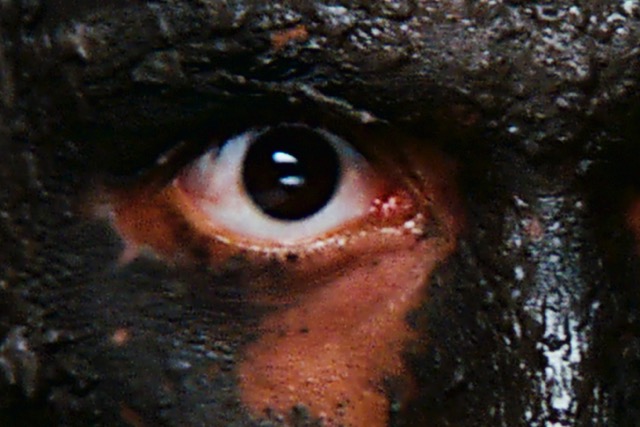
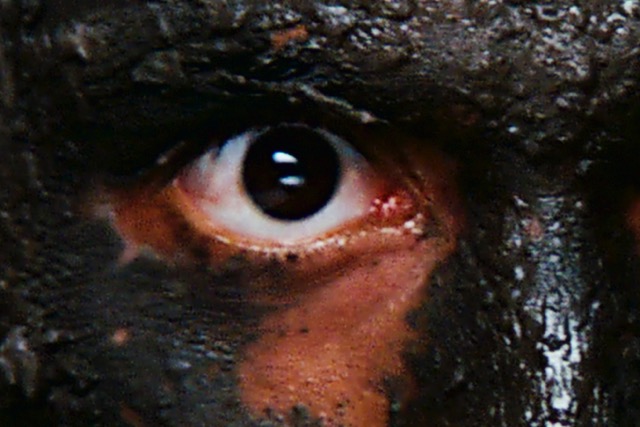
So you think the CRT shot has more detail and clarity, do you really mean that?? Give me a break, it is easy to see it is the opposite. 
This picture is a crop from the high resolution jpg picture.
| Description: |
|
| Filesize: |
70.86 KB |
| Viewed: |
2669 Time(s) |
|
| Description: |
|
| Filesize: |
55.09 KB |
| Viewed: |
2669 Time(s) |
|
_________________
http://www.minhembio.com/21Andreas
Last edited by Andreas21 on Wed Mar 11, 2015 8:23 pm; edited 1 time in total
|
|
| Back to top |
|
|
mp20748
Joined: 12 Sep 2006
Posts: 5689
Location: Maryland
TV/Projector: 9500LC Ultra / Super 02 and 03 VIM
|
| Posted: Wed Mar 11, 2015 8:23 pm Post subject: |
|
|
| Andreas21 wrote: |
And you can not show black with a screenshot, it is impossible |
No, you cannot show black with a screenshot. You'll need a CRT projector to be able to do that.
| Quote: | | You have not calibrated your CRT, but still you think it shows the best picture and what is intended to be shown from the blu-ray. How do you know this when it is not calibrated. You at least need to calibrate grayscale and gamme to know your blacklevel is clean and you have a clean grayscale, but I am talking to a total ignorant projector expert who don´t even bother to calibrate his CRT. This is wonderful! |
No, it only supports how much confidence I have in screenshots. If doing screenshots and test why bother, especially when I may swap in and out up to 5 different boards per day.
Now on the other hand, if you knocked on my door with your bulb projector, I would then have it calibrated and ready for you. And when you leave, you'd be inquiring on how to get a CRT projector. I would only ask you to take your digital with you when you leave.
| Quote: | | And yes everything i write is relevant to your erlier posts, but it seems you don´t remember that. |
No, you make about as much sense as a dog barking meow
|
|
| Back to top |
|
|
stridsvognen
Guest
|
| Posted: Wed Mar 11, 2015 8:24 pm Post subject: |
|
|
| Andreas21 wrote: | | stridsvognen wrote: | | Andreas21 wrote: | | stridsvognen wrote: | | Andreas21 wrote: | | Here is what is looks like with e-shift off, and calibrated to the correct standards with a 2.35 power gamma. Mine is maby a tad dark compared to what is shown on screen. |
Cant you post a pic of the muddy face made like this one.? |
Why? I use e-shift on my JVC all the time as I find it to be best and all my screenshots except this is with e-shift on and I will not take another shot of the mud face. |
I dont understand why you resist so much making a high resolution shot of that muddy face, and show how it really looks like.
Its a very nice part to show details and naturalness, and the shot you have posted have no details and no naturalnes, so please lets see a high resolution picture with no artifacts that will do the JVC justice. |
So you think the CRT shot has more detail, do you really mean that?? Give me a break, it is easy to see the total opposite. |
Try focus on the fine details/ high resolution parts.. not the low resolution parts of the image.
I can simply not understand that the artifacts and stuff going on around the eye dont bother you.
|
|
| Back to top |
|
|
Andreas21
Joined: 02 Oct 2013
Posts: 582
|
| Posted: Wed Mar 11, 2015 8:30 pm Post subject: |
|
|
| mp20748 wrote: | | Andreas21 wrote: |
And you can not show black with a screenshot, it is impossible |
No, you cannot show black with a screenshot. You'll need a CRT projector to be able to do that.
| Quote: | | You have not calibrated your CRT, but still you think it shows the best picture and what is intended to be shown from the blu-ray. How do you know this when it is not calibrated. You at least need to calibrate grayscale and gamme to know your blacklevel is clean and you have a clean grayscale, but I am talking to a total ignorant projector expert who don´t even bother to calibrate his CRT. This is wonderful! |
No, it only supports how much confidence I have in screenshots. If doing screenshots and test why bother, especially when I may swap in and out up to 5 different boards per day.
Now on the other hand, if you knocked on my door with your bulb projector, I would then have it calibrated and ready for you. And when you leave, you'd be inquiring on how to get a CRT projector. I would only ask you to take your digital with you when you leave.
| Quote: | | And yes everything i write is relevant to your erlier posts, but it seems you don´t remember that. |
No, you make about as much sense as a dog barking meow |
Says the cat meowing wooff!
If you invite me I will come, but I will not bring my digital over seas so you would have to provide one for the side by side test., and I am 100% sure I will never inquire a CRT.
Why don´t you have a test machine to swap out 5 different cards per day and leave one in your HT, or do you have a testlab and no HT?? I use my digital mainly to watch movies not test different settings or hardware as it is not needed as I know it is very good and JVC will bring something better soon.
_________________
http://www.minhembio.com/21Andreas
|
|
| Back to top |
|
|
mp20748
Joined: 12 Sep 2006
Posts: 5689
Location: Maryland
TV/Projector: 9500LC Ultra / Super 02 and 03 VIM
|
| Posted: Wed Mar 11, 2015 8:31 pm Post subject: |
|
|
| stridsvognen wrote: |
Try focus on the fine details/ high resolution parts.. not the low resolution parts of the image.
I can simply not understand that the artifacts and stuff going on around the eye dont bother you. |
And to think, they want to focus in on a CGI image imbedded in an image.. 
But I guest I have to remember that the blurrier the tighter image is, the less noise you'll see. Because the image of the eye, all that junk around the eye would normally dispel what should be able to be called a High Definition Image. Well, the noise proved otherwise...
Last edited by mp20748 on Wed Mar 11, 2015 8:32 pm; edited 1 time in total
|
|
| Back to top |
|
|
El Duderino
Joined: 23 Jan 2011
Posts: 4653
Location: Portland, OR
|
| Posted: Wed Mar 11, 2015 8:32 pm Post subject: |
|
|
| mp20748 wrote: | | And that is why I said I'm using the shot to show BLACK period. Write that down. |
I think the problem with using a camera to show the black level is auto-exposure. Most auto-exposures will find the darkest pixel and clamp that to 0,0,0 and find the brightest pixel and clamp that to 255,255,255. Regardless.
I don't think you can use YOUR camera and MY display to show me what you see as black. All blacks (0,0,0) will look the same and only as 'black' as my display will go, not yours. I'm going to bet that 99% of the forum members these days are not looking at these forum screenshots on a CRT, and certainly not your excellent CRT.
|
|
| Back to top |
|
|
Andreas21
Joined: 02 Oct 2013
Posts: 582
|
| Posted: Wed Mar 11, 2015 8:32 pm Post subject: |
|
|
| stridsvognen wrote: | | Andreas21 wrote: | | stridsvognen wrote: | | Andreas21 wrote: | | stridsvognen wrote: | | Andreas21 wrote: | | Here is what is looks like with e-shift off, and calibrated to the correct standards with a 2.35 power gamma. Mine is maby a tad dark compared to what is shown on screen. |
Cant you post a pic of the muddy face made like this one.? |
Why? I use e-shift on my JVC all the time as I find it to be best and all my screenshots except this is with e-shift on and I will not take another shot of the mud face. |
I dont understand why you resist so much making a high resolution shot of that muddy face, and show how it really looks like.
Its a very nice part to show details and naturalness, and the shot you have posted have no details and no naturalnes, so please lets see a high resolution picture with no artifacts that will do the JVC justice. |
So you think the CRT shot has more detail, do you really mean that?? Give me a break, it is easy to see the total opposite. |
Try focus on the fine details/ high resolution parts.. not the low resolution parts of the image.
I can simply not understand that the artifacts and stuff going on around the eye dont bother you. |
What, so you actually mean the CRT shows more fine detail/high resolution?? The artifacts is there on the CRT as well, but theu are so soft it is difficult to see them.
_________________
http://www.minhembio.com/21Andreas
|
|
| Back to top |
|
|
HogPilot
Joined: 21 Jan 2010
Posts: 2383
TV/Projector: Vizio P702ui-B3, Pioneer Elite Pro-151FD & 111FD
|
| Posted: Wed Mar 11, 2015 8:34 pm Post subject: |
|
|
Next up: we will compare our speakers using recordings captured with multiple uncalibrated mics and played back on our computer speakers! You guys crack me up.
_________________
| ecrabb wrote: | | Curt Palme wrote: | | Interesting, Mac isn't returning my emails. Go figure. |
He's mad at us for making Hog a moderator. He took his ball and went home.
SC |
|
|
| Back to top |
|
|
Andreas21
Joined: 02 Oct 2013
Posts: 582
|
| Posted: Wed Mar 11, 2015 8:36 pm Post subject: |
|
|
| mp20748 wrote: | | stridsvognen wrote: |
Try focus on the fine details/ high resolution parts.. not the low resolution parts of the image.
I can simply not understand that the artifacts and stuff going on around the eye dont bother you. |
And to think, they want to focus in on a CGI image imbedded in an image..
But I guest I have to remember that the blurrier the tighter image is, the less noise you'll see. Because the image of the eye, all that junk around the eye would normally dispel what should be able to be called a High Definition Image. Well, the noise proved otherwise... |
You don´t have the balls to post the Prometheus picture.
And all the noise it there in the CRT picture, but it is to soft to show it.
Oh no, I forgot it is not allowed to post picture of movies shot on digital or with CGI in the picture.
_________________
http://www.minhembio.com/21Andreas
Last edited by Andreas21 on Wed Mar 11, 2015 8:37 pm; edited 1 time in total
|
|
| Back to top |
|
|
mp20748
Joined: 12 Sep 2006
Posts: 5689
Location: Maryland
TV/Projector: 9500LC Ultra / Super 02 and 03 VIM
|
| Posted: Wed Mar 11, 2015 8:36 pm Post subject: |
|
|
| El Duderino wrote: | | mp20748 wrote: | | And that is why I said I'm using the shot to show BLACK period. Write that down. |
I think the problem with using a camera to show the black level is auto-exposure. Most auto-exposures will find the darkest pixel and clamp that to 0,0,0 and find the brightest pixel and clamp that to 255,255,255. Regardless.
I don't think you can use YOUR camera and MY display to show me what you see as black. All blacks (0,0,0) will look the same and only as 'black' as my display will go, not yours. I'm going to bet that 99% of the forum members these days are not looking at these forum screenshots on a CRT, and certainly not your excellent CRT. |
Yeah, but that's not what has been happening wit the shots. They are showing different layers of black. But you're right especially about the digital. Because it is not showing black, it shows gray, which means auto exposure never saw black, or anything close enough to black to clamp total black
|
|
| Back to top |
|
|
stridsvognen
Guest
|
| Posted: Wed Mar 11, 2015 8:37 pm Post subject: |
|
|
| Andreas21 wrote: | | stridsvognen wrote: | | Andreas21 wrote: | | stridsvognen wrote: | | Andreas21 wrote: | | stridsvognen wrote: | | Andreas21 wrote: | | Here is what is looks like with e-shift off, and calibrated to the correct standards with a 2.35 power gamma. Mine is maby a tad dark compared to what is shown on screen. |
Cant you post a pic of the muddy face made like this one.? |
Why? I use e-shift on my JVC all the time as I find it to be best and all my screenshots except this is with e-shift on and I will not take another shot of the mud face. |
I dont understand why you resist so much making a high resolution shot of that muddy face, and show how it really looks like.
Its a very nice part to show details and naturalness, and the shot you have posted have no details and no naturalnes, so please lets see a high resolution picture with no artifacts that will do the JVC justice. |
So you think the CRT shot has more detail, do you really mean that?? Give me a break, it is easy to see the total opposite. |
Try focus on the fine details/ high resolution parts.. not the low resolution parts of the image.
I can simply not understand that the artifacts and stuff going on around the eye dont bother you. |
What, so you actually mean the CRT shows more fine detail/high resolution?? The artifacts is there on the CRT as well, but theu are so soft it is difficult to see them. |
Try see the texture in the skin, the fine details in the mud, stuff not shown on the JVC.. Then when the resolution goes a bit down in the image, it looks like the details get pumped up on the JVC.
Do you think the JVC image looks the most natural.? Is that how skin look in real life, when you take a close look.?
Last edited by stridsvognen on Wed Mar 11, 2015 8:39 pm; edited 1 time in total
|
|
| Back to top |
|
|
jbmeyer13

Joined: 03 Dec 2010
Posts: 1135
|
| Posted: Wed Mar 11, 2015 8:37 pm Post subject: |
|
|
| Andreas21 wrote: | | jbmeyer13 wrote: | | Andreas21 wrote: | | jbmeyer13 wrote: | | ecrabb wrote: |
If I'm interpreting your sentiment correctly Justin, you're saying you can't see the detail in the images they're posting anyway, and so the small, cropped shots are useless. I have to disagree on both counts.
SC |
I think of this like looking at a chart used for eye exams. Yes you can see something at the very bottom of the chart but can you really make it out?
I posted that comment after doing some quick measurements of that image. On my computer screen the image is 336.55mm wide and the width of one of the little lights on the spaceship is 1mm. I scaled that up so on my 87" wide screen that light would be 6.5mm (.25"). I'd think from 10' away it's going to be hard for many people to make out that difference; especially when the image is moving and your eyes are adjusting to contrast changes and such. |
I can see the detail just fine in my setup from 3.7m away, even when the movie is rolling. And this makes a huge difference in the HD feel of the picture.
|
You'd need to have both the digital and the CRT in the same room to see what discernible difference there is for something at that size (6.5mm) from 300cm away. It's obvious that the digitals are sharper but when you use something that tiny to support your theory of utter superiority it's downright silly. There's a whole host of other attributes that contribute to the "HD feel" of a picture and you're using a rather poor example to support your argument. |
To get the HD feel in rhe picture one of the most important thing is to be able to show 1080p as close to 100% as possible, but of corse all the other different aspects need to be in place also. But i don´t have to go in detail there do I?
And no, the difference is so big between a CRT and a good digital that you don´t have to see them side by side to see the difference. I have done both many times and know what I am talking about.I have not seen a 300mhz Marquee, but I doubt the difference between that and a vell setup Barco 909 to be very big.
|
Andreas,
Do you feel that from 3.7m away you could tell the difference between a round perforation on an AT Screen and diamond shaped perforation? Not being a smart ass, rather just curious.
_________________
Projector: Modded 9501LC ULtra- MP VIM, Vold VNB, ETECH LVPS, Silver VIM Cables, HD10F's & a V1 case!
|
|
| Back to top |
|
|
|
|
|
|
|
You cannot post new topics in this forum
You cannot reply to topics in this forum
You cannot edit your posts in this forum
You cannot delete your posts in this forum
You cannot vote in polls in this forum
You cannot attach files in this forum
You can download files in this forum
|
Forum powered by phpBB © phpBB Group
|
|



