| Author |
Message |
Andreas21
Joined: 02 Oct 2013
Posts: 582
|
| Posted: Sat Mar 07, 2015 6:04 pm Post subject: |
|
|
| ElTopo wrote: | 0 IRE is important at least for me.
There are a lot of scenes with fading to black.
I can highly recommend to check out the latest digitals (with the image of the CRT in mind). Myself i was disappointed cause i expected much much more from units with such a price tag.
It's 2015 and CRT is still here for some that's good. |
The new JVC´s and Sony VW1000/1100 can keep up very good on fade to black. My X500 looks complete black when fade to black as long as the black is not displayed to long and in most movies it is not. And if you set the brightness correct on your CRT´s they dont shut down completely as the green tube still lights up, but I don+t have to tell you that??
_________________
http://www.minhembio.com/21Andreas
|
|
| Back to top |
|
 |
Andreas21
Joined: 02 Oct 2013
Posts: 582
|
| Posted: Sat Mar 07, 2015 6:18 pm Post subject: |
|
|
| thewolfman wrote: | | Diddern wrote: | But in any way have a look at the pictures at the start, very similar to the car pictures and others hehe.
a CRT 909 cine9 marquee 9500 or g90 will NEVER
Be near a high end digital as the jvcx500 or any other digital at HD material 1080P or higher. NEVER..
But black level on some digitals better yes. And I can say that I need that. And of course motion resolution and imputlag. Then for gaming mostly and simulators.
But this is not nearly visible in blueray motion /FI/. I have had a-b tests with bluray oppo on 909 vs sony hw55 and the jvc x500 and the vw1000 and on all the test material I used.
Then film, the digital was better on the motion in picture visible. And I really tried to see the god side here on the CRT. The 909 was better when motion resolution test pattern came on yes.
Used avatar, casino royal, zero dark thirty, borne identity car s. And manny more.
But the CRT was very close at motion compared, so there not much to talk about.
And for those of you that think there is only sharpness think again.
It's EVERY other aspect in a picture except 0 ire then on most of the digitals out there.
The closest and very very close is the x500 or x700,
my x500 measures 38900:1 with iris fully open. With 15FL.
then correct adjusted. A CRT like a cine 9 with 250-300 lumens lol. It feels like my old CRT but just 1000 times better and with 1500 lumens. |
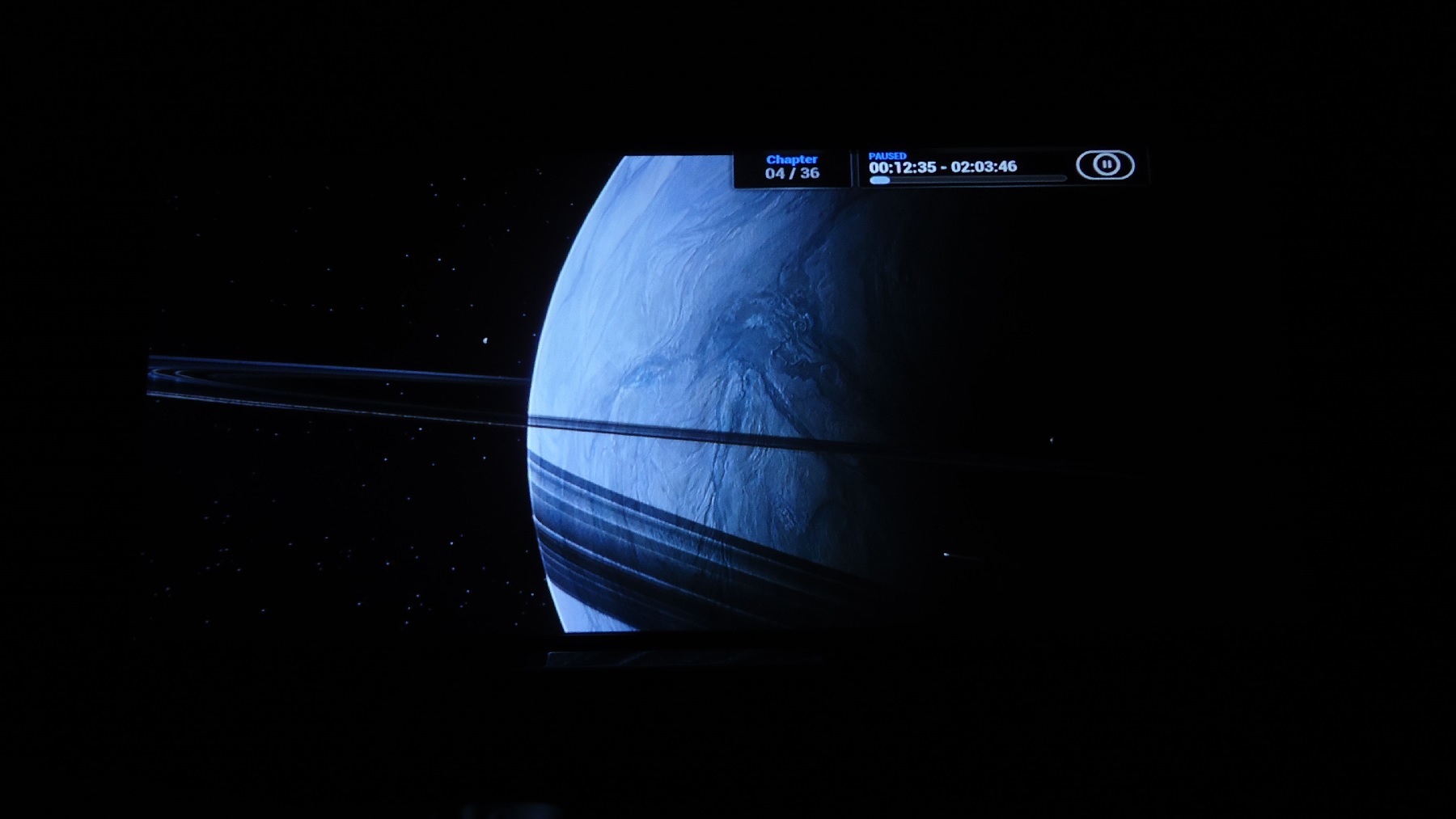
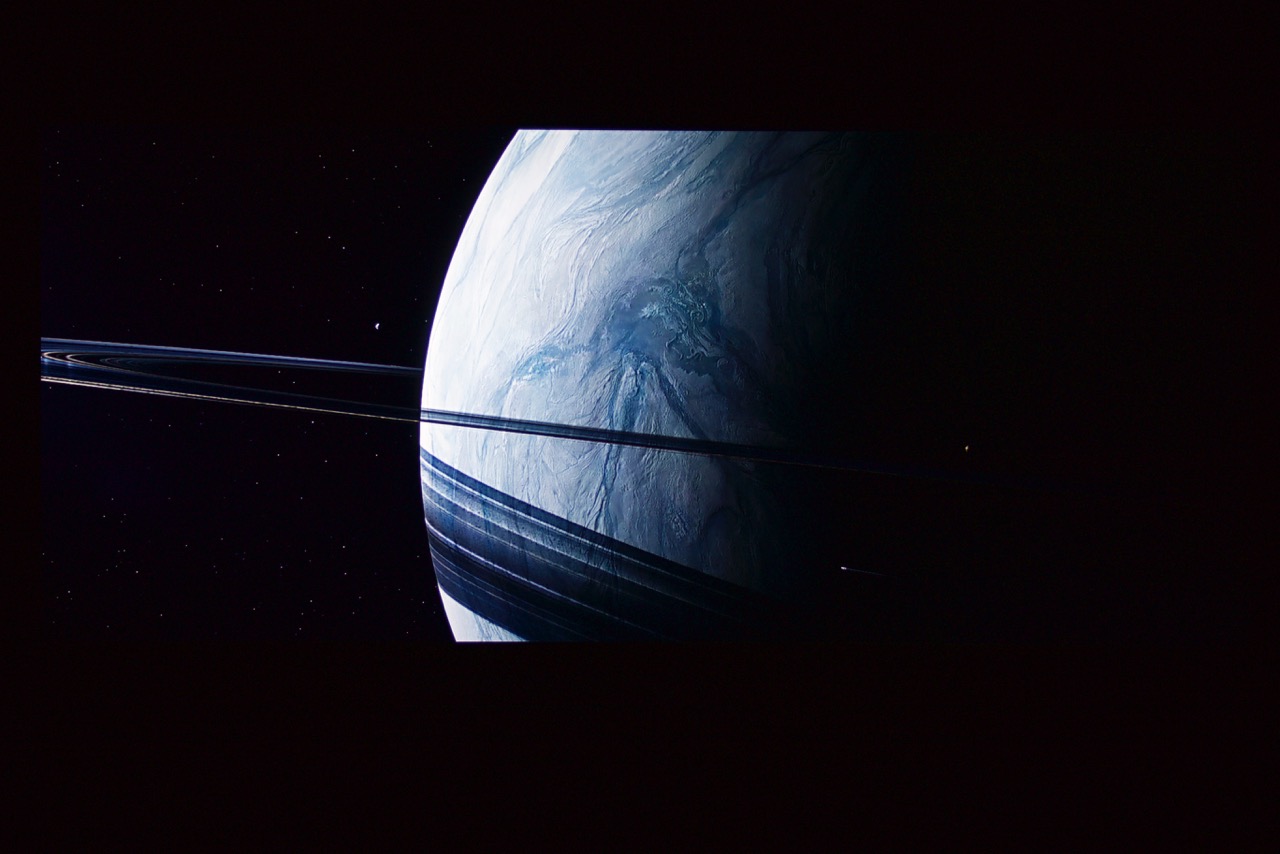
To sum it up: This is what digitals are missing out on.  |
Here is yours compared to mine.
| Description: |
|
| Filesize: |
154.79 KB |
| Viewed: |
2168 Time(s) |
|
| Description: |
|
| Filesize: |
133.62 KB |
| Viewed: |
2168 Time(s) |
|
_________________
http://www.minhembio.com/21Andreas
|
|
| Back to top |
|
|
Andreas21
Joined: 02 Oct 2013
Posts: 582
|
| Posted: Sat Mar 07, 2015 6:55 pm Post subject: |
|
|
Mike!
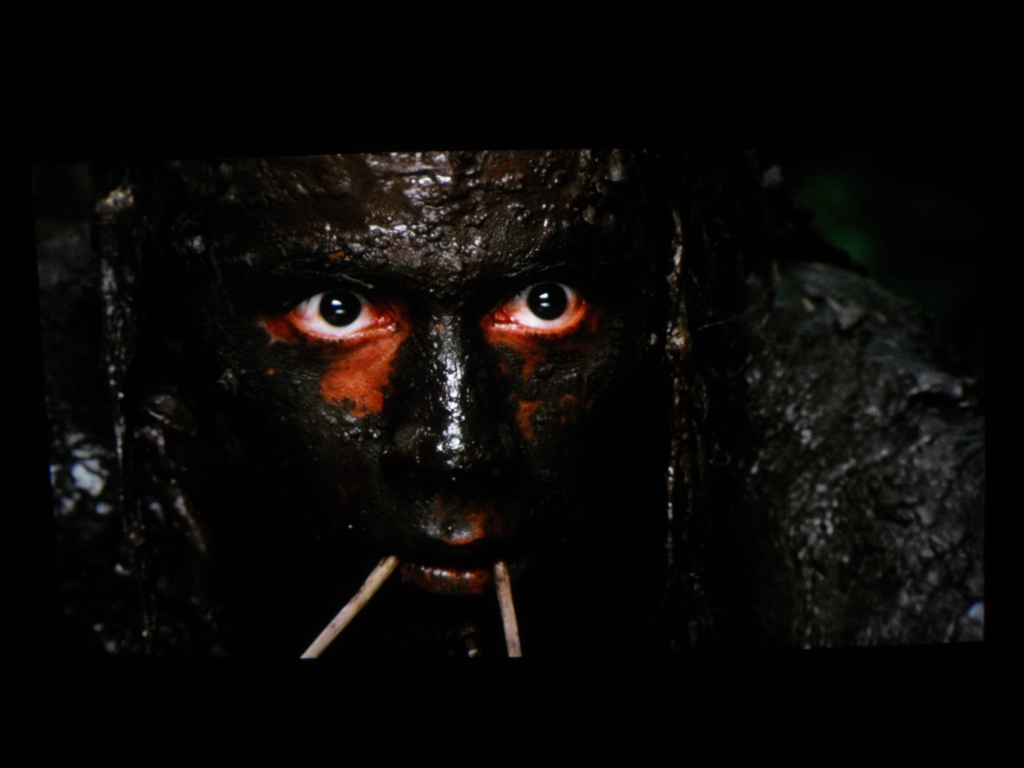
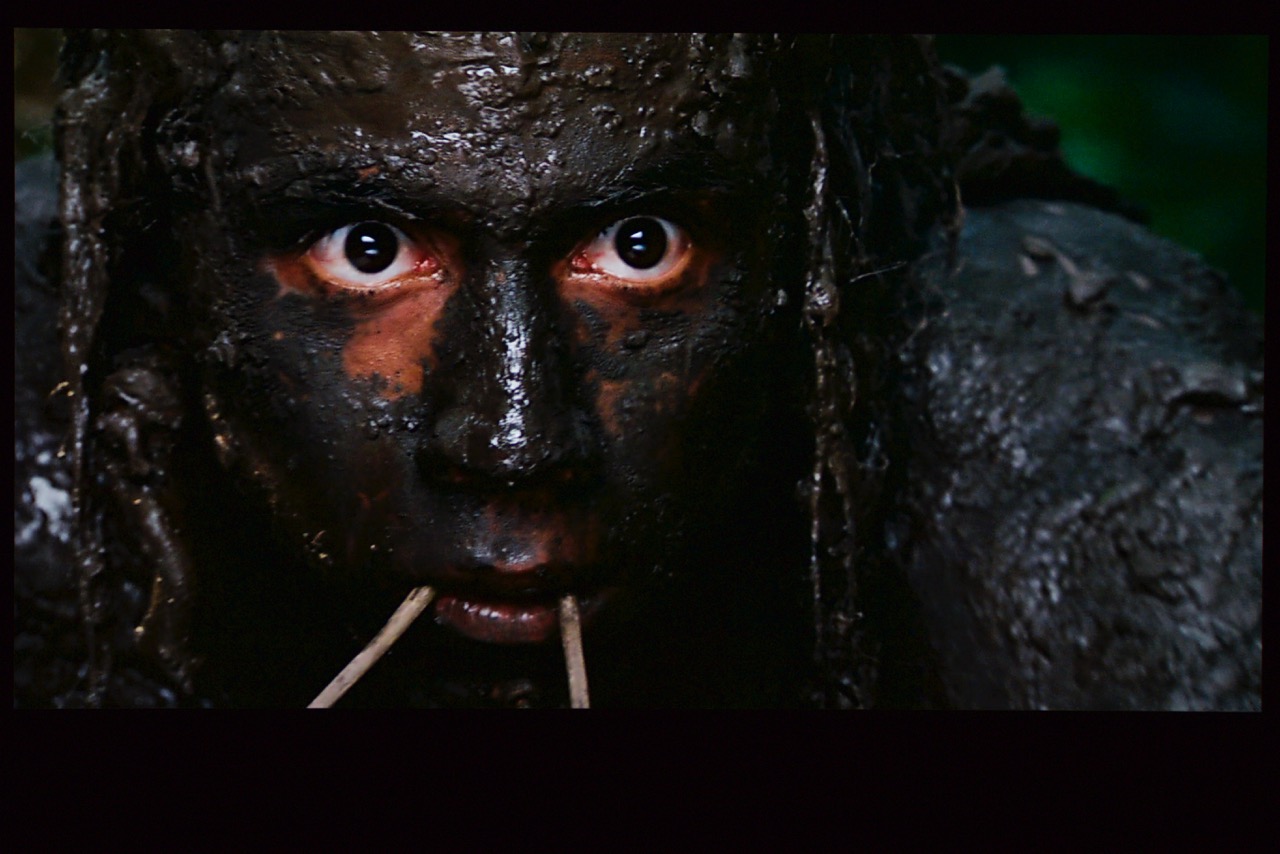
I don´t know what you did with this Apocalypto screenshot, but it is actually in the middle of the day with full daylight. Mine is closer to how it looks on screen.
| Description: |
|
| Filesize: |
169.3 KB |
| Viewed: |
2156 Time(s) |
|
| Description: |
|
| Filesize: |
185.7 KB |
| Viewed: |
2156 Time(s) |
|
_________________
http://www.minhembio.com/21Andreas
Last edited by Andreas21 on Sat Mar 07, 2015 7:00 pm; edited 1 time in total
|
|
| Back to top |
|
|
thewolfman

Joined: 28 Mar 2011
Posts: 1311
Location: Sweden
|
| Posted: Sat Mar 07, 2015 6:59 pm Post subject: |
|
|
It strange why mine gets so blue when I have set it better now. Seeing yours make me wonder if mine is still to blue - or - the camera adds layer of blue just like mobile always does. I'll have a look on the screen later and see if looks that white or blue.
Beautiful image, btw. See, these images tells us something and that is that colors can be adjust more towards what they are suppose to be. Without a video processor it's by eye mostly and comparable images like these. Thanks!
EDIT: The shot could have been taken when I had everything way to blue.
|
|
| Back to top |
|
|
Andreas21
Joined: 02 Oct 2013
Posts: 582
|
| Posted: Sat Mar 07, 2015 7:03 pm Post subject: |
|
|
| thewolfman wrote: | It strange why mine gets so blue when I have set it better now. Seeing yours make me wonder if mine is still to blue - or - the camera adds layer of blue just like mobile always does. I'll have a look on the screen later and see if looks that white or blue.
Beautiful image, btw. See, these images tells us something and that is that colors can be adjust more towards what they are suppose to be. Without a video processor it's by eye mostly and comparable images like these. Thanks!
EDIT: The shot could have been taken when I had everything way to blue. |
Mine is calibrated with top of the line equpment and by a pro and I use a eeColor box for calibration with delta E under 0.5 results. 
_________________
http://www.minhembio.com/21Andreas
|
|
| Back to top |
|
|
mp20748
Joined: 12 Sep 2006
Posts: 5689
Location: Maryland
TV/Projector: 9500LC Ultra / Super 02 and 03 VIM
|
| Posted: Sat Mar 07, 2015 7:22 pm Post subject: |
|
|
| Andreas21 wrote: | Mike!
I don´t know what you did with this Apocalypto screenshot, but it is actually in the middle of the day with full daylight. Mine is closer to how it looks on screen. |
?? what are you talking about
|
|
| Back to top |
|
|
redfox001

Joined: 16 Mar 2009
Posts: 2257
Location: The Netherlands
|
| Posted: Sat Mar 07, 2015 7:33 pm Post subject: |
|
|
| Andreas21 wrote: | This is how high MTF should look like, this from my sold VW1000/1100.
It should be taken much closer, but I don´t have the right lens for that. But we get an idea anyway. |
Simple said MTF is subtracting black from white when displaying 1 pixel black than 1 pixel white.
See here tse's explanation
http://www.avsforum.com/forum/16-crt-projectors/633597-wtf-mtf.html
Now it does not say that 1 pixel on 1 pixel off should be a square wave. It says to measure black and white.
If you see the 1 pixel on 1 off as a spatial wave. You see that to sample a sine wave you need 2 samples that means 2 pixels. So the 1:1 can at most reproduce a sine wave. However the digital makes it a square wave. If you understand Fourier you know that a square wave has a ground frequency and harmonics. The digital adds these harmonics and that is called pixelation. It looks great on artificial desktop pictures but it does enhance detail in real situations.
So this picture of you is not a sine wave and so it is wrong. Now do go into the technical discussion please because you guys seem to know nothing about Fourier, Nyquist sampling criteria or the fact that your pixels are samples that should be filtered like in cd audio where the samples are interpolated and filtered to reproduce the original singnal that is the Nyquist/Shanon sampling theorema. You want the mathematics?
_________________
701s->runco933->8500ultra->cinemax->9500mp->919 splitpack + cinemax
|
|
| Back to top |
|
|
mp20748
Joined: 12 Sep 2006
Posts: 5689
Location: Maryland
TV/Projector: 9500LC Ultra / Super 02 and 03 VIM
|
| Posted: Sat Mar 07, 2015 7:37 pm Post subject: |
|
|
| Spanky Ham wrote: | MP,
I was referencing El Topo's original post back on page 48 or so. It was the post that bumped the thread from last year.
I have no knowledge of the Sony internal scaler. You would have to ask your buddy Haflich, since he has a 1100. IIRC Teranex was and I think still is considered the best scaler out there. Black Magic has brought the price down considerably from a decade ago to under $4k. I think Deja Vu on AVS uses one to convert 2D to 3D. Also, Glimmie on AVS uses one to upconvert all his non-hd source material. |
Oh sorry about that. I was not aware of the connection. but you're right about needing a very powerful unit like the Teranex to do the conversion. And there could be some much much cheaper with the present technology. It's just that Sony does not have the scaler thing in their favor, in nothing they do.
Last edited by mp20748 on Sat Mar 07, 2015 7:38 pm; edited 1 time in total
|
|
| Back to top |
|
|
Andreas21
Joined: 02 Oct 2013
Posts: 582
|
| Posted: Sat Mar 07, 2015 7:37 pm Post subject: |
|
|
| mp20748 wrote: | | Andreas21 wrote: | Mike!
I don´t know what you did with this Apocalypto screenshot, but it is actually in the middle of the day with full daylight. Mine is closer to how it looks on screen. |
?? what are you talking about |
The picture I have taken from Apocalypto and compared to ypurs is frm a daylight scene, why does your have alot of blackcrush and looks like it is a night scene??
_________________
http://www.minhembio.com/21Andreas
|
|
| Back to top |
|
|
Andreas21
Joined: 02 Oct 2013
Posts: 582
|
| Posted: Sat Mar 07, 2015 7:40 pm Post subject: |
|
|
| redfox001 wrote: | | Andreas21 wrote: | This is how high MTF should look like, this from my sold VW1000/1100.
It should be taken much closer, but I don´t have the right lens for that. But we get an idea anyway. |
Simple said MTF is subtracting black from white when displaying 1 pixel black than 1 pixel white.
See here tse's explanation
http://www.avsforum.com/forum/16-crt-projectors/633597-wtf-mtf.html
Now it does not say that 1 pixel on 1 pixel off should be a square wave. It says to measure black and white.
If you see the 1 pixel on 1 off as a spatial wave. You see that to sample a sine wave you need 2 samples that means 2 pixels. So the 1:1 can at most reproduce a sine wave. However the digital makes it a square wave. If you understand Fourier you know that a square wave has a ground frequency and harmonics. The digital adds these harmonics and that is called pixelation. It looks great on artificial desktop pictures but it does enhance detail in real situations.
So this picture of you is not a sine wave and so it is wrong. Now do go into the technical discussion please because you guys seem to know nothing about Fourier, Nyquist sampling criteria or the fact that your pixels are samples that should be filtered like in cd audio where the samples are interpolated and filtered to reproduce the original singnal that is the Nyquist/Shanon sampling theorema. You want the mathematics? |
I know what MTF is and I dont have to spend hours reading up on it. If you read what spankyham writes a CRT does not have 100% MTF and far from it he says max 30% at 1080p, and I am a little nicer and say 30-50% at 1080p. And I am sorry but it is the thruth. 
And I am sorry to say that all digital media is based on pixels, even movies shot on film is digitally mastered.
And this was only a MTF discussion nothing else, just admit you where wrong with a CRT can show 1080p at 100% MTF??
_________________
http://www.minhembio.com/21Andreas
Last edited by Andreas21 on Sat Mar 07, 2015 7:43 pm; edited 2 times in total
|
|
| Back to top |
|
|
mp20748
Joined: 12 Sep 2006
Posts: 5689
Location: Maryland
TV/Projector: 9500LC Ultra / Super 02 and 03 VIM
|
| Posted: Sat Mar 07, 2015 7:42 pm Post subject: |
|
|
| Andreas21 wrote: | | mp20748 wrote: | | Andreas21 wrote: | Mike!
I don´t know what you did with this Apocalypto screenshot, but it is actually in the middle of the day with full daylight. Mine is closer to how it looks on screen. |
?? what are you talking about |
The picture I have taken from Apocalypto and compared to ypurs is frm a daylight scene, why does your have alot of blackcrush and looks like it is a night scene?? |
You're most likely talking about a camera issue, or comparison to your shot (digital bright). The point about the picture is the BLACK period, and the level of black that it is. In comparison, your shot looks gray. Can you tell me why your shot is gray?

|
|
| Back to top |
|
|
Andreas21
Joined: 02 Oct 2013
Posts: 582
|
| Posted: Sat Mar 07, 2015 7:44 pm Post subject: |
|
|
| mp20748 wrote: | | Andreas21 wrote: | | mp20748 wrote: | | Andreas21 wrote: | Mike!
I don´t know what you did with this Apocalypto screenshot, but it is actually in the middle of the day with full daylight. Mine is closer to how it looks on screen. |
?? what are you talking about |
The picture I have taken from Apocalypto and compared to ypurs is frm a daylight scene, why does your have alot of blackcrush and looks like it is a night scene?? |
You're most likely talking about a camera issue, or comparison to your shot (digital bright). The point about the picture is the BLACK period, and the level of black that it is. In comparison, your shot looks gray. Can you tell me why your shot is gray?
|
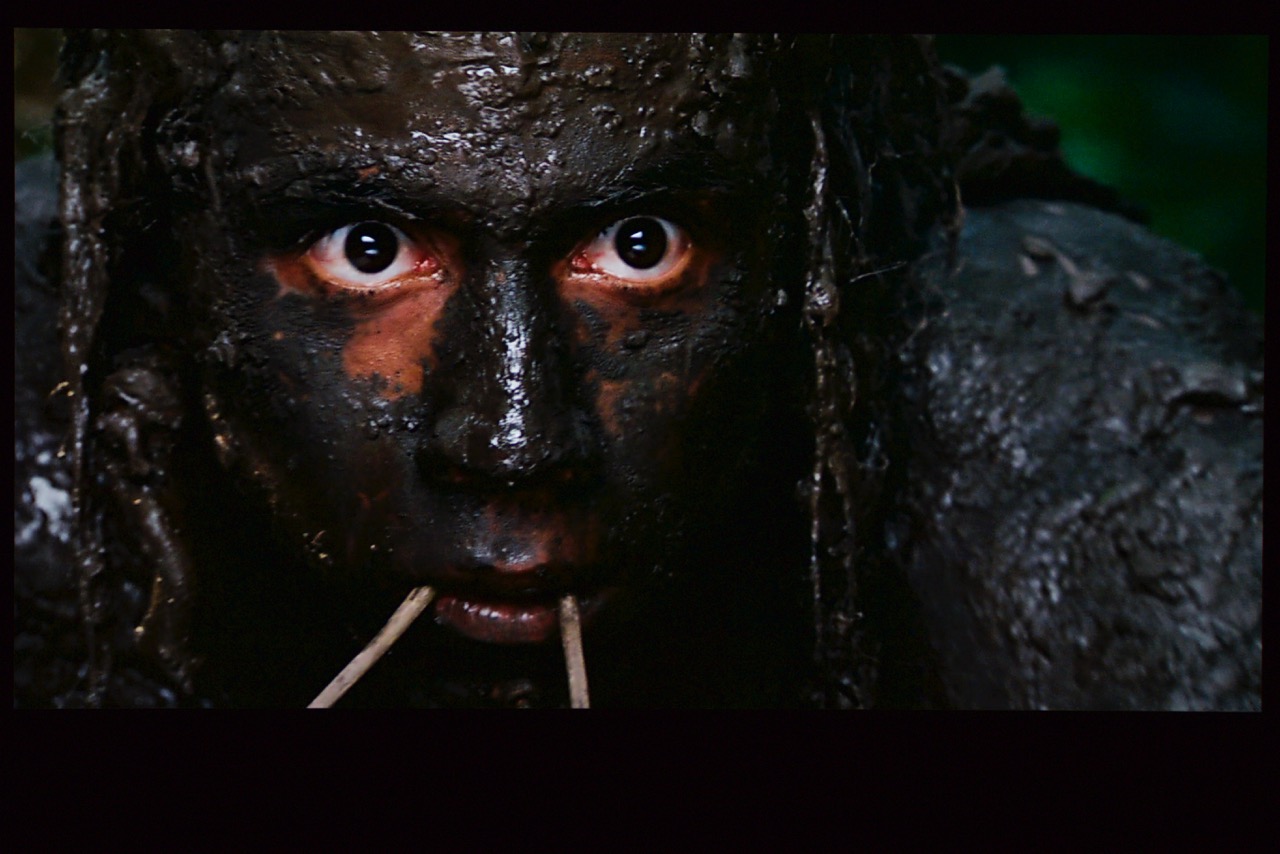
It is actually more brown as the mud is brownish, and this has nothing to do with blacklevel. It is a daylight scene with brownish mud. Take another look at Apocalypto and you will see. Your is full of blackcrush and loss of detail, if you can not take better screenshot dont bother. 
As it is many years since I have seen Apocalypto (actually 8 years) I was looking for a night scene and to my surprice it was a daylight scene. If you need to underexpose your projector to make a scene like this look dark to show off blacklevel I find strange as it is not a scene with blacklevel at all...
| Description: |
|
| Filesize: |
185.7 KB |
| Viewed: |
2106 Time(s) |
|
_________________
http://www.minhembio.com/21Andreas
Last edited by Andreas21 on Sat Mar 07, 2015 8:00 pm; edited 1 time in total
|
|
| Back to top |
|
|
mp20748
Joined: 12 Sep 2006
Posts: 5689
Location: Maryland
TV/Projector: 9500LC Ultra / Super 02 and 03 VIM
|
| Posted: Sat Mar 07, 2015 7:59 pm Post subject: |
|
|
You're missing the point. I'm saying why does your image NOT show true and deep black. The crush issue is most likely the camera. You can't depend on these cheap cameras to get that right.
Sometime you can capture all the detail and sometime you can't. The point in capturing the shot is to show how well you're able to reveal the true Black in the mud. The Mud is not gray. And if you look in the shot, you'll notice on the right of the guy, an area that is more gray than black. let that be your reference that true black does exist in that image
|
|
| Back to top |
|
|
Andreas21
Joined: 02 Oct 2013
Posts: 582
|
| Posted: Sat Mar 07, 2015 8:07 pm Post subject: |
|
|
| mp20748 wrote: | You're missing the point. I'm saying why does your image NOT show true and deep black. The crush issue is most likely the camera. You can't depend on these cheap cameras to get that right.
Sometime you can capture all the detail and sometime you can't. The point in capturing the shot is to show how well you're able to reveal the true Black in the mud. The Mud is not gray. And if you look in the shot, you'll notice on the right of the guy, an area that is more gray than black. let that be your reference that true black does exist in that image |
This is bull! I have a high end camera and if I set it with shorter shutterspeed I could get the same look you did. But I always try to capture what is on screen and the comment about blacklevel here is not correct. This is a intrascene contrast picture and here the X500 is superior to your CRT by a huge margin.
As I have told you I can easily make a DLP with very poor blacklevel look like it has inky deep blacks. Maby you need to take some photo lessons.
_________________
http://www.minhembio.com/21Andreas
|
|
| Back to top |
|
|
mp20748
Joined: 12 Sep 2006
Posts: 5689
Location: Maryland
TV/Projector: 9500LC Ultra / Super 02 and 03 VIM
|
| Posted: Sat Mar 07, 2015 8:17 pm Post subject: |
|
|
| Andreas21 wrote: | | mp20748 wrote: | You're missing the point. I'm saying why does your image NOT show true and deep black. The crush issue is most likely the camera. You can't depend on these cheap cameras to get that right.
Sometime you can capture all the detail and sometime you can't. The point in capturing the shot is to show how well you're able to reveal the true Black in the mud. The Mud is not gray. And if you look in the shot, you'll notice on the right of the guy, an area that is more gray than black. let that be your reference that true black does exist in that image |
This is bull! I have a high end camera and if I set it with shorter shutterspeed I could get the same look you did. But I always try to capture what is on screen and the comment about blacklevel here is not correct. This is a intrascene contrast picture and here the X500 is superior to your CRT by a huge margin. |
Lol... and how long have I been taking screeshots?
My camera is showing what's on my screen. But in person the level of black and the surrounding detail is much much better. And if you say your camera is capturing what you see on the screen, that is good because you're being honest about what you see. But again, it'ss not showing the level of black that exist in the original.
But don't feel troubled, because you obviously have never experienced what a very fast video chain in a CRT projector can do. And if you were here to see for yourself like others have, and that include many who own digitals. It's a whole nother world of low end performance. And one thing about black, it cannot be created from nothing on a display screen.
And one other thing I'd like to point out to you in the shots. Look at the facial complexion around the eyes. Mine is truer, because it is a more correct saturation level of a red hue. And this is also a nother level of performance that is only possible at 1080P on a very fast video chain.....in other words, I'm able to knock your socks off with colors and the range of colors.
.
|
|
| Back to top |
|
|
redfox001
Joined: 16 Mar 2009
Posts: 2257
Location: The Netherlands
|
| Posted: Sat Mar 07, 2015 8:19 pm Post subject: |
|
|
| Andreas21 wrote: | | redfox001 wrote: | | Andreas21 wrote: | This is how high MTF should look like, this from my sold VW1000/1100.
It should be taken much closer, but I don´t have the right lens for that. But we get an idea anyway. |
Simple said MTF is subtracting black from white when displaying 1 pixel black than 1 pixel white.
See here tse's explanation
http://www.avsforum.com/forum/16-crt-projectors/633597-wtf-mtf.html
Now it does not say that 1 pixel on 1 pixel off should be a square wave. It says to measure black and white.
If you see the 1 pixel on 1 off as a spatial wave. You see that to sample a sine wave you need 2 samples that means 2 pixels. So the 1:1 can at most reproduce a sine wave. However the digital makes it a square wave. If you understand Fourier you know that a square wave has a ground frequency and harmonics. The digital adds these harmonics and that is called pixelation. It looks great on artificial desktop pictures but it does enhance detail in real situations.
So this picture of you is not a sine wave and so it is wrong. Now do go into the technical discussion please because you guys seem to know nothing about Fourier, Nyquist sampling criteria or the fact that your pixels are samples that should be filtered like in cd audio where the samples are interpolated and filtered to reproduce the original singnal that is the Nyquist/Shanon sampling theorema. You want the mathematics? |
I know what MTF is and I dont have to spend hours reading up on it. If you read what spankyham writes a CRT does not have 100% MTF and far from it he says max 30% at 1080p, and I am a little nicer and say 30-50% at 1080p. And I am sorry but it is the thruth.
And I am sorry to say that all digital media is based on pixels, even movies shot on film is digitally mastered.
And this was only a MTF discussion nothing else, just admit you where wrong with a CRT can show 1080p at 100% MTF?? |
No digital media is on samples not about pixels. Your digital makes them pixels. A crt makes them analogue.
_________________
701s->runco933->8500ultra->cinemax->9500mp->919 splitpack + cinemax
|
|
| Back to top |
|
|
Andreas21
Joined: 02 Oct 2013
Posts: 582
|
| Posted: Sat Mar 07, 2015 8:36 pm Post subject: |
|
|
| mp20748 wrote: | | Andreas21 wrote: | | mp20748 wrote: | You're missing the point. I'm saying why does your image NOT show true and deep black. The crush issue is most likely the camera. You can't depend on these cheap cameras to get that right.
Sometime you can capture all the detail and sometime you can't. The point in capturing the shot is to show how well you're able to reveal the true Black in the mud. The Mud is not gray. And if you look in the shot, you'll notice on the right of the guy, an area that is more gray than black. let that be your reference that true black does exist in that image |
This is bull! I have a high end camera and if I set it with shorter shutterspeed I could get the same look you did. But I always try to capture what is on screen and the comment about blacklevel here is not correct. This is a intrascene contrast picture and here the X500 is superior to your CRT by a huge margin. |
Lol... and how long have I been taking screeshots?
My camera is showing what's on my screen. But in person the level of black and the surrounding detail is much much better. And if you say your camera is capturing what you see on the screen, that is good because you're being honest about what you see. But again, it'ss not showing the level of black that exist in the original.
But don't feel troubled, because you obviously have never experienced what a very fast video chain in a CRT projector can do. And if you were here to see for yourself like others have, and that include many who own digitals. It's a whole nother world of low end performance. And one thing about black, it cannot be created from nothing on a display screen.
And one other thing I'd like to point out to you in the shots. Look at the facial complexion around the eyes. Mine is truer, because it is a more correct saturation level of a red hue. And this is also a nother level of performance that is only possible at 1080P on a very fast video chain.....in other words, I'm able to knock your socks off with colors and the range of colors.
. |
You having taken screenshots for a long time does not say you know what you are doing. And this scene has nothing to do with low level performance as it is a daylight scene with much light in it, but your CRT does not have enough brightness to show it. How do you know what the original looks like?? Have you seen the master on a perfect calibrated monitor in the studio??
All you say here is bull. Your picture has way to much color and does not look natural. And my JVC has no problem displaying rec 709 colors that this BD is based on and is calibrated 10 hours ago with high end equipment by a pro who knows what he is doing.
If you look at the Cars pictures we posted your colors look dull and boring compared to mine.
And a daylight scene is supposed to look like a daylight scene not a night scene...
_________________
http://www.minhembio.com/21Andreas
|
|
| Back to top |
|
|
Andreas21
Joined: 02 Oct 2013
Posts: 582
|
| Posted: Sat Mar 07, 2015 8:39 pm Post subject: |
|
|
| redfox001 wrote: | | Andreas21 wrote: | | redfox001 wrote: | | Andreas21 wrote: | This is how high MTF should look like, this from my sold VW1000/1100.
It should be taken much closer, but I don´t have the right lens for that. But we get an idea anyway. |
Simple said MTF is subtracting black from white when displaying 1 pixel black than 1 pixel white.
See here tse's explanation
http://www.avsforum.com/forum/16-crt-projectors/633597-wtf-mtf.html
Now it does not say that 1 pixel on 1 pixel off should be a square wave. It says to measure black and white.
If you see the 1 pixel on 1 off as a spatial wave. You see that to sample a sine wave you need 2 samples that means 2 pixels. So the 1:1 can at most reproduce a sine wave. However the digital makes it a square wave. If you understand Fourier you know that a square wave has a ground frequency and harmonics. The digital adds these harmonics and that is called pixelation. It looks great on artificial desktop pictures but it does enhance detail in real situations.
So this picture of you is not a sine wave and so it is wrong. Now do go into the technical discussion please because you guys seem to know nothing about Fourier, Nyquist sampling criteria or the fact that your pixels are samples that should be filtered like in cd audio where the samples are interpolated and filtered to reproduce the original singnal that is the Nyquist/Shanon sampling theorema. You want the mathematics? |
I know what MTF is and I dont have to spend hours reading up on it. If you read what spankyham writes a CRT does not have 100% MTF and far from it he says max 30% at 1080p, and I am a little nicer and say 30-50% at 1080p. And I am sorry but it is the thruth.
And I am sorry to say that all digital media is based on pixels, even movies shot on film is digitally mastered.
And this was only a MTF discussion nothing else, just admit you where wrong with a CRT can show 1080p at 100% MTF?? |
No digital media is on samples not about pixels. Your digital makes them pixels. A crt makes them analogue. |
So you say digital media is not pixels?? So when a movie is shot with the Red Epic in 5K it does not have 5K resolution??
What is more correct? To let digital media be digital or make it analogue??
_________________
http://www.minhembio.com/21Andreas
|
|
| Back to top |
|
|
Andreas21
Joined: 02 Oct 2013
Posts: 582
|
| Posted: Sat Mar 07, 2015 8:43 pm Post subject: |
|
|
| Andreas21 wrote: | | mp20748 wrote: | | Andreas21 wrote: | | mp20748 wrote: | You're missing the point. I'm saying why does your image NOT show true and deep black. The crush issue is most likely the camera. You can't depend on these cheap cameras to get that right.
Sometime you can capture all the detail and sometime you can't. The point in capturing the shot is to show how well you're able to reveal the true Black in the mud. The Mud is not gray. And if you look in the shot, you'll notice on the right of the guy, an area that is more gray than black. let that be your reference that true black does exist in that image |
This is bull! I have a high end camera and if I set it with shorter shutterspeed I could get the same look you did. But I always try to capture what is on screen and the comment about blacklevel here is not correct. This is a intrascene contrast picture and here the X500 is superior to your CRT by a huge margin. |
Lol... and how long have I been taking screeshots?
My camera is showing what's on my screen. But in person the level of black and the surrounding detail is much much better. And if you say your camera is capturing what you see on the screen, that is good because you're being honest about what you see. But again, it'ss not showing the level of black that exist in the original.
But don't feel troubled, because you obviously have never experienced what a very fast video chain in a CRT projector can do. And if you were here to see for yourself like others have, and that include many who own digitals. It's a whole nother world of low end performance. And one thing about black, it cannot be created from nothing on a display screen.
And one other thing I'd like to point out to you in the shots. Look at the facial complexion around the eyes. Mine is truer, because it is a more correct saturation level of a red hue. And this is also a nother level of performance that is only possible at 1080P on a very fast video chain.....in other words, I'm able to knock your socks off with colors and the range of colors.
. |
You having taken screenshots for a long time does not say you know what you are doing. And this scene has nothing to do with low level performance as it is a daylight scene with much light in it, but your CRT does not have enough brightness to show it. How do you know what the original looks like?? Have you seen the master on a perfect calibrated monitor in the studio??And it is a daylight scene in the jungle with the sun shining, what do you think it will look like??
All you say here is bull. Your picture has way to much color and does not look natural. And my JVC has no problem displaying rec 709 colors that this BD is based on and is calibrated 10 hours ago with high end equipment by a pro who knows what he is doing.
If you look at the Cars pictures we posted your colors look dull and boring compared to mine.
And a daylight scene is supposed to look like a daylight scene not a night scene... |
_________________
http://www.minhembio.com/21Andreas
|
|
| Back to top |
|
|
stridsvognen
Guest
|
| Posted: Sat Mar 07, 2015 9:00 pm Post subject: |
|
|
CRT VS Digital
Last edited by stridsvognen on Sat Mar 07, 2015 9:06 pm; edited 2 times in total
|
|
| Back to top |
|
|
|
|




