| Author |
Message |
Digivid72
Joined: 22 Jan 2013
Posts: 12
Location: The Netherlands
|
| Posted: Mon Aug 19, 2013 8:03 pm Post subject: Sony VPH-1031QM Red tube shows force field? |
|
|
Hi everyone,
Hope someone has some answers to get me going to the stage of putting this heavy beast to the ceiling and experience the cinema at home.
I've got a Sony 1031QM european model.
Swapped 2 tubes and everything looked good.
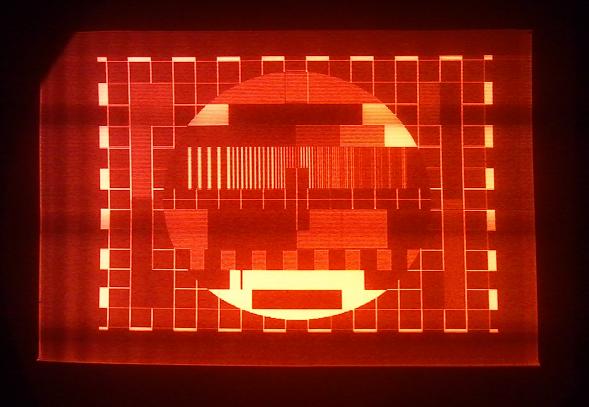
Only when rastering the image according to tips from here the red tube displays a kind of forcefield around the image, while blue and green aren't.
When I turn the switch from test to PAL the red tube gives a short flickering square on the tube then turns black again as the others colors when nothing is connected.
The forcefield is however still within the fosfor.
The DVD player is set on 4x3 letterbox, have I missed something during this raster tube procedure.
Thanks !
| Description: |
|
| Filesize: |
31.75 KB |
| Viewed: |
4156 Time(s) |
|
|
|
| Back to top |
|
 |
Curt Palme
CRT Tech
Joined: 08 Mar 2006
Posts: 24396
Location: Langley, BC
TV/Projector: All of them!
|
| Posted: Mon Aug 19, 2013 8:52 pm Post subject: |
|
|
|
It looks like the top left corner is off the tube phosphor, so you need to reposition it. If you're talking the halo/haze around the red image, I think you have a very mild case of fungus on the red tube, at least that's what it looks like.
|
|
| Back to top |
|
|
Digivid72
Joined: 22 Jan 2013
Posts: 12
Location: The Netherlands
|
| Posted: Mon Aug 19, 2013 9:07 pm Post subject: |
|
|
Hi Curt,
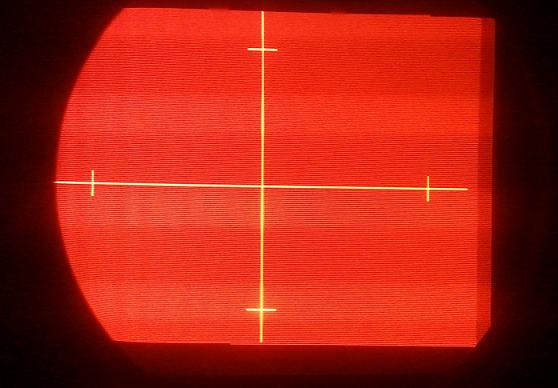
The picture is taken with the lenses on the machine. Sorry about that.
But the halo is in the complete image.
When I call up the cross test pattern every line is red, while on the green and blue tube only the cross lites up in Blue/Green. The rest is dark/grey.
Could it be that the G2 control is set to hi for the red tube because every line has lit up?
Regards,
Mar.
| Description: |
|
| Filesize: |
29.4 KB |
| Viewed: |
4127 Time(s) |
|
|
|
| Back to top |
|
|
the big E
Joined: 20 Apr 2013
Posts: 1928
Location: speedwell Tn.
|
| Posted: Tue Aug 20, 2013 12:58 am Post subject: |
|
|
| Digivid72 wrote: | Hi Curt,
The picture is taken with the lenses on the machine. Sorry about that.
But the halo is in the complete image.
When I call up the cross test pattern every line is red, while on the green and blue tube only the cross lites up in Blue/Green. The rest is dark/grey.
Could it be that the G2 control is set to hi for the red tube because every line has lit up?
Regards,
Mar. |
What you are seeing is the raster of the tube turn the g2 knob down till the raster just dissappers then you should be good(check the white balance afterwards)
_________________
crt king of black
|
|
| Back to top |
|
|
CasetheCorvetteman

Joined: 09 Nov 2008
Posts: 6326
Location: Australia
|
| Posted: Tue Aug 20, 2013 6:39 am Post subject: |
|
|
|
Just down the G2 down. The 1031 is an extremely basic machine. I dont think it has any digital adjustments at all ( certainly not for convergence, but not for brightness or contrast either i dont think )
|
|
| Back to top |
|
|
Digivid72
Joined: 22 Jan 2013
Posts: 12
Location: The Netherlands
|
| Posted: Tue Aug 20, 2013 10:02 pm Post subject: |
|
|
Allright guys,
Well turn down the G2 did the job 
@Case yep this machine is without all the digital fuzz, only I must take the hood off everytime to do the settings 
Since the hood is off anyway I would like to set the white balance to the best possible settings and use the most of the fosfor.
I now have about 2 cm of fosfor unused.
Can I use the master wide and height on the DB board because on the converge board I can not turn the green more to the right and keeping the 2cm around the image unused.
|
|
| Back to top |
|
|
the big E
Joined: 20 Apr 2013
Posts: 1928
Location: speedwell Tn.
|
| Posted: Tue Aug 20, 2013 10:44 pm Post subject: |
|
|
| Digivid72 wrote: | Allright guys,
Well turn down the G2 did the job
@Case yep this machine is without all the digital fuzz, only I must take the hood off everytime to do the settings
Since the hood is off anyway I would like to set the white balance to the best possible settings and use the most of the fosfor.
I now have about 2 cm of fosfor unused.
Can I use the master wide and height on the DB board because on the converge board I can not turn the green more to the right and keeping the 2cm around the image unused. |
Yep but I would check for previous wear patterns before proceeding as my vision 3 had been set at some point with a smaller raster then needed and the wear pattern shows on the green tube(set has almost 3k hours on the tubes)
_________________
crt king of black
|
|
| Back to top |
|
|
CasetheCorvetteman
Joined: 09 Nov 2008
Posts: 6326
Location: Australia
|
| Posted: Wed Aug 21, 2013 12:31 am Post subject: |
|
|
Use the width coils on the small board to the left, set the width settings on the convergence pots to mid point.
Dont go too big on the 1031 cause you will have trouble getting the convergence to line up on the whole screen. You will need to use shims to get the tube angles correct if the factory shims are not correct.
|
|
| Back to top |
|
|
|
|




