| Author |
Message |
Machi
Joined: 18 Aug 2013
Posts: 17
Location: Buenos Aires, Argentina
|
| Posted: Tue Aug 20, 2013 3:53 am Post subject: |
|
|
| the big E wrote: | | Machi wrote: | | Nashou66 wrote: | What is the frame rate for the DVD players output? Is it higher than 24hz? Also how are you connecting the DVD player to the VP? Composite? Component?
Athanasios |
I tried to connect the computer through an adapter, VGA to RCA AV, S-Video. (http://www.ebay.com/itm/PC-Laptop-VGA-To-RCA-AV-Video-Composite-S-video-Converter-Adapter-/190888006697?pt=AU_Television_Accessories&hash=item2c71cfd429 ) And the result is the same.
[No VSync] o [No HSync] cuando conecto los cables de sincronización vertical y horizontal.
Tambien [Sync Out Of Range] cuando conecto el cable de sincronización compuesto.
In all cases, the picture looks bad.
It's like the projector does not detect sync cables.  |
Most likely the vim(video input module) with the rgb plugs is bad and needs replaced contact curt for a replacement as he has a lot of marquee parts and they will work with your set since it is a marquee in disquse |
Too bad. I think it will be impossible to get in Argentina 
|
|
| Back to top |
|
 |
the big E
Joined: 20 Apr 2013
Posts: 1928
Location: speedwell Tn.
|
| Posted: Tue Aug 20, 2013 4:10 am Post subject: |
|
|
| Machi wrote: | | the big E wrote: | | Machi wrote: | | Nashou66 wrote: | What is the frame rate for the DVD players output? Is it higher than 24hz? Also how are you connecting the DVD player to the VP? Composite? Component?
Athanasios |
I tried to connect the computer through an adapter, VGA to RCA AV, S-Video. (http://www.ebay.com/itm/PC-Laptop-VGA-To-RCA-AV-Video-Composite-S-video-Converter-Adapter-/190888006697?pt=AU_Television_Accessories&hash=item2c71cfd429 ) And the result is the same.
[No VSync] o [No HSync] cuando conecto los cables de sincronización vertical y horizontal.
Tambien [Sync Out Of Range] cuando conecto el cable de sincronización compuesto.
In all cases, the picture looks bad.
It's like the projector does not detect sync cables. |
Most likely the vim(video input module) with the rgb plugs is bad and needs replaced contact curt for a replacement as he has a lot of marquee parts and they will work with your set since it is a marquee in disquse |
Too bad. I think it will be impossible to get in Argentina |
Drop curt a email and see if he can work something out for you as I know he has a lot of parts for these sets and can get you back up and running
Don't give up on your set as it will give a awesome picture for sure I know as I have its little brother(vision 3) and they share the same video circuitry
_________________
crt king of black
|
|
| Back to top |
|
|
Nashou66

Joined: 12 Jan 2007
Posts: 16171
Location: West Seneca NY
|
|
| Back to top |
|
|
Machi
Joined: 18 Aug 2013
Posts: 17
Location: Buenos Aires, Argentina
|
| Posted: Tue Aug 20, 2013 7:55 pm Post subject: |
|
|
I tried that and now it's worse than before. I do not know what has happened. But he made a noise like relays, and turn off the image.
Now when I turn it on is not responding. LEDs light up, but no picture. dle even menu. CRTs do not work.
|
|
| Back to top |
|
|
Machi
Joined: 18 Aug 2013
Posts: 17
Location: Buenos Aires, Argentina
|
| Posted: Tue Aug 20, 2013 8:31 pm Post subject: |
|
|
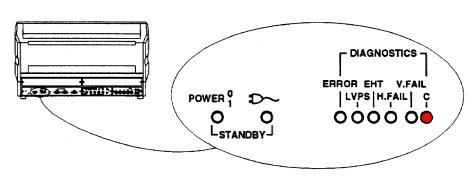
The projector turns on but will not turn the CRT. When I press any button on the remote control on the rear panel of LED lights in the picture which I marked in red.
When I release the button on the remote control turns off.
| Description: |
|
| Filesize: |
14.57 KB |
| Viewed: |
5137 Time(s) |
|
|
|
| Back to top |
|
|
Tim in Phoenix

Joined: 21 Oct 2006
Posts: 4409
Location: Phoenix
|
| Posted: Tue Aug 20, 2013 9:08 pm Post subject: |
|
|
Hello
Turn off the Faroudja and try this on the projector. Push UTIL, 1, 6, 2 and see if you have a stable test grid
|
|
| Back to top |
|
|
Machi
Joined: 18 Aug 2013
Posts: 17
Location: Buenos Aires, Argentina
|
| Posted: Tue Aug 20, 2013 9:23 pm Post subject: |
|
|
Nothing.
Runs, but do not work the three CRT. I do not know what to do. Now it's worse than before. Before it was only sync. now nothing works.
|
|
| Back to top |
|
|
Tim in Phoenix
Joined: 21 Oct 2006
Posts: 4409
Location: Phoenix
|
| Posted: Tue Aug 20, 2013 9:27 pm Post subject: |
|
|
Hello
Try reseating the horizontal board; it is the board with the yoke couplers that you flipped
|
|
| Back to top |
|
|
Machi
Joined: 18 Aug 2013
Posts: 17
Location: Buenos Aires, Argentina
|
| Posted: Tue Aug 20, 2013 9:39 pm Post subject: |
|
|
|
Nothing. CRTs are off, but the projector turns on. :s
|
|
| Back to top |
|
|
Machi
Joined: 18 Aug 2013
Posts: 17
Location: Buenos Aires, Argentina
|
| Posted: Tue Aug 20, 2013 9:47 pm Post subject: |
|
|
|
Maybe try turning on the projector without VIM?
|
|
| Back to top |
|
|
Tim in Phoenix
Joined: 21 Oct 2006
Posts: 4409
Location: Phoenix
|
| Posted: Tue Aug 20, 2013 9:59 pm Post subject: |
|
|
| Machi wrote: | | Maybe try turning on the projector without VIM? |
Hello
Projector cannot run without the VIM due to protection circuits on it. Someone with a voltmeter, an oscilloscope, some spare parts and some experience could figure this problem out. Your remote location is a disadvantage, and messing about with deadly voltages without proper experience is not recommended.
|
|
| Back to top |
|
|
Machi
Joined: 18 Aug 2013
Posts: 17
Location: Buenos Aires, Argentina
|
| Posted: Tue Aug 20, 2013 10:04 pm Post subject: |
|
|
|
I have contacted an electronics lab. They said they will review it. I hope they can fix it.
|
|
| Back to top |
|
|
Tim in Phoenix
Joined: 21 Oct 2006
Posts: 4409
Location: Phoenix
|
| Posted: Tue Aug 20, 2013 11:09 pm Post subject: |
|
|
Hello
The projector should give at least a test pattern from the UTIL menu. You may have a loose connection, a failed board, a failed power supply, a false trip of a protection circuit, there are several possibilities. For tubes to fire up they need power to the filament, they need G2 bias voltage, they need 34,900 volts to the anode, and a signal to display. Loss of H sweep, V sweep or loss of some other signals can cause protection circuits to shut the tubes down
|
|
| Back to top |
|
|
Machi
Joined: 18 Aug 2013
Posts: 17
Location: Buenos Aires, Argentina
|
| Posted: Tue Aug 20, 2013 11:16 pm Post subject: |
|
|
|
It may be that H sync cable was not properly secured? When I took apart the plug, I found that there was seated securely.
|
|
| Back to top |
|
|
Tim in Phoenix
Joined: 21 Oct 2006
Posts: 4409
Location: Phoenix
|
| Posted: Tue Aug 20, 2013 11:23 pm Post subject: |
|
|
Hello
Again, the projector should at least make its own test patterns, even with defective cables or no cables connected
|
|
| Back to top |
|
|
Nashou66
Joined: 12 Jan 2007
Posts: 16171
Location: West Seneca NY
|
| Posted: Wed Aug 21, 2013 2:32 am Post subject: |
|
|
Probably a good cleaning and reseating of all the boards is what's needed.
Here is a link to parts and boards of the Marquee. Reseating of the Focus board and HDM is just pulling it out and putting in in a few times to clean the contacts, you dont have to remove any connections to do this. Just pull up and put back in a few times. http://www.curtpalme.com/Electrohome...e_Layout1.shtm
Location of FCM and HDM.

on the hdm their is a daughter board that also need to be removed and reconected.
HDM Pic

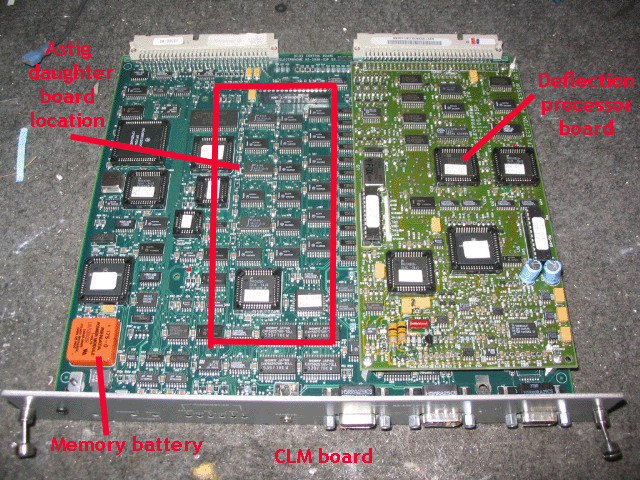
Next on the CLM there are some chips that can be taken out from their
sockets, do one at a time. you will need a IC puller from radio shack to do this.
Location of CLM:
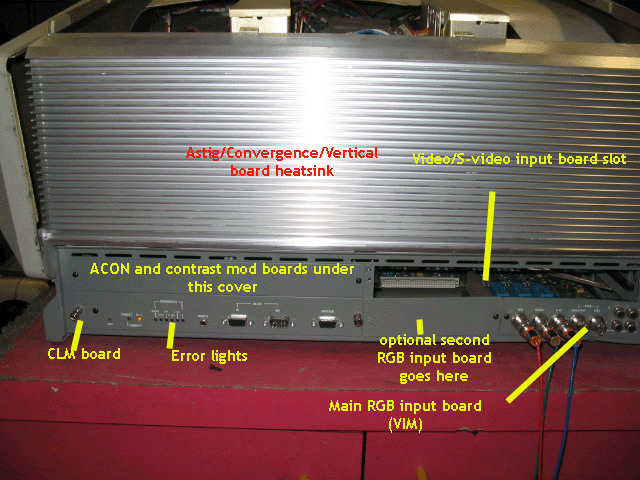
CLM out of Set showing chips.
chip puller pic:

Clean all chips with some contact cleaner or Denatured Alcohol.
I use DeOxit:
[img]http://store.caig.com/core/media/media.nl?id=1491&c=ACCT113328&h=e3c3a4a7806d4b7935fd[/img]
Do one chip at a time and remember how it came out so you put it back in the same way.
Athanasios
_________________
Don't blame your underwear for your crooked ass~ unknown Greek philosopher
"Republicans believe every day is the Fourth of July, but the Democrats believe every day is April 15." --- President Reagan
One Smart Dog!!!
Marquee High Performance Bellows now shipping!!
Marquee Modifications and Performance Enhancement
Marquee C-element and Bellow removal
|
|
| Back to top |
|
|
|
|