|
As this forum is rarely used anymore, we've locked it. Feel free to browse and read. Questions? Please reach out to us directly. Cheers! |

|
 |
|
|
| Author |
Message |
andy2000
Joined: 03 May 2013
Posts: 32
|
| Posted: Fri May 03, 2013 3:21 pm Post subject: NEC 9PG insufficient width above 1080i |
|
|
I'm attempting to revive this NEC PG-9000 that initially had vertical problems due to bad caps. I've changed all the caps I can find that were either leaking, or had high ESR. I've checked all boards except the power supply. Now I have a decent display at 480i, 480p, and 1080i.
720p is about 25% narrower than the other modes, and the on screen width control only has an effect up to about 1/3. Beyond that the picture stays the same. I assume that's not normal. 1080p has fold over on both sides, and the width control hardly has any effect. Based on the specs it seems that it should be able to scan 1080p with no trouble (I know bandwidth is another story).
Even at 1080i the width control stops responding above about 90%. The problem gets worse as the horizontal frequency increases. I would appreciate any tips that might save me some time.
|
|
| Back to top |
|
 |
blue_z
Joined: 27 Apr 2006
Posts: 63
Location: So Calif
|
| Posted: Fri May 03, 2013 6:06 pm Post subject: |
|
|
Use the Contrast=0 & Brightness=100 trick to check the width of the raster versus the width of the image.
Often times it's the long/wide horizontal porches that cause the width shrinkage.
What are you using for source?
Regards
|
|
| Back to top |
|
|
Tinman

Joined: 09 Mar 2006
Posts: 1326
Location: Carson City Nevada
|
| Posted: Fri May 03, 2013 6:16 pm Post subject: |
|
|
You shouldn't run a PG9 at 1080p. It'll get too hot and you don't gain anything in image quality. Run it in 1080i or 720p and it'll be far more stable and reliable.
Yes, it's normal for 720p to be narrower. There are ways to get around that, but the PG's were not originally designed for (now) standard HD resolutions. They were meant to run PC, SUN and Mac scan rates.
I used to set mine up at 720p at 90% and then tweak the deflection board to get the raster I wanted, then used the menu controls to set all the other resolutions to match, being LESS on the scale.
Keep in mind that if you push a PG too far you'll blow out the H-Out transistor, which is no longer available.
Marc
_________________
This space for rent.
|
|
| Back to top |
|
|
gjaky

Joined: 05 Jun 2010
Posts: 2802
Location: Budapest, Hungary
|
| Posted: Fri May 03, 2013 6:36 pm Post subject: |
|
|
The fact that the active picture is smaller don't mean there is a problem with the set, you should check if the raster also shrinks with the active picture, if so then really there is a problem.
You should check your power supply however, the supply for the H deflection enters at PA pin 1, and PA pin 2 is the control voltage going in to the power supply, I think the H def supply voltage increases with the scan freqency. According to the service manual: hook up a 480i source and set horizontal amplitude to 100%, then set 1.8V (+/-0.1V) at PA pin 2 with VR5005 (H width pot), BUT BEFORE YOU DO THIS: turn the VR5005 back and forth with the projector OFF, as a cratchy pot could kill the deflection transistor.
Anyway have you checked the small caps as well around the upc1880 on the DEF board?
_________________
projectors in the past : NEC 6-9PG xtra, Electrohome Marquee 6-7500, NEC XG 1351 LC ( with super modified Electrohome VNB neckboard !!!)
current: VDC Marquee 9500LC
The MOD: VNB-DB, VIM-DB
|
|
| Back to top |
|
|
andy2000
Joined: 03 May 2013
Posts: 32
|
| Posted: Fri May 03, 2013 8:13 pm Post subject: |
|
|
Thanks for the replies.
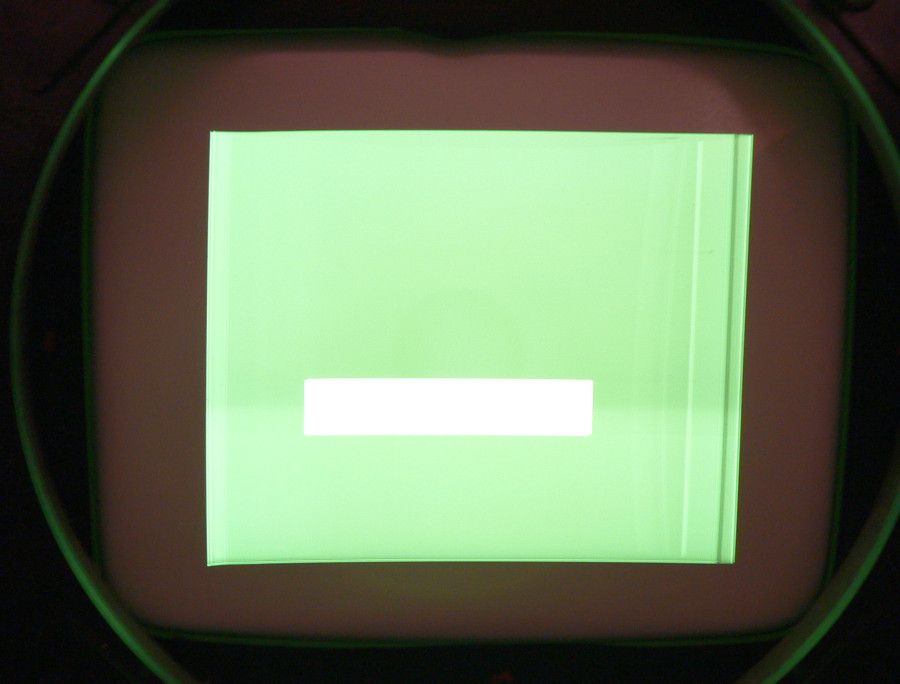
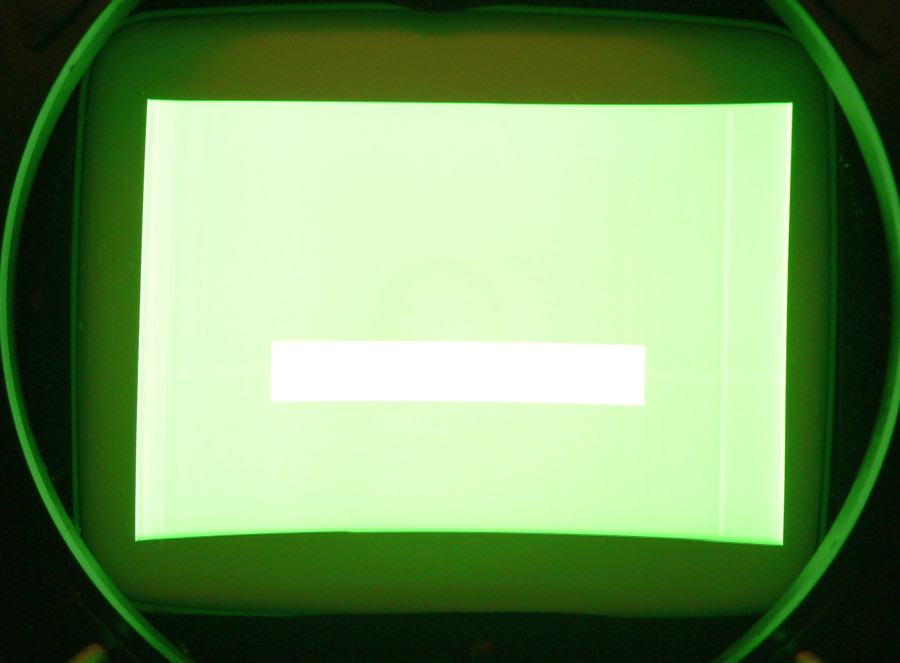
The raster is definitely shrinking, not just the active image, but the active image is a lot smaller in 720p than at 1080i. In 1080p, the active image is actually larger than the raster (the sides are folded over). I don't plan to do 1080p, but I'm bothered that it can't handle 67.5 kHz when it should go to 90kHz according to specs. Did they over rate this projector?
In 720p, the amplitude adjustment hits a wall at -70%. Nothing above that changes the width at all (including the internal width pot). At 1080i, it hits the wall at +30%, but it has plenty of width. I've attached images showing the maximum raster sizes for 1080i, and 720p. I also tried a PC at 800x600, 1024x768, and 1280x1024. 800x600 is the only one that comes close to filling the screen, and even that's borderline.
I will check the deflection voltages. I plan to pull the power supply at some point, but I don't think that's the problem because of the behavior of the width control. I'm pretty confident that I've found all the bad caps on the deflection board. I even gave it a thorough bath in alcohol to make sure all the electrolyte was removed.
If this behavior is normal for a 9PG, that's fine, but it seems poor to me. I used to have a Sony 1270 and it had no trouble filling the screen at any resolution within it's range.
| Description: |
|
| Filesize: |
135.95 KB |
| Viewed: |
9805 Time(s) |
|
| Description: |
|
| Filesize: |
119.74 KB |
| Viewed: |
9805 Time(s) |
|
|
|
| Back to top |
|
|
CasetheCorvetteman

Joined: 09 Nov 2008
Posts: 6326
Location: Australia
|
| Posted: Fri May 03, 2013 10:02 pm Post subject: |
|
|
What Tinman said. No good reason to be doing 1080p. Change the porches for 720p and itll be full width.
Try 720p at 50Hz and i bet it will be a different width to 60Hz.
If im understanding what youre saying here correctly, there is nothing wrong with your machine, its the signal youre feeding it. Also there is nothing to stop you winding up the width pot on the DEF board, ive been running mine that way for years now, but that isnt your whole problem.
|
|
| Back to top |
|
|
Curt Palme
CRT Tech
Joined: 08 Mar 2006
Posts: 24396
Location: Langley, BC
TV/Projector: All of them!
|
| Posted: Fri May 03, 2013 10:22 pm Post subject: |
|
|
|
Yep, what you describe sounds normal...
|
|
| Back to top |
|
|
andy2000
Joined: 03 May 2013
Posts: 32
|
| Posted: Fri May 03, 2013 11:27 pm Post subject: |
|
|
Ok, just to be clear, those pictures are of the raster, not the active video (it looks bright because of the exposure). The width pot has no effect beyond what I can get through the menu. I can't get an acceptable picture at 720p.
I just turned it back on to check something, and it's worse than before. Now at 720p the menu width has no effect at all, and it only works in the bottom 10% at 1080i. I pulled the power supply, and there are some leaking caps in there. Hopefully that will take care of it. I'll post back either way.
|
|
| Back to top |
|
|
CIR Engineering

Joined: 25 Aug 2008
Posts: 4269
Location: Chicago USA & Berlin Germany
|
| Posted: Sat May 04, 2013 1:32 am Post subject: |
|
|
With 720p standard timings, there are a lot of pixels that are not active (active pixels contain the image). 720p has a huge amount of inactive pixels in its porches (1080i does not). If you run a video processor or HTPC you can tweak the "timings" and reduce the porches to something more suited to the projector. This will increase the image width, but will also increase the sharpness of the image because with the reduced porches there will also be less bandwidth used. The less bandwidth, the sharper the image. Also, the projector will run cooler.
craigr
_________________
JETI 1501-HiRes 2nm Spectroradiometer
JETI 1211 Spectroradiometer
Photo Research PR-650 Spectroradiometer
Klein K10-A Colorimeter
Murideo Fresco SIX-G HDMI 2.x Multimedia Generator
Murideo Fresco SIX-A HDMI 2.x Analyzer
Light Illusion ColourSpace XPT Color Calibration Software
Light Illusion LightSpace XPT Pro Version 10.x Color Calibration Software
OMARDRIS JVC Software Patch to use K10-A and Jeti with JVC OEM AutoCal Software!
Sencore CR7000 CRT Tube Analyzer / Rejuvenater
Authorized Dealer for Lumagen & just about everything worth buying 
www.CIR-Engineering.com - craigr@cir-engineering.com
Phone: 865-405-6892
|
|
| Back to top |
|
|
gjaky
Joined: 05 Jun 2010
Posts: 2802
Location: Budapest, Hungary
|
| Posted: Sat May 04, 2013 7:05 am Post subject: |
|
|
It seems I am the only one who belives you, the raster should not shrink with increasing scanrate. You can verify this by setting the resolution to say 800x600, but set the vertical refresh to higher and higher, and see what happens.
As I already said PA pin1 is the supply voltage to the H deflection PA pin2 is the control voltage going to the LVPS, now if you set the 1.8V at PA pin2 @480i measure the voltage at PA pin1, go higher with resolution (/scanrate) and measure PA pin1 and 2 again, when you see the raster shrinking that means the voltage at PA pin1 can't get higher, but to assure this you have to measure PA pin 2 as well, because if pin2 also don't raises after a certain point, the deflection board has the problem, while PA pin2 raises but PA pin1 does not, then the power supply has the problem. If you need, later the day I can do these readings on my PG xtra too, if that helps.
NEC indeed overrated their projectors in terms of scanrate, while they could do technically what they are specified, but the cooling of the deflection board is insuficient at scanrates over ~65-70kHz, so they frequently died, but the most of the projectors at that time was overrated, I feel the PG 6 series to a more bullet proof construction, as the scanrate is limited to the range what they are really capable of doing (both bandwidth wise and resolution wise). You can add fans to the deflection board, so you can push them a little harder, but PGs are seem to be happy in the ~50kHz range (720P-72Hz, 1080i-96Hz) without any modifications.
_________________
projectors in the past : NEC 6-9PG xtra, Electrohome Marquee 6-7500, NEC XG 1351 LC ( with super modified Electrohome VNB neckboard !!!)
current: VDC Marquee 9500LC
The MOD: VNB-DB, VIM-DB
|
|
| Back to top |
|
|
andy2000
Joined: 03 May 2013
Posts: 32
|
| Posted: Sat May 04, 2013 3:10 pm Post subject: |
|
|
There are indeed a lot of unused pixels at 720p, but that's not what I'm complaining about. It's the fact that the raster is only using about 50-60% of the CRT that bothers me. Even 800x600 from a PC is lacking width. Also the fact that the width control isn't working in the higher scanning rates seems odd.
I did verify that the power supply voltage is changing with horizontal scanning rate. The output always responds to the control voltage, but I have no way to know if it's providing the correct voltage at the higher scanning rates. Is the output a fixed multiple of the control voltage?
As soon as I recap the power supply I will check/adjust the voltage at 480i and then see what it does at higher scanning rates. Trying to make sense of specific symptoms is a waste of time until I know all the caps in the power supply are good.
|
|
| Back to top |
|
|
gjaky
Joined: 05 Jun 2010
Posts: 2802
Location: Budapest, Hungary
|
| Posted: Sat May 04, 2013 3:21 pm Post subject: |
|
|
Once you've changed the caps in the powersupply, I can help you what should you measure at PA pin1.
Did you change any of the big 200V 33uF, and 200V 10uF capacitors on the deflection board? -Be careful with those they are rated for very high ripple current.
_________________
projectors in the past : NEC 6-9PG xtra, Electrohome Marquee 6-7500, NEC XG 1351 LC ( with super modified Electrohome VNB neckboard !!!)
current: VDC Marquee 9500LC
The MOD: VNB-DB, VIM-DB
|
|
| Back to top |
|
|
andy2000
Joined: 03 May 2013
Posts: 32
|
| Posted: Sat May 04, 2013 10:35 pm Post subject: |
|
|
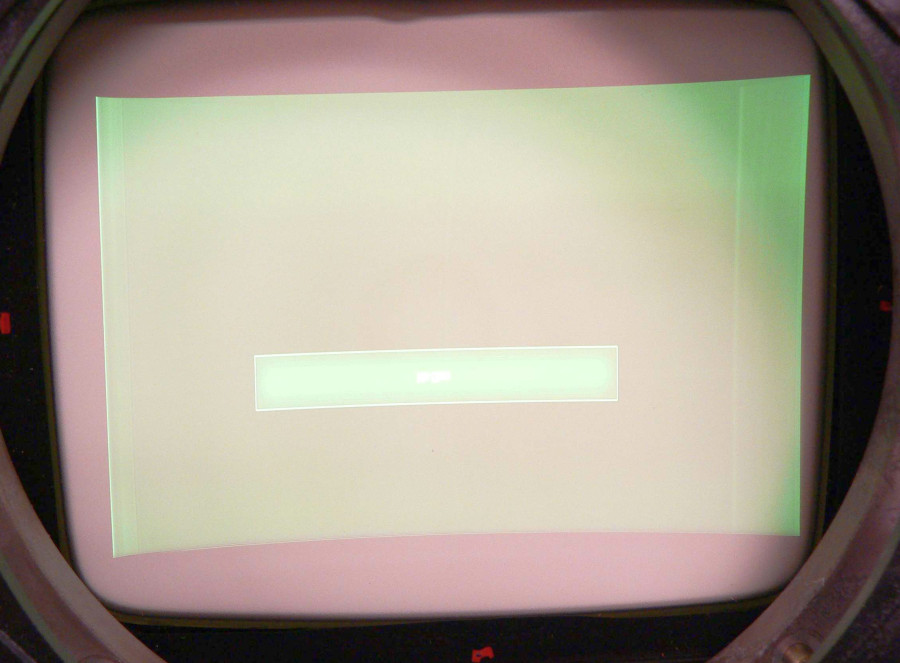
Things are looking a lot better after replacing the power supply caps. I can now get a good sized raster at 720p.
There were a lot of leaking caps in the power supply (most of them). They're good quality (Rubycon) caps, and they haven't lead a hard life in this particular projector. I guess NEC bought a bad batch of caps in the early 90's.
I strongly advise checking for leaking caps on any NEC from this era before powering it up. I almost killed the CRTs the first time I powered it up because it lost vertical deflection, and didn't go into protection. Fortunately, I pulled the plug before a line was burned in the CRTs.
I haven't replaced the big 200v caps on the deflection board. They weren't leaking, and they're a different type so I suspect they will be fine.
Thanks to all who helped. One last thing, does anyone have a PDF of the service manual they can share? I found a schematic, but I wouldn't mind having the service adjustment procedures, troubleshooting, and what ever else is in the SM.
| Description: |
| 720p raster with new caps. |
|
| Filesize: |
103.13 KB |
| Viewed: |
9727 Time(s) |
|
|
|
| Back to top |
|
|
CasetheCorvetteman
Joined: 09 Nov 2008
Posts: 6326
Location: Australia
|
| Posted: Sun May 05, 2013 11:37 am Post subject: |
|
|
|
Looks like wrapping there...
|
|
| Back to top |
|
|
andy2000
Joined: 03 May 2013
Posts: 32
|
| Posted: Sun May 05, 2013 3:02 pm Post subject: |
|
|
| CasetheCorvetteman wrote: | | Looks like wrapping there... |
No, the lines near the edges are just the edges of the active video. I can move the image around within the raster with no problems.
|
|
| Back to top |
|
|
CasetheCorvetteman
Joined: 09 Nov 2008
Posts: 6326
Location: Australia
|
| Posted: Sun May 05, 2013 9:46 pm Post subject: |
|
|
|
Youre way too large for a PG there in my opinion.
|
|
| Back to top |
|
|
andy2000
Joined: 03 May 2013
Posts: 32
|
| Posted: Mon May 06, 2013 5:50 am Post subject: |
|
|
| CasetheCorvetteman wrote: | | Youre way too large for a PG there in my opinion. |
I know, I was illustrating that the maximum raster size is now more than big enough.
|
|
| Back to top |
|
|
CasetheCorvetteman
Joined: 09 Nov 2008
Posts: 6326
Location: Australia
|
| Posted: Mon May 06, 2013 8:59 am Post subject: |
|
|
|
No worries, was hoping you werent planning a setup like that
|
|
| Back to top |
|
|
andy2000
Joined: 03 May 2013
Posts: 32
|
| Posted: Mon May 06, 2013 5:33 pm Post subject: |
|
|
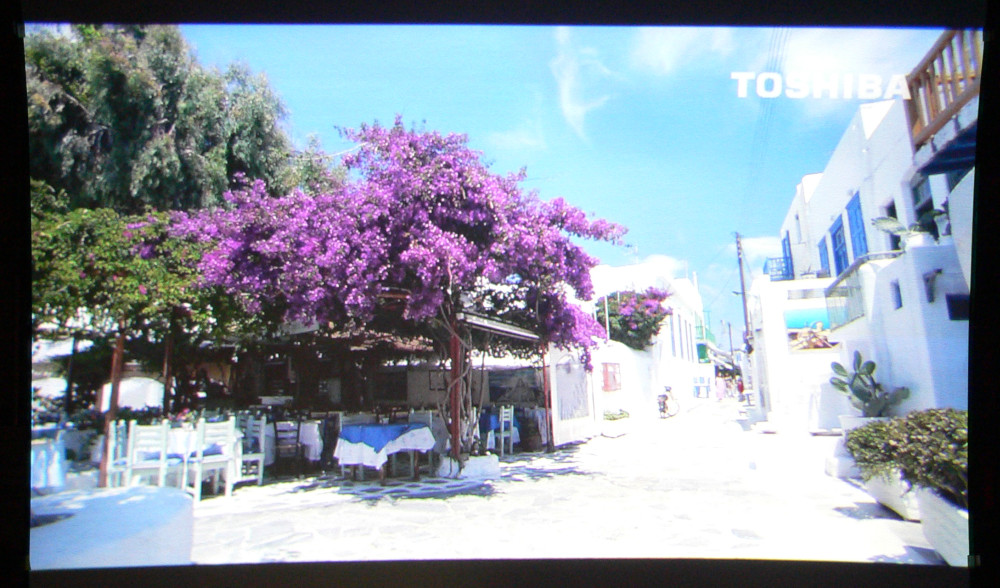
Here's a quick screen shot after doing a rough convergence. Sorry, it's not the best photo (over exposed). The only problem is that now my Epson 8500UB in the main setup doesn't look as good as it did last week...
If anyone has an extra video input board, I would like to add it for the rare occasion when I might want to give it composite, or S-video directly.
Also, I'm using a Sony PC-1271 switcher with it. I have a Moome DVI card, 3 RGB cards, and an IFB-3000 line doubler in it. So far, I haven't been able to get the line doubler to work at all. It's installed in slots 5-8, the fan runs, and the lights come on when one of its inputs is selected, but the projector doesn't even get sync. Are there any tricks to making an IFB-3000 work? Does anyone have a service, or operating manual for it?
| Description: |
|
| Filesize: |
235.04 KB |
| Viewed: |
9624 Time(s) |
|
|
|
| Back to top |
|
|
CasetheCorvetteman
Joined: 09 Nov 2008
Posts: 6326
Location: Australia
|
| Posted: Mon May 06, 2013 11:41 pm Post subject: |
|
|
|
I have those boards, make an offer.
|
|
| Back to top |
|
|
|
|
|
|
|
You cannot post new topics in this forum
You cannot reply to topics in this forum
You cannot edit your posts in this forum
You cannot delete your posts in this forum
You cannot vote in polls in this forum
You cannot attach files in this forum
You can download files in this forum
|
Forum powered by phpBB © phpBB Group
|
|




