| Author |
Message |
stridsvognen
Guest
|
| Posted: Sun Apr 28, 2013 2:31 pm Post subject: |
|
|
| CIR Engineering wrote: | | stridsvognen wrote: |
Nice to know Craig.. thanks for sharing.. Never seen anyone writing about that.
Now i have 2 low hour 9500lc machines, so ill try change boards, and see if i can find out wich one make the change.
Is there any conection betwen ultra and non ultra, like the non ultra resolving better, or the other way around.? |
Theoretically Ultra should always be better.
craigr |
Well that dont seems to stick to this problem.
I like that i dont have the light banding, but for sure it dont matter what kind of lenses i put on this ULTRA. Its just not up to the task resolving 1080P 60hz.
My non ultra with dirty glycol can handle that with no problem.
Now i know why Marquee users need so many spare machines.. 
|
|
| Back to top |
|
 |
barclay66

Joined: 27 Jun 2011
Posts: 1304
Location: Germany
TV/Projector: Marquee 9500 Ultra
|
| Posted: Sun Apr 28, 2013 4:41 pm Post subject: |
|
|
Hi,
There are two things I'd like to mention:
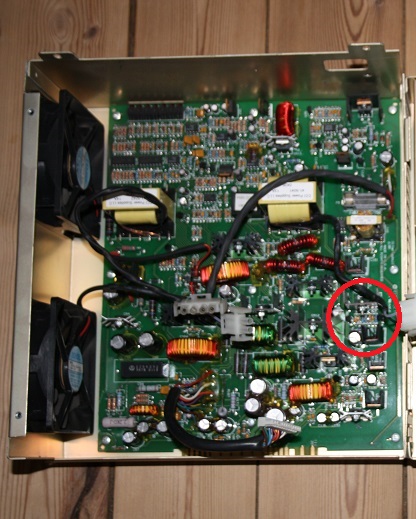
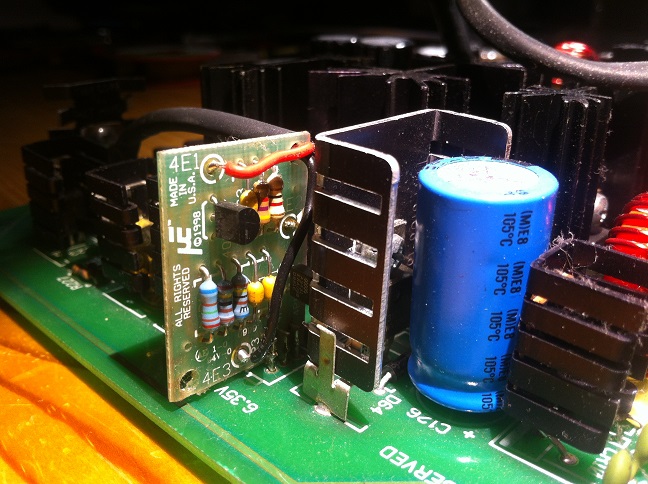
- Looking at the pictures of Your LVPS I couldn't make out the small extra board that is to be found in later models and is intended to make sure that the filament voltage (plug P14) is held within tight margins. Please see the picture below for reference. Of course Your LVPS model could be so new that the circuit has been incorporated into the LVPS board. But, if You still find the old spindle trimmer for the 6.35V filament voltage You should check this first.
- The capability of resolving a certain resolution could be affected by the peaking circuit on the VIM. If the three additional variable capacitors are tuned in for a specific resolution it could well be possible that other resolutions look considerably worse. Look here: http://www.curtpalme.com/forum/viewtopic.php?p=178247#178247.
If You would like to retune it for Your preferred resolution You will need a good oscilloscope and some reference signal for it.
Regards,
barclay66
| Description: |
|
| Filesize: |
99.36 KB |
| Viewed: |
8821 Time(s) |
|
| Description: |
|
| Filesize: |
140.36 KB |
| Viewed: |
8824 Time(s) |
|
|
|
| Back to top |
|
|
stridsvognen
Guest
|
| Posted: Sun Apr 28, 2013 5:57 pm Post subject: |
|
|
I have not tested the filament voltage yet, but i put the LVPS from my non ultra machine, that i know is right, so ill se tonight when it gets dark.
I dont have that regulator board in any of my LVPS.
I dont think the resolving power have anything to do with the vim, like im using my old 02 vim, who resolved 1080P 60hz with no problem.
|
|
| Back to top |
|
|
gjaky

Joined: 05 Jun 2010
Posts: 2802
Location: Budapest, Hungary
|
| Posted: Sun Apr 28, 2013 6:10 pm Post subject: |
|
|
Is that 'ultra' as sharp as your other machine? I mean are the magnetics (coils, CPC...) aligned well? Try some lower resolution like 720P and look at the scanlines, if they appear equally thin.
_________________
projectors in the past : NEC 6-9PG xtra, Electrohome Marquee 6-7500, NEC XG 1351 LC ( with super modified Electrohome VNB neckboard !!!)
current: VDC Marquee 9500LC
The MOD: VNB-DB, VIM-DB
|
|
| Back to top |
|
|
stridsvognen
Guest
|
| Posted: Sun Apr 28, 2013 6:24 pm Post subject: |
|
|
| gjaky wrote: | | Is that 'ultra' as sharp as your other machine? I mean are the magnetics (coils, CPC...) aligned well? Try some lower resolution like 720P and look at the scanlines, if they appear equally thin. |
Well i dont think its related to magnetic setup.. Actualy i think that might be better setup than my old non ultra.
But i can promise for sure, i will find out with time..
|
|
| Back to top |
|
|
Nashou66

Joined: 12 Jan 2007
Posts: 16171
Location: West Seneca NY
|
| Posted: Sun Apr 28, 2013 7:24 pm Post subject: |
|
|
| CIR Engineering wrote: | | Nashou66 wrote: | | stridsvognen wrote: | The VIM with no audio.
Its a 02 VIM with trimpots. |
Yep same as mine. The only bad thing with that board is if you want correct color balance you have to stick
with one resolution or with in a small range pixel clock.
So use you radiance to run the same output for all sources.
Nashou |
Just use another one of your grey scale presets and make it into D65. When I want to run multiple resolutions on a Marquee I often do this.
So you have your 6500k preset, but you also have a 3000k something, a 9000k something, and a custom. Just make them all 6500k and assign them each to their respective scan rate.
craigr |
Craig with the peaking circuit you can not set the trim pots for multiple resolutions unless you have an extender board, throw up the one to one pattern and adjust each pot for each color. The circuit is maximized by adjusting the capacitor pot till
the horizontal and vertical line box for the one to one pattern matches in brightness. Once you adjust each color for the same brightness and you turn on all three colors the one to one pattern should be distinct black and white lines or close to it. If not set properly it will lean towards a certain tint, yellow, green, pink, purple etc.
So what you do is you set the resolution to what you plan to use. adjust each color with the one to one pixel line pattern up.
Make the horizontal and vertical line box of that pattern match in brightness. now move on to greyscale and recheck for
the tinting. there should be none. now if you change to a greater or lower resolution and try to re adjust greyscale and then throw up that pattern you'll se its tinted towards one of the colors. And the only way to fix it is not by grey scale calibration but by adjusting the pots. but now you just altered the other setting. So its best to choose one resolution with that vim. that Vim is made to be able to do very high resolutions and its why craig was able to run 1080p@72. It cam from the factory set for a very high resolution with those trim pots .
To be honest I wish I left mine alone as it was perfect the first time I set it up. I first tried 1080p@72.
I would not have the Vim modded Kurt. Its a great Vim as is and can run up 240mhz pixel clock according to Scott and from why I have seen.
I had it running through the RGBHV input 1056x800@120hz in my blend. I only changed it as I wanted only one cable(HDMI) going to the PJ's. I took out the heavy and bulky RGBHV's.\
Athanasios
_________________
Don't blame your underwear for your crooked ass~ unknown Greek philosopher
"Republicans believe every day is the Fourth of July, but the Democrats believe every day is April 15." --- President Reagan
One Smart Dog!!!
Marquee High Performance Bellows now shipping!!
Marquee Modifications and Performance Enhancement
Marquee C-element and Bellow removal
|
|
| Back to top |
|
|
CIR Engineering

Joined: 25 Aug 2008
Posts: 4269
Location: Chicago USA & Berlin Germany
|
| Posted: Sun Apr 28, 2013 7:34 pm Post subject: |
|
|
| Nashou66 wrote: |
Craig with the peaking circuit you can not set the trim pots for multiple resolutions unless you have an extender board, throw up the one to one pattern and adjust each pot for each color. The circuit is maximized by adjusting the capacitor pot till
the horizontal and vertical line box for the one to one pattern matches in brightness. Once you adjust each color for the same brightness and you turn on all three colors the one to one pattern should be distinct black and white lines or close to it. If not set properly it will lean towards a certain tint, yellow, green, pink, purple etc.
So what you do is you set the resolution to what you plan to use. adjust each color with the one to one pixel line pattern up.
Make the horizontal and vertical line box of that pattern match in brightness. now move on to greyscale and recheck for
the tinting. there should be none. now if you change to a greater or lower resolution and try to re adjust greyscale and then throw up that pattern you'll se its tinted towards one of the colors. And the only way to fix it is not by grey scale calibration but by adjusting the pots. but now you just altered the other setting. So its best to choose one resolution with that vim. that Vim is made to be able to do very high resolutions and its why craig was able to run 1080p@72. It cam from the factory set for a very high resolution with those trim pots .
To be honest I wish I left mine alone as it was perfect the first time I set it up. I first tried 1080p@72.
I would not have the Vim modded Kurt. Its a great Vim as is and can run up 240mhz pixel clock according to Scott and from why I have seen.
I had it running through the RGBHV input 1056x800@120hz in my blend. I only changed it as I wanted only one cable(HDMI) going to the PJ's. I took out the heavy and bulky RGBHV's.\
Athanasios |
I'm talking about color calibration, not peaking adjustments.
craigr
_________________
JETI 1501-HiRes 2nm Spectroradiometer
JETI 1211 Spectroradiometer
Photo Research PR-650 Spectroradiometer
Klein K10-A Colorimeter
Murideo Fresco SIX-G HDMI 2.x Multimedia Generator
Murideo Fresco SIX-A HDMI 2.x Analyzer
Light Illusion ColourSpace XPT Color Calibration Software
Light Illusion LightSpace XPT Pro Version 10.x Color Calibration Software
OMARDRIS JVC Software Patch to use K10-A and Jeti with JVC OEM AutoCal Software!
Sencore CR7000 CRT Tube Analyzer / Rejuvenater
Authorized Dealer for Lumagen & just about everything worth buying 
www.CIR-Engineering.com - craigr@cir-engineering.com
Phone: 865-405-6892
|
|
| Back to top |
|
|
Nashou66
Joined: 12 Jan 2007
Posts: 16171
Location: West Seneca NY
|
| Posted: Sun Apr 28, 2013 7:44 pm Post subject: |
|
|
| CIR Engineering wrote: | | Nashou66 wrote: |
Craig with the peaking circuit you can not set the trim pots for multiple resolutions unless you have an extender board, throw up the one to one pattern and adjust each pot for each color. The circuit is maximized by adjusting the capacitor pot till
the horizontal and vertical line box for the one to one pattern matches in brightness. Once you adjust each color for the same brightness and you turn on all three colors the one to one pattern should be distinct black and white lines or close to it. If not set properly it will lean towards a certain tint, yellow, green, pink, purple etc.
So what you do is you set the resolution to what you plan to use. adjust each color with the one to one pixel line pattern up.
Make the horizontal and vertical line box of that pattern match in brightness. now move on to greyscale and recheck for
the tinting. there should be none. now if you change to a greater or lower resolution and try to re adjust greyscale and then throw up that pattern you'll se its tinted towards one of the colors. And the only way to fix it is not by grey scale calibration but by adjusting the pots. but now you just altered the other setting. So its best to choose one resolution with that vim. that Vim is made to be able to do very high resolutions and its why craig was able to run 1080p@72. It cam from the factory set for a very high resolution with those trim pots .
To be honest I wish I left mine alone as it was perfect the first time I set it up. I first tried 1080p@72.
I would not have the Vim modded Kurt. Its a great Vim as is and can run up 240mhz pixel clock according to Scott and from why I have seen.
I had it running through the RGBHV input 1056x800@120hz in my blend. I only changed it as I wanted only one cable(HDMI) going to the PJ's. I took out the heavy and bulky RGBHV's.\
Athanasios |
I'm talking about color calibration, not peaking adjustments.
craigr |
No I understand. But when Running different resolutions on a Marquee WITH the peaking circuit your stuck to one resolution.
You can try to use different presets in the RGB menu but you wont get it right compared to the one resolution you set the peaking circuit to. I tried, the entire greyscale gets a but tinted. Unless the resolutions are close in pixel clock rates then you could do that.
Id have to show you a picture of the peaking circuit when adjusted for a certain resolution and then changing it and showing
the same test pattern. Its tinted a certain color. I can then adjust the peaking circuit and it looks fine but then If i go back to the original resolution its all wrong.
Scott could explain it better than I.
nashou
_________________
Don't blame your underwear for your crooked ass~ unknown Greek philosopher
"Republicans believe every day is the Fourth of July, but the Democrats believe every day is April 15." --- President Reagan
One Smart Dog!!!
Marquee High Performance Bellows now shipping!!
Marquee Modifications and Performance Enhancement
Marquee C-element and Bellow removal
|
|
| Back to top |
|
|
mp20748
Joined: 12 Sep 2006
Posts: 5689
Location: Maryland
TV/Projector: 9500LC Ultra / Super 02 and 03 VIM
|
| Posted: Sun Apr 28, 2013 9:31 pm Post subject: |
|
|
Those pots on the VIM is great for commercial video (graphics), but when used at higher bandwidth signals, the op amp will loose its stability. And that's why the colors will change (that let's you know its not stable). Setting it to any one frequency will not solve the problem. It will still drift because its not going to be stable with that cap on the feedback resistor.
It's not only the frequency that causes drifting, almost any differences or variations in the signal will cause color drifting or color shifting. Just pump in a low IRE window and then step up to the higher IRE windows and watch the windows change colors.
Perfect for graphics presentation, because D6500, hues and color shifting is not that important.
The G90 designers also played around with peaking at the FB/G resistor of the last amp on the BA board with a single fixed cap. A fixed cap was a part of the original design, but I'm sure that after they put that circuit in action and found out that you're not going to get a clean bandwidth performance from an overly peaked circuit, so it appears that idea was not put on the final board work.
|
|
| Back to top |
|
|
Nashou66
Joined: 12 Jan 2007
Posts: 16171
Location: West Seneca NY
|
| Posted: Sun Apr 28, 2013 11:05 pm Post subject: |
|
|
No, mine is stable on one res. Low or high IRE. It is stable. I have a few years experience with these, hundreds of hours of calibration working on the blend. Ask Cliff what he saw here. the reason the colors change in the one on one pattern is because the resolution changes.
I know you'll argue this to no end . But I know what I know because I know it And So does TSE the designer of that circuit as he states here and in the link Jorge posted.
| tse wrote: | The variable caps on the VIM help to compensate for the low pass filter made up of U13 series resistance (red channel) and all the capacitances between U11 and U14 input. Use the variable caps to make one pixel on/one pixel off test pattern as near the same as possible to the one line on/one line off test pattern.
Signals shown are one pixel on/one pixel off series at 2048x1536@60Hz. Top trace is output of U11. Middle trace is input to U14 with no peaking. Bottom trace shows input to U14 with peaking circuit added.
The neck card is essentially another low pass filter that can be somewhat compensated for by (over)peaking the output of U11.
This mod gives enough bandwidth for pixel clock 240MHz needed for QXGA (2048x1536@60Hz). Standard configuration is a little low for 150MHz pixel clock or 1600x1200@60Hz or 1920x1080@60Hz.


Scott |
Nashou
_________________
Don't blame your underwear for your crooked ass~ unknown Greek philosopher
"Republicans believe every day is the Fourth of July, but the Democrats believe every day is April 15." --- President Reagan
One Smart Dog!!!
Marquee High Performance Bellows now shipping!!
Marquee Modifications and Performance Enhancement
Marquee C-element and Bellow removal
|
|
| Back to top |
|
|
mp20748
Joined: 12 Sep 2006
Posts: 5689
Location: Maryland
TV/Projector: 9500LC Ultra / Super 02 and 03 VIM
|
| Posted: Mon Apr 29, 2013 1:08 am Post subject: |
|
|
I've wondered why you never had a problem with this, when some years back there was someone who had this same problem when calibrating the colors on their Marquee that had the VIM with the Pots.
It was suggested to them to remove the Pots, and the problem went away. It was a long thread on this. Not sure if it was on AVS or here.
I'm thinking it was 1031 but not sure. I'll do a search first before I post my own experience, but without having to do that, I'd like to know what Kurt will find out for himself.. I remember this problem well..
|
|
| Back to top |
|
|
Nashou66
Joined: 12 Jan 2007
Posts: 16171
Location: West Seneca NY
|
| Posted: Mon Apr 29, 2013 4:46 am Post subject: |
|
|
Mike it was jarmo, But when we discussed this I put an 02 vim i had here with no peak circuit and I got the same results.
I think the key is setting each color perfectly so not to get shifting when raising brightness or contrast. i have that now. But ti takes few iterations of back and forth of setting the trim pots, looking at the pattern then adjusting Contrast and brightness till no change is happening in doing so. Took a few times but it is possible.
I guess the best way to do this is with a scope at the points Scott mentions above. Input the signal and hook up a two channel scope to each test point and adjust the trim pot to match the input at U14 to the output at U11 for each color. then you know its perfect. But doing it the way I did would also work.
In retrospect since I run a blend I really don't need the peaking circuit. But for those who want to run 1080p@72 its a must.
Maybe some day I'll make a video showing this on the scope.
Nashou
_________________
Don't blame your underwear for your crooked ass~ unknown Greek philosopher
"Republicans believe every day is the Fourth of July, but the Democrats believe every day is April 15." --- President Reagan
One Smart Dog!!!
Marquee High Performance Bellows now shipping!!
Marquee Modifications and Performance Enhancement
Marquee C-element and Bellow removal
|
|
| Back to top |
|
|
stridsvognen
Guest
|
| Posted: Mon Apr 29, 2013 6:22 am Post subject: |
|
|
I have been up all night adjusting magnetics and stuff, but i still need to trim focus and stigmator.
so i dont have any status right now, i think its better, at least i now have nice round dots on all 3 tubes.
i will continue when it gets dark again.
|
|
| Back to top |
|
|
stridsvognen
Guest
|
| Posted: Mon Apr 29, 2013 7:42 am Post subject: |
|
|
|
My neck boards are 50-2039-01P and have a trimpot in the top left corner, to adjust what?
|
|
| Back to top |
|
|
barclay66
Joined: 27 Jun 2011
Posts: 1304
Location: Germany
TV/Projector: Marquee 9500 Ultra
|
| Posted: Mon Apr 29, 2013 8:15 am Post subject: |
|
|
Hi,
These neck boards haven't been modified and the trimpots are standard. They control the beam current limiting. Better do not touch them. There is a reason why they are sealed...
Regards,
barclay66
|
|
| Back to top |
|
|
stridsvognen
Guest
|
| Posted: Mon Apr 29, 2013 9:13 am Post subject: |
|
|
Well WIM back to the one with the trimpots, but have removed the vertical line mod.
But that Wim has a lot of noise on the green, and the pic is a bit unstable.. shaking a bit.
Just had to make a factory reset on my lumagen.. I thought i lost it.. It got all wierd.
i better get some sleep before smoke is getting out.
|
|
| Back to top |
|
|
barclay66
Joined: 27 Jun 2011
Posts: 1304
Location: Germany
TV/Projector: Marquee 9500 Ultra
|
| Posted: Mon Apr 29, 2013 9:23 am Post subject: |
|
|
You know:
Security = Hours of Sleep / Enthusiasm
I've got lots of proofs on this formula...
|
|
| Back to top |
|
|
Nashou66
Joined: 12 Jan 2007
Posts: 16171
Location: West Seneca NY
|
| Posted: Mon Apr 29, 2013 11:10 am Post subject: |
|
|
Do not remove the Vertical line mod, I have no issues on my Vim with those. Nice deep blacks with good Gamma. I do not have the elevated black some see. And this is on Both VIM's I have.
Hope fully yours does not have the issue. You should have done a complete set up and calibration before removing stuff.
Remember to look at the Astig amp and CMM, on mine there is where the strange noises were from.
Nashou
_________________
Don't blame your underwear for your crooked ass~ unknown Greek philosopher
"Republicans believe every day is the Fourth of July, but the Democrats believe every day is April 15." --- President Reagan
One Smart Dog!!!
Marquee High Performance Bellows now shipping!!
Marquee Modifications and Performance Enhancement
Marquee C-element and Bellow removal
|
|
| Back to top |
|
|
stridsvognen
Guest
|
| Posted: Mon Apr 29, 2013 11:57 am Post subject: |
|
|
The line mod have the same effect on both my cards. I have been trying both 3-4 times now, and its clear to see how the mod elevate the black, now i can change board and use the same G2 settings, and i did calibrate G2 and colortemp. with both cards every time no doubt that i prefer the black, and black details on the non moddet. but i also get the line.
I will in the ende prefer to remove the line another place, or live with it.
Dont worry i always test more than one time before changing anything, and i always make sure i can revers what i did.
|
|
| Back to top |
|
|
Nashou66
Joined: 12 Jan 2007
Posts: 16171
Location: West Seneca NY
|
|
| Back to top |
|
|
|
|




