|
As this forum is rarely used anymore, we've locked it. Feel free to browse and read. Questions? Please reach out to us directly. Cheers! |

|
 |
|
|
| Author |
Message |
kal
Forum Administrator

Joined: 06 Mar 2006
Posts: 18114
Location: Ottawa, Canada
TV/Projector: JVC DLA-NZ7
|
| Posted: Sun Mar 31, 2013 9:19 pm Post subject: |
|
|
Correct Mike - if you keep the HDMI signal as 16-235 (and not exhanced HDMI) the contrast and brightness settings on the RS56 will be perfect. No need to change them. You won't bloom / crush white / crush black.
Gamma still may need to be tweaked however.
Don't touch contrast on a digital. You use the iris and Hi/Lo bulb setting to change the light output. Not the contrast control. Digitals are completely different.
Agreed that out of the box the RS56 is reasonable but a few tweaks make it really shine. These are the points I mentioned earlier: Install as far back as possible. On a small 16x9 screen like the one you used, use low lamp mode and close the iris down as much as possibe. Measure the ftL - if it's not high enough consider moving the projector closer and/or open up the iris. I'm at -10 (-15 is complete closed). Also make sure to not use any keystone during installation. Turn MPC level to "Film", turn MPC image enhancement settings all the way off. Until you get it greyscale/gamma calibrated, use picture mode 'Standard' with a gamma of around 2.2 - 2.3 (depends a bit on the
room).
Kal
_________________

Support our site by using our affiliate links. We thank you!
My basement/HT/bar/brewery build 2.0
|
|
| Back to top |
|
 |
mp20748
Joined: 12 Sep 2006
Posts: 5689
Location: Maryland
TV/Projector: 9500LC Ultra / Super 02 and 03 VIM
|
| Posted: Sun Mar 31, 2013 10:37 pm Post subject: |
|
|
| kal wrote: | | Correct Mike - if you keep the HDMI signal as 16-235 (and not exhanced HDMI) the contrast and brightness settings on the RS56 will be perfect. No need to change them. You won't bloom / crush white / crush black |
Yes, that was my point. Right out of the box it should not have any blooming issues if the settings are not changed.
| Quote: | | Gamma still may need to be tweaked however. |
This I would most likely need to do.
| Quote: | | Don't touch contrast on a digital. You use the iris and Hi/Lo bulb setting to change the light output. Not the contrast control. Digitals are completely different |
Lo Lamp Setting is always the best setting on digitals.
I understand the Iris, and that it's one of the tweaks that does more harm than good for best overall performance. And that's why the projector was/will be further evaluated without making any adjustments.. after we get a sense for things, and before we get deep into adjustments, I would like to get a feel of its dynamic range first. And based on what JVC has to say about it. It should not need any IRIS adjustment to achieve its great specs. But if you know like I do, that's not likely to be the case.
| Quote: | Outstanding native contrast ratio: 90,000:1
For years, JVC has led the industry with projectors that produce the highest native contrast ratio. The DLA-RS56 is built around a newly designed optical engine with even higher contrast than previous models. An upgraded wire-grid polarizer reduces stray light caused by reflections and helps increase the native contrast ratio to a stunning 90,000:1. When we say "native contrast ratio" we're talking about the intrinsic ability of the projector to show the complete range of image contrast simultaneously, in every frame. There is no dynamic iris to artificially inflate contrast specifications. This is important because it allows the blackest levels of the image to be shown with the bright high lights
|
The above explains my approach to this projector. and it also proves what I have said about the "contrast" problem with digital technology.
|
|
| Back to top |
|
|
kal
Forum Administrator
Joined: 06 Mar 2006
Posts: 18114
Location: Ottawa, Canada
TV/Projector: JVC DLA-NZ7
|
|
| Back to top |
|
|
mp20748
Joined: 12 Sep 2006
Posts: 5689
Location: Maryland
TV/Projector: 9500LC Ultra / Super 02 and 03 VIM
|
| Posted: Mon Apr 01, 2013 12:08 am Post subject: |
|
|
| kal wrote: | Mike,
Those rated contrast ratios are only at max throw and min iris.
Iris is not a "tweak". It's a fundamental concept in optics be it photography or projectors. I'm not talking about the dynamic iris that some digital projectors use to "fake" their contrast ratios. JVC has no such thing.
Kal |
Contrast ratio is not something I was going after. I'm quite aware of the numbers game all the manufacturers use to play up their products. Especially the ones that's never challenged.
Again, my goal was to NOT adjust anything, and without making any adjustments at all I should not experience the contrast (blooming) problem.
|
|
| Back to top |
|
|
mp20748
Joined: 12 Sep 2006
Posts: 5689
Location: Maryland
TV/Projector: 9500LC Ultra / Super 02 and 03 VIM
|
| Posted: Mon Apr 01, 2013 9:02 am Post subject: |
|
|
| kal wrote: |
Iris is not a "tweak". It's a fundamental concept in optics be it photography or projectors. I'm not talking about the dynamic iris that some digital projectors use to "fake" their contrast ratios. JVC has no such thing.
Kal |
I forgot to respond to this:
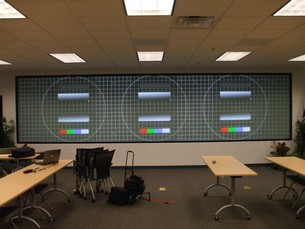
Almost all of the technology has some form of light control built in. Some has auto, or Dynamic, and as you say the JVC does not have such thing. But it's on every top end projector I know of. For instance (see attached photo) one of my blended setups uses three Christie Digital HD3 / 3 chip DLP projectors. These projectors have various forms of light control, that can be considered dynamic or auto depending on what they do. But being like what was common on the HT projectors for light control, these circuits are far more advanced.
In the picture (btw, that is my service kit - both laptop and tool bags pictured). As you can see on the 40' wide rear projected screen is three rear projected images showing three different test patterns. I had just finished the light balance and getting ready to do the blending. If you look at the pictures, in the test patterns there are three places were you could see white and even the reference of white to black. On that screen is projected three different images and they are all of the same light intensity with matching fl output. Here's the thing I want to point out. None of he three images light output is controlled by or modulated by an iris. I am however using an electronic iris control to keep what I have setup constant, but the the balancing of the three had nothing to do with an iris. In fact, these projectors have several auto iris and lens light output controls built in. But of course, it would be a disastrous case if these features were allowed to do their thing to control the light output in a Blend setup.
So here's the thing. I have three projected images and none of them are using the Iris to regulate or modulate the light output. Yet I have a balanced light output between the three projectors. I can have the iris help keep what I've already achieved. I sometime do that, but in no way do I involve an iris to get to where I'm going.
But at the same time, these three projectors have very low contrast ratios. Now if they had higher contrast ratios then I would have a problem being able to achieve what you see on the screen, with out using some form of iris control. but also going against something you said, the reason why I would not want to use the iris control on the RS56, because I know it can affect the dynamics (contrast ratio) and diminish the light output.
So for the commercial application in the picture, super C/R is not important. But for HT and being able to get great video dynamics with good whiter than whites and blacker than blacks performance, I want to leave the iris alone. I want to see if that's possible on the JVC.
Also, and if you notice from the picture. My whites in all three of those projected images are really white (not silver, clipping or blooming.. ). You have to look at the last bar at the bottom and the white at the far right of it. Now that took some work, and it was done with the optics wide open.. ). You have to look at the last bar at the bottom and the white at the far right of it. Now that took some work, and it was done with the optics wide open..
On my next visit, I'll be taking my Chroma Pattern Generator with me. It has DVI output. I will use it to make sure I'm sending the RS56 the right colorspace and signal level. It also has the perfect test pattern for for where I'm going next.
| Description: |
|
| Filesize: |
28.87 KB |
| Viewed: |
4689 Time(s) |
|
|
|
| Back to top |
|
|
stridsvognen
Guest
|
| Posted: Mon Apr 01, 2013 10:10 am Post subject: |
|
|
Interesting Mike..
I noticed that i preferred my JVC with full open iris when the lamp was around 500hours, now im almost there again with my 2nd lamp,
Just changed the iris from - 4 to -2 its around 350 hours, i just hope this lamp keeps a decent light output for more than 600 hours.
So conclusion, better a dimm lamp than a closed iris.
Mike is it possible you could make, and post some white balance measurements of the RS56 from cold to hot.. If your going to calibrate it.
I would like to see if these new models are drifting less.
If it behaves like mine you have to think about when to calibrate it.. lets say you start with other things, and goes 3-4 hours before you calibrate it, you risk that it needs to be on for 4-5 hours before it looks decent again.
i try to calibrate mine around 2 hours of heatup, then i can start the movie 1 hour after i turn the projector on, and it will be perfect somewhere during the movie.
That is one of the reasons i prefer my Marquee.
|
|
| Back to top |
|
|
kal
Forum Administrator
Joined: 06 Mar 2006
Posts: 18114
Location: Ottawa, Canada
TV/Projector: JVC DLA-NZ7
|
| Posted: Mon Apr 01, 2013 1:25 pm Post subject: |
|
|
| mp20748 wrote: | | Almost all of the technology has some form of light control built in. Some has auto, or Dynamic, and as you say the JVC does not have such thing. But it's on every top end projector I know of. |
We're probably talking about different things. If you follow digital projectors in HT forums like AVS, there's enormous talk about some projectrs having a mechanical dynamic iris that, when enabled, closes the iris down during dark scenes and opens it up during bright scenes. This gives you a high contrast ratio but doesn't always work well (sudden changes from dark to light, mixed content, etc).
So most people who look for image quality turn off the dynamic iris. JVC doesn't have one at all that can be turned on or off. The iris is 100% set by the owner. The lack of dynamic iris a design choice that JVC made that really matches my wants and needs in digital projectors. It's one of the reasons I chose JVC - it has better native blacks without 'faking' it.
Sony LCoS projectors, considered by many to be along the same image quality or level of the JVC LCoS line, do have a dynamic iris. For example, the $7K MSRP the Sony VPL-VW95ES (direct competitor to the RS56) does have it. Up to the user if they want to use it or not as it can be disabled.
I do not follow commercial digital projectors so I can't comment on what they use.
Kal
_________________
Support our site by using our affiliate links. We thank you!
My basement/HT/bar/brewery build 2.0
|
|
| Back to top |
|
|
mp20748
Joined: 12 Sep 2006
Posts: 5689
Location: Maryland
TV/Projector: 9500LC Ultra / Super 02 and 03 VIM
|
| Posted: Mon Apr 01, 2013 6:08 pm Post subject: |
|
|
| stridsvognen wrote: | Interesting Mike..
I noticed that i preferred my JVC with full open iris when the lamp was around 500hours, now im almost there again with my 2nd lamp,
Just changed the iris from - 4 to -2 its around 350 hours, i just hope this lamp keeps a decent light output for more than 600 hours.
So conclusion, better a dimm lamp than a closed iris |
There are three problem areas with Digital's that creates a problem for me owning one of them. And you mentioned the second one, with the contrast problem being the first.
So it seems like you have been made aware of the issue with the lamps. I got to experience that first hand myself. We had a customer that spent a ton of money on a multi-display CUBE 3D Immersive setup. The computer, rig for the projectors and screen assembly cost big bucks. But the customer went with less expensive three panel LCD projectors (4 of them) to save money on the projector purchase. These LCD projectors was somewhere around $11,000.00 each. Not a lot of money at all for these systems. Plus the lamps were a lot cheaper than the far more expensive DLP projectors with the very costly Zenon lamps.
It was at a great savings for the customer. But at the same time, it was a real headache trying to keep those same projectors from loosing their calibration. The lamps were constantly changing. Not only were they changing in light output, they were also becoming more difficult to get them to the right temperature.
| Quote: | Mike is it possible you could make, and post some white balance measurements of the RS56 from cold to hot.. If your going to calibrate it. I would like to see if these new models are drifting less.
|
Maybe, but I doubt that would be the case. From my understanding, to get around this problem you would need a projector that uses Zenon lamps. The Zenon lamps had the short life span but were very stable from drifting and they maintained very well in matching blending setups.
I may be able to do a scale for you, but I won't be able to stay with tracking that scale over any period of time. I would not want the owner to think something is wrong with their projector.
| Quote: | If it behaves like mine you have to think about when to calibrate it.. lets say you start with other things, and goes 3-4 hours before you calibrate it, you risk that it needs to be on for 4-5 hours before it looks decent again.
i try to calibrate mine around 2 hours of heatup, then i can start the movie 1 hour after i turn the projector on, and it will be perfect somewhere during the movie. |
Frustrating isn't it?
| Quote: |
That is one of the reasons I prefer my Marquee |
YES!!
-------------------
The lamp below is one of my set of lamps from my test bed Christie Digital Mirage DLP projector. It is a 500 watt lamp. The same projector can also run 700 watt and 1200 watt lamps as well, but you would need a matching lamp power supply for the lamps.
Zenon lamps usually have multiple fins wrapped around the lamp element. They dissipate a lot of heat.


|
|
| Back to top |
|
|
stridsvognen
Guest
|
| Posted: Mon Apr 01, 2013 6:35 pm Post subject: |
|
|
Mike, i don't think the temp drifting is the lamp, im not 100% sure, but i have a old Benq PE8720 with same " type of lamp" its stable from cold to hot.. its just loosing light output, and have long term drifting.
The feeling is that the JVC panels are changing/ drifting.. its quite extreme if you measure color gamut and gray scale, they all change a lot, from cold to hot, and hotter.
If you just make a cold measurement lets say 10 min of heatup, and then 50 min later, ill be able to see if it behaves like the RS50
CIE chart and white balance will do.
I have not had any luck getting anyone to do this, it feels a bit like people just dont like to know. Or no one in here with JVC calibrate.. 
I think that understanding the behavior is a big help making a better calibration. And in this case to know if i should save up for the latest JVC model.
Your welcome to post here..
https://www.curtpalme.com/forum_archived/viewtopic.php@t=33373.html
As you see there is a lot of interest.
|
|
| Back to top |
|
|
ecrabb
Forum Moderator

Joined: 13 Mar 2006
Posts: 15909
Location: Utah
TV/Projector: JVC RS40, Epson 5010
|
| Posted: Mon Apr 01, 2013 6:45 pm Post subject: |
|
|
| stridsvognen wrote: | | I have not had any luck getting anyone to do this, it feels a bit like people just dont like to know. Or no one in here with JVC calibrate.. |
Or, it's that we really don't care that much to take the time. I calibrate... I just don't feel the need to drag everything out and take two sets of measurements to confirm what we already suspect - especially when I could be watching movies instead.
I used to wait an HOUR for my CRT to warm up before I calibrated; the convergence, geometry, color temp, and picture settings were never optimal until the chassis was warmed up at least 20 minutes, but ideally longer. I don't understand why it's a big mystery that the JVC's would be changing between 10 minutes and 50 or 60 minutes into a warmup.
You really seem to be obsessed with this issue. It's interesting.
SC
|
|
| Back to top |
|
|
stridsvognen
Guest
|
| Posted: Mon Apr 01, 2013 8:08 pm Post subject: |
|
|
| ecrabb wrote: | | stridsvognen wrote: | | I have not had any luck getting anyone to do this, it feels a bit like people just dont like to know. Or no one in here with JVC calibrate.. |
Or, it's that we really don't care that much to take the time. I calibrate... I just don't feel the need to drag everything out and take two sets of measurements to confirm what we already suspect - especially when I could be watching movies instead.
I used to wait an HOUR for my CRT to warm up before I calibrated; the convergence, geometry, color temp, and picture settings were never optimal until the chassis was warmed up at least 20 minutes, but ideally longer. I don't understand why it's a big mystery that the JVC's would be changing between 10 minutes and 50 or 60 minutes into a warmup.
You really seem to be obsessed with this issue. It's interesting.
SC |
Well we are all different.. RS50 is drifting a lot the first hour, but its still drifting after 4-5 hours.
I dont mind if you dont care, or dont like to spend time thinking that into your calibration, but i like perfection, and when perfect is not possible i like the best possible compromise.
I think Mike notice some of the same issues that you might not notice or care about, so ill love to play ball with him.
I dont have any need to protect my investment, so ill keep my eyes open to weaknesses, and possible solutions. And share them with others.
I think My JVC is a nice Projector, just not a perfect plug and play device.. It needs at least as much care as a CRT to keep up to optimal performance. Its just other issues than CRT
And you dont need to remind me the problems with CRT.. Im aware of the problems there to.
I have my Marquee 9500LC and the RS50, i can always compare them side by side, and i just prefer the Marquee.
So ill just keep tweaking performance or a better compromise out of my JVC.. No matter how crazy others think it is.. 
|
|
| Back to top |
|
|
KellenerSptM5
Joined: 08 Mar 2009
Posts: 198
|
| Posted: Mon Apr 01, 2013 8:20 pm Post subject: |
|
|
| stridsvognen wrote: | | ecrabb wrote: | | stridsvognen wrote: | | I have not had any luck getting anyone to do this, it feels a bit like people just dont like to know. Or no one in here with JVC calibrate.. |
Or, it's that we really don't care that much to take the time. I calibrate... I just don't feel the need to drag everything out and take two sets of measurements to confirm what we already suspect - especially when I could be watching movies instead.
I used to wait an HOUR for my CRT to warm up before I calibrated; the convergence, geometry, color temp, and picture settings were never optimal until the chassis was warmed up at least 20 minutes, but ideally longer. I don't understand why it's a big mystery that the JVC's would be changing between 10 minutes and 50 or 60 minutes into a warmup.
You really seem to be obsessed with this issue. It's interesting.
SC |
Well we are all different.. RS50 is drifting a lot the first hour, but its still drifting after 4-5 hours.
I dont mind if you dont care, or dont like to spend time thinking that into your calibration, but i like perfection, and when perfect is not possible i like the best possible compromise.
I think Mike notice some of the same issues that you might not notice or care about, so ill love to play ball with him.
I dont have any need to protect my investment, so ill keep my eyes open to weaknesses, and possible solutions. And share them with others.
I think My JVC is a nice Projector, just not a perfect plug and play device.. It needs at least as much care as a CRT to keep up to optimal performance. Its just other issues than CRT
And you dont need to remind me the problems with CRT.. Im aware of the problems there to.
I have my Marquee 9500LC and the RS50, i can always compare them side by side, and i just prefer the Marquee.
So ill just keep tweaking performance or a better compromise out of my JVC.. No matter how crazy others think it is.. |
I think you have a defective lamp considering nobody else has observed what you are describing.
|
|
| Back to top |
|
|
stridsvognen
Guest
|
| Posted: Mon Apr 01, 2013 8:26 pm Post subject: |
|
|
|
Well 2 defective lamps then, how is your JVC behaving..? Could you help confirming its just my JVC whos defect.?
|
|
| Back to top |
|
|
|
|
|
|
|
You cannot post new topics in this forum
You cannot reply to topics in this forum
You cannot edit your posts in this forum
You cannot delete your posts in this forum
You cannot vote in polls in this forum
You cannot attach files in this forum
You can download files in this forum
|
Forum powered by phpBB © phpBB Group
|
|




