| Author |
Message |
barco_75
Joined: 14 Jan 2009
Posts: 171
Location: Chicago
|
| Posted: Mon Feb 11, 2013 8:35 pm Post subject: Flickering fantastic fun! |
|
|
Surely someone here can help me out! I truly hope...
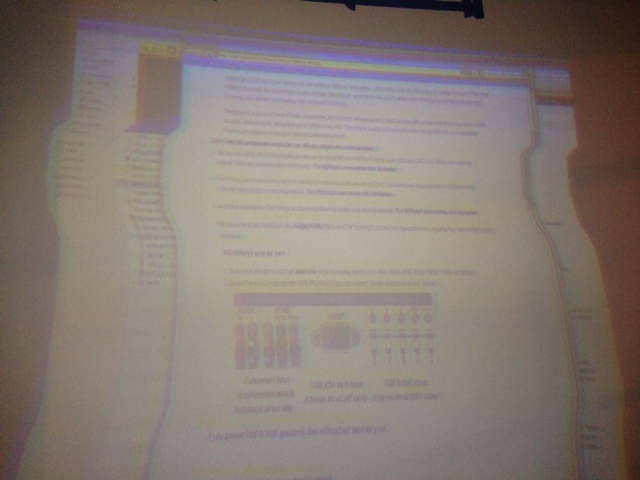
I just retired my old Barco 708 (after it burnt up) and I am in the process of installing a Barco 808 graphics. I obtained it really cheap (case of beer) and was super pumped to get this baby installed. After fabricating a custom mount and hoisting this beast to my ceiling, I find after booting it up that the blue and red crt are flickering on the test pattern. However if I change the test pattern to show the green, blue, and red individually none of the crt's flicker. The projector is being feed by an HDFury 1 through port 4/5 (5 BNC connection) from my BluRay and Mac computer via HDMI. In addition, when sending an image from the computer, I get a distortion horizontally between the center and top of the image. When sending via BluRay, I don’t get the distortion. Included is a photo. Keep in mind no alignment or convergence has been done.
The previous owner bought the projector through Curt and I understand the typical basic upgrades were previously done. The chassis has 11,000 hours but I believe the CRT’s have been changed out because they are in good but not perfect shape.
I have 3 thoughts.
1.) It's an electrical component inside (hope not). I saw in one forum that it could be G2 levels or a CRT Neck boards.
2) My electrical power to the projector are not up to spec (The Barco 708 consumed less watts)
3) One of the boards or cables are not making good contact (I hope!).
The prior owner pulled the projector apart piece by piece (removed the boards, lens, anything he could) to remove it from his ceiling. Perhaps during this process something was not reinstalled correctly. The owner at one time had the power supply upgraded as well.
Thoughts? Thanks in advance for any help!!
| Description: |
| distortion displaying computer signal |
|
| Filesize: |
79.38 KB |
| Viewed: |
10018 Time(s) |
|
|
|
| Back to top |
|
 |
Curt Palme
CRT Tech
Joined: 08 Mar 2006
Posts: 24396
Location: Langley, BC
TV/Projector: All of them!
|
| Posted: Tue Feb 12, 2013 12:08 am Post subject: |
|
|
I'll guess at a few things.
1) Don't trust that Curt guy! 
2) The flickering is probably small HV arcing. If it is, try turning the contrast down very low, and see if it goes away with all three tubes on. It should also get worse with higher contrast. If so, you can usually hear small arcing somewhere. My guess would be the HV splitter, or something internal to an HV lead.
3) H bending- are you sure you have negative sync output on both H and V signals? You need to set this in the video drivers of your computer. That's my guess anyway.
|
|
| Back to top |
|
|
Phoenixed
Joined: 13 Oct 2011
Posts: 514
Location: The mitten
|
|
| Back to top |
|
|
barco_75
Joined: 14 Jan 2009
Posts: 171
Location: Chicago
|
| Posted: Tue Feb 12, 2013 12:59 am Post subject: |
|
|
|
Thanks for the suggestions Curt and Phoenixed. I'll give a try when I get home. I read that the sync was required to be negative and I was hoping that I didn't need to change anything since everything worked on the 708 without any adapters. I beginning to remember the fun of getting these set up. I went throught a barrel of fun setting up the 708 about 4 years ago. Yee-haw!
|
|
| Back to top |
|
|
Phoenixed
Joined: 13 Oct 2011
Posts: 514
Location: The mitten
|
| Posted: Tue Feb 12, 2013 1:06 am Post subject: |
|
|
If you had a Windows based PC or even Linux I could prolly help with seting syncs up through the drivers but I cant for the life of me tell you howto do it on a mac.
_________________
Planar PD-8150/Runco LS-5
|
|
| Back to top |
|
|
Phoenixed
Joined: 13 Oct 2011
Posts: 514
Location: The mitten
|
| Posted: Tue Feb 12, 2013 1:12 am Post subject: |
|
|
Also. Make sure you disable 24 frames a second output from the bd player/media player. Its such a newbie thing no offense but it can get over looked.
_________________
Planar PD-8150/Runco LS-5
|
|
| Back to top |
|
|
mxer
Joined: 14 Aug 2012
Posts: 27
|
| Posted: Tue Feb 12, 2013 6:52 pm Post subject: |
|
|
|
You didn't turn it on before hoisting it to the ceiling??
|
|
| Back to top |
|
|
barco_75
Joined: 14 Jan 2009
Posts: 171
Location: Chicago
|
| Posted: Tue Feb 12, 2013 8:18 pm Post subject: |
|
|
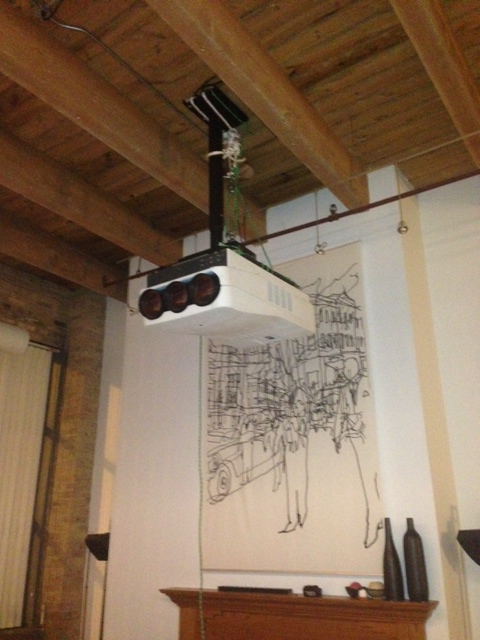
I did turn it on before hoisting but there were no lens on it. I was told by the past owner it all worked properly so when I saw the green, red, and blue crt's firing, I thought great lets get this baby mounted! Included is a photo of my mount if so interested. It turned out pretty nice.
I did try Curt's suggestions but ironicly, I found that the opposite happened. When I lowered the contrast with all guns firing it flickered more. When I raised the contrast it didn't appear to be flickering. However, the flickering is not consistent. Sometimes it flickers, sometime it doesn't. Last night, I did adjust the screen width and height so that I didn't have the image going past the phosphere (Intially, I didn't care since I only had it one for a few minutes). Sometimes, I also saw the red projected image "dance" by shifting around slightly.
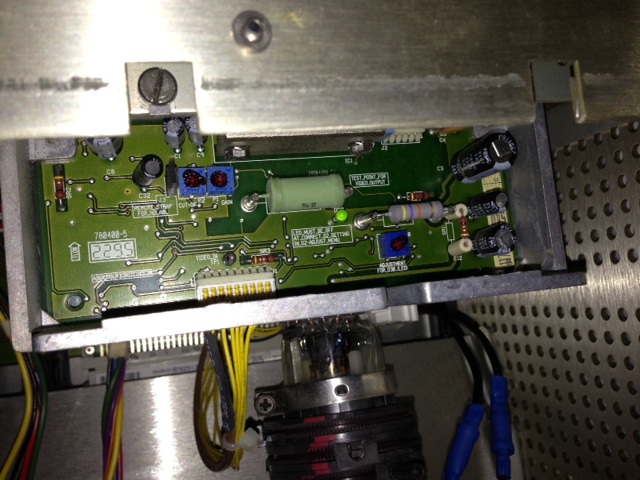
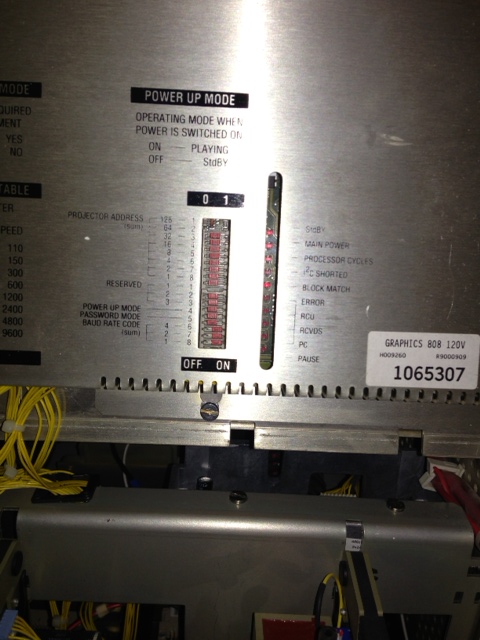
I opened up the case to look at the LED's as suggested on Curt's 808 setup guide. In the rear board compartment, I had greens lights on the boards with the exception of the led's on the access door. I had solid reds on Standby, main power, block match, and a blinking red on processor cycles. I'm assuming this is normal. However, I think I might of found the problem. In the front crt tube compartment, each tube has a output amplifier above the neck of each tube. The blue and red tubes output amplifier had the green LED on indicating that the "LED must be off at correct G2 setting. In G2- adjust menu". Is the G2 setting causing the flickering as some had suggested in other forums? If this is the problem, how do I adjust the G2? Also, I would note that some of the wires around the guns are not well secured because the plastic cable holders are broke. I don't know if this could cause a arc issue, but I thought I would bring it up just in case.
In regards the the sync issue, I think I might have the problem solved. I got a Extron RGB 109xi which I thought was not going to be used in my setup since I was using the HDfury. According to the manual it appears that you can switch the sync of the cable using the Extron. The only place that I can put the Extron without buying more cables is between the HDfury and the projector and then output the 5 bnc cables to port 4/5. I remember the HDfury is recommend to be connected direct to the projector. Will this setup work or is it not recommended. Currently, I have the bluray and Mac output HDMI to a Monoprice HDMI switcher box which outputs HDMI signal to the HDfury hooked up to Port 4/5. Can both the BluRay and Mac be hooked up to the Extron via the HDMI switcher box without causing sync issues? Thoughts?
Thanks for the newbie suggestions because I still consider myself this. I know the basics but I still haven't learned all the tricks.
Cheers! and thanks for the help.
| Description: |
| output amplifier - G2 green light |
|
| Filesize: |
134.99 KB |
| Viewed: |
9875 Time(s) |
|
| Description: |
|
| Filesize: |
122.7 KB |
| Viewed: |
9875 Time(s) |
|
| Description: |
|
| Filesize: |
125.96 KB |
| Viewed: |
9875 Time(s) |
|
|
|
| Back to top |
|
|
barco_75
Joined: 14 Jan 2009
Posts: 171
Location: Chicago
|
| Posted: Wed Feb 13, 2013 4:57 am Post subject: |
|
|
|
One more thing, in making some minor adjustments I get the error code 12C error: addr.: F4H. I have the service manuals for the projector so if you have any suggestions, I can read up in the manuals.
|
|
| Back to top |
|
|
barco_75
Joined: 14 Jan 2009
Posts: 171
Location: Chicago
|
| Posted: Wed Feb 13, 2013 2:29 pm Post subject: |
|
|
The F4H code in the manual states it's for Vertical Amplitude, Vertical Linearity, Horizontal Phase, Top Blanking. See attached manual. In adjusting the G2, I note that many people ignore the green lights because they often quit working. Should I do the same? In the manual it notes adjusting the +900 volts system prior to g2 adjustment, but frankly, that scares me a little because I'm not a tech, just a normal dude which somewhat knows how to use a voltmeter (which doesn't appear to be the right equipment for adjusting the +900V)...oh and I don't want to kill myself doing something I don't know what the hell I'm doing!
Also, I note that I hear a slight humming sound which increases as I turn the contrast up. Is that normal? Anyhow, any help is appreciated!
| Description: |
| Service A I2C codes manual |
|

Download |
| Filename: |
SERVICE A FAILURE.pdf |
| Filesize: |
994.59 KB |
| Downloaded: |
412 Time(s) |
|
|
| Back to top |
|
|
Ile

Joined: 09 Mar 2006
Posts: 1491
Location: Jyväskylä, Finland
|
| Posted: Wed Feb 13, 2013 2:41 pm Post subject: |
|
|
Ignore G2 leds for now.
Your old 708 was less sensitive to sync issues, so can you test with video only (composite) or s-video source to see if this is sync issue or something else?
|
|
| Back to top |
|
|
barco_75
Joined: 14 Jan 2009
Posts: 171
Location: Chicago
|
| Posted: Wed Feb 13, 2013 3:22 pm Post subject: |
|
|
|
I inserted an old VHS copy of the Blues Brothers on svideo and the picture seemed ok. However nothing is aligned converged or anything so it's kind of hard to evaluate the picture. I didn't get the sync issue that I was having with computer which it's having issues syncing with (cant get it to lock on the computer feed consistently). I thought Jake and Elwood could help me out but sadly all the want to do us smash it.
|
|
| Back to top |
|
|
AnalogRocks
Forum Moderator

Joined: 08 Mar 2006
Posts: 26706
Location: Toronto, Ontario, Canada
TV/Projector: Sony 1252Q, AMPRO 4000G
|
| Posted: Wed Feb 13, 2013 3:42 pm Post subject: |
|
|
| barco_75 wrote: | | I inserted an old VHS copy of the Blues Brothers on svideo and the picture seemed ok. However nothing is aligned converged or anything so it's kind of hard to evaluate the picture. I didn't get the sync issue that I was having with computer which it's having issues syncing with (cant get it to lock on the computer feed consistently). I thought Jake and Elwood could help me out but sadly all the want to do us smash it. |
Maybe your projector need cop shocks and regular gas 
_________________
Tech support for nothing
CRT.
HD done right!
|
|
| Back to top |
|
|
barco_75
Joined: 14 Jan 2009
Posts: 171
Location: Chicago
|
| Posted: Wed Feb 13, 2013 4:01 pm Post subject: |
|
|
|
I'm sure gasoline and a match would fix it. I could throw in the cop shocks for good measure.
|
|
| Back to top |
|
|
Curt Palme
CRT Tech
Joined: 08 Mar 2006
Posts: 24396
Location: Langley, BC
TV/Projector: All of them!
|
| Posted: Wed Feb 13, 2013 4:16 pm Post subject: |
|
|
WEll, unless you have an issue on the RGB card, to me the problem with the computer signal has to do with the source, not the projector.
'dancing' picture- disconnect the red HV leads from the splitter that go to the tubes one at a time. Wait 10 minutes after unplugging the set to take the red HV leads out, then touch the tip of the lead to the chassis to discharge the tubes (chances are you won't get a spark). Make sure you don't take out the red lead going to the HV quadrupler, or you'll see big sparks when you power back up.
See if disconnecting one of the tubes gets rid of the dancing, which would indicate arcing within one of the leads, the one that you disconnected. Otherwise, the HV splitter can also cause the jumping.
|
|
| Back to top |
|
|
barco_75
Joined: 14 Jan 2009
Posts: 171
Location: Chicago
|
| Posted: Wed Feb 13, 2013 4:54 pm Post subject: |
|
|
I agree the sync issue on the computer is the source. Both the Bluray and VHS work with no issues. So does the 10 minute wait allow all voltage in the set to be discharged? I've always wondered when it is safe to probe inside the projector due to the possiblity of high voltage being stored in a capaciter. Is 10 minutes a rule of thumb and it's then safe?
I don't have the projector in front of me, but if I understand you Curt, there are 4 wires going to the HV spliter. 1 each for each Red, Green, and Blue tube, and 1 to the HV quadrepler. You want me to disconned each red lead going to the red, green, and blue tube
and ground each to the chassis (and NOT grounding the contact inside the HV splitter where each lead was hooked up). Then power it up with one lead (going to the red, blue, or green tube) one at a time to observe if the "dancing" moves to a different tube. Is this correct?
|
|
| Back to top |
|
|
barco_75
Joined: 14 Jan 2009
Posts: 171
Location: Chicago
|
| Posted: Wed Feb 13, 2013 5:06 pm Post subject: |
|
|
|
To clarify the second to last sentence..."then power it up with one lead REMOVED......
|
|
| Back to top |
|
|
barco_75
Joined: 14 Jan 2009
Posts: 171
Location: Chicago
|
| Posted: Thu Feb 14, 2013 5:21 am Post subject: |
|
|
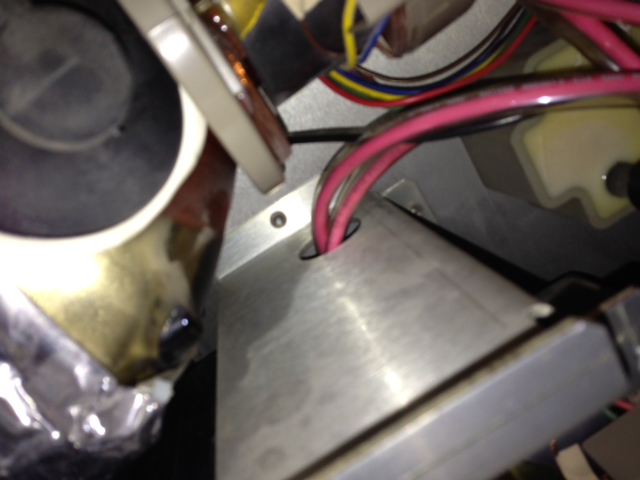
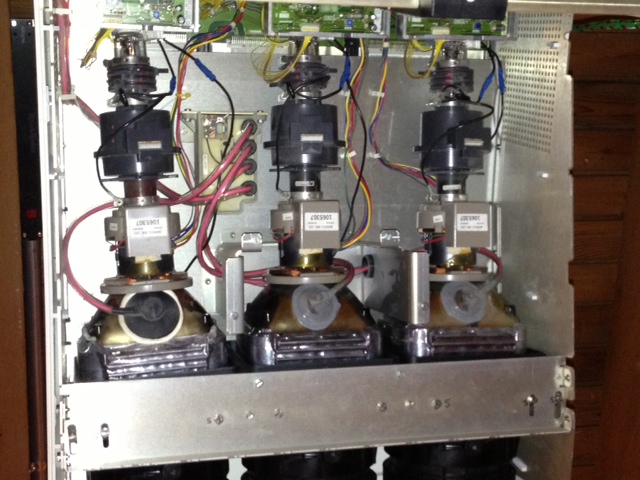
Looks like Curt was right! I disconnected the HV lead from the HV splitter which went to the red tube and presto.. no dancing...no flickering. Ironically, I also pulled the cover on the front of the tubes and I see that one tube is not like the others. Mr. Red has a different rubber boot. Is the arc issue in the lead or the boot? Should I remove and replace per Curt's instructions here:
http://www.curtpalme.com/HV_Lead_Removal.shtm
I also noted the lead pass through the aluminum housing and are missing a plastic safety grommet. Is this important?
| Description: |
|
| Filesize: |
81.93 KB |
| Viewed: |
9711 Time(s) |
|
| Description: |
|
| Filesize: |
136.95 KB |
| Viewed: |
9711 Time(s) |
|
|
|
| Back to top |
|
|
Curt Palme
CRT Tech
Joined: 08 Mar 2006
Posts: 24396
Location: Langley, BC
TV/Projector: All of them!
|
| Posted: Thu Feb 14, 2013 6:23 am Post subject: |
|
|
Actually it looks like the red tube has had the HV lead replaced. The gray ones are BArco original stock, the black one is one made by Hobson, that was then bought out by VDC.
Check this out perhaps: I've done this a number of times: There are two clips that lock the rubber boot and HV lead into the hole in the tube where the anode connection is. If the HV clips of the lead spring out as you're putting the silicone on, the HV will arc ever so slightly and the pix will jump around. See these pix:
http://curtpalme.com/HV_Lead_Removal.shtm
If you put pressure on the centre part of the rubber boot, you can squeeze the HV clips together, push them down into the hole, and then let them expand. I usually cut the silicone off, in fact the last time I did it (2 weeks ago), the silicone was still a bit damp, and the lead came off easily. IN your case, the lead will be a few years old, so you can cut off the silicone as per the link, but if the clips have come out of the hole in the tube, squeezing them and reinserting them should be able to be done without cutting the silicone.
if not, I've also had the HV leads pull away from the metal clips in the middle of the rubber boot, and I think once I've had an HV lead develop an arc within the wire itself that could only be replaced by changing the whole lead out. IF the wire has pulled away from the metal clip in the boot, you should be able to cut the boot off, and solder the HV lead onto the clip.
|
|
| Back to top |
|
|
barco_75
Joined: 14 Jan 2009
Posts: 171
Location: Chicago
|
| Posted: Sun Feb 17, 2013 1:28 am Post subject: |
|
|
Well turns out I don't think it was the HV lead from the HV splitter to the CRT red tube. I tried getting the clip on the boot and after disconnecting the red it turned out that I still had the flickering problem. I contact the past owner regarding how he disassembled it and he said it was working when he took it down so I expected the issue might be a loose cable or connection. I found the red wire which goes to the G2 was not connected only the rubber boot was connected. I assume this was causing the flickering and dancing. After running the VHS playback, I don't seem to have any more dancing or flickering (the VHS is a horrible source but I have to use that until I can get my sync issues worked out...so hopefully I can tell). After fixing the lead I was able to adjust the G2's which did not cooperate prior.
So with that fixed, now lets move on to my IC2 errors.
I pulled all the cards out and checked their connections. I found a burnt connection on the SM Power supply. Not sure if this is an issue. I pulled out the Focus and Horizontal shift board and I saw one of the pins got bent and was actually using the adjacent socket. Holy Cow, not sure how the hell that got bent over like that!! That explains the IC2 errors. After fixing the pin, I still get a FOH IC2 error and I can't electronically shift the horizontal raster. Do you think the Focus and Horizontal shift board is toast? Part # is R762503. What about the SM Power Supply R7621705?
I haven't tried to manual override the raster shift but I can try that:
http://www.curtpalme.com/Barco808_Layout2.shtm
Here are some other forums I found on this focus and horizontal shift boards which I try out when I get a chance.
http://www.avsforum.com/t/191521/i2c-error-address-f0h-barco-808
http://www.avsforum.com/t/452619/rasters-wont-budge
|
|
| Back to top |
|
|
|
|




