| Author |
Message |
kschmit2
Joined: 09 Mar 2006
Posts: 1141
Location: Heidelberg, Germany
|
| Posted: Thu Dec 28, 2006 7:17 pm Post subject: 1080i96 screenshots using Moome ISS-HD -Updated January 2009 |
|
|
Eventually managed to take a couple of somewhat decent screenshots (my camera truly "sux" under low light conditions).
Projector: NEC 6PG Plus
Resolution: 1920x1080i 95.904 Hz
Source: HTPC with Geforce 6800, using DVI out into NEC ISS-6020 with Moome ISS-HD w/gamma addon
Something noteworthy:
I used to run VGA out into the ISS-6020, and both my previous Radeon 9600 and the current Nvidia Geforce 6800 exhibited serious ghosting (standalone or through the switcher - there was zero difference)..
ALL of the ghosting is now TOTALLY GONE using DVI out into the Moome ISS-HD input card inside the ISS-6020 switcher. Output of the switcher is of course still RGBHV. 

bottom left: (before you ask, that's a cable hanging from the ceiling  ) )

bottom right:

top left:

top right:

Kai
screenshot UPDATES:
29 SEPT 2007
http://www.curtpalme.com/forum/viewtopic.php?p=76688#76688
and
19 January 2009
http://www.curtpalme.com/forum/viewtopic.php?p=167482#167482
plus current 1920x1080i96 timings here:
http://www.curtpalme.com/forum/viewtopic.php?p=167236#167236
Last edited by kschmit2 on Mon Jan 19, 2009 9:39 am; edited 3 times in total
|
|
| Back to top |
|
 |
bfeils

Joined: 23 Apr 2006
Posts: 166
Location: Phoenix
|
| Posted: Thu Dec 28, 2006 8:18 pm Post subject: |
|
|
|
nice shots, where did you get those files?
|
|
| Back to top |
|
|
jask

Joined: 17 Mar 2006
Posts: 10187
Location: kamloops BC
|
| Posted: Fri Dec 29, 2006 5:06 am Post subject: |
|
|
|
WOW!! that is impressive... somehow I think it will be a lot easier for us nec guys to get the Moome card than the 6020
|
|
| Back to top |
|
|
Person99
Joined: 09 Mar 2006
Posts: 4899
Location: Flower Mound, TX
|
| Posted: Fri Dec 29, 2006 5:56 am Post subject: |
|
|
Nice. Perfect example of why you don't need 1080p and they 8" machine is still the greatest bargain in HT.
Dave
_________________
Dave
A train station is where the train stops. A bus station is where the bus stops. On my desk, I have a work station....
|
|
| Back to top |
|
|
Mark_A_W
Joined: 15 Mar 2006
Posts: 3068
Location: Sunny Melbourne Australia
|
| Posted: Fri Dec 29, 2006 7:26 am Post subject: |
|
|
Gunna get me a DVI to HDMI cable tomorrow, give mine a whirl.
I might not see a difference, as modding my Radeon 9500 really cleaned it up, but we'll see,
Kai, how about a 1:1 lines close up shot (the money shot)?
|
|
| Back to top |
|
|
kschmit2
Joined: 09 Mar 2006
Posts: 1141
Location: Heidelberg, Germany
|
| Posted: Fri Dec 29, 2006 7:50 am Post subject: |
|
|
| bfeils wrote: | | nice shots, where did you get those files? |
I created it when Mike Parker asked for a detailed standardized test image.
It is meant to be used as a reference image when you do screenshots.
Everyone can get the source image, and compare that to the screenshot, and to what they get at home when projecting it.
The losslessly compressed version is available here:
http://rapidshare.com/files/137785542/AVSFORUMtestpic01.png
Kai
Last edited by kschmit2 on Fri Jan 23, 2009 12:30 pm; edited 2 times in total
|
|
| Back to top |
|
|
mp20748
Joined: 12 Sep 2006
Posts: 5689
Location: Maryland
TV/Projector: 9500LC Ultra / Super 02 and 03 VIM
|
| Posted: Fri Dec 29, 2006 8:18 am Post subject: |
|
|
Your new setup is doing VERY well with that pattern.
I still have my 1080p (HD-8 lenses) version here:

|
|
| Back to top |
|
|
kschmit2
Joined: 09 Mar 2006
Posts: 1141
Location: Heidelberg, Germany
|
| Posted: Fri Dec 29, 2006 8:39 am Post subject: |
|
|
|
yeah, I did check your pic yesterday. It is simply amazing
|
|
| Back to top |
|
|
mp20748
Joined: 12 Sep 2006
Posts: 5689
Location: Maryland
TV/Projector: 9500LC Ultra / Super 02 and 03 VIM
|
| Posted: Fri Dec 29, 2006 8:43 am Post subject: |
|
|
| kschmit2 wrote: | | yeah, I did check your pic yesterday. It is simply amazing |
Hey, you also have a great thing going there as well. That pattern is truly a very good reference image. But what i really like about it is its ability to reveal gamma performance. In that aspect, I'm truly impressed with what i'm NOW seeing with a Moome card.. 
|
|
| Back to top |
|
|
Mark_A_W
Joined: 15 Mar 2006
Posts: 3068
Location: Sunny Melbourne Australia
|
| Posted: Sun Dec 31, 2006 12:16 am Post subject: |
|
|
Kai
Can you tell me a bit more about your setup?
I tried my card yesterday, and I had the same problem as I had with a Moome DVI XG card (which works fine with a HD-A1 at 60i).
Progressive resolutions work mostly fine, had some minor issues with some timings, but mostly fine. 1080p 48 works great (bit flickery on a monitor, but it works).
All interlaced res's "stack" the interlaced lines on top of each other (looks like 540p video with big gaps), and all WINDOWS fonts are screwed up. Other text works fine.
I seem to have a video driver/video card problem over DVI. I'm running a Radeon 9500, but I also remember having the same problem with a 6600gt.
Kai, what is your 1080i 96 setup exactly?
|
|
| Back to top |
|
|
kschmit2
Joined: 09 Mar 2006
Posts: 1141
Location: Heidelberg, Germany
|
| Posted: Sun Dec 31, 2006 9:03 am Post subject: |
|
|
video card is a Geforce 6800 AGP
driver version: 93.71
Windows XP MCE (should be identical to XP Pro wrt video)
Asus A8V mainboard
AMD Athlon X2 3800+ running at 2.65 GHz
I never had ANY success with custom timings in the Nvidia display driver, so I always stuck with Powerstrip.
In Powerstrip I was now able to use the exact same timings I used for VGA out for DVI out into the Moome ISS-HD.
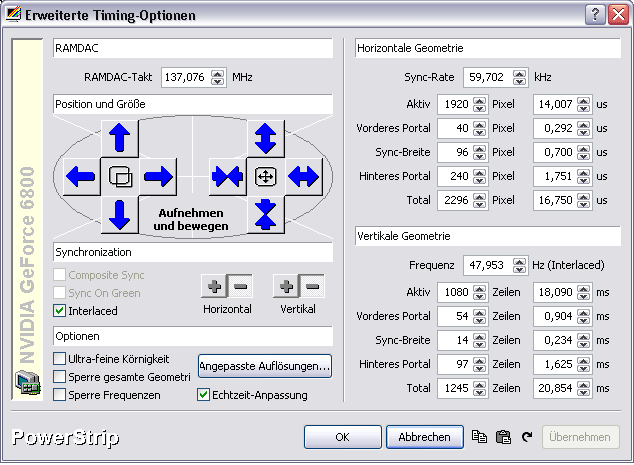
I did proceed as follows:
in powerstrip, go to advanced timings, custom resolutions, add settings for your custom resolution on the right.
in my case:
1920 1080
60 48
40 54
96 14
240 97
negative negative
interlaced
any
then click add resolution
The new resolution should now be added under custom resolutions on the left.
Select it there and apply.
you should now be back to the custom timings panel.
Apply the final tweaks there.
in my case the settings are as follows:
###############################
NOTE: Updated timings available on the next page
###############################
| Description: |
| powerstrip timings for 1080i96 |
|
| Filesize: |
24.21 KB |
| Viewed: |
19336 Time(s) |
|
Last edited by kschmit2 on Sun Jan 18, 2009 7:38 pm; edited 1 time in total
|
|
| Back to top |
|
|
kschmit2
Joined: 09 Mar 2006
Posts: 1141
Location: Heidelberg, Germany
|
| Posted: Sun Dec 31, 2006 9:04 am Post subject: |
|
|
|
btw, this should work just as fine for ATI cards (I used to own a Radeon 9600)
|
|
| Back to top |
|
|
Mark_A_W
Joined: 15 Mar 2006
Posts: 3068
Location: Sunny Melbourne Australia
|
| Posted: Sun Dec 31, 2006 11:26 am Post subject: |
|
|
My setup is much the same, but the timings which work fine for VGA give me 540p for interlaced res's, and corrupt windows fonts.
I'll try newer drivers.
BTW, you have big porches, what happens if you reduce them?
Happy New Year!
|
|
| Back to top |
|
|
kschmit2
Joined: 09 Mar 2006
Posts: 1141
Location: Heidelberg, Germany
|
| Posted: Sun Dec 31, 2006 2:12 pm Post subject: |
|
|
Actually I'm happy I found these timings that allow me to perfectly fit the image in my screen with zero overscan.
any lower porches didn't allow me to do that, so I'll leave it at that
|
|
| Back to top |
|
|
Mark_A_W
Joined: 15 Mar 2006
Posts: 3068
Location: Sunny Melbourne Australia
|
| Posted: Mon Jan 01, 2007 2:08 am Post subject: |
|
|
I've played around a bit more.
It seems I have 2 problems.
1. Interlaced res's don't work properly - it's more like 540p. This may be a Radeon bug, I'm doing some searching.
2. Any res higher than 1080p 50 (141mhz) causes fine detail to get omitted - stuffing up text for instance. I can slowly see it falling apart as I increase the refresh rate hz by hz from 50 to 60hz. I'm using a fairly cheap DVI to HDMI cable, but it's only 1.5m long, I think it should be ok.
I'm going to try a different dirvers and then a different PC.
|
|
| Back to top |
|
|
kschmit2
Joined: 09 Mar 2006
Posts: 1141
Location: Heidelberg, Germany
|
| Posted: Mon Jan 01, 2007 1:52 pm Post subject: |
|
|
|
picture is way sharper here using DVI than previously with VGA. I really did not expect that. I think it is mostly due to the total elimination of ghosting.
|
|
| Back to top |
|
|
Mark_A_W
Joined: 15 Mar 2006
Posts: 3068
Location: Sunny Melbourne Australia
|
| Posted: Sat Jan 06, 2007 11:22 am Post subject: |
|
|
Got it working at 1080i 72/96hz Kai.
Tried Pasey's spare 6600GT and it just worked.
Also tried his cable and 1080p 60hz works - my cable is bad, it's going back.
|
|
| Back to top |
|
|
kschmit2
Joined: 09 Mar 2006
Posts: 1141
Location: Heidelberg, Germany
|
| Posted: Sat Jan 06, 2007 9:59 pm Post subject: |
|
|
cool.
Nvidia is just so much more capable than ATI nowadays
|
|
| Back to top |
|
|
Mark_A_W
Joined: 15 Mar 2006
Posts: 3068
Location: Sunny Melbourne Australia
|
| Posted: Mon Jan 08, 2007 11:56 am Post subject: |
|
|
A small correction.
With the Nvidia 6600GT I can run 1080i 72/75hz, but not 96hz. It falls apart at about 90hz. I can't get 1080p 50hz to work at all with either of my leads.
The Radeon did up to 1080p 56hz with the same lead.
I really need a lead that's not made out of cheese..DVI/HDMI at high res is really painful - and I only have a 1m run. RGBHV is far more suitable for long runs - and 1080p 72hz is a pipedream for DVI.
|
|
| Back to top |
|
|
kschmit2
Joined: 09 Mar 2006
Posts: 1141
Location: Heidelberg, Germany
|
|
| Back to top |
|
|
|
|




