| Author |
Message |
jbmeyer13

Joined: 03 Dec 2010
Posts: 1135
|
| Posted: Thu Dec 20, 2012 12:14 am Post subject: Strange line during dark scenes on Marquee 9500LC |
|
|
The following photos show a strange line that only shows up during dark scenes; a little less than a quarter of the way from the right border. This first appeared after Craig did a greyscale calibration and it appears on all memory channels (800p/72, 1080p60, 1080p48, etc.) and sources (BD, HD Cable). Oddly enough I can only find it on the blue/red channels but not green.
I tried the following to no avail:
1) adjusting the phase to see if it could be something with the deflection module but the line doesn't move.
2) swapped neck cards and the leads to the VIM.
3) entered the secret menu and lowered the internal pattern generator level.
any thoughts on what this is being created by; ground loop, CLM, VIM??


_________________
Projector: Modded 9501LC ULtra- MP VIM, Vold VNB, ETECH LVPS, Silver VIM Cables, HD10F's & a V1 case!
|
|
| Back to top |
|
 |
stridsvognen
Guest
|
|
| Back to top |
|
|
mr_ro_co

Joined: 08 May 2006
Posts: 1643
Location: Santa Fe NM
|
| Posted: Thu Dec 20, 2012 12:23 am Post subject: Re: Strange line during dark scenes on Marquee 9500LC |
|
|
| jbmeyer13 wrote: | The following photos show a strange line that only shows up during dark scenes; a little less than a quarter of the way from the right border. This first appeared after Craig did a greyscale calibration and it appears on all memory channels (800p/72, 1080p60, 1080p48, etc.) and sources (BD, HD Cable). Oddly enough I can only find it on the blue/red channels but not green.
I tried the following to no avail:
1) adjusting the phase to see if it could be something with the deflection module but the line doesn't move.
2) swapped neck cards and the leads to the VIM.
3) entered the secret menu and lowered the internal pattern generator level.
any thoughts on what this is being created by; ground loop, CLM, VIM?? |
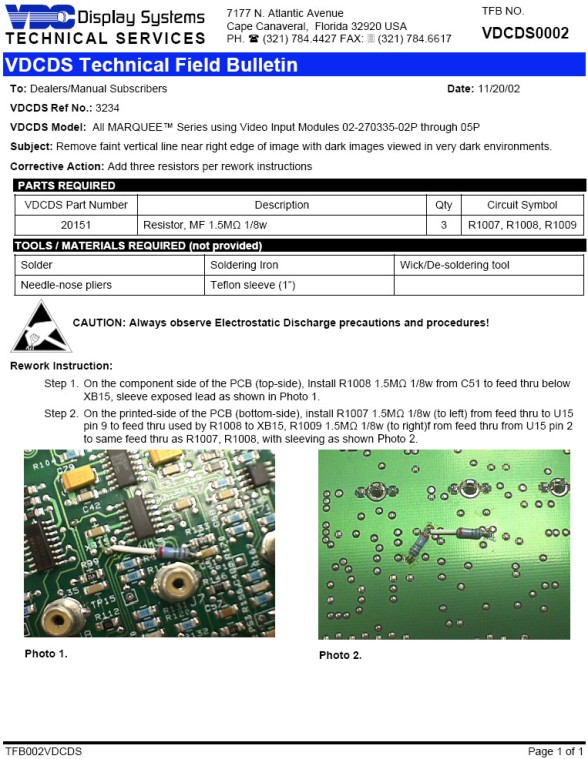
It may be this. I have the same issue but have yet to apply this fix. I'm sure the other Marquee experts will chime in.
Steve
| Description: |
|
| Filesize: |
136.19 KB |
| Viewed: |
13526 Time(s) |
|
_________________
Not only is there no god, try finding a plumber on Sunday!
|
|
| Back to top |
|
|
jbmeyer13
Joined: 03 Dec 2010
Posts: 1135
|
| Posted: Thu Dec 20, 2012 12:27 am Post subject: |
|
|
| stridsvognen wrote: | https://www.curtpalme.com/forum_archived/viewtopic.php@t=29890.html
Its a Marquee thing..  |
I have seen that thread but do not think that is the problem. In the secret menu I turned the pattern generator down to zero and it made no difference in any way.
_________________
Projector: Modded 9501LC ULtra- MP VIM, Vold VNB, ETECH LVPS, Silver VIM Cables, HD10F's & a V1 case!
|
|
| Back to top |
|
|
stridsvognen
Guest
|
| Posted: Thu Dec 20, 2012 12:28 am Post subject: |
|
|
I can only say don't do that mod.. And for sure you need a new calibration if you do it.. I don't think there ever was a perfect solution to it.. But a option was to use a different value resistor then the one recommended by VDC.
But you still will mess up your calibration.
|
|
| Back to top |
|
|
stridsvognen
Guest
|
| Posted: Thu Dec 20, 2012 12:39 am Post subject: |
|
|
| jbmeyer13 wrote: | | stridsvognen wrote: | https://www.curtpalme.com/forum_archived/viewtopic.php@t=29890.html
Its a Marquee thing.. |
I have seen that thread but do not think that is the problem. In the secret menu I turned the pattern generator down to zero and it made no difference in any way. |
1st not just going away just like that.. Then i'm sure we all just would turn that down to 0..
It looks like the same, and its only visible after a god calibration where you get the black level nailed.
put your brightness up a bit and it will go away.. i'm not sure if its the same problem on the later vim boards, but what nr is yours.?
Only thing that makes me doubt a bit is that you don't see it on green
Last edited by stridsvognen on Thu Dec 20, 2012 12:43 am; edited 1 time in total
|
|
| Back to top |
|
|
Nashou66

Joined: 12 Jan 2007
Posts: 16171
Location: West Seneca NY
|
| Posted: Thu Dec 20, 2012 12:43 am Post subject: |
|
|
| stridsvognen wrote: | I can only say don't do that mod.. And for sure you need a new calibration if you do it.. I don't think there ever was a perfect solution to it.. But a option was to use a different value resistor then the one recommended by VDC.
But you still will mess up your calibration. |
He had Craig do a calibration on it when it appeared from what I was told. So changing anything will ruin an expensive pro calibration. I just can't see a calibration introducing this line. I have been trying to trouble shoot this with justin via phone calls and am the one who found the internal video adjustment for him to try.
Now that I see the pics it is definitly some type of noise from a board similar to the noise I had from the Astig boards.
Justin , Look around the house for any audio cables or USB cables that have a ferrite clam on them.
like this

Some power cables have them from wall warts. take it off the power cord or usb cord and clamp it over the astir
wires near the amp on the blu channel.
see if that helps.
Athanasios
_________________
Don't blame your underwear for your crooked ass~ unknown Greek philosopher
"Republicans believe every day is the Fourth of July, but the Democrats believe every day is April 15." --- President Reagan
One Smart Dog!!!
Marquee High Performance Bellows now shipping!!
Marquee Modifications and Performance Enhancement
Marquee C-element and Bellow removal
|
|
| Back to top |
|
|
mr_ro_co
Joined: 08 May 2006
Posts: 1643
Location: Santa Fe NM
|
| Posted: Thu Dec 20, 2012 12:43 am Post subject: |
|
|
| stridsvognen wrote: | I can only say don't do that mod.. And for sure you need a new calibration if you do it.. I don't think there ever was a perfect solution to it.. But a option was to use a different value resistor then the one recommended by VDC.
But you still will mess up your calibration. |
I've delved into the thread you provided and had no idea that this "fix" had such downside. Good stuff, been out of touch with this hobby for too long.
Steve
_________________
Not only is there no god, try finding a plumber on Sunday!
|
|
| Back to top |
|
|
Nashou66
Joined: 12 Jan 2007
Posts: 16171
Location: West Seneca NY
|
| Posted: Thu Dec 20, 2012 12:50 am Post subject: |
|
|
Here is the lines I had but these were from the CMM board which Justin does not have. But if you look close you can see squiggly lines here going across the image and they are vertical. This was from the Astig board but I was told by Scott that they can make other weird things as well.

So try those ferrite clamps first.
Maybe even on the Video cables right off the VIM.
you never know.
Athanasios
_________________
Don't blame your underwear for your crooked ass~ unknown Greek philosopher
"Republicans believe every day is the Fourth of July, but the Democrats believe every day is April 15." --- President Reagan
One Smart Dog!!!
Marquee High Performance Bellows now shipping!!
Marquee Modifications and Performance Enhancement
Marquee C-element and Bellow removal
|
|
| Back to top |
|
|
stridsvognen
Guest
|
| Posted: Thu Dec 20, 2012 12:51 am Post subject: |
|
|
| mr_ro_co wrote: | | stridsvognen wrote: | I can only say don't do that mod.. And for sure you need a new calibration if you do it.. I don't think there ever was a perfect solution to it.. But a option was to use a different value resistor then the one recommended by VDC.
But you still will mess up your calibration. |
I've delved into the thread you provided and had no idea that this "fix" had such downside. Good stuff, been out of touch with this hobby for too long.
Steve |
yeah its not a win win situation.. And for sure a bad idea to do that mod right after a pro calibration..
|
|
| Back to top |
|
|
Nashou66
Joined: 12 Jan 2007
Posts: 16171
Location: West Seneca NY
|
|
| Back to top |
|
|
stridsvognen
Guest
|
| Posted: Thu Dec 20, 2012 1:00 am Post subject: |
|
|
| Nashou66 wrote: | The thing is , not all Marquees do this. He also stated that he used ferrite beads on the connector lines of the VIM to eliminate them.
So hence my idea of the ferrite beads on the Video cables and the astig cables where i have seen lots of noise.
Just look at this video and what those clamps can do.
https://www.youtube.com/watch?v=P7Eu4RHnle8
Athanasios |
My ears and eyes are wide open.. Lets hope its that simple..
|
|
| Back to top |
|
|
Nashou66
Joined: 12 Jan 2007
Posts: 16171
Location: West Seneca NY
|
|
| Back to top |
|
|
jbmeyer13
Joined: 03 Dec 2010
Posts: 1135
|
| Posted: Thu Dec 20, 2012 1:12 am Post subject: |
|
|
The other problem with the faint line thread is that it went off on a tangent; remote, capacitors, etc.. It sounded like Mike Parker eliminated this issue by creating a switch that shut off the internal generator but then he started trying to use the remote to control this and there was no clear answer as to the end result.
Nash- I'm looking for the clamps..
_________________
Projector: Modded 9501LC ULtra- MP VIM, Vold VNB, ETECH LVPS, Silver VIM Cables, HD10F's & a V1 case!
|
|
| Back to top |
|
|
jbmeyer13
Joined: 03 Dec 2010
Posts: 1135
|
| Posted: Thu Dec 20, 2012 1:20 am Post subject: |
|
|
| Nashou66 wrote: | Justin, is it there which the internal video pattern set to black? And when in black raise the brightness so you come out of black and into the amount go grey you see the lines and see if they are present on the internal black pattern. Even the stair step pattern might show it.
Athanasios |
It shows up on the solid Lumagen 0 IRE pattern
_________________
Projector: Modded 9501LC ULtra- MP VIM, Vold VNB, ETECH LVPS, Silver VIM Cables, HD10F's & a V1 case!
|
|
| Back to top |
|
|
Nashou66
Joined: 12 Jan 2007
Posts: 16171
Location: West Seneca NY
|
|
| Back to top |
|
|
stridsvognen
Guest
|
| Posted: Thu Dec 20, 2012 1:20 am Post subject: |
|
|
| jbmeyer13 wrote: | The other problem with the faint line thread is that it went off on a tangent; remote, capacitors, etc.. It sounded like Mike Parker eliminated this issue by creating a switch that shut off the internal generator but then he started trying to use the remote to control this and there was no clear answer as to the end result.
Nash- I'm looking for the clamps.. |
If i remember right it was never solved, and never possible to remove the signal generator without making other issues..
|
|
| Back to top |
|
|
Nashou66
Joined: 12 Jan 2007
Posts: 16171
Location: West Seneca NY
|
| Posted: Thu Dec 20, 2012 1:27 am Post subject: |
|
|
I had an issue with the internal patterns still being visible if say one color was on, like green, but i could still faintly see red and blue. the Super secret password menu fixed that. Default value was 70 i lowered it to 50. Problem solved. I wish it was going to fix this but it didn't. 
I was thinking of why some Marquees do it and others don't? Does this follow Vim's or is it more the CLM issue? id the latter then I wonder if a chip change for the pixel generator might be the answer? or the DC restore op amp the tlo71 on the VIM?
Athanasios
_________________
Don't blame your underwear for your crooked ass~ unknown Greek philosopher
"Republicans believe every day is the Fourth of July, but the Democrats believe every day is April 15." --- President Reagan
One Smart Dog!!!
Marquee High Performance Bellows now shipping!!
Marquee Modifications and Performance Enhancement
Marquee C-element and Bellow removal
|
|
| Back to top |
|
|
stridsvognen
Guest
|
| Posted: Thu Dec 20, 2012 1:30 am Post subject: |
|
|
| Nashou66 wrote: | I had an issue with the internal patterns still being visible if say one color was on, like green, but i could still faintly see red and blue. the Super secret password menu fixed that. Default value was 70 i lowered it to 50. Problem solved. I wish it was going to fix this but it didn't.
I was thinking of why some Marquees do it and others don't? Does this follow Vim's or is it more the CLM issue? id the latter then I wonder if a chip change for the pixel generator might be the answer? or the DC restore op amp the tlo71 on the VIM?
Athanasios |
Well maybe you just didn't try out the super super secret password yet..
Having a Marquee is more and more like a old scottish castle with secret doors and all kinds of traps.. lol
|
|
| Back to top |
|
|
Nashou66
Joined: 12 Jan 2007
Posts: 16171
Location: West Seneca NY
|
| Posted: Thu Dec 20, 2012 1:48 am Post subject: |
|
|
| stridsvognen wrote: | | Nashou66 wrote: | I had an issue with the internal patterns still being visible if say one color was on, like green, but i could still faintly see red and blue. the Super secret password menu fixed that. Default value was 70 i lowered it to 50. Problem solved. I wish it was going to fix this but it didn't.
I was thinking of why some Marquees do it and others don't? Does this follow Vim's or is it more the CLM issue? id the latter then I wonder if a chip change for the pixel generator might be the answer? or the DC restore op amp the tlo71 on the VIM?
Athanasios |
Well maybe you just didn't try out the super super secret password yet..
Having a Marquee is more and more like a old scottish castle with secret doors and all kinds of traps.. lol |
Yeah i searched around all over the first set of menus and the ones that pressing not listed options open up.
I never found that pressing a number opened up another password option.
Athanasios
_________________
Don't blame your underwear for your crooked ass~ unknown Greek philosopher
"Republicans believe every day is the Fourth of July, but the Democrats believe every day is April 15." --- President Reagan
One Smart Dog!!!
Marquee High Performance Bellows now shipping!!
Marquee Modifications and Performance Enhancement
Marquee C-element and Bellow removal
|
|
| Back to top |
|
|
|
|




