| Author |
Message |
Runslikeapenguin
Joined: 11 Dec 2012
Posts: 9
|
| Posted: Tue Dec 11, 2012 2:18 am Post subject: Super noob looking to resurrect a dinosaur |
|
|
Hello
I'm new here and i need some help.
I'm sure most of my questions could be answered from a search but I'm going to admit that I'm too lazy to do that much reading right now. My questions are concise and simple ones I'm sure you folks will have answers too.
So Basically I'm a photographer and i really wanted to use a projector in a project i have coming up and most of what i was finding was too expensive for my tastes. All the projectors i found on Craigslist were $100 or more and I'm a student who has other expensive hobbies to feed.
Any way i found a dude who had an old CRT projector for the tune of $20! perfect.
its a Panasonic PT-101, circa 1985
When i picked it up it wasn't projecting per say but i figured i would buy it anyway because of the size of the glass this beast has. Even if its a gonner the lenses on this beast have to be good for something.
the issues i have now are the following.
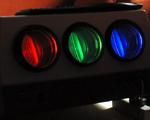
1. it dosen't project. The guy i bought it from theorized that it would only project if it had some kind of input. I'm not sure about this but I'm sure someone here would know. When i hit the on switch it powers up, makes a whining sound, the power light comes on and the fan turns on. But nothing projects. Is this thing toast or is this normal? However when i turn it off all three projectors, RGB, all turn on for a second and flash. So this is technically working i guess.
2. To do what i want to do i need to connect this beast to a lap top Will the following work for my needs?
http://www.amazon.com/RiteAV-BNC-Male-Female-Adapter/dp/B000V1R97U/ref=sr_1_1?s=electronics&ie=UTF8&qid=1355186383&sr=1-1&keywords=rca+to+bnc
http://www.amazon.com/Wired-Up-15m-Premium-Component-Cable/dp/B000RJLSZU
Any help would be much appreciated.
|
|
| Back to top |
|
 |
Runslikeapenguin
Joined: 11 Dec 2012
Posts: 9
|
| Posted: Tue Dec 11, 2012 2:24 am Post subject: |
|
|
Just an update with a picture.

|
|
| Back to top |
|
|
Tim in Phoenix

Joined: 21 Oct 2006
Posts: 4409
Location: Phoenix
|
| Posted: Tue Dec 11, 2012 3:55 am Post subject: |
|
|
Hello
The 101 is 480i only, it will never run from a laptop.
.
|
|
| Back to top |
|
|
Runslikeapenguin
Joined: 11 Dec 2012
Posts: 9
|
| Posted: Tue Dec 11, 2012 4:41 am Post subject: |
|
|
|
So you're telling me that i can't get any signal from a PC into this monster?
|
|
| Back to top |
|
|
gjaky

Joined: 05 Jun 2010
Posts: 2802
Location: Budapest, Hungary
|
| Posted: Tue Dec 11, 2012 6:47 am Post subject: |
|
|
| Runslikeapenguin wrote: | | So you're telling me that i can't get any signal from a PC into this monster? |
You can, through s-video (or composite) output 
_________________
projectors in the past : NEC 6-9PG xtra, Electrohome Marquee 6-7500, NEC XG 1351 LC ( with super modified Electrohome VNB neckboard !!!)
current: VDC Marquee 9500LC
The MOD: VNB-DB, VIM-DB
|
|
| Back to top |
|
|
CasetheCorvetteman

Joined: 09 Nov 2008
Posts: 6326
Location: Australia
|
| Posted: Tue Dec 11, 2012 6:50 am Post subject: |
|
|
Yeah, provided you can put out 15.75kHz from the RGB or it has S-video.
480i isnt all itll do and isnt the highest itll do either, itll do 576i which is a higher resolution in both width and height.
This would be perfect for retro video game consoles, all of them put out RGB, almost all are 240p resolution.
|
|
| Back to top |
|
|
Curt Palme
CRT Tech
Joined: 08 Mar 2006
Posts: 24396
Location: Langley, BC
TV/Projector: All of them!
|
| Posted: Tue Dec 11, 2012 1:27 pm Post subject: |
|
|
|
THe guys are right, the high resolution RGB inputs on the front of this unit are useless. It's been years since I worked on a 101, but I think the last owner may be right, you may need a composite input into the beast before it even projects the test pattern. Feed the output of a VHS or DVD player into it, and see what happens. It's a good set to practice on if nothing else, but you want a data grade video projector for what you're trying to do.
|
|
| Back to top |
|
|
CasetheCorvetteman
Joined: 09 Nov 2008
Posts: 6326
Location: Australia
|
| Posted: Tue Dec 11, 2012 1:37 pm Post subject: |
|
|
|
Curt, they are FAR from useless!! Have you ever compared video game consoles on composite and RGB?
|
|
| Back to top |
|
|
Curt Palme
CRT Tech
Joined: 08 Mar 2006
Posts: 24396
Location: Langley, BC
TV/Projector: All of them!
|
| Posted: Tue Dec 11, 2012 2:10 pm Post subject: |
|
|
But how many people can find a video card that outputs 320 X 240? Well... apparently you did.
No, actually I've never compared the two on a 480i/576i projector to be honest...
|
|
| Back to top |
|
|
CasetheCorvetteman
Joined: 09 Nov 2008
Posts: 6326
Location: Australia
|
| Posted: Tue Dec 11, 2012 2:34 pm Post subject: |
|
|
Game consoles are easy to come by! They all put out 240p over RGB 
|
|
| Back to top |
|
|
CasetheCorvetteman
Joined: 09 Nov 2008
Posts: 6326
Location: Australia
|
| Posted: Tue Dec 11, 2012 2:36 pm Post subject: |
|
|
|
And you know i have 2x Sony 1001QMs here.... Awesome machines fir 15.75kHz...
|
|
| Back to top |
|
|
Curt Palme
CRT Tech
Joined: 08 Mar 2006
Posts: 24396
Location: Langley, BC
TV/Projector: All of them!
|
| Posted: Tue Dec 11, 2012 2:54 pm Post subject: |
|
|
| CasetheCorvetteman wrote: | | Game consoles are easy to come by! They all put out 240p over RGB |
<smacks palm(e) to forehead>... of course they do! DUH, that wasn't obvious to me, as it's one of the few things I've never repaired.
|
|
| Back to top |
|
|
CasetheCorvetteman
Joined: 09 Nov 2008
Posts: 6326
Location: Australia
|
| Posted: Tue Dec 11, 2012 3:17 pm Post subject: |
|
|
|
Well at least ive got something to compare with you then!!
|
|
| Back to top |
|
|
ecrabb
Forum Moderator

Joined: 13 Mar 2006
Posts: 15909
Location: Utah
TV/Projector: JVC RS40, Epson 5010
|
| Posted: Tue Dec 11, 2012 4:11 pm Post subject: |
|
|
Unfortunately, none of the talk of vintage game consoles really helps the OP. He wants to get a computer displaying on the projector.
Penguinish, what you're going to need to get a PC to display on the older-than-dirt Panasonic projector is called a "scan converter". There are very good professional versions that still sell on ebay for 10 cents on the dollars, but that still means $50-100. There are also cheap, plastic, non-pro versions that sell for $20-30. One of those will work - physically - to get the signal from the laptop to the projector, assuming your laptop has an analog (DVI-I or VGA) output. A scan converter will typically take a VGA, SVGA, or XGA signal input from a computer and then convert it to plain old 480i SD analog video via s-video or composite. I even have one laying around I'd sell you for $20 or something, but I'm about 90% sure I'd never be able to find it.
The next problem could be the age of the laptop, though. If it's pretty new and running Vista or Windows 7, I'm not even sure those OS's will run OK on a VGA or SVGA display. XGA would probably be OK.
Assuming you've got a laptop with an analog output, and an OS that will display SVGA or XGA...
Here's a couple of the pro versions:
http://r.ebay.com/3PrxFf
http://r.ebay.com/mQlpNU
Here's one of the cheapies:
http://r.ebay.com/sb8byJ
OP, what's your time frame? How fast do you have to have everything working? Christmas, or do you have a couple of months?
SC
|
|
| Back to top |
|
|
fuchs
Joined: 27 Jun 2012
Posts: 153
Location: the NL
|
| Posted: Tue Dec 11, 2012 6:33 pm Post subject: |
|
|
HAHA! That's a great find!
If you can get it to work, you can have a whole lot of fun for $20!
Your first step would be to check if the projector still works.
Try connecting a cheap DVD player's composite-video-output (usually yellow RCA) to the VIDEO IN on the projector, and switch to that input.
I used to operate something like that years ago on alternative movie night.
I forgot the number, but it was in a wooden case and even had a TV tuner built in
_________________
onkel fuchs' cheapskate cinema
NEC plain 9PG
|
|
| Back to top |
|
|
Tim in Phoenix
Joined: 21 Oct 2006
Posts: 4409
Location: Phoenix
|
| Posted: Tue Dec 11, 2012 6:52 pm Post subject: |
|
|
Hello
My advice is watch some DVDs on this puppy for a while, and if you find front projection to be compelling, look for a nice 8" mag focus system, a Marquee 8500 for $500, something that does HDTV.
.
|
|
| Back to top |
|
|
Runslikeapenguin
Joined: 11 Dec 2012
Posts: 9
|
| Posted: Tue Dec 11, 2012 7:25 pm Post subject: |
|
|
Well heres the thing.
I don't really plan on using this thing as a viewing device, i need to project some images into a model and maybe again in the future. So I'm not concerned about image quality or hooking it up to a blueray player or anything.
The game console would be a great way to test this because i happen to have every game console ever made here in my house right now, going all the way back to an OG Nintendo, however none of them have BNC connectors. Only the OG Nintendo has a coax cable and thats not the same as BNC right? But if i get the BNC to RCA converters i could hook up one of the game systems.
So one of those scanners would get my laptop to show on this beast? given that my inputs are working.
|
|
| Back to top |
|
|
Runslikeapenguin
Joined: 11 Dec 2012
Posts: 9
|
|
| Back to top |
|
|
gjaky
Joined: 05 Jun 2010
Posts: 2802
Location: Budapest, Hungary
|
| Posted: Tue Dec 11, 2012 7:49 pm Post subject: |
|
|
| Runslikeapenguin wrote: |
The game console would be a great way to test this because i happen to have every game console ever made here in my house right now, going all the way back to an OG Nintendo, however none of them have BNC connectors. Only the OG Nintendo has a coax cable and thats not the same as BNC right? But if i get the BNC to RCA converters i could hook up one of the game systems. |
HAHA, CasetheCorvetteman will be you new best friend 
That wallmart s-video to BNC cable looks fine for hoking it up.
_________________
projectors in the past : NEC 6-9PG xtra, Electrohome Marquee 6-7500, NEC XG 1351 LC ( with super modified Electrohome VNB neckboard !!!)
current: VDC Marquee 9500LC
The MOD: VNB-DB, VIM-DB
|
|
| Back to top |
|
|
Runslikeapenguin
Joined: 11 Dec 2012
Posts: 9
|
| Posted: Tue Dec 11, 2012 9:39 pm Post subject: |
|
|
Well a trip to Radioshack, and a wallet rape (As usual) has yielded success!
BNC to RCA to S video
I was able to get the colors lined up somewhat, and some of the settings right, but this thing doesn't seem in focus. I tried holding up a piece of foam core to see if i was too close but it didn't seem in focus farther out either. Its not a huge deal, none of the images I'm going to be projecting need to be high res or anything.


|
|
| Back to top |
|
|
|
|




