| Author |
Message |
1Deflection
Joined: 18 Nov 2012
Posts: 16
|
| Posted: Sun Nov 18, 2012 1:47 pm Post subject: Sony G70 Error 36 ZeropowerSRAM exchange ? Hard Reset? |
|
|
Edit 05.12.2012
Caution make no hard reset for fun. all data lost
If you have to replace an SRAM, the data should be transferred to the new SRAM.
In that case should not be necessary to reset ??.
My English is not good. Translator translates. ' ' '
Hello, I have two SonyG70, one does not function.
The other G70 already hangs in the cinema.' ' '
The SonyG70 had first Error 27 and one more Error.
(Button of the cable cover is on top on it OK)
The G70 has got afterwards the old software with G2 setting.
The original software has no manual G2 setting.
The private trader had by this contribution in the link the idea with the Zeropower-SRAM exchange and hard Reset:
http:// www.avsforum.com/t/1193903/sony-g70-error-code-23-24-29-36
I have bought this:
http:// Www.ebay.de/itm/1-St-Zeropower-SRAM-M48Z128Y-70PM1-/360423969391
Another big German trader (Josef) said of the old SRAM, is not mainly guilty in the mistake.
Can the old ZeropowerSRAM release / indicate an Error?
Is one necessary with new ZeropowerSRAM, hard Reset?
Can a Hard Reset release other mistakes? Oscilloscope and new attitude needed?
Is hard Reset 10 seconds of Reset button on the board properly press
Before the turning on already press???
Is soft reset on press button on the Remute ?
Factory Reset = Soft reset or Factory reset = Hard Reset ?
1.
I have inserted the new ZeroPowerSRAM.
2.
I have pressed the Reset counter the board and have switched on the G70 (main switch)
= First Error88
= G70 switched off and anew Reset.
= G70 switched on and no Error. 
= The G70 has got high voltage and has remained switched on.
= The green tube has easily shone???
= No menu Function no test picture.
3.
The G70 has high voltage, however, no menu Picture and the green tube Shining on the whole surface???
= I have operated the brightness counter
= G70 is switched off with Error36.
4.
Topically I have Error36 only with operate of the On key.
= the G70 switches off itself after 1 second with Error36.
Is it to be tested sensibly the V-Board E-Board and Y board?
Is it able to do yours the old Error 27 now is only invisible because error 36 is quicker?
Can I damage functioning E- Board / V-Boards from another G70 for test ?
Greetings
Sebastian from Dortmund
Edit 25.11.2012
I had. Always error 36, even before the SRAM replacement and hard reset
Not Error 27... The seller was on tour and knew more precisely what error was previously available.
I had no more in remembrance.
I think it was never a problem with the SRAM.
| Description: |
|
| Filesize: |
109.68 KB |
| Viewed: |
11834 Time(s) |
|
Last edited by 1Deflection on Wed Dec 05, 2012 10:18 am; edited 6 times in total
|
|
| Back to top |
|
 |
Curt Palme
CRT Tech
Joined: 08 Mar 2006
Posts: 24396
Location: Langley, BC
TV/Projector: All of them!
|
| Posted: Sun Nov 18, 2012 3:24 pm Post subject: |
|
|
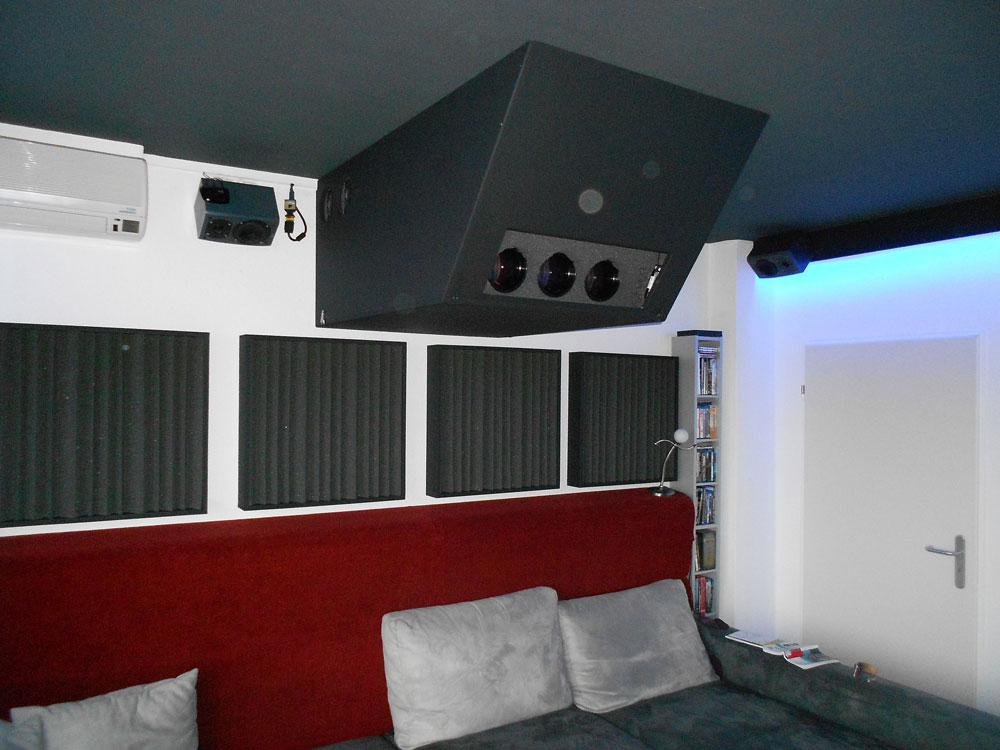
Nice room!
Check the V switch under the cover where the H yoke connectors are. I've never had a Ya or Yb board cause random errors, but I guess it's possible. Worst case, find another G70 to put your Ya or Yb boards into to test, or send them to me, and I can check them here. Also make sure that the focus/V board is seated correctly.
|
|
| Back to top |
|
|
1Deflection
Joined: 18 Nov 2012
Posts: 16
|
| Posted: Mon Nov 19, 2012 2:07 pm Post subject: |
|
|
Hello Curt,
thanks for the compliments.
Wonderful forum. ''
Questions about questions
The V-button under the cover are OK, I know there can be also released Error 27.
Had you already belonged from an Error by an old battery SRAM?
I had Error 27 and an other Error at the beginning.
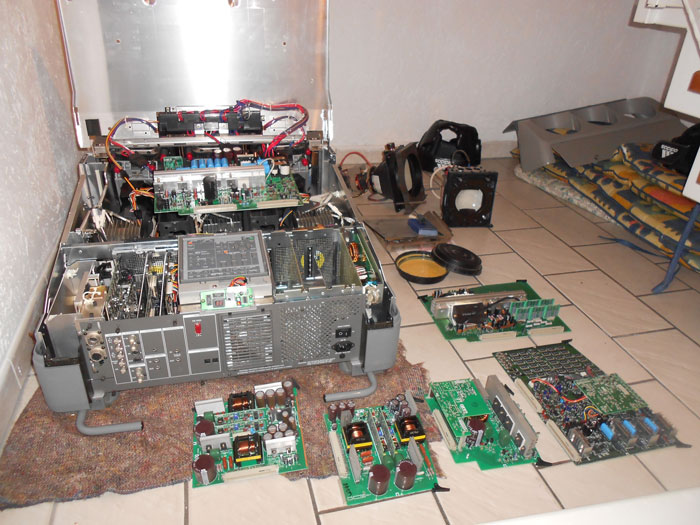
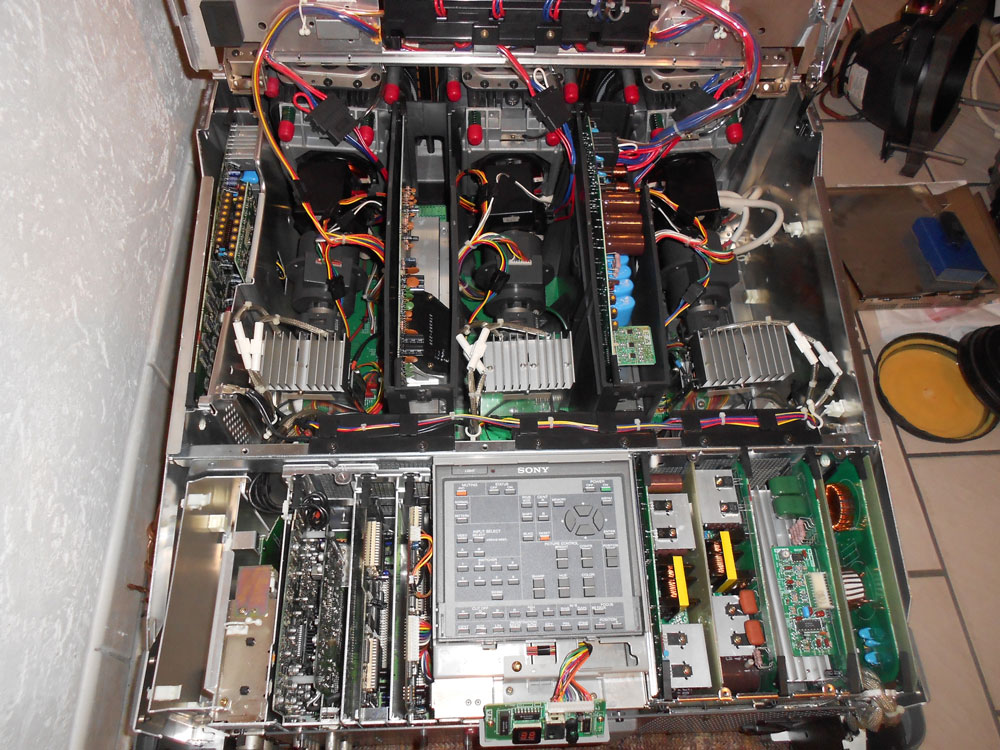
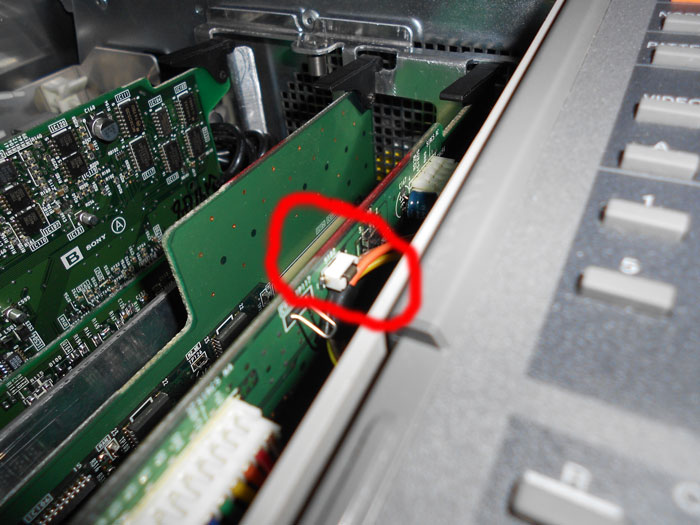
Then I need the SRAM exchanged and a Reset on the board made (Video), was not bad of the Reset or for the new SRAM?
However, Error 36 I also have with the old battery SRAM.
Can it be by the Reset on the board a new problem exists? ' ' .... Error 36... ' .... Error 36...
Some people say a Hard Reset ( on board ?) it is bad.too much shifts oscilloscopes urgently ???
Today I have switched on the G70 and all tubes shine very brightly, no Error in the display.
When I wanted to regulate the brightness has gone out of the G70 with Error 36.
I will try to procure the G70-Boards and a Board exchange make.
Do I need for other substitute Boards oscilloscopes for the adaptation? or is this not mostly necessary?
Would you take for the test the Boards from the functioning G70 from the home cinema, or is this a risk?
Didaschi from the link on top in the contribution had apparently a defective E-Board and the Errors went with the new SRAM wake up.
Whether he has made a real hard Reset I do not know.
Video of the Reset on the board: ??bad??
http://www.youtube.com/watch?v=8ve-K9GSmzY&feature=youtu.be
The best greetings Sebastian
| Description: |
|
| Filesize: |
104.79 KB |
| Viewed: |
11773 Time(s) |
|
| Description: |
|
| Filesize: |
222.84 KB |
| Viewed: |
11773 Time(s) |
|
| Description: |
|
| Filesize: |
85.94 KB |
| Viewed: |
11773 Time(s) |
|
|
|
| Back to top |
|
|
Curt Palme
CRT Tech
Joined: 08 Mar 2006
Posts: 24396
Location: Langley, BC
TV/Projector: All of them!
|
| Posted: Mon Nov 19, 2012 2:44 pm Post subject: |
|
|
There is a Barco CRT next to the Sony that's why it doesn't work!
I've never done a reset on a G70, I've never had any need to, but if that's when the problems started, then I would suggest that's where the problem could be. I personally don't believe in doing resets on CPU boards unless nothing else you've tried solves the problem.
Cheers!
|
|
| Back to top |
|
|
macgyver655
Joined: 22 Aug 2007
Posts: 8508
|
| Posted: Mon Nov 19, 2012 2:49 pm Post subject: |
|
|
|
Is there a setting in the menu for projector position?
|
|
| Back to top |
|
|
1Deflection
Joined: 18 Nov 2012
Posts: 16
|
| Posted: Mon Nov 19, 2012 3:42 pm Post subject: |
|
|
| Curt Palme wrote: | There is a Barco CRT next to the Sony that's why it doesn't work!
I've never done a reset on a G70, I've never had any need to, but if that's when the problems started, then I would suggest that's where the problem could be. I personally don't believe in doing resets on CPU boards unless nothing else you've tried solves the problem.
Cheers! |
OK I should have exchanged first the Boards.
Curt you would take the Boards from the G70 in function (in the home cinema) or not?
I will have to buy the third G70.
Yes I have put the Barco already somewhere else there. 
To me has occurred a little bit.
Can it be all tubes once so brightly have shone because the G70 after the Reset in the warm-up mode starts?
With other attempts went of the G70, as usual, with, on, button press in the Error 36.
The software seems to be in order, otherwise there would have to be Error 88 permanently?
Is warming up finished with the G70 As soon as one presses the brightness / contrast key?
There is apparently a problem with the signals of the G70 beyond the warming up agrees. Mmmh …
It buttons behind in the G70 stand on 01
@macgyver655
what do you mean exactly?
Do you mean That grid by the Reset on the tube is shifted?
I do not come to the menu
It is I think of not turning well the potentiometers in the device.
Cheers!
|
|
| Back to top |
|
|
macgyver655
Joined: 22 Aug 2007
Posts: 8508
|
| Posted: Mon Nov 19, 2012 5:23 pm Post subject: |
|
|
I am having some difficulty trying to understand just what you are saying. But I believe your saying you do not get any menu. Did you have menus before changing the RAM?
You also say you have bright screen. Is there an image in the bright screen, like, is the menu maybe there and you just can't see it because it is washed out?
|
|
| Back to top |
|
|
1Deflection
Joined: 18 Nov 2012
Posts: 16
|
| Posted: Mon Nov 19, 2012 9:49 pm Post subject: |
|
|
| macgyver655 wrote: | | But I believe your saying you do not get any menu. |
This is right.
At the moment switches off itself of the G70 always (Error 36 after 1 second).... no menu …
Directly after the exchange RAM and Reset the green tube has easily shone = (no Error) =, however, with activity of the brightness button has switched off itself of the G70 = (Error 36)
Or should I have pressed directly the menu Button no brightness?
Today all tubes have shone once very very brightly = no Error =, however, as me the brightness rules wanted has switched off itself of the CRT = (Error 36)
I have read after the Reset of the G70 in the warm-up phase starts.??????
I have to 98% always Error 36, Up to now the tubes have shone only twice without Error,
When I had visited the G70 by the purchase, there still was sometimes no Error, however, a menu.
Before the exchange RAM and Reset there was a menu.
The G70 became some years not used = the Privately trader, hence, thought of an old PowerRAM.
Before exchange of the RAM: =sometimes Error 27 and sometimes still another funny Error.
The G70 went out as well as today also with Error 27 after one second.
Do you mean the menu could have by the hard Reset a damage?
I have inserted once for the test the original software without G2 setting (five E-Proms/RAMs? in the small box)
There was Error 68 directly with the turning on of the main switch.
Later I have mounted the older software again and, as usual, the Error 36.
Would have you to take fear of it Boards from a functioning G70 for the test?
Greetings from Dortmund
Sebastian
|
|
| Back to top |
|
|
Curt Palme
CRT Tech
Joined: 08 Mar 2006
Posts: 24396
Location: Langley, BC
TV/Projector: All of them!
|
| Posted: Mon Nov 19, 2012 10:31 pm Post subject: |
|
|
You won't have the tubes warm enough to display anything on the tube face, as the set shuts down too quickly.
Mac, no, the inversion switches are hard wired. THe V switch is software controlled I think, but with a hard wired switch, and the H deflection is done via swapping connectors.
YEs, you may have damaged the Ya board by doing a reset, that's why I've never done it. I remember reading 10 years ago that at least one person had issues with their G70 after doing a software reset of the Ya board.
|
|
| Back to top |
|
|
macgyver655
Joined: 22 Aug 2007
Posts: 8508
|
| Posted: Tue Nov 20, 2012 12:04 am Post subject: |
|
|
| Curt Palme wrote: | You won't have the tubes warm enough to display anything on the tube face, as the set shuts down too quickly.
Mac, no, the inversion switches are hard wired. THe V switch is software controlled I think, but with a hard wired switch, and the H deflection is done via swapping connectors.
YEs, you may have damaged the Ya board by doing a reset, that's why I've never done it. I remember reading 10 years ago that at least one person had issues with their G70 after doing a software reset of the Ya board. |
Yeah, I agree their seems to be a problem with the YA, maybe. Especially if it didn't do a correct factory reset. If it was even a factory reset that he did. Also, who knows if the new ram is dead or not....
I would at least try to switch the vertical deflection plugs opposite and see if the code goes away or not.
Curt, you will have to say whether he can try the other YA board without damage or not.
|
|
| Back to top |
|
|
1Deflection
Joined: 18 Nov 2012
Posts: 16
|
| Posted: Tue Nov 20, 2012 11:13 am Post subject: |
|
|
| macgyver655 wrote: |
Curt, you will have to say whether he can try the other YA board without damage or not. |
I also think that's a risk?
I should buy another G70 as a spare unit.
I have understood it so of the SRAM can be simply exchanged.
Copy of the data of the old SRAM on the new SRAM is not necessary.
However, the CRT loses his serial number and all settings.
One can transfer the old settings on the new SRAM if one wanted??
There below in the contribution is also written that the YA-Boards are very susceptible for static electricity..
Maybe I have damaged the YA Board or the SRAM is defective.
Posted by Frank-D ..AVS..
5. Unlatched the YA board black clips at either ends of the board and slid out the YA board carefully. Make sure that you are not carrying any static electrical charge as the YA board is sensitive to static electricity and you can end up damaging the board rendering it useless. (I think Sony is currently charging about 1700 to fix it)
6. Placed the YA board on an antistatic foam sheet. Bought the sheet at a local electronics store measuring 18” x 24” for few bucks.
http:// www.avsforum.com/t/1005331/sony-g90-dallas-chip-ds1245y-successfully-changed/30
Greetings Sebastian.
|
|
| Back to top |
|
|
Curt Palme
CRT Tech
Joined: 08 Mar 2006
Posts: 24396
Location: Langley, BC
TV/Projector: All of them!
|
| Posted: Tue Nov 20, 2012 1:42 pm Post subject: |
|
|
|
As long as the software revisions of the Ya board are the same, you can interchange them. If they are different, then you need to change the Ya and Yb boards as a pair.
|
|
| Back to top |
|
|
macgyver655
Joined: 22 Aug 2007
Posts: 8508
|
| Posted: Tue Nov 20, 2012 3:11 pm Post subject: |
|
|
| 1Deflection wrote: | | macgyver655 wrote: |
Curt, you will have to say whether he can try the other YA board without damage or not. |
I also think that's a risk?
I should buy another G70 as a spare unit.
I have understood it so of the SRAM can be simply exchanged.
Copy of the data of the old SRAM on the new SRAM is not necessary.
However, the CRT loses his serial number and all settings.
One can transfer the old settings on the new SRAM if one wanted??
There below in the contribution is also written that the YA-Boards are very susceptible for static electricity..
Maybe I have damaged the YA Board or the SRAM is defective.
Posted by Frank-D ..AVS..
5. Unlatched the YA board black clips at either ends of the board and slid out the YA board carefully. Make sure that you are not carrying any static electrical charge as the YA board is sensitive to static electricity and you can end up damaging the board rendering it useless. (I think Sony is currently charging about 1700 to fix it)
6. Placed the YA board on an antistatic foam sheet. Bought the sheet at a local electronics store measuring 18” x 24” for few bucks.
http:// www.avsforum.com/t/1005331/sony-g90-dallas-chip-ds1245y-successfully-changed/30
Greetings Sebastian. |
This information is for the G90, not the G70. And I also think there is a process you need to follow when putting in a blank ram which was also for the G90 but I'm not sure if the G70 is the same process. Someone who has actually changed the ram with a blank on a G70 would have to comment on this.
|
|
| Back to top |
|
|
1Deflection
Joined: 18 Nov 2012
Posts: 16
|
| Posted: Sat Nov 24, 2012 9:58 am Post subject: |
|
|
The G70 had yesterday by three days as no electricity. (3 days no standby)
1
Today I connected the G70 with the power cable into the power and turned on the big main switch on the device.
== As always, no error.
2
Then I have the G70 on switched ON button.
== All tubes have bright light on the whole area, for 5 seconds.
3
After five seconds, the G70 has automatically shuts down with error 10 .....i pressed no button...
((I had thought in the past week that the G70 finished with error when I pressed the brightness button.
That was just a coincidence ))
4
At restart, there was, as always, Error 36 after 1 second.
The same has happened in the last week once.
Co .. amazing fast ..
Whom the G70 has no electricity for several days (3 days no standby) then:
== G70 Starts with bright tubes for 5 seconds
== G70 gets from even a Error10 (no Error 36)
== Reboot comes in as only Error 36 after 1 second.
What is Error 10?
I once something moves the Y board and katte short Error .. 20 21 22 60.
but only individually never simultaneously.
((This error only when I move the Y board somewhat))
I think the Y board then has no contact at all connectors at the bottom.
I think these three errors are unimportant because they endstehen only movement on the Y board. (20/22/60)
best Regards
Sebastian
|
|
| Back to top |
|
|
1Deflection
Joined: 18 Nov 2012
Posts: 16
|
| Posted: Sat Nov 24, 2012 10:41 am Post subject: |
|
|
To Error 10 I have found:
http://www.avsforum.com/t/394281/sony-g70-error-10
Phil,
Error code 10, which is the loss of input sync is normal on the older firmware (1.03). On the later firmware, 1.10 and up, you will only see error 10 after there is a loss of sync for 5 seconds or more.
Bruce
I have the old software with G2 setting.
The original G70 had the new software without manual setting G2.
A previous owner had made a downgrade.
Both my G70 have no serial number.
I think because of downgrade and hard reset.
|
|
| Back to top |
|
|
1Deflection
Joined: 18 Nov 2012
Posts: 16
|
| Posted: Sat Nov 24, 2012 5:33 pm Post subject: |
|
|
I can make a video with glowing tubes and error10/36
http://www.youtube.com/watch?v=D_5vvOrR7ag
The software is probably in function, why I think (no Error 88 permanently)?
But I think the reset has caused a problem and I need other Y boards.
Or another board had long been a problem.
Thanks for the help for now.
|
|
| Back to top |
|
|
macgyver655
Joined: 22 Aug 2007
Posts: 8508
|
| Posted: Sat Nov 24, 2012 5:57 pm Post subject: |
|
|
|
Do you have an input source connected and if so what resolution are you sending?
|
|
| Back to top |
|
|
1Deflection
Joined: 18 Nov 2012
Posts: 16
|
| Posted: Sat Nov 24, 2012 6:12 pm Post subject: |
|
|
The start of the G70 as the video is rarely.
Normally, the G70 has error36 after 1 second. (As in the first video above)
No, I have not connected any source.
Should I connect a source via RGBHV?
I need to disassemble the RGBHV cables from G70 in the home theater. it's something work.
I have a PC as a source.
What resolution should I set the PC for the test?
Greetings Sebastian
|
|
| Back to top |
|
|
macgyver655
Joined: 22 Aug 2007
Posts: 8508
|
| Posted: Sat Nov 24, 2012 6:17 pm Post subject: |
|
|
|
I would suggest connecting a source and run a low resolution. The point is for it to lock to a different entry which may avoid the shutdown. I'm thinking a setting is maybe causing the issue. But not sure yet. More testing is needed.
|
|
| Back to top |
|
|
1Deflection
Joined: 18 Nov 2012
Posts: 16
|
| Posted: Sun Nov 25, 2012 7:38 pm Post subject: |
|
|
| macgyver655 wrote: | | I would suggest connecting a source and run a low resolution. The point is for it to lock to a different entry which may avoid the shutdown. I'm thinking a setting is maybe causing the issue. But not sure yet. More testing is needed. |
OK.
I had. Always error 36, even before the SRAM replacement and hard reset
Not Error 27... The seller was on tour and knew more precisely what error was previously available.
I had no more in remembrance.
I think it was never a problem with the SRAM.
I was told that the hard reset is not necessary if the data from the old to the new SRAM is transferred?
On the old SRAM for the purpose, the data must still be present
If there are no data on the old SRAM needs to be made of a hard reset...For the commissioning of the new SRAM without data in memory?
I'll still take the test with an attached picture of the source.
Alternatively, I'll buy one for the test VBoard. (Error 36)
best Regards
Last edited by 1Deflection on Sun Nov 25, 2012 10:21 pm; edited 1 time in total
|
|
| Back to top |
|
|
|
|




