| Author |
Message |
Decibel

Joined: 31 May 2007
Posts: 904
Location: Roma - Italia
|
| Posted: Sun Sep 23, 2012 1:37 pm Post subject: Custom timings |
|
|
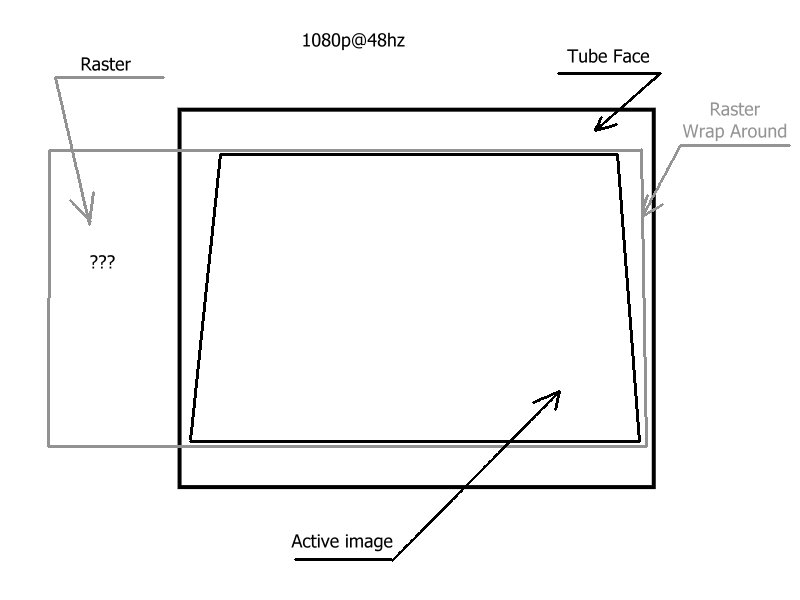
I try to modify timings with DVDO VP50 but with HD resolutions (1080p/1080i/720p) the image is always too small than raster.
I want to adapt the image at the raster as best is possible.
Other issue: If I see through the lenses, in right the raster wrap around.
I tried to swap all boards except deflection, focus and except the boards in convergence tray.
Any suggests?
p.s. Barco Graphics 808 ---mod 808s
_________________
Domenico (Barco fan!)
Last edited by Decibel on Fri Oct 05, 2012 3:13 pm; edited 1 time in total
|
|
| Back to top |
|
 |
Decibel
Joined: 31 May 2007
Posts: 904
Location: Roma - Italia
|
| Posted: Fri Oct 05, 2012 2:54 pm Post subject: |
|
|
Video chain is:
sources ---> DVDO VP50 ----> HDFury4 ----OUTPUT VGA---> RGBHV 808
Custom H Timings:
H Shift: 292
H Size: 1920
H Front: 188
H Sync: 240
H Back: 292
H Sync: +
V Sync: -
I can not enlarge the image to fit the raster 
This is the schematic for explain of my projector issue.
| Description: |
|
| Filesize: |
35.92 KB |
| Viewed: |
10282 Time(s) |
|
_________________
Domenico (Barco fan!)
|
|
| Back to top |
|
|
barclay66

Joined: 27 Jun 2011
Posts: 1304
Location: Germany
TV/Projector: Marquee 9500 Ultra
|
| Posted: Fri Oct 05, 2012 3:05 pm Post subject: |
|
|
Hi,
There are three things that I would try:
- Switch the H-Sync to negative polarity (either by setting on the VP50 or by forcing the HDFury to H/V negative using the DIP switches). Barco PJs sometimes have trouble with positive Sync.
- Try the H-Shift function on the HDFury. Maybe it's shifted too much to one side.
- If there's a short retrace option in the menus then try it out.
Regards,
barclay66
|
|
| Back to top |
|
|
Decibel
Joined: 31 May 2007
Posts: 904
Location: Roma - Italia
|
| Posted: Fri Oct 05, 2012 4:22 pm Post subject: |
|
|
| barclay66 wrote: | | - Switch the H-Sync to negative polarity (either by setting on the VP50 or by forcing the HDFury to H/V negative using the DIP switches). Barco PJs sometimes have trouble with positive Sync. |
Tried: no fix 
| barclay66 wrote: | | - Try the H-Shift function on the HDFury. Maybe it's shifted too much to one side. |
The problem is not the shifted image but width of it, is always too small than raster.
So I must enlarge the raster outside the tube face for fit image.
| barclay66 wrote: | | - If there's a short retrace option in the menus then try it out. |
I'm not found nothing in menu.
_________________
Domenico (Barco fan!)
|
|
| Back to top |
|
|
Nashou66

Joined: 12 Jan 2007
Posts: 16171
Location: West Seneca NY
|
|
| Back to top |
|
|
tse
Joined: 03 May 2006
Posts: 1014
Location: Sweatbucket, Fl.
|
| Posted: Sat Oct 06, 2012 12:10 am Post subject: |
|
|
The H Front is too big compared to the other H Blank (H Sync and H Back) parts. Try lowering it to something like 30. That will make the image cover more of the raster and shift it to the right.
Scott
_________________
"Were we directed from Washington when to sow and when to reap, we would soon want bread."
Thomas Jefferson
|
|
| Back to top |
|
|
CasetheCorvetteman

Joined: 09 Nov 2008
Posts: 6326
Location: Australia
|
| Posted: Sat Oct 06, 2012 1:34 am Post subject: |
|
|
| Decibel wrote: |
So I must enlarge the raster outside the tube face for fit image.. |
Why is that an issue? As long as the image isnt over the edges of the tube face, youre not watching it with the rasters brightly lit up so it wont matter if they go over the edge, and you will blank that area any way.
|
|
| Back to top |
|
|
Ile

Joined: 09 Mar 2006
Posts: 1491
Location: Jyväskylä, Finland
|
| Posted: Sat Oct 06, 2012 3:34 pm Post subject: |
|
|
I use these 1080i96 timings.

Any smaller gives raster ringing in my 808s.
Adjust Hphase so that picture doesn't wrap from right edge.
Then set Hwidth to 95 from menu and tweak master width pot from smps to get big enough picture.
Then raster centering.
Unused raster will be shot to out side of face plate like in your drawing, it doesn't matter.
|
|
| Back to top |
|
|
Decibel
Joined: 31 May 2007
Posts: 904
Location: Roma - Italia
|
| Posted: Sun Oct 07, 2012 8:04 am Post subject: |
|
|
| Nashou66 wrote: | | Did you try to re size the image with in the Projectors controls or Just inthe DVDO? |
The controls of the projector works on the raster. There is a crt projector that has controls on the image?
DVDO can modify custom timings for resize image.
_________________
Domenico (Barco fan!)
|
|
| Back to top |
|
|
Decibel
Joined: 31 May 2007
Posts: 904
Location: Roma - Italia
|
| Posted: Sun Oct 07, 2012 8:24 am Post subject: |
|
|
| tse wrote: | | The H Front is too big compared to the other H Blank (H Sync and H Back) parts. Try lowering it to something like 30. That will make the image cover more of the raster and shift it to the right. |
Good!
I was able to finally get a image almost coincides with the raster editing the timings.
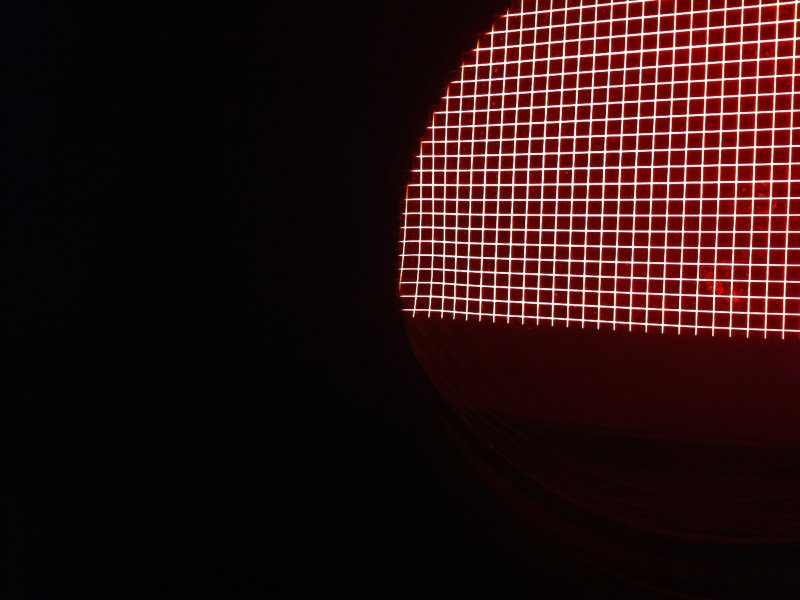
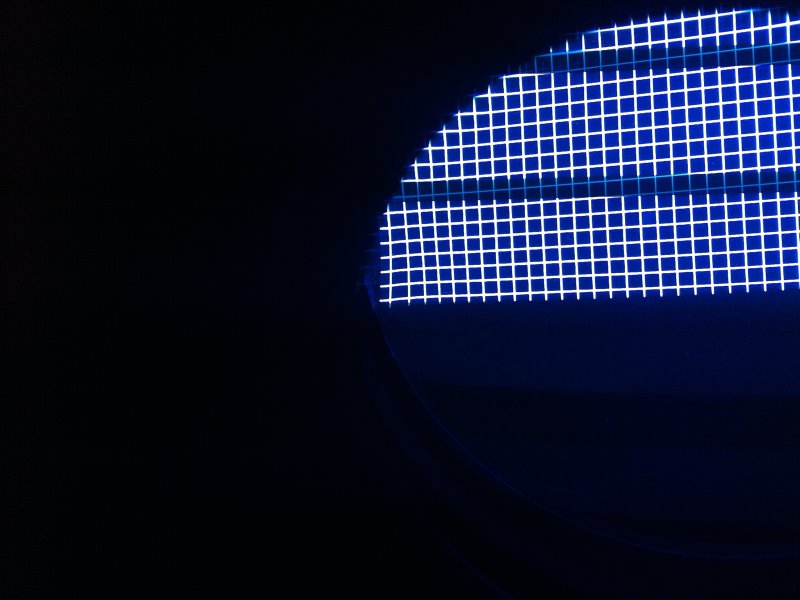
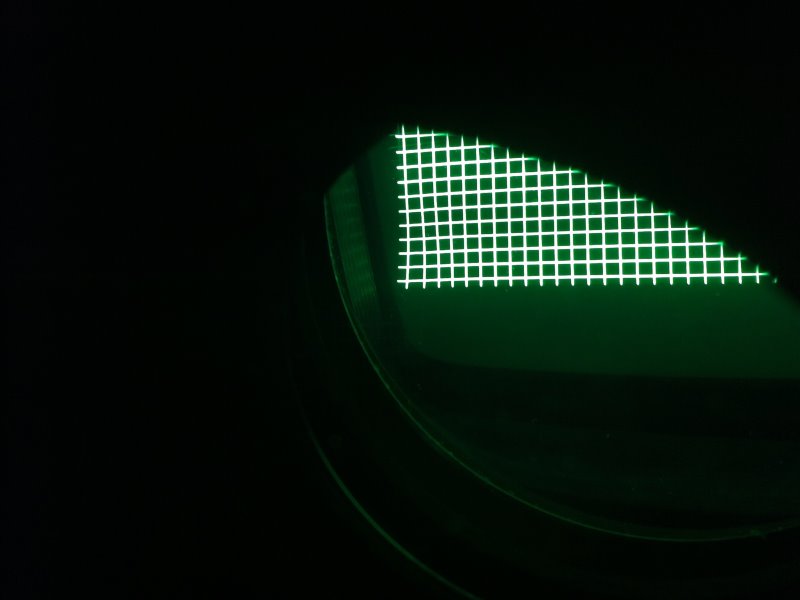
Unfortunately, in this situation, I have some distortions in the corner of the image (bottom left through the lenses, top left on the screen) that I can not fix.
So I have to expand a little bit the raster out of the faceplate of the tube and use the control HPhase for minimize this issue.
But I am convinced that I have a problem on some card because on the left I have always a distortion that I able to minimize but not completely fix. 
_________________
Domenico (Barco fan!)
|
|
| Back to top |
|
|
Ile
Joined: 09 Mar 2006
Posts: 1491
Location: Jyväskylä, Finland
|
| Posted: Mon Oct 08, 2012 8:28 am Post subject: |
|
|
| Decibel wrote: | | But I am convinced that I have a problem on some card because on the left I have always a distortion that I able to minimize but not completely fix. |
What kind of distortion?
If it's raster ringing (waves at left edge) it's pretty much normal. Beam needs time to stabilize with high resolution.
Not sure what would happen if width coils are removed. 
If it's something different try swapping horizontal deflection and Hsift boards.
|
|
| Back to top |
|
|
Decibel
Joined: 31 May 2007
Posts: 904
Location: Roma - Italia
|
| Posted: Mon Oct 08, 2012 8:51 am Post subject: |
|
|
| Ile wrote: | | What kind of distortion? |
see pictures
(the stains, especially in red tube, are a strange effect of the photos, do not exist in reality)
| Description: |
|
| Filesize: |
67.99 KB |
| Viewed: |
10117 Time(s) |
|
| Description: |
|
| Filesize: |
62 KB |
| Viewed: |
10117 Time(s) |
|
| Description: |
|
| Filesize: |
34.04 KB |
| Viewed: |
10117 Time(s) |
|
_________________
Domenico (Barco fan!)
|
|
| Back to top |
|
|
gjaky

Joined: 05 Jun 2010
Posts: 2802
Location: Budapest, Hungary
|
| Posted: Mon Oct 08, 2012 9:28 am Post subject: |
|
|
Is it sure this is a timing issue? Maybe this is a dumb question, but have you verified that your pj works fine from other source like PC?
_________________
projectors in the past : NEC 6-9PG xtra, Electrohome Marquee 6-7500, NEC XG 1351 LC ( with super modified Electrohome VNB neckboard !!!)
current: VDC Marquee 9500LC
The MOD: VNB-DB, VIM-DB
|
|
| Back to top |
|
|
Decibel
Joined: 31 May 2007
Posts: 904
Location: Roma - Italia
|
| Posted: Mon Oct 08, 2012 9:41 am Post subject: |
|
|
I never thought it was a problem of timings.
I've always said it was a problem in some board.
The problem occurs with any source because the output is always that of the DVDO/HdFury4.
I tried a HTPC, a media player and a satellite receiver.
_________________
Domenico (Barco fan!)
|
|
| Back to top |
|
|
gjaky
Joined: 05 Jun 2010
Posts: 2802
Location: Budapest, Hungary
|
| Posted: Mon Oct 08, 2012 9:48 am Post subject: |
|
|
Well then I'd guess this is rather a convergence problem since the grid is distorted in both vertical and horizontal direction.
_________________
projectors in the past : NEC 6-9PG xtra, Electrohome Marquee 6-7500, NEC XG 1351 LC ( with super modified Electrohome VNB neckboard !!!)
current: VDC Marquee 9500LC
The MOD: VNB-DB, VIM-DB
|
|
| Back to top |
|
|
Decibel
Joined: 31 May 2007
Posts: 904
Location: Roma - Italia
|
| Posted: Mon Oct 08, 2012 10:01 am Post subject: |
|
|
| gjaky wrote: | | Well then I'd guess this is rather a convergence problem since the grid is distorted in both vertical and horizontal direction. |
I already tried to swap the convergence driver board. I will try to swap the convergence output board.
_________________
Domenico (Barco fan!)
|
|
| Back to top |
|
|
Decibel
Joined: 31 May 2007
Posts: 904
Location: Roma - Italia
|
| Posted: Mon Oct 08, 2012 2:39 pm Post subject: |
|
|
Tried to swap focus board and Hdefl board. No fix 
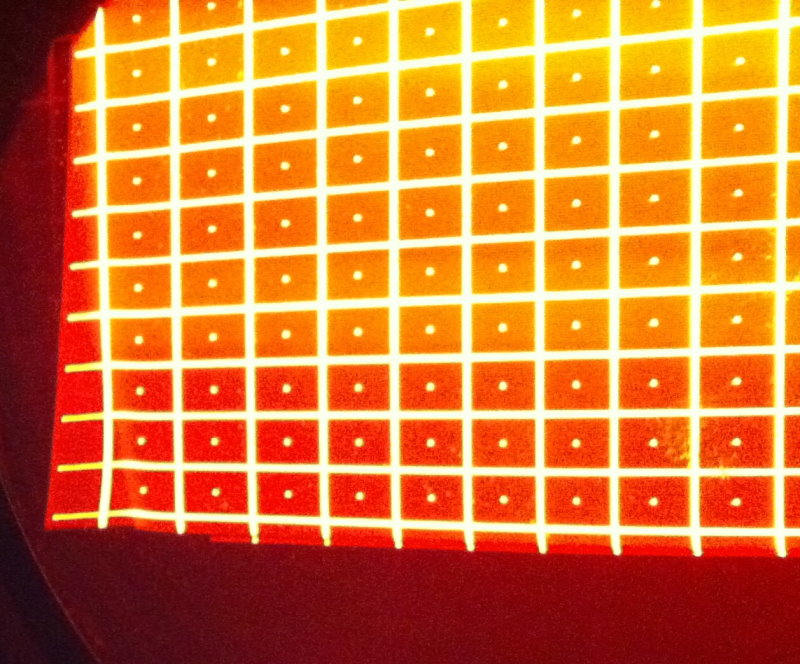
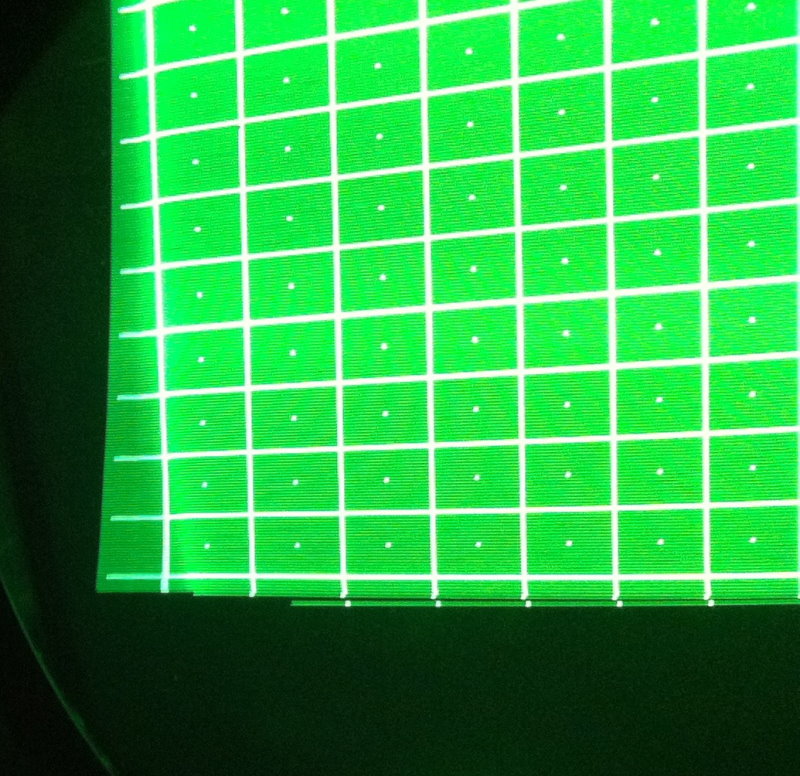
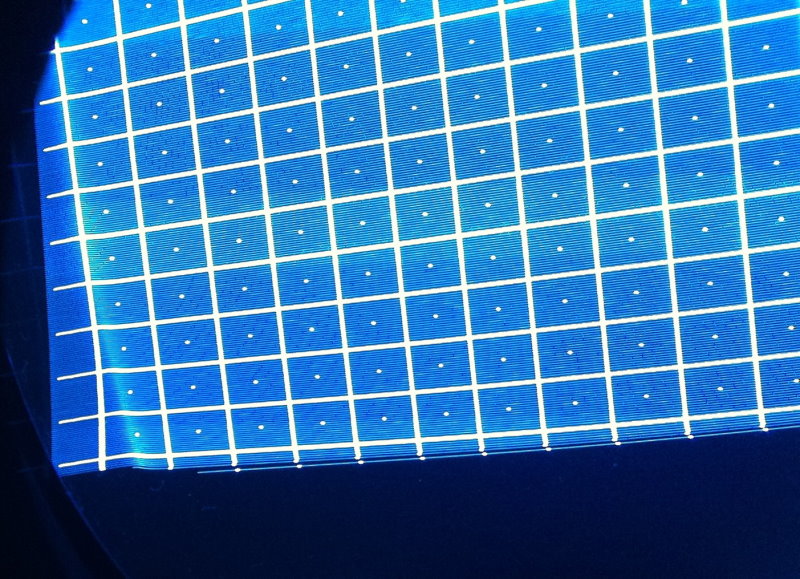
Below other pictures, no source connected, internal pattern 15khz.
I put low contrast and high brightness to reveal the raster
The problem can be seen very clearly.
| Description: |
|
| Filesize: |
137.05 KB |
| Viewed: |
10077 Time(s) |
|
| Description: |
|
| Filesize: |
156.41 KB |
| Viewed: |
10077 Time(s) |
|
| Description: |
|
| Filesize: |
166.43 KB |
| Viewed: |
10077 Time(s) |
|
_________________
Domenico (Barco fan!)
|
|
| Back to top |
|
|
Nashou66
Joined: 12 Jan 2007
Posts: 16171
Location: West Seneca NY
|
|
| Back to top |
|
|
Ile
Joined: 09 Mar 2006
Posts: 1491
Location: Jyväskylä, Finland
|
| Posted: Tue Oct 09, 2012 6:38 am Post subject: |
|
|
Does it chance when you move raster or make it smaller.
| Nashou66 wrote: | | you might need to go into the secrete service menu and adjust the convergence timing. |
No such thing in Barco.
Only 6 pots in convergence driver board, it can't be done without extension board and good scope.
|
|
| Back to top |
|
|
Decibel
Joined: 31 May 2007
Posts: 904
Location: Roma - Italia
|
| Posted: Tue Oct 09, 2012 9:10 am Post subject: |
|
|
I think I partially* solved the problem.
This morning I tried to replace the entire tray of the convergence (so all three internal boards) but without resolving anything.
Then I changed only the board of convergence driver (R762518) with the old model (BG808).
Now I do not have any raster distortion at left corner and finally I can set the image almost coincident with the raster 
*:I've got errors when I try to use the controls "left adjustment" and "seagull" because the old board of the convergence does not have the chip needed for these functions.
I tried two different newest model of convergence driver boards, it's impossible that both are faulty.
I think that in some place could be some incompatibility.
This projector was modded from BG808 to BG808s (swap newest boards and firmware).
Any advice?
Boards swapped (modded BG808-->BG808s):
SMPS (tried to swap with old model, no fix)
Vert.defl (tried to swap with old model, no fix)
RGB input
RGB Driver
Convergence driver (tried to swap with old model and solved).
_________________
Domenico (Barco fan!)
|
|
| Back to top |
|
|
|
|





