| Author |
Message |
Curt Palme
CRT Tech
Joined: 08 Mar 2006
Posts: 24396
Location: Langley, BC
TV/Projector: All of them!
|
| Posted: Mon Nov 05, 2012 4:30 pm Post subject: |
|
|
|
Faults like this are almost impossible to troubleshoot via email. Try swapping every other board over to the working set. I'm sure you'll find which one is bad.
|
|
| Back to top |
|
 |
ElTopo

Joined: 07 Nov 2006
Posts: 1640
|
| Posted: Mon Nov 05, 2012 4:39 pm Post subject: |
|
|
Well Curt i'm a little scared to drop a board which is maybe dead into my working set.
_________________
Barco Cine 9 the one and only
|
|
| Back to top |
|
|
Curt Palme
CRT Tech
Joined: 08 Mar 2006
Posts: 24396
Location: Langley, BC
TV/Projector: All of them!
|
| Posted: Mon Nov 05, 2012 4:49 pm Post subject: |
|
|
|
Then you'd have to send them to me for testing. There is no other way to repair this.
|
|
| Back to top |
|
|
km987654

Joined: 25 Jul 2007
Posts: 2874
Location: Australia
TV/Projector: Barco BG809s
|
| Posted: Mon Nov 05, 2012 8:32 pm Post subject: |
|
|
| ElTopo wrote: | EHT board from Curt arrived, thanks again !
Tried get the set running again with a brand new quad and the new EHT from Curt.
Same behaviour: After pressing the main power button i can here one pop (like a fuse blows again). The set was not even fired up. Damn  Will measure again which fuse is it this time. Will measure again which fuse is it this time.
My goal was to operate this projector and not to have spare parts (which is also good).
One other option would be to buy a late Runco/Barco 1209s set for dropping the tubes in and keep the Cine9 for spares......
Any other hints ?
thank you
ElTopo |
The chance of a projector failure is inversley proportional to the number of spares you have.
|
|
| Back to top |
|
|
gjaky

Joined: 05 Jun 2010
Posts: 2802
Location: Budapest, Hungary
|
| Posted: Mon Nov 05, 2012 8:44 pm Post subject: |
|
|
| km987654 wrote: | | ElTopo wrote: | EHT board from Curt arrived, thanks again !
Tried get the set running again with a brand new quad and the new EHT from Curt.
Same behaviour: After pressing the main power button i can here one pop (like a fuse blows again). The set was not even fired up. Damn Will measure again which fuse is it this time.
My goal was to operate this projector and not to have spare parts (which is also good).
One other option would be to buy a late Runco/Barco 1209s set for dropping the tubes in and keep the Cine9 for spares......
Any other hints ?
thank you
ElTopo |
The chance of a projector failure is inversley proportional to the number of spares you have. |
But it is sure if a problem occurs, it will be on a board which you DON'T have as spare 
_________________
projectors in the past : NEC 6-9PG xtra, Electrohome Marquee 6-7500, NEC XG 1351 LC ( with super modified Electrohome VNB neckboard !!!)
current: VDC Marquee 9500LC
The MOD: VNB-DB, VIM-DB
|
|
| Back to top |
|
|
ElTopo
Joined: 07 Nov 2006
Posts: 1640
|
| Posted: Wed Jun 26, 2013 8:48 pm Post subject: |
|
|
What's Barcos behaviour when the horizontal board is bad or the board is missing inside the projector?
Will it shutdown after a while (as mine does) or should the set be running (without tube output) ?
thx
_________________
Barco Cine 9 the one and only
|
|
| Back to top |
|
|
km987654
Joined: 25 Jul 2007
Posts: 2874
Location: Australia
TV/Projector: Barco BG809s
|
| Posted: Thu Jun 27, 2013 1:07 am Post subject: |
|
|
| ElTopo wrote: | What's Barcos behaviour when the horizontal board is bad or the board is missing inside the projector?
Will it shutdown after a while (as mine does) or should the set be running (without tube output) ?
thx |
I would think at the very least a missing or faulty Horizontal board would produce a scan fail and there would be no HV.
|
|
| Back to top |
|
|
ElTopo
Joined: 07 Nov 2006
Posts: 1640
|
| Posted: Fri Jul 12, 2013 9:55 am Post subject: |
|
|
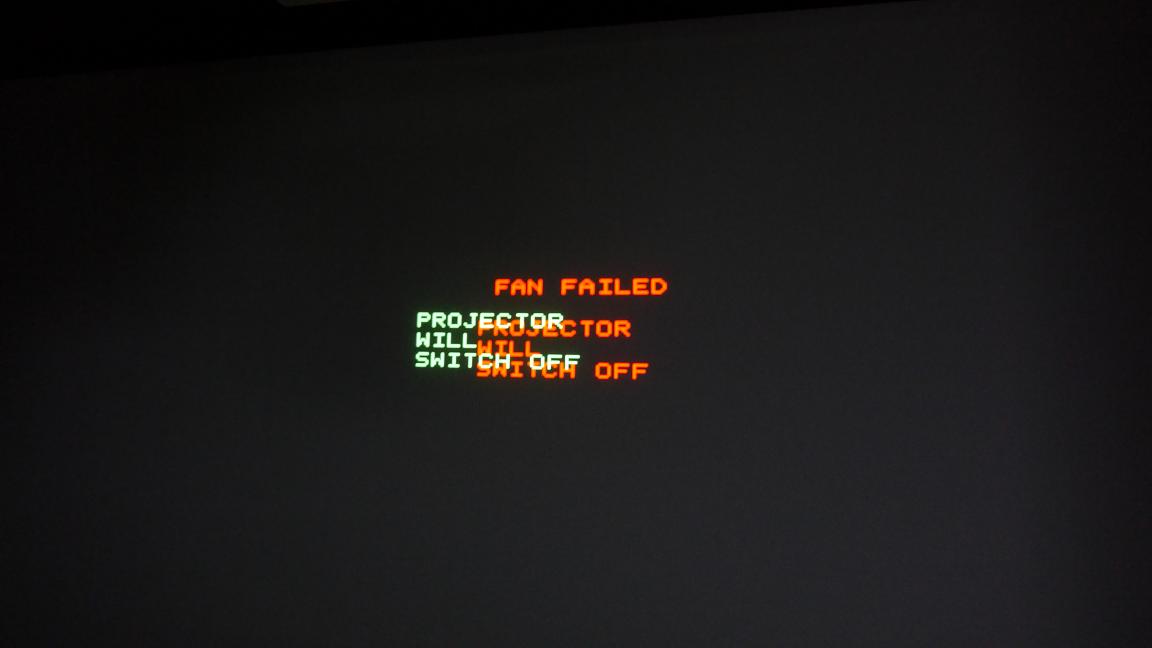
UPDATE: I finally got HV on the projector and can see a projected image !
UPDATED also the Buy/Sell section: Cine9 is not for sale anymore as it works.
Replaced Quad, replaced EHT (thanks CURT !!!) , inserted good Horizontal Board
But one little thing is unsolved: Projector shuts down due to a fan fail(s) ?! At least that is what i can see on the screen before it shuts down.
The two fans in the front and the two in the back are running.
Maybe the fans themselves have issues or the set was maybe modded on the fan control ?!
What do you think ?
thanks
ElTopo
| Description: |
|
| Filesize: |
37.87 KB |
| Viewed: |
7160 Time(s) |
|
_________________
Barco Cine 9 the one and only
|
|
| Back to top |
|
|
barclay66

Joined: 27 Jun 2011
Posts: 1304
Location: Germany
TV/Projector: Marquee 9500 Ultra
|
| Posted: Fri Jul 12, 2013 11:07 am Post subject: |
|
|
Hi,
I would check all connections between:
- Fans and Frame
- Fan Control Board and Frame
- Fan Control Board and Dynamic Astig Board (if present)
- Fan Control Board and Focus Board (if present)
The Fan Control Board can have a problem. Or the problem is on the SMPS (either the fan voltage generation or the fan monitoring and generation of the FAN_FAIL signal).
Tricky...
You might need some equipment (DMM, Oscilloscope) and patience for taking measurements for this.
I can offer both. As You know, we still have a visit planned (exchanging lenses etc.)...
Regards,
barclay66
|
|
| Back to top |
|
|
CasetheCorvetteman

Joined: 09 Nov 2008
Posts: 6326
Location: Australia
|
| Posted: Fri Jul 12, 2013 11:11 am Post subject: |
|
|
Your convergence is out abit... 
|
|
| Back to top |
|
|
ElTopo
Joined: 07 Nov 2006
Posts: 1640
|
| Posted: Sat Jul 13, 2013 9:58 am Post subject: |
|
|
Jumper S1 set on fan board = low fan speed
Jumper S1 not set on fan board = full fan speed all the time?
Anyone got details ? I only have the 909 manuals and there is no exta fan board in the rear area.
thx
ElTopo
_________________
Barco Cine 9 the one and only
|
|
| Back to top |
|
|
ElTopo
Joined: 07 Nov 2006
Posts: 1640
|
| Posted: Sat Jul 13, 2013 10:02 am Post subject: |
|
|
@Casethe: Conv is stable as a rock check out the pic again 
_________________
Barco Cine 9 the one and only
|
|
| Back to top |
|
|
mp20748
Joined: 12 Sep 2006
Posts: 5689
Location: Maryland
TV/Projector: 9500LC Ultra / Super 02 and 03 VIM
|
| Posted: Sat Jul 13, 2013 10:15 am Post subject: |
|
|
| ElTopo wrote: | Jumper S1 set on fan board = low fan speed
Jumper S1 not set on fan board = full fan speed all the time?
Anyone got details ? I only have the 909 manuals and there is no exta fan board in the rear area.
thx
ElTopo |
The "Fan fail" shut down is normally an indication that either one of the fans is bad/not working/bad batch run, or the fan circuit (on the LVPS) itself is out of tolerance.
The problem is usually corrected when you replace the two outer rear fans. The one in the center is for the Horizontal deflection module and it operates based on the temperature of the deflection module.... I'm operating from memory here on this one.
The mini fan circuit board should be located in the open area right behind the fans. And it should be on both Cine 9 and 909, because they are both technically the same projector.
|
|
| Back to top |
|
|
ElTopo
Joined: 07 Nov 2006
Posts: 1640
|
| Posted: Sat Jul 13, 2013 11:18 am Post subject: |
|
|
Hi Mike,
thx for reply.
You ever played with the jumper S1?
ElTopo
_________________
Barco Cine 9 the one and only
|
|
| Back to top |
|
|
mp20748
Joined: 12 Sep 2006
Posts: 5689
Location: Maryland
TV/Projector: 9500LC Ultra / Super 02 and 03 VIM
|
| Posted: Sat Jul 13, 2013 11:32 am Post subject: |
|
|
|
Yes, but forgot a lot since then. Don't recall it solving a fan issue though.
|
|
| Back to top |
|
|
Hulio
Joined: 15 Apr 2006
Posts: 494
Location: Belgium
|
| Posted: Wed Jul 17, 2013 12:44 pm Post subject: |
|
|
Don't mess with the S1 jumper on the focus board. Like Mike said, it won't solve a fan fail problem.
That jumper is for the front-tray fans only and the user can choose between full speed and temp. controlled speed from
SMPS module. It is wise to let them operate at full speed as they are meant to pull out the heat from the projector.
Altrough the Cine 9 is technically similar with BR909, their fans regulation is different (see my early post in this tread).
Beside the standard R763452 fan control board, two additional fan speed regulators R763706 were designed for Cine 9.
Here the technical doc.
Just replace those fans with new ones and you'll be ok.
| Description: |
|

Download |
| Filename: |
TDE1675_00_note.pdf |
| Filesize: |
271.83 KB |
| Downloaded: |
329 Time(s) |
|
|
| Back to top |
|
|
CasetheCorvetteman
Joined: 09 Nov 2008
Posts: 6326
Location: Australia
|
| Posted: Wed Jul 17, 2013 11:57 pm Post subject: |
|
|
|
One blows in and one sucks out.
|
|
| Back to top |
|
|
Curt Palme
CRT Tech
Joined: 08 Mar 2006
Posts: 24396
Location: Langley, BC
TV/Projector: All of them!
|
| Posted: Thu Jul 18, 2013 12:03 am Post subject: |
|
|
| CasetheCorvetteman wrote: | | One blows in and one sucks out. |
So many one liners for this sentence, but I'mm be machoor, and won't go there.
|
|
| Back to top |
|
|
Hulio
Joined: 15 Apr 2006
Posts: 494
Location: Belgium
|
| Posted: Thu Jul 18, 2013 4:09 am Post subject: |
|
|
|
Both front fans should extract the hot air from the unit. Air intake happens between lenses (look at the tech. drawing at the bottom of page 3). You should see the fan blue stikkers trough the front grille.
|
|
| Back to top |
|
|
CasetheCorvetteman
Joined: 09 Nov 2008
Posts: 6326
Location: Australia
|
| Posted: Thu Jul 18, 2013 4:31 am Post subject: |
|
|
|
Mine isnt that way, someone may have molested it.
|
|
| Back to top |
|
|
|
|




