| Author |
Message |
Jakeklem
Joined: 18 Aug 2010
Posts: 45
|
| Posted: Mon Jul 30, 2012 11:37 pm Post subject: philips 47pfl7403d- won't turn on, is it what I think it is? |
|
|
I've fixed several LCD's in the past couple years, but none have been this difficult in diagnosing. Any help is appreciated!
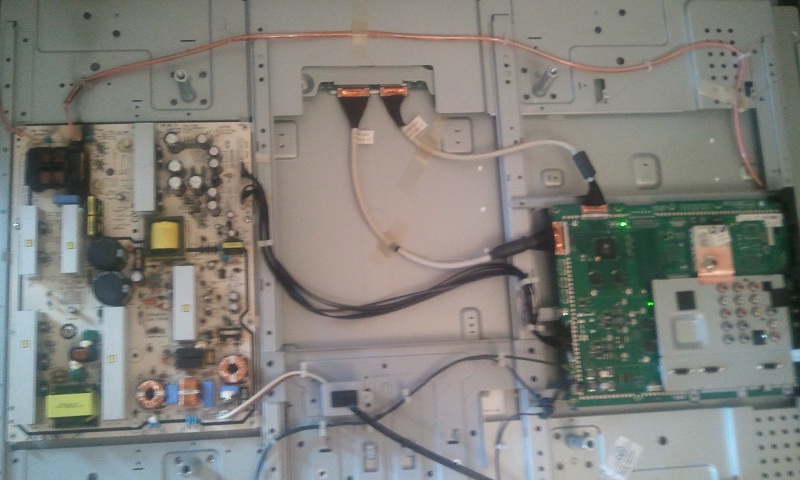
When I first pulled off the back panel, I noticed the power board was charred (upper left near the backlight connectors). The main board has two green LEDs which still lit up when the tv is plugged in and turned on. I figured it would be a simple power board swap so I bought a set of boards that included power board, main board and TCON. I switched out the power supply and it would not give the same relay clicks, nor did the LED's on the main board light up.
With the new power board in, I proceeded to then swap the main board and still no LED's. I also put the new TCON in and no change. When I put all the original boards back in, the LEDs come on, but the tv won't work due to the burnt power board.
Is this a good indication that the backlight(s) are shorted as I fear? Are the new boards going into a protective mode which prohibit the set from powering up?
In the attached picture you can see the main board LEDs lit and also where the power board caught fire...
| Description: |
| original boards installed |
|
| Filesize: |
138.73 KB |
| Viewed: |
138 Time(s) |
|
|
|
| Back to top |
|
 |
macgyver655
Joined: 22 Aug 2007
Posts: 8508
|
| Posted: Tue Jul 31, 2012 12:34 am Post subject: |
|
|
|
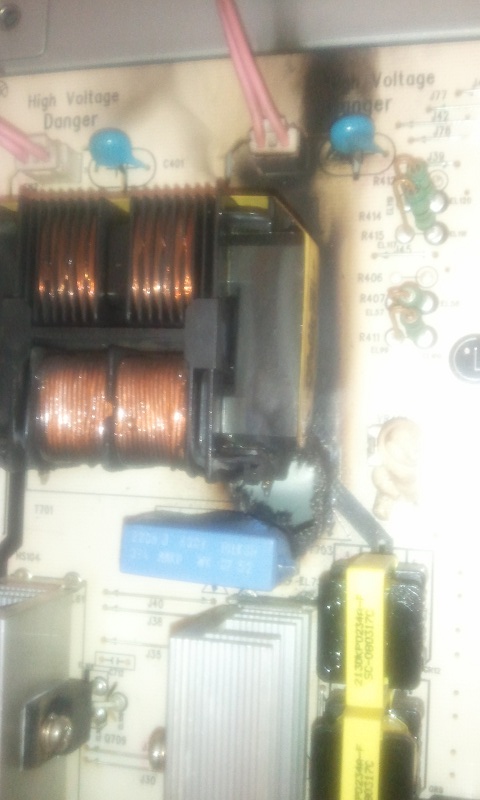
Hard to tell from your pictures. Is the burnt part right on that connector?
|
|
| Back to top |
|
|
Jakeklem
Joined: 18 Aug 2010
Posts: 45
|
| Posted: Tue Jul 31, 2012 5:47 am Post subject: |
|
|
Nope, it's below that. Right above that blue relay. Here's a close up
| Description: |
|
| Filesize: |
108.49 KB |
| Viewed: |
130 Time(s) |
|
|
|
| Back to top |
|
|
Jakeklem
Joined: 18 Aug 2010
Posts: 45
|
| Posted: Tue Aug 28, 2012 7:28 am Post subject: |
|
|
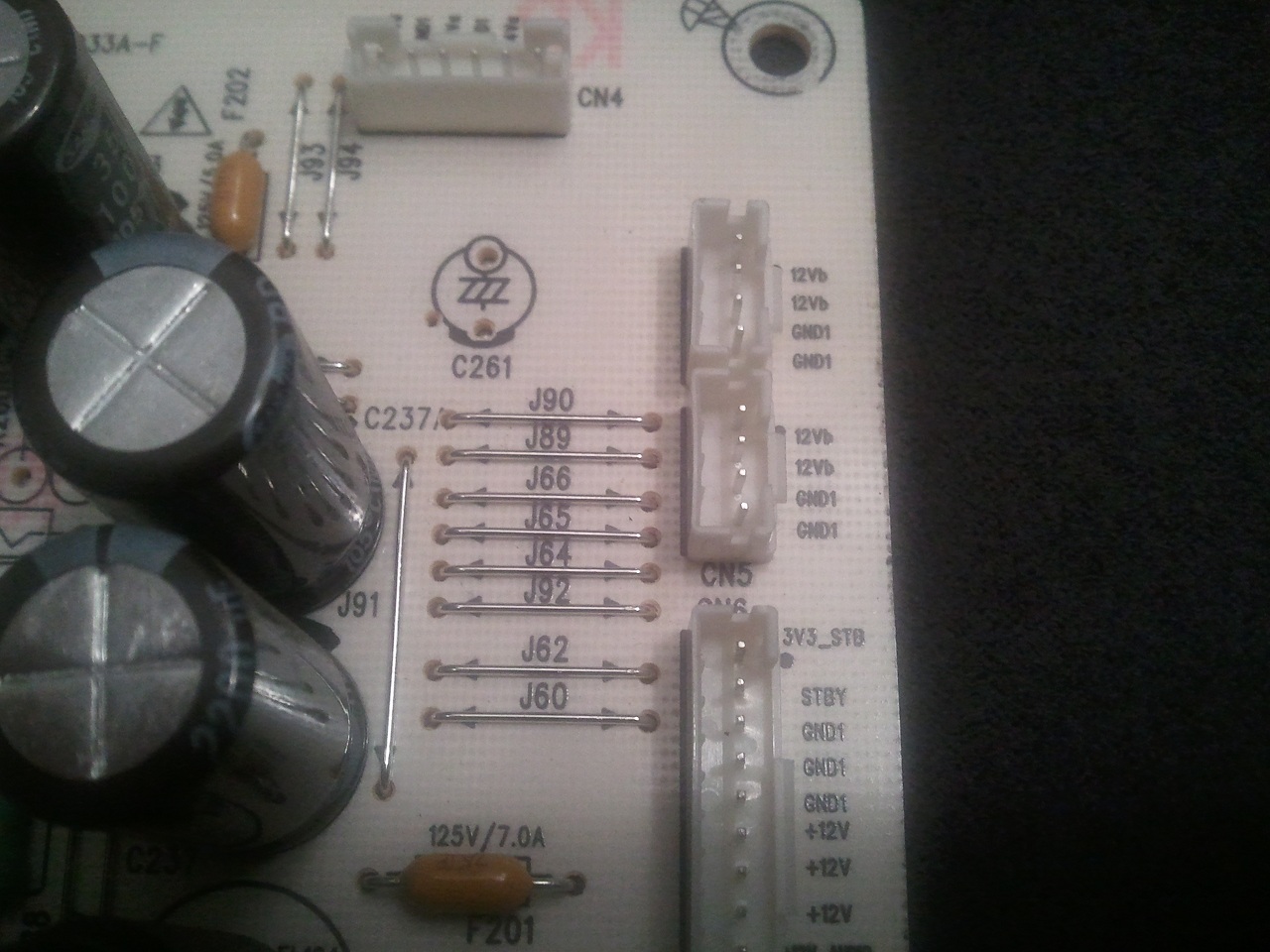
I'm really stumped on this one. I have 3.3V at 3v3 STB on both power boards with all plugs disconnected (except wall outlet). Also about 2.6V on STBY on both boards with nothing else plugged in.
What could be preventing the main board from turning on with the newer power supply board in?
| Description: |
|
| Filesize: |
279.14 KB |
| Viewed: |
20 Time(s) |
|
|
|
| Back to top |
|
|
Curt Palme
CRT Tech
Joined: 08 Mar 2006
Posts: 24396
Location: Langley, BC
TV/Projector: All of them!
|
| Posted: Tue Aug 28, 2012 1:34 pm Post subject: |
|
|
While it would seem unlikely, I've had several LCDs have issues on the main controller board after there are power supply problems. More than once I've recapped power supplies only to find out that the controller board got nuked by the spikes coming out of leaky cap power supplies. I ended up spending 2 hours on checking the first time it happened, and the power supply checked 100% with regards to output voltages. I ended up with an identical second set, and swapped controller boards, and that proved that the controller got nuked. I've seen it a few times since then as well.
So it's probably safe to assume that the controller board is bad if all your power supply voltages are OK.
|
|
| Back to top |
|
|
macgyver655
Joined: 22 Aug 2007
Posts: 8508
|
| Posted: Tue Aug 28, 2012 1:56 pm Post subject: |
|
|
|
In your picture you have CN6, 3v3_stb. You say you have that 3.3v, correct. Now monitor the pin below that "stby". When the power button is pressed you should have 3.3v to 5v on that pin. Do you?
|
|
| Back to top |
|
|
Jakeklem
Joined: 18 Aug 2010
Posts: 45
|
| Posted: Tue Aug 28, 2012 10:03 pm Post subject: |
|
|
| Curt Palme wrote: | While it would seem unlikely, I've had several LCDs have issues on the main controller board after there are power supply problems. More than once I've recapped power supplies only to find out that the controller board got nuked by the spikes coming out of leaky cap power supplies. I ended up spending 2 hours on checking the first time it happened, and the power supply checked 100% with regards to output voltages. I ended up with an identical second set, and swapped controller boards, and that proved that the controller got nuked. I've seen it a few times since then as well.
So it's probably safe to assume that the controller board is bad if all your power supply voltages are OK. |
Curt, that's what I was thinking at first too. However, I bought a complete set of boards so I swapped out the main as well. Still nothing. Maybe the new Power board is bad???
| Quote: | | In your picture you have CN6, 3v3_stb. You say you have that 3.3v, correct. Now monitor the pin below that "stby". When the power button is pressed you should have 3.3v to 5v on that pin. Do you? |
Yes that is correct about the CN6 3v3 having 3.3v. I checked the STBY and if I remember correctly it was at 2.6v on the new AND original boards. I'll double check though and post back.
Another quick question, can a resistance check on the lamps determine if they're still good?
|
|
| Back to top |
|
|
macgyver655
Joined: 22 Aug 2007
Posts: 8508
|
| Posted: Tue Aug 28, 2012 10:38 pm Post subject: |
|
|
| Jakeklem wrote: |
| Quote: | | In your picture you have CN6, 3v3_stb. You say you have that 3.3v, correct. Now monitor the pin below that "stby". When the power button is pressed you should have 3.3v to 5v on that pin. Do you? |
Yes that is correct about the CN6 3v3 having 3.3v. I checked the STBY and if I remember correctly it was at 2.6v on the new AND original boards. I'll double check though and post back.
|
i don't think 2.6v is enough.
| Jakeklem wrote: |
Another quick question, can a resistance check on the lamps determine if they're still good? |
No
|
|
| Back to top |
|
|
Jakeklem
Joined: 18 Aug 2010
Posts: 45
|
| Posted: Sun Sep 02, 2012 2:39 am Post subject: |
|
|
| macgyver655 wrote: |
i don't think 2.6v is enough.
|
It's strange, but that is what both boards are at with nothing plugged into them. When I plug in cn6 the old board gets 3.3v to stby and the newer board only has several mv.
However, with the original power board and the newer main board.... I get the same effect as above. only several mv on STBY.
Any suggestions?
|
|
| Back to top |
|
|
macgyver655
Joined: 22 Aug 2007
Posts: 8508
|
| Posted: Sun Sep 02, 2012 2:07 pm Post subject: |
|
|
You need to test the power supply outputs with your different combination of boards. After hitting the power button test for voltage at connectors cn6 and cn7.
Fill in the blanks:
CN6:
1.
2.
3. Use this for ground when testing 1 through 8.
6.
7.
8.
9.
10. Use this for ground when testing 9 and 11
11.
CN7:
1.
2.
3. Use this for ground when testing 1 and 2.
5.
6.
7.
8. Use this for ground when testing 5 through 7.
|
|
| Back to top |
|
|
Jakeklem
Joined: 18 Aug 2010
Posts: 45
|
| Posted: Sun Sep 02, 2012 4:43 pm Post subject: |
|
|
| macgyver655 wrote: | You need to test the power supply outputs with your different combination of boards. After hitting the power button test for voltage at connectors cn6 and cn7.
Fill in the blanks:
CN6:
1.
2.
3. Use this for ground when testing 1 through 8.
6.
7.
8.
9.
10. Use this for ground when testing 9 and 11
11.
CN7:
1.
2.
3. Use this for ground when testing 1 and 2.
5.
6.
7.
8. Use this for ground when testing 5 through 7. |
quick question before I do that. I hit the power button to turn the tv off or on? I ask because with the old boards in, the mainboard led's light up as soon as i plug it in and once I press the power button they go off. With new boards in it, nothing comes on.
|
|
| Back to top |
|
|
macgyver655
Joined: 22 Aug 2007
Posts: 8508
|
| Posted: Sun Sep 02, 2012 5:10 pm Post subject: |
|
|
|
I would probably use the boards in which the leds are lit and test both ways, with them lit and then not lit just to see. Your trying to see if you get any voltages on those other lines.
|
|
| Back to top |
|
|
Jakeklem
Joined: 18 Aug 2010
Posts: 45
|
| Posted: Mon Sep 03, 2012 2:11 am Post subject: |
|
|
| macgyver655 wrote: | | I would probably use the boards in which the leds are lit and test both ways, with them lit and then not lit just to see. Your trying to see if you get any voltages on those other lines. |
ok, if I remember correctly, the 12v were there with the leds on. I'll measure and post back. Thanks for your help so far mac!
|
|
| Back to top |
|
|
Jakeklem
Joined: 18 Aug 2010
Posts: 45
|
| Posted: Tue Sep 04, 2012 11:30 pm Post subject: |
|
|
Results are in:
with leds ON
CN6:
1. 3.3v
2. 21.7mv
3. Use this for ground when testing 1 through 8.
4. 0
5. 0
6. 12v
7. 12v
8. 12v
9. 12v
10. Use this for ground when testing 9 and 11
11. 12v
CN7:
1. 12v
2. 12v
3. Use this for ground when testing 1 and 2.
5. 3.3v
6. 1.7v
7. 1.5v
8. Use this for ground when testing 5 through 7.
Leds OFF
CN6:
1. 3.3v
2. 3.3v
3. Use this for ground when testing 1 through 8.
6. 86mv
7. 86mv
8. 86mv
9. 0
10. Use this for ground when testing 9 and 11
11. 0
CN7:
1. 84mv
2. 84mv
3. Use this for ground when testing 1 and 2.
5. 0
6. .6v
7. .6v
8. Use this for ground when testing 5 through 7.
|
|
| Back to top |
|
|
macgyver655
Joined: 22 Aug 2007
Posts: 8508
|
| Posted: Wed Sep 05, 2012 12:00 am Post subject: |
|
|
It appears to be turning on the power supply somewhat.
Are you sure that you didn't have that 3.3v on CN6, pin 2 in the first scenario with all the voltages?
CN6, pin 11 should be -12v which you may have just not read correctly.
CN7. pins 5, 6 and 7 look to low so I'm guessing you don't have a back light, correct?
|
|
| Back to top |
|
|
macgyver655
Joined: 22 Aug 2007
Posts: 8508
|
| Posted: Wed Sep 05, 2012 12:02 am Post subject: |
|
|
|
Is the led on the front of the tv flashing when turned on?
|
|
| Back to top |
|
|
macgyver655
Joined: 22 Aug 2007
Posts: 8508
|
| Posted: Wed Sep 05, 2012 12:18 am Post subject: |
|
|
|
Did you buy this not working or has it worked for you in the past?
|
|
| Back to top |
|
|
Jakeklem
Joined: 18 Aug 2010
Posts: 45
|
| Posted: Wed Sep 05, 2012 6:19 am Post subject: |
|
|
| macgyver655 wrote: | It appears to be turning on the power supply somewhat.
Are you sure that you didn't have that 3.3v on CN6, pin 2 in the first scenario with all the voltages?
CN6, pin 11 should be -12v which you may have just not read correctly.
CN7. pins 5, 6 and 7 look to low so I'm guessing you don't have a back light, correct? |
I will double check the 3.3v on CN6 pin 2. You're probably right about the -12v, I didn't pay much attention to whether there is a - or not. Correct, there is no back light as this is on the original board that had burned through where the blue relay is (from the pics above).
I'll also check for the flashing front led.
I bought it as it is now, not working.
|
|
| Back to top |
|
|
macgyver655
Joined: 22 Aug 2007
Posts: 8508
|
| Posted: Wed Sep 05, 2012 1:39 pm Post subject: |
|
|
|
Oh, this is the P/S with the burn. And you have not tried to repair it? Put in the other P/S leaving this main and post the voltages of those 2 CN's. I know you said the LEDs on the main don't light with the other P/S so I want to see what voltages are missing and if the supply is being turned on.
|
|
| Back to top |
|
|
Jakeklem
Joined: 18 Aug 2010
Posts: 45
|
| Posted: Wed Sep 05, 2012 5:09 pm Post subject: |
|
|
No I haven't tried repairing the power board, there's actually a hole burned through the board. In fact, the hole is probably big enough for me to put my finger through it hahaha. Not sure it's worth trying to repair. If it were just one or two components that were toast, I would simply replace them. But I figured there has to be some extensive damage there, to the traces especially and who knows what surrounding components.
Ok I'll check the other power board and post back results.
|
|
| Back to top |
|
|
|
|





