| Author |
Message |
km987654

Joined: 25 Jul 2007
Posts: 2874
Location: Australia
TV/Projector: Barco BG809s
|
| Posted: Tue Jul 10, 2012 10:14 pm Post subject: No Controller Response |
|
|
Has anyone with a barco had this experience? The projector is in standby mode when power is applied and powers on fine with the remote. After a period of time the projector will not respond to the remote it also will not respond to the built in hardwired one either and at the same time there seems to be a dimming of the image on all three tubes.
Seems like an RGB input or driver issue but not sure I thought I might ask before operating.
|
|
| Back to top |
|
 |
barclay66

Joined: 27 Jun 2011
Posts: 1304
Location: Germany
TV/Projector: Marquee 9500 Ultra
|
| Posted: Tue Jul 10, 2012 10:36 pm Post subject: |
|
|
Hi,
Does this happen with the controller board I've sent?
Seems to me like some kind of processor lock up. You may try reseating all connectors and socketed chips. Does the 'Cycles' LED continue with its blinking when this happens? It indicates the processor's activity, You know.
I don't know if the Barco controller has a watchdog circuitry. If it had, the watchdog would monitor the processor's activity. If it would sense the lack thereof it would trigger a reset avoiding events similar to those You described.
Sometimes these lock ups happen when the +5V supply is off. You could measure the actual value at the controller itself. If it's below 4.85V or over 5.20V problems are common.
I believe it's the controller that dims the picture. You could try to disconnect the cable going from the controller to the RGB input board in order to verify that.
Hope that helps.
Regards,
barclay66
|
|
| Back to top |
|
|
km987654
Joined: 25 Jul 2007
Posts: 2874
Location: Australia
TV/Projector: Barco BG809s
|
| Posted: Tue Jul 10, 2012 10:46 pm Post subject: |
|
|
| barclay66 wrote: | Hi,
Does this happen with the controller board I've sent?
Seems to me like some kind of processor lock up. You may try reseating all connectors and socketed chips. Does the 'Cycles' LED continue with its blinking when this happens? It indicates the processor's activity, You know.
I don't know if the Barco controller has a watchdog circuitry. If it had, the watchdog would monitor the processor's activity. If it would sense the lack thereof it would trigger a reset avoiding events similar to those You described.
Sometimes these lock ups happen when the +5V supply is off. You could measure the actual value at the controller itself. If it's below 4.85V or over 5.20V problems are common.
I believe it's the controller that dims the picture. You could try to disconnect the cable going from the controller to the RGB input board in order to verify that.
Hope that helps.
Regards,
barclay66 |
Thanks I will check the voltage. This is with my existing controller when I install the one you sent the projector cycles on and off repeatedly and does not respond to the remote at all. I figured this was likely a projector issue.
|
|
| Back to top |
|
|
barclay66
Joined: 27 Jun 2011
Posts: 1304
Location: Germany
TV/Projector: Marquee 9500 Ultra
|
| Posted: Wed Jul 11, 2012 7:42 am Post subject: |
|
|
Hi,
I looked up the controller schematics and I found that there is indeed a watchdog circuitry present. So lock up issues caused by software errors (e.g. infinite loops) shouldn't occur.
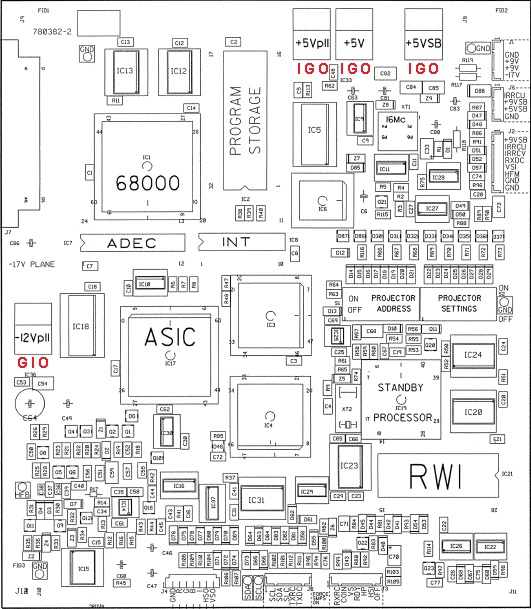
In addition I could see that the main supply voltages are generated on board with voltage regulators. Please refer to the picture attached where I've added their pinout in red (I=Input, G=Ground, O=Output).
Regarding the board that I've sent: This controller was pulled from a working PJ with worn tubes. So it was working with its original software (V6.2 if I recall correctly). I plugged in the newer Software and RWI EPROMs that I purchased from a company in Germany but I wasn't able to test this configuration as I never came around assembling the parts into a new PJ. You could check if I did something wrong when changing the EPROMS (i.e. bent pin) although I was very careful when I did the swap.
Another try could be taking the EPROMs from Your controller and using them in the one I've sent.
Regards,
barclay66
| Description: |
|
| Filesize: |
150.69 KB |
| Viewed: |
4967 Time(s) |
|
|
|
| Back to top |
|
|
km987654
Joined: 25 Jul 2007
Posts: 2874
Location: Australia
TV/Projector: Barco BG809s
|
| Posted: Wed Jul 11, 2012 8:48 am Post subject: |
|
|
| barclay66 wrote: | Hi,
I looked up the controller schematics and I found that there is indeed a watchdog circuitry present. So lock up issues caused by software errors (e.g. infinite loops) shouldn't occur.
In addition I could see that the main supply voltages are generated on board with voltage regulators. Please refer to the picture attached where I've added their pinout in red (I=Input, G=Ground, O=Output).
Regarding the board that I've sent: This controller was pulled from a working PJ with worn tubes. So it was working with its original software (V6.2 if I recall correctly). I plugged in the newer Software and RWI EPROMs that I purchased from a company in Germany but I wasn't able to test this configuration as I never came around assembling the parts into a new PJ. You could check if I did something wrong when changing the EPROMS (i.e. bent pin) although I was very careful when I did the swap.
Another try could be taking the EPROMs from Your controller and using them in the one I've sent.
Regards,
barclay66 |
No bent pins that I could see I will try putting those chips on another board.
|
|
| Back to top |
|
|
km987654
Joined: 25 Jul 2007
Posts: 2874
Location: Australia
TV/Projector: Barco BG809s
|
| Posted: Thu Jul 12, 2012 3:58 am Post subject: |
|
|
| barclay66 wrote: | Hi,
I looked up the controller schematics and I found that there is indeed a watchdog circuitry present. So lock up issues caused by software errors (e.g. infinite loops) shouldn't occur.
In addition I could see that the main supply voltages are generated on board with voltage regulators. Please refer to the picture attached where I've added their pinout in red (I=Input, G=Ground, O=Output).
Regarding the board that I've sent: This controller was pulled from a working PJ with worn tubes. So it was working with its original software (V6.2 if I recall correctly). I plugged in the newer Software and RWI EPROMs that I purchased from a company in Germany but I wasn't able to test this configuration as I never came around assembling the parts into a new PJ. You could check if I did something wrong when changing the EPROMS (i.e. bent pin) although I was very careful when I did the swap.
Another try could be taking the EPROMs from Your controller and using them in the one I've sent.
Regards,
barclay66 |
Just read this post again. There are different versions of this board even though Barco use the same part number. I have found this problem before now when trying to use certain versions of the firmware and RWI on different boards and that is one of the reasons I wanted yours as the chips came with the right board (I thought so) so maybe it cycles endlessly because the board not correct?? I am not too concerned though and will try the boards I have and also check the 5 volts as you point out.
|
|
| Back to top |
|
|
barclay66
Joined: 27 Jun 2011
Posts: 1304
Location: Germany
TV/Projector: Marquee 9500 Ultra
|
| Posted: Thu Jul 12, 2012 7:30 am Post subject: |
|
|
Ok,
I didn't know that. If You want I can send You the original EPROMs that were on the controller. No additional cost involved...
Regards,
barclay66
|
|
| Back to top |
|
|
km987654
Joined: 25 Jul 2007
Posts: 2874
Location: Australia
TV/Projector: Barco BG809s
|
| Posted: Thu Jul 12, 2012 7:37 am Post subject: |
|
|
| barclay66 wrote: | Ok,
I didn't know that. If You want I can send You the original EPROMs that were on the controller. No additional cost involved...
Regards,
barclay66 |
No don't bother I have too many as it is. I haven't been able to check the 5v yet. Perhaps this weekend. There will be the right board somewhere if that doesn't fix it.
|
|
| Back to top |
|
|
km987654
Joined: 25 Jul 2007
Posts: 2874
Location: Australia
TV/Projector: Barco BG809s
|
| Posted: Mon Jul 16, 2012 9:58 am Post subject: |
|
|
| barclay66 wrote: | Hi,
I looked up the controller schematics and I found that there is indeed a watchdog circuitry present. So lock up issues caused by software errors (e.g. infinite loops) shouldn't occur.
In addition I could see that the main supply voltages are generated on board with voltage regulators. Please refer to the picture attached where I've added their pinout in red (I=Input, G=Ground, O=Output).
Regarding the board that I've sent: This controller was pulled from a working PJ with worn tubes. So it was working with its original software (V6.2 if I recall correctly). I plugged in the newer Software and RWI EPROMs that I purchased from a company in Germany but I wasn't able to test this configuration as I never came around assembling the parts into a new PJ. You could check if I did something wrong when changing the EPROMS (i.e. bent pin) although I was very careful when I did the swap.
Another try could be taking the EPROMs from Your controller and using them in the one I've sent.
Regards,
barclay66 |
OK checked the 5V and they are right on 5V so this seems to not be the problem.
I have received a second set of chips so I put those on another control board which had earlier version chips on it just as you did and it performs the same way ie the projector restarts over and over. CPU cycles do stop before each restart. There doesn't seem to be any other indication of a problem that is to say no red LEDs anywhere I can see so it looks like its probably just the wrong control board for this version of the control chip and RWI.
I am running 7.41 with RWI 5.09 and that seems to work fine. I don't know what benefit there is between 7.41 and 7.61 perhaps some can say.
|
|
| Back to top |
|
|
barclay66
Joined: 27 Jun 2011
Posts: 1304
Location: Germany
TV/Projector: Marquee 9500 Ultra
|
| Posted: Tue Jul 17, 2012 8:53 am Post subject: |
|
|
| km987654 wrote: | ...it looks like its probably just the wrong control board for this version of the control chip and RWI.
I am running 7.41 with RWI 5.09 and that seems to work fine. I don't know what benefit there is between 7.41 and 7.61 perhaps some can say. |
Hi,
Can you post some pictures of the two different board styles? Maybe I can dig up some schematics and see what's the real difference. Maybe the newer software uses larger EPROMs and therefore needs an additional address line to be connected (just a guess).
Unfortunately I don't have any information about the 7.41 vs. 7.61 differences...
Regards,
barclay66
|
|
| Back to top |
|
|
km987654
Joined: 25 Jul 2007
Posts: 2874
Location: Australia
TV/Projector: Barco BG809s
|
| Posted: Tue Jul 17, 2012 9:25 am Post subject: |
|
|
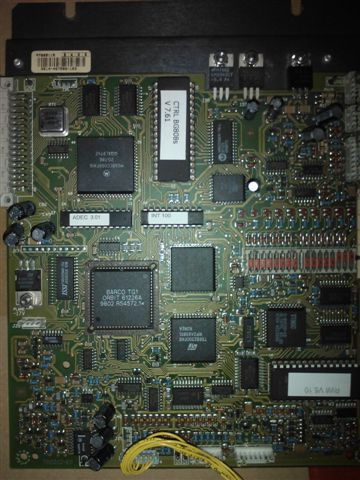
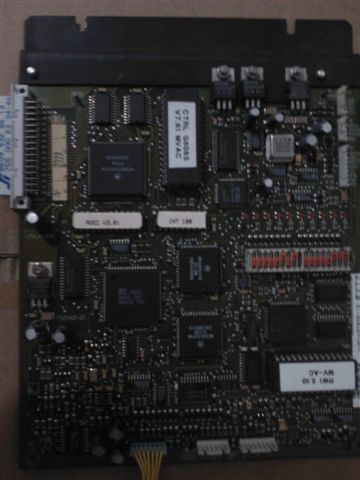
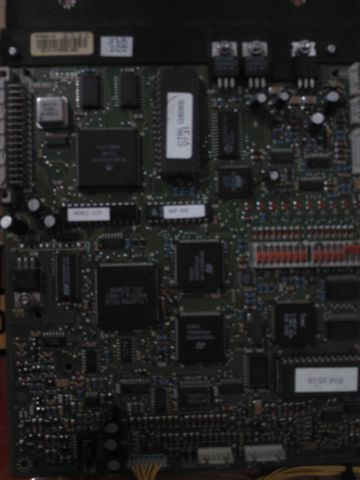
Here are some pictures of three different boards each is a little different but the part number is the same.
| Description: |
|
| Filesize: |
45.4 KB |
| Viewed: |
4848 Time(s) |
|
| Description: |
|
| Filesize: |
28.58 KB |
| Viewed: |
4848 Time(s) |
|
| Description: |
|
| Filesize: |
26.1 KB |
| Viewed: |
4848 Time(s) |
|
|
|
| Back to top |
|
|
barclay66
Joined: 27 Jun 2011
Posts: 1304
Location: Germany
TV/Projector: Marquee 9500 Ultra
|
| Posted: Tue Jul 17, 2012 10:04 am Post subject: |
|
|
Hi,
As far as my research went there are at least two or three revisions. Not only the location of the crystal oscillator (the part with the metal case) changes but its value too. You might find 32MHz and 16MHz respectively.
I compared the controller schematics from a BG1209s (from 1997, oscillator to the left, 16MHz) and a BD808 (from 1994, oscillator to the right, 16MHz) and so far I haven't found any differences in EPROM types and addressing between these two. I'd like to verify this against the BG808s schematics but I haven't been able to locate a copy. I'll be able to verify against the Cine8 schematics which I have a hardcopy of but this will be some time later...
Regards,
barclay66
|
|
| Back to top |
|
|
km987654
Joined: 25 Jul 2007
Posts: 2874
Location: Australia
TV/Projector: Barco BG809s
|
| Posted: Wed Jul 18, 2012 8:42 am Post subject: |
|
|
| barclay66 wrote: | Hi,
As far as my research went there are at least two or three revisions. Not only the location of the crystal oscillator (the part with the metal case) changes but its value too. You might find 32MHz and 16MHz respectively.
I compared the controller schematics from a BG1209s (from 1997, oscillator to the left, 16MHz) and a BD808 (from 1994, oscillator to the right, 16MHz) and so far I haven't found any differences in EPROM types and addressing between these two. I'd like to verify this against the BG808s schematics but I haven't been able to locate a copy. I'll be able to verify against the Cine8 schematics which I have a hardcopy of but this will be some time later...
Regards,
barclay66 |
I have the bg808s schematics. How do I get them to you? They are in hard copy.
|
|
| Back to top |
|
|
barclay66
Joined: 27 Jun 2011
Posts: 1304
Location: Germany
TV/Projector: Marquee 9500 Ultra
|
| Posted: Wed Jul 18, 2012 10:53 am Post subject: |
|
|
| km987654 wrote: | | I have the bg808s schematics. How do I get them to you? They are in hard copy. |
Let me check the Cine8 schematics first (hard copy too). I can scan the page with the board layout and send that to You. If You find that it's different from Yours then we'll see which pages of Your copy are important ones...
Regards,
barclay66
|
|
| Back to top |
|
|
km987654
Joined: 25 Jul 2007
Posts: 2874
Location: Australia
TV/Projector: Barco BG809s
|
| Posted: Thu Jul 19, 2012 9:20 am Post subject: |
|
|
| barclay66 wrote: | | km987654 wrote: | | I have the bg808s schematics. How do I get them to you? They are in hard copy. |
Let me check the Cine8 schematics first (hard copy too). I can scan the page with the board layout and send that to You. If You find that it's different from Yours then we'll see which pages of Your copy are important ones...
Regards,
barclay66 |
I remember buying Cine8 Manual I will look for that.
|
|
| Back to top |
|
|
|
|





