| Author |
Message |
Dertah
Joined: 11 Sep 2010
Posts: 48
Location: Connecticut
|
| Posted: Thu Jun 07, 2012 9:49 pm Post subject: Vidikron Vision One - Loud Pop & trouble focusing blue t |
|
|
Hello All,
My Vidikron Vision One (Marque 9500LC) makes a very loud pop 15 to 20 minutes after I turn it on. The screen goes blank for a moment and then fades back in. It does this every single time and does not pop again until I turn it back on the next day.
It is very scary and sounds like a high voltage discharge. Anyone have any ideas?
Also, I can't get my blue tube to focus very well. Even the menu is difficult to read when it goes to just blue writing when doing the mechanical setup. What could be causing this?
I have a spare 9500 that I could swap parts on.
|
|
| Back to top |
|
 |
Curt Palme
CRT Tech
Joined: 08 Mar 2006
Posts: 24396
Location: Langley, BC
TV/Projector: All of them!
|
| Posted: Thu Jun 07, 2012 10:23 pm Post subject: |
|
|
|
I would not continue running the set. YOu need a new HV lead, do not take a used one from your other set. I've got new ones at $25 incl shipping. Swap the focus board out between the two sets, chances are that's what smoked, and you'll smoke it again if you don't change the blue tube lead. I'd swap all three, since they are all the same age.
|
|
| Back to top |
|
|
Dertah
Joined: 11 Sep 2010
Posts: 48
Location: Connecticut
|
| Posted: Fri Jun 08, 2012 9:18 pm Post subject: |
|
|
|
Thanks Curt - How do I get the HV leads from you? Should I send a PM?
|
|
| Back to top |
|
|
stefuel

Joined: 07 Mar 2006
Posts: 3353
Location: Green Harbor MA USA
|
| Posted: Sat Jun 09, 2012 10:07 am Post subject: |
|
|
Same pair of projectors, different screen name. You are not by chance, a past moderator at AVS???
_________________
Chip
A Barco is only a AmPro with training wheels
Card carrying member of the AVS chain gang.
|
|
| Back to top |
|
|
Curt Palme
CRT Tech
Joined: 08 Mar 2006
Posts: 24396
Location: Langley, BC
TV/Projector: All of them!
|
| Posted: Sat Jun 09, 2012 1:51 pm Post subject: |
|
|
Shoot me an email to curtpalme@shaw.ca
Thanks!
|
|
| Back to top |
|
|
Dertah
Joined: 11 Sep 2010
Posts: 48
Location: Connecticut
|
| Posted: Wed Jun 13, 2012 1:23 am Post subject: |
|
|
stefuel - I used to post some at the AVS forum but I was never a moderator. I was referred here when asking too many CRT tech questions 
|
|
| Back to top |
|
|
Dertah
Joined: 11 Sep 2010
Posts: 48
Location: Connecticut
|
| Posted: Sat Jun 16, 2012 12:35 am Post subject: |
|
|
So I bought 3 HV leads from Curt. Can anyone reccomend a post that shows the best way to replace them? I read a few posts that talked about applying silicone to the joints at the splitter but what about at the tube?
Can I use clear silicone instead of black? Shouldn't make a difference right? I have a tube of GE 100% clear silicone.
What about the discharge? Do I just tap the wire on the frame after I disconnect it from the splitter?
Also, can I do this without taking the tubes out of the PJ?
|
|
| Back to top |
|
|
dturco

Joined: 06 Feb 2009
Posts: 3778
Location: Eastern Shore Maryland
TV/Projector: Runco DLP VX-3000i Marquee 9500 parts doner
|
| Posted: Sat Jun 16, 2012 12:53 am Post subject: |
|
|
| Dertah wrote: | So I bought 3 HV leads from Curt. Can anyone reccomend a post that shows the best way to replace them? I read a few posts that talked about applying silicone to the joints at the splitter but what about at the tube?
Can I use clear silicone instead of black? Shouldn't make a difference right? I have a tube of GE 100% clear silicone.
What about the discharge? Do I just tap the wire on the frame after I disconnect it from the splitter?
Also, can I do this without taking the tubes out of the PJ? |
Here you go
http://www.curtpalme.com/HV_Lead_Removal.shtm
_________________
Firefly rules. Can't stop the signal.
http://www.hulu.com/firefly
|
|
| Back to top |
|
|
Dertah
Joined: 11 Sep 2010
Posts: 48
Location: Connecticut
|
| Posted: Sat Sep 08, 2012 10:13 pm Post subject: |
|
|
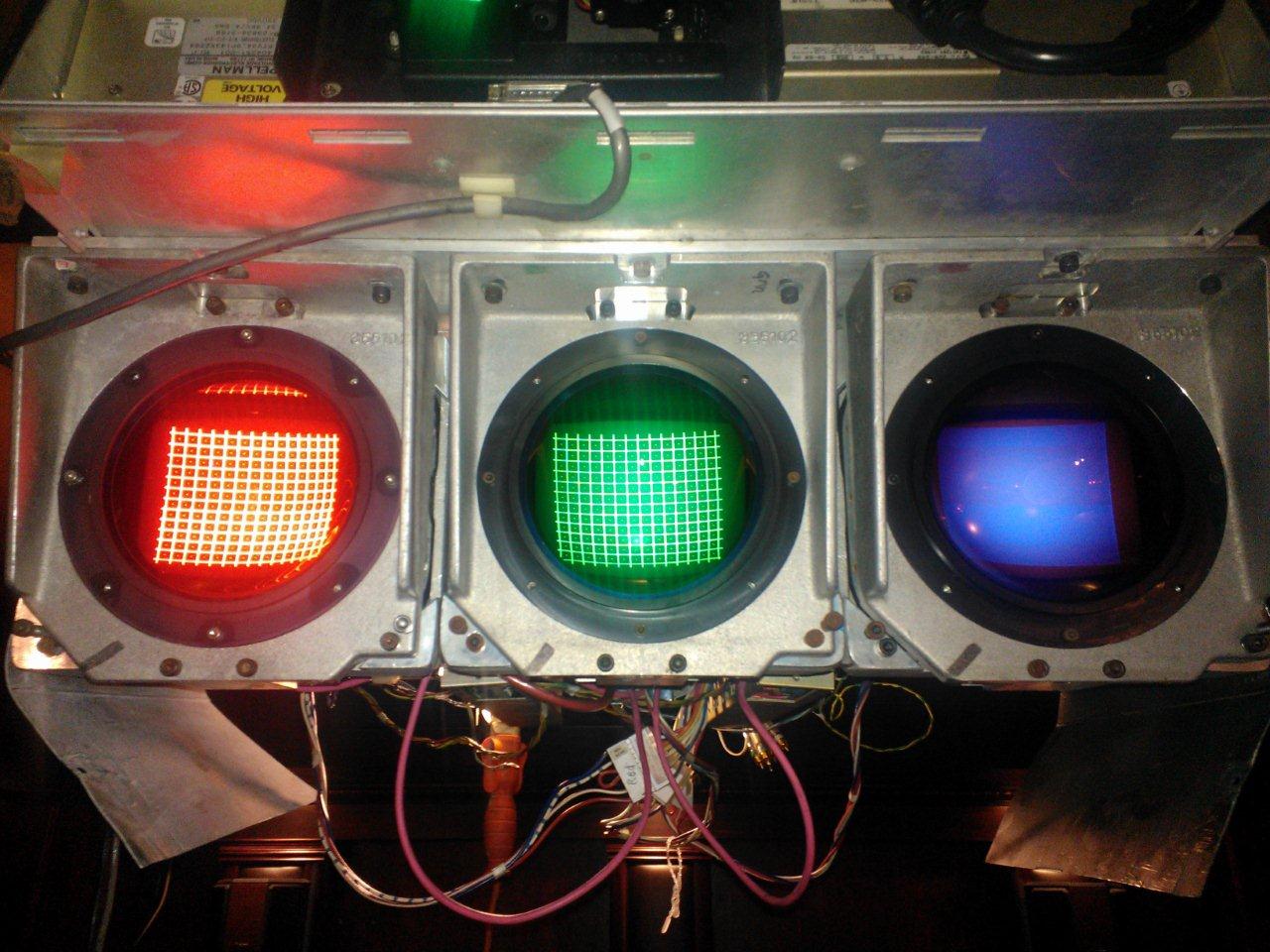
Ok so I re-did the HV leads to each tube and I have the entire thing back together. Now I have another problem with the blue tube. It lights up but has no image. Attached is a picture of what it looks like with the grid pattern displayed. I have a spare PJ and hace replaced the below parts with no change:
Blue Neck board
HDM
Focus Board
Mini RCA cable to Blue Neck board
Any suggestions?
[img][/img]
| Description: |
|
| Filesize: |
185.35 KB |
| Viewed: |
6508 Time(s) |
|
|
|
| Back to top |
|
|
Tim in Phoenix

Joined: 21 Oct 2006
Posts: 4409
Location: Phoenix
|
| Posted: Sat Sep 08, 2012 11:52 pm Post subject: |
|
|
Hello
Did you turn blue drive way down? Drive should be 30 to 45. Also, move the mini coax from the green neckboard onto the blue neckboard; lower the contrast to 30 for this.
.
|
|
| Back to top |
|
|
Dertah
Joined: 11 Sep 2010
Posts: 48
Location: Connecticut
|
| Posted: Sun Sep 09, 2012 12:40 am Post subject: |
|
|
|
Thanks Tim. I will try switching with the Green mini RCA. What is drive?
|
|
| Back to top |
|
|
Dertah
Joined: 11 Sep 2010
Posts: 48
Location: Connecticut
|
| Posted: Sun Sep 09, 2012 1:02 am Post subject: |
|
|
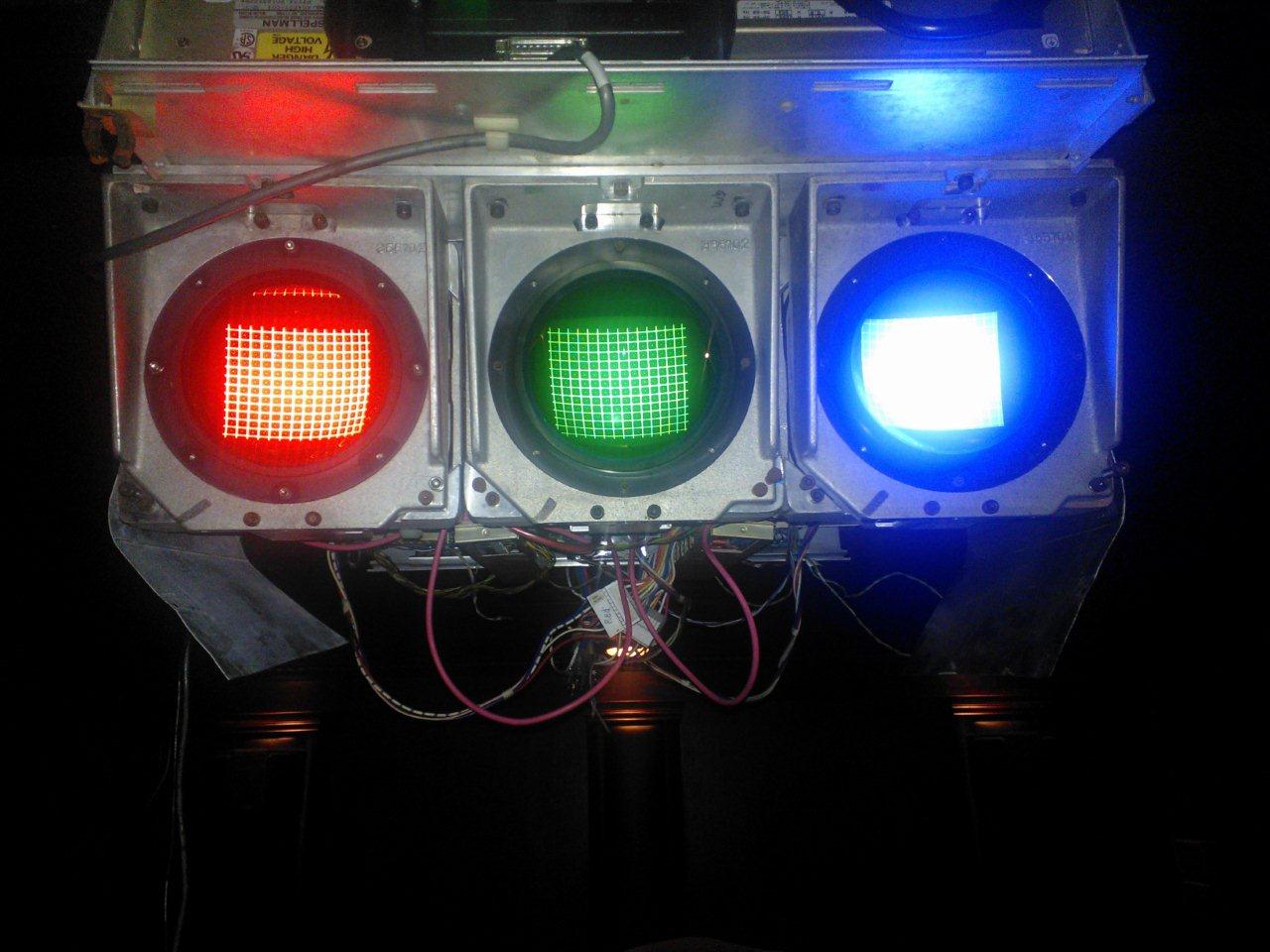
So I went down to switch the RCA mini and turned the PJ on to lower the contrast. Voila, the blue tube turned on and showed the grid. But it seems way too bright in the background. I don't have a lot of experience looking at these with the lenses off but there is not much contrast between the grid and the rest of the tube face. The attached picture shows what I mean. I just replaced the battery so the settings should all be default.
| Description: |
|
| Filesize: |
138.02 KB |
| Viewed: |
6497 Time(s) |
|
|
|
| Back to top |
|
|
Tim in Phoenix
Joined: 21 Oct 2006
Posts: 4409
Location: Phoenix
|
| Posted: Sun Sep 09, 2012 1:36 am Post subject: |
|
|
Hello
Your G2 setting for blue might be too high, that is okay.
Put the cables back where they started, and try a gray scale setup for 6500K as described in Tech Tip One: http://www.etechvideo.com/techtips.htm
.
|
|
| Back to top |
|
|
Dertah
Joined: 11 Sep 2010
Posts: 48
Location: Connecticut
|
| Posted: Sun Sep 30, 2012 2:34 pm Post subject: |
|
|
|
I followed Tim's instructions in Tech Tip One and put in his typical G2 and drive settings. My Green is now way too bright. I learned early on that my green tube is different from the others. It is a Barco type tube for green, the G2 is on Pin 6 and I have a modded neckboard for green to accomadate this. Are the typical G2 and drive settings for Barco type tubes different? I don't recall what they were set at before the change but I know they were different.
|
|
| Back to top |
|
|
draganm

Joined: 08 Mar 2006
Posts: 8990
Location: Colorado
|
| Posted: Sun Sep 30, 2012 3:30 pm Post subject: |
|
|
| Dertah wrote: | | I followed Tim's instructions in Tech Tip One and put in his typical G2 and drive settings. My Green is now way too bright. I learned early on that my green tube is different from the others. It is a Barco type tube for green, the G2 is on Pin 6 and I have a modded neckboard for green to accomadate this. Are the typical G2 and drive settings for Barco type tubes different? I don't recall what they were set at before the change but I know they were different. |
the barco version P19 tube tube is the same tube P19 tube as marquee with simply a different G2 location. it's probably not a Barco tube but a PT-22 LUG tube which has a smaller aperture in the electron gun. This makes the tube respond very differently to G2 adjustments. at this point without calibration equipment and experience it will be trial and error.
one or 2 clicks is all it takes to change the output, so make small adjustments.
|
|
| Back to top |
|
|
Dertah
Joined: 11 Sep 2010
Posts: 48
Location: Connecticut
|
| Posted: Mon Oct 01, 2012 2:52 am Post subject: |
|
|
|
After a few hours of trial and error I think I have a pretty good picture. Many thanks to all of you. There is a guy here in Connecticut who used to be the regional tech for Vidikron. I may hire him to do the entire setup. But for now I am very happy.
|
|
| Back to top |
|
|
|
|




