| Author |
Message |
silverter
Joined: 23 Dec 2011
Posts: 12
Location: Ulm, Germany
|
| Posted: Wed Mar 07, 2012 8:20 pm Post subject: Setup issues with Barco Cine 7 after repair, please help |
|
|
Hello again,
I finally got my Barco Cine 7 repaired, the focus block got replaced as it was faulty and there was no image being displayed. However, I have some problems setting the projector up properly and might need some help from you guys.
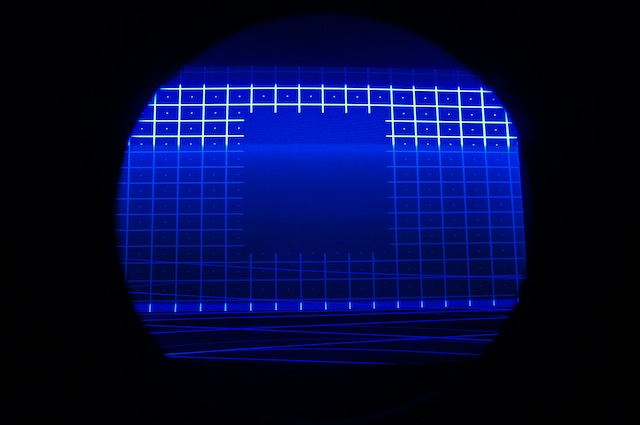
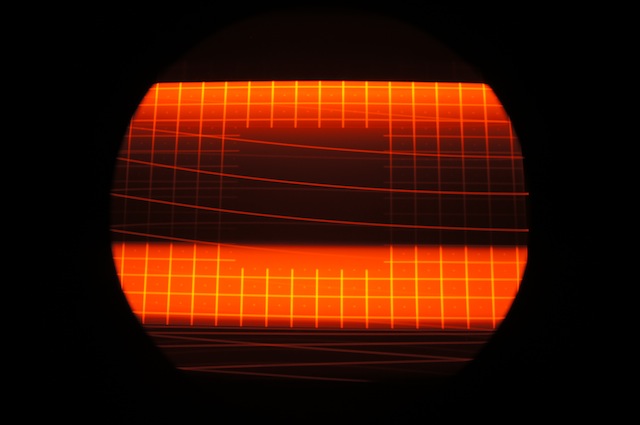
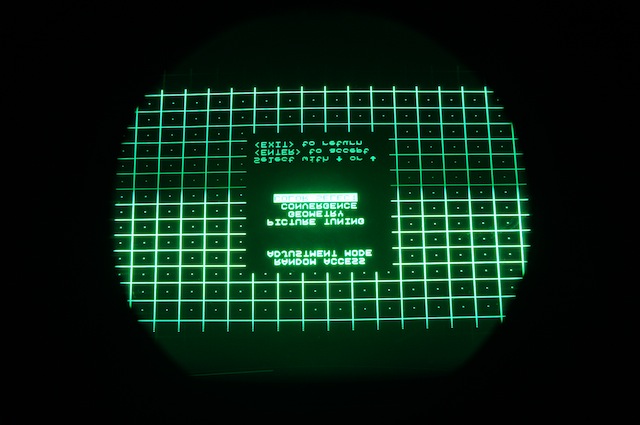
If you look at the photos I've attached, my problem is that the RED and BLUE tubes are too bright and I'm not able to correct that. When I look on to the face of the CRT's, on the GREEN tube, only the lines and dots are visible, the rest (background) ist pitched black. This is not the case for the BLUE and RED tube unfortunately. I believe on the RED and GREEN tube, only the dots and lines should be visible and the backdroung should be black.
On a side note, this is the internal test pattern of the barco cine 7, I have no source attached to it.
Can someone let me know what I need to adjust in order to get his set properly?
Thank you for your help.
Best Regards,
| Description: |
|
| Filesize: |
48.71 KB |
| Viewed: |
4173 Time(s) |
|
| Description: |
|
| Filesize: |
41.88 KB |
| Viewed: |
4173 Time(s) |
|
| Description: |
|
| Filesize: |
66.84 KB |
| Viewed: |
4173 Time(s) |
|
|
|
| Back to top |
|
 |
r.bauer
Joined: 08 Apr 2006
Posts: 280
Location: The Netherlands
|
| Posted: Wed Mar 07, 2012 11:14 pm Post subject: |
|
|
Looks like the G2 needs to be adjusted on all three tubes.
It has a combined focus and G2 block, so after replacement focus and G2 needs te be re-adjusted.
http://www.curtpalme.com/Barco701_Layout5.shtm
|
|
| Back to top |
|
|
silverter
Joined: 23 Dec 2011
Posts: 12
Location: Ulm, Germany
|
| Posted: Thu Mar 08, 2012 2:24 am Post subject: |
|
|
Thanks a lot for the hint. I'm about to proceed to do that.
In the installation manual, it says I need to go into the service menu into the G2 Adjustments then I have to turn the G2 pots until the green leds go out. I haven't proceeded with it yet due to the warning concerning the 35kv around those pots...
Apart from killing myself, is there anything I could damage on the projector while turning these pots? I really just need to turn them until the single LEDs (the ones located underneath the green tubes) go out ? No need to look into the CRT ?
Thanks for your help.
Kind regards,
|
|
| Back to top |
|
|
jantje112
Joined: 17 Jul 2006
Posts: 328
|
| Posted: Thu Mar 08, 2012 7:03 am Post subject: |
|
|
| silverter wrote: | Thanks a lot for the hint. I'm about to proceed to do that.
In the installation manual, it says I need to go into the service menu into the G2 Adjustments then I have to turn the G2 pots until the green leds go out. I haven't proceeded with it yet due to the warning concerning the 35kv around those pots...
Apart from killing myself, is there anything I could damage on the projector while turning these pots? I really just need to turn them until the single LEDs (the ones located underneath the green tubes) go out ? No need to look into the CRT ?
Thanks for your help.
Kind regards, |
I always used a plastic piece for the adjustments in the projector. If you don't poke around in other parts you should be safe. But a crt always has some very dangerous areas in the projector.
|
|
| Back to top |
|
|
CasetheCorvetteman

Joined: 09 Nov 2008
Posts: 6326
Location: Australia
|
| Posted: Thu Mar 08, 2012 10:50 am Post subject: |
|
|
|
Yes, lots of damage to the tube faces if you dont turn them down abit, itll burn the phosphor if youve got it up that high.
|
|
| Back to top |
|
|
silverter
Joined: 23 Dec 2011
Posts: 12
Location: Ulm, Germany
|
| Posted: Thu Mar 08, 2012 3:21 pm Post subject: |
|
|
Hello again,
I proceeded with the G2 adjustments on my PJ as mentioned above and all went well. The picture on the face of the CRT is now better that before, BUT (why oh why) the LEDs would not stay OFF.
I had turned those pots on the G2 adjusments untill they went off; it stayed like that... I proceeded to re-adjust the focus thereafter and all went well. But to my dismay, after a while, the three LEDs went on again ... What am I doing wrong ? Aren't they supposed to stay off ?
Am I supposed to re-adjust the G2 again ? I'm confused...
Thanks for your help.
|
|
| Back to top |
|
|
r.bauer
Joined: 08 Apr 2006
Posts: 280
Location: The Netherlands
|
| Posted: Thu Mar 08, 2012 4:25 pm Post subject: |
|
|
|
Yes, they are supposed to stay off, but due to drift they can turn on again. That's why you should check the adjustment after the set has been powerd on for at least an hour. Now you're done.
|
|
| Back to top |
|
|
silverter
Joined: 23 Dec 2011
Posts: 12
Location: Ulm, Germany
|
| Posted: Thu Mar 08, 2012 9:18 pm Post subject: |
|
|
Ok thank you for that confirmation, I'll try that later and hopefully it'll be fine.
The other issue I have is color calibration. Maybe not related to the G2 adjustments, maybe related, not sure but I've realized that after the repair (replacement of the focus bloc) the colors are not as they were before.
I have the barco connected to a HTPCc and before it failed, I had set the color scheme to 9500 °K and I liked (I'm trusting my eyes) the way the colors looked then. I have the impression that they've change now. Can this be related to the G2 adjustments ?
Where do I find any instructions on how to calibrate the colors on this set. Don't get me wrong, I can't afford to get a specialist around to run the color calibration for me. If there are any DYI instructions without expensive gear, thank you for guiding me.
Thanks for the help.
Best regards
|
|
| Back to top |
|
|
r.bauer
Joined: 08 Apr 2006
Posts: 280
Location: The Netherlands
|
| Posted: Fri Mar 09, 2012 4:24 pm Post subject: |
|
|
Judging the picture just by your eye and thinking "I like this" has nothing to to with calibrating. If you want to calibrate yourself, there is an entire board about calibrating.
Before you calibrate, set the G2 accordingly:
- Choose 6500K color temperature (So the Cut-off and Gain are set to factory defaults)
- Adjust G2
- Choose Custom color temperature and calibrate your projector.
|
|
| Back to top |
|
|
silverter
Joined: 23 Dec 2011
Posts: 12
Location: Ulm, Germany
|
| Posted: Fri Mar 09, 2012 5:26 pm Post subject: |
|
|
Thank you for the hint. I'll proceed as suggested and see if I'm satisfied with the results. I believe that's all it counts  Otherwise, I'll proceed to the board on calibration and read more on it there... Otherwise, I'll proceed to the board on calibration and read more on it there...
best regards,
|
|
| Back to top |
|
|
silverter
Joined: 23 Dec 2011
Posts: 12
Location: Ulm, Germany
|
| Posted: Mon Mar 12, 2012 7:18 am Post subject: |
|
|
I've done my homework and finally got the set up an running to my satisfaction. Thank you again all for the hints and help.
Regards.
|
|
| Back to top |
|
|
|
|




