| Author |
Message |
AnalogRocks
Forum Moderator

Joined: 08 Mar 2006
Posts: 26706
Location: Toronto, Ontario, Canada
TV/Projector: Sony 1252Q, AMPRO 4000G
|
| Posted: Fri Oct 19, 2007 2:21 am Post subject: |
|
|
Scott, is there a way in the video driver to adjust this? I know there's front and back porch settings that affect the sides but what about the top and bottom? I have a Geforce 8600 card that has the powerstrip functionality built into the driver (supposedly-the jury's still out on whether or not it works as well as Powerstrip or indeed at all )
My temporary fix for now is to use the 4 way arrow keys and bump the picture down in the raster. However there's not enough adjustment to get the whole 4:3 desktop out of the 'flag'.
_________________
Tech support for nothing
CRT.
HD done right!
|
|
| Back to top |
|
 |
tse
Joined: 03 May 2006
Posts: 1014
Location: Sweatbucket, Fl.
|
| Posted: Fri Oct 19, 2007 12:44 pm Post subject: |
|
|
It would be best to fix the problem with the GeForce card, if possible. I am not familiar with it but maybe there is a way to change the way the sync works during the vertical blanking interval. The card might stop outputting horizontal sync during vertical blanking or it might double the horizontal sync frequency. One causes the projector's horizontal oscillator to begin slowing in frequency, the other causes an increase. Then after the blanking interval the h sync returns to normal and the oscillator moves back to the correct phase.
Look for sync options and try changing those.
I hate to tell you to start making adjustments to the projector. It takes a video generator that can be set for h sync from 15KHz to something like 80KHz in 5 or 10KHz steps to align the horizontal processor card.
Scott
_________________
"Were we directed from Washington when to sow and when to reap, we would soon want bread."
Thomas Jefferson
|
|
| Back to top |
|
|
AnalogRocks
Forum Moderator
Joined: 08 Mar 2006
Posts: 26706
Location: Toronto, Ontario, Canada
TV/Projector: Sony 1252Q, AMPRO 4000G
|
| Posted: Sat Oct 20, 2007 2:30 am Post subject: |
|
|
| tse wrote: | It would be best to fix the problem with the GeForce card, if possible. I am not familiar with it but maybe there is a way to change the way the sync works during the vertical blanking interval. The card might stop outputting horizontal sync during vertical blanking or it might double the horizontal sync frequency. One causes the projector's horizontal oscillator to begin slowing in frequency, the other causes an increase. Then after the blanking interval the h sync returns to normal and the oscillator moves back to the correct phase.
Look for sync options and try changing those.
I hate to tell you to start making adjustments to the projector. It takes a video generator that can be set for h sync from 15KHz to something like 80KHz in 5 or 10KHz steps to align the horizontal processor card.
Scott |
Yikes. Ok I'll play with the GeForce driver this weekend and see what I can do.
Thanks again. 
_________________
Tech support for nothing
CRT.
HD done right!
|
|
| Back to top |
|
|
AnalogRocks
Forum Moderator
Joined: 08 Mar 2006
Posts: 26706
Location: Toronto, Ontario, Canada
TV/Projector: Sony 1252Q, AMPRO 4000G
|
| Posted: Sat Dec 15, 2007 8:10 pm Post subject: |
|
|
Just a little update.
I finaly tried setting up the GeForce 8600 card for 1080i/60. It really seemed to piss of this Ampro. The top of the screen is bending to the left just as it did at 1024x768 at 72Hz. 960P it didn't like either. It seems anything over 1024x768 really upsets this beast.
Any sugestions? (quiet Pete  ) )
_________________
Tech support for nothing
CRT.
HD done right!
|
|
| Back to top |
|
|
stefuel

Joined: 07 Mar 2006
Posts: 3353
Location: Green Harbor MA USA
|
| Posted: Sat Dec 15, 2007 9:46 pm Post subject: |
|
|
| AnalogRocks wrote: | Just a little update.
I finaly tried setting up the GeForce 8600 card for 1080i/60. It really seemed to piss of this Ampro. The top of the screen is bending to the left just as it did at 1024x768 at 72Hz. 960P it didn't like either. It seems anything over 1024x768 really upsets this beast.
Any sugestions? (quiet Pete ) |
Have you ever had success at inputting a HD resolution with it. I had 2 4000G's and only one of them wouls take a tri-level sync source. If it's a older 4000G you might need a later version RGB 1 board that does tri level sync. Just a thought.
_________________
Chip
A Barco is only a AmPro with training wheels
Card carrying member of the AVS chain gang.
|
|
| Back to top |
|
|
AnalogRocks
Forum Moderator
Joined: 08 Mar 2006
Posts: 26706
Location: Toronto, Ontario, Canada
TV/Projector: Sony 1252Q, AMPRO 4000G
|
| Posted: Sat Dec 15, 2007 11:29 pm Post subject: |
|
|
Hi Chip,
Hmmmm nope I don't remember ever running this at anything much more than 1024 x 768. I think this one was manufactured in 1992. What other models had the board in question?
_________________
Tech support for nothing
CRT.
HD done right!
|
|
| Back to top |
|
|
tse
Joined: 03 May 2006
Posts: 1014
Location: Sweatbucket, Fl.
|
| Posted: Sun Dec 16, 2007 5:44 pm Post subject: |
|
|
If you are connecting 5-wire sync (RGBHV) to the projector there won't be any tri-level sync involved. If your connection is 3-wire (RGB) wiyth sync-on-green then you will most likely have problems from tri-level sync with HD video. Does your video card show the video parameters when you set it for different resolutions? Things like number of front porch pixels or lines, number of displayed pixels per line? Stuff like that?
Scott
_________________
"Were we directed from Washington when to sow and when to reap, we would soon want bread."
Thomas Jefferson
|
|
| Back to top |
|
|
AnalogRocks
Forum Moderator
Joined: 08 Mar 2006
Posts: 26706
Location: Toronto, Ontario, Canada
TV/Projector: Sony 1252Q, AMPRO 4000G
|
| Posted: Sun Dec 16, 2007 7:11 pm Post subject: |
|
|
Yes the GeForce 8600 card has it's own powerstrip clone that shows the porces etc...
My connection is RGBS with the H+V T'd together. I have the V input on the other Quad card but the projector won't sync with that.
_________________
Tech support for nothing
CRT.
HD done right!
|
|
| Back to top |
|
|
tse
Joined: 03 May 2006
Posts: 1014
Location: Sweatbucket, Fl.
|
| Posted: Sun Dec 16, 2007 7:49 pm Post subject: |
|
|
| Quote: | | My connection is RGBS with the H+V T'd together |
That might be causing a problem. The picture rolls if you conect v sync to the decoder card? Which RGB bd do you have? Some have a jumper that helps with this.
Scott
_________________
"Were we directed from Washington when to sow and when to reap, we would soon want bread."
Thomas Jefferson
|
|
| Back to top |
|
|
AnalogRocks
Forum Moderator
Joined: 08 Mar 2006
Posts: 26706
Location: Toronto, Ontario, Canada
TV/Projector: Sony 1252Q, AMPRO 4000G
|
| Posted: Mon Dec 17, 2007 3:59 am Post subject: |
|
|
I'll check and let you know.
_________________
Tech support for nothing
CRT.
HD done right!
|
|
| Back to top |
|
|
AnalogRocks
Forum Moderator
Joined: 08 Mar 2006
Posts: 26706
Location: Toronto, Ontario, Canada
TV/Projector: Sony 1252Q, AMPRO 4000G
|
| Posted: Tue Dec 18, 2007 2:32 am Post subject: |
|
|
Ok the RGBS card has the following stickers on it:
Main board: 4194-25A
DaughterBoard: 4228-09 X1
_________________
Tech support for nothing
CRT.
HD done right!
|
|
| Back to top |
|
|
tse
Joined: 03 May 2006
Posts: 1014
Location: Sweatbucket, Fl.
|
| Posted: Wed Dec 19, 2007 1:49 am Post subject: |
|
|
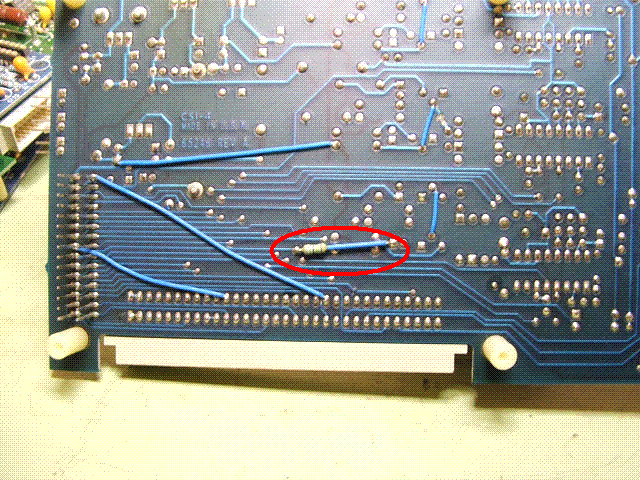
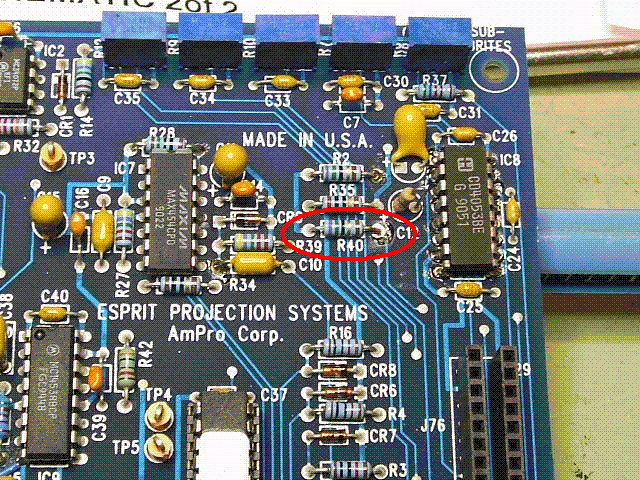
Ampro assemblies have a 8XXXX number. The bare circuit boards have a 65XXX number. Your numbers are the serial number and revision level. The V sync input is terminated with a 75 ohm resistor. If you remove it sometimes that cures sync problems. Attached are two pics of the termination resistor on different boards. The first is on the 80881 RGB bd (from 4200X). The second is on the 81118 sync bd (from 2000HD). If one of these matches your bd remove the resistor and see if the v sync on the decoder bd works. It might cure the flagging problem.
Scott
| Description: |
|
| Filesize: |
104.72 KB |
| Viewed: |
6875 Time(s) |
|
| Description: |
|
| Filesize: |
139.23 KB |
| Viewed: |
6875 Time(s) |
|
_________________
"Were we directed from Washington when to sow and when to reap, we would soon want bread."
Thomas Jefferson
|
|
| Back to top |
|
|
AnalogRocks
Forum Moderator
Joined: 08 Mar 2006
Posts: 26706
Location: Toronto, Ontario, Canada
TV/Projector: Sony 1252Q, AMPRO 4000G
|
| Posted: Wed Dec 19, 2007 3:20 am Post subject: |
|
|
Ahhh ok I'll get a better look in there. I think I remember the 8XXXX number you are refering to. It's screened on the board isn't it?
_________________
Tech support for nothing
CRT.
HD done right!
|
|
| Back to top |
|
|
papalek
Joined: 08 Mar 2006
Posts: 1536
Location: Longs SC
|
| Posted: Wed Dec 19, 2007 3:28 am Post subject: |
|
|
| AnalogRocks wrote: | | Ahhh ok I'll get a better look in there. I think I remember the 8XXXX number you are refering to. It's screened on the board isn't it? |
No, it is on a white sticker.
_________________
My current list of PJ's AmPro 1 1/2-4600,4200, 1/2-3600,2600.
I do love my AmPro's
|
|
| Back to top |
|
|
AnalogRocks
Forum Moderator
Joined: 08 Mar 2006
Posts: 26706
Location: Toronto, Ontario, Canada
TV/Projector: Sony 1252Q, AMPRO 4000G
|
| Posted: Wed Dec 19, 2007 4:16 am Post subject: |
|
|
I hope the sticker's still there.
_________________
Tech support for nothing
CRT.
HD done right!
|
|
| Back to top |
|
|
AnalogRocks
Forum Moderator
Joined: 08 Mar 2006
Posts: 26706
Location: Toronto, Ontario, Canada
TV/Projector: Sony 1252Q, AMPRO 4000G
|
| Posted: Thu Dec 20, 2007 2:37 am Post subject: |
|
|
Ok found it. What a difference when you open the blinds and look in the daylight.
RGBS card 80881
Daughter Board 80998
_________________
Tech support for nothing
CRT.
HD done right!
|
|
| Back to top |
|
|
AnalogRocks
Forum Moderator
Joined: 08 Mar 2006
Posts: 26706
Location: Toronto, Ontario, Canada
TV/Projector: Sony 1252Q, AMPRO 4000G
|
| Posted: Sun Dec 23, 2007 12:17 am Post subject: |
|
|
Uhhh oh, the dreaded HVPS restart is happening again. Curt sent me out 2 neck cards to test with, I was thinking the previous two may have been a problem. I swaped every combination but still the same results. No start. I hear the high voltage come up but then it goes into restart.
I tried disconnecting the neck boards both G2 and G1 and the edge connectors. The HVPS still went into shut down.
I did notice the red power light on the LVPS was not lit when I had the HVPS's wires connected inside the set. However when I disconnected the HVPS's wires and turned the set back on the red power light beside the mains rocker switch illuminated.
Sincerely from Ampro hell,
~AR~
_________________
Tech support for nothing
CRT.
HD done right!
|
|
| Back to top |
|
|
macgyver655
Joined: 22 Aug 2007
Posts: 8508
|
| Posted: Tue Dec 25, 2007 2:44 pm Post subject: |
|
|
|
I see there is a 4000G with remote for 350.00 in ottawa is you need parts.
|
|
| Back to top |
|
|
Fujifrontier

Joined: 20 Oct 2007
Posts: 354
Location: San Antonio, Texas
|
| Posted: Tue Dec 25, 2007 3:01 pm Post subject: |
|
|
Time to get a nice Sony. 
|
|
| Back to top |
|
|
AnalogRocks
Forum Moderator
Joined: 08 Mar 2006
Posts: 26706
Location: Toronto, Ontario, Canada
TV/Projector: Sony 1252Q, AMPRO 4000G
|
| Posted: Tue Dec 25, 2007 8:39 pm Post subject: |
|
|
I have a nice Sony. Just thought I'd try an Ampro. So far not good.
Merry Christmas 
_________________
Tech support for nothing
CRT.
HD done right!
|
|
| Back to top |
|
|
|
|




