| Author |
Message |
tse
Joined: 03 May 2006
Posts: 1014
Location: Sweatbucket, Fl.
|
| Posted: Tue Apr 03, 2007 12:46 am Post subject: |
|
|
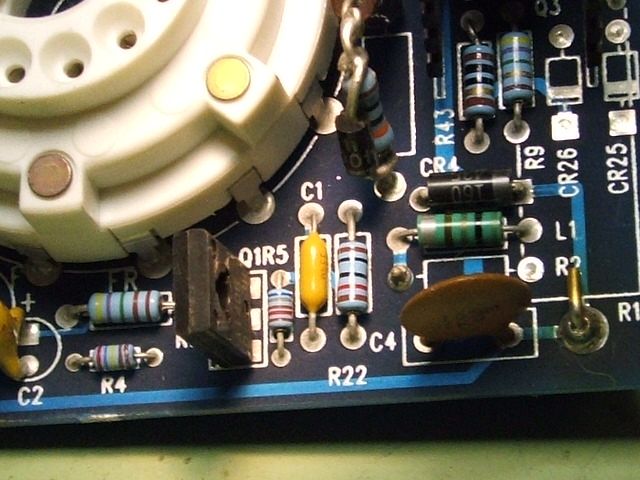
The blanking signal is common to all three cards so it it works some of the cards it's probably ok. There is a blanking circuit on each CRT card that drives the G-1. The red card looks like it might have something wrong with it's blanking circuit. Hmmm, the streaking issue. Does that only happen with the green card? The only thing I remember that causes that is C1 on the CRT card. Older ones have a small ceramic cap of 0.01uF. It will be about half the size of the one in the pic. Numbers on it will be 103. Later ones had a bigger ceramic cap like the one in the pic. It's 0.33uF Numbers on it will be 334.
Scott
| Description: |
|
| Filesize: |
70.35 KB |
| Viewed: |
6852 Time(s) |
|
_________________
"Were we directed from Washington when to sow and when to reap, we would soon want bread."
Thomas Jefferson
|
|
| Back to top |
|
 |
AnalogRocks
Forum Moderator

Joined: 08 Mar 2006
Posts: 26706
Location: Toronto, Ontario, Canada
TV/Projector: Sony 1252Q, AMPRO 4000G
|
| Posted: Wed Apr 04, 2007 11:52 pm Post subject: |
|
|
Alright I've swapped in the 2000 convergence boards and now the set won't power up. If I do a 30 CODE I get -25 volts Hi. The two 25 volt lights on the LV powersupply stay lit after I unplug the power.
Did I miss something?
_________________
Tech support for nothing
CRT.
HD done right!
|
|
| Back to top |
|
|
AnalogRocks
Forum Moderator
Joined: 08 Mar 2006
Posts: 26706
Location: Toronto, Ontario, Canada
TV/Projector: Sony 1252Q, AMPRO 4000G
|
| Posted: Wed Apr 04, 2007 11:53 pm Post subject: |
|
|
| tse wrote: | The blanking signal is common to all three cards so it it works some of the cards it's probably ok. There is a blanking circuit on each CRT card that drives the G-1. The red card looks like it might have something wrong with it's blanking circuit. Hmmm, the streaking issue. Does that only happen with the green card? The only thing I remember that causes that is C1 on the CRT card. Older ones have a small ceramic cap of 0.01uF. It will be about half the size of the one in the pic. Numbers on it will be 103. Later ones had a bigger ceramic cap like the one in the pic. It's 0.33uF Numbers on it will be 334.
Scott |
Is that a bipolar cap? I was just wondering if it matters how it's soldered in the circuit.
_________________
Tech support for nothing
CRT.
HD done right!
|
|
| Back to top |
|
|
tse
Joined: 03 May 2006
Posts: 1014
Location: Sweatbucket, Fl.
|
| Posted: Thu Apr 05, 2007 12:40 am Post subject: |
|
|
| AnalogRocks wrote: | Alright I've swapped in the 2000 convergence boards and now the set won't power up. If I do a 30 CODE I get -25 volts Hi. The two 25 volt lights on the LV powersupply stay lit after I unplug the power.
Did I miss something? |
What do you mean by won't power up? It sounds like the SMPS is running as the -25V comes from it. When the 25V LEDs stay lit it is because there is a very light load on those rails. Most of the 25V power goes to the registration amps. Make sure everything is plugged in right.
Scott
_________________
"Were we directed from Washington when to sow and when to reap, we would soon want bread."
Thomas Jefferson
|
|
| Back to top |
|
|
tse
Joined: 03 May 2006
Posts: 1014
Location: Sweatbucket, Fl.
|
| Posted: Thu Apr 05, 2007 12:45 am Post subject: |
|
|
| AnalogRocks wrote: | | tse wrote: | The blanking signal is common to all three cards so it it works some of the cards it's probably ok. There is a blanking circuit on each CRT card that drives the G-1. The red card looks like it might have something wrong with it's blanking circuit. Hmmm, the streaking issue. Does that only happen with the green card? The only thing I remember that causes that is C1 on the CRT card. Older ones have a small ceramic cap of 0.01uF. It will be about half the size of the one in the pic. Numbers on it will be 103. Later ones had a bigger ceramic cap like the one in the pic. It's 0.33uF Numbers on it will be 334.
Scott |
Is that a bipolar cap? I was just wondering if it matters how it's soldered in the circuit. |
It is non polarized. About any ceramic or plastic cap would work. Even polarized if you put + side towards tube cathode. Value is not critical. 0.33 to a couple of uF is ok. There is only a volt or so across it so that isn't critical, either. Leave the 0.01uF cap in there. Just solder bigger one across.
Scott
_________________
"Were we directed from Washington when to sow and when to reap, we would soon want bread."
Thomas Jefferson
|
|
| Back to top |
|
|
AnalogRocks
Forum Moderator
Joined: 08 Mar 2006
Posts: 26706
Location: Toronto, Ontario, Canada
TV/Projector: Sony 1252Q, AMPRO 4000G
|
| Posted: Thu Apr 05, 2007 2:26 am Post subject: |
|
|
I took the whole convergence tray apart and put the origional 4000G convergence power supply back in. I also put all the origional 4000 convergence boards back in except the one that handles the blanking. At least the error went away the tubes lit but with only a horizontal line at the bottom ( looking into the lenses)
I also tried for the help menu. All I got was a scambled green.
THen I smelt some magic burning smell so I shut it down.
I'll put the origional stuff ( all of it )back in tomorow.
the -25 error was gone.
_________________
Tech support for nothing
CRT.
HD done right!
|
|
| Back to top |
|
|
AnalogRocks
Forum Moderator
Joined: 08 Mar 2006
Posts: 26706
Location: Toronto, Ontario, Canada
TV/Projector: Sony 1252Q, AMPRO 4000G
|
| Posted: Mon Apr 09, 2007 4:57 am Post subject: |
|
|
Right.
I put almost all of the origional stuff back in. With the exception of one of the small boards. Not sure of the function but there are 3 side by each.
I bought the movie 'Crank' that's Grand Theft Auto come to life. That movie is great!
I pushed down on all the chips on the origional convergence board. The thin dark line seems to be gone. The power supplies were running cooler. However about 10 minutes before the end of the movie there was a 'pop' and the blanking on the left side jumped over by 3 inches. Although on the remote it still said 29%.
I'll tear it down tomorow and see if that convergence board poped a capacitor or something.
Anything else I should look for?
Oh yeah and the red neck card still has the diagonal lines. I noticed the Orange G2 wire only has ONE strand soldered to the neck card. Would this cause a problem?
_________________
Tech support for nothing
CRT.
HD done right!
|
|
| Back to top |
|
|
AnalogRocks
Forum Moderator
Joined: 08 Mar 2006
Posts: 26706
Location: Toronto, Ontario, Canada
TV/Projector: Sony 1252Q, AMPRO 4000G
|
| Posted: Mon Apr 09, 2007 11:08 pm Post subject: |
|
|
Ok took it all apart and found no burnt anything.
I'm stumped as to why it would do that??
Maybe a heat issue? I had the cover down while watching the movie to keep the fan noise down a little.
EDIT: Spelling
_________________
Tech support for nothing
CRT.
HD done right!
Last edited by AnalogRocks on Thu May 31, 2007 5:05 am; edited 1 time in total
|
|
| Back to top |
|
|
AnalogRocks
Forum Moderator
Joined: 08 Mar 2006
Posts: 26706
Location: Toronto, Ontario, Canada
TV/Projector: Sony 1252Q, AMPRO 4000G
|
| Posted: Tue Apr 10, 2007 12:55 am Post subject: |
|
|
Just tried setting it up again. The convergence won't hold. Hmmmmm
_________________
Tech support for nothing
CRT.
HD done right!
|
|
| Back to top |
|
|
tse
Joined: 03 May 2006
Posts: 1014
Location: Sweatbucket, Fl.
|
| Posted: Tue Apr 10, 2007 2:00 am Post subject: |
|
|
The six devices attached to the registration amp heatsink have thermal shutdown circuits built in. They will turn off if they overheat. Once cool they will turn back on. So if the green vertical amp overheats the green will jump to the position it is in when registration is turned off. Same for blue horizontal, red vertical.....
Check that the screws are snug, they can loosen over time.
Scott
_________________
"Were we directed from Washington when to sow and when to reap, we would soon want bread."
Thomas Jefferson
|
|
| Back to top |
|
|
AnalogRocks
Forum Moderator
Joined: 08 Mar 2006
Posts: 26706
Location: Toronto, Ontario, Canada
TV/Projector: Sony 1252Q, AMPRO 4000G
|
| Posted: Tue Apr 10, 2007 3:08 am Post subject: |
|
|
Thanks Scott. I ran it for about 2 hours. I'd do an alignment and within 5 minutes the red and the blue have drifted. I opened it up and snugged all the screws prior to testing today. It was the left blanking that jumped. I couldn't find anything burnt on the blanking board. The spare I have here isn't working.
Also I noticed that red neck card...I'd set the G2 down and when I looked back in a couple of minutes the raster was lit up again.
The focus didn't seem to be there like it was before either. I tweaked and re-tweaked the lenses and the electronic focus and I just can't seem to get it as sharp as before. What would cause this?
_________________
Tech support for nothing
CRT.
HD done right!
|
|
| Back to top |
|
|
AnalogRocks
Forum Moderator
Joined: 08 Mar 2006
Posts: 26706
Location: Toronto, Ontario, Canada
TV/Projector: Sony 1252Q, AMPRO 4000G
|
| Posted: Thu Apr 12, 2007 11:19 pm Post subject: |
|
|
Ok I'm going to go to it again tonight. Lets see if the convergence will hold and the Red G2 will stay where I put it.
_________________
Tech support for nothing
CRT.
HD done right!
|
|
| Back to top |
|
|
AnalogRocks
Forum Moderator
Joined: 08 Mar 2006
Posts: 26706
Location: Toronto, Ontario, Canada
TV/Projector: Sony 1252Q, AMPRO 4000G
|
| Posted: Wed May 30, 2007 4:08 pm Post subject: |
|
|
Ok long time since an update. I have the CPU board, all 4 neck cards ( 2 old blown R22 ones, and the one with the bad G2 and the Green with the streaking ) and the Quad Decoder/V.sync cards all going back to Curt. Will be mailed out today.
Let's see what he can find.
_________________
Tech support for nothing
CRT.
HD done right!
|
|
| Back to top |
|
|
AnalogRocks
Forum Moderator
Joined: 08 Mar 2006
Posts: 26706
Location: Toronto, Ontario, Canada
TV/Projector: Sony 1252Q, AMPRO 4000G
|
| Posted: Mon Jul 02, 2007 1:35 am Post subject: |
|
|
Hi Curt, did you get these yet? If so have you had a chance to look them over?
_________________
Tech support for nothing
CRT.
HD done right!
|
|
| Back to top |
|
|
AnalogRocks
Forum Moderator
Joined: 08 Mar 2006
Posts: 26706
Location: Toronto, Ontario, Canada
TV/Projector: Sony 1252Q, AMPRO 4000G
|
| Posted: Thu Oct 18, 2007 11:26 pm Post subject: |
|
|
Wow been a while. I got these boards back last Friday. I put them in on Tuesday night. I powered the projector up and it worked, didn't shut down and ran for quite a while. Then on Wednesday night-from a cold, unplugged start- I got the dreaded HVPS RESTART. It wouldn't restart so I turned off the main power switch and waited 10 seconds. Then it all powered up as normal. I ***HOPE*** it stay's running this time.
_________________
Tech support for nothing
CRT.
HD done right!
|
|
| Back to top |
|
|
AnalogRocks
Forum Moderator
Joined: 08 Mar 2006
Posts: 26706
Location: Toronto, Ontario, Canada
TV/Projector: Sony 1252Q, AMPRO 4000G
|
| Posted: Thu Oct 18, 2007 11:28 pm Post subject: |
|
|
Oh yeah. Last night I decided to try 1024x768 at 72Hz, well that was interesting. The top of the picture curves to the left. What causes this? It doens't do it at 60Hz
_________________
Tech support for nothing
CRT.
HD done right!
|
|
| Back to top |
|
|
tse
Joined: 03 May 2006
Posts: 1014
Location: Sweatbucket, Fl.
|
| Posted: Thu Oct 18, 2007 11:54 pm Post subject: |
|
|
The "technical" term for the curving at the top is flagging. Some video sources output a non standard sync that the projector misbehaves with. Or it might be a mis adjustment on the horizontal processor card. My 4200 (almost identical to 4000) does the same thing with some video inputs. I haven't spent any time chasing it down as my regular sources work right.
Scott
_________________
"Were we directed from Washington when to sow and when to reap, we would soon want bread."
Thomas Jefferson
|
|
| Back to top |
|
|
Nashou66

Joined: 12 Jan 2007
Posts: 16171
Location: West Seneca NY
|
|
| Back to top |
|
|
tse
Joined: 03 May 2006
Posts: 1014
Location: Sweatbucket, Fl.
|
| Posted: Fri Oct 19, 2007 12:42 am Post subject: |
|
|
Different situation. Flagging has the lines all bent in the same direction. It is caused by the projector not being perfectly in sync with the video during the vertical retrace period. After the retrace period the projector finishes "pulling in" to sync with the video.
When the lines curve in (or out) from the center, at the top, it is usually because the circuits that regulate the width have not completed the keystone function during the vertical blanking period and are finishing during the display interval. The new version Marquees don't seem to have much problem with this.
Scott
_________________
"Were we directed from Washington when to sow and when to reap, we would soon want bread."
Thomas Jefferson
|
|
| Back to top |
|
|
Nashou66
Joined: 12 Jan 2007
Posts: 16171
Location: West Seneca NY
|
|
| Back to top |
|
|
|
|




