|
As this forum is rarely used anymore, we've locked it. Feel free to browse and read. Questions? Please reach out to us directly. Cheers! |

|
 |
|
|
| Author |
Message |
bachiano
Joined: 13 Mar 2006
Posts: 163
|
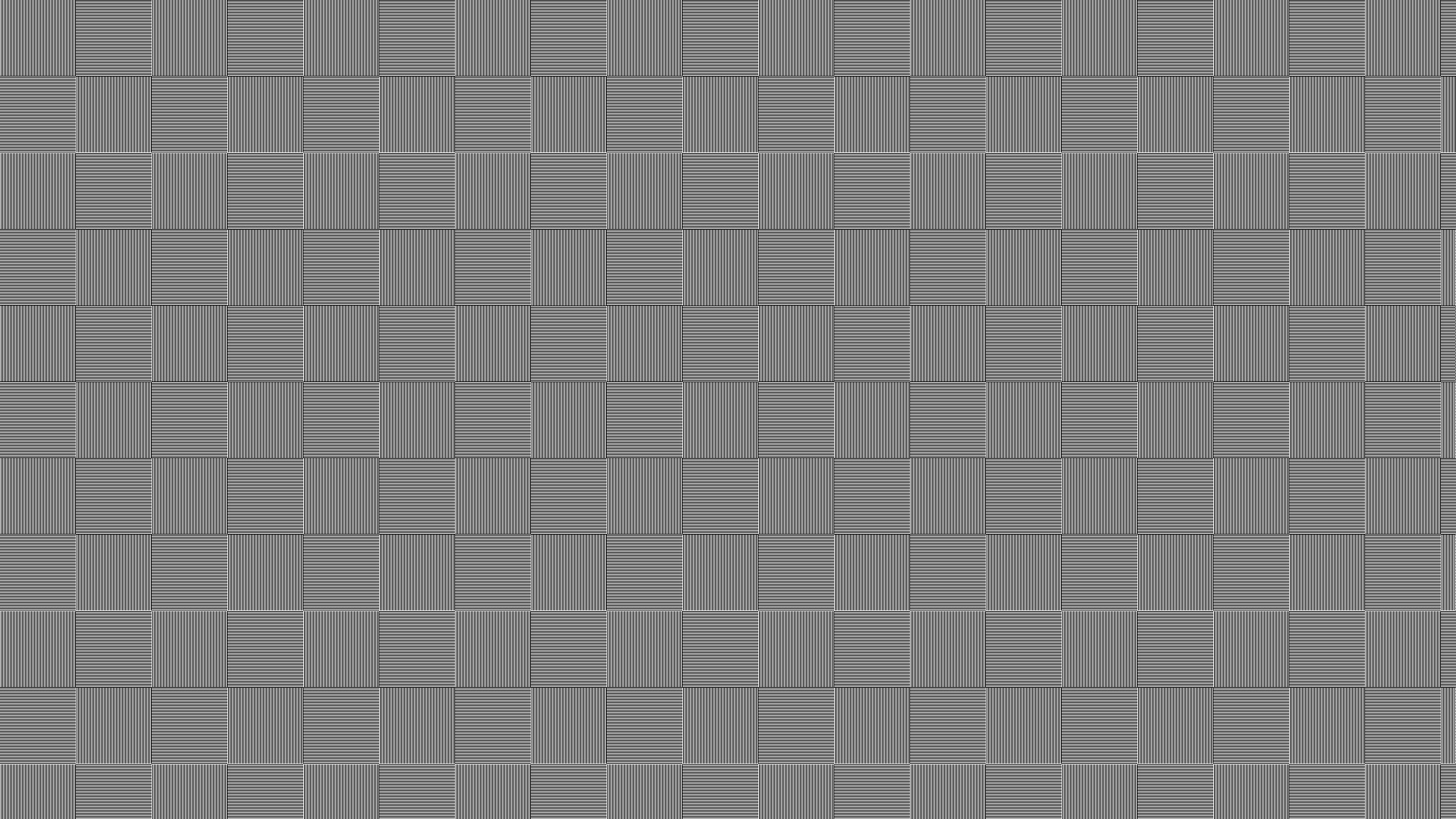
| Posted: Tue Feb 07, 2012 6:28 pm Post subject: 1:1 test patterns for testing 1080p |
|
|
Been looking around a while and could not find it.
Links appreciated.
Thanks
|
|
| Back to top |
|
 |
ecrabb
Forum Moderator

Joined: 13 Mar 2006
Posts: 15909
Location: Utah
TV/Projector: JVC RS40, Epson 5010
|
|
| Back to top |
|
|
wkosmann
Joined: 29 Nov 2006
Posts: 387
Location: Middleburg, Virginia
|
| Posted: Wed Feb 08, 2012 3:00 am Post subject: |
|
|
Yo Ecrabb;
Is that bad boy only in 1.85:1?
I.e., do you have a version in 2.35:1, to check out on the blend?
William
_________________
(B)(G)(R) BlendZilla Up Over (R)(G)(B)
|
|
| Back to top |
|
|
bachiano
Joined: 13 Mar 2006
Posts: 163
|
| Posted: Wed Feb 08, 2012 3:01 am Post subject: |
|
|
Yeap. Just like that one.
Thank you !!!
|
|
| Back to top |
|
|
ecrabb
Forum Moderator
Joined: 13 Mar 2006
Posts: 15909
Location: Utah
TV/Projector: JVC RS40, Epson 5010
|
| Posted: Wed Feb 08, 2012 3:05 am Post subject: |
|
|
| wkosmann wrote: | | I.e., do you have a version in 2.35:1, to check out on the blend? |
I don't. I made that thing well before the scope craze. Wouldn't take much to whip it up, though. I wouldn't mind having one around myself.
1920x800, right?
SC
|
|
| Back to top |
|
|
wkosmann
Joined: 29 Nov 2006
Posts: 387
Location: Middleburg, Virginia
|
| Posted: Wed Feb 08, 2012 3:17 am Post subject: |
|
|
Actual projected resolution is 2660 x 1050, (1400 x 1050 minus 10% for the blend) which works out to an aspect ratio of 2.53:1. although the SmX screen is a true 2.35:1.
Sooooo, since I really care about the aspect ratio, 1920 x 817 gives me exactly 2.35:1.
Buttttttttttttt, since beggars shouldn't be choosers, I'll take what I can get. 
_________________
(B)(G)(R) BlendZilla Up Over (R)(G)(B)
|
|
| Back to top |
|
|
bachiano
Joined: 13 Mar 2006
Posts: 163
|
| Posted: Wed Feb 08, 2012 3:22 am Post subject: |
|
|
Hi ecrabb
Do you still use a G70?
Are you able to fully resolve 1080p with your g70 ?
I've read through, I think, most of the g70 threads and I know you said you prefer 1080P.
Curious.
|
|
| Back to top |
|
|
ecrabb
Forum Moderator
Joined: 13 Mar 2006
Posts: 15909
Location: Utah
TV/Projector: JVC RS40, Epson 5010
|
| Posted: Wed Feb 08, 2012 3:57 am Post subject: |
|
|
Howdy!
Yep, still happily watching my G70... I wish it was smaller and quieter, and I wish my screen was scope, but hey - you can't have everything, right?
Yes, I much prefer 1080p on my G70, but no - it definitely doesn't "fully resolve" 1080p; I don't know that even most 9" machines "fully resolve" 1080p. It's all about MTF, so varying degrees of sharpness. If a machine is nearly perfectly sharp (like a DLP, for instance), then you can think of those on/off lines like a square wave. A softer machine will make that square wave start to look more like a sine wave. If it gets too soft, the on/off lines blend together, and you end up with a mushy grey, or a flat line instead of a square wave or sine wave.
So, back to the G70. Vertical is very good. Nice and sharp. Not fully resolving 1080p, but nice and sharp. You can't see scan lines like you can with a sharp 9" machine, but you can clearly see on/off lines.
Horizontal is probably closer to the sine wave I mentioned. Not super-sharp, but not too soft, either.
I would guess if you wanted really sharp resolving power, you'd have to run the G70 somewhere in the 960-1280 horizontal ballpark, and in the 720p vertical ballpark.
But, we're not trying to full resolve all the pixels, right? We're trying to create a life-like, film-like image. Running at 1080p, the projector may not be able to fully resolve all the picture information we send it, but that doesn't mean we should throw away a bunch of picture information in the digital domain just so the projector can more fully resolve the pixels.
I find that by running at 1080p, you get sort of an "oversampling" effect, where you see no pixels or scan lines, and you end up with a very film-like image.
That's probably a bit of a long-winded answer, but that's how I think about it.
I can snap a pic of my on/off patterns at 1080p if you want.
Cheers,
SC
|
|
| Back to top |
|
|
Nashou66

Joined: 12 Jan 2007
Posts: 16171
Location: West Seneca NY
|
|
| Back to top |
|
|
bachiano
Joined: 13 Mar 2006
Posts: 163
|
| Posted: Wed Feb 08, 2012 2:23 pm Post subject: |
|
|
Thanks Nashou66
it's going to be interesting putting up that pattern up on my pj.
|
|
| Back to top |
|
|
bachiano
Joined: 13 Mar 2006
Posts: 163
|
| Posted: Wed Feb 08, 2012 2:45 pm Post subject: |
|
|
ecrabb
Very clear explanation.
So the g70 does not "fully resolve" 1080p
but "just resolves" 1080p.
Got it.
So in the little gullies where the sine wave does not dip all the way down we get a little less contrast between the on/off line but that's all.
I think I can live with that.
Last night I tried, in my 5 min set up, 1080p and 1080i.
In 1080i it was very sharp but the scan lines were very prominent and a bit distracting.
In 1080p the image was impressive with great color saturation and no scan lines - very silky looking image - but I did see the softness.
I expect when I do a real setup and spend a couple of days with focus and scheimpflug,
I will be able to squeeze out most of that softness.
Thanks
|
|
| Back to top |
|
|
Nashou66
Joined: 12 Jan 2007
Posts: 16171
Location: West Seneca NY
|
| Posted: Wed Feb 08, 2012 3:28 pm Post subject: |
|
|
| bachiano wrote: | ecrabb
Very clear explanation.
So the g70 does not "fully resolve" 1080p
but "just resolves" 1080p.
Got it.
So in the little gullies where the sine wave does not dip all the way down we get a little less contrast between the on/off line but that's all.
I think I can live with that.
Last night I tried, in my 5 min set up, 1080p and 1080i.
In 1080i it was very sharp but the scan lines were very prominent and a bit distracting.
In 1080p the image was impressive with great color saturation and no scan lines - very silky looking image - but I did see the softness.
I expect when I do a real setup and spend a couple of days with focus and scheimpflug,
I will be able to squeeze out most of that softness.
Thanks |
Right, a good set up makes it a bit sharper. or if you have a VP you could try 1080p@48hz, some do not like a slight flicker but i never notice it.
Athanasios
_________________
Don't blame your underwear for your crooked ass~ unknown Greek philosopher
"Republicans believe every day is the Fourth of July, but the Democrats believe every day is April 15." --- President Reagan
One Smart Dog!!!
Marquee High Performance Bellows now shipping!!
Marquee Modifications and Performance Enhancement
Marquee C-element and Bellow removal
|
|
| Back to top |
|
|
dturco

Joined: 06 Feb 2009
Posts: 3778
Location: Eastern Shore Maryland
TV/Projector: Runco DLP VX-3000i Marquee 9500 parts doner
|
| Posted: Tue Feb 21, 2012 2:29 am Post subject: |
|
|
| ecrabb wrote: | | wkosmann wrote: | | I.e., do you have a version in 2.35:1, to check out on the blend? |
I don't. I made that thing well before the scope craze. Wouldn't take much to whip it up, though. I wouldn't mind having one around myself.
1920x800, right?
SC |
Hey Crabb did you ever do the 235:1?
_________________
Firefly rules. Can't stop the signal.
http://www.hulu.com/firefly
|
|
| Back to top |
|
|
ecrabb
Forum Moderator
Joined: 13 Mar 2006
Posts: 15909
Location: Utah
TV/Projector: JVC RS40, Epson 5010
|
| Posted: Tue Feb 21, 2012 5:57 am Post subject: |
|
|
Had it mostly done, then got away from it... Circled back tonight and finished.
I made the first 1920x800, which is 2.40:1. From everything I could find on the subject, everything recent is all shot at 2:39 or 2:40. It works well because 80 is evenly divisible into both dimensions for a nice grid.
But, seeing that William's screen is 2.35, and I've heard others using that AR, I made another at 1920x817. I did so by simply padding 8 pixels to the top and 9 pixels to the bottom, then I just extended the grid that amount and slapped a new border on. I didn't see any point in recreating the grid, as I doubt there's anything evenly divisible into 1920 and 817.
Here they are:
ecrabb_SMPTE_1920x800_v1.png
ecrabb_SMPTE_1920x817_v1.png
So, William... If you have a 2.35:1 screen, do most of the scope movies have 1/2 an inch or so of blank pixels between your screen border and the active image? From the reading I did, Cinemascope features haven't been 2.35:1 since the early 70's. Since then, everything has been 2.39 or 2.40:1.
Given that, I don't don't quite even understand why Carada (or anybody else for that matter) sells a 2.35:1 screen... Seems like everybody should be standardizing on 2.40:1.
SC
|
|
| Back to top |
|
|
dvh99

Joined: 25 Dec 2009
Posts: 2158
Location: nederland
|
| Posted: Tue Feb 21, 2012 6:12 am Post subject: |
|
|
| ecrabb wrote: | Had it mostly done, then got away from it... Circled back tonight and finished.
I made the first 1920x800, which is 2.40:1. From everything I could find on the subject, everything recent is all shot at 2:39 or 2:40. It works well because 80 is evenly divisible into both dimensions for a nice grid.
But, seeing that William's screen is 2.35, and I've heard others using that AR, I made another at 1920x817. I did so by simply padding 8 pixels to the top and 9 pixels to the bottom, then I just extended the grid that amount and slapped a new border on. I didn't see any point in recreating the grid, as I doubt there's anything evenly divisible into 1920 and 817.
Here they are:
ecrabb_SMPTE_1920x800_v1.png
ecrabb_SMPTE_1920x817_v1.png
So, William... If you have a 2.35:1 screen, do most of the scope movies have 1/2 an inch or so of blank pixels between your screen border and the active image? From the reading I did, Cinemascope features haven't been 2.35:1 since the early 70's. Since then, everything has been 2.39 or 2.40:1.
Given that, I don't don't quite even understand why Carada (or anybody else for that matter) sells a 2.35:1 screen... Seems like everybody should be standardizing on 2.40:1.
SC |
1919 and 817 both divisible by 19
_________________
1 answer always poses multiple questions.
marquee 9500ultra HD10L moome hdmi1.3 v3+ some mods.
|
|
| Back to top |
|
|
wkosmann
Joined: 29 Nov 2006
Posts: 387
Location: Middleburg, Virginia
|
| Posted: Sat Feb 25, 2012 7:08 pm Post subject: |
|
|
| Quote: | Had it mostly done, then got away from it... Circled back tonight and finished.
I made the first 1920x800, which is 2.40:1. From everything I could find on the subject, everything recent is all shot at 2:39 or 2:40. It works well because 80 is evenly divisible into both dimensions for a nice grid.
But, seeing that William's screen is 2.35, and I've heard others using that AR, I made another at 1920x817. I did so by simply padding 8 pixels to the top and 9 pixels to the bottom, then I just extended the grid that amount and slapped a new border on. I didn't see any point in recreating the grid, as I doubt there's anything evenly divisible into 1920 and 817.
Here they are:
ecrabb_SMPTE_1920x800_v1.png
ecrabb_SMPTE_1920x817_v1.png
So, William... If you have a 2.35:1 screen, do most of the scope movies have 1/2 an inch or so of blank pixels between your screen border and the active image? From the reading I did, Cinemascope features haven't been 2.35:1 since the early 70's. Since then, everything has been 2.39 or 2.40:1.
Given that, I don't don't quite even understand why Carada (or anybody else for that matter) sells a 2.35:1 screen... Seems like everybody should be standardizing on 2.40:1.
SC |
Dear Steve;
Thank you. Thank you. Thank you. Thank you. Thank you. Thank you. Thank you. Thank you.
You are now my official hero. If I ever grow up, I want to be just like you. 
Once I get the aspect ratio set up properly, I will have to check to see if scope movies have a 1/2 inch or so of blank pixels between my screen border and the active image. I will not be getting to this until after I have completed my PhD dissertation, some time later this year.
Thank you.
William
_________________
(B)(G)(R) BlendZilla Up Over (R)(G)(B)
|
|
| Back to top |
|
|
|
|
|
|
|
You cannot post new topics in this forum
You cannot reply to topics in this forum
You cannot edit your posts in this forum
You cannot delete your posts in this forum
You cannot vote in polls in this forum
You cannot attach files in this forum
You can download files in this forum
|
Forum powered by phpBB © phpBB Group
|
|